Game Development AI: The Full Sorceress Stack (2026)

By Arron R.13 min read
Game development AI in 2026 is a seven-pillar stack - coding agent, visual generation, 2D sprites, 3D characters, voxel, audio, and publish - and Sorceress ship

Game development AI in 2026 is no longer a single tool you bolt onto an engine; it is a stack — a pipeline of seven AI primitives that together turn one paragraph of design intent into a playable browser game with original art, original audio, and original code. Sorceress ships every layer of that stack inside one suite, which is why this guide reads like a tour of a stack rather than a list of disconnected products. The seven pillars below cover everything an indie team actually needs to ship: the coding agent, the visual generation layer, the 2D sprite pipeline, the 3D character pipeline, the voxel pipeline, the audio pipeline, and the publish-and-iterate layer. Each pillar is mapped to the specific Sorceress tool that owns it, with the verified model lineup, capability scope, and credit costs. Verified May 12, 2026.
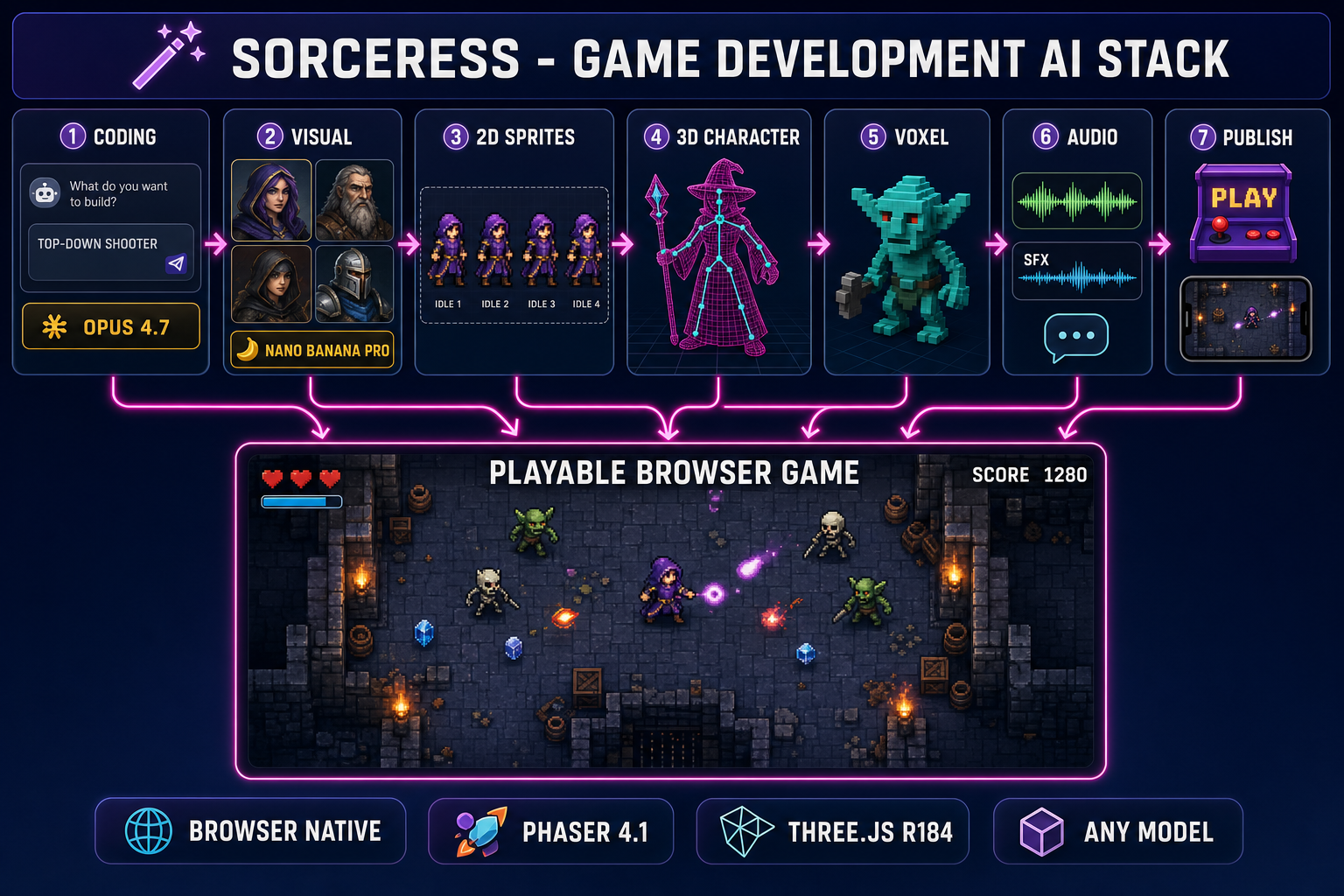
Game development AI stack diagram: seven numbered pillars (Coding, Visual, 2D Sprites, 3D Characters, Voxel, Audio, Publish) feeding a browser-playable game inside a WizardGenie editor
The full Sorceress game development AI stack. Seven pillars, each driving one layer of the pipeline from one prompt to a finished, playable browser game.

The game development AI stack at a glance

Before walking each pillar in detail, the overview. The Sorceress game development AI stack is organised around the actual order an indie team ships a game in — coding first because the project shape decides everything that follows, then visual generation because the art identity decides which sprite and 3D pipelines apply, then the asset layers in genre order, then audio, then the publish-and-play loop. The seven pillars and the one-line case for each:

  1. The coding layer. An AI agent that writes, runs, and iterates on the game in a browser tab. WizardGenie + Sorceress Code drive every leading frontier coding model and emit playable Phaser 4.1 / Three.js r184 projects from a single prompt.
  2. The visual generation layer. Every flagship image and video model in one panel. AI Image Gen covers stills; AI Video Gen covers motion. Together they feed every downstream art pipeline.
  3. The 2D sprite and tile layer. Quick Sprites, Auto-Sprite v2, True Pixel, Tileset Forge, and Seamless Tile Gen turn AI art into game-ready 2D sprites and tilemaps.
  4. The 3D character and world layer. 3D Studio + Auto-Rigging + Procedural Walk + Material Forge ship a rigged, animated 3D character from a single 2D reference, plus full PBR materials.
  5. The voxel layer. Voxel Studio turns prompts, images, or 3D models into rigged voxel creations — the only stack we ship for blocky-aesthetic games.
  6. The audio layer. Sound Studio bundles Music Gen, SFX Gen, Speech Gen, and SFX Editor. Every audio asset a game needs — music, SFX packs, NPC voices, mastered clips — without leaving the browser.
  7. The publish and iterate layer. Push the finished game to the Sorceress Arcade or GitHub Pages, preview it on every screen size with Layout Preview, and surface it in front of other vibe coders on the Play Arcade. Closes the loop.

Read the rest of this post as a top-down tour of the stack — what each pillar does, the specific tool that owns it inside Sorceress, the credit cost where it matters, and which other pillar each one feeds into. Cross-links use ?ref=blog so the dashboard can attribute the pipeline-to-tool funnel.

What “game development AI” actually means in 2026

Two narrower phrases hide behind the umbrella term and they often get conflated. The first is the coding side — an agent that writes the game’s logic, scenes, physics, input, and rendering glue from a natural-language prompt. The second is the asset side — AI models that generate the sprites, the 3D meshes, the music, the SFX, and the voiceover the agent then loads at runtime. A real game development AI stack covers both, because shipping the code without the assets gives you a coloured-square prototype and shipping the assets without the code gives you a folder of files no one can play.

The 2026 version of the stack is also browser-native and model-agnostic. Browser-native because installing an engine is a friction step indie teams skip; model-agnostic because the per-token cost of frontier reasoners makes single-model pipelines uneconomical past the prototype phase. Both points show up in every pillar below. The coding layer drives eight frontier models behind a single picker; the 2D layer accepts art from any image model with a reference-image input; the 3D layer routes between seven image-to-3D providers depending on the source. The principle: any one model is a temporary best-in-class — the stack outlives the model lineup.

The Sorceress catalog under /tools-guide lists every tool by group. The seven pillars below collapse those groups into the order an actual project uses them. Verified against src/app/_home-v2/_data/tools.ts and the per-tool page components on May 12, 2026.

1. The coding layer — WizardGenie and Sorceress Code

The agent that writes the game. WizardGenie at /wizard-genie/app is the AI-native game engine at the heart of Sorceress — describe the game, the agent writes the file tree, runs the dev server, observes the output, and iterates. The model picker drives eight frontier coding models: Claude Opus 4.7, Claude Sonnet 4.6, GPT-5.5, Gemini 3.1 Pro, DeepSeek V4 Pro, Kimi K2.5, Grok 4.2, and MiniMax M2.7. Bring-your-own-key is the unlimited path on every model; the trial chip in the header tracks the free DeepSeek V4 Flash pool every account starts with.

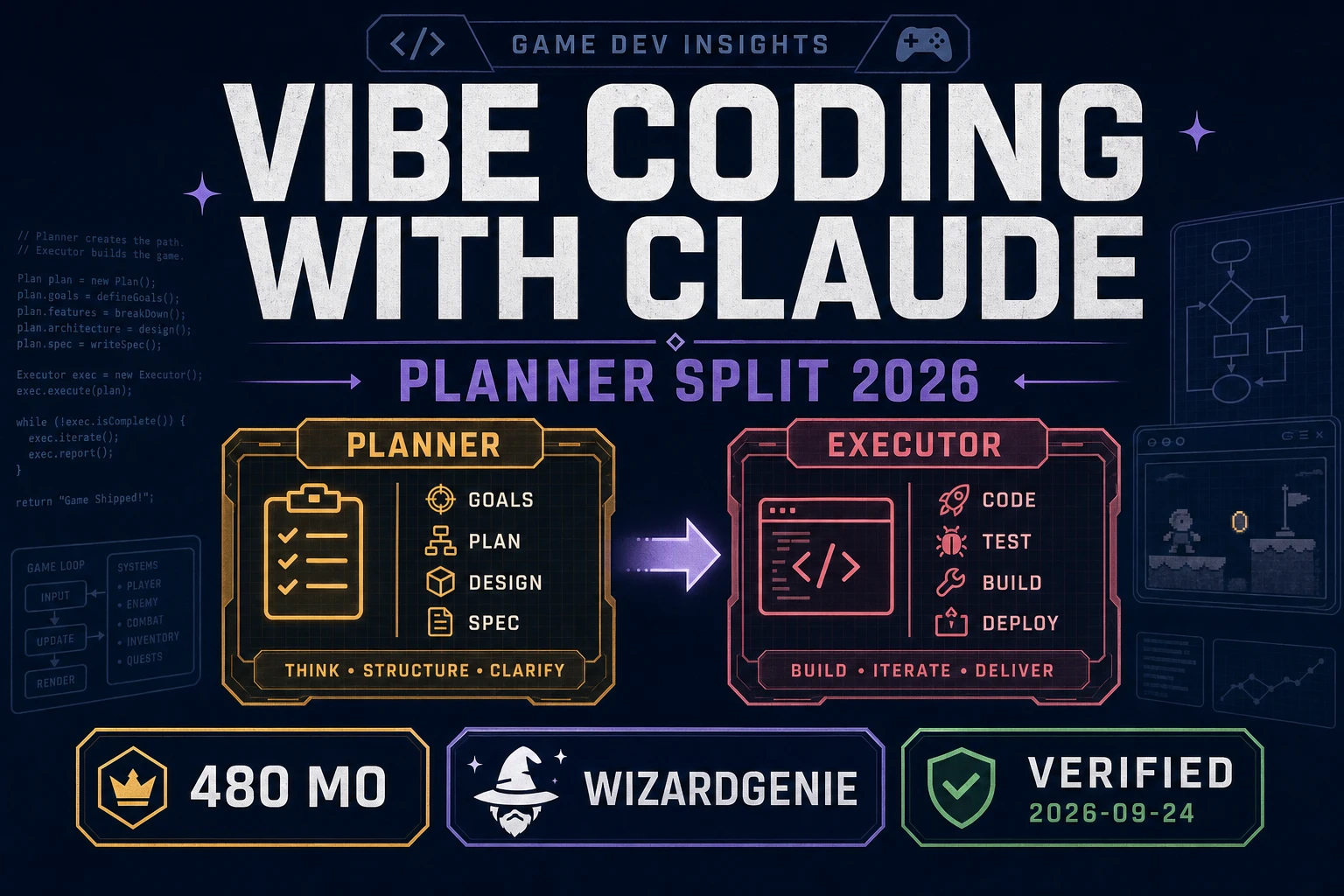
WizardGenie ships in two flavours. The web build runs at /wizard-genie/app with no install, and the Windows desktop build ships native filesystem access plus longer-running agent sessions for supporters. Both builds emit projects on Phaser 4.1 for 2D and Three.js r184 for 3D. The dual-agent Planner+Executor mode pairs a frontier reasoner (Opus 4.7, GPT-5.5, Gemini 3.1 Pro, Grok 4.2) with a budget executor (DeepSeek V4 Pro, Kimi K2.5, MiniMax M2.7) and lands the per-session cost at roughly one-fifth of single-frontier on the same project.

Sorceress Code at /code is the lighter-weight coding agent for non-engine code — tooling scripts, build pipelines, asset converters. The two products share a model picker but split the workload: WizardGenie owns the gameplay loop, Sorceress Code owns the surrounding plumbing. The full per-model deep dive is in the best AI model for coding write-up, and the four pipeline shapes — one-shot, dual-agent, asset-first, genre-template — are walked in the prompt-to-game pipelines guide.

2. The visual generation layer — AI Image Gen and AI Video Gen

The art-source layer. AI Image Gen at /generate drives every flagship image model from one panel: Nano Banana Pro and Nano Banana 2 (Google), GPT Image 2 (OpenAI), Seedream 5 Lite (uncensored), Flux 2 Pro (Black Forest Labs), Z-Image Turbo, and Grok Imagine. Reference-image input on every model means character consistency across an entire game is a workflow, not a happy accident — the stay-on-model character guide walks the recipe.

The companion video panel at /video covers motion. Eight video models in the picker: Grok Imagine Video, Wan 2.7 (uncensored), Seedance 2.0, Seedance 2.0 Fast, Wan 2.2 Fast, Seedance 1.5 Pro, Kling 3.0, and Kling 2.5 Turbo Pro. Image-to-video and text-to-video both supported, with end-frame control on the latest Seedance and Kling models. The video output feeds two downstream pillars: pillar 3 (Auto-Sprite v2 turns video into sprite sheets) and pillar 7 indirectly (cinematic trailers for the published game). The cinematic-cutscene workflow is in the cinematic AI animation guide.

Two utility tools sit inside the same group and matter for the asset pipeline. BG Remover turns any image into a transparent PNG — mandatory before any sprite-sheet step. Image Expander outpaints AI art beyond its original borders, which is how parallax backgrounds and key art get made from a single generation. The background remover guide walks the sprite-prep recipe.
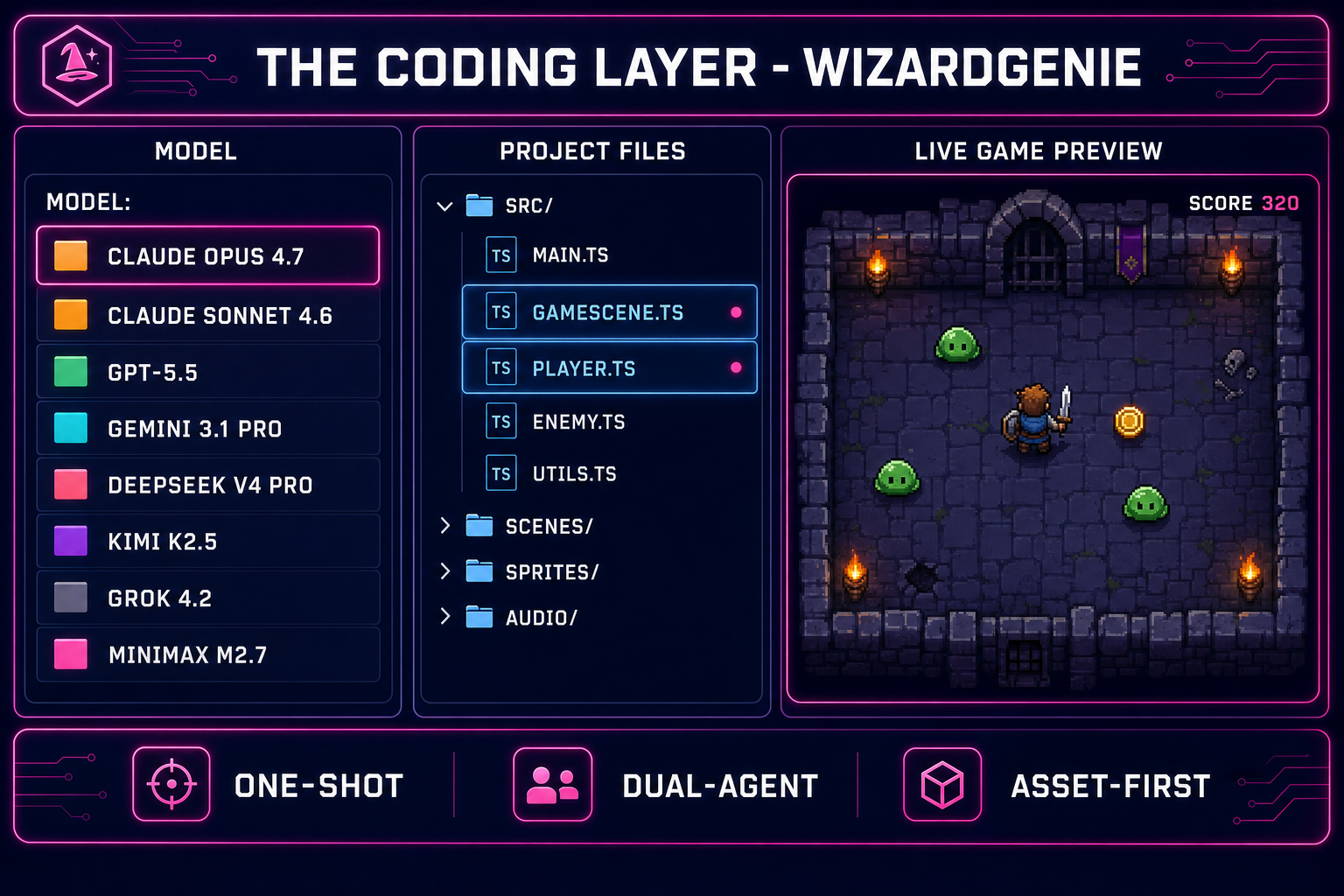
Coding layer detail diagram: WizardGenie editor with model picker showing eight coding models, file tree, agent message stream, and a Phaser 4.1 game preview running in the browser tab
The coding layer in detail. WizardGenie’s model picker drives eight frontier models — pick one for one-shot, pair two for dual-agent.

3. The 2D sprite and tile layer

The 2D asset pipeline. Five tools own this pillar, each solving a different shape of “I have art, I want a game-ready sprite or tile” problem:

  • Quick Sprites at /quick-sprites emits a complete pixel-art animated sprite sheet (idle, walk, attack, hit, death) from a single text prompt — transparent background, grid-aligned, sized for any 2D engine. The two-minute sprite sheet guide walks the prompt-to-export recipe.
  • Auto-Sprite v2 at /autosprite-v2 handles the harder cases. Three-step pipeline: AI image generation, AI video animation, then automatic sprite-sheet extraction with background removal and frame alignment. Best when Quick Sprites’ prompt-only path can’t hit the motion you need.
  • True Pixel at /pixel-art converts any image or video into authentic pixel art. Palette quantisation (PICO-8, SWEETIE-16, Endesga 32, Game Boy 4, NES 54), dither modes, edge cleanup, batch processing, sprite-sheet export. The image-to-pixel-art guide walks the conversion recipe.
  • Tileset Forge at /tileset-creator drops AI-generated art onto a tile grid and aligns it — clean tilesets ready for any 2D engine. The AI tileset generator guide covers the workflow.
  • Seamless Tile Gen at /tileset-generator emits seamless tiling textures — grass, sand, stone, lava, wood — for backgrounds, terrain, and parallax layers. Pairs with Tileset Forge above for finished tile art and with Material Forge below for full PBR variants.

Two helper tools live alongside this pillar. Sprite Analyzer previews a sprite sheet frame by frame and detects the underlying grid — useful when reverse-engineering an existing sheet’s frame size. Slicer cuts an AI-generated 4×4 grid image into individual frame PNGs, which is the missing step between a single AI Image Gen output and a finished sprite folder.

4. The 3D character and world layer

The 3D asset pipeline. Four tools chain together to turn a 2D reference image into a rigged, animated, texture-rich 3D character ready to drop into any engine.

3D Studio at /3d-studio is the entry point. Drop in a 2D reference image, pick one of seven image-to-3D models — Meshy 6 (50 cr), Meshy 5 (31 cr), Rodin 2.0 (50 cr), Tripo v3.1 (30/40 cr), Hunyuan3D 3.1 (25 cr), TRELLIS (8 cr), and TRELLIS 2 (40 cr) — and get a textured GLB mesh. Credit costs verified against src/lib/threed-models.ts on May 12, 2026. New accounts start with 100 starter credits, enough for several free generations. The output exports as glTF 2.0 (.glb) for any modern engine. The free AI 3D model generator guide walks the credit-stretching strategy and the full character pipeline guide walks the image-to-rigged-character path.

Auto-Rigging at /rigging attaches an Unreal-style humanoid skeleton to any 3D mesh and computes weights, plus a paint-style refinement tab for the spots automatic weight calculation gets wrong. Pro-tier feature. The auto-rig walkthrough covers the weight-paint pass.

Procedural Walk at /rigging-multileg rigs and walks non-bipeds — spiders, crabs, centipedes, quadrupeds — with real-time inverse kinematics. Feet plant naturally on uneven terrain without baked keyframes. The only IK-walk-rig tool in the suite that handles arbitrary leg counts.

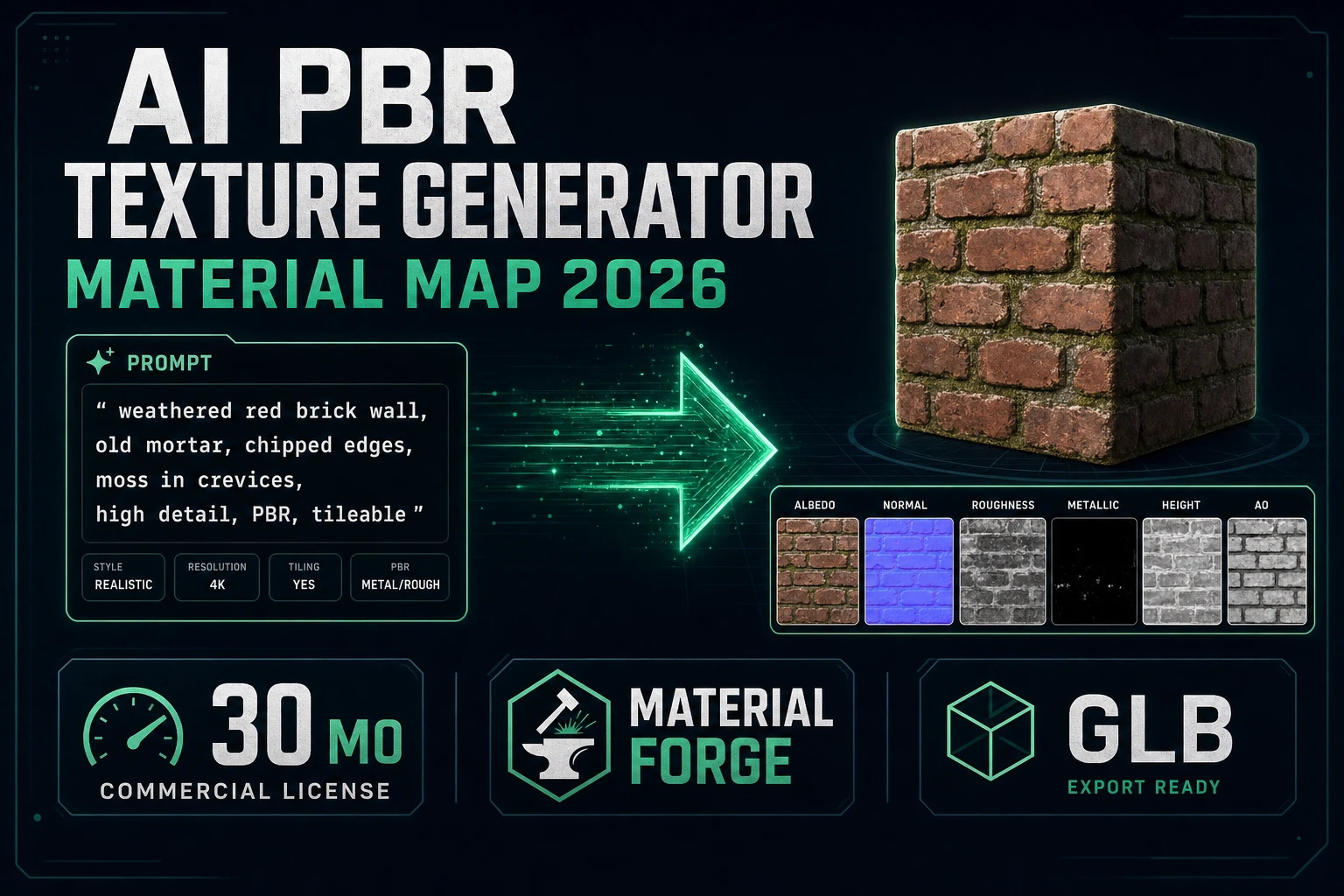
Material Forge at /material-forge turns any image into a full PBR material — albedo, roughness, metallic, normal, ambient occlusion — with a live 3D preview and one-click export to Unity, Unreal, or Godot. The PBR texture generator guide walks the photo-to-material recipe.

5. The voxel layer — Voxel Studio

The blocky-aesthetic pillar. Voxel Studio at /voxelgen turns text prompts, 2D images, or imported 3D meshes into voxel creations — characters, props, terrain, vehicles. The same auto-rig and procedural-walk primitives the 3D pillar uses are wired into Voxel Studio for voxel-native rigging, including a multi-legged variant for voxel insects and quadrupeds. Text-to-animation drives the rigged voxel humanoid through any motion described in plain English, which is how a single voxel character becomes a walk cycle, an attack swing, and a death animation in one session.

Voxel Studio is the only stack we ship for the blocky-aesthetic genre — the polygon-mesh path through pillar 4 produces smooth meshes, not voxel blocks, so projects with a Minecraft-adjacent or sandbox visual identity should start here rather than at 3D Studio. Output exports cleanly to MagicaVoxel-compatible .vox files plus standard polygon formats (FBX, GLB, OBJ) for engines that don’t natively load voxel data. The voxel generator walkthrough covers the prompt-to-rigged-voxel recipe.

Pairs naturally with the audio pillar (chiptune-style soundtracks land well on voxel projects), the 2D layer’s palette tools (voxel art rewards aggressive palette discipline), and the publish layer (voxel browser games are dense and load fast, which the Sorceress Arcade ranks well for).

6. The audio layer — Sound Studio

The full audio stack. Sound Studio is the umbrella product at /sound-creator; it bundles four sub-tools, each owning one slice of game audio:

  • Music Gen at /music-gen emits full vocal or instrumental tracks from a prompt or custom lyrics — two variations per generation. Looping royalty-free game music is the workhorse use case; cinematic cutscene scores and vocal title tracks are the stretch ones. The game music guide walks the prompt patterns that work.
  • SFX Gen at /sfx-gen batch-generates entire SFX packs from a structured list — UI clicks, combat hits, footsteps, ambience — with AI-driven duration detection so a thirty-clip pack lands in one session. The full SFX pack guide covers the batch workflow.
  • Speech Gen at /speech-gen ships seventeen voices for AI voiceover and narration plus voice cloning for consistent character VO across a project. Multilingual support out of the box. The NPC voice guide walks the studio-free workflow.
  • SFX Editor at /sfx-editor is the cleanup pass — trim, fade, normalize, master, export. Every AI audio clip needs a cleanup pass before it lands in the engine; this is where it happens.

The four sub-tools share a project library so a single session can produce a full game’s soundtrack — one looping main theme, one boss theme, a thirty-clip SFX pack, and ten lines of NPC dialogue — without leaving the browser tab. Audio is the pillar most often skipped on indie projects because hand-foley and licensed libraries are expensive and slow; the AI shortcut here is meaningful precisely because the alternative is so painful.

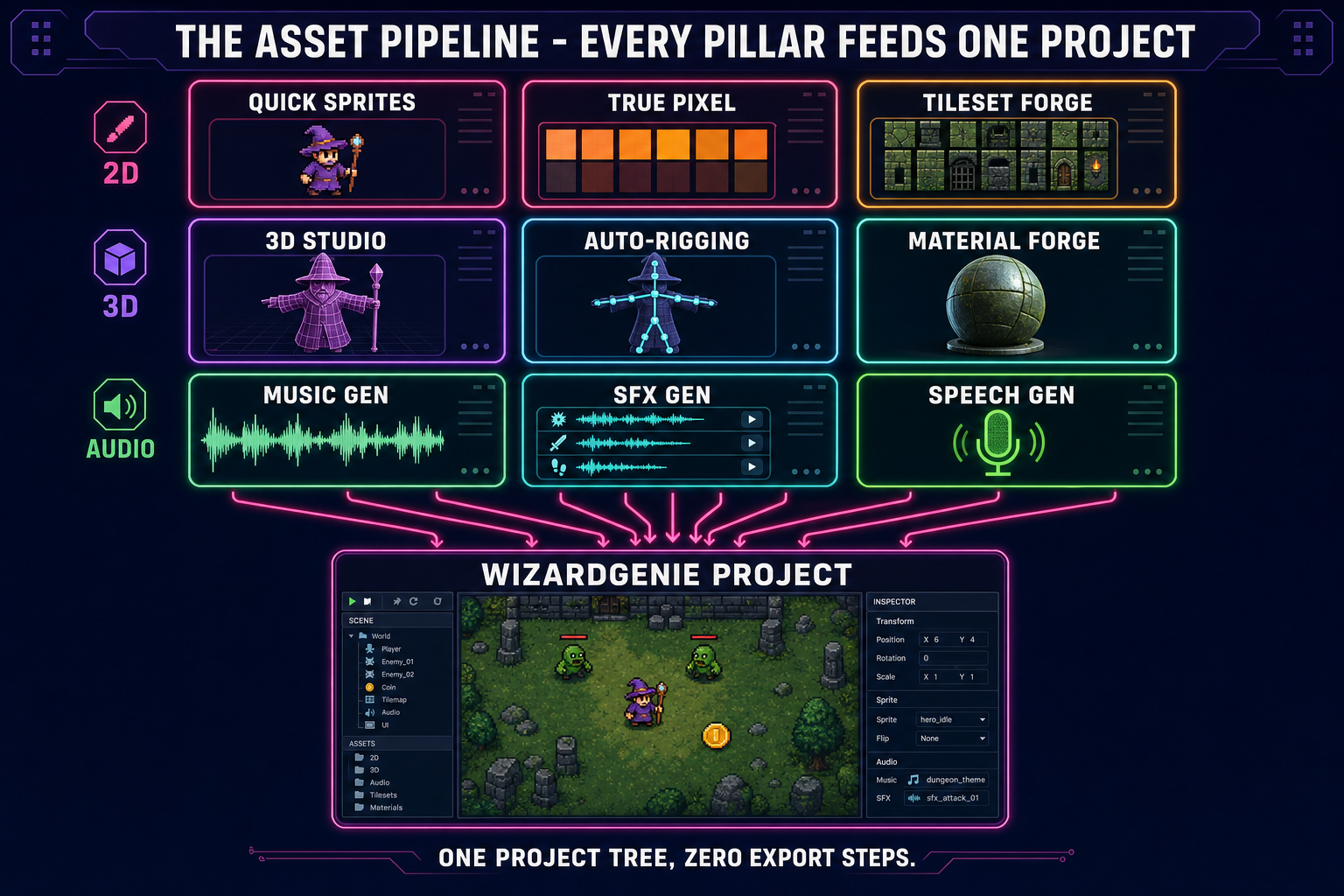
Asset pipeline detail diagram: 2D sprite tools (Quick Sprites, True Pixel, Tileset Forge), 3D tools (3D Studio, Auto-Rigging, Material Forge), voxel (Voxel Studio), and audio tools (Music Gen, SFX Gen, Speech Gen) all feeding the same WizardGenie game project
The full asset pipeline. Every Sorceress asset tool exports straight into the WizardGenie project tree — no engine import dance, no FBX-conversion side trip.

7. The publish and iterate layer

Closing the loop. A finished browser game needs a URL someone can play, a way to test it on phones and tablets before that URL goes public, and a place to surface in front of other vibe coders. Four tools own this pillar:

  • Publishing at /my-games pushes a built game to the Sorceress Arcade with one click, or auto-deploys to GitHub Pages for projects that prefer a custom URL. Both paths preserve the project structure WizardGenie writes; no rewrite step.
  • Layout Preview at /layout-preview simulates phones, tablets, desktops, and orientation changes against a built game URL. Catches the “works on my 27-inch monitor, broken on a phone” bug before the publish step makes it public.
  • Play Arcade at /play-games is the curated gallery of community-built games on the suite. Surfaces finished projects in front of other indie devs and jam folks — cheap distribution for a vibe-coded prototype that needs eyes.
  • Marketplace at /marketplace is the creator-driven asset store. Sprites, models, music, sound packs, tilesets — sellable game-ready assets, with explicit AI-disclosure norms. Useful for projects where you want a polished asset pack you didn’t make yourself, and for asset creators who want to monetise the by-products of pillar 3 / 4 / 6 work.

The publish step also fires the SEO ping infrastructure for the game’s landing page if it’s on a custom URL — same IndexNow + link metadata path the Sorceress blog itself uses.

How we picked the seven pillars

The criteria for which Sorceress tools made the “stack” cut:

  1. One layer of the actual indie pipeline. Each pillar maps to a step the team would have to do anyway — coding, art generation, sprite extraction, 3D modelling, audio, publishing. Tools that don’t fit one of those steps live alongside the stack rather than inside it.
  2. End-to-end inside one tool group. No pillar handed off to a competitor product. The stack is closed-loop on purpose: the moment any pillar requires a third-party tool the project loses the cross-tool integrations that make the suite worth using.
  3. Production-ready output. Every pillar emits files an engine can load directly — transparent PNGs, GLB meshes, FBX rigged characters, MP3 / WAV audio, finished tilesets. Nothing on the list emits a half-finished asset that needs Photoshop or Blender to be usable.
  4. Browser-native or installable. Web build first, desktop optional. Indie teams skip engine installs more often than they admit; the stack respects that.

Tools that didn’t make the seven-pillar list are still part of the catalog — they support a pillar rather than own one. Canvas is a touch-up editor; Corridor Chroma is a chroma-key utility; 3D to 2D renders a 3D model into a 2D sprite sheet for hybrid projects; Prompt Lexicon is the community prompt library. All useful, none load-bearing on the stack.

Frequently Asked Questions

What does game development AI mean in 2026?

Game development AI is the umbrella term for two adjacent pipelines that together turn a design prompt into a playable game. The first is the coding side — an agent that writes the gameplay logic, scenes, physics, input, and rendering glue from natural language; in Sorceress this is WizardGenie at /wizard-genie/app driving eight frontier coding models (Claude Opus 4.7, Sonnet 4.6, GPT-5.5, Gemini 3.1 Pro, DeepSeek V4 Pro, Kimi K2.5, Grok 4.2, MiniMax M2.7) against Phaser 4.1 and Three.js r184. The second is the asset side — AI models that generate sprites, 3D meshes, music, SFX, and voiceover the agent then loads at runtime. A real game development AI stack covers both halves because shipping the code without the assets gives you a coloured-square prototype and shipping the assets without the code gives you a folder of files no one can play. The 2026 version is also browser-native and model-agnostic: any one model is a temporary best-in-class, the stack outlives the lineup.

Which AI tools do I actually need to make a game from scratch?

Seven, organised as a pipeline. The coding layer (WizardGenie + Sorceress Code) writes the gameplay. The visual generation layer (AI Image Gen + AI Video Gen) produces the source art. The 2D sprite layer (Quick Sprites + Auto-Sprite v2 + True Pixel + Tileset Forge + Seamless Tile Gen) turns that art into game-ready sprites and tiles for 2D projects. The 3D character layer (3D Studio + Auto-Rigging + Material Forge + Procedural Walk) ships rigged animated characters and full PBR materials. The voxel layer (Voxel Studio) covers blocky-aesthetic projects. The audio layer (Sound Studio - Music Gen + SFX Gen + Speech Gen + SFX Editor) handles every audio asset. The publish layer (Publishing + Layout Preview + Play Arcade + Marketplace) closes the loop. Sorceress ships all seven inside one suite at sorceress.games, which is why this guide reads as a stack tour.

Is game development AI good enough to replace a small indie team?

Not quite, and that framing misses the point. Game development AI eliminates the implementation tax on the parts of indie work that are tedious and well-understood — engine boilerplate, sprite sheet rotoscoping, royalty-free music shopping, NPC voice recording, PBR texture authoring — and leaves the parts that actually need taste to the human. A solo dev with the full stack ships at roughly the throughput of a three-to-five-person 2024 indie team, and a five-person team using the stack ships at the throughput of a small studio. The catch: the work that remains is the work that mattered all along (design, balance, narrative, polish, the no-the-jump-should-feel-heavier calls). The stack does not replace those calls; it removes everything else from the calendar so those calls have time to happen.

Can I use the Sorceress game development AI stack for free?

Partly. New accounts start with 100 starter credits granted at sign-up, which is enough for several free 3D generations, several music tracks, and a generous pixel-art sprite-sheet session. The free DeepSeek V4 Flash trial inside WizardGenie also covers several short coding sessions without any payment. Beyond the starter pool, the suite uses a credit top-up model with tiers at $10 / $20 / $50 / $100 (1,000 / 2,000 / 5,000 / 10,000 credits respectively), plus a $49 Lifetime tier that unlocks the non-AI-generative tools (Auto-Sprite v2, 3D Studio with rigging and text-to-animation, True Pixel, Tileset Forge, Procedural Walk, SFX Editor, Sprite Analyzer + Slicer, Canvas, Layout Preview, and Publishing) without any credit cost. The bring-your-own-key path inside WizardGenie covers the coding side at the user's own provider rate. Verified against /plans on May 12, 2026.

Which game engines does the Sorceress AI stack target?

WizardGenie ships projects on Phaser 4.1 (released April 30, 2026) for 2D and Three.js r184 (released April 16, 2026) for 3D — both run inside any modern browser tab without an install step. The asset tools export to formats every other engine reads cleanly: PNG with alpha for sprites, TMX/JSON for tilesets, FBX/GLB/GLTF for 3D characters, .vox plus the polygon formats for voxel models, MP3/WAV for audio. That means the stack works as the AI front end for Unity, Unreal, Godot, RPG Maker, GameMaker, and any other engine that loads industry-standard formats — you generate the assets in Sorceress, then import them into whatever engine you prefer. Browser-native is the default, but it is not the only target.

How is this stack different from a generic AI coding assistant for game development?

Generic AI coding assistants handle the code. The Sorceress game development AI stack handles the entire project — code plus art plus audio plus publishing — with all seven pillars sharing one project tree, one credit pool, one model picker, and one user account. The cross-tool integrations are the actual differentiator: a sprite generated in Quick Sprites lands in the WizardGenie project tree without an export step; a 3D character rigged in 3D Studio loads into a Three.js scene with one line of agent-written code; a Music Gen track plays from the level loop the moment it finishes generating. A generic AI coding assistant requires you to leave the editor for art, leave again for audio, then come back to wire it — which is friction the indie schedule does not have room for. The stack closes that loop on purpose.

Sources

  1. Phaser 4.1.0 release notes (phaserjs/phaser)
  2. Three.js r184 release (mrdoob/three.js)
  3. glTF 2.0 (Wikipedia)
  4. HTML <link> element (MDN Web Docs)
  5. Inverse kinematics (Wikipedia)
  6. Physically based rendering (Wikipedia)
Written by Arron R.·2,816 words·13 min read

Related posts