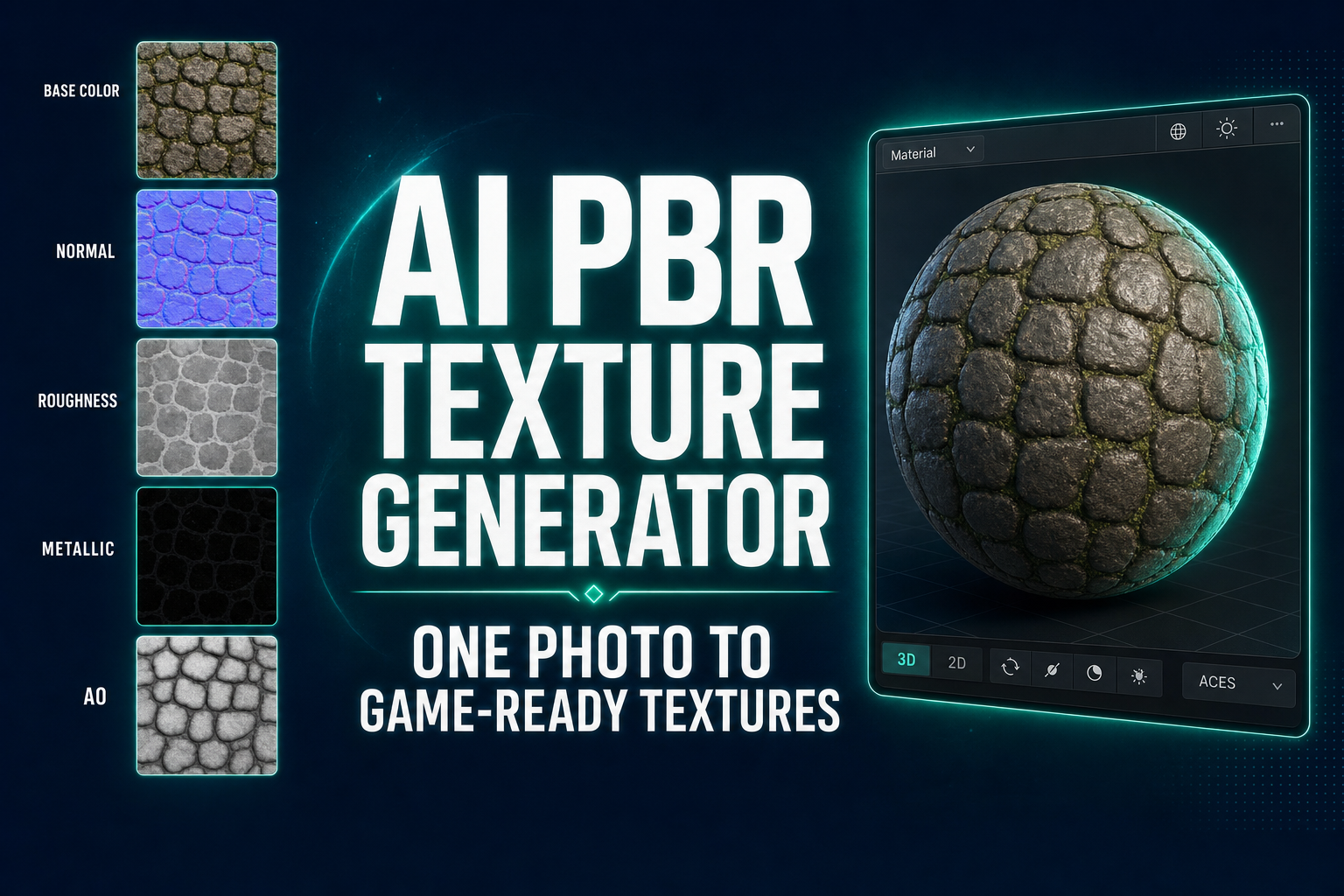
AI PBR Texture Generator: One Photo to Game-Ready Textures

By Arron R.11 min read
An AI PBR texture generator turns a photo or text prompt into a full PBR material — base color, normal, roughness, metallic, AO, and emissive maps — without lea

A 2026 PBR material is a stack of six images, not one. Albedo (the surface color), normal (which way the surface is tilted at every point), roughness (how shiny each pixel is), metallic (which pixels reflect like metal), ambient occlusion (where shadows pool in crevices), and emissive (which pixels glow on their own). Every modern engine — Unity, Unreal, Godot, Three.js — expects all six maps stacked, aligned, and correctly authored. The traditional pipeline to produce that stack is Substance Painter, Photoshop, and a Blender bake pass. The 2026 alternative collapses the whole stack into one browser tab.
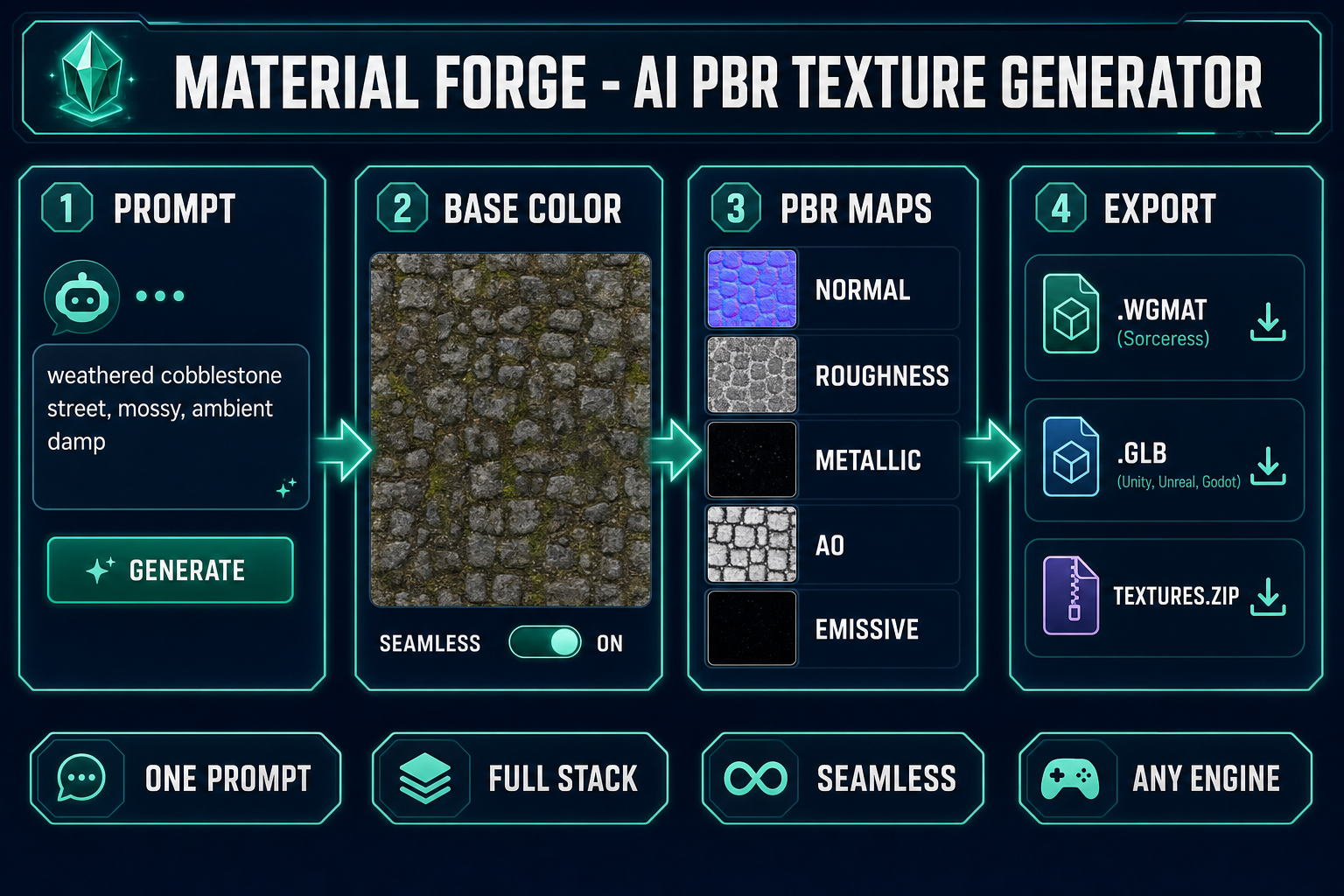
AI PBR texture generator pipeline: prompt or photo to base color, derived PBR maps, and engine-ready exports
The four-stage AI PBR texture generator pipeline: prompt, base color, derived PBR maps, export to any engine. The full loop runs without leaving the browser.

How an AI PBR texture generator turns one photo into a material

  • Open Material Forge in your browser. Type a description (weathered cobblestone street, mossy, ambient damp) or drop a reference photo of the surface you want.
  • The texture-generation pass produces a seamless base color (albedo) map using the selected image model — Nano Banana 2 by default, with GPT Image 2, Seedream 5 Lite, Flux 2 Pro, Z-Image Turbo, and Grok Imagine all available in the same picker (verified May 9, 2026 against src/lib/models.ts).
  • The derive pass runs in-browser using canvas-based image processing. From the single base color it produces the normal, roughness, metallic, AO, and emissive maps. Zero API cost; the work happens locally on your GPU.
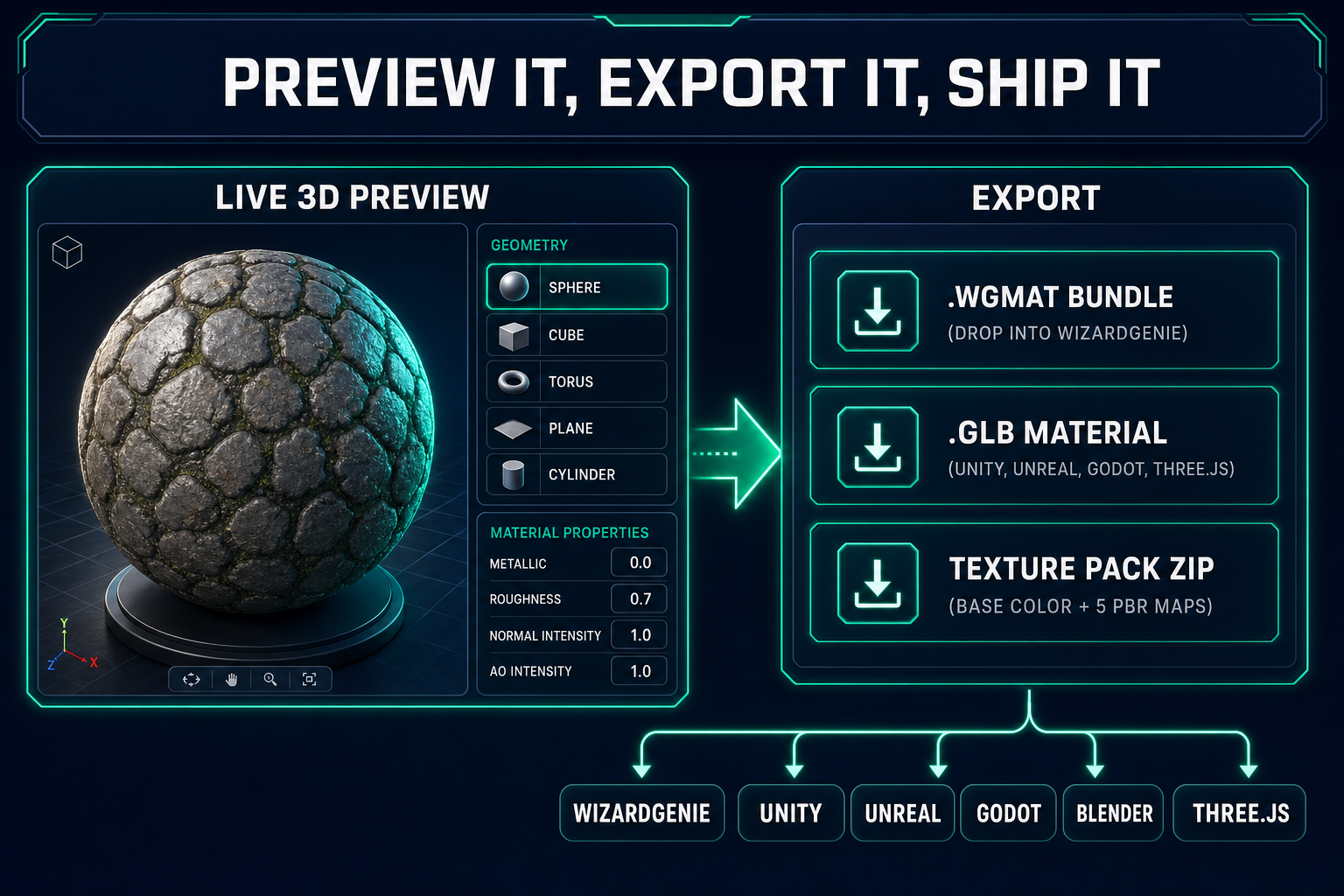
  • The live 3D preview renders the full material on a sphere, cube, torus, plane, cylinder, or repeating tile. Sliders for metallic, roughness, normal intensity, AO, clearcoat, sheen, IOR, and transmission tune the material as a physically-based whole.
  • Export the result as a WGMAT bundle (one-click drop into a WizardGenie project), a GLB material preview (Unity, Unreal, Godot, Three.js, Babylon.js, Blender), or a raw texture pack zip (six PNG maps wired up by your own pipeline).

From blank tab to a full PBR material on disk takes roughly two to five minutes, the bulk of which is the AI generation step waiting for the image model to return. Everything after the base color is local computation that finishes in seconds.

What “PBR” actually means (and why one photo is not a PBR material)

Physically based rendering is the lighting model every modern game engine uses to make surfaces look correct under real lighting conditions instead of being painted to look correct under one specific light. PBR is a shading framework grounded in a bidirectional reflectance distribution function — a mathematical model of how a surface scatters incoming light back into the world. To evaluate that BRDF the engine needs to know, at every point on the surface, six things:

  • Base color (albedo) — the underlying color of the surface, with no lighting baked in. A red brick is red even in shadow; that color is the albedo.
  • Normal — the surface direction at every pixel, encoded in the RGB channels as a vector. Normal mapping is what makes a flat polygon read as a bumpy stone wall; the normal map tells the shader to pretend the polygon has the geometry of the high-frequency detail.
  • Roughness — how broadly the surface scatters reflected light. Polished marble is low roughness; raw concrete is high roughness.
  • Metallic — whether each pixel obeys metal-like or dielectric-like reflection physics. Metal pixels colorize their reflections; dielectric pixels do not.
  • Ambient occlusion (AO)ambient occlusion bakes the shadowing that crevices and concavities produce under diffuse skylight, so the engine does not have to compute it at runtime.
  • Emissive — pixels that emit light independent of the lighting in the scene. Lava cracks, neon glyphs, runes, glowing buttons.

A photograph of a cobblestone street is not a PBR material. It is exactly one of those six channels — the base color — and even that channel has shadows and lighting baked in that should not be there. To go from photograph to material you need a tool that knows the shape of all six maps and how to derive the missing five from the one you have. That is the job an AI PBR texture generator does.

Step 1 — Describe or upload your source surface

Open Material Forge and you land on the gallery view with a chat panel on the left, a live 3D preview in the center, and a material inspector on the right. The chat panel is the Material Assistant — a GPT-5 Mini agent that translates natural language into PBR property changes (too shiny, more bumpy, tighter tile, warmer color, less metal) and orchestrates the texture-generation pass.

Two ways in. Type a prompt or drop a reference. The patterns that consistently produce clean, riggable surfaces:

weathered cobblestone street, damp, mossy in the cracks, ambient grey
rough sandstone block, sun-bleached, tightly tessellated
hammered iron plate armor, dark patina, rivets at the corners
woven linen fabric, ivory cream, plain weave, slightly translucent
volcanic basalt slab, cooling fissures, dim red emissive in cracks

The literal phrase seamless tiling is not necessary in the prompt because Material Forge has a Seamless toggle that prepends the appropriate sampler instructions for the chosen image model. Toggling Seamless ON before generating produces a base color that wraps cleanly at the borders — suitable for tiling on terrain, walls, fabric, brick, and any other repeating surface.

If you have a real-world reference — a photograph of the actual leather, the actual stone, the actual tile pattern you want — drop it in the upload zone. Material Forge passes the reference to the chosen image model and the model uses it as a style and color anchor for the seamless base color.
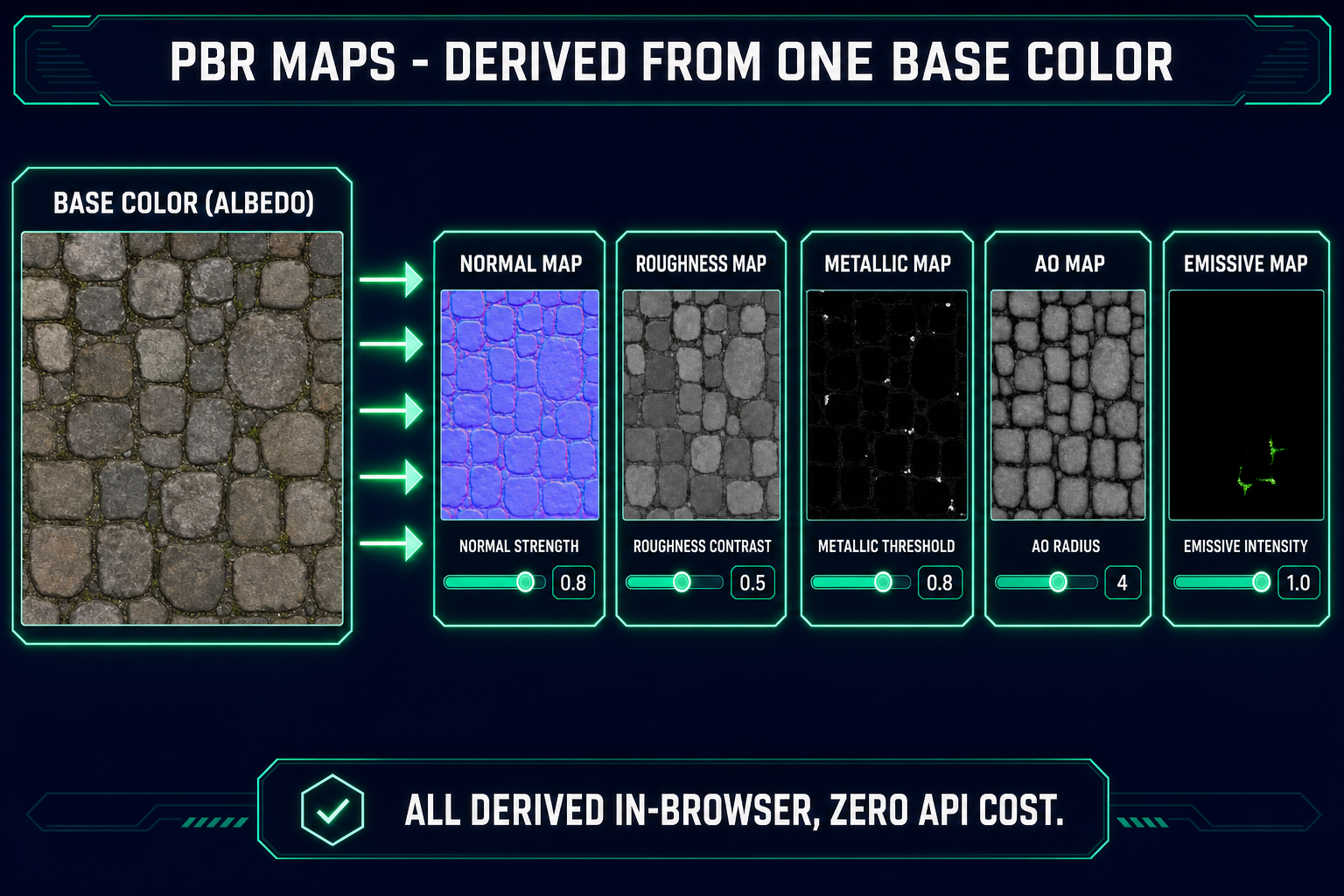
Material Forge PBR map derivation diagram: base color splits into normal, roughness, metallic, AO, and emissive maps, each tuned by its own slider
One base color generates five derived maps in-browser. Each map has a slider for tuning without re-generating the source.

Step 2 — Generate the seamless base color texture

The image-model picker exposes the same models you see in AI Image Gen: Nano Banana Pro, Nano Banana 2 (default for Material Forge), GPT Image 2, Seedream 5 Lite, Flux 2 Pro, Z-Image Turbo, and Grok Imagine. Pick the one whose strengths match your surface:

  • Nano Banana 2 — the strong default. Tight prompt adherence, consistent style across re-rolls, fast. Produces clean tileable surfaces for stone, brick, wood, metal, fabric.
  • GPT Image 2 — the right pick when the texture has fine in-image text or symbols (rune-engraved stone, painted tiles, signed metal plates). It is the only model in the panel that reliably renders dense legible text inside an image.
  • Seedream 5 Lite — the right pick for stylized or uncensored material direction the others cannot produce.
  • Flux 2 Pro — the right pick for photorealistic surfaces where you have a specific real-world reference and want maximum fidelity.

Click Generate. The base color appears in the preview within roughly fifteen to forty-five seconds depending on the model. Re-roll until the surface character matches what you want; the prompt, model, parameters, and any tags are saved with the material so you can reuse the exact pipeline later.
Step 3 — Derive the rest of the PBR map stack

This is the moment an AI PBR texture generator earns its name. The base color is the only AI-generated map. The other five — normal, roughness, metallic, AO, emissive — are derived algorithmically from the base color directly in the browser using canvas-based image processing. Zero additional API calls, zero additional credit burn, zero additional waiting.

Normal map. The derive pass extracts a luminance buffer from the base color, then runs a Sobel-style gradient operator across it to estimate surface direction at every pixel. Brighter pixels are read as raised; darker pixels are read as recessed. The result is a tangent-space normal map that gives the surface depth without changing the geometry. The Normal Strength slider scales the steepness of the gradient; higher values produce more pronounced bumpiness, lower values produce a subtler effect.

Roughness map. Derived from luminance with bias and contrast controls. The base intuition: surfaces with high-frequency detail (rough stone, woven fabric, weathered wood) should be rougher; surfaces with low-frequency detail (polished marble, smooth metal, lacquered wood) should be smoother. The slider lets you push the result either way and invert when needed.

Metallic map. Disabled by default because most surfaces are dielectric. Enable it for armor, machinery, polished panels. The threshold slider sets the luminance value above which a pixel is treated as metal; pixels below the threshold remain dielectric. Inverting flips the assignment.

AO map. Derived from a local-contrast pass that estimates how dark each pixel reads relative to its neighborhood, then converted into a soft-shadow grayscale. Strength and radius sliders tune the depth and reach of the occlusion. Crevices in cobblestone darken; flat plate metal stays neutral.

Emissive map. Disabled by default. Enable it for lava, runes, glow surfaces. The threshold isolates the brightest pixels of the base color; the intensity slider sets how strongly those pixels emit light. Result: the rune carvings glow, the surrounding stone does not.

Every slider tunes the derived map without re-generating the base color. The full derive pass takes well under a second per map on a modern laptop GPU because every derivation reduces to a small handful of canvas operations. Tuning becomes the loop: generate the base color once, then dial the five derivations until the material reads correctly under the live preview light.

Material Forge live 3D preview showing the PBR cobblestone material on a sphere, with property sliders and three export options (WGMAT, GLB, texture-zip)
The live 3D preview ties the maps together. Three export targets cover every game pipeline.

Step 4 — Tune the live 3D preview

The preview viewport renders the full material on a 3D mesh under a real-time PBR light rig. The geometry picker offers sphere, cube, torus, plane, cylinder, and tiled-plane previews. Each geometry surfaces a different aspect of the material:

  • Sphere reveals how the material reads under wraparound lighting. The classic preview — if the material looks right on a sphere, it usually looks right everywhere.
  • Cube reveals seam alignment between adjacent faces. Use this to confirm the seamless toggle worked.
  • Torus exposes how the material reads under high-curvature shading. Great for catching too-aggressive AO or normals that are over-amplified.
  • Plane and tiled-plane reveal repetition character. Tiled-plane in particular is the test for whether the seamless base color truly tiles or whether a faint seam is still visible.

The material inspector exposes every PBR property as a slider: metallic, roughness, normal intensity, emissive intensity, opacity, AO intensity, clearcoat, clearcoat roughness, sheen, sheen color, IOR (index of refraction), transmission, and tiling (X and Y repeat counts independently). The Material Assistant chat in the left panel changes the same properties through natural language — tell it more clearcoat for wet asphalt or tighter tiling, half the size and it dispatches the corresponding property updates while explaining what it changed.

Step 5 — Export your AI PBR texture generator output

Three export targets, each appropriate for a different downstream pipeline:

  • .wgmat — the Sorceress runtime bundle. Drops directly into a WizardGenie project; the rig, the maps, and every property load with one line of code. Right export for any project staying inside the Sorceress ecosystem.
  • .glb — a glTF binary. The open-standard 3D format defined by Khronos Group; glTF 2.0 is the spec every modern engine reads. Loads directly into Unity, Unreal, Godot, Three.js, Babylon.js, Blender, and any tool that consumes 3D meshes. The GLB ships the material applied to a preview mesh so the import lands as a usable material asset, not a loose texture pile.
  • Texture pack zip — the raw maps as separate PNG files (base color, normal, roughness, metallic, AO, emissive). The right export when your engine expects each map plugged into a specific shader graph slot manually, or when you are building a custom pipeline that ingests texture packs.

The texture pack export is also the path to bring the material into 3D Studio for application to a generated 3D character — the same emerald cobblestone tile that surfaces a dungeon floor in WizardGenie can dress a generated 3D pillar in 3D Studio without re-generating anything.

When a hand-authored PBR material still wins

Honest tradeoff. The AI PBR texture generator workflow is the right answer for the bulk of a material library — environments, terrain, walls, fabric, weathering passes, surfaces whose identity comes from texture rather than from large-scale geometry. It is not the right answer for:

  • Surfaces whose normal map needs real displacement information. Coarse chainmail, woven rope, structural rivets, embossed plates. The derived normal reads luminance-as-shape, which is right for fine surface roughness and wrong for genuine three-dimensional pattern. For these, a real high-poly bake from a sculpted source still wins.
  • Hero materials where the surface is itself a star of the shot. The signature material on a boss character’s armor, a unique prop the camera lingers on, a one-off material that has to feel artisanal. AI generation produces excellent generic materials and adequate signature materials; for the small set of true heroes, hand-author with deliberate intent.
  • Surfaces with strict licensing or brand requirements. A licensed fabric pattern, a real-world product material, a logo-bearing surface that has to match an external visual identity exactly. AI is broadly fine here but the legal review still matters.

The pragmatic answer studios are settling on in 2026: AI-generate the bulk of the library — environment surfaces, weathering, common props — and hand-author the small set of hero materials. Tileset Forge and Material Forge cover the bulk; the artist’s hand still wins on the four or five materials whose identity carries the game’s look.

Where Material Forge fits in the Sorceress 3D pipeline

Material Forge is one stage in a longer pipeline that also includes 3D Studio for image-to-3D character and prop generation, Voxel Studio for voxel art, Seamless Tile Gen for tileable patterns at the AI Image Gen step, and Auto-Rigging for putting skeletons on the meshes. The clean handoff: generate the geometry in 3D Studio or Voxel Studio, generate the materials in Material Forge, dress the geometry with the materials in your engine of choice. For a complete walkthrough of the geometry side, see the full image-to-3D pipeline guide; for a deeper dive on tileable AI textures, see the tileset generator walkthrough.

Frequently Asked Questions

What is an AI PBR texture generator?

An AI PBR texture generator turns a text prompt or reference photo into a complete physically based rendering material — not just one image but a stack of maps: base color (albedo), normal, roughness, metallic, ambient occlusion, and emissive. Modern game engines like Unity, Unreal, Godot, and Three.js all expect this map stack so the surface reacts correctly to light. The Sorceress version is Material Forge: it generates the base color with an image model (Nano Banana 2, GPT Image 2, Seedream, Flux, or any of the supported image models verified May 9, 2026 in src/lib/models), then derives the other five maps from the base color directly in the browser using algorithmic luminance, edge, and gradient analysis. The full pipeline runs in a single tab without Substance Painter, Photoshop, or Blender.

Does an AI PBR texture generator make seamless tiling textures?

Yes — Material Forge has a seamless toggle that prepends tileable-texture instructions to the image-generation prompt. The result is a base color map that repeats cleanly without visible seams, suitable for terrain, walls, fabric, brick, and any other surface that tiles. The seams problem is harder than it looks: a naive AI texture has a border discontinuity that Photoshop has to clone-stamp away, and bad tiling becomes obvious as a repeating grid pattern in-game. The seamless mode runs the prompt through a different sampler path that constrains the model to produce a wraparound-safe result on the first try.

Can the AI PBR texture generator use a reference photo?

Yes, when the selected image model supports reference inputs. Drop a photo of a wall, fabric swatch, leaf, or rock into the Material Forge upload zone and the texture-generation pass will pull color palette, surface detail, and material direction from the reference. This is the right mode when you have a real-world surface you want to match — say, a specific leather, a specific stone, or a specific period wallpaper for a horror game. The pipeline is photo → seamless base color → derived PBR stack, end to end in the same tab.

Is every PBR map AI-generated separately, or are some derived?

Only the base color (albedo) is AI-generated. Normal, roughness, metallic, AO, and emissive are all derived algorithmically from the base color directly in the browser using canvas-based image processing. This is the right architecture for two reasons. First, deriving from a single coherent base color produces maps that line up perfectly — there is no per-pixel mismatch where the normal map disagrees with the albedo. Second, derivation is free: zero API cost, zero generation time, zero credit burn after the base color generates. Sliders for normal strength, roughness contrast, AO strength and radius, metallic threshold, and emissive intensity let you tune each derived map without re-generating anything.

What surfaces does an AI PBR texture generator handle well?

The honest sweet spot: stone, rock, dirt, brick, wood, fabric, leather, metal panels, sci-fi armor, terrain, plaster, concrete, weathered surfaces, and stylized magical materials like crystal, lava, runes, and emissive glyphs. The general principle: surfaces whose material identity comes from texture and small-scale detail rather than from large geometric features. The honest weak spot: surfaces that are mostly geometry (chainmail, woven cloth at coarse weave, repeating mechanical parts) where the normal map needs to encode actual three-dimensional shape rather than luminance-based shading. For those, a real displacement bake from a high-poly source still wins.

What does the AI PBR texture generator export to?

Three options. WGMAT: a Sorceress runtime bundle that includes every map plus all material settings, drops directly into a WizardGenie project with one line of code. GLB: a glTF 2.0 binary that ships the material applied to a preview mesh — Unity, Unreal, Godot, Three.js, Babylon.js, and Blender all import this natively. Texture pack: a zip of the raw maps (base color, normal, roughness, metallic, AO, emissive as separate PNG files) for any pipeline that wants to wire the maps up by hand. The same source material can be exported in all three formats; pick whichever your engine workflow expects.

Will the AI material look as good as a hand-authored Substance Painter material?

For prototyping, jam-week assets, indie-budget projects, and any surface where stylistic consistency across a whole environment matters more than per-material artisanal flourish — yes, often indistinguishable in motion. The tradeoff: a hand-authored Substance material has a deliberately edited normal that encodes real surface geometry the AI cannot see. The AI version derives the normal from luminance, which works perfectly for anything with shading-based depth (rough stone, fabric weave, brick mortar) but undersells anything where the normal needs to carry actual displacement. The pragmatic answer most studios are settling on in 2026: AI-generate the bulk of the material library, hand-author a small set of hero assets where the surface is itself a star of the shot.

Sources

  1. Physically based rendering (Wikipedia)
  2. Normal mapping (Wikipedia)
  3. Bidirectional reflectance distribution function (Wikipedia)
  4. Ambient occlusion (Wikipedia)
  5. glTF (Wikipedia)
  6. glTF 2.0 specification (Khronos Group)
Written by Arron R.·2,387 words·11 min read

Related posts