How to Make a Roguelike With AI (Procgen in the Browser)

By Arron R.13 min read
How to make a roguelike with AI in 2026: open WizardGenie, describe the run loop in one prompt, and let the agent scaffold a Phaser project with BSP procgen, tu

A roguelike used to be the project a beginner started, three nights in, and quietly abandoned. The genre asks for more than a platformer does at the same level of polish. Permadeath needs a clean run-state reset. Procedurally generated dungeons need an algorithm choice and a parameter pass that produces interesting space, not noise. Turn-based combat needs an action queue. Items need a tiny entity-component system. Field of view needs a shadowcast. Each piece is a small, well-known problem, but together they intimidate — and that is exactly the kind of multi-system scaffolding that AI agents now do in a single prompt. The 2026 version of “how to make a roguelike” collapses every one of those subsystems into a browser tab and a few rounds of conversational iteration with an agent that already knows the algorithms.
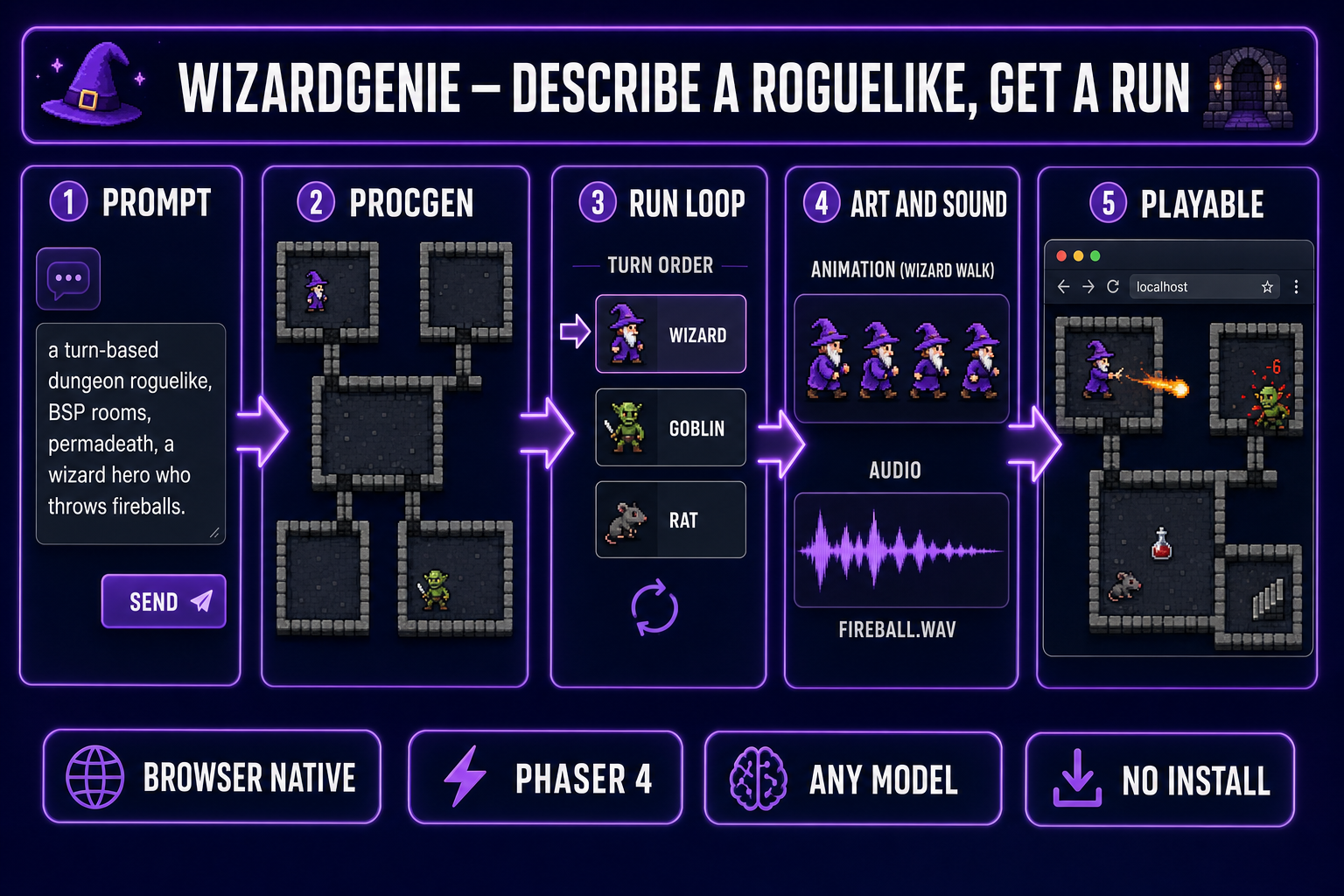
How to make a roguelike with AI: prompt to procedurally generated dungeon to turn-based run loop to art and sound to playable build, all inside the WizardGenie browser tab
The five-stage roguelike pipeline inside WizardGenie. Prompt becomes a BSP dungeon, becomes a turn-based action queue, becomes art and sound, becomes a playable build — all in one browser tab.

How to make a roguelike — the workflow at a glance

The whole pipeline is five named steps, each one a single conversational round with the agent. Open WizardGenie in a browser tab. Step one is a single prompt that names the genre, the procedural-generation algorithm, the perspective, the combat style, and the permadeath rule. The agent scaffolds a Phaser 4 project with named files for the dungeon generator, the actor model, the combat resolver, and the run state. Step two tunes the procedural generation — room size, corridor width, density, seed handling. Step three fleshes out the run loop with combat, items, and the inventory. Step four folds in art (sprites for the hero, enemies, doors, items) and audio (footsteps, hits, ambient loops). Step five picks the right model for the kind of iteration you are doing and ships the build. Total wall-clock time for a playable first build: ten to twenty minutes if the prompts are concrete, an hour or two if they are vague and you spend it iterating.

Two upfront facts to take with you. First, browser-native means you do not install Godot, Unity, GameMaker, or any Python interpreter. The whole project lives in a tab and ships as a static site. Second, the agent picks the algorithm only if you let it; if you have a preference (BSP for clean rooms, drunkard’s walk for caves, cellular automata for blended caves-and-corridors, Wave Function Collapse for tile-authored dungeons), name it in the first prompt. The procedural generation choice has more impact on how the game feels than any other single decision.

What a roguelike actually is (mechanically)

The word roguelike covers a range of games — the strict 1980 Berlin-Interpretation roguelike (turn-based, grid-based, ASCII-friendly, permadeath) and the much looser “roguelite” (real-time, with persistent meta-progression). Both end up needing the same five mechanical components. Naming them upfront keeps the agent’s scaffolding focused.

  • Procedurally generated levels. Each new run produces a different floor plan from a seeded random number generator. The algorithm can be deterministic or stochastic; either way the seed is captured so the same dungeon can be replayed for debugging. The canonical roguelike uses BSP rooms because they are easy to populate with treasure and enemies.
  • Turn-based action. The player acts; every other actor in initiative order acts; the turn ends. Time only passes when the player decides to act. That single rule is what gives the genre its puzzle-like pacing and lets a beginner understand the consequence of every step.
  • Permadeath. When the player dies, the run is over and the run state clears. The permadeath rule is what makes every decision matter; without it the game collapses into a save-scummed grind.
  • Item synergy. The fun comes from combining unidentified items in unexpected ways — a wand of fire next to a potion of frost, a ring of teleport stacked with a scroll of mapping. Items are tiny entities with named effects, not balanced power tiers.
  • Field of view + line of sight. The player sees only what the hero can see; everything outside the visible cone stays in fog of war or in remembered-but-unseen state. Field of view calculation is usually a shadowcast or a recursive ray walk and is a famously fiddly piece of code to get right by hand — prime territory for letting the agent write it.

Tell the agent which of the five you actually want. A modern roguelite can drop turn-based action and field of view (think of the action-roguelikes that play in real time) and still satisfy the genre on the procedural-generation, permadeath, and item-synergy axes.

Step 1 — the minimum-viable roguelike prompt

The first prompt is the most important one of the project. The agent will pick algorithms, file structure, and tile system based on what you say in this single message. A vague first prompt produces a mush of generic boilerplate that takes ten rounds of conversation to undo; a concrete first prompt produces a real scaffold that takes one round to refine.

A workable starter prompt looks like this:

A turn-based dungeon roguelike in Phaser 4. Top-down grid view, 32-pixel tiles.
Procedural floor plan: BSP, five to ten rooms, corridor width 1, minimum room area 16 tiles.
The hero is a wizard who throws fireballs and walks one tile per turn.
Three enemy types to start: goblin (melee, weak), rat (fast, low HP), shadow (ranged, glass cannon).
Permadeath. Seed exposed in the URL so the same run can be replayed.
Field of view by recursive shadowcast, 8-tile radius. Fog of war for unseen tiles.
Items: heal potion, wand of fire, ring of teleport. Inventory hotkeys 1 through 9.
HP, gold, dungeon depth shown at the top of the screen. Combat is one hit, one resolve.
Use a single main.js plus separate files for dungeon, combat, items, and fov.

Note what the prompt does and does not name. It names the algorithm (BSP), the parameters (five to ten rooms, corridor width 1, minimum area 16), the engine (Phaser 4), the perspective, the tile size, the actor types, the combat style, the inventory size, and the file split. It does not name colors, fonts, sprite sheets, level scripts, or boss patterns — those come later. The agent now has enough constraint to make sensible choices for everything you did not specify.

The same prompt-shape works for any roguelike variant. Swap BSP for drunkard’s walk and you get an organic cave game. Swap turn-based for real-time and you get a roguelite. Add “meta-progression: permanent gold buys upgrades between runs” and you get a Hades-style structure. The agent reads the constraints and assembles them into the right scaffold.
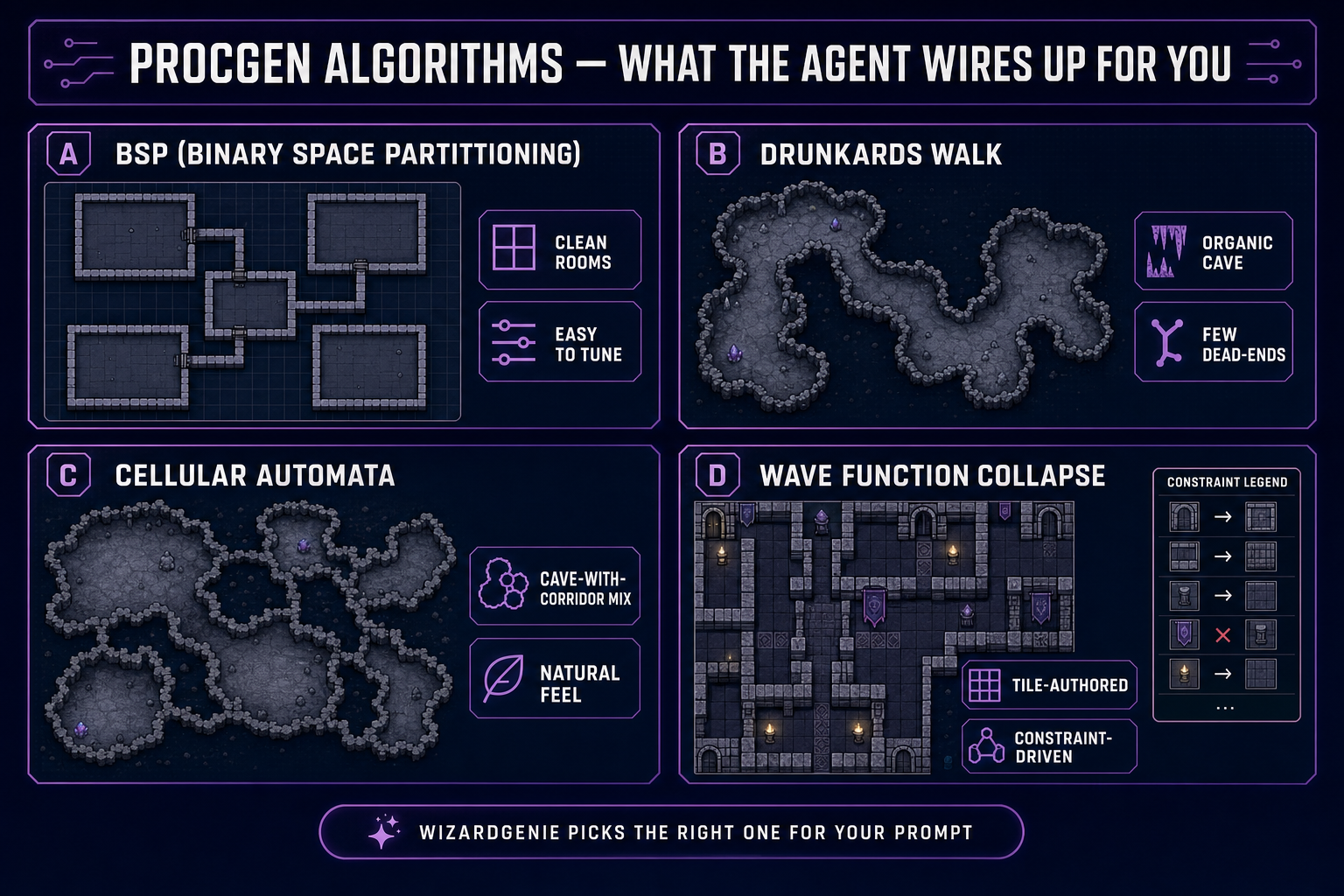
Comparison of four procgen algorithms a roguelike agent can wire up: BSP for clean rooms, drunkard's walk for organic caves, cellular automata for cave-corridor mixes, and Wave Function Collapse for tile-authored constraints
The four procgen algorithms the agent can scaffold for a roguelike. Pick by feel — BSP for tactical room-by-room dungeons, drunkard’s walk for cave exploration, cellular automata for the in-between, Wave Function Collapse when you want hand-authored tile rules.

Step 2 — wire up procedural floor generation

Procedural floor generation is the algorithmic heart of any roguelike. Pick the wrong algorithm and the dungeon will feel monotonous regardless of how much content you stuff into it; pick the right one and the game feels different on every run with no extra authoring effort. The four standard choices map cleanly to game feels:

  • Binary space partitioning (BSP). Recursively split the dungeon rectangle into smaller rectangles until each is below a maximum area, then carve a room inside each leaf and connect the rooms with corridors. The resulting dungeon is a clean grid of rectangular rooms with straight corridors — the canonical “dungeon roguelike” look. Easy to populate (each room is a discrete encounter slot) and easy to tune (room size, depth limit, corridor width are all single constants).
  • Drunkard’s walk. Start at a random tile and randomly carve floor tiles in a meander until enough of the map is open. Produces a single connected organic cave with very few dead ends. The right choice when the game is about exploration through a continuous space rather than tactical room-clearing.
  • Cellular automata. Start with random noise, then apply a Conway-style smoothing rule for several iterations until walls and floors form natural-looking blobs. Tune the rule and iteration count for either tight caves or open chambers. The middle ground between BSP rigidity and drunkard’s-walk chaos.
  • Wave Function Collapse. Author a small library of tile patterns and constraint rules; the algorithm collapses the level until every tile satisfies the constraints. The most authored option — use it when the game needs a coherent visual style (e.g. a recognizable temple or castle layout) on every run rather than free-form geometry.

Ask the agent to expose the parameters as named constants at the top of the file. MIN_ROOM_AREA, MAX_ROOMS, CORRIDOR_WIDTH, BSP_DEPTH_LIMIT — each one a number you can tune by chat (“bump MIN_ROOM_AREA to 25”) without touching the code yourself. Ask for the seed to be exposed in the URL or in localStorage so a particularly good run can be replayed for debugging or capture. And ask for a flat generateDungeon(seed) function as the only entry point — keeping the API surface small means iterating on the algorithm later does not break the rest of the project.
Step 3 — combat, items, and the run loop

The run loop is the connective tissue between procgen and combat. A canonical turn-based roguelike main loop has four stages: read the player’s intended action, apply it, run every other actor’s action in initiative order, and then redraw. Ask the agent to scaffold this as a small state machine with an explicit turnQueue array and a resolveTurn() function. Combat resolution then becomes a separate pure function: attack(attacker, defender) => result, where result includes damage, knockback, and any status effect. The function takes stats and returns a deterministic outcome given a seeded random source — critical for reproducibility when you want to debug a run.

Items are the most fun part to iterate on, and the part where AI agents shine. Each item is a small JSON object with a name, an icon, an optional onUse callback, an optional onPickup callback, and an optional onTurn callback for items that tick (e.g. a torch that loses a turn of fuel each step). Ask WizardGenie for ten starter items in one message: heal potion, mana potion, scroll of mapping, scroll of fireball, ring of teleport, ring of haste, wand of fire, wand of ice, amulet of regeneration, food ration. The agent writes the JSON, the callbacks, and the spawn-table entries in one pass. Want a specific item to drop more rarely? Ask: “make the ring of teleport drop at one in fifty.” The change is a single number in the spawn table.

The run-loop closing rule is permadeath. When HP drops to zero, the agent should clear the run state, roll a new seed, and offer to start a new run. If you are building a roguelite with meta-progression, ask explicitly: “on death, save the run’s peak gold to localStorage and let the player spend it on permanent upgrades from a hub screen between runs.” The agent will scaffold the hub screen and the upgrade store as part of the run-end transition.

Step 4 — art and audio without leaving the browser

A roguelike scaffold without art is a wireframe. The Sorceress asset pipeline lives in adjacent tabs, and the WizardGenie agent can ingest URLs from any of them straight into the project’s asset folder.

  • Quick Sprites for pixel-art sprite sheets. One prompt gives you a four-frame walk cycle for the hero, the goblins, the rats, the shadows. Outputs are transparent-background PNG sized for Phaser. The full sprite-sheet workflow covers prompt patterns and frame count selection.
  • AI Image Gen for static art — the title screen, the death screen, the inventory icons, the dungeon backdrop. Drop the URLs into the project’s assets/ui/ folder and ask the agent to wire them in. The reference-image consistency trick matters here when you want the hero portrait to look like the in-game sprite.
  • SFX Gen for the audio pack. One batch prompt produces a coherent set of clips: footsteps on stone, sword swings, fireball impacts, potion drinks, item pickups, level-up jingles. The SFX pack guide walks the batch workflow in detail.
  • Music Gen for the dungeon ambient loop. Roguelikes benefit from low-key procedural-feeling background music; ask for “dark ambient dungeon loop, eight bars, low strings, occasional dripping water” and let the agent crossfade two variations during long runs.

The asset hand-off pattern that works: generate the asset in one tab, copy the public URL, paste it into the WizardGenie chat (“use this image as the hero sprite, slice it as four 32x32 frames”). The agent downloads the asset, drops it into the project, and wires the loader. No file uploads, no FTP, no command-line incantations.

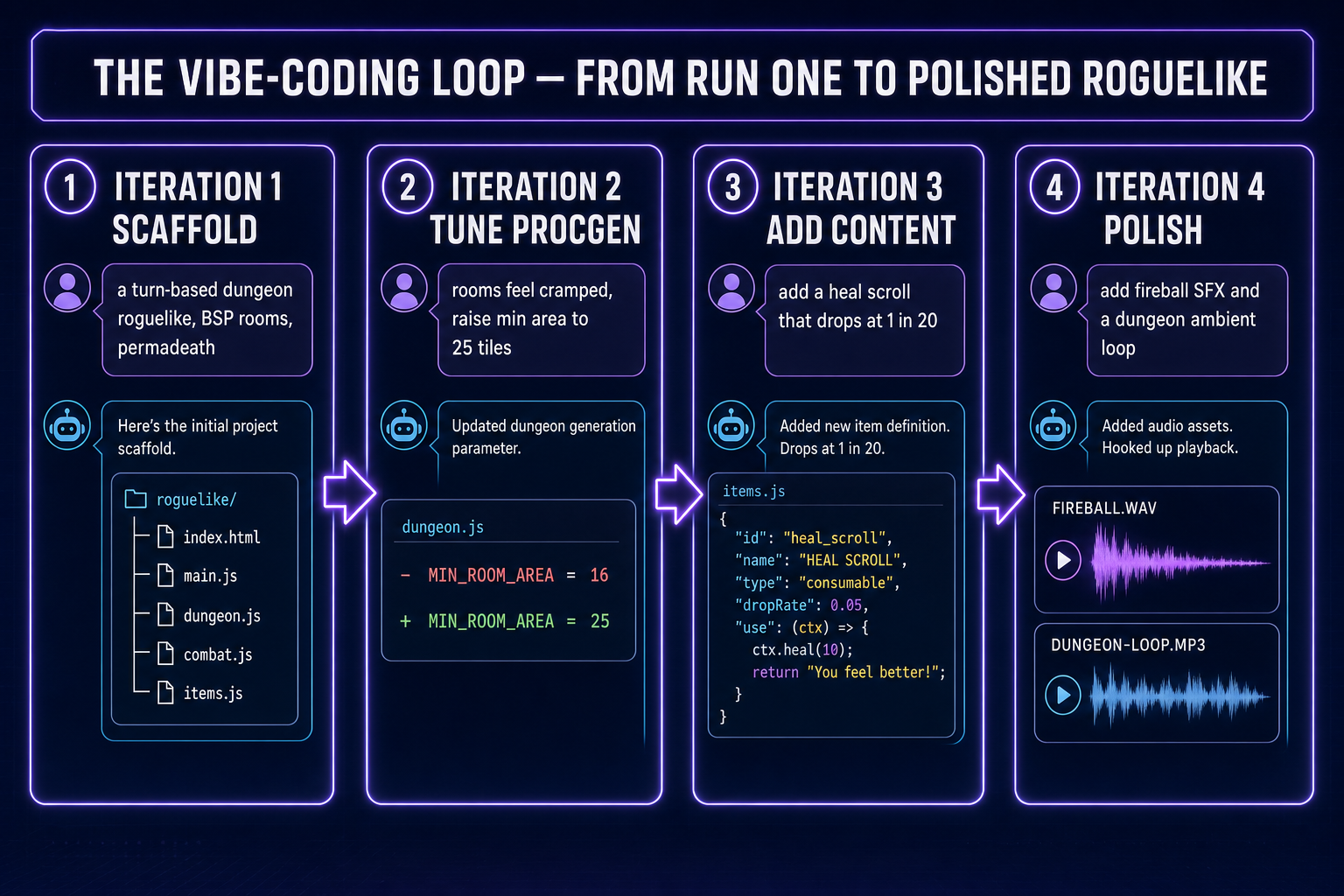
Four-card iteration log of a vibe-coding session for a roguelike: scaffold, tune procgen, add a heal scroll, add fireball SFX and dungeon ambient loop
A typical vibe-coding loop for a roguelike. Each card is one chat round; the dungeon goes from generic scaffold to tuned procgen to content-rich to polished in four short conversations.

Step 5 — pick the right agent model and iteration tempo

The model picker inside WizardGenie exposes the full coding lineup, verified May 9, 2026 against src/app/_home-v2/_data/tools.ts: Claude Opus 4.7, Claude Sonnet 4.6, GPT-5.5, Gemini 3.1 Pro, DeepSeek V4 Pro, Kimi K2.5, Grok 4.2, and MiniMax M2.7. The right choice depends on the iteration phase, not on which is “best” in absolute terms. The model picker walkthrough covers each one in depth; the short version for roguelike scaffolding:

  • Scaffold pass (the first prompt). Claude Opus 4.7 or GPT-5.5 — frontier models with strong algorithmic reasoning. They pick a sensible procgen algorithm, write a clean turn loop, and produce well-named files in one pass. Worth the credits because the scaffold becomes everything else you build on.
  • Tuning pass (rooms feel cramped, fix the off-by-one in FOV, the spawn rate is too aggressive). DeepSeek V4 Pro, Kimi K2.5, or MiniMax M2.7 — cheap, fast executor models. The Planner+Executor pattern means the frontier model is the planner you talk to about strategy; the cheap model is what types out the diff. The vibe coding explainer covers the pattern in detail. Cost ratio: roughly one fifth of frontier-only.
  • Content pass (add ten more items, add three more enemy types, add a boss). Mid-tier models like Claude Sonnet 4.6 or Gemini 3.1 Pro hit the sweet spot — enough taste to write distinctive item descriptions, enough cost discipline that you can run dozens of these prompts without burning the budget.

The iteration tempo that consistently produces shippable roguelikes is one round per concrete change. Do not stack five requests into one message (“add ten items, fix the FOV, change the BSP parameters, add music, add a boss”) — the agent will half-do all of them. One message, one change, observe the result, next message. The whole project compresses into roughly twenty to forty rounds for a polished first version.

Where AI roguelikes fail (and how to recover)

The honest failure modes of AI-scaffolded roguelikes in 2026 are predictable. Knowing them turns three days of debugging into three minutes:

  • The dungeon is technically procedural but every run feels the same. The agent picked algorithm parameters that produce too-similar geometry. Recovery: ask for more variance in the parameters themselves — vary MIN_ROOM_AREA per floor, vary the BSP depth limit, vary the corridor width on alternating floors. Procgen feel comes from parameter variance more than from algorithm switching.
  • FOV calculation has artifacts. The classic shadowcast off-by-one at corners or the diagonal-leak through walls. Both are well-known problems with well-known fixes; the agent will recognize the symptom by name. Tell it: “the FOV leaks diagonally through wall corners — the symmetry rule is broken.” The fix is a single conditional in the visibility check.
  • Combat damage scales out of control by floor 5. The agent picked a multiplicative formula that compounds across floors. Recovery: ask for a linear damage curve with floor-tier multipliers instead. Or ask for a logarithmic HP curve. Be explicit about which side of combat you want to scale.
  • Items feel boring — every potion is just a heal. The agent generated functional but generic item callbacks. Recovery: name the synergies you want. “Add a wand of fire that does double damage to enemies standing on a tile adjacent to a torch.” Synergy emerges from named cross-item rules, not from item-by-item balance.
  • Permadeath kills your willingness to test. Add a debug seed mode the agent can wire up in one message: “on startup, if the URL has ?seed=N, use that seed and skip the death screen.” The dev loop becomes faster than playing a save-scummed run.
  • The iteration loop slows down because you stopped naming the change. “Make it better” is not a prompt. “Reduce MIN_ROOM_AREA to 12, raise MAX_ROOMS to 14, add a torch that consumes one tile of fuel per turn” is. Concrete prompts get concrete diffs.

Where the roguelike fits in the broader Sorceress workflow

An AI-built roguelike is one project shape inside the larger “describe a game, get a game” pipeline. Adjacent shapes are covered in their own walkthroughs:

  • Platformer. The same workflow, real-time physics instead of turn-based grid logic. Walk-through in the platformer guide.
  • RPG. Larger world, persistent characters, narrative scaffolding. The RPG guide covers the asset-pipeline-heavy version.
  • 2D game in any other genre. Same agent, same engine, no install. Generic walkthrough in how to make a 2D game with AI.
  • Code-only workflow. If you prefer a pure coding agent without the game-engine scaffolding, Sorceress Code is the file-aware sibling. Useful when the project has graduated past the prototype phase.

Every one of those projects starts the same way: open the tab, write the first concrete prompt, let the agent scaffold, iterate by chat. The difference is the shape of the first prompt. For a roguelike, that prompt names the procgen algorithm, the turn rule, and the permadeath rule. For everything else, it names whatever subsystems matter most for that genre. The skill that transfers between projects is not knowledge of any single algorithm — it is the discipline of writing the first prompt with enough constraint that the agent can scaffold something real.

Frequently Asked Questions

What is the easiest way to make a roguelike in 2026?

Describe the run loop in one prompt to a browser-native AI game agent like WizardGenie, then iterate by chat. The agent scaffolds a Phaser project with a procedurally generated dungeon, a turn-based player loop, simple enemies, an inventory, and permadeath — usually playable in ten minutes from the first prompt. Refinement happens by talking to the agent (“the BSP rooms are too cramped — bias toward 8x8 minimum”, “add a heal scroll that drops at 1 in 20”), not by writing every algorithm by hand.

Do I need to install Godot, Unity, or learn Python to make a roguelike?

No. WizardGenie ships a browser-native runtime that wraps Phaser 4.1 (Salusa, released April 30, 2026 — verified May 9, 2026 against the Phaser 4 release notes). The whole workflow runs in a tab — no engine install, no command line, no Python interpreter. If you later want to port the project to Godot or Unity, the assets and the algorithm choices travel cleanly because the agent writes plain JavaScript with named functions for floor generation, FOV, line of sight, and combat.

Can AI generate the dungeon levels procedurally, not just write the code?

Yes — and that is the whole point of asking the agent to choose an algorithm rather than picking one yourself. Ask WizardGenie for binary space partitioning (BSP) for clean rectangular dungeons, drunkard’s walk for organic caves, cellular automata for cave-with-corridor mixes, or Wave Function Collapse if you want tile-based authored constraints. The agent writes the chosen algorithm, exposes the parameters as constants at the top of the file, and lets you ask for tweaks (“increase corridor width to 3”, “raise minimum room area to 25 tiles”) in plain English.

What about combat, items, and the run loop?

Roguelike combat is usually turn-based on a grid: player acts, then every enemy in the level acts in initiative order, then the turn ends. WizardGenie scaffolds this as a small state machine with a queue of pending actor turns, plus a hit-resolution function that takes attacker stats, defender stats, and a damage formula you can adjust in chat. Items are typically a simple ECS-like attachment — a Potion is just a JSON object with a use() callback the agent writes for you. Permadeath is the easy part: on death, the run state clears and the seed for the next run rolls. Meta-progression (Hades-style upgrades) is where you spend extra prompts and iteration time.

Which AI model should drive the agent for a roguelike?

For one-shot scaffolding (the first prompt, where the agent is making algorithm choices), Claude Opus 4.7 or GPT-5.5 produce the cleanest procedural-generation code in a single pass — verified May 9, 2026 against the model picker in src/app/_home-v2/_data/tools.ts, which currently exposes Claude Opus 4.7, Claude Sonnet 4.6, GPT-5.5, Gemini 3.1 Pro, DeepSeek V4 Pro, Kimi K2.5, Grok 4.2, and MiniMax M2.7. For iterative back-and-forth (“tune the spawn rate”, “fix the FOV calculation off-by-one”), the cheaper executor models — DeepSeek V4 Pro, Kimi K2.5, MiniMax M2.7 — are dramatically more cost-effective and fast enough that the loop feels real-time. Never put a frontier-priced model on the typing side of a Planner+Executor pair.

Can the roguelike I build with WizardGenie be a real published game?

Yes. The output is a normal Phaser 4 project — JavaScript modules, an asset folder, a build config — and you can host it anywhere a static site works (your own domain, GitHub Pages, an itch.io upload of the build folder). It is your code and your saved seed history; nothing in the workflow locks the project to Sorceress. Browser-native means the player does not have to download anything either, which historically has been the single biggest install-friction barrier for indie roguelikes.

Sources

  1. Roguelike (Wikipedia)
  2. Procedural generation (Wikipedia)
  3. Binary space partitioning (Wikipedia)
  4. Permadeath (Wikipedia)
  5. Phaser official documentation
  6. Field of view in video games (Wikipedia)
  7. Vibe coding (Wikipedia)
Written by Arron R.·3,026 words·13 min read

Related posts