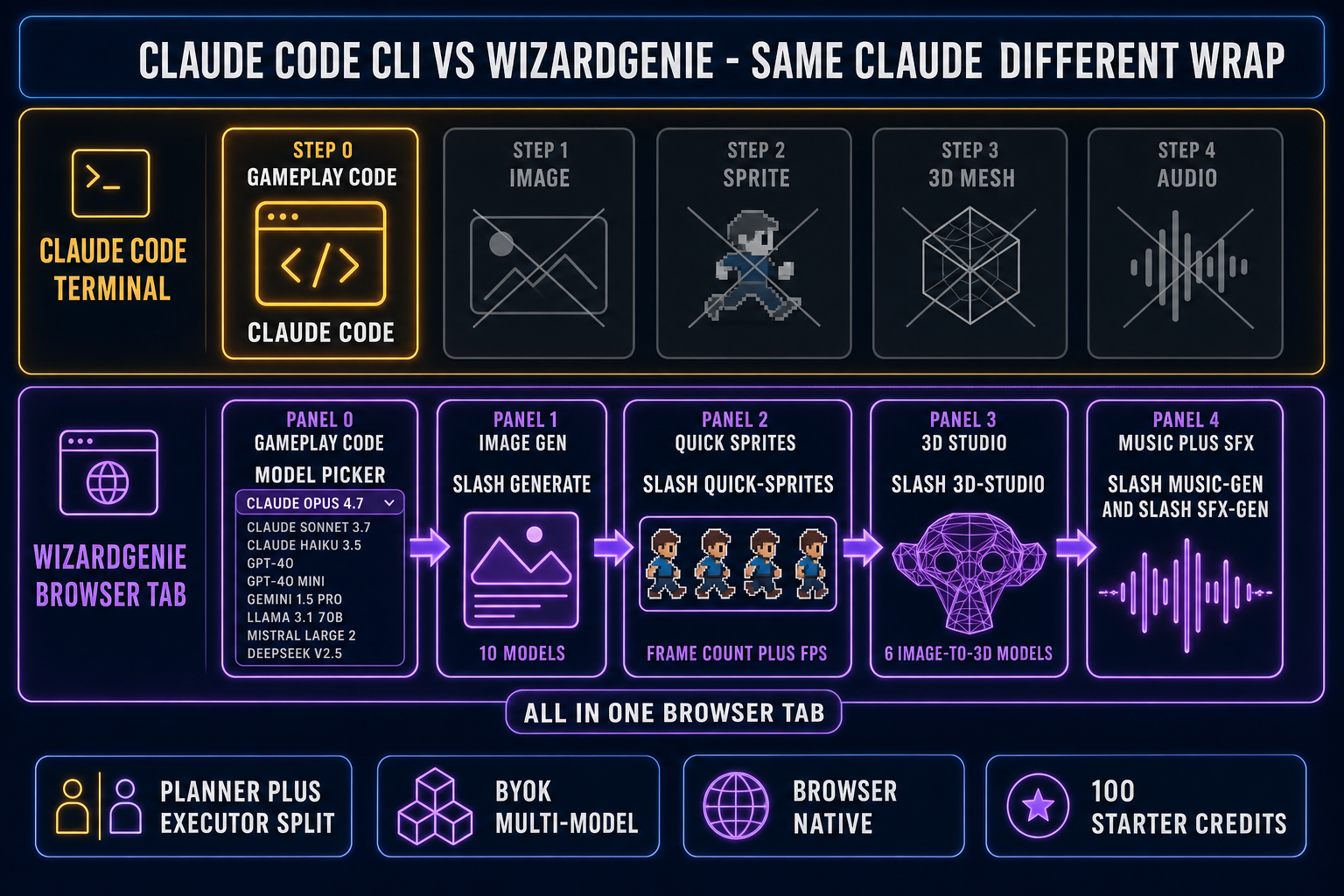
Searches for claude code for vibe coding in 2026 land in two camps: solo devs who already pay for a Claude subscription and want to know if the terminal CLI is the right surface for their game project, and indies coming from cheaper agents who heard Anthropic shipped Opus 4.8 in Claude Code v2.1.154 on May 28, 2026 and want a sober field test before paying. This is that field test. We run a real game-dev session through the CLI, document the four-step asset wall it cannot cross, then walk the browser path that wraps the same Claude alongside the Sorceress asset stack in one tab. Every fact in this post was verified against the live source on June 1, 2026.
What “claude code for vibe coding” actually is in 2026
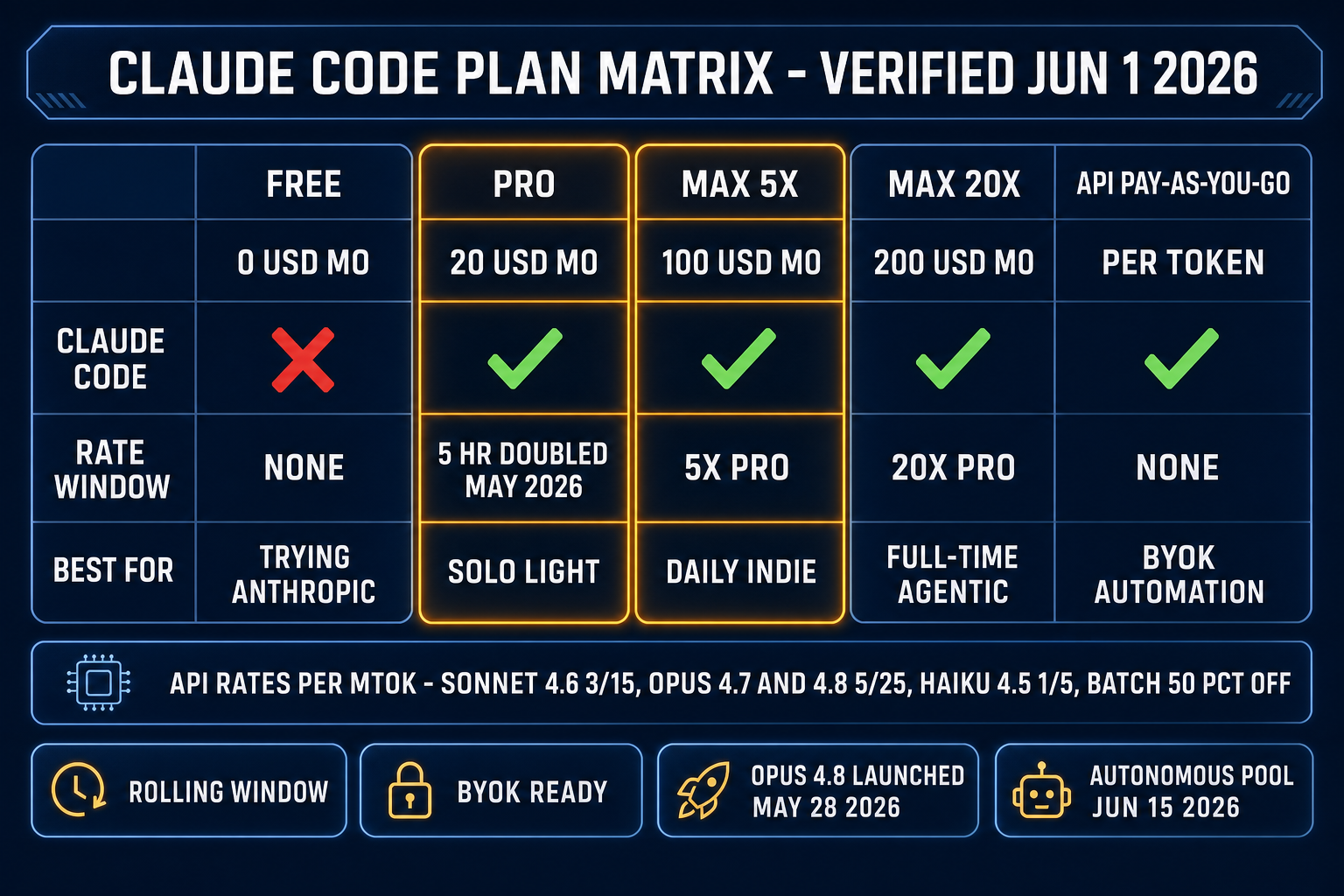
Claude Code is Anthropic’s agentic terminal CLI, hosted at github.com/anthropics/claude-code. It runs in any modern terminal, reads your project, executes shell commands, and applies file edits as diffs. The current release as of June 1, 2026 is v2.1.154 (published May 28, 2026), which shipped Opus 4.8 as the new flagship reasoning model, the Dynamic Workflows orchestration primitive (run /workflows to view runs), and a faster Opus 4.8 Fast Mode at 2x the standard rate for 2.5x the speed.
Vibe coding is the workflow Andrej Karpathy named in February 2025 (per the Vibe coding Wikipedia entry and Simon Willison’s February 6, 2025 weblog post): describe intent in plain English, accept the diff sight unseen, run the build, watch the screen, react to what the screen shows. Using claude code for vibe coding, then, is running the CLI in its auto-edit mode where the agent applies edits without per-change confirmation, with the dev reading the running game instead of every line of the diff.
The same CLI runs the opposite posture too. Claude Code on the propose-then-confirm flow with line-by-line review is pair programming, not vibe coding. The vibe-coding distinction is the developer’s behavior, not the tool. Knowing that matters because almost every “is Claude Code vibe coding” argument confuses the surface (the CLI) with the posture (auto-edit, accept the diff). The longer write-up at Is Claude Code Vibe Coding? walks the posture argument in more depth. Both postures use the same binary; the human decides which one is running.
The game-dev test setup: a Phaser 4 platformer prototype
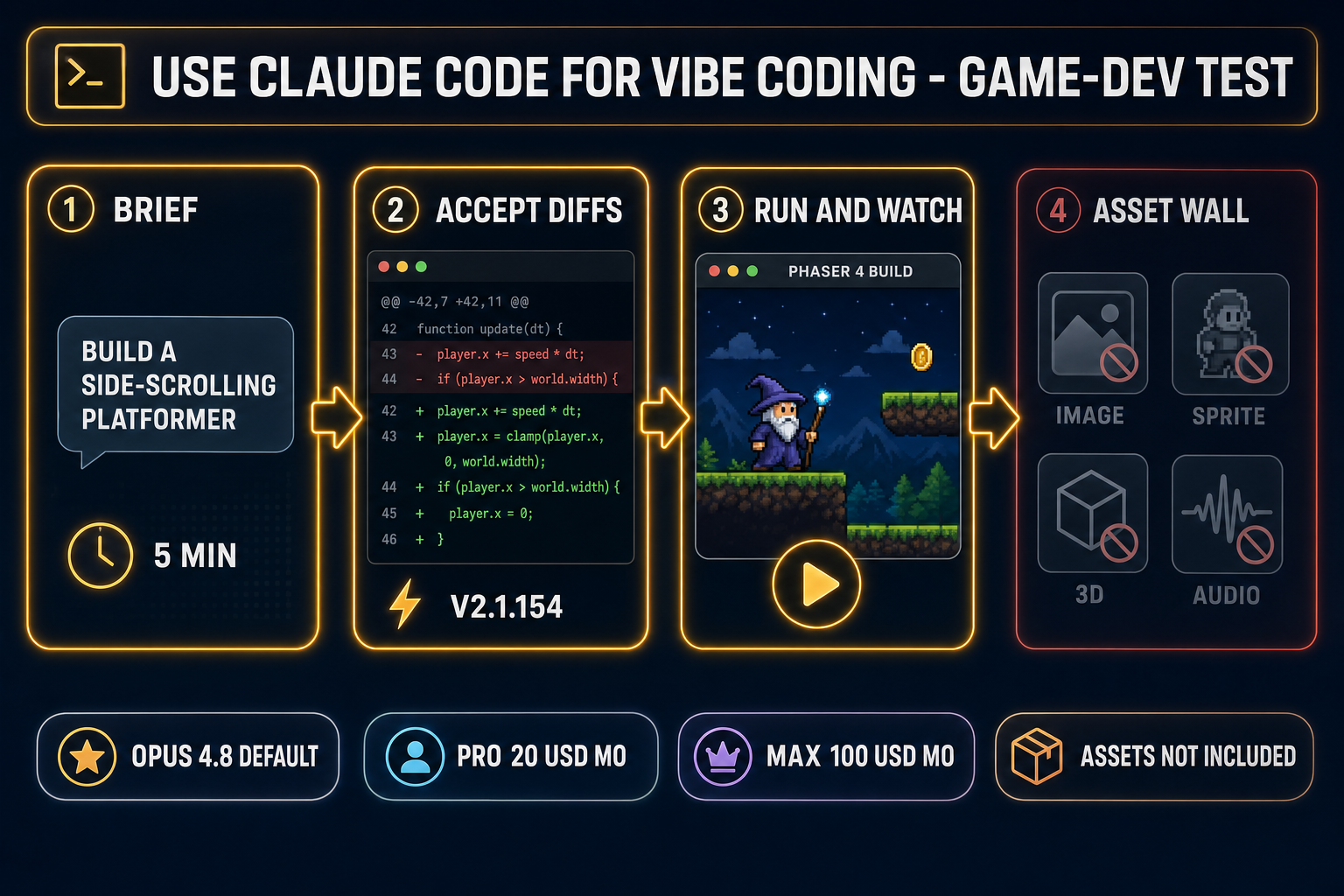
For the test we picked a deliberately small game shape that exercises every code subsystem an indie 2D platformer needs: a side-scrolling Phaser 4 prototype with a controllable wizard character, a tilemap level, gravity and double-jump, a coin pickup with score, an enemy patrol, and a death/respawn loop. The brief we pasted to Claude Code as the vibe prompt was, verbatim:
Build a side-scrolling Phaser 4 platformer in TypeScript. One scene, tilemap level loaded from a JSON exported by Tiled, a wizard player with arrow-key movement and double-jump, three coin pickups, two patrolling slime enemies that kill the player on touch, a score counter in the HUD, and a respawn back to the spawn tile on death. Use the Phaser 4 arcade physics, no Matter.js. Output a vite project I can
npm run dev.
The setup detail that matters for the test: we ran Claude Code on the Pro plan ($20 a month, 5-hour rolling rate window doubled in May 2026) with Opus 4.8 selected via /model, on a brand-new working directory. We accepted every diff without reading it. The only feedback we gave Claude across the session was paste-the-error when the build threw, plus “the player falls through the floor” once when the screen showed it. That is the strict vibe-coding posture: the dev’s eyes are the only validator, the dev never line-edits the agent’s output.
One clarifying note on the test ground rules. We did not pre-populate the project with sprites, tilemaps, or audio. The brief above is what Claude Code received and the only resource it had. That deliberately exposes the four-step asset wall that defines this whole article.
Step 1: gameplay code — where Claude Code for vibe coding genuinely shines
The gameplay-code half of the test went well. In a single Opus 4.8 vibe session of about 35 minutes, Claude Code shipped:
- A working
vite+ Phaser 4 + TypeScript project that built and ran on the firstnpm run devafter Claude installed dependencies. - A single
GameScene.tswith a preload, create, and update lifecycle that loaded a Tiled JSON tilemap, registered the player and enemy sprites against the arcade physics group, and wired the cursor-key controls. - Correct double-jump logic with a counter that resets on ground contact, the coyote-time edge case handled implicitly by checking the body’s blocked.down flag.
- A score HUD using a Phaser BitmapText with proper depth ordering above the world layer, plus a respawn-on-death routine that reset the player position to the spawn tile defined in the tilemap object layer.
- An enemy patrol loop with a turnaround on tile-edge using a raycast trick I would not have written myself (cast a short ray ahead of the foot, reverse direction if the ray misses ground).
The two times the build threw an error, Claude Code recovered in one paste-back. The first error was a Phaser 4 API mismatch (the agent had memorized a Phaser 3 collide signature); the second was a tilemap-layer property the Tiled export had renamed. Both took less than a minute of agent time after I pasted the stack trace.
The honest takeaway from the gameplay-code half: Claude Opus 4.8 in Claude Code v2.1.154 vibe-coded a working platformer skeleton in 35 minutes from a one-paragraph brief, with about $1.40 of API spend equivalent (the Pro plan ate it inside its rolling window) and zero line-by-line review. That part of the test is the success story.
Step 2: the four-step asset wall — where Claude Code stops
The brief asked for a wizard sprite, a slime sprite, a tilemap with platforms, and (implicitly) something other than silence when coins are picked up. The vibe-coding posture says: accept what the agent ships, run the build, look at the screen. Here is what we saw on the screen the first time we ran npm run dev:
- A black playing field with a magenta-and-cyan placeholder sprite for the wizard.
- Slime enemies rendered as similar placeholder rectangles.
- A blank tilemap because Claude Code had emitted a stub
level.jsonin Tiled format with one platform but no tile graphics. - Console warnings about missing audio paths for the coin-pickup and death sounds.
None of that is a Claude failure. It is the four-step asset wall. A finished game is gameplay code plus a sprite sheet (per the Sprite computer graphics Wikipedia entry, sprites are rasterized images that get composited at runtime), plus a 3D mesh when the game is 3D (per the glTF 2.0 specification at Khronos, meshes are vertex / index buffers with material maps), plus a rigged skeleton for animation (per the Skeletal animation Wikipedia entry), plus music, plus sound effects, plus voice. Claude Code, as a CLI that edits text files in your workspace (per the CLI Wikipedia entry), can describe what those assets ought to contain. It cannot render them.
We pushed Claude Code on the asset side anyway, just to confirm the wall was real. Asked for a wizard sprite sheet, it shipped a Pillow Python script that ran against a path that did not exist; asked for a coin-pickup chime, it shipped an apology and a suggestion to record one with a phone. Asked for a tilemap full of grass tiles, it shipped a 256-line JSON of integer indices into a tileset that also did not exist. None of that is the agent’s fault — frontier coding LLMs are trained on text, not on pixel-art conventions, palette quantization, mocap retargeting, or drum patterns.
The vibe-coding posture meets the asset wall the same way regardless of which agent you point at the project. The posture is “accept what lands.” What lands from a code-only model is gameplay code plus stubs. The fix is not to switch agents; it is to feed real assets into the same project from a tool that actually generates pixels and audio. The companion Claude vibe coding for games guide covers the same wall on the broader Claude side, not just the CLI surface.