Tick How to Make an Idle Game (Browser AI 2026)

By Arron R.9 min read
How to make an idle game in 2026 is a four-layer browser pipeline: WizardGenie writes the Phaser 4.2 clicker economy, Quick Sprites generates upgrade and buildi

Search how to make an idle game on July 10, 2026 and the SERP splits awkwardly: Unity and Godot tutorials that assume you already picked an engine, YouTube playlists that hand-wave the economy math, and mobile-store marketing pages selling ad-revenue fantasies. None of those paths answer the indie question — what is the honest toolchain from empty idea to a playable browser clicker I can send to friends this weekend? This guide answers that. The 2026 answer is a four-layer browser pipeline: WizardGenie writes the Phaser 4.2 economy loop, Quick Sprites fills upgrade icons, AI Image Gen paints the HUD, and localStorage save state keeps prestige progress between sessions. Every tool cost and model name below is verified against the live Sorceress source on July 10, 2026.
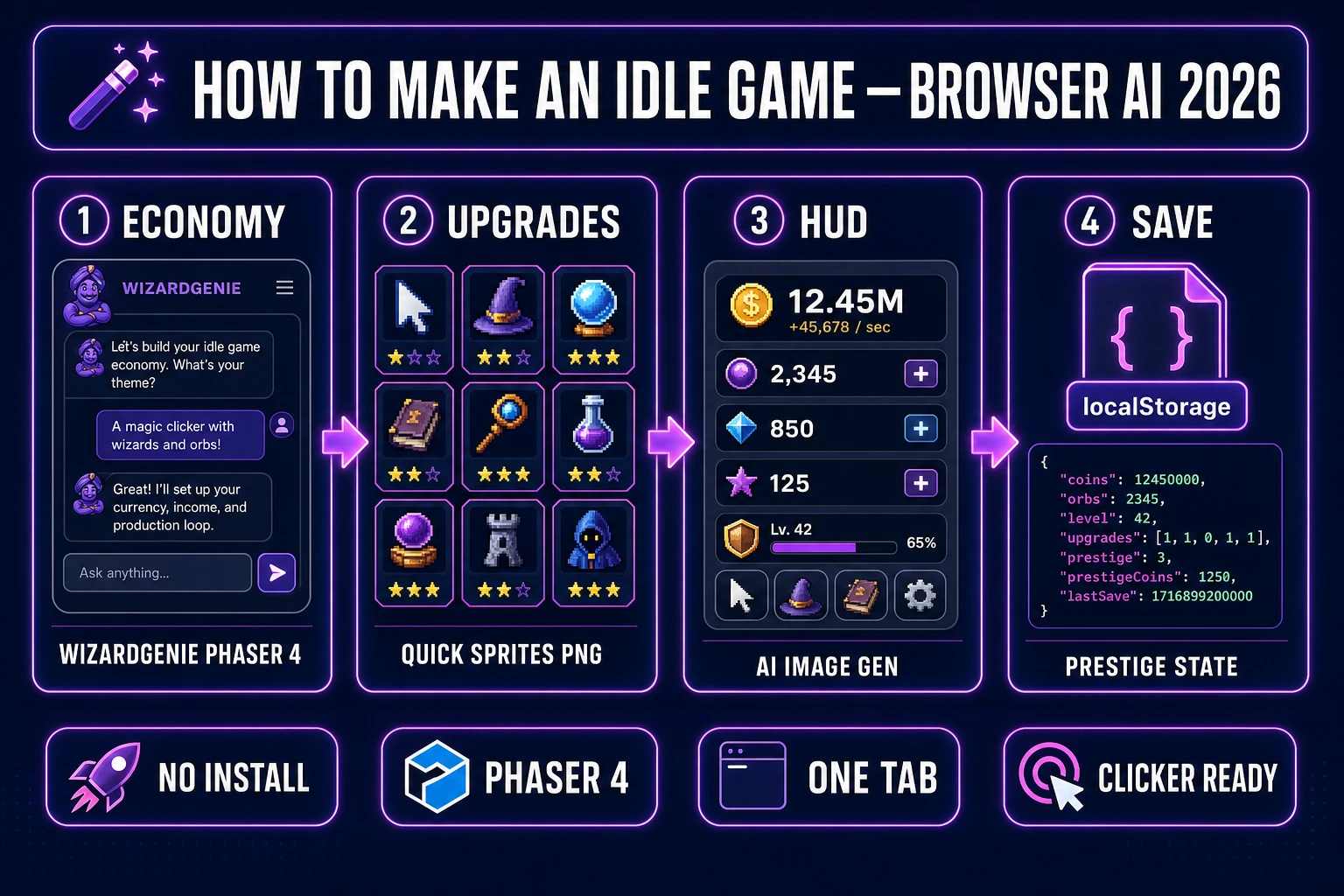
How to make an idle game in 2026 — four-step browser AI pipeline from WizardGenie economy scaffold through Quick Sprites upgrade art to save-state prestige, verified July 10, 2026
How to make an idle game in 2026 means four moves in one tab: prompt WizardGenie for the Phaser 4.2 clicker economy, generate upgrade sprites in Quick Sprites, paint HUD panels in AI Image Gen, then wire localStorage save state for prestige resets.

What “how to make an idle game” actually means in 2026

The phrase how to make an idle game (70/mo, KD 0 per DataForSEO probe verified July 10, 2026) targets a specific reader: someone who wants a incremental or clicker game — tap to earn currency, buy upgrades that generate passive income, watch numbers climb, optionally prestige and reset for multipliers — without committing to a mobile SDK or a desktop engine install first. The sibling queries confirm the cluster: how to make an idle clicker game (10/mo), how to make an idle game in javascript (10/mo), and how to make an idle mobile game (10/mo, KD 47) all describe the same systems with different deployment targets.

An idle game in a browser tab is still a browser game: index.html, a JavaScript game loop, asset files, and a static host. What changed in 2024–2026 is that the two layers idle games need — economy code and upgrade art — now have credible AI handoffs from one Sorceress account. The traditional bottleneck was never the click handler. It was the volume of distinct upgrade icons, building thumbnails, and HUD panels required before the economy feels like a game instead of a spreadsheet with buttons.

Why idle clickers are the right first genre for browser AI game dev

Idle games decompose cleanly into a systems half and a presentation half. The systems half — BigNumber formatting, exponential cost curves, upgrade effect stacking, offline earnings caps, prestige reset logic — is almost entirely deterministic code and JSON tables. That is exactly what WizardGenie handles well: the patterns are well-documented across open-source incremental repos, and the logic does not depend on frame-perfect physics feel.

The presentation half — twenty to forty distinct upgrade icons, building sprites, purchase particle bursts — is art volume without walk-cycle complexity. Quick Sprites generates pixel icons and small sprite sheets at 9 credits per generation (src/app/quick-sprites/page.tsx line 21, model retro-diffusion/rd-animation). Compare that to a platformer where jump coyote time and enemy AI define fun, or an RPG where quest state machines sprawl across dozens of files. An idle game playtests as satisfying the moment the passive-income ticker climbs — the fastest honest feedback loop for a first AI-assisted ship.

The Sorceress how to make an idle game pipeline in five steps

Every idle game ships five layers regardless of theme: economy code, upgrade definitions, sprite art, HUD chrome, and persistent save state. In 2026 each layer maps to one Sorceress tool verified against the live catalog on July 10, 2026:

  • Economy codeWizardGenie with eight CODING_MODELS (Claude Opus 4.7, Sonnet 4.6, GPT-5.5, Gemini 3.1 Pro, DeepSeek V4 Pro, Kimi K2.5, Grok 4.2, MiniMax M2.7 per src/app/_home-v2/_data/tools.ts lines 734–742).
  • Upgrade icons and buildingsQuick Sprites at 9 credits per generation; Small Sprites at 32×32 suits icon grids, VFX style at 64×64 suits purchase bursts.
  • HUD panels and backgroundsAI Image Gen across the image model lineup in src/lib/models.ts.
  • Purchase feedback audioSFX Gen at 1 credit per second (src/app/sfx-gen/page.tsx line 24) for coin chimes and upgrade stings.
  • Save state — WizardGenie-generated localStorage serialization; no server required for a prototype.

Pricing is a $49 lifetime unlock plus pay-as-you-go credit packs — Starter $10/1,000 credits, Creator $20/2,000, Plus $50/5,000, Studio $100/10,000 — verified against src/app/plans/page.tsx lines 46 and 50. New accounts ship with 100 starter credits. Cross-link the broader no-code context in launch an AI game maker free and the general web-game path in how to make a web game.
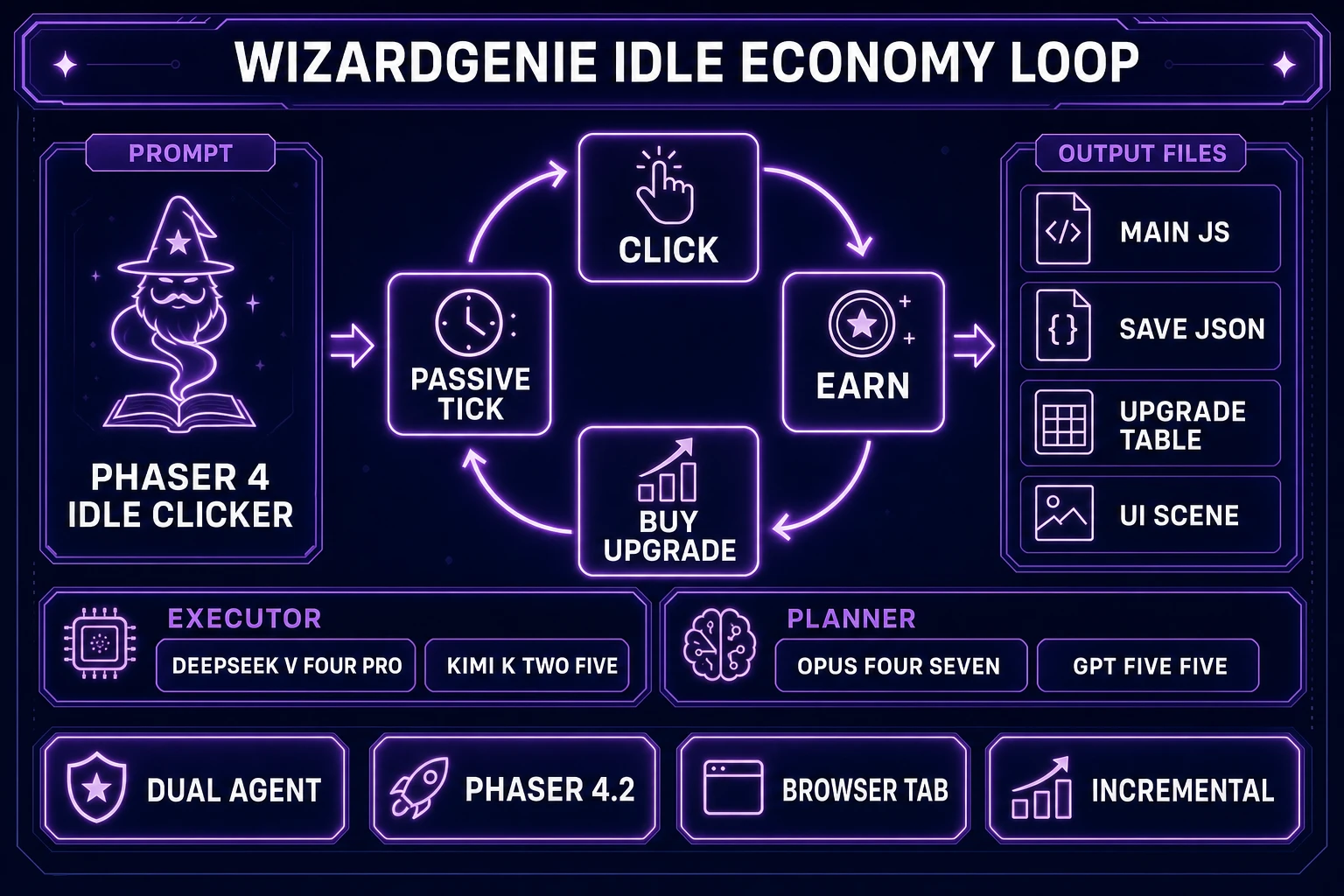
WizardGenie dual-agent Planner and Executor diagram scaffolding a Phaser 4 idle clicker economy with upgrade tables and save JSON output, verified July 10, 2026
WizardGenie’s Planner + Executor pattern writes the idle economy scaffold: Opus 4.7 or GPT-5.5 plans the upgrade table architecture; DeepSeek V4 Pro or Kimi K2.5 types the bulk Phaser 4.2 tick loop — roughly one-fifth the cost of a single frontier model on both sides.

Step 1 — prompt WizardGenie for the Phaser 4.2 idle economy scaffold

Open WizardGenie and name the target explicitly: “Write a Phaser 4.2 browser idle clicker with a main currency counter, click-to-earn button, five upgrade slots with exponential cost curves (base cost × 1.15^level), passive income tick every 100 ms, BigNumber formatting past 1e6, and localStorage save/load on every purchase.” Pick Claude Opus 4.7 or Gemini 3.1 Pro for this scaffolding pass — upgrade effect stacking and offline-earnings math benefit from the heavy reasoner.

Phaser 4.2.0 “Giedi” shipped June 19, 2026 (verified against phaser.io/news/2026/06/phaser-v4-2-0-released on July 10, 2026). WizardGenie’s agent targets the current Phaser scene API, not legacy Phaser 3 examples floating around older tutorials. The second prompt round adds genre features: “Add a prestige button that resets currency and upgrades but grants a permanent +10% multiplier per prestige,” “cap offline earnings at eight hours,” “show DPS and total earned in the HUD.” Switch to DeepSeek V4 Pro or Kimi K2.5 for iteration — acceptable executors per Sorceress guidance, never a frontier-priced model on the typing side.

Step 2 — generate upgrade icons and building sprites in Quick Sprites

An idle game dies in playtest when every upgrade button is a gray rectangle. Quick Sprites closes that gap. For a factory-themed clicker, batch prompts like “retro pixel factory icon, 32×32, conveyor belt, transparent background” and “retro pixel robot worker icon, 32×32, assembly line, transparent background” — pick Small Sprites style for 32×32 icon grids. Budget 9 credits per generation; a minimal idle game needs roughly five to ten generations covering the upgrade roster, one building thumbnail per tier, and a VFX burst for purchase feedback.

Export each PNG into the assets/ folder WizardGenie scaffolded. Wire them into Phaser’s preload scene as a texture atlas or individual image keys mapped to upgrade IDs in the JSON upgrade table. The economy code references upgradeIcons['conveyor']; the art layer just fills those keys. If an icon needs recoloring for tier variants, run it through AI recolor palette swap instead of regenerating from scratch.

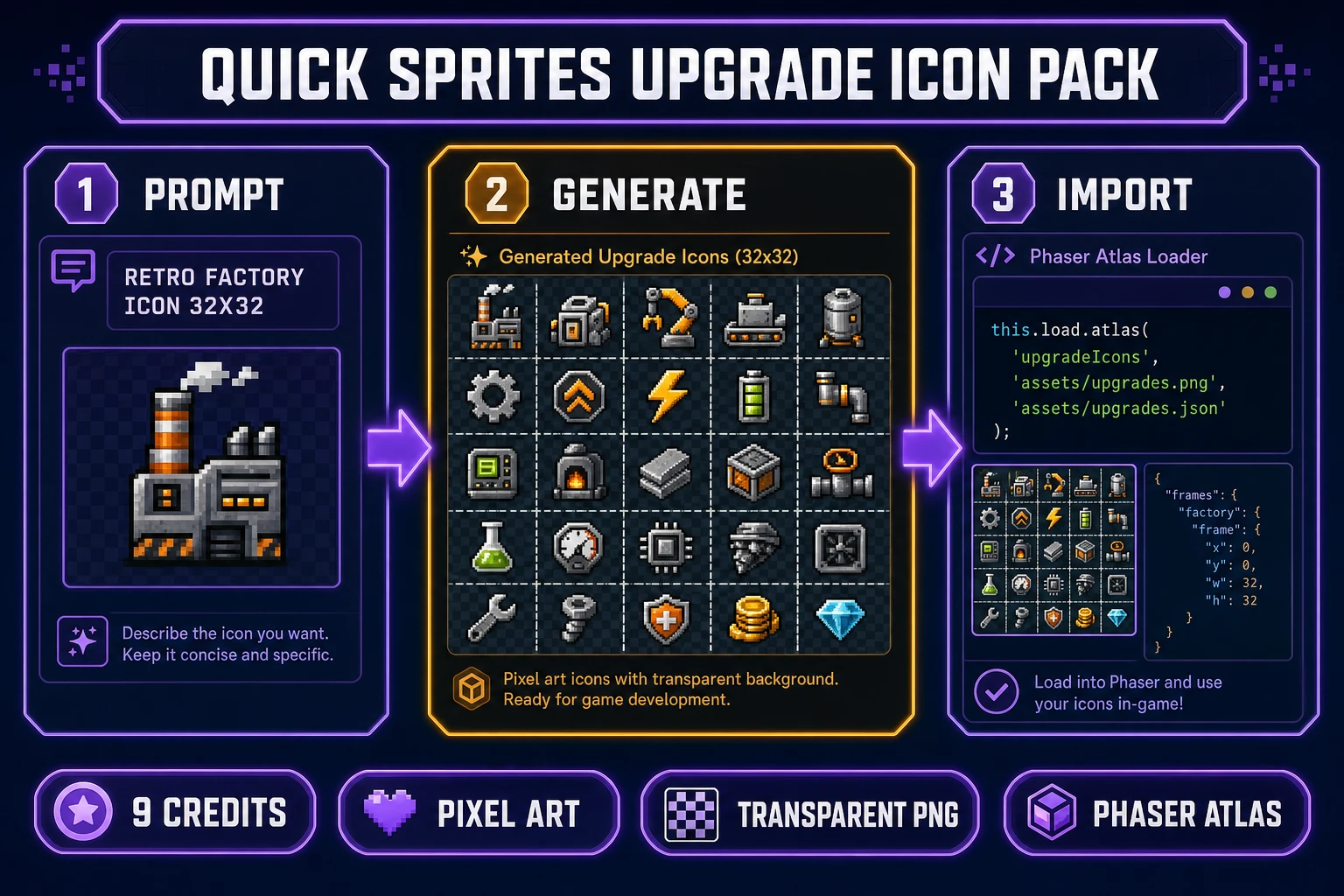
Quick Sprites upgrade icon pipeline for idle games — prompt retro factory icon, generate 32x32 sprite sheet, import into Phaser atlas loader, verified July 10, 2026
Quick Sprites fills the upgrade icon roster: prompt a retro factory or fantasy building icon, export the 32×32 PNG, map it to an upgrade ID in the WizardGenie-generated JSON table.

Step 3 — paint HUD panels and wire passive income feedback

Currency counters, prestige banners, and settings panels need chrome beyond pixel icons. AI Image Gen batches HUD assets — “dark fantasy idle game UI panel, ornate gold border, 400×80, transparent PNG” — and BG Remover cleans edges if the model adds a solid backdrop. Load panels as Phaser image objects behind the DOM-style text overlays WizardGenie generates.

Passive income needs sensory feedback or players forget the game is running. SFX Gen at 1 credit per second batches a coin-clink on manual click, a soft chime on upgrade purchase, and a prestige fanfare. Optional: a menu loop from Music Gen at 10 credits per track (src/app/music-gen/page.tsx line 26) — one ambient loop, low volume, so it does not fatigue during long sessions. Wire audio triggers in the same purchase handler WizardGenie wrote; no new architecture required.

Step 4 — add prestige, offline progress, and save-state hardening

Prestige is what separates a demo from a game players reopen. The WizardGenie scaffold should already expose a prestige function; your job is tuning the multiplier curve so the first prestige lands around fifteen to thirty minutes of active play. Prompt follow-ups: “Show a prestige confirmation modal with projected multiplier,” “animate the currency counter on prestige reset,” “track total prestiges in save JSON.”

Offline progress compares Date.now() against the last-save timestamp and credits passive income up to the cap. Test by saving, closing the tab, advancing your system clock (or waiting), and reloading — the currency jump should match the DPS × elapsed formula. Harden save state: JSON.stringify the full game state on every purchase and on window.beforeunload. For a production build, add export/import buttons so players can back up saves manually; localStorage clears when users wipe browser data.

Step 5 — playtest balance, then host the how to make an idle game build

Idle game balance is spreadsheet work disguised as code. Export the upgrade table to CSV, plot cost versus income curves in any spreadsheet, and adjust base costs until the first wall hits at the intended minute mark. WizardGenie iteration prompts handle the code-side tweaks: “Reduce upgrade 3 base cost from 500 to 200,” “add a soft cap that reduces DPS growth above 1e12.”

Hosting is static. Zip index.html and assets/, upload to itch.io or GitHub Pages, share the URL. Mobile wrapping via Capacitor is a follow-on step — the HTML5 bundle is the same. For a card-game or puzzle variant instead of a clicker, see how to make a card game; the Sorceress asset pipeline is identical, only the WizardGenie economy prompts change.

What a how to make an idle game project costs on Sorceress in 2026

Cost math verified July 10, 2026. Base unlock: $49 lifetime. WizardGenie coding: your own API key. Typical idle-game prototype: 120–280 Sorceress credits ($1–$3 at Starter tier rates) covering five to ten Quick Sprites runs, a handful of AI Image Gen HUD panels, and optional Music Gen plus SFX Gen audio. Compare that to commissioning a pixel icon pack and hiring a contractor for economy code — the idle-game SERP reader is usually a hobbyist or jam participant optimizing for speed.

The Sorceress tools guide lists every tool in the catalog; the pricing page shows live credit tiers. Start with the 100 free credits, ship a gray-box economy in WizardGenie with placeholder rectangles, then spend credits only on the upgrade icons the playtest proves players actually buy.

The verdict on how to make an idle game with browser AI

How to make an idle game in 2026 is no longer a month of hand-drawn icons wrapped around a weekend of economy math. The four layers — Phaser 4.2 clicker scaffold, upgrade sprite sheets, HUD chrome, save-state persistence — each have a Sorceress handoff reachable without installing Aseprite, a DAW, or a local Node toolchain. WizardGenie writes the tick loop; Quick Sprites fills the upgrade roster; AI Image Gen paints the panels; SFX Gen gives purchases weight. The entire pipeline lives in browser tabs until the final itch.io upload.

Pick one theme — factory, fantasy kingdom, space colony, meme clicker — prompt the economy, generate one tier of upgrade art, playtest until the first prestige feels earned, then add content on the same multiplier. The idle genre rewards small shippable slices over grand design documents. AI generation now handles the slice that used to stall every solo dev: the icon roster between “the numbers work” and “I want to show someone.”

Frequently Asked Questions

Do I need to know JavaScript to follow this how to make an idle game guide?

Not for the first playable prototype. WizardGenie writes the Phaser 4.2 economy scaffold from natural-language prompts — currency counters, passive income ticks, upgrade buttons, and save-state serialization — so you can ship a gray-box idle game without typing code yourself. You will eventually want to read the generated main.js when you tune balance numbers (cost curves, prestige multipliers, offline earnings caps), but that is spreadsheet math in code form, not engine architecture. The Sorceress half — Quick Sprites for icons, AI Image Gen for HUD panels — requires zero coding. The honest 2026 path is: prompt the loop in WizardGenie, generate art in Sorceress tabs, playtest in a browser, then iterate balance in small WizardGenie follow-up prompts.

Why is an idle clicker the right first genre when learning how to make an idle game with AI?

Because idle games separate cleanly into two layers that map directly to AI tools. The systems layer — BigNumber math, exponential cost curves, prestige resets, offline progress — is almost entirely code and data tables. WizardGenie handles that layer well because the patterns are well-documented in open-source incremental-game repos and the logic is deterministic. The presentation layer — upgrade icons, building thumbnails, particle bursts on purchase — is sprite volume without animation complexity. Quick Sprites and AI Image Gen fill that layer at 9 credits per sprite generation without walk-cycle rigging. Compare that to a platformer where feel depends on frame-perfect jump physics, or an RPG where quest state machines sprawl. An idle game playtests as fun the moment the numbers tick upward, which is the fastest honest feedback loop for a first AI-assisted ship.

Can I export a browser idle game built with this Sorceress stack to mobile or Steam?

The Phaser 4.2 output is standard HTML5 and JavaScript — the same bundle itch.io and GitHub Pages host today. Wrapping that bundle in Capacitor or Cordova for iOS/Android is a well-trodden path documented across the incremental-game community; the Sorceress pipeline does not block it. Steam requires a desktop wrapper (Electron, NW.js, or a native port) and Steamworks integration, which is outside WizardGenie's default scaffold but not incompatible with the generated code. Sorceress does not auto-publish finished games to any proprietary arcade in WizardGenie today — distribution stays generic: export the build folder, pick a host or wrapper, ship. The credit costs (Quick Sprites at 9 credits per generation, verified against src/app/quick-sprites/page.tsx line 21 on July 10, 2026) are production costs, not revenue shares.

How does this differ from a Phaser 3 idle game tutorial already on YouTube?

Most Phaser idle tutorials assume you already write JavaScript, manually source CC0 icon packs, and spend a weekend tuning art before the economy feels real. This how to make an idle game guide targets the DataForSEO query at 70/mo, KD 0 (verified July 10, 2026 against probe-fresh-seeds-8.md) — readers who want the end-to-end path from empty idea to a playable browser tab with AI handling both the economy code and the upgrade art. The engine choice is Phaser 4.2.0 Giedi (released June 19, 2026 per phaser.io/download/phaser4) rather than legacy Phaser 3 examples, because WizardGenie's agent is wired for the current Phaser scene API. Cross-link the broader no-code context in the Sorceress ai game maker comparison post; this article is the genre-specific drill-down.

What does a minimal how to make an idle game prototype cost on Sorceress credits in 2026?

Verified July 10, 2026 against src/app/plans/page.tsx (LIFETIME_PRICE = 49, CREDIT_TIERS) and per-tool constants. The Sorceress base unlock is $49 one-time; WizardGenie coding runs on your own API key. A minimal idle game prototype typically burns 120–280 Sorceress credits: roughly 45–90 credits for five to ten Quick Sprites generations (CREDITS_PER_GEN = 9) covering upgrade icons and building thumbnails, 30–60 credits for AI Image Gen HUD panels and background layers, and 45–130 credits for optional Music Gen menu loops (MUSIC_CREDIT_COST = 10) plus SFX Gen purchase chimes (SEED_AUDIO_CREDITS_PER_SECOND = 1). That lands around $1–$3 of pay-as-you-go credits on top of the one-time unlock — far below commissioning a sprite pack and hiring a contractor for the economy code.

Sources

  1. Incremental game (Wikipedia)
  2. Web browser game (Wikipedia)
  3. localStorage — MDN Web Docs
  4. Phaser v4.2.0 release notes
Written by Arron R.·1,922 words·9 min read

Related posts



