Gauge a Damage Number Generator (Combat Float Text 2026)

By Arron R.7 min read
A damage number generator in 2026 pairs Quick Sprites VFX pop frames with a Canvas-built 0–9 digit atlas, then WizardGenie wires Phaser 4.2 floating combat text

Every action RPG playtest hits the same wall: combat math works, but hits feel weightless because damage still renders as plain debug text. Searchers typing damage number generator on July 10, 2026 want floating combat text that pops, rises, and fades — not a monospace console log pinned to the enemy sprite. This guide covers the 2026 browser pipeline: Quick Sprites batches the hit-burst VFX frames, Canvas assembles a crisp 0–9 digit atlas, and Phaser 4.2 spawns the float text on every strike. Tool costs below are verified against the live Sorceress source on July 10, 2026.
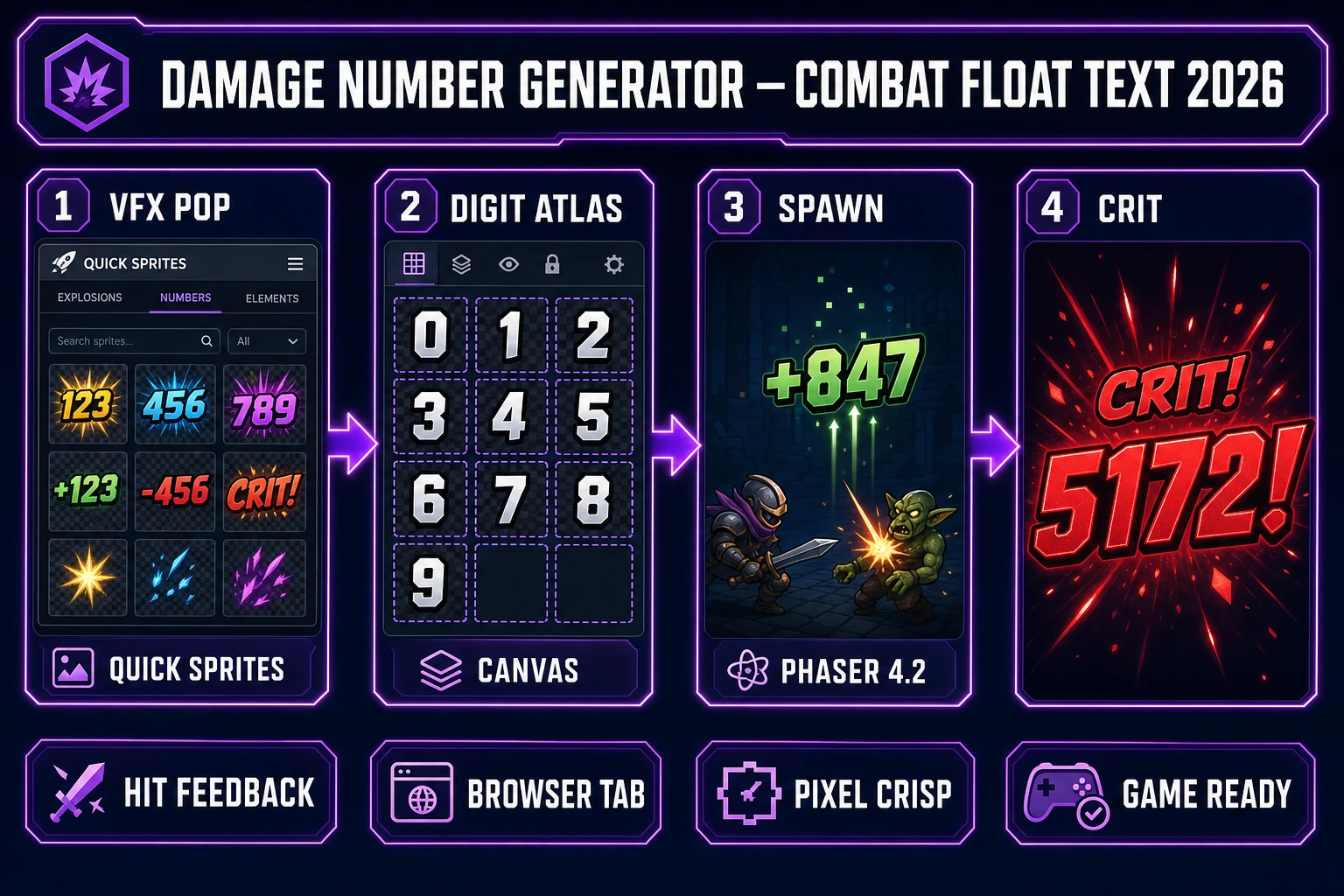
Damage number generator in 2026 — four-step browser pipeline from Quick Sprites VFX pop through Canvas digit atlas to Phaser 4.2 floating combat text, verified July 10, 2026
A damage number generator in 2026 means four moves: VFX pop in Quick Sprites, digit atlas in Canvas, spawn-and-tween in Phaser 4.2, then a crit variant row for heavy hits.

What a damage number generator outputs for game dev

The phrase damage number generator (40/mo, KD 0 per DataForSEO probe verified July 10, 2026) targets a reader wiring real-time combat who needs floating damage text (20/mo, KD 0) — numerals that spawn at the hit point, drift upward, and dissolve. Sibling queries confirm the cluster: combat text generator, hit number sprite sheet, and game damage numbers all describe the same two-part asset stack: a digit atlas (0 through 9, sometimes a minus sign and “K” for thousands) plus a short VFX burst that sells impact.

In a role-playing or action combat loop, floating numbers are a HUD element anchored to world coordinates, not screen corners. What changed in 2024–2026 is that both halves — the pop VFX and the digit sheet — now batch inside one Sorceress account without opening Aseprite or After Effects for a single enemy type.

Why placeholder text kills combat feel

console.log(damage) or a static Phaser Text label glued to an enemy reads fine in gray-box tests. It fails the moment a friend playtests because players treat float text as production polish — the same way a placeholder boss rectangle fails next to a real health bar. Crit hits need a different color, heavier outline, or larger scale. Healing numbers often drift green instead of red. Multi-hit combos stack several floats offset by a few pixels so digits never overlap.

The traditional bottleneck was never the tween math. It was sourcing a monospace digit sheet that matches your pixel scale, hand-aligning ten glyphs in a grid, and re-exporting when the art director wants gold crit numbers instead of white. Quick Sprites closes the juice layer with VFX bursts; Canvas closes the atlas layer with grid-snapped alignment. Cross-link the HUD context in boss health bar generator and pixel font generator posts — damage numbers share the same monospace discipline as shop prices and dialogue counters.

The Sorceress damage number generator pipeline in four steps

Every combat float setup ships three runtime pieces regardless of art style: digit atlas, spawn VFX, and tween code. In 2026 each maps to one Sorceress tool verified against the live catalog on July 10, 2026:

  • Hit-burst VFX framesQuick Sprites VFX style at 64×64 (or 32×32 for retro games); 9 credits per generation per src/app/quick-sprites/page.tsx line 21.
  • Digit atlas assemblyCanvas with 1:1 Square preset (1024×1024), grid alignment, multi-layer export, no per-export credit charge.
  • Optional stylised digit sourceAI Image Gen when you want ornate numerals instead of hand-painted glyphs; import PNGs into Canvas.
  • Runtime spawn and tweenWizardGenie scaffolds Phaser 4.2 containers; your API key covers coding credits.

Pricing is a $49 lifetime unlock plus pay-as-you-go credit packs — Starter $10/1,000 credits, Creator $20/2,000, Plus $50/5,000, Studio $100/10,000 — verified against src/app/plans/page.tsx lines 46 and 50. New accounts ship with 100 starter credits. The Sorceress tools guide lists every tool in the catalog.
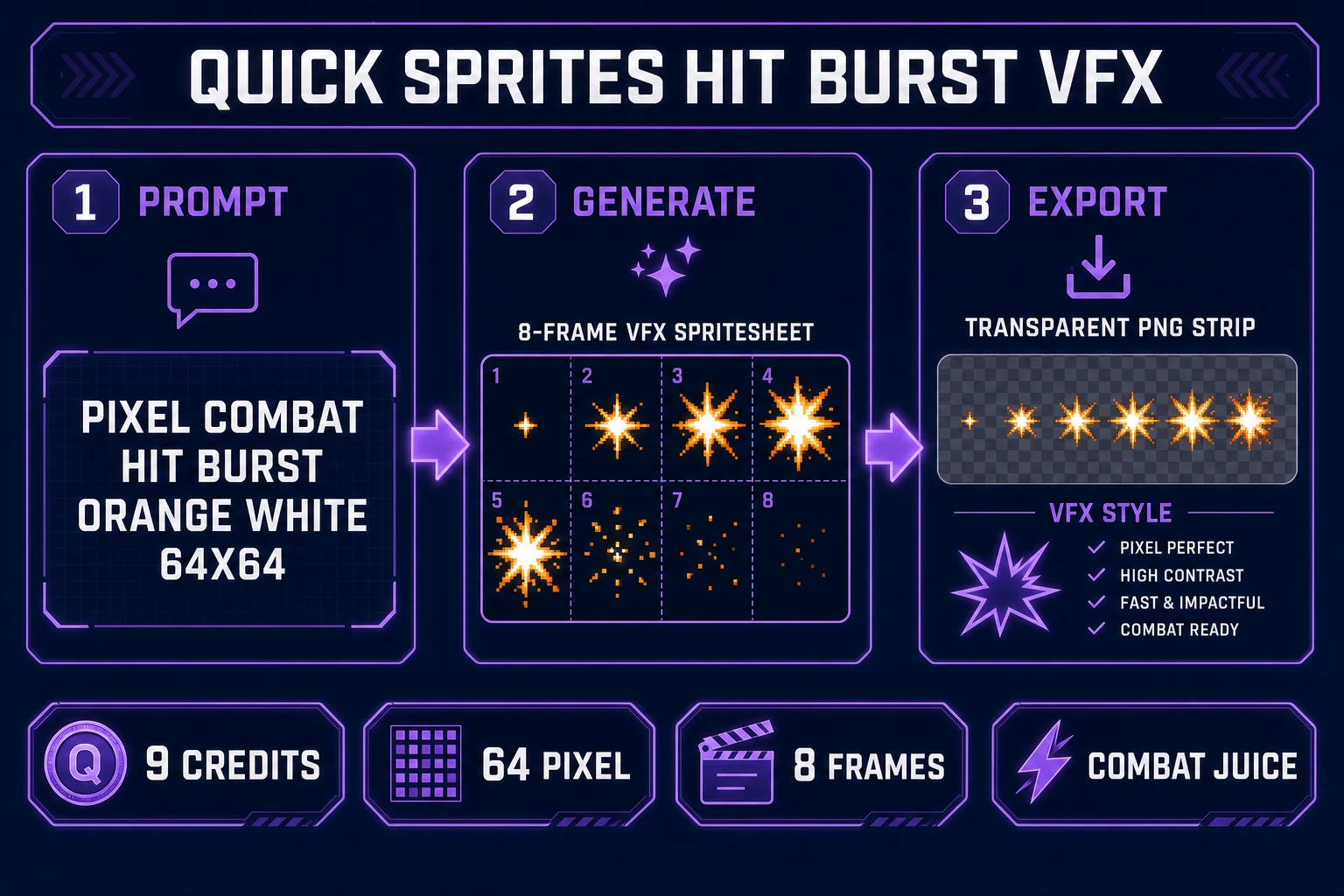
Quick Sprites VFX pipeline generating pixel combat hit burst frames at 64x64 for damage number spawn juice, verified July 10, 2026
Quick Sprites VFX style batches the spawn burst: prompt a pixel combat hit pop, export the transparent spritesheet, and trigger frame zero when the float text appears.

Step 1 — generate hit-burst VFX in Quick Sprites

Open Quick Sprites, select the VFX Effects animation style, and set size to 64 for a standard pixel RPG or 32 for a tighter retro scale. Prompt explicitly: “pixel combat hit burst, orange and white spark, transparent background, game damage popup VFX.” Enable spritesheet return so you get a horizontal strip of frames rather than a single still.

Batch a second generation for crit bursts with a heavier palette: “pixel critical hit explosion, gold and red flash, 64x64, transparent PNG.” Each pass costs 9 credits. Preview the strip in the Quick Sprites gallery — you want six to eight readable frames where the brightest pixel sits near center frame two or three, matching the moment the digit appears. Export the PNG and note frame width; Phaser will use frameWidth and frameHeight in the preload config WizardGenie writes.

Quick Sprites animation styles target walk cycles and effect bursts — not monospace digit sheets. Keep digits on the Canvas step; Quick Sprites owns the juice layer where retro-diffusion excels at fire, sparks, and impact flashes.

Step 2 — build the digit atlas in Canvas

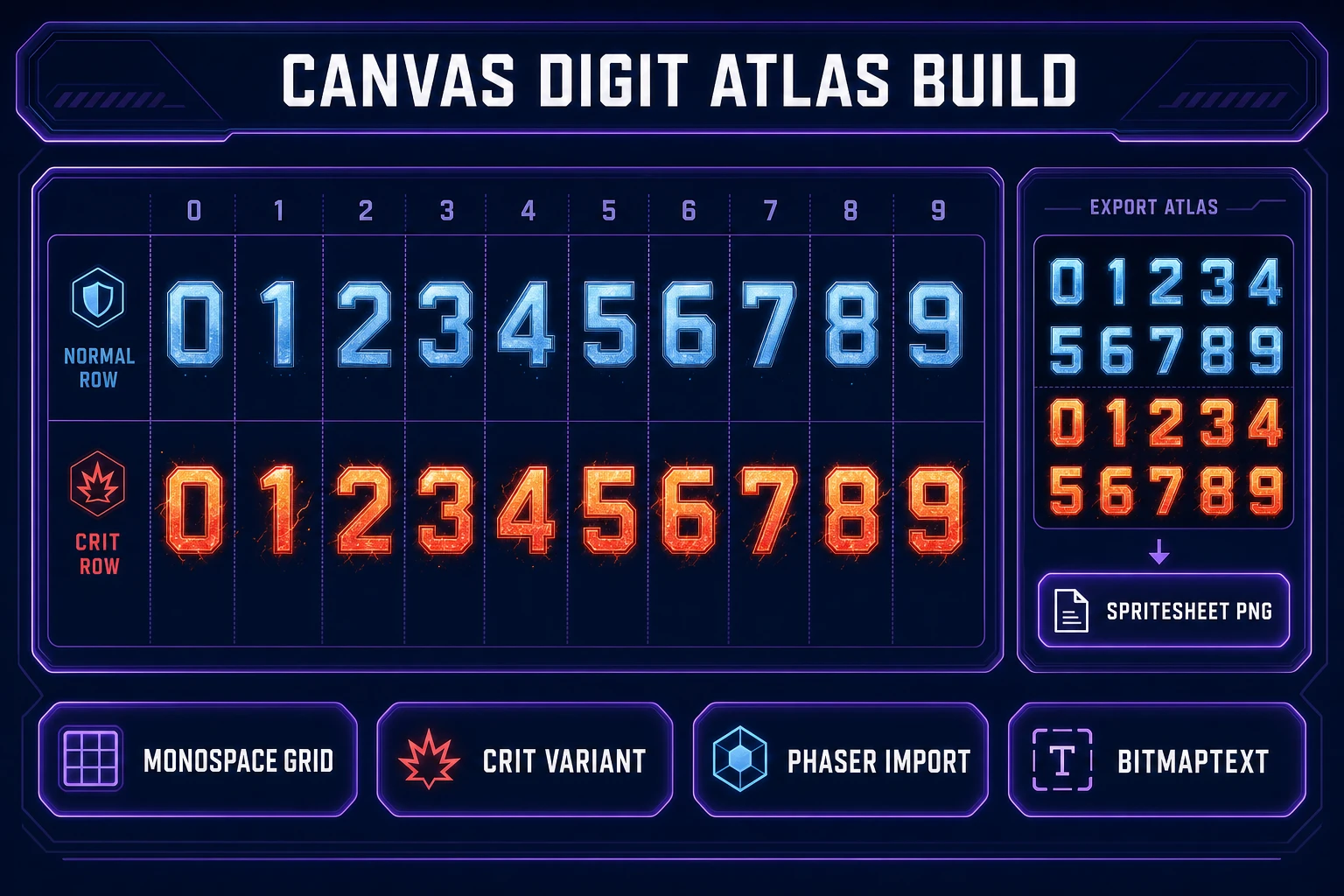
Open Canvas, pick the 1:1 Square preset (1024×1024), and lay a monospace grid: ten equal cells across for digits 0–9, each cell sized to your target glyph (24×32 or 32×32 is typical for pixel combat). Two honest paths into those cells:

  1. Import from AI Image Gen — prompt “pixel game damage digits 0 through 9 in one horizontal strip, red outline white fill, monospace width, transparent PNG” at AI Image Gen, then import the strip and slice cells with Canvas crop handles.
  2. Paint in Canvas — use the brush tool on a locked grid layer; snap strokes to pixel boundaries with zoom at 800% so edges stay crisp.

Add a second row below for crit variants — same digit shapes with gold fill or a thicker outline. Lock the grid guide layer, export one flattened spritesheet PNG with all twenty glyphs, and record cell width and height for Phaser’s texture frame config. Canvas opacity sliders let you preview how white digits read against a dark dungeon background before export. If anti-aliased edges bleed, run a single color pass with the fill tool or downscale through True Pixel after export.

Canvas grid compositing damage number digit atlas with normal and crit rows for Phaser BitmapText import, verified July 10, 2026
Canvas locks the monospace grid: one row for normal hits, one for crits, export a single spritesheet PNG Phaser loads as a BitmapText or manual frame picker.

Step 3 — wire floating combat text in Phaser 4.2

Phaser 4.2.0 “Giedi” shipped June 19, 2026 (verified against phaser.io/news/2026/06/phaser-v4-2-0-released and phaser.io/download/phaser4 on July 10, 2026). Open WizardGenie and prompt: “Add Phaser 4.2 floating damage text: on enemy hit, spawn a container at enemy.x and enemy.y minus 20, play the Quick Sprites VFX burst animation once, show damage as BitmapText from digitAtlas using the damage string, tween y minus 50 and alpha to zero over 700ms with ease OutQuad, destroy the container on complete.”

Pick Claude Opus 4.7 or Gemini 3.1 Pro for the first scaffold — container nesting, frame picking, and pool reuse benefit from the heavy reasoner. Iterate on crit scale and stack offset with DeepSeek V4 Pro or Kimi K2.5 as the executor; never a frontier model on the typing side. Pass an isCrit flag from your damage handler to pick the crit atlas row or apply setScale(1.3) on the text child. Offset each spawn by ±8 pixels on x when three hits land the same frame so digits never stack unreadably.

Step 4 — tune juice, then ship the combat float build

Playtest readability before art polish: digits must stay legible against every arena background. If white numbers vanish on snow maps, regenerate the atlas row with a dark outline in Canvas. Test at 1280×720 and 1920×1080 — float text that rises 50 pixels on desktop can leave the viewport on mobile unless you scale the rise distance with viewport height.

Audio sells hits harder than tween curves alone. Batch an impact sting in SFX Gen at 1 credit per second (src/app/sfx-gen/page.tsx) and fire it in the same handler that spawns the float. For the broader combat stack, see AI sprite animation for attack cycles and AI monster generator for enemy sprites — floating damage text is the feedback cap on that pipeline.

What a damage number generator session costs on Sorceress in 2026

Cost math verified July 10, 2026. Base unlock: $49 lifetime. Canvas: free to use. A minimal combat float setup typically burns 30–80 Sorceress credits ($0.30–$0.80 at Starter tier rates) covering one to two Quick Sprites VFX generations at 9 credits each, optional AI Image Gen digit strip if you skip hand-painting, and zero Canvas export charges. WizardGenie coding runs on your own API key. Compare that to buying a generic VFX pack that does not match your digit style — the damage number generator SERP reader is usually a solo dev optimizing for one shippable combat loop.

Start with the 100 free credits, generate one VFX pop and paint digits 0–9 directly in Canvas, wire the spawn tween in WizardGenie with placeholder damage values, then spend credits only on a crit burst variant the playtest proves players notice. The pricing page shows live credit tiers; the AI recolor post covers palette swaps when you need elemental damage colors without redrawing the atlas.

The verdict on damage number generator workflows in 2026

A damage number generator in 2026 is no longer a weekend aligning ten glyphs in Photoshop and hand-keying eight spark frames. Quick Sprites batches the burst, Canvas locks the monospace atlas, WizardGenie writes the tween, and SFX Gen gives hits weight. The Canvas API layer alignment and Phaser spawn pools are the technical spine; the art pass is what players remember on stream.

Pick one combat theme — fire mage, ice knight, poison rogue — generate the VFX pop, build the digit sheet, prompt the float container, and playtest until crit numbers read clearly above normal hits. Combat float text rewards contrast and motion over ornate typography. AI generation now handles the slice that used to stall every solo dev between “the sword connects” and “the hit feels real.”

Frequently Asked Questions

Do I need a dedicated damage number generator app?

No standalone app is required for a first playable combat HUD. The Sorceress stack covers the art and code halves in browser tabs: Quick Sprites at /quick-sprites batches VFX pop frames (9 credits per generation per src/app/quick-sprites/page.tsx), Canvas at /canvas assembles a 0–9 digit atlas from imported PNGs with no per-export charge, and WizardGenie at /wizard-genie/app scaffolds Phaser 4.2 spawn-and-tween logic on your API key. AI Image Gen at /generate is optional when you want stylised digit glyphs instead of painting them in Canvas — batch one strip prompt like 'pixel game damage digits 0 through 9, red outline, transparent PNG' and slice the output in Canvas.

How is floating damage text different from a regular UI label?

Floating damage text (20/mo search volume per DataForSEO probe verified July 10, 2026) describes numbers that spawn at a world coordinate, rise upward, scale briefly, and fade — they communicate hit impact in the moment rather than sitting in a static HUD corner. A damage number generator workflow therefore ships two asset types: a digit atlas for the numerals and a short VFX burst for the spawn frame. Phaser 4.2 tweens position, alpha, and scale on a container; the atlas supplies crisp glyphs at native pixel scale via BitmapText or a manual frame picker.

Can Quick Sprites generate the actual digits 0 through 9?

Quick Sprites animation styles (four_angle_walking, small_sprites, vfx) target character walk cycles and effect bursts — not monospace digit sheets. The honest split: use Quick Sprites VFX style for the hit spark that plays when a number spawns ('pixel combat hit burst, orange and white, 64x64, 8 frames'), then build the digit atlas in Canvas by importing AI Image Gen output or painting glyphs with the brush tool. That keeps Quick Sprites on the juice layer where its retro-diffusion model excels, and Canvas on the atlas layer where pixel alignment matters.

How do I show crit numbers in a different color?

Export two digit atlases from Canvas — one for normal hits (white or yellow digits) and one for crits (red or gold with a heavier outline). At runtime, Phaser picks the atlas based on a isCrit flag in your damage handler. Alternatively, keep one atlas and tint the BitmapText with setTint(0xff4444) on crits; Canvas separation is cleaner when crit digits need a different silhouette, not just a color swap. WizardGenie prompt: 'Spawn floating damage text at enemy.x/enemy.y, use critAtlas when damage exceeds 2x base, tween y minus 40 over 600ms with ease OutQuad.'

What does a damage number generator session cost on Sorceress in 2026?

Verified July 10, 2026 against src/app/plans/page.tsx (LIFETIME_PRICE = 49) and Quick Sprites at 9 credits per generation. Base unlock is $49 one-time. A minimal combat float setup typically burns 30–80 credits: one Quick Sprites VFX pop (9 credits), optional second VFX pass for crit bursts (9 credits), one to three AI Image Gen runs for digit strips if you skip hand-painting (model-dependent), and zero Canvas export charges. WizardGenie coding uses your own API key. That lands around $0.30–$0.80 of pay-as-you-go credits on top of the lifetime unlock.

Sources

  1. Head-up display (Wikipedia)
  2. Phaser v4.2.0 release notes
  3. Canvas API — MDN Web Docs
  4. Role-playing video game (Wikipedia)
Written by Arron R.·1,672 words·7 min read

Related posts


