Saga How to Make a JRPG (Browser Party Loop 2026)

By Arron R.15 min read
How to make a jrpg in 2026: model a 4-hero party with stats, MP, and skills, wire an overworld with random encounters into turn-based menu battles inside Wizard

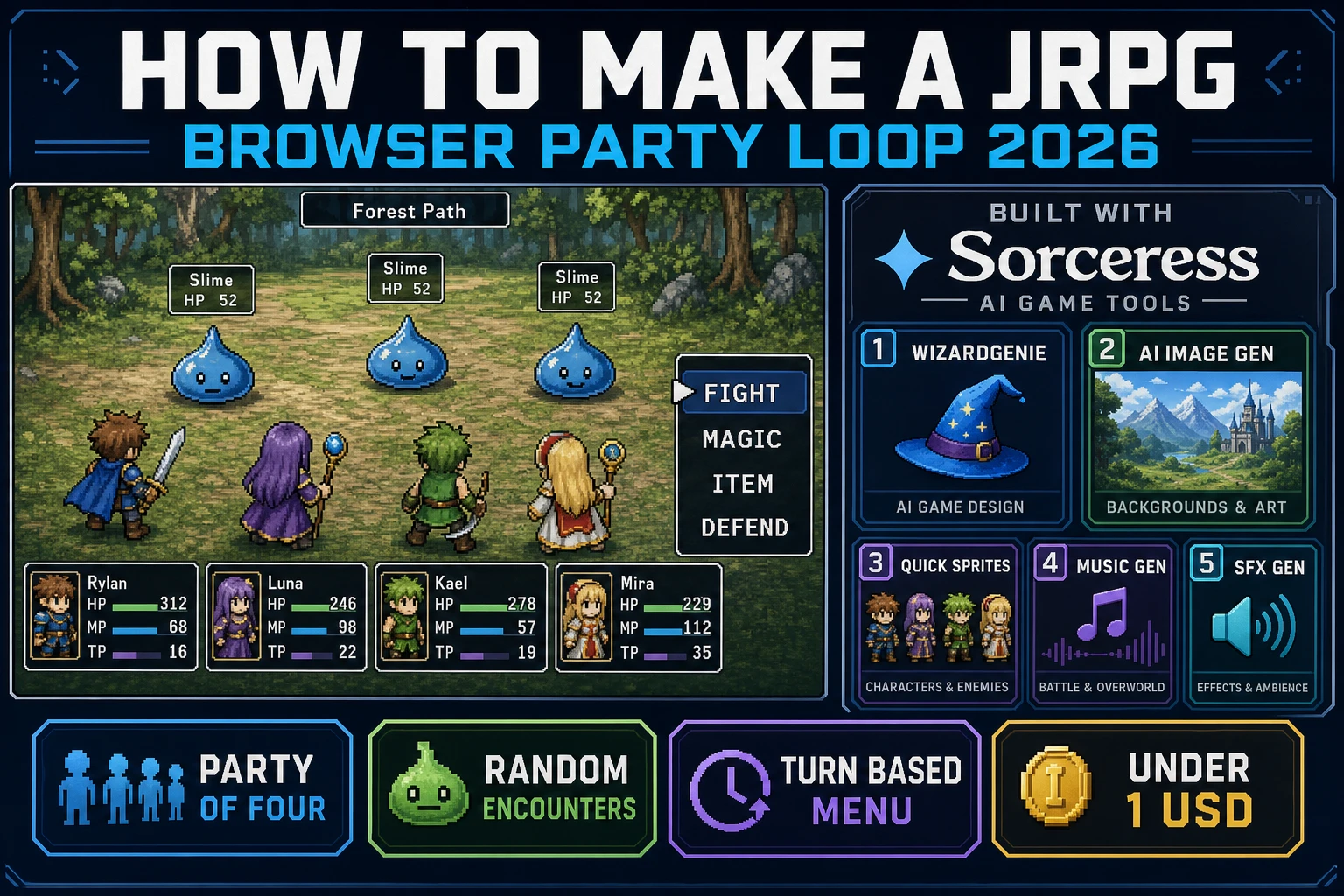
Most beginners who search "how to make a jrpg" want the Dragon Quest or Final Fantasy feel - a small overworld with a party of four heroes walking toward a shimmering forest, a random encounter that fades to a battle screen with three slimes across the field, a classic FIGHT MAGIC ITEM DEFEND menu that resolves in strict turn order, and a reward panel showing EXP, gold, and a level-up flare - not a 40-hour campaign with a fully voice-acted cast on day one. Japanese role-playing games are famously demanding at commercial scale because a single project juggles a party class system, an MP-gated spell tree, an encounter table per region, dialogue branches, and a linear story with named heroes. A browser jrpg aimed at a jam or a portfolio piece is a different animal. A coding agent scaffolds the overworld tile pass, the encounter roll, the battle screen transition, and the classic command menu from one prompt, and AI generation covers the backdrops, the party sprites, and the music. On desktop or web, that means WizardGenie for the party-loop interpreter, AI Image Gen for environment backdrops, Quick Sprites for hero and enemy sheets, Music Gen for the boss theme, and SFX Gen for menu clicks and hit cues. This guide is the honest end-to-end for how to make a jrpg in 2026, as a weekend build you can actually finish.
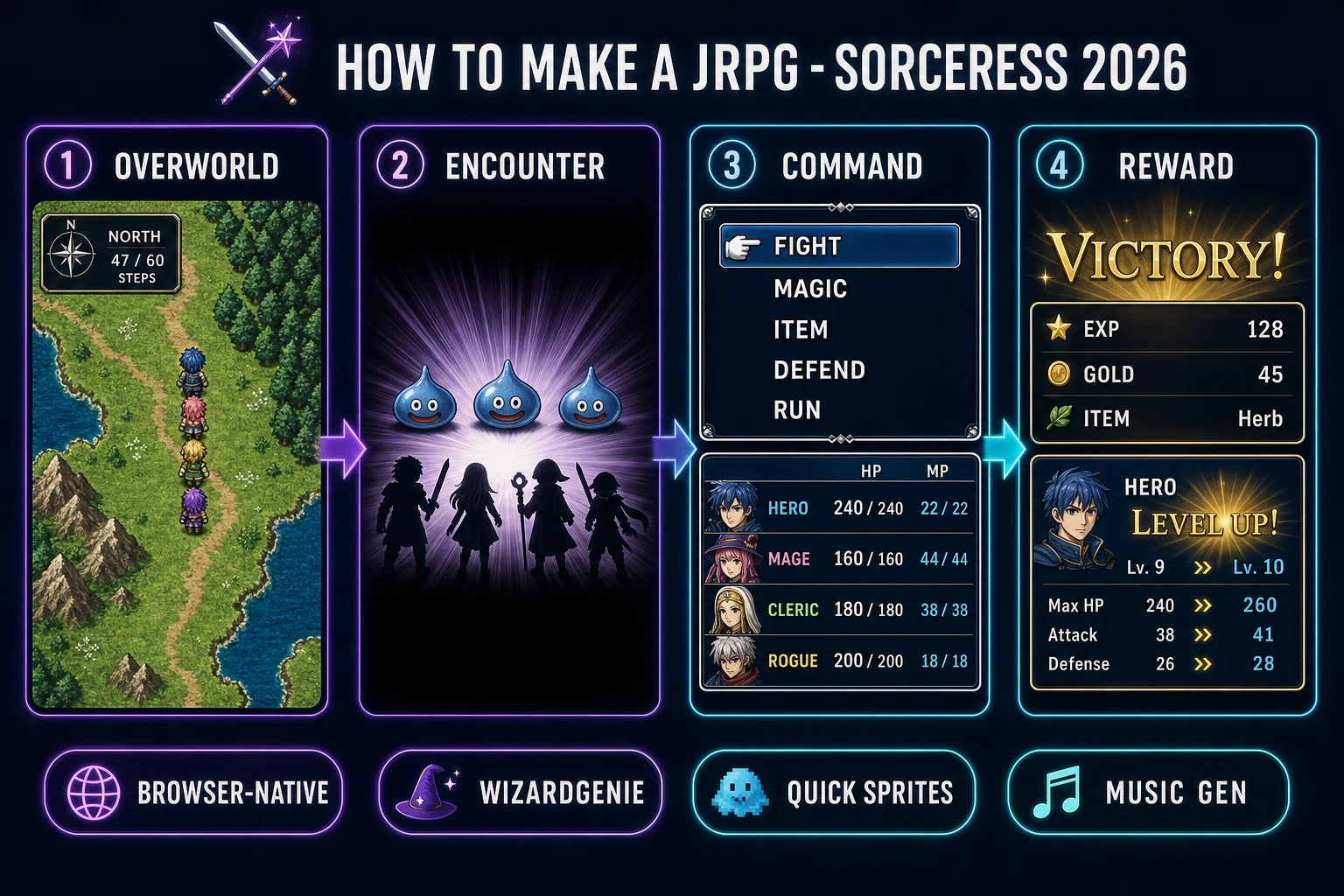
How to make a jrpg browser pipeline: overworld, random encounter, turn-based command menu, and reward loop wired in WizardGenie with AI Image Gen backdrops and Quick Sprites party sheets
The 2026 how to make a jrpg recipe: a four-hero party walks the overworld, random encounters transition to a battle screen, a classic FIGHT MAGIC ITEM DEFEND menu resolves the turn, and a reward panel closes the loop.

What how to make a jrpg actually means in 2026

The query "how to make a jrpg" hides three distinct intents. Some searchers want a game-design deep dive on party composition, class trees, and story pacing - a design brief, not a browser build. A second intent is the broader how to make an rpg guide covering any RPG lineage including Western action RPGs - useful, but that guide correctly targets a broader tempo contract and often assumes real-time combat with active abilities. The intent this article targets is the third: a browser jrpg that boots into a single-page HTML shell with a pixel-art overworld, four named heroes, random encounters that fade to a separate battle screen, a classic strict-turn command menu with FIGHT, MAGIC, ITEM, DEFEND, and RUN, an MP-gated spell list, level ups on victory, and one town with a shop and a couple of dialogue lines. That is a weekend build, it demos the Sorceress toolset, and it is the format most jrpg tutorial and javascript jrpg searchers actually want.

The presentation contract is small and strict. A top-down overworld fills most of the viewport, tile-drawn on a Canvas layer, with the party sprite walking under WASD or arrow-key control. A tick every step increments a distance counter; when the counter passes a random threshold, an encounter fires, the screen flashes, and the game state pivots to a battle scene with a static backdrop, enemy sprites facing the player, and a classic bottom-panel menu. HP and MP bars line the bottom for each of the four heroes. Turn order resolves by speed stat. The role-playing video game overview on Wikipedia (verified 2026-08-30) traces the jrpg branch from Dragon Quest (1986) through Final Fantasy, Chrono Trigger, and the SaGa line, and confirms these are the defining beats - cite that page in your itch.io blurb so players know you shipped a browser party-menu loop, not a Western action-RPG prototype.

The JRPG party loop in one minute (overworld, encounter, command, reward)

Five moving parts, cycled forever. First, overworld walk - the party sprite moves across a tile map under player input, and a hidden step counter increments each tile. Second, encounter roll - once the counter passes a threshold picked from the range 12 to 24 tiles, the game rolls an encounter from the region encounter table and fires the transition. Third, battle screen - the overworld camera fades to a static backdrop, the party lines up on the right, one to three enemies line up on the left, and the classic command menu opens on the party leader. Fourth, command - each hero picks an action (FIGHT, MAGIC, ITEM, DEFEND, or RUN), the turn queue resolves in speed order, damage numbers pop over sprites, and MP or item counts decrement as spells and items are used. Fifth, reward - on victory, a panel rolls out with EXP gained, gold gained, item drops, and any level-up flares; on defeat, the game routes to a game-over screen or a soft respawn at the last town. That five-step cycle, wrapped by one or two towns for NPC dialogue and shopping, is the whole html5 jrpg loop - everything else (party recruitment, class change, side quests, world map airship) is polish on top.
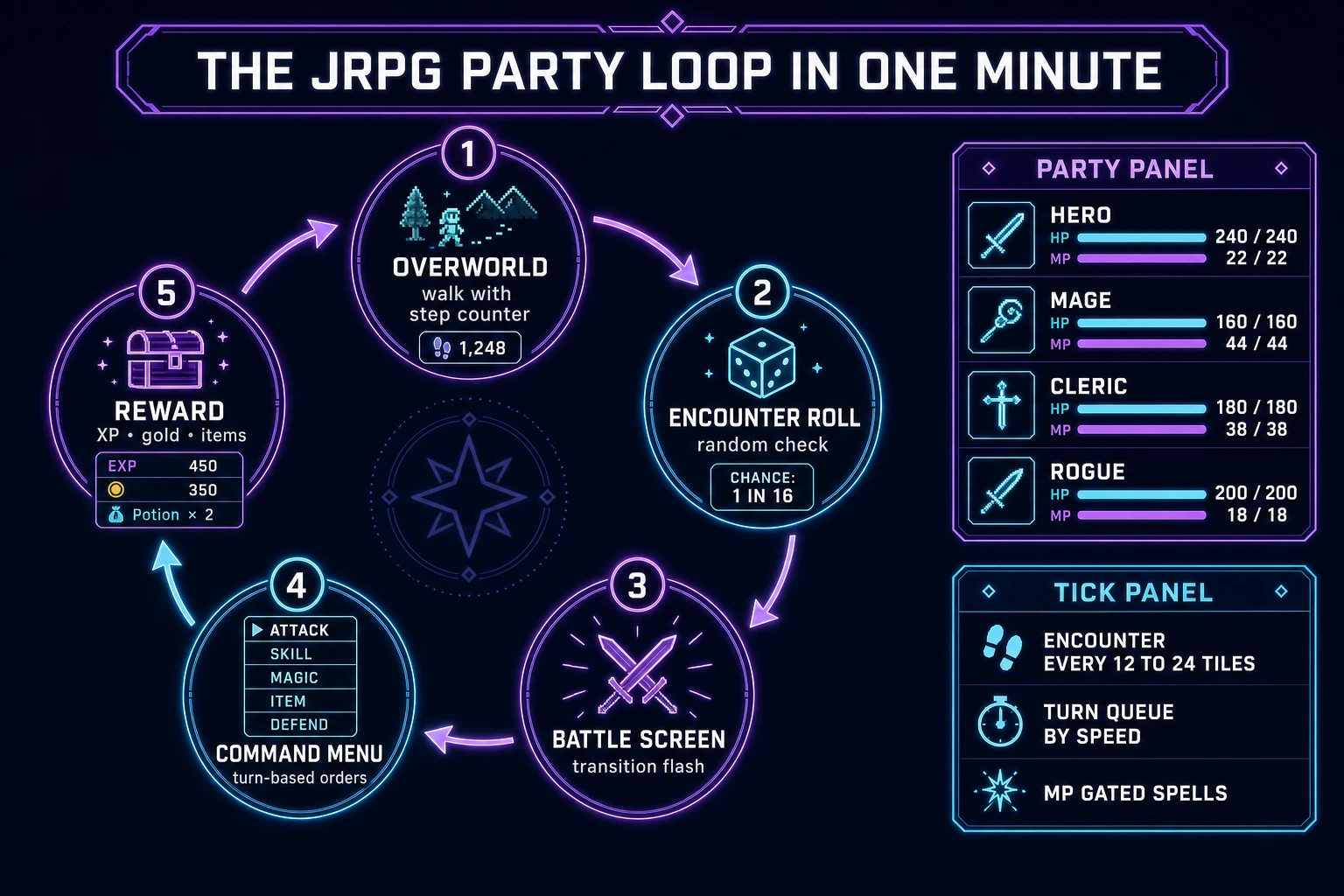
JRPG party loop state machine diagram showing overworld walk, encounter roll, battle screen transition, command menu, and reward with party HP and MP panel
The JRPG party loop: overworld walk, encounter roll, battle screen transition, classic command menu, and reward - all on a strict turn order with speed-based initiative and MP-gated spells.

Pick your engine for how to make a jrpg: Canvas, Phaser, or WizardGenie

Three good targets in 2026, each with a different trade-off. Plain HTML Canvas 2D is the honest default and the pick this guide recommends for a first build. JRPG is light on physics - there is no collision solver, no continuous motion, no path smoothing - and the biggest render loads are the overworld tile pass and the battle backdrop, both of which are static per frame. The MDN Canvas API reference (verified 2026-08-30) covers the drawImage sprite-atlas pattern and the offscreen-canvas trick that lets you cache the static overworld tile mask once and only redraw the moving party sprite plus the HUD each frame. That single optimization keeps a 128x128 tile overworld at a stable 60 fps in any modern browser, and the battle screen is basically free because nothing moves on it except a couple of hit-flash overlays.

Separate the simulation tick from the render frame anyway - it costs almost nothing and keeps animations honest. A 100 ms simulation tick handles battle turn resolution, dialogue advance, and shop transactions; the render loop uses requestAnimationFrame and interpolates the party sprite position between the last two overworld state samples. The MDN requestAnimationFrame docs (verified 2026-08-30) explain why coupling render to display refresh (rather than to a raw setInterval) is what makes 60 fps stable and why heavy work must stay inside the simulation callback. For battle-screen hit flashes, drive them off the render frame with a short easing curve - that is the one place a variable framerate is actually fine.

Phaser v4.2.1 "Giedi" (released 9 July 2026, verified 2026-08-30 on the official Phaser stable download page) becomes the right pick when a browser jrpg wants Phaser's Scene system, tile-map loader, camera, and input plugins out of the box. Phaser scenes map cleanly to jrpg screens - OverworldScene, BattleScene, MenuScene, ShopScene, DialogueScene - and the built-in scene transitions handle the encounter flash for free. For a first weekend jrpg where the transitions and camera code do not need to be reinvented, Phaser saves a couple of hours; for a pure vanilla-JavaScript learning build, plain Canvas is more instructive.

WizardGenie is not a separate jrpg engine - it scaffolds whichever of the two you pick from a single natural-language prompt. WizardGenie ships as both a desktop app (Windows installer with auto-update, available to Early Access supporters and above) and a no-install web build. Its coding-model lineup covers Claude Opus 4.7, Claude Sonnet 4.6, GPT-5.5, Gemini 3.1 Pro, DeepSeek V4 Pro, Kimi K2.5, Grok 4.2, and MiniMax M2.7 (verified 2026-08-30 in src/app/_home-v2/_data/tools.ts). For a first jrpg party loop, any frontier model scaffolds the overworld-encounter-battle state machine in one prompt. Pair a frontier planner with a budget executor like DeepSeek V4 Pro or Kimi K2.5 for the typing pass - the dual-agent pattern lands most projects at roughly one-fifth the single-frontier cost.

Step 1 - model party, stats, MP, and the encounter roll

Nothing else in the pipeline matters if the numbers do not feel right at low levels. Start with a small, testable model:

const state = {
  party: [
    { id: "hero",   name: "Aren",  hp: 240, hpMax: 240, mp: 22, mpMax: 22, atk: 24, def: 14, mag: 8,  spd: 18, xp: 0, lvl: 1 },
    { id: "mage",   name: "Lyra",  hp: 160, hpMax: 160, mp: 44, mpMax: 44, atk: 10, def: 8,  mag: 26, spd: 14, xp: 0, lvl: 1 },
    { id: "cleric", name: "Bran",  hp: 180, hpMax: 180, mp: 38, mpMax: 38, atk: 12, def: 12, mag: 22, spd: 12, xp: 0, lvl: 1 },
    { id: "rogue",  name: "Kai",   hp: 200, hpMax: 200, mp: 18, mpMax: 18, atk: 20, def: 10, mag: 6,  spd: 24, xp: 0, lvl: 1 },
  ],
  inventory: { herb: 4, ether: 1, gold: 40 },
  overworld: { px: 12, py: 8, region: "meadow", stepsUntilEncounter: 18 },
  screen: "overworld",
  battle: null,
};

const SPELLS = {
  spark:  { mp: 4,  power: 22, target: "enemy",  desc: "fire spark, single target" },
  cure:   { mp: 6,  power: 40, target: "friend", desc: "restore HP" },
  gust:   { mp: 8,  power: 18, target: "all",    desc: "wind gust, hits all enemies" },
};

const ENCOUNTERS = {
  meadow: [
    { enemies: [{ type: "slime", hp: 30, atk: 8, def: 4, spd: 6, xp: 12, gold: 5 }] },
    { enemies: [{ type: "slime", hp: 30, atk: 8, def: 4, spd: 6, xp: 12, gold: 5 }, { type: "slime", hp: 30, atk: 8, def: 4, spd: 6, xp: 12, gold: 5 }] },
    { enemies: [{ type: "wolf",  hp: 45, atk: 12, def: 6, spd: 10, xp: 22, gold: 9 }] },
  ],
};

function stepOverworld(dx, dy) {
  state.overworld.px += dx;
  state.overworld.py += dy;
  state.overworld.stepsUntilEncounter -= 1;
  if (state.overworld.stepsUntilEncounter <= 0) rollEncounter();
}

function rollEncounter() {
  const table = ENCOUNTERS[state.overworld.region];
  const pick = table[Math.floor(Math.random() * table.length)];
  state.battle = { enemies: JSON.parse(JSON.stringify(pick.enemies)), turnQueue: [], turnIndex: 0 };
  state.overworld.stepsUntilEncounter = 12 + Math.floor(Math.random() * 13);
  state.screen = "battle";
  buildTurnQueue();
}

Unit-test five cases before you generate any art: pressing an arrow key over grass decrements stepsUntilEncounter and re-rolls only when the counter hits zero; a random encounter selects from the region table with even distribution across the entries; MP for the mage decrements by 4 on Spark and by 8 on Gust; a Cure cast on the hero adds power to hp but never above hpMax; a Slime with 30 hp taking a 24-atk FIGHT drops to 30 minus roughly 20 damage after a def of 4 is subtracted. Those five tests catch ninety percent of javascript jrpg bugs. Keep spells cheap in MP at level 1 so the mage does not run dry after two casts, and tune the def formula so no attack is instant-kill or zero-damage on a first zone.
Step 2 - wire menu battles and dialogue trees in WizardGenie

With the state model drafted, open WizardGenie. Drop in a bare index.html shell with a full-viewport canvas, a small overworld HUD reading MEADOW - STEP 47, and a hotkey table. Give the agent one paragraph: Build a browser jrpg. The overworld is a top-down tile map with WASD movement and a hidden encounter counter that fires a random battle when it hits zero. The battle screen fades in with a static backdrop, three enemy slimes on the left, and a four-hero party HUD on the right showing HP, MP, and portraits. The command menu opens on the active hero with FIGHT, MAGIC, ITEM, DEFEND, and RUN. Turn order resolves by speed stat. MAGIC opens a submenu of spells the hero knows and their MP cost. ITEM opens the shared inventory. On victory, roll a reward panel with total EXP, gold, and any drops; apply level-up on any hero that crosses their threshold. On defeat, route to a game over screen. Include one town scene with two NPCs whose dialogue advances a single flag and a shop that sells herb and ether. Feed that to any coding model in the lineup and the interpreter scaffolds in under twenty minutes.

The remaining hour is polish via follow-up prompts. Add a party menu battle keyboard layout so arrow keys move the menu cursor and Enter or Z commits - twenty lines of pointer and key handling that mirror the classic Dragon Quest scheme. Add speed-sorted turn order so a Kai with spd 24 acts before a slime with spd 6, and a mage-first slime pack goes last - eight lines. Add damage numbers that pop over sprites with a short 400 ms rise and fade - twelve lines built on the MDN requestAnimationFrame docs (verified 2026-08-30). Add a dialogue tree for one town NPC as a small array of nodes with text, options, and next fields, then advance a flags object on selection - thirty lines. Add a save slot that JSON-stringifies the state object into localStorage on each level-up and reloads on boot - ten lines. Each item is a follow-up prompt, and the whole browser jrpg experience lands over a Saturday afternoon.

Optional siblings on the same base shell: for a slower turn-based tactics variant on a grid battlefield instead of a facing battle line, borrow the phase machine from how to make a turn based game. For a Western action-RPG cousin with real-time combat and hotbar abilities, revisit how to make an rpg. For an isometric strategy sibling with base-building instead of party progression, see how to make an rts game.

Step 3 - AI Image Gen scenes, Quick Sprites portraits, Music Gen themes, SFX Gen menu clicks

A blank Canvas with placeholder rectangles reads as unfinished even when the battle math is honest. Four asset passes cover the whole html5 jrpg experience:

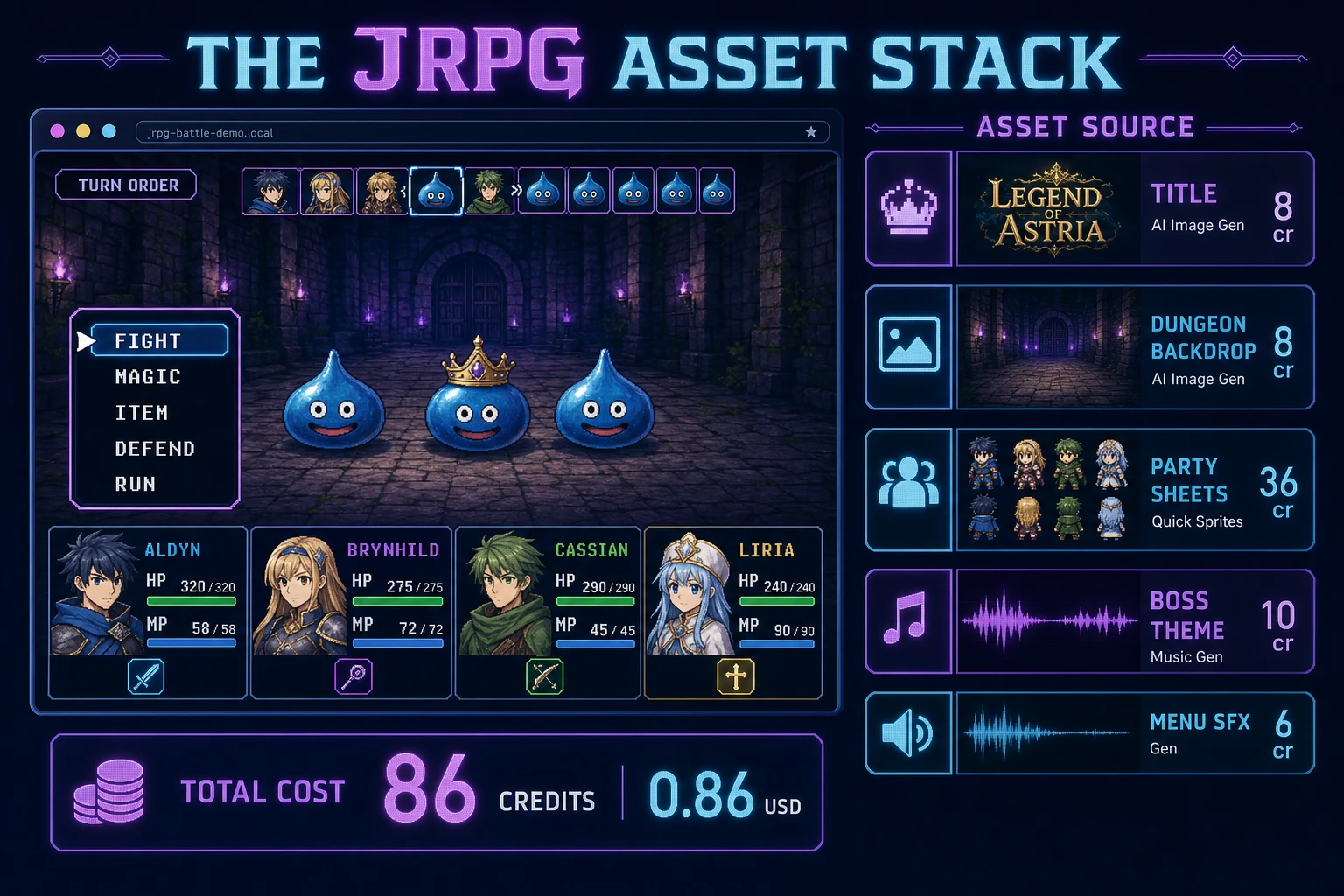
  • Environment backdrops - open AI Image Gen and prompt three 3:2 scene panels: a golden-hour meadow title screen with a distant castle silhouette, an evening forest overworld panorama, and a torch-lit dungeon interior. AI Image Gen ships every leading model in one panel including Nano Banana Pro, GPT Image 2, Seedream 5 Lite, Flux 2 Pro, Z-Image Turbo, and Grok Imagine (verified 2026-08-30 in src/app/_home-v2/_data/tools.ts). GPT Image 2 handles legible text on signage best; Nano Banana Pro carries mood best for JRPG panoramas. Cost lands around 8 credits per generation, roughly 24 credits for three panels.
  • Party sprites - open Quick Sprites and generate one animated pixel sprite sheet per party member. A first build needs four sheets total: hero warrior, mage in a cloak, cleric with a staff, rogue in a hood. Prompt in plain language: "small 32x32 pixel-art JRPG hero, side view for battle and 4-frame walk cycle for overworld, transparent background". Quick Sprites bundles character generation, animation, and sheet packing at 9 credits per generation (verified 2026-08-30 in src/app/quick-sprites/page.tsx line 21) - four sheets land around 36 credits.
  • Music themes - open Music Gen and prompt two 60-second loops: "warm overworld theme with pizzicato strings and light woodwinds, moderate tempo, curious mood, seamless loop" and "driving boss theme with brass hits and taiko drums, 140 bpm, tension without resolution, seamless loop". Music Gen bills 10 credits per track (verified 2026-08-30 in src/app/music-gen/page.tsx line 28), and each generation returns two variations. Two tracks land around 20 credits.
  • SFX cues - open SFX Gen and describe five clips: "short menu blip for cursor move", "warm confirm chime for menu commit", "sharp weapon impact for FIGHT hit", "descending three-note stinger for level up", "long triumphant fanfare for battle victory". SFX Gen bills per second of generated audio via getSeedAudioCreditCost (verified 2026-08-30 in src/app/sfx-gen/page.tsx), and five short cues total under 6 credits. Cap the menu blip at 60 ms so rapid arrow presses do not blow out the mix.

Load backdrops as regular Image elements against a single sprite atlas per party role, and let Canvas drawImage batch draws by atlas. Do not chase a "perfect" first pass - a second Quick Sprites retry is cheap, but three retries per sheet is a signal to rewrite the prompt, not to reroll the seed.

JRPG game asset stack diagram showing AI Image Gen backdrops, Quick Sprites party sheets, Music Gen themes, and SFX Gen menu cues - about 86 credits total
The JRPG asset stack: AI Image Gen for backdrops, Quick Sprites for party sheets, Music Gen for overworld and boss themes, SFX Gen for menu and combat cues - about 86 credits total.

Step 4 - playtest the browser jrpg like a jam judge

Before you share the build, run a five-minute checklist borrowed from JRPG jam judges:

  1. The first battle lands inside a minute - the party walks the overworld from spawn, the encounter counter ticks down visibly, and the transition flash fires with a satisfying delay that gives the player a moment of dread.
  2. The command menu is legible at a glance - FIGHT MAGIC ITEM DEFEND RUN across the bottom, HP and MP for the four heroes visible without scrolling, and the active hero highlighted with a distinct ring or arrow.
  3. Turn order reads correctly - Kai (spd 24) acts before Lyra (spd 14), a slime (spd 6) acts last, and damage numbers pop in the right order over the right sprites.
  4. MP gating actually gates - casting Gust twice with the mage drops her MP to 28, a third Gust attempt is greyed out with a Not Enough MP tooltip, and Ether restores MP.
  5. Victory rewards feel earned - a single-slime fight rewards about 12 XP and 5 gold, a wolf drops around 22 XP and 9 gold, three or four random battles per zone bring the hero from level 1 to level 2, and the level-up flare is clearly visible.

Log issues as WizardGenie follow-ups, not rewrites. "Add a text-speed slider to the dialogue system" is one prompt. "Add a save slot on the pause menu that JSON-stringifies state to localStorage" is another. The Sorceress tools guide lists every asset tool if you want to swap Quick Sprites for hand-drawn portraits or add a Speech Gen line for a boss taunt. If you want a live musical layer for the boss fight, the MDN Web Audio API reference (verified 2026-08-30) covers the AudioContext and BufferSource patterns you need for gapless looping and per-track volume ducking on menu open.

What how to make a jrpg costs on Sorceress in 2026

An honest budget for the stack above against the 2026 Sorceress rate card (verified 2026-08-30 against local source):

  • Three AI Image Gen backdrops (title screen, overworld panorama, dungeon): ~24 credits (0.24 USD)
  • Four Quick Sprites party sheets (hero, mage, cleric, rogue): ~36 credits (0.36 USD)
  • Two Music Gen tracks (overworld theme + boss theme): ~20 credits (0.20 USD)
  • Five SFX Gen cues (menu blip, confirm chime, hit impact, level up, victory fanfare): ~6 credits (0.06 USD)
  • Coding-model API time with planner + budget executor: under 0.40 USD

Total roughly 86 credits or 0.86 USD in generation, plus a small model bill. The free 100-credit signup grant covers this build outright, with headroom for a second character portrait pass or an ambient-town music variant. Lifetime Early Access sits at 49 USD (LIFETIME_PRICE in src/app/plans/page.tsx) if you want desktop WizardGenie with auto-update for the next jam. Credits convert at 100 per dollar (CREDITS_PER_DOLLAR in src/lib/models.ts). Adding a class-change UI, a second town, and a fifth party member portrait adds about 15 credits, still well under the one-dollar ceiling this guide targets.

That is the whole path for how to make a jrpg as a browser party loop in 2026: model the party, stats, MP, and encounters as a small tick-simulated state, let WizardGenie scaffold the overworld-encounter-battle flow from one prompt, dress the world with AI Image Gen backdrops, Quick Sprites sheets, Music Gen themes, and SFX Gen cues, and ship the browser jrpg before the weekend ends. When you are ready for airships, world maps, and a real class tree, graduate slowly - but finish one honest party loop first.

Frequently Asked Questions

What defines a JRPG as a genre in 2026?

A JRPG (Japanese role-playing game) is the console-lineage RPG subgenre defined by a fixed party of characters, turn-based menu battles, random or scripted encounters on an overworld, XP-driven level ups, MP-gated spells, and a linear story with named heroes, per the role-playing video game overview on Wikipedia (verified 2026-08-30). The defining beats trace to Dragon Quest (1986) and Final Fantasy (1987) and were refined across Chrono Trigger, Final Fantasy VI, and the SaGa and Star Ocean lines. A browser JRPG that ships a four-hero party, an explorable overworld with random battles, a working command menu with attack, magic, item, and defend, and a boss encounter reads correctly as JRPG to a genre-literate player, even without a 40-hour campaign.

How is how to make a jrpg different from how to make an rpg or how to make a turn based game?

The differences are inheritance and tempo, not intent. Broad how to make an rpg tutorials cover any lineage - Western action RPG, MMO, tactical, roguelike - and often assume real-time combat with active abilities. A general how to make a turn based game tutorial covers any grid-based turn tempo (chess, tactics, board games). JRPG is the specific console-lineage overlap where the party is fixed and small, encounters interrupt overworld movement, combat is menu-driven and takes place on a separate battle screen with facing enemies, MP gates spells, and level ups feed a linear stat curve. An honest how to make a jrpg tutorial should cover the overworld with random encounter roll, the transition to a battle screen, the ATB-or-classic command menu, the damage formula, the reward roll (XP, gold, items), and one or two towns for dialogue and shopping. If you only cover combat you shipped a battler; if you only cover overworld exploration you shipped a walker prototype.

Do I need active-time battle or a full ATB gauge for a first browser JRPG?

Not for a weekend build. Classic strict turn order (party acts, then enemies act) is what Dragon Quest and early Final Fantasy shipped, and it reads perfectly well to modern players who grew up on Undertale, Sea of Stars, and Chained Echoes revivals. The strict-turn model needs one queue and a couple of speed comparisons - ATB adds a per-actor readiness gauge, timed inputs, and a tick that runs during menu navigation, which is a fine polish pass but not a launch requirement. Ship classic turn order first, prove the numbers feel right at levels 1 through 10, and then add ATB in a second sprint if the reviews demand it. A browser JRPG that lands a coherent classic loop out-scores an ATB build that ships broken.

How do random encounters stay fun instead of feeling like a chore?

Three tuning levers, all cheap to implement. First, cap the encounter rate on the overworld to somewhere between one encounter every 12 to 24 tiles of movement, and re-roll a fresh distance target after each battle so players never feel a fixed timer. Second, keep the average battle under 30 seconds at party level, with a hard exit path (Run command with high success on non-boss fights). Third, tune the reward curve so a random battle at level 3 delivers about 12 to 18 percent of the XP needed for level 4 - three or four random battles per zone, not thirty. Modern revivals like Sea of Stars replaced random encounters with visible overworld encounters entirely, which is a legitimate design choice; use it if you want fewer interruptions but still want the ambush drama. The MDN Canvas API reference (verified 2026-08-30) covers the drawImage patterns you need for both the overworld tile pass and the transition-flash into the battle screen.

How much does building a JRPG on Sorceress cost in 2026?

A first-project browser JRPG budgets like this against the 2026 Sorceress rate card (verified 2026-08-30 against local source). Three AI Image Gen environment backdrops (title screen, overworld sky, dungeon interior) at roughly 8 credits per generation lands around 24 credits. Four Quick Sprites party sheets (hero, mage, cleric, rogue with idle, walk, and attack) at 9 credits per sheet (verified in src/app/quick-sprites/page.tsx line 21) lands around 36 credits. One Music Gen 60-second overworld theme plus one 60-second boss theme at 10 credits each (verified in src/app/music-gen/page.tsx line 28) lands around 20 credits. Five SFX Gen menu and combat cues at roughly one credit per second of generated audio total around 6 credits. Coding-model API time with a planner plus budget executor under 0.40 USD. Total roughly 86 credits or 0.86 USD in generation. The free 100-credit signup grant covers the build with headroom. Lifetime Early Access is 49 USD (LIFETIME_PRICE in src/app/plans/page.tsx) and unlocks the desktop WizardGenie with auto-update for the next jam.

Sources

  1. Role-playing video game - Wikipedia
  2. Phaser v4.2.1 Giedi stable download
  3. MDN - Canvas API
  4. MDN - requestAnimationFrame
  5. MDN - Web Audio API
Written by Arron R.·3,267 words·15 min read

Related posts