Loop Vibe Coding With Claude (2026 Game-Dev Path)

By Arron R.15 min read
Vibe coding with Claude in 2026 means looping Opus 4.8 or Sonnet 4.6 in auto-edit mode, accepting diffs sight unseen, watching the build. Code lands; sprites, 3

Searches for vibe coding with claude in 2026 split into two camps: devs who already pay for a Claude subscription and want to know how to point Anthropic’s models at a game project, and indies coming from cheaper agents who heard about Opus 4.8 in the May 28, 2026 release and want a sober field test before committing. This is that field test. We walk every Claude surface you can vibe-code in, name the model picks that actually fit a game-dev session, run the Planner + Executor math that drops cost to roughly one-fifth of solo-frontier billing, and finish with the browser-tab loop that wraps Claude alongside the four asset panels Claude itself cannot render. Every fact in this post was verified against the live source on June 6, 2026.
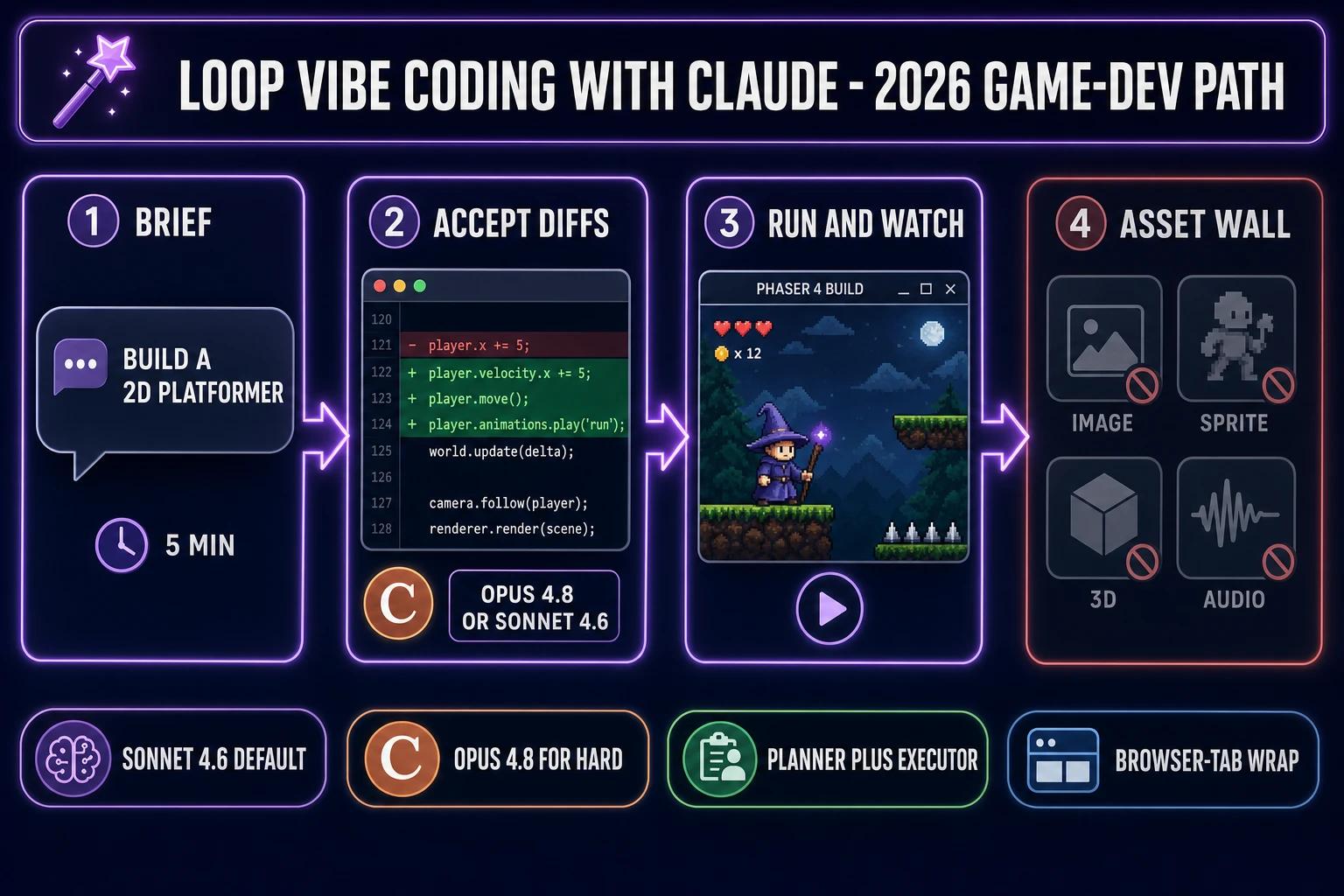
Loop vibe coding with Claude game-dev path - 4-step pipeline from brief to asset wall
The vibe coding with Claude loop on a game project: brief, accept diffs, run, watch — then bounce off the asset wall. WizardGenie swaps the wall for one-click image, sprite, 3D, and audio panels in the same tab.

What “vibe coding with claude” actually means in 2026

Vibe coding is the workflow Andrej Karpathy named in February 2025 (per the Vibe coding Wikipedia entry and Simon Willison’s February 6, 2025 weblog post): describe intent in plain English, accept the diff sight unseen, run the build, watch the screen, react to what the screen shows. Vibe coding with Claude, then, is running Anthropic’s frontier models (Opus 4.8, Sonnet 4.6, or Haiku 4.5) in auto-edit mode where the agent applies edits without per-change confirmation, with the developer reading the running game instead of every line of the diff.

The Claude side of the loop has four real surfaces in 2026, and the model behavior is identical across all four because they hit the same API. What differs is the wrap: the Claude.ai chat app on the web, the Claude Code terminal CLI (currently v2.1.154 from May 28, 2026), the Claude API direct (BYOK billing per million tokens), and Claude embedded inside another editor like WizardGenie, the AI-native game engine at the heart of Sorceress. Picking the surface is the first decision; picking the model second; picking the posture third.

Two related posts on this site cover sibling angles: the claude vibe coding for games piece walks the brand-anchored framing, and the use Claude Code for vibe coding field test focuses specifically on the terminal CLI. This piece focuses on the practical “I have a Claude account, point me at a game project” angle — which surface, which model, which posture, which wrap.

The four Claude surfaces you can vibe-code in (and why the wrap matters)

Surface one is Claude.ai chat on the web. The chat tab is the simplest entry point: paste a brief, copy back the code, paste into your editor. The posture is “assisted” rather than vibe-coded because the chat surface does not apply diffs to your project. Useful for one-off snippets and architecture questions; the wrong tool for a 35-minute vibe loop because the manual paste-and-tab tax kills the “watch the screen” posture vibe coding wants.

Surface two is Claude Code, the agentic terminal CLI (per the CLI Wikipedia entry). It runs in any modern terminal, reads your project, executes shell commands, applies file edits as diffs, and ships Opus 4.8 as the default reasoning model in v2.1.154 (released May 28, 2026, with high effort by default and an /effort xhigh mode for the hardest tasks). The v2.1.154 release also introduced Dynamic Workflows, an orchestration primitive where Claude coordinates tens to hundreds of parallel sub-agents in the background. For a code-only artifact (a web app, a CLI tool, a backend service) the terminal is the cleanest wrap.

Surface three is the Anthropic API direct. BYOK billing per million tokens, no subscription wrap, useful when your project ships its own agent loop and the “wrap” is your own code. The rate card runs Opus 4.8 at $5 input / $25 output per million tokens, Sonnet 4.6 at $3 / $15, Haiku 4.5 at $1 / $5, with prompt caching cutting cached input by roughly 90 percent. Useful for custom integrations; not the right wrap for a vibe loop unless you have built one.

Surface four is Claude inside WizardGenie, the AI-native game engine at /wizard-genie/app. WizardGenie talks to the same Anthropic Claude API the other three surfaces talk to, so the model behavior is identical. The difference is the wrap: a multi-model picker (Claude is one of eight rails verified against src/app/_home-v2/_data/tools.ts on June 6, 2026), a Dual-agent Planner + Executor mode for the cost split, and the four asset tools (image, sprite, 3D, audio) in adjacent panels in the same browser tab. For a game project specifically, this is the wrap that closes the four-step asset wall every Claude vibe loop bounces off when it tries to ship a finished game.
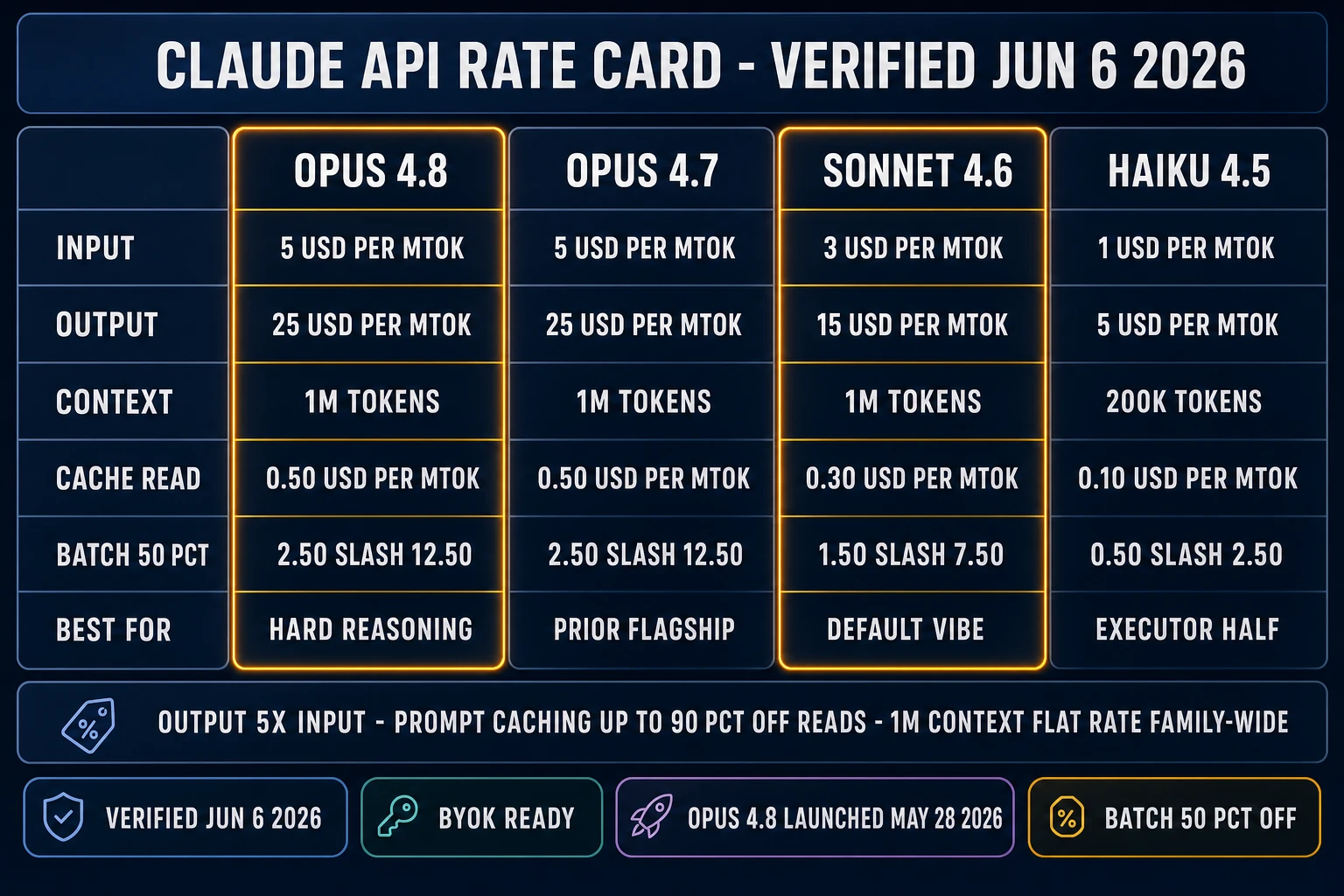
Claude API rate card matrix - Opus 4.8 / Opus 4.7 / Sonnet 4.6 / Haiku 4.5 with input, output, context, cache read, and batch pricing, verified June 6 2026
The 2026 Claude API rate card. Opus 4.8 and Sonnet 4.6 share the 1M-token context window flat rate; output is 5x input across the family; prompt caching cuts cached input by roughly 90 percent.

Opus 4.8 vs Sonnet 4.6 vs Haiku 4.5: which Claude to pick for vibe coding with claude on games

The model lineup that matters for vibe coding with Claude on a game project as of June 6, 2026: Opus 4.8 (current flagship, $5 input / $25 output per million tokens, 1M-token context window), Opus 4.7 (prior flagship, same price and context), Sonnet 4.6 ($3 / $15, 1M context), and Haiku 4.5 ($1 / $5, 200K context). Output tokens are 5x input across the family. Cache reads charge 10 percent of base input price. Batch API delivers a 50 percent discount across the board for non-time-sensitive workloads.

Sonnet 4.6 is the default vibe-coding model for a small to mid game project. It is fast, smart, and at $3 / $15 per million tokens it leaves enough budget for a long agent session. A typical 35-minute Phaser-platformer vibe session on Sonnet 4.6 lands around $1 to $3 of API-equivalent spend on a brand-new working directory. The model picker in WizardGenie defaults to it for exactly this reason: most game-dev vibe sessions are pattern-recognition work (Phaser arcade physics, three-js boilerplate, Godot GDScript idioms) where Sonnet’s training distribution already knows the right answer.

Opus 4.8 is the upgrade pick for hard-reasoning work — a tricky multiplayer netcode bug, a custom shader pipeline, an architecture choice between two physics models, a refactor that crosses six files. Opus is roughly 1.7x the per-token cost of Sonnet for the same workflow, but it catches more edge cases on the first try and reduces the paste-the-error follow-ups in a vibe loop. The May 28, 2026 release made Opus 4.8 default to high effort and added an /effort xhigh mode for the hardest tasks; the Fast Mode on Opus 4.8 is now available at 2x the standard rate for 2.5x the speed, which is a strict improvement on the prior Opus 4.7 baseline at the same effort level.

Haiku 4.5 is the executor pick for the typist half of a Planner + Executor split. At $1 / $5 per million tokens, Haiku is cheap enough that running it on the bulk of an agentic session keeps the rate card honest. The catch: Haiku stays at the 200K-token context window where Opus and Sonnet both ship 1M; for a long-context game-dev session, fall back to DeepSeek V4 Pro or Kimi K2.5 as the executor instead (see the Planner + Executor section below). For more on the full eight-rail picker logic, the longer read at best AI model for coding covers it.

The vibe coding posture with Claude: accept the diff, run the build, watch the screen

The posture is what distinguishes vibe coding from pair programming. Both run on the same Claude API; the human decides which posture is active. Pair programming with Claude is the propose-then-confirm flow with line-by-line diff review — the dev reads every change before accepting it. Vibe coding with Claude is the opposite: auto-edit mode, accept the diff sight unseen, run the build, look at the screen, react to what the screen shows. The dev’s eyes are the only validator; the dev never line-edits the agent’s output.

For a game project specifically, the practical vibe loop with Claude is: open a one-paragraph brief (“build a side-scrolling Phaser 4 platformer in TypeScript with double-jump, three coin pickups, and patrolling slime enemies”), click accept on diff after diff, watch the build, paste back any error, and react to the screen. The loop produces gameplay code (movement, collision, scoring, scene transitions) reliably; in a typical 35-minute Opus 4.8 session it ships a working vite + Phaser 4 + TypeScript project that builds and runs on the first npm run dev, with correct double-jump logic, a score HUD using Phaser BitmapText, and an enemy patrol loop. The two times the build throws an error, Claude recovers in one paste-back of the stack trace.

The longer write-up at vibe coding meaning for indie game devs walks the posture argument in more depth, and the is Claude Code vibe coding piece argues the same posture distinction on the CLI surface specifically. The short version: the binary is the same, the posture is the choice. Vibe coding with Claude means picking the loose posture on purpose.

Where vibe coding with Claude shines (gameplay code) and where it stops (the four-step asset wall)

The gameplay-code half of a vibe session with Claude is the success story. The asset half is where the wall sits. A finished game is gameplay code plus a sprite sheet (per the Sprite computer graphics Wikipedia entry, sprites are rasterized images that get composited at runtime), plus a 3D mesh when the game is 3D (per the glTF 2.0 specification at Khronos, meshes are vertex / index buffers with material maps), plus a rigged skeleton for animation (per the Skeletal animation Wikipedia entry), plus music, plus sound effects, plus voice.

Claude, as a frontier text and code model (per the Large language model Wikipedia entry), can write the gameplay code that references those assets. It cannot render the pixels for the sprite, it cannot extrude the 3D mesh, it cannot rig the skeleton, and it cannot synthesize the WAV file. Asking Claude to do those steps anyway returns a Pillow Python snippet that runs against a path that does not exist, a bullet list of frame indices into a tileset that also does not exist, an apology and a suggestion to record the chime on a phone, or a 256-line JSON stub of tile indices into a tileset that also does not exist. None of that is a Claude failure — frontier coding LLMs are trained on text, not on pixel-art conventions, palette quantization, mocap retargeting, or drum patterns.

The vibe-coding posture meets the asset wall the same way regardless of which Claude surface you point at the project. The posture is “accept what lands.” What lands from a code-only model is gameplay code plus stubs. The fix is not to switch agents; it is to feed real assets into the same project from a tool that actually generates pixels and audio. That is the entire reason the WizardGenie wrap matters for game projects in a way it does not matter for web apps.
The Planner + Executor split: pair Opus with a cheap typist, not Sonnet

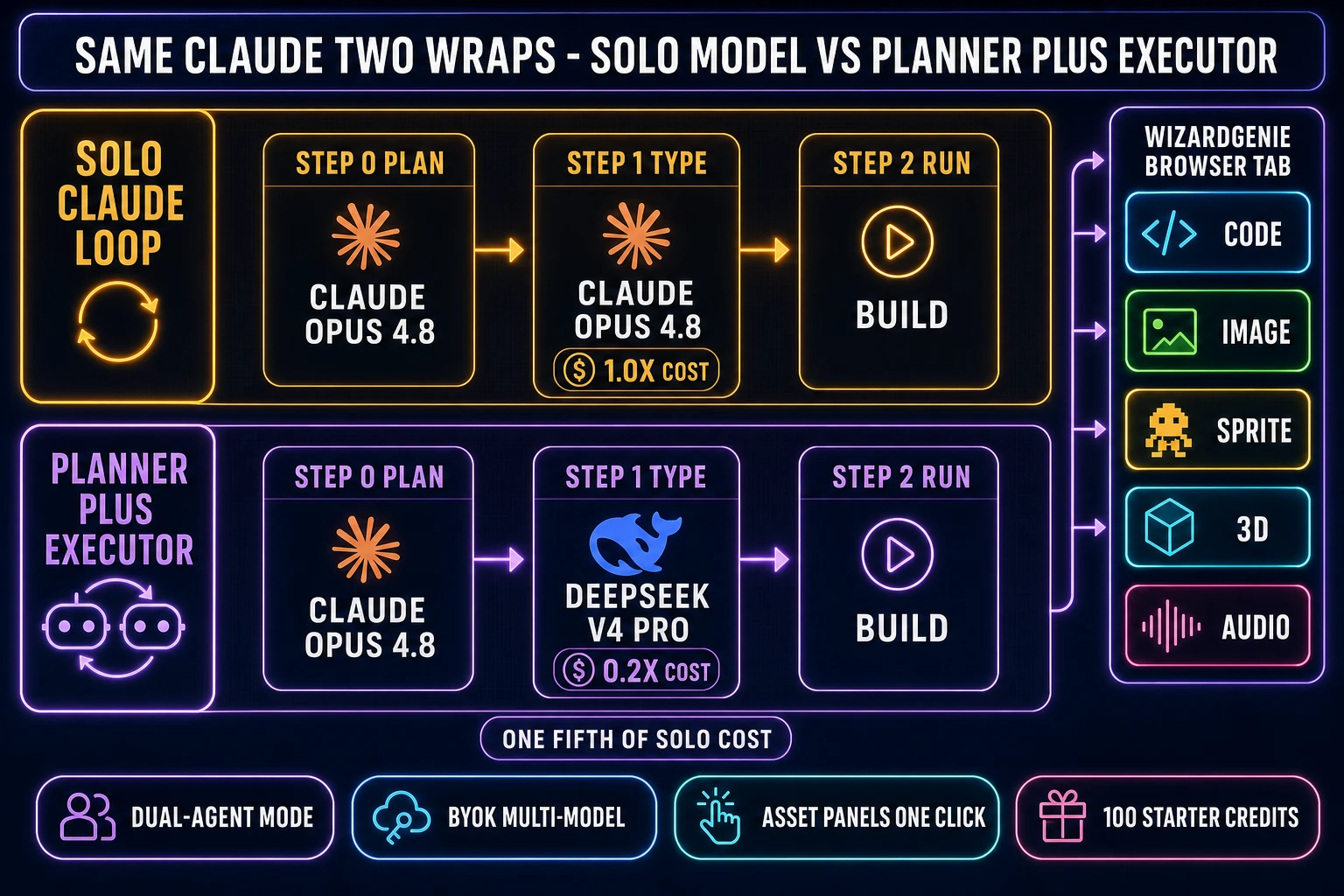
The cheapest way to vibe-code with a frontier model is the Planner + Executor split: route the planning step (the hard reasoning, the architecture decision, the diff plan) to an expensive reasoner, and route the actual code-typing step (the bulk of the output tokens) to a true cheap executor. The economic logic is “expensive reasoner thinks, cheap fast typer executes,” and the cost ratio lands at roughly one-fifth of running the frontier model on both sides across a long agentic session, because the executor types the bulk of the tokens.

Acceptable Planners (expensive, top-tier reasoning): Claude Opus 4.8, Claude Opus 4.7, GPT-5.5, Gemini 3.1 Pro, Grok 4.2. Acceptable Executors (cheap, fast, big context): DeepSeek V4 Pro, Kimi K2.5, MiniMax M2.7, Gemini 3.1 Flash, GPT-5.5 Mini, Claude Haiku 4.5. The single biggest mistake in vibe coding with Claude is putting Sonnet 4.6, Opus 4.7, or Opus 4.8 on the typing side — doing so erases roughly 80 percent of the cost advantage that makes the pattern worth deploying. Sonnet input / output at $3 / $15 per million tokens versus DeepSeek V4 Pro at roughly $0.27 / $1.10 is the spread the split is built to capture.

Claude Code is single-model per session by design. The Dynamic Workflows feature shipped in v2.1.154 runs parallel sub-agents, but those sub-agents are all Claude — you cannot route the typist half to a non-Anthropic model from inside the CLI. To run the actual Planner + Executor split with Claude on the planner half and a cheap executor on the typist half, you need a multi-model editor that exposes both halves in the same picker, with the planner’s plan auto-fed to the executor without two API keys to juggle. The Dual-agent Planner + Executor mode in WizardGenie is the wrap that ships this. The deeper read at best vibe coding tools for building games walks the picker criteria in more depth, and the AI coding API pricing 2026 piece covers the raw rate card across all the relevant frontier and budget models.

Same Claude two wraps - solo Claude loop at 1x cost vs Planner plus Executor at 0.2x cost, with WizardGenie browser-tab asset stack on the right
Same Anthropic Claude API on both wraps. Solo loops Opus on both halves and pays 1.0x; the Planner + Executor split keeps Opus on planning and routes typing to DeepSeek V4 Pro for roughly one-fifth of the cost, with the four asset panels one click away in the same tab.

Loop vibe coding with Claude through WizardGenie (the game-dev path)

WizardGenie at /wizard-genie/app is the AI-native game engine at the heart of Sorceress. It runs both on the web (no-install entry point inside any modern browser tab, backed by the Fly.io headless build) and on the desktop (Windows installer with auto-updater, native filesystem access, longer-running agent sessions, fully offline-capable project work after a download). It talks to the same Anthropic Claude API the other Claude surfaces talk to. The eight-rail model picker, verified against src/app/_home-v2/_data/tools.ts on June 6, 2026, exposes Claude Opus 4.7 (top tier, amber accent), Claude Sonnet 4.6 (fast and smart, the default), GPT-5.5 (frontier), Gemini 3.1 Pro (1M context), DeepSeek V4 Pro (budget executor), Kimi K2.5 (256K coding-tuned), Grok 4.2 (2M context), and MiniMax M2.7 (agent-ready). Bring your own key for any of the eight; pay the providers directly, no markup.

The vibe-coding loop on a fresh game project inside WizardGenie is: open the app, pick Claude Sonnet 4.6 in the picker for the default vibe session (or Opus 4.7 / 4.8 for hard-reasoning sessions, or the Dual-agent Planner + Executor preset to split Opus onto planning and DeepSeek V4 Pro onto typing), paste a one-paragraph game brief, accept the agent diffs as they land. When the gameplay code references a sprite or a 3D mesh that does not yet exist, generate it one click away in the same tab:

  • Image generation in AI Image Gen — seven image models verified against src/app/_home-v2/_data/tools.ts on June 6, 2026: Nano Banana Pro (Google, top tier), Nano Banana 2 (Google, fast and sharp), GPT Image 2 (OpenAI, photoreal), Seedream 5 Lite (ByteDance, uncensored), Flux 2 Pro (Black Forest Labs, pro), Z-Image Turbo (Tongyi-Mai, ultra fast), and Grok Imagine (xAI, creative). All with reference-image conditioning for character consistency. Use it for the wizard concept art and the slime concept art the Phaser brief was missing.
  • Sprite sheets in Quick Sprites — turns a character image into a packed animated sprite sheet with the retro-diffusion/rd-animation model at 9 credits per generation, in three animation styles (four-angle walking at 48x48, small sprites at 32x32, VFX at 24-96 pixels) verified against src/app/quick-sprites/page.tsx on June 6, 2026. The walk cycle the platformer needed lands here, ready to drop into the Phaser preload.
  • 3D meshes in 3D Studio — six image-to-3D models verified against src/lib/threed-models.ts on June 6, 2026: TRELLIS at 8 credits, Hunyuan 3D 3.1 at 25 credits (recommended), Tripo v3.1 at 30 to 40 credits, TRELLIS 2 at 35 to 45 credits, Meshy 6 at 50 to 75 credits with PBR, and Rodin 2.0 at 50 credits. For a 2D platformer this part is optional; for a 3D project it replaces a Blender install.
  • Music and SFX in Sound StudioMusic Gen for vocal or instrumental tracks, SFX Gen for full SFX packs from text, plus a built-in editor for trimming and mastering. The coin-pickup chime the Phaser brief was missing lands here.

The starter terms verified against src/app/_home-v2/_components/HomeHero.tsx on June 6, 2026: “Try the tools free — get 100 starter credits on us.” Credit pack tiers verified against src/app/plans/page.tsx: $10 / 1000 Starter, $20 / 2000 Creator, $50 / 5000 Plus, $100 / 10000 Studio, all no-expiry credits; the LIFETIME_PRICE constant is $49 for the non-AI tools. New accounts get 100 starter credits, which is enough to test a vibe-coding session on Sonnet 4.6 plus generate the four missing assets for the Phaser platformer above before committing to a paid pack. The plans page covers the credit math; the Sorceress tools guide maps every tool to the game-dev step it owns.

The verdict: how to set your vibe coding with claude rig for game dev in 2026

The verdict on vibe coding with Claude for a game project in 2026 is shaped by two practical truths. First, Anthropic’s frontier models (Opus 4.8, Sonnet 4.6, Haiku 4.5) are genuinely excellent at gameplay code and agentic edits; the model side of the loop is already solved. Second, none of the four Claude surfaces (chat, Claude Code CLI, API direct, WizardGenie wrap) closes the four-step asset wall on their own — that wall is a property of LLMs as a class, not of Claude. The decision shifts to which wrap closes the wall fastest for the kind of project you have.

For a code-only artifact (a web app, a CLI tool, a backend service), Claude Code is the cleanest wrap and Sonnet 4.6 in auto-edit mode is the default vibe model. Upgrade to Opus 4.8 for the hard-reasoning sessions, swap to the Planner + Executor split on long boilerplate-heavy sessions by routing the typist half through the Anthropic API to Haiku 4.5 (or, for better executors, route to DeepSeek V4 Pro or Kimi K2.5 outside the CLI via a different wrap). The use Claude Code for vibe coding field test walks the CLI path end-to-end with a real Phaser session.

For a game project, the better wrap is WizardGenie because it closes all four asset steps in the same browser tab where the gameplay-code loop is running. Pick Sonnet 4.6 as the default Claude rail; upgrade to Opus 4.7 / 4.8 for hard sessions; flip to the Dual-agent Planner + Executor preset when the session is going to run long; generate the wizard sprite, the slime, the tilemap art, the coin-pickup chime, and the menu music in adjacent panels without ever leaving the tab. Vibe coding with Claude stops being a code-only loop and starts being a complete game-dev loop, which is the move that lets a brand-new indie ship a real prototype in a weekend instead of stalling out at the asset wall.

For deeper reading on the surrounding cluster: the claude vibe coding for games piece walks the brand-anchored framing; the what is vibe coding primer covers the workflow from first principles for readers brand new to it; the best vibe coding tools for games roundup covers the picker criteria across competitors; the cursor vibe coding piece walks the same asset wall on a different competitor surface; the replit vibe coding piece covers a different competitor wrap; and the how to make a video game with AI piece is the broader entry point. On the technical primitives, the Vibe coding Wikipedia entry covers the term’s origin, the Phaser game framework Wikipedia entry covers the 2D engine used in the worked examples above, and the Khronos glTF 2.0 specification covers the runtime format every engine reads for 3D assets.

Frequently Asked Questions

What does vibe coding with Claude actually mean in 2026?

Vibe coding with Claude means running Anthropic's Claude (Opus 4.8, Sonnet 4.6, or Haiku 4.5) in auto-edit mode where the agent applies diffs without per-change confirmation, while the developer watches the running build instead of every line of the diff. The phrase comes from Andrej Karpathy in February 2025 (see the Vibe coding Wikipedia entry). The Claude side of the loop has three surfaces in 2026: the Claude Code terminal CLI (currently v2.1.154 from May 28, 2026), the Anthropic API direct (BYOK billing per million tokens), and Claude embedded inside another editor like WizardGenie at /wizard-genie/app where the same Claude API runs alongside an image / sprite / 3D / audio stack in one browser tab. The model behavior is identical across the three surfaces because they all hit the same API; the wrap is what differs.

How much does vibe coding with Claude cost on the API in 2026?

Verified June 6, 2026 against the official Anthropic API documentation: Claude Opus 4.8 (current flagship, released May 28, 2026) costs $5 input / $25 output per million tokens. Claude Opus 4.7 also costs $5 / $25. Claude Sonnet 4.6 costs $3 / $15. Claude Haiku 4.5 costs $1 / $5. Output tokens are 5x input across the current generation. Prompt caching cuts cached input by roughly 90 percent (cache reads charge 10 percent of base input price). Batch API delivers a 50 percent discount across the board for non-time-sensitive work. Cache writes carry a premium: 1.25x base for the 5-minute TTL, 2.0x for the 1-hour extended TTL. Opus 4.8, Opus 4.7, and Sonnet 4.6 all expose a 1M-token context window at flat rates. Haiku 4.5 stays at 200K context.

Which Claude model should I pick for game-dev vibe coding?

Pick Sonnet 4.6 for the default vibe loop on a small to mid game project. It is fast, smart, and at $3 / $15 per million tokens it leaves enough budget for a long agent session. Pick Opus 4.8 (or 4.7) when the work is genuinely hard reasoning: a tricky multiplayer netcode bug, a custom shader pipeline, an architecture choice between two physics models. Opus is roughly 1.7x the per-token cost of Sonnet for the same workflow, but it catches more edge cases on the first try and reduces the paste-the-error follow-ups in a vibe loop. Save Haiku 4.5 ($1 / $5) for the executor side of a Planner+Executor split, for big-context reads (it caps at 200K), and for cheap utility tasks like reformatting JSON or generating boilerplate from a schema. Avoid running Opus on both halves of a long agentic session; use the split.

What is the four-step asset wall every Claude vibe-coding loop hits on a game project?

The wall is image, sprite, 3D mesh, and audio. Claude is a frontier text and code model. It can write the gameplay code that references a wizard sprite and a coin-pickup chime, but it cannot render the pixels for the wizard (per the Sprite computer graphics Wikipedia entry, sprites are rasterized images that get composited at runtime), it cannot extrude a 3D mesh (per the glTF 2.0 specification at Khronos, meshes are vertex / index buffers with material maps), it cannot rig a skeleton (per the Skeletal animation Wikipedia entry), and it cannot synthesize a WAV file. Asking Claude to do those steps anyway returns a Pillow snippet that runs against a path that does not exist, a bullet list of frame indices, an apology, or a suggestion to record the chime on a phone. The honest path is to keep Claude on the gameplay-code half it is good at and run image / sprite / 3D / audio in adjacent tools.

How does the Sorceress Planner + Executor split cut the cost of vibe coding with Claude?

The Planner + Executor split routes the planning step (the hard reasoning, the architecture decision, the diff plan) to an expensive frontier model and routes the actual code-typing step (the bulk of the output tokens) to a true cheap executor. The economic logic is expensive-reasoner-thinks, cheap-fast-typer-executes. Acceptable Planners include Claude Opus 4.7 / 4.8, GPT-5.5, Gemini 3.1 Pro, and Grok 4.2. Acceptable Executors include DeepSeek V4 Pro, Kimi K2.5, MiniMax M2.7, Gemini 3.1 Flash, GPT-5.5 Mini, and Claude Haiku 4.5. Pairing Opus 4.8 as Planner with DeepSeek V4 Pro as Executor lands at roughly one-fifth the cost of running Opus 4.8 on both sides across a long agentic session, because the executor types the bulk of the tokens. WizardGenie at /wizard-genie/app exposes the split as Dual-agent Planner + Executor mode in the model picker (verified against src/app/wizard-genie/page.tsx on June 6, 2026); Claude Code, by design, runs single-model per session and cannot route the typist half to a non-Anthropic model.

What does the browser-native loop for vibe coding with Claude look like in WizardGenie?

The browser-native loop runs Claude through WizardGenie at /wizard-genie/app, the AI-native game engine at the heart of Sorceress. The eight-rail model picker (verified against src/app/_home-v2/_data/tools.ts on June 6, 2026) includes Claude Opus 4.7, Claude Sonnet 4.6, GPT-5.5, Gemini 3.1 Pro, DeepSeek V4 Pro, Kimi K2.5, Grok 4.2, and MiniMax M2.7. Open WizardGenie, pick Claude in the picker (or pick the Dual-agent Planner + Executor preset to split Opus 4.8 onto planning and DeepSeek V4 Pro onto typing), paste a one-paragraph game brief, accept the agent diffs as they land. When the gameplay code references a sprite or a 3D mesh, generate it one click away in the same tab: AI Image Gen at /generate runs seven image models (Nano Banana Pro, Nano Banana 2, GPT Image 2, Seedream 5 Lite, Flux 2 Pro, Z-Image Turbo, Grok Imagine), Quick Sprites at /quick-sprites turns a character image into a packed sprite sheet with the retro-diffusion/rd-animation model at 9 credits per gen, 3D Studio at /3d-studio runs six image-to-3D models (TRELLIS at 8 credits, Hunyuan 3D 3.1 at 25, Tripo v3.1 at 40, TRELLIS 2 at 40, Meshy 6 at 50, Rodin 2.0 at 50, all verified against src/lib/threed-models.ts on June 6, 2026), and Sound Studio at /sound-creator covers Music Gen at /music-gen and SFX Gen at /sfx-gen for full audio packs.

Is vibe coding with Claude better than vibe coding with GPT-5.5 or Gemini 3.1 Pro for games?

There is no single winner across all 2026 frontier models for game-dev vibe coding. Claude Opus 4.8 and Sonnet 4.6 carry a real edge on agentic code editing, function-calling discipline, and refusing to hallucinate API signatures that do not exist. GPT-5.5 has a slight edge on shader and graphics-math reasoning. Gemini 3.1 Pro wins when the project context exceeds 1M tokens (the 1M context window is shared with Opus and Sonnet, but Gemini's pricing on long context is competitive). Grok 4.2 brings a 2M-context option for genuinely huge codebases. The honest answer is: on a small to mid project where the code base fits in 200K tokens, Sonnet 4.6 is the default vibe model and Opus 4.8 is the upgrade for hard-reasoning sessions. On a large project, switch to whichever frontier model has the longest context window for the work in front of you. WizardGenie's eight-rail picker exists exactly because no single model is right for every session.

When is Claude not the right model for a vibe-coding session?

Claude is not the right model when (a) cost dominates the decision and the work is straight typing - in that case route the typist half to DeepSeek V4 Pro, Kimi K2.5, or MiniMax M2.7 via the Planner + Executor split, keep Opus or Sonnet on the planner half if you want Claude reasoning at all; (b) the work needs a 2M-token context window, which Grok 4.2 provides and Claude does not; (c) the work is heavily creative-image generation in code form (a procedural shader, a parametric model) where GPT-5.5's graphics-math edge can matter; (d) the work is the asset half of a game project (image, sprite, 3D, audio), in which case no LLM of any vendor is the right tool - that work belongs in the dedicated generators inside Sorceress. The single biggest mistake in vibe coding with Claude is putting Claude on a 4-hour boilerplate-typing session at full Opus rates instead of splitting Opus onto planning and a cheap executor onto typing.

Sources

  1. Vibe coding (Wikipedia)
  2. Andrej Karpathy on vibe coding (Simon Willison Weblog, Feb 6 2025)
  3. Sprite (computer graphics) (Wikipedia)
  4. Skeletal animation (Wikipedia)
  5. glTF 2.0 specification (Khronos Group)
  6. Command-line interface (Wikipedia)
  7. Large language model (Wikipedia)
  8. Phaser (game framework) (Wikipedia)
Written by Arron R.·3,363 words·15 min read

Related posts