Choose a Vibe Coding Tool (Game Build Workflow)

By Arron R.8 min read
A vibe coding tool for games must keep a playable loop, accept failing playtests as prompts, and absorb art and audio without rewriting the scene. Score WizardG

Chat demos that spit HTML forms are not game builds. A real vibe coding tool for games has to keep a running project, show you the playable result, accept a failing playtest as the next prompt, and leave room for art and audio without resetting the whole session. This article scores that loop honestly, then shows how WizardGenie closes it on desktop and in the browser with hooks into AI Image Gen and the Sorceress audio suite. Model names below match the current Sorceress coding catalog in src/app/_home-v2/_data/tools.ts, verified July 21, 2026. The vibe-coding definition cites Wikipedia, also verified July 21, 2026.
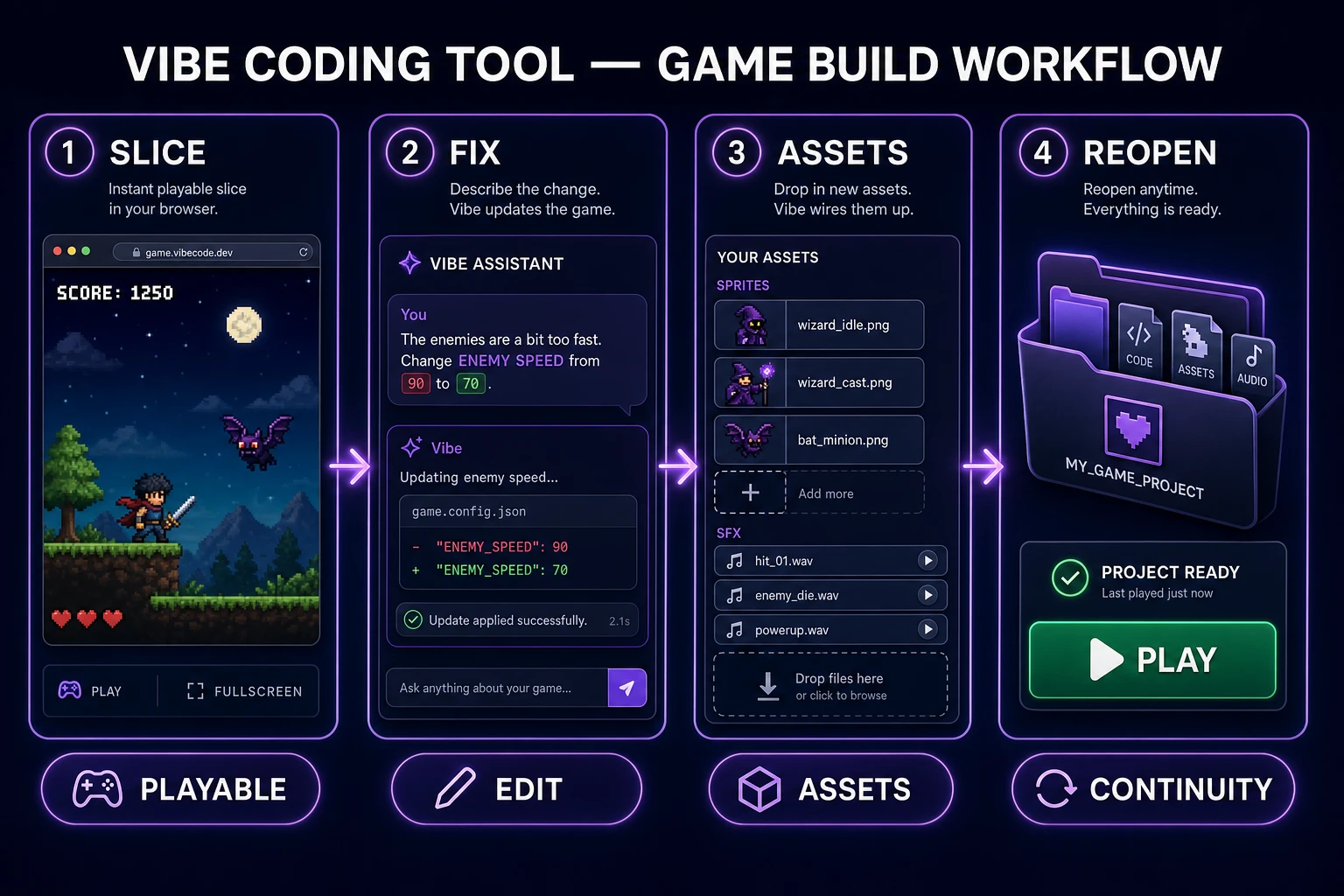
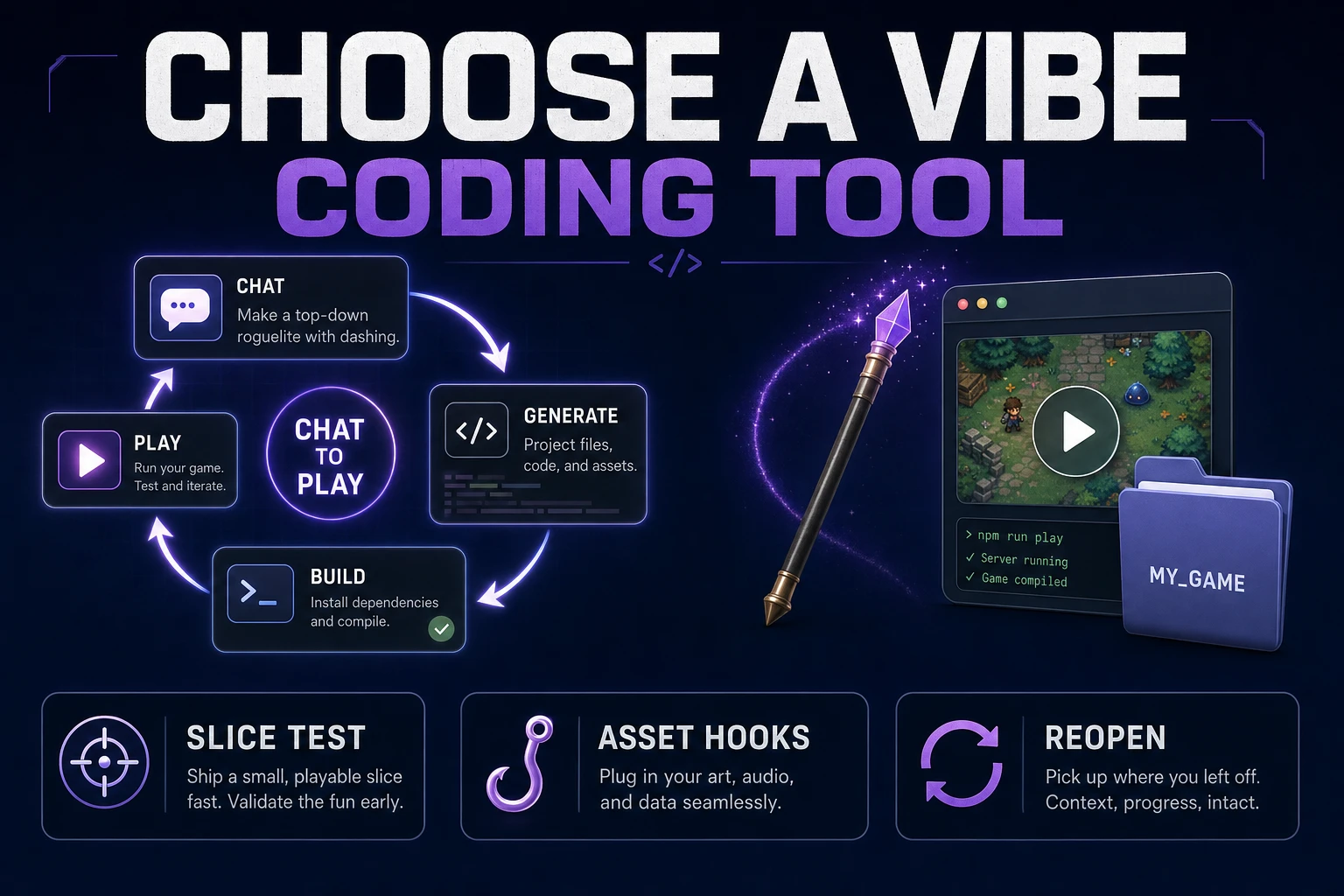
Vibe coding tool workflow from playable slice test through WizardGenie loop to art and audio hooks
Pick a vibe coding tool by the bottleneck it removes: live play, file continuity, asset hooks, or cheap iteration—not by the landing-page demo.

What a vibe coding tool must handle for games

DataForSEO lists vibe coding tool at 2,900 monthly searches with KD 44 in research-supplement.md, verified July 21, 2026. The plural sibling vibe coding tools shares the same volume with KD 23. Readers typing either phrase are shopping for a working loop, not a glossary entry. For the definition of the practice itself, see our earlier note on what does vibe coding mean.

Wikipedia defines vibe coding as AI-assisted development where you describe a task in natural language and an LLM generates code, often with heavy reliance on results and follow-up prompts. Andrej Karpathy coined the term in February 2025; Collins named it Word of the Year for 2025. That history matters less than the game-specific constraint: a playable build fails in the player’s hands, not in a unit-test green bar.

A vibe coding tool that belongs on a game desk must cover five jobs:

  • Project memory: scenes, assets, and prompts stay attached to one folder across sessions.
  • Runtime feedback: you can press play, observe a bug, and feed that observation back without re-explaining the genre.
  • Input and timing: keyboard, pointer, and frame timing are first-class, not bolted-on after a CRUD scaffold.
  • Asset intake: sprites, SFX, and music can enter the same project without a separate export ritual each time.
  • Cheap iteration: small feel fixes should not require a frontier-priced model on every keystroke.

If a product only generates a static landing page or a chat transcript, it is not a vibe coding tool for games—it is a text assistant wearing a demo costume.

Judge the loop, not the landing-page demo

Marketing reels compress thirty minutes of cleanup into fifteen seconds of “describe a game, get a game.” Your scorecard should ignore the reel and measure the second hour.

Run this fixed test on any candidate:

  1. Ask for a one-screen browser game with move, collide, score, and restart.
  2. Break one rule on purpose (wrong gravity, sticky wall, silent death) and ask for a single-variable fix.
  3. Add one sprite sheet and one short SFX without rewriting the scene from scratch.
  4. Quit, reopen, and confirm the project still runs with the same constants.

Tools that pass steps 1–2 but fail 3–4 are fine for throwaway experiments and weak for a jam. Games are stateful systems; the loop that preserves state is the product. MDN’s overview of web games still centers on a running loop, input, and assets—exactly the surfaces a vibe coding tool must keep warm.

Write the score on paper. Pass/fail beats vibes-about-vibes. A tool that nails the first generation and then collapses on the second fix will waste a weekend. Prefer the product that looks boring on the homepage and still preserves your constants on hour three.

Also time the loop. If a tiny gravity tweak takes longer than playing the screen twice, the tool is optimizing for spectacle. Game feel work is a high-frequency edit cycle; latency and rewrite risk matter more than a cinematic first render.

When you compare chat-only coding agents to game-aware ones, watch where context dies. Generic agents often rebuild the scene when you mention art. Game-aware agents should edit the existing scene file, swap a texture path, and leave your jump numbers alone unless you ask for a feel pass.
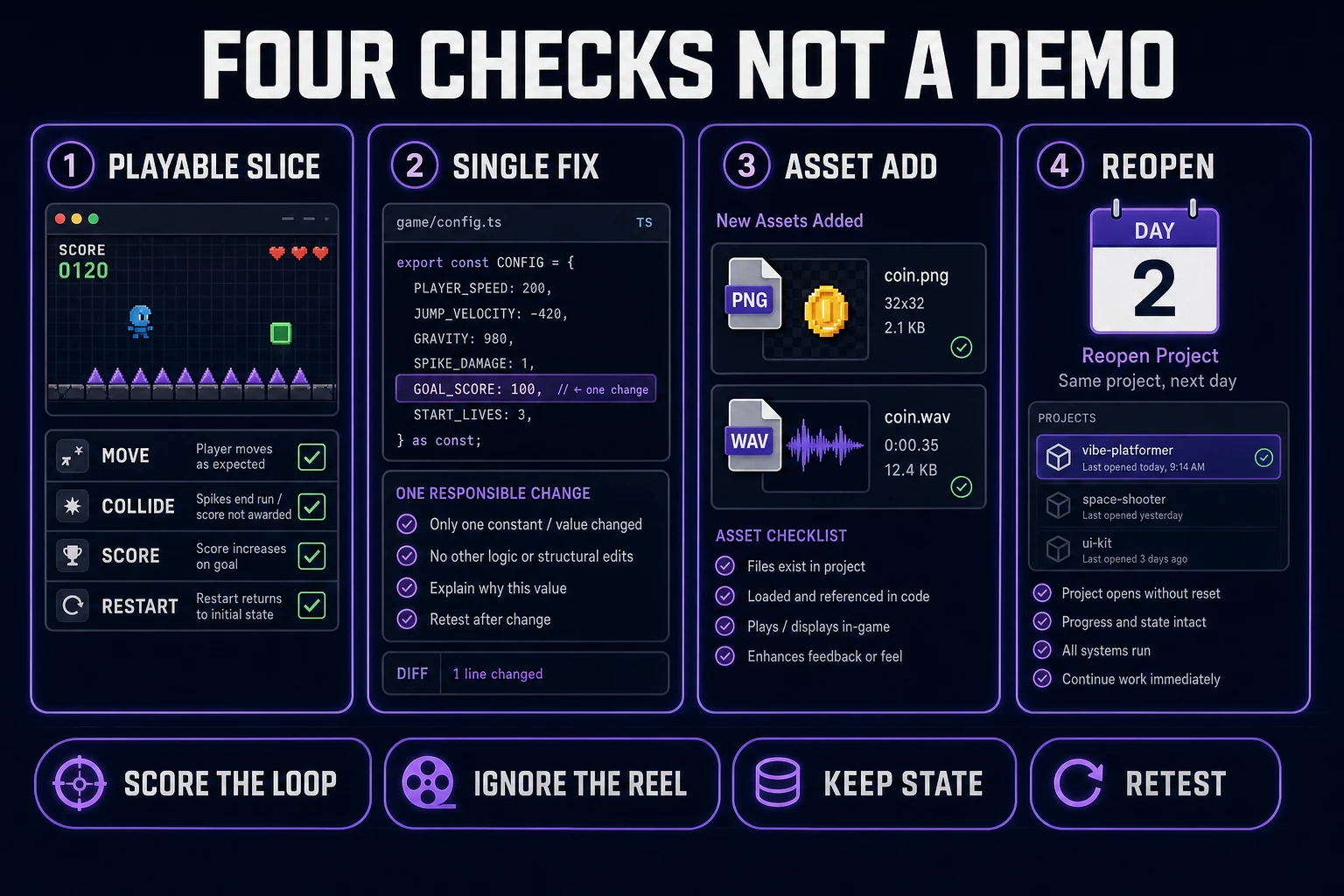
Scorecard for a vibe coding tool showing playable slice, bug fix, asset add, and reopen continuity panels
Four checks beat a feature list: playable slice, single-variable fix, asset add without rewrite, and reopen continuity.

Test a vibe coding tool with one playable slice

Do not start with your dream RPG. Start with a slice you can play in under a minute. A useful first prompt names genre, camera, win condition, and forbidden systems:

Build a one-screen browser action prototype. Top-down or side-view is fine—pick one and stick to it. Player can move and collide with walls. Collect three pickups to raise score. Touching an enemy restarts the run. Use colored rectangles only. No inventory, no dialogue, no menu beyond restart. Expose move speed and enemy speed as named constants.

That prompt forces the vibe coding tool to prove input, collision, scoring, and restart. Those four systems appear in almost every jam genre. If the tool cannot keep them stable across three revisions, it will not survive your real project.

After the slice runs, write three failing observations as the next prompts. Example: “Enemy speed 90 feels unfair on the first screen; lower to 70 and keep player speed fixed.” Specific failures produce specific diffs. Vague vibes produce random rewrites.

For browser targets, pin a real runtime when you care about physics behavior. As of July 21, 2026, the stable Phaser release on phaser.io/download/stable is Phaser v4.2.1 “Giedi” (released July 9, 2026). Naming the version in the prompt reduces silent API drift between sessions.
Check file access, runtime feedback, and asset handling

Three plumbing questions separate toys from tools:

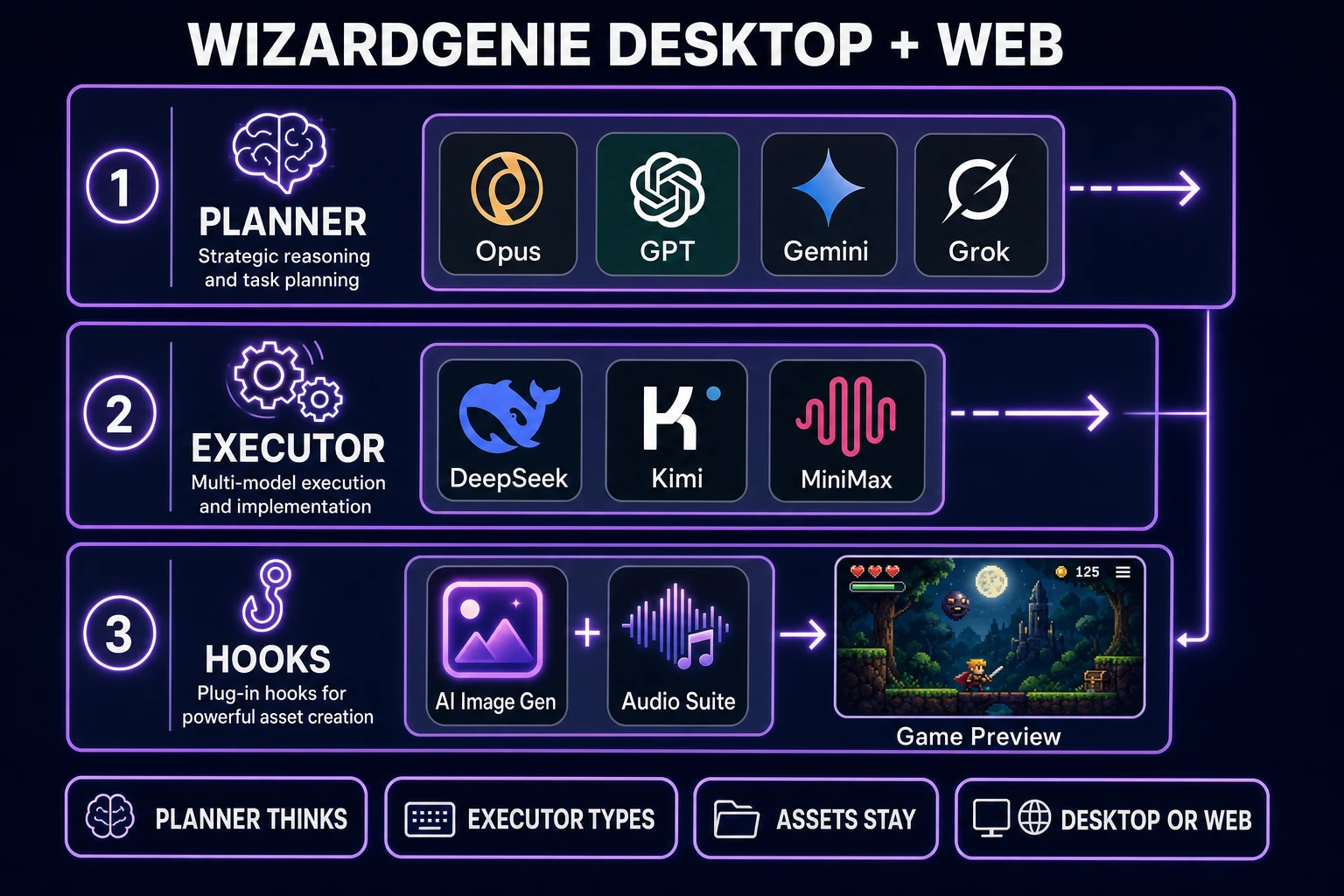
  • Where do files live? A desktop project with a real folder beats a disposable sandbox when you need git, local textures, or a teammate. WizardGenie ships both a Windows desktop app and a web entry at /wizard-genie/app—pick based on whether you need native filesystem access or a no-install start.
  • How do you see the bug? A live preview beside the chat is mandatory. If you must export, zip, and upload elsewhere to feel a jump, the loop is broken.
  • How do assets enter? Dragging a PNG into the project and referencing it should be one step. If every art change requires regenerating the entire game, you will stop adding art.

Asset handling is where many general coding tools stall for games. They write elegant React, then shrug when you need a 32×32 walk cycle. Sorceress bridges that gap by keeping generation tools on the same account as the coding agent: pull concept frames from AI Image Gen, then keep iterating code in WizardGenie without pasting a new lore dump every time.

For a wider stack view beyond the coding loop, see ai tool for game development and the catalog in the tools guide.

WizardGenie desktop and web vibe coding tool paths with planner executor pairing and asset hooks
Desktop for filesystem depth, web for instant entry; planner models think, cheap executors type, asset tools feed the same project.

Compare browser and desktop project workflows

Browser entry wins when you want zero install and a shareable session. Desktop wins when you want long agent runs, local asset libraries, and ordinary folder habits. WizardGenie supports both; the mistake is pretending they are identical.

Use the browser path to validate the slice and the prompt style. Move to desktop when the project grows past a single scene, when you need to drop dozens of frames into an assets folder, or when you want the agent to keep working while you playtest on a second monitor.

A practical habit: keep a one-page movement contract in the repo root. Paste it at the top of every substantial prompt for a week. Agents forget; files remember. When a teammate joins, they inherit the same gravity and coyote numbers instead of inventing a new jump language from a Discord clip.

Version the contract when you intentionally change feel. Do not let the agent edit the contract file unless the prompt says "feel pass" and lists the exact fields allowed to change. That single gate prevents silent power creep where every bugfix also rewrites jump height.

Either way, treat the movement and combat numbers as sacred constants. Ask the agent to refuse silent edits to those constants unless you request a feel pass. That rule alone prevents half the “it rewrote my jump again” failures that make people quit vibe coding mid-jam.

Connect art, audio, and code without context loss

Games are not code-only products. A vibe coding tool that cannot absorb art and audio will push you into three disconnected chats and a broken import step.

Practical wiring on Sorceress:

  • Generate character or prop concepts in AI Image Gen, then reference the files from the game project.
  • Build UI beeps, hits, and pickups in the audio suite (SFX Gen, Music Gen, Speech Gen) and name files by event (pickup.wav, hurt.wav).
  • Ask WizardGenie to load those paths and fire them on state transitions—not on raw button presses—so feedback teaches the rules.

Name assets like code. pickup_coin.png and sfx_hurt.wav beat final_final2.png. When the vibe coding tool searches the project, predictable names reduce hallucinated paths. After each generate-and-import cycle, play for sixty seconds before asking for more systems. Art and audio bugs hide under new features if you keep scaffolding.

If you need a prompt-to-playable narrative that starts even earlier, the sibling guide prompt to game ai covers the first scaffold. This article stays on tool selection: which loop you trust for the next fifty revisions.

Choose a vibe coding tool by the project bottleneck

Match the tool to the failure you hit last week:

  • Bottleneck: blank-file paralysis. You need a strong planner to scaffold systems. In WizardGenie’s current lineup (verified July 21, 2026): Claude Opus 4.7, GPT-5.5, Gemini 3.1 Pro, or Grok 4.2 for planning. Pair with a cheap executor—DeepSeek V4 Pro, Kimi K2.5, MiniMax M2.7, or Gemini 3.1 Flash-class models when available—for tiny follow-ups. Do not put a frontier-priced model on every typing pass; that erases the cost advantage of the pattern.
  • Bottleneck: feel tuning. You need live play plus single-variable edits. Prioritize tools with an always-on preview and named constants.
  • Bottleneck: art and audio context loss. You need asset hooks beside the agent, not a separate SaaS island.
  • Bottleneck: reopen amnesia. You need desktop folder continuity or an equivalent persistent project.

Claude Sonnet 4.6 remains a strong general coding model in the Sorceress catalog, but it is a poor default executor when you are burning tokens on twenty micro-fixes. Keep Sonnet for mid-weight reasoning tasks; keep the typing loop cheap.

Retest after every major model rotation. The July 21, 2026 catalog will not be the December catalog. Re-run the four-step slice test whenever a planner or executor changes, and keep the written movement contract beside the chat so the new model inherits your rules instead of inventing a new genre.

If a candidate cannot clear that retest, it is not your vibe coding tool for games—no matter how polished the homepage looks. Choose the loop that survives play, assets, and reopen. Everything else is costume.

FAQ-ready notes on picking a vibe coding tool

Common traps: scoring a tool on the first generation only; allowing silent constant edits; separating art into a chat that never sees the scene graph; and treating desktop vs web as a brand preference instead of a filesystem decision. Fix those four and most “vibe coding does not work for games” complaints disappear.

Frequently Asked Questions

What should a vibe coding tool prove before I trust it for a game jam?

Run one playable slice with move, collide, score, and restart. Then demand a single-variable feel fix, add one sprite and one SFX without a full rewrite, and reopen the project to confirm continuity. If any of those four steps fail, the tool is a demo machine, not a jam partner.

Is WizardGenie only a browser vibe coding tool?

No. WizardGenie runs on Windows desktop with native filesystem access and also at /wizard-genie/app in the browser. Use web for instant entry and desktop when you need longer agent sessions, local asset folders, and ordinary project habits.

Which models should I pair inside a vibe coding tool for games?

As of July 21, 2026, Sorceress lists Claude Opus 4.7, GPT-5.5, Gemini 3.1 Pro, and Grok 4.2 among strong planners, with DeepSeek V4 Pro, Kimi K2.5, and MiniMax M2.7 as practical cheap executors. Keep frontier models off the typing pass so micro feel fixes stay affordable.

How is a vibe coding tool different from a generic coding chat?

A game-ready vibe coding tool preserves a running project, shows live play, and accepts art and audio into the same workspace. A generic chat that regenerates the whole scene when you mention sprites will erase your jump numbers and waste the jam.

Do I need Phaser to use a vibe coding tool for browser games?

No, but pinning a real browser runtime helps. As of July 21, 2026, Phaser v4.2.1 Giedi is the stable release on phaser.io. Name the version in prompts when physics behavior matters, and keep the first scene tiny until the loop is honest.

Sources

  1. Vibe coding — Wikipedia
  2. Download Phaser v4.2.1 — Phaser
  3. Games — MDN Web Docs
Written by Arron R.·1,886 words·8 min read

Related posts