Dash How to Make a Platformer (Browser AI Loop)

By Arron R.8 min read
How to make a platformer starts with jump feel, not levels. WizardGenie scaffolds move, jump, and collide; Quick Sprites and SFX Gen make the loop readable befo

Most first platformers fail on feel, not on missing levels. The jump hangs, the ledge forgives nothing, or death dumps the player into an unclear restart. Start with a smaller contract: run, jump, collide, die, and respawn on one screen. This guide turns that contract into a browser build with WizardGenie, then makes the loop readable with Quick Sprites and SFX Gen. Phaser version facts below were verified against the official Phaser download page on July 20, 2026. WizardGenie and asset-tool behavior were checked against the Sorceress source the same day.
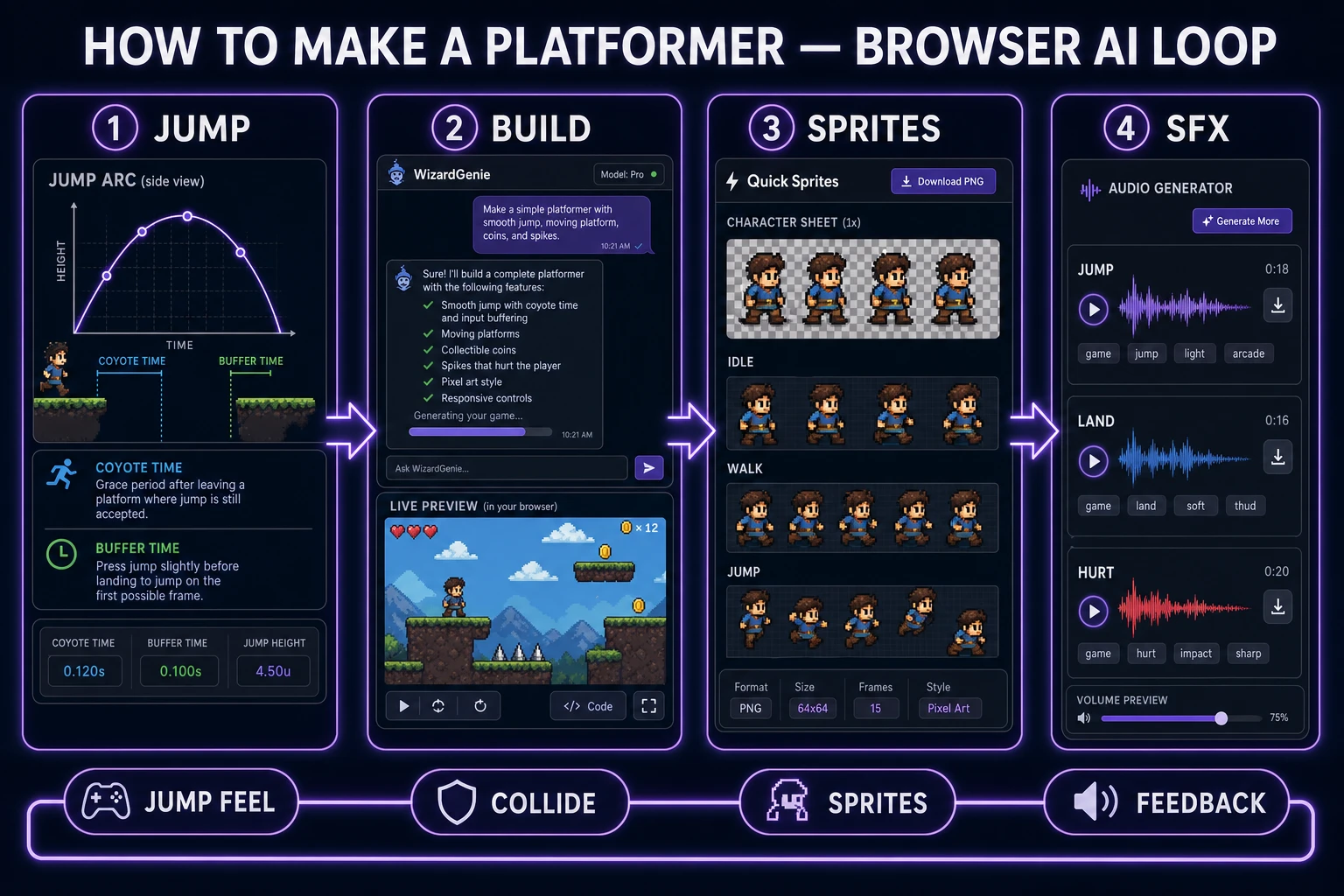
How to make a platformer workflow showing jump feel, WizardGenie build, Quick Sprites frames, and SFX feedback
A shippable platformer begins as jump numbers, becomes a collide-and-respawn loop, gains readable sprites, and earns trust with short land and hurt feedback.

What how to make a platformer must define first

The primary query how to make a platformer has 320 monthly searches and KD 0 in the DataForSEO-backed research-supplement.md, verified July 20, 2026. Its natural sibling how to make a platformer game shares the same volume and difficulty. Readers typing those phrases usually want a playable side-view mover with jumps, not a genre essay.

A platform game is defined by traversal across suspended ground, with jumping as the central skill. For a first browser prototype, translate that into six written fields before any art:

  • Run speed: horizontal units per second while grounded and airborne.
  • Jump velocity: the initial upward impulse on a successful jump.
  • Gravity: constant downward acceleration after the jump apex.
  • Coyote time: how long after leaving a ledge a jump still counts.
  • Jump buffer: how long a premature jump press is remembered.
  • Max fall speed: the terminal velocity that keeps long drops readable.

Add three rules beside those numbers: what counts as ground, what kills the player, and where respawn restores control. If you cannot fill that card, keep designing. An agent given only “make a fun platformer” will invent a different contract on every revision.

Lock jump feel before levels or art

Jump feel is the product. Levels are arrangements that stress that product. Art is a readability layer over both. Order them that way or you will polish the wrong failure.

Build a single gray box stage with two platforms, one gap that requires a clean jump, one gap that requires coyote or buffer forgiveness, and one spike or pit. Play it for five minutes with keyboard only. If you routinely clip the near ledge, raise coyote time slightly. If you press jump early and nothing happens on landing, raise the buffer. If the apex feels floaty, increase gravity or reduce jump velocity—change one variable at a time.

Axis-aligned box checks are enough for this stage. MDN’s guide to 2D collision detection covers AABB overlap as the practical default for rectangles that do not rotate. Keep player hitboxes slightly smaller than the visual sprite later so hair and cape pixels do not kill the run. Do not introduce slopes, one-way platforms, or wall jumps until the basic arc is honest.

The Sorceress how to make a platformer workflow

The workflow has four handoffs. Each one produces an artifact you can inspect before moving on:

  1. Movement card: the six numbers plus ground, hazard, and respawn rules.
  2. Playable gray box: WizardGenie writes and runs the browser loop with colored shapes.
  3. Readable cast: Quick Sprites supplies player and hazard frames that stay clear at play size.
  4. Feedback pack: SFX Gen adds short land, jump, and hurt cues that confirm state changes.

WizardGenie is available on desktop and web. On both surfaces the core loop is the same: describe the game, let the agent write and run it, then iterate in real time. Bring your own API key or use the trial path exposed in the product. Model choices in the current Sorceress catalog include Claude Opus 4.7, Claude Sonnet 4.6, GPT-5.5, Gemini 3.1 Pro, DeepSeek V4 Pro, Kimi K2.5, Grok 4.2, and MiniMax M2.7. For platformer prototyping, prefer a strong planner for the first scaffold and a cheaper fast model for tiny feel tweaks so iteration stays cheap.

If you want Phaser specifically, pin a real version. As of July 20, 2026, the stable release on phaser.io/download/stable is Phaser v4.2.1 “Giedi” (released July 9, 2026). Name that version in the prompt when you care about Arcade Physics body behavior. Keep the first scene tiny: one camera, one player body, static platforms, one hazard group.

Optional cleanup tools live in the Sorceress tools guide, but this how to make a platformer path only needs the three featured tools below. A longer Phaser-focused sibling lives at how to make a 2d platformer game if you later want a deeper engine angle.
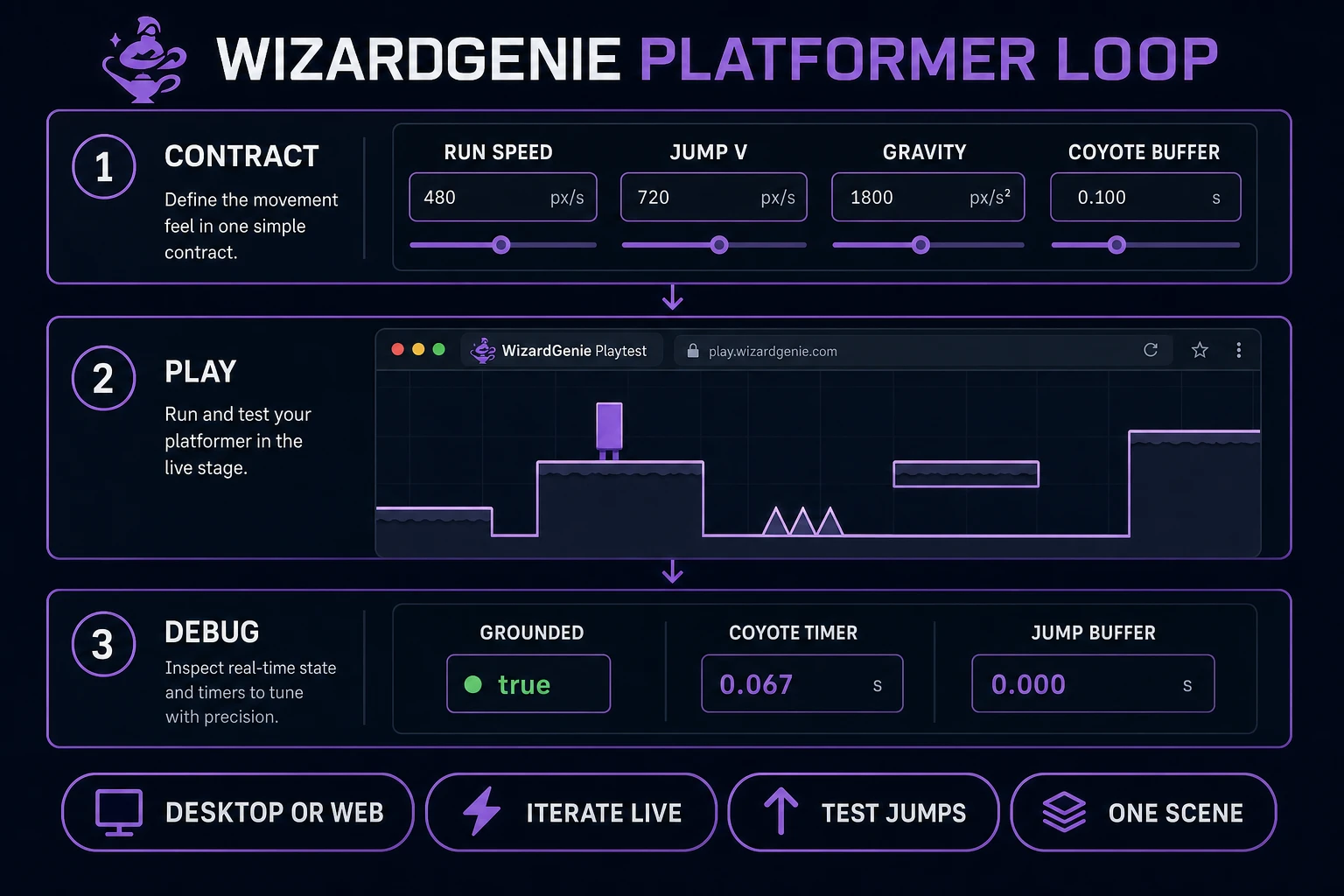
WizardGenie platformer loop with movement contract fields, live browser stage, and grounded coyote buffer debug values
Expose grounded, coyote, and buffer timers in a debug strip until jump inputs match the written contract every time.

Step 1 — scaffold move, jump, and collide in WizardGenie

Open WizardGenie and lead with the contract, not the theme. A useful first prompt is:

Build a browser side-view platformer on one screen. Player run speed 160, jump velocity -420, gravity 1200, max fall speed 600, coyote time 100 ms, jump buffer 100 ms. Use axis-aligned boxes for the player and platforms. Include left/right and jump on keyboard, a grounded flag, coyote and buffer timers, one spike hazard that respawns the player at a marked spawn, and a small debug strip showing grounded, coyote remaining, and buffer remaining. Use colored rectangles only. No inventory, no enemies with AI, no menu.

This prompt gives the agent boundaries it can test. “Make a Mario-like” does not. Ask the first revision to freeze the movement numbers in named constants and to reject silent changes to those constants unless you request a feel pass. When something feels wrong, quote a single failing case: “From the left ledge, releasing jump at apex still floats for half a second; increase gravity 10% and keep jump velocity fixed.”

Route keyboard and optional touch into one jump request function. The input layer should only say “jump pressed this frame” or “jump held.” The movement layer decides whether coyote, buffer, or grounded state allows the impulse. That split prevents a touch button from inventing a second physics ruleset.

Death must be boring and reliable. On hazard overlap, disable controls, play the hurt cue later, snap to spawn, reset velocity, and re-enable controls after a short lockout. Do not rebuild the scene from scratch on every death unless you are intentionally testing load paths. A respawn that reallocates platforms will hide collision bugs behind loading noise.

Step 2 — generate readable player and hazard sprites

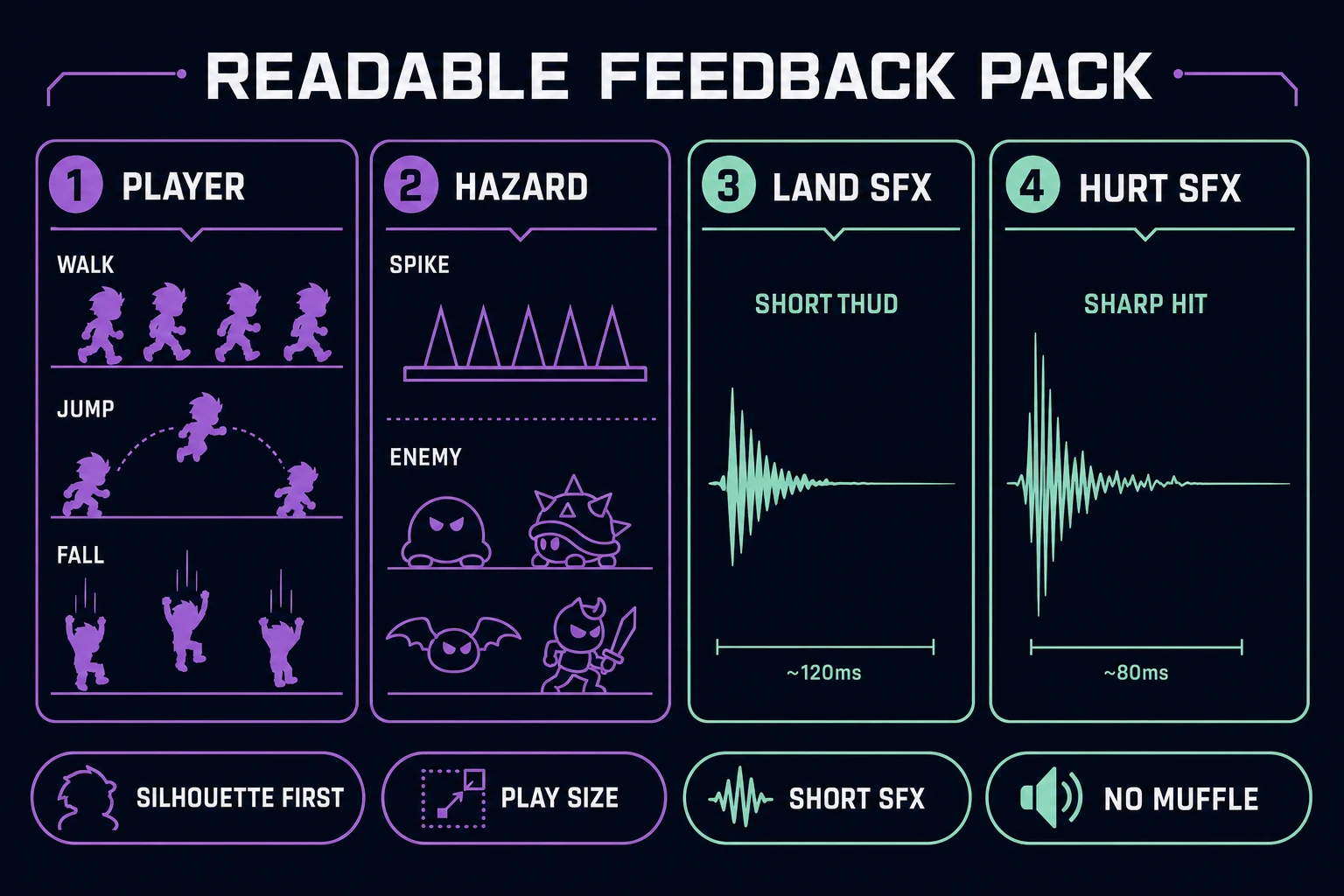
Only after the gray box passes a five-minute playtest should you replace rectangles. Open Quick Sprites and generate a small player set: idle, walk, jump, fall. Keep the silhouette family identical across those frames. Then generate one hazard family—spikes or a simple patrolling enemy—with a taller, sharper outline than the player so threat reads before contact.

A practical player prompt is “16-bit side-view adventurer, readable silhouette, idle walk jump fall, transparent background, game sprite sheet, no text.” A practical hazard prompt is “16-bit metal spike cluster, sharp triangular silhouette, transparent background, single frame.” Export the sheet, then verify each frame at the on-screen pixel size you actually use. Detail that looks good in a gallery preview can vanish at 32×32.

Match collision boxes to the solid body, not the full art bounds. Trim the feet box so the character appears to stand on the platform rather than hover above it. If you need a broader sprite pipeline later, the AI sprite generator sheet workflow covers sheet hygiene in more depth. For this prototype, one consistent player sheet and one hazard sheet are enough.

Quick Sprites player and hazard silhouettes beside short land and hurt sound waveforms for platformer feedback
Silhouette clarity and short confirmation sounds carry more gameplay information than extra decoration on the first screen.

Step 3 — add land, jump, and hurt feedback sounds

Open SFX Gen and generate three short cues: jump (soft rising tick), land (low thud under 200 ms), and hurt (sharp hit without long reverb). Keep them dry. Long tails stack during rapid jumps and turn into mud. Name files by event, not by mood: jump.wav, land.wav, hurt.wav.

Wire sounds to state transitions, not to raw button presses. Jump audio fires when the impulse is actually applied. Land audio fires on the grounded false→true edge after a fall, not on every frame while standing. Hurt audio fires once when the death lockout begins. That mapping teaches players what the rules accepted, which is the entire point of feedback in a platformer.

Volume should sit under any future music bed. If a land thud masks dialogue later, shorten it rather than lowering the whole bus into silence. You can refine clips in other Sorceress audio tools later; for the how to make a platformer prototype, three honest cues beat a large unfinished library.

Playtest coyote time, jump buffer, and death recovery

Finish with a written matrix. For the single screen, record:

  • Walk off a ledge and press jump within coyote time — must jump.
  • Walk off a ledge and press jump after coyote expires — must fail.
  • Press jump slightly before landing on the tall platform — buffer must fire on touch.
  • Hold jump through a spike — death must interrupt the hold and require a fresh press after respawn if that is your rule.
  • Respawn — controls, velocity, and camera must restore without a stuck hurt state.

Run the matrix after every art or sound swap. Visual changes often alter perceived contact points even when physics constants stay fixed. If players still miss jumps that the matrix says are legal, the gap is too wide for the current arc—shorten the gap before blaming the player.

Only then add a second screen, a moving platform, or an enemy with patrol logic. Each new system should stress the same jump contract, not replace it. When the contract holds across three screens, you have finished the core of how to make a platformer in the browser. Everything else is content.

Common issues when learning how to make a platformer

  • The jump changes every agent reply. Freeze constants and request one numeric change at a time with a before/after feel note.
  • Walls feel sticky. Separate horizontal resolution from vertical resolution, and zero only the axis that hit.
  • Sprites look good but collisions feel wrong. Shrink the hitbox and align feet to the platform top; do not enlarge physics to match decorative pixels.
  • Coyote time feels like flying. You raised the window too far. Bring it back near 80–120 ms and widen the gap geometry instead.
  • Death soft-locks input. Clear the hurt lockout timer on respawn and require a new jump press after unlock.
  • SFX spam on landing. Trigger land audio on the grounded edge, not while grounded remains true.

Frequently Asked Questions

Do I need an engine install to follow this how to make a platformer guide?

No. WizardGenie runs on desktop and in the browser, and it can write and iterate a playable browser platformer from a written movement contract. You still need to play the result critically: floaty jumps, sticky walls, and broken death recovery are design bugs, not missing installs. Keep the first draft on colored rectangles until the feel is honest.

What should I define before asking an AI agent to build a platformer?

Write six numbers and three rules: run speed, jump velocity, gravity, coyote time, jump buffer, max fall speed, plus what counts as ground, what kills the player, and where respawn happens. Without those values, the agent invents a different game every revision. A short contract produces reproducible bugs you can fix with one follow-up prompt.

What is coyote time and jump buffering in a platformer?

Coyote time is a few frames after leaving a ledge where a jump input still counts as grounded. Jump buffering remembers a jump press for a few frames before landing so the next touch of ground fires the jump. Together they make intentional leaps feel fair on imperfect timing. Start around 80 to 120 ms for each and tune by feel, not by copying another game exact numbers.

Should I generate art before the movement loop works?

No. Art hides bad feel. Scaffold move, jump, collide, death, and respawn with simple shapes first. Only after the jump arc and hazard reads are honest should you replace rectangles with Quick Sprites frames. If a silhouette fails at play size, fix the silhouette before adding idle polish.

Which Phaser version should a 2026 browser platformer target?

As of July 20, 2026, the current stable Phaser release is v4.2.1 Giedi, released July 9, 2026 per phaser.io. Confirm the tag on the official download page before pinning a CDN or npm version. WizardGenie can target Phaser for browser builds; keep collision and camera logic simple until the jump contract is proven.

Sources

  1. Download Phaser v4.2.1 — Phaser
  2. 2D collision detection — MDN Web Docs
  3. Platform game — Wikipedia
Written by Arron R.·1,779 words·8 min read

Related posts