Google AI Studio Vibe Coding (Game-Dev Honest Path)

By Arron R.14 min read
Google AI Studio vibe coding via Build mode and the Antigravity agent ships full-stack web apps and Kotlin Android prototypes well but stops at the game-asset w

Searches for google ai studio vibe coding in mid-2026 are running hot because Google rebuilt the product twice in three months: the March 20, 2026 launch turned the old prompt playground into a full-stack Build mode powered by the Antigravity coding agent, and the May 19, 2026 I/O reveal bolted native Android (Kotlin + Jetpack Compose) on top. The product is genuinely good at what it ships — production-ready web apps with Firebase auth and Firestore, or native Android prototypes with an in-browser emulator. The product is also not a game engine. This post walks the honest game-dev read on Google AI Studio vibe coding: what it actually builds today, what it cannot reach, and the browser-tab game-dev stack that picks up where Build mode stops. All facts verified live on 2026-06-08.
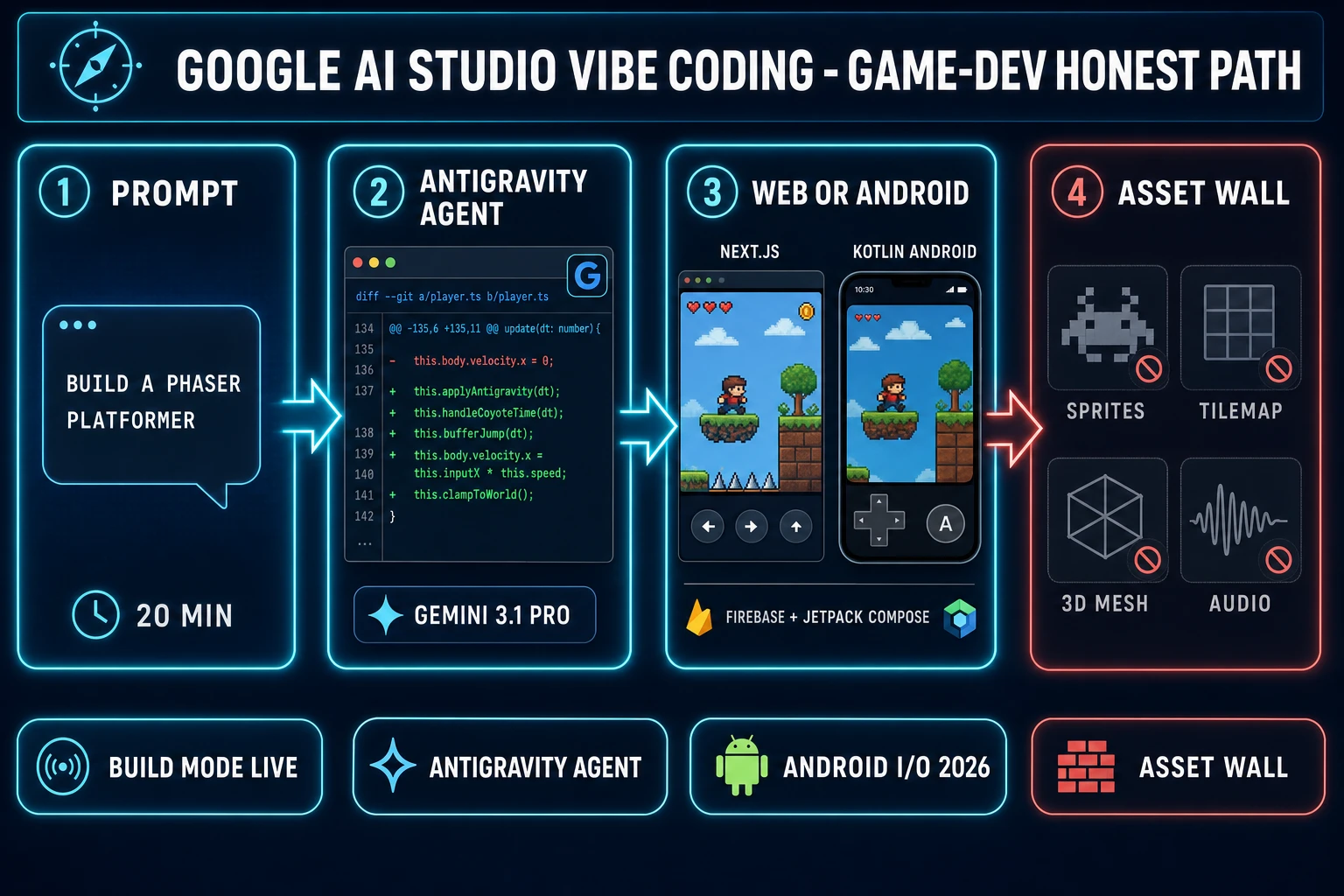
Google AI Studio vibe coding game-dev honest path — 4-step pipeline from prompt to web app, then bouncing off the game-asset wall
The Google AI Studio vibe coding loop ships a Firebase-backed web app or a native Android shell quickly — then stalls on sprites, tilemaps, 3D meshes, and adaptive audio. WizardGenie wraps the same eight frontier coding models alongside the game-asset stack in one tab.

What “google ai studio vibe coding” actually means in 2026

Vibe coding is the loose workflow Andrej Karpathy named in February 2025 (per the Vibe coding Wikipedia entry): describe intent in plain English, accept the diff sight unseen, run the build, watch the screen, react to what you see. Vibe coding with Google AI Studio specifically means doing that loop inside Google’s browser-based Build mode at aistudio.google.com — Gemini drives the chat, the Antigravity coding agent applies file edits across a multi-file project, and the preview pane renders the running output every keystroke.

Two important framing distinctions before going further. First, “Google AI Studio vibe coding” is the browser surface; the standalone Google Antigravity 2.0 desktop IDE is the same underlying agent harness in a heavier shell, and the new mobile app (pre-registration opened at I/O 2026) is the same pipeline on a phone. The agent and the model behavior are identical across the three surfaces because they all hit the same Gemini API. Second, Build mode is a real product, not a demo — Google reports it has been used internally to build hundreds of thousands of apps over the months leading into the public launch, and the public version ships to anyone with a Google account at zero install cost.

What the surface does well is exactly what a non-game developer wants: scaffolding a full-stack web app, an Android prototype, or a Workspace-integrated dashboard from a prompt. What it does not do, on purpose, is generate the asset stack a real game needs. The honest answer to “can I vibe-code my game in Google AI Studio?” depends entirely on what kind of game.

Inside Google AI Studio Build mode (Antigravity, Firebase, Next.js, Android)

Build mode replaced the legacy prompt playground on March 20, 2026 (Hard Rule #16 verification: blog.google announcement “Vibe Code to production with Google AI Studio” cross-referenced with the gemilab.net practical guide and the official ai.google.dev Build mode docs on 2026-06-08). The agent on the inside is Antigravity — originally a standalone VS Code-derived IDE acquired from the Windsurf team in late 2025, then folded directly into the browser Build mode. Antigravity maintains persistent context across the whole project: installed npm packages and their versions, the file tree, previous prompts and the diffs they produced, Firebase services provisioned, secrets stored. That persistent context is the difference between “LLM that writes one file at a time” and “agent that ships a working multi-file app.”

The web side of Build mode ships React, Next.js, or Angular as the framework choices, with full-stack runtimes on the server. The Firebase integration is the headline March 2026 feature: when the agent detects that the app needs persistent data or login, it asks for one approval and then provisions Cloud Firestore, configures Firebase Authentication with the Google Sign-In provider, and writes the SDK wiring into the generated code. The Secrets Manager stores third-party API keys server-side (the agent never embeds them in client code). One-click deployment to Cloud Run closes the prompt-to-production loop without leaving the browser tab.

I/O 2026 (May 19, 2026 — verified via the blog.google I/O recap on 2026-06-08) layered four more capabilities. Native Android arrived first: pick “Build an Android app” in the platform picker and the agent generates a standard Gradle project with Kotlin and Jetpack Compose, Material 3 theming, single-activity architecture, and ViewModels. The in-browser emulator previews the running app, ADB pushes it to a real device over USB, and a single click promotes the build to the Google Play Internal Test Track for invite-only testing. The Annotation Mode tool lets you draw on the live preview to request specific UI changes, custom image assets are generated inline via the Nano Banana image model, Workspace integrations call Drive and Sheets natively, and the Antigravity Export button hands a project (with full conversation history, files, and secrets) over to the Antigravity 2.0 desktop IDE for heavier local iteration.

Two real caveats worth pinning down. Android apps in Build mode are explicitly client-side only — no Firebase, no Workspace APIs, no Secrets Manager, no multiplayer runtime on the Android side (confirmed in the ai.google.dev Android Build mode docs on 2026-06-08). And per TechCrunch’s I/O 2026 coverage, the Android apps Build mode generates are currently intended for personal use and Internal Test Track distribution; the family-and-friends and full Play Store publishing flow is on the roadmap, not shipping today.
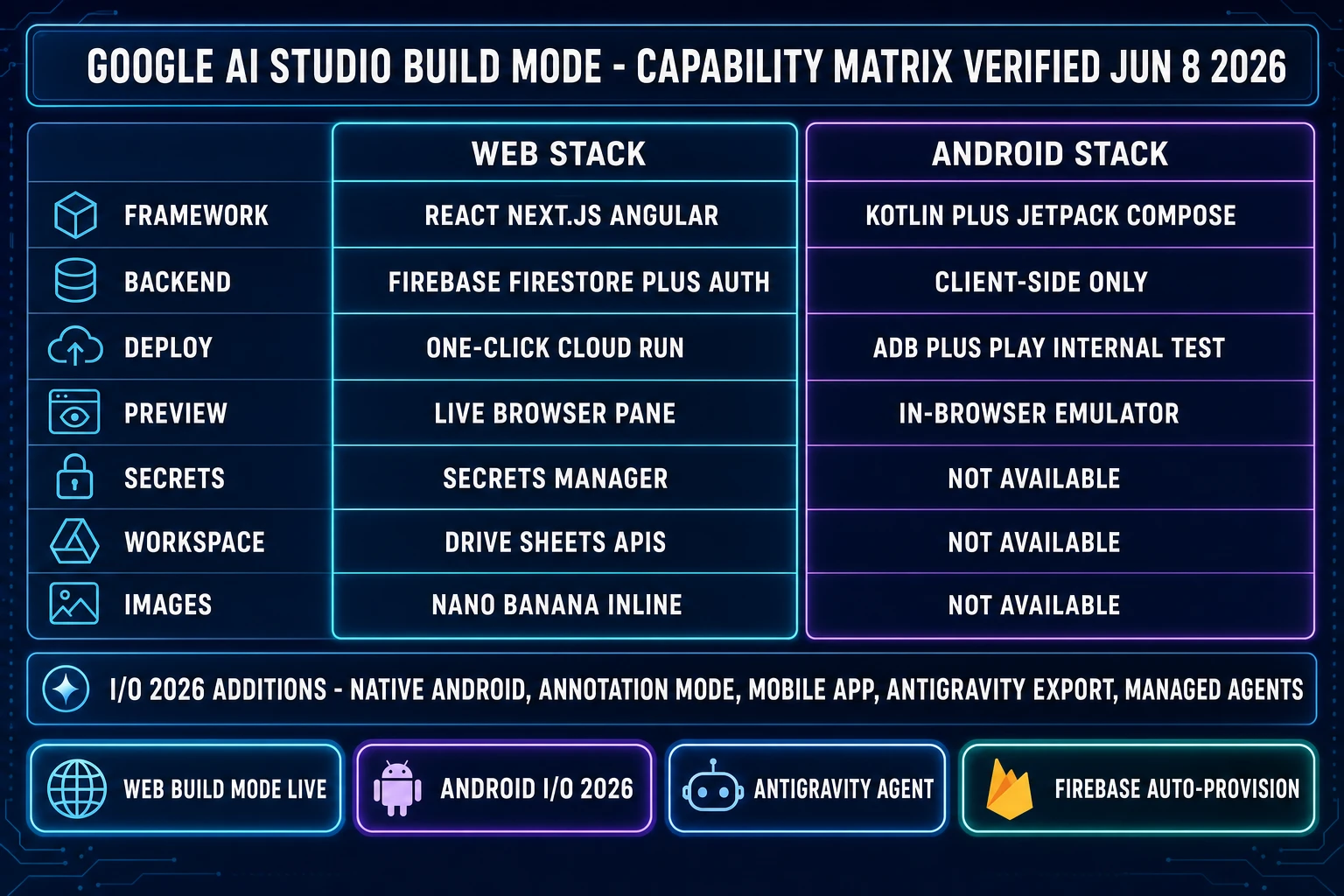
Google AI Studio Build mode feature matrix — web full-stack with Firebase vs Android client-only with Kotlin and Jetpack Compose, plus I/O 2026 additions verified June 8 2026
The 2026 Google AI Studio Build mode capability matrix as of 2026-06-08. The web side ships full-stack with Firebase; the Android side ships client-only Kotlin / Jetpack Compose with an in-browser emulator.

Where google ai studio vibe coding wins (and where it stops for games)

The wins are clear-cut. A Build mode session that targets a CRUD web app with login, a persisted user profile, and a Firestore-backed list view ships a working deploy in a single 20-minute prompt loop. A productivity tool that calls Sheets, a small social app, an internal company dashboard, a marketing micro-site, a typing-test web app, a kanban board — those are the workloads Build mode was rebuilt for and they land cleanly. Pick the Android platform instead and the same loop ships a Kotlin app on the in-browser emulator with theme, navigation, and local state; push to ADB and the app runs on real hardware in minutes.

The stop point for games starts where the prompt asks for anything past a code artifact. A 2D platformer brief that says “side-scrolling Phaser game with a wizard who double-jumps, three coin pickups, and patrolling slime enemies” gets a working Phaser scaffold from Build mode in the same way it would from any frontier-LLM agent — the gameplay code is fine. The wizard sprite is a stock asset placeholder, the slime is the same, the coin pickup chime is a Web Audio synthesized beep at best, and the tilemap is a manual TODO comment in the source. Build mode is built around React / Next.js / Angular for web and Kotlin + Jetpack Compose for Android; it is not built around Phaser 4, Three.js, PlayCanvas, native HTML5 canvas + Web Audio, or any other engine the indie game ecosystem actually ships to.

The deeper structural issue is that game dev is multi-asset by definition. A finished playable game is gameplay code plus a sprite sheet (per the Sprite computer graphics Wikipedia entry, sprites are rasterized images composited at runtime), plus often a 3D mesh in glTF or USDZ format, plus a rigged skeleton (per the Skeletal animation Wikipedia entry), plus tile-able PBR textures, plus a music track, plus a stack of sound effects, plus usually voice. Gemini is a frontier coding and reasoning model (per the Large language model Wikipedia entry); it does not render pixel art, it does not extrude meshes, it does not bake skeletal rigs, and it does not synthesize WAV files of footsteps on gravel. Nano Banana inside Build mode handles custom UI illustration well — it is not a game-sprite, game-tileset, game-3D-asset, or game-audio pipeline.

The real game-dev stack Google AI Studio doesn’t ship

Walk the actual asset list a working game needs and the gap becomes concrete. Character art is a frame-consistent reference-locked image model — Build mode’s single Nano Banana rail does not expose reference-image conditioning the way a multi-rail image stack does. Sprite sheets are walk cycles, idles, and VFX in fixed pixel dimensions with packed rows — there is no built-in way to ask Build mode for a 48x48 four-angle walk cycle of a wizard, get back the packed sheet, and drop it into the running game. 3D meshes are image-to-3D or text-to-3D generations exported as glTF (per the Khronos glTF 2.0 specification) — Build mode does not call out to TRELLIS, Hunyuan 3D, Tripo, Meshy, or Rodin. Rigging is mocap retargeting onto a generated mesh — also not in scope. PBR textures are tile-able multi-map outputs at 1024 or 2048 pixels — not in scope. Music is full-track AI generation with stems — also not in scope. SFX are bouncy game sounds at game-correct lengths — not in scope. Voice is character-locked TTS with multiple personas — not in scope.

None of this is a failure on Google’s part — the product wasn’t built to do those things. It is built to ship full-stack apps quickly, and it does that well. The mismatch only shows up when a game developer types “vibe-code my game” into Google AI Studio expecting the asset half to be there. The honest path is to use Build mode for what it is good at (a code-only artifact) and run the asset stack in tools that exist precisely to generate game-quality assets.
WizardGenie: a game-engine-first alternative for vibe coding

WizardGenie is the AI-native game engine at the heart of Sorceress. The framing is intentionally opposite to Build mode: instead of one Google-owned model wired to one Google backend stack, WizardGenie exposes an eight-rail model picker (verified against src/app/_home-v2/_data/tools.ts CODING_MODELS on 2026-06-08) and ships ready to call Claude Opus 4.7, Claude Sonnet 4.6, GPT-5.5, Gemini 3.1 Pro, DeepSeek V4 Pro, Kimi K2.5, Grok 4.2, and MiniMax M2.7 on a bring-your-own-key basis. You pay providers directly, no markup, and switch models per session.

The cost-aware posture for a long agentic session is the Dual-agent Planner + Executor preset. The economic logic is “expensive reasoner thinks, cheap fast typer executes” — route the planning step (the hard reasoning, the architecture decision, the diff plan) to a frontier reasoner like Claude Opus 4.7, GPT-5.5, Gemini 3.1 Pro, or Grok 4.2, and route the actual code-typing half (the bulk of the output tokens) to a true cheap executor like DeepSeek V4 Pro, Kimi K2.5, MiniMax M2.7, Gemini 3.1 Flash, GPT-5.5 Mini, or Claude Haiku 4.5. The cost ratio across a long session lands at roughly one-fifth of running the frontier model on both sides, because the executor types the bulk of the tokens. The companion read at best vibe coding tools for building games walks the picker criteria, and the AI coding API pricing piece runs the raw rate card across the relevant frontier and budget models.

WizardGenie is available on both desktop (Windows installer with auto-updater, native filesystem access, longer-running agent sessions, fully offline-capable project work after a download) and web (no-install entry point at /wizard-genie/app inside any modern browser tab, backed by the Fly.io headless build). Pick the surface that matches the work; the engine is the same on both. The engines the agent actually ships to are the ones indie game devs ship to: Phaser 4, Three.js, PlayCanvas, Pixi.js, and native HTML5 canvas with Web Audio.

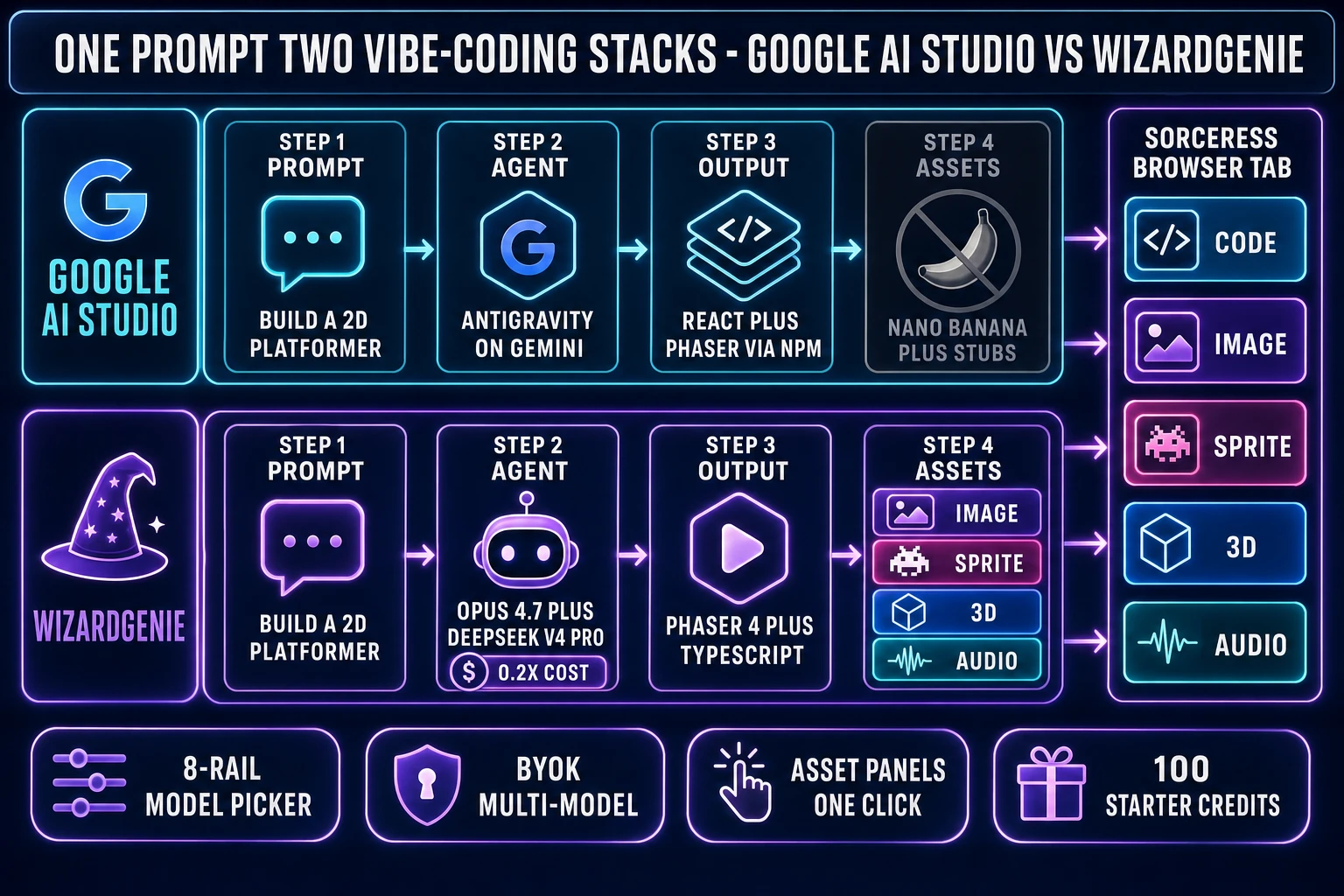
Side-by-side: Google AI Studio vibe coding stack vs WizardGenie + Sorceress browser-tab game-dev stack, with asset panels for image / sprite / 3D / audio in the same tab
Same vibe-coding posture, different wraps. Google AI Studio ships a Firebase-backed web app or a Kotlin Android prototype; WizardGenie ships gameplay code plus the image, sprite, 3D, and audio panels one click away in the same browser tab.

Sorceress Code: the browser vibe-coding surface without the lock-in

For developers who want a Cursor-style code-editor surface in the browser (a file tree, a Monaco editor, a chat pane, and an agent that applies diffs) without giving up multi-model choice, Sorceress Code is the second vibe-coding wrap inside Sorceress. It runs in any modern browser, opens to a Monaco editor with the same eight frontier coding rails available in WizardGenie, and is built specifically for the “point an agent at a project, watch the diffs land” loop. The agent can run shell commands inside the project, propose multi-file diffs, save checkpoints, and roll back when a vibe loop goes sideways. Bring your own API key for the model rail you pick; route a session through Sonnet 4.6 as the default vibe model, or split Opus onto planning and DeepSeek V4 Pro onto typing for the cost-conscious long session.

The honest difference vs Google AI Studio Build mode is the lock-in surface. Build mode keys hard to Gemini, Firebase, and Google Cloud Run — the value proposition is the integrated stack and the one-click deploy, not portability. Sorceress Code and WizardGenie key to whichever frontier model the dev brings credit for, target whichever engine the project uses, and run gameplay output as plain files the dev owns. The trade-off is real: if the project genuinely wants a Firestore backend with Google auth and Cloud Run deploy, Build mode wins on integration depth. If the project is a game, the lock-in becomes a tax and the multi-model browser path wins.

Side-by-side: one prompt, two vibe-coding stacks, two outputs

Take a single concrete brief and run it through both stacks to see the difference. Prompt: “A side-scrolling 2D platformer in Phaser 4 + TypeScript: a wizard character who can double-jump, three collectible coins per level, patrolling slime enemies, a coin counter HUD, a death-and-restart loop, and a level select screen. Pixel-art aesthetic, 48x48 sprites.”

In Google AI Studio Build mode, the Antigravity agent does not ship Phaser as a target framework — Build mode targets React, Next.js, or Angular for web and Kotlin + Jetpack Compose for Android. The cleanest in-product path is to ask Build mode to bootstrap a React app with a canvas element and write the Phaser-like game loop in plain JavaScript, or to point Antigravity at npm and have it install Phaser into the React project. The agent ships a working scaffold with a TypeScript canvas wrapper, the gameplay loop runs, the double-jump physics work, the collision detection works. The wizard sprite is a Nano Banana single image with no walk cycle; the slime sprite is the same; the coin sprite is a third single image; the coin-pickup chime is a Web Audio synthesized beep; the level select screen is a flat HTML overlay. The artifact runs in the preview pane; the assets read as placeholders.

In WizardGenie, the same brief routes to the chosen coding rail (Sonnet 4.6 as the default vibe model, or Opus 4.7 + DeepSeek V4 Pro as the Planner + Executor split), and the gameplay code lands the same way it does in Build mode — Phaser scaffold, double-jump logic, collision, scoring HUD, scene transitions. When the gameplay code references the wizard sprite, the slime, the coin, the chime, and the menu music, each one is one click away in adjacent panels in the same browser tab:

  • Image generation in AI Image Gen — seven image models verified against src/app/_home-v2/_data/tools.ts on 2026-06-08: Nano Banana Pro (top tier), Nano Banana 2 (fast and sharp), GPT Image 2 (photoreal text), Seedream 5 Lite (uncensored), Flux 2 Pro, Z-Image Turbo, and Grok Imagine, all with reference-image conditioning so the wizard stays on-model across art passes.
  • Sprite sheets in Quick Sprites — turns the wizard reference image into a packed 48x48 four-angle walk cycle with the retro-diffusion/rd-animation model at 9 credits per generation (verified against src/app/quick-sprites/page.tsx CREDITS_PER_GEN on 2026-06-08), and ships the same pipeline for small sprites and VFX.
  • 3D meshes in 3D Studio — six image-to-3D models verified against src/lib/threed-models.ts on 2026-06-08: TRELLIS, Hunyuan 3D 3.1, Tripo v3.1, TRELLIS 2, Meshy 6 (with PBR), and Rodin 2.0 with native STL export. Optional for the 2D platformer; the path that replaces Blender for a 3D project.
  • Music and SFX in Sound StudioMusic Gen for the menu loop and the level music, SFX Gen for the coin-pickup chime and footstep packs, plus a built-in editor for trimming and mastering.

The starter terms verified against src/app/plans/page.tsx on 2026-06-08: a $49 one-time Lifetime unlock for the non-AI tools, plus no-expiry credit packs ($10 / 1,000 Starter, $20 / 2,000 Creator, $50 / 5,000 Plus, $100 / 10,000 Studio). New accounts get 100 starter credits, which is enough to vibe-code a Sonnet 4.6 session and generate the four missing assets for the Phaser platformer above before committing to a paid pack. The plans page covers the credit math; the Sorceress tools guide maps every tool to the game-dev step it owns.

The verdict on google ai studio vibe coding for game devs in 2026

The verdict is shaped by what kind of project the developer actually has. Google AI Studio vibe coding is a strong product for full-stack web apps, Android prototypes, internal tools, marketing micro-sites, productivity hacks, and anything that lives or dies on a Firebase backend plus a one-click Cloud Run deploy. The Antigravity agent is real, the Firebase auto-provisioning is real, the Kotlin + Jetpack Compose Android path is real, and the one-tab loop from prompt to running preview is fast. If the goal is “ship a small SaaS product or an Android app this weekend,” Build mode is one of the cleanest paths shipping today.

For a game project, the verdict flips. The asset half of a game (image, sprite, 3D mesh, rigged skeleton, PBR texture, music, SFX, voice) is the half Google AI Studio was not built to ship, and patching it together with Nano Banana plus a stock-asset library plus Web Audio synthesis lands at “jam-quality prototype with placeholders” rather than “playable game with shipped art.” Build mode also targets React, Next.js, Angular, and Kotlin — not the Phaser 4, Three.js, PlayCanvas, and native HTML5 canvas + Web Audio targets the indie game ecosystem ships to. The browser-tab path that closes that gap is WizardGenie for the “describe a game, get a game” surface, with Sorceress Code as the editor-style vibe-coding surface, both backed by the same eight-rail multi-model picker and the same image, sprite, 3D, and audio panels one click away in the same tab.

For deeper reading on the surrounding cluster: loop vibe coding with Claude walks the Anthropic side of the same browser-tab loop, use Claude Code for vibe coding covers the terminal CLI surface, cursor vibe coding walks the same asset-wall problem on a different competitor surface, replit vibe coding covers another competitor wrap, best vibe coding tools for games runs the picker criteria across competitors, inside vibe coding platforms breaks down the platform layer, best AI model for coding tests all eight rails, and test the best local AI model for coding covers the no-GPU local path. On the technical primitives, the Vibe coding Wikipedia entry covers the term’s origin, the Phaser game framework Wikipedia entry covers the engine the worked example above targets, the Khronos glTF 2.0 specification covers the format every engine reads for 3D assets, and the SWE-bench paper (Jimenez et al., 2023, Princeton NLP) covers the benchmark frontier coding models are routinely graded on.

Frequently Asked Questions

What does google ai studio vibe coding actually mean in 2026?

Google AI Studio vibe coding means running the loose vibe-coding workflow (describe intent, accept the diff, watch the build, react) inside Google AI Studio's Build mode at aistudio.google.com. The agent on the inside is Antigravity — originally a standalone VS Code-derived IDE acquired from the Windsurf team in late 2025, folded directly into the browser Build mode on March 20, 2026. Antigravity maintains persistent context across the whole project: file tree, installed npm packages, previous prompts and the diffs they produced, Firebase services provisioned, secrets stored. The web side of Build mode ships React, Next.js, or Angular as framework choices with full-stack runtimes; the Android side (added at Google I/O 2026 on May 19, 2026) ships native Kotlin plus Jetpack Compose with an in-browser emulator. All facts verified live on June 8, 2026.

What can Google AI Studio Build mode build well today?

Build mode is built for full-stack web apps and Android prototypes. The web side ships React, Next.js, or Angular with a Firebase backend the Antigravity agent auto-provisions (Cloud Firestore for persistent data, Firebase Authentication with the Google Sign-In provider, a Secrets Manager for third-party API keys, and one-click deployment to Cloud Run). The Android side ships standard Gradle projects with Kotlin and Jetpack Compose, Material 3 theming, a single-activity architecture, an in-browser Android emulator, ADB to a real device, and direct-to-Play-Store Internal Test Track publishing. CRUD web apps with login, productivity tools that call Sheets, small social apps, internal dashboards, marketing micro-sites, kanban boards, typing-test web apps — those workloads land cleanly in a 20-minute prompt loop. Verified June 8, 2026.

Why is google ai studio vibe coding not the right tool for games?

Two reasons. First, Build mode targets React, Next.js, Angular for web and Kotlin plus Jetpack Compose for Android — not Phaser 4, Three.js, PlayCanvas, Pixi.js, or native HTML5 canvas with Web Audio, which is what the indie game ecosystem ships to. The closest in-product path is to bootstrap a React app and ask Antigravity to install Phaser into it via npm, which works but is one step removed from a game-engine-first surface. Second, a finished playable game is gameplay code plus a sprite sheet, plus often a 3D mesh in glTF, plus a rigged skeleton, plus tile-able PBR textures, plus music, plus sound effects, plus voice. Google AI Studio is built around Gemini text and code generation; it does not generate game-ready pixel-art sprite sheets, image-to-3D meshes, mocap rigs, PBR textures, music tracks with stems, game SFX, or voice. The Nano Banana image rail inside Build mode is fine for UI illustration; it is not a game-art pipeline.

What did Google AI Studio add at I/O 2026?

Google I/O 2026 (May 19, 2026) added five major capabilities to Build mode, verified live on June 8, 2026 against the blog.google I/O recap and the ai.google.dev official docs. (1) Native Android vibe coding: pick the Android platform, get a Gradle project with Kotlin plus Jetpack Compose, preview in a browser-based emulator, install via ADB, push to Play Internal Test Track. (2) Workspace integrations: agents call Drive and Sheets APIs natively. (3) AI Studio mobile app (pre-registration): the full Build mode loop on a phone. (4) Annotation Mode: draw on the live preview to request specific UI changes. (5) Antigravity Export: hand a project with full conversation history, files, and secrets over to the Antigravity 2.0 desktop IDE for heavier local iteration. Managed Agents in the Gemini API arrived in parallel — an Antigravity-harness-powered agent on Gemini 3.5 Flash spinnable up with one API call.

How is WizardGenie different from Google AI Studio Build mode for game-dev vibe coding?

WizardGenie is the AI-native game engine at the heart of Sorceress. The framing is opposite to Build mode in two important ways. First, multi-model: WizardGenie exposes an eight-rail picker (Claude Opus 4.7, Claude Sonnet 4.6, GPT-5.5, Gemini 3.1 Pro, DeepSeek V4 Pro, Kimi K2.5, Grok 4.2, MiniMax M2.7) with bring-your-own-key billing, vs Build mode's single Gemini stack. Second, game-engine first: WizardGenie targets the engines indie game devs actually ship to (Phaser 4, Three.js, PlayCanvas, Pixi.js, native HTML5 canvas plus Web Audio) and exposes adjacent image, sprite, 3D, and audio panels in the same browser tab, so when the gameplay code references a wizard sprite or a coin-pickup chime the asset is one click away. WizardGenie runs both on the web at /wizard-genie/app and on the desktop as a Windows installer with native filesystem access. Verified against src/app/_home-v2/_data/tools.ts on June 8, 2026.

What is the Planner + Executor split and how does it cut the cost of vibe coding?

The Planner + Executor split is the cost-aware posture for a long agentic vibe-coding session. The economic logic is expensive-reasoner-thinks, cheap-fast-typer-executes. Route the planning step (the hard reasoning, the architecture decision, the diff plan) to a frontier reasoner like Claude Opus 4.7, GPT-5.5, Gemini 3.1 Pro, or Grok 4.2. Route the actual code-typing step (the bulk of the output tokens) to a true cheap executor like DeepSeek V4 Pro, Kimi K2.5, MiniMax M2.7, Gemini 3.1 Flash, GPT-5.5 Mini, or Claude Haiku 4.5. The cost across a long session lands at roughly one-fifth of running the frontier model on both sides, because the executor types the bulk of the tokens. WizardGenie ships this as the Dual-agent Planner + Executor preset in the model picker. Google AI Studio Build mode does not expose a split — it routes the whole loop through Gemini.

Can I use Sorceress Code as a code-editor vibe-coding surface instead of WizardGenie?

Yes. Sorceress Code at /code is the second vibe-coding wrap inside Sorceress, built for the Cursor-style code-editor posture rather than the WizardGenie describe-a-game-get-a-game posture. It runs in any modern browser, opens to a Monaco file editor with a file tree and a chat pane, and exposes the same eight frontier coding rails the WizardGenie picker exposes. The agent runs shell commands inside the project, proposes multi-file diffs, saves checkpoints, and rolls back when a vibe loop goes sideways. Bring your own API key for the model rail you pick; route a session through Sonnet 4.6 as the default vibe model, or split Opus onto planning and DeepSeek V4 Pro onto typing for the cost-conscious long session. The Sorceress Code page is the file editor wrap; the WizardGenie page is the game-engine wrap. Pick the surface that matches the work.

When is Google AI Studio vibe coding actually the right pick over WizardGenie or Sorceress Code?

Google AI Studio Build mode is the right pick when the project is genuinely a full-stack web app or a native Android app that benefits from the integrated Google stack — Firebase auth and Firestore on the backend, one-click Cloud Run deploy, Workspace integrations to Drive and Sheets, Kotlin plus Jetpack Compose on Android, push-to-Play-Store Internal Test Track. Build mode is also a strong pick for productivity tools, internal dashboards, marketing micro-sites, and SaaS prototypes. The lock-in (Gemini, Firebase, Cloud Run, Google account) is a feature in that context, not a tax. For a game project, the lock-in inverts: you trade away the multi-model picker, the engine portability, and the game-asset stack for an integration depth a game doesn't need. The honest read is to pick the surface that matches the kind of artifact you're shipping.

Sources

  1. Vibe coding (Wikipedia)
  2. Large language model (Wikipedia)
  3. Sprite (computer graphics) (Wikipedia)
  4. Skeletal animation (Wikipedia)
  5. glTF 2.0 specification (Khronos Group)
  6. Phaser (game framework) (Wikipedia)
  7. Three.js (Wikipedia)
  8. Web Audio API (Wikipedia)
  9. SWE-bench paper (Jimenez et al., 2023, Princeton NLP, arXiv:2310.06770)
Written by Arron R.·3,240 words·14 min read

Related posts