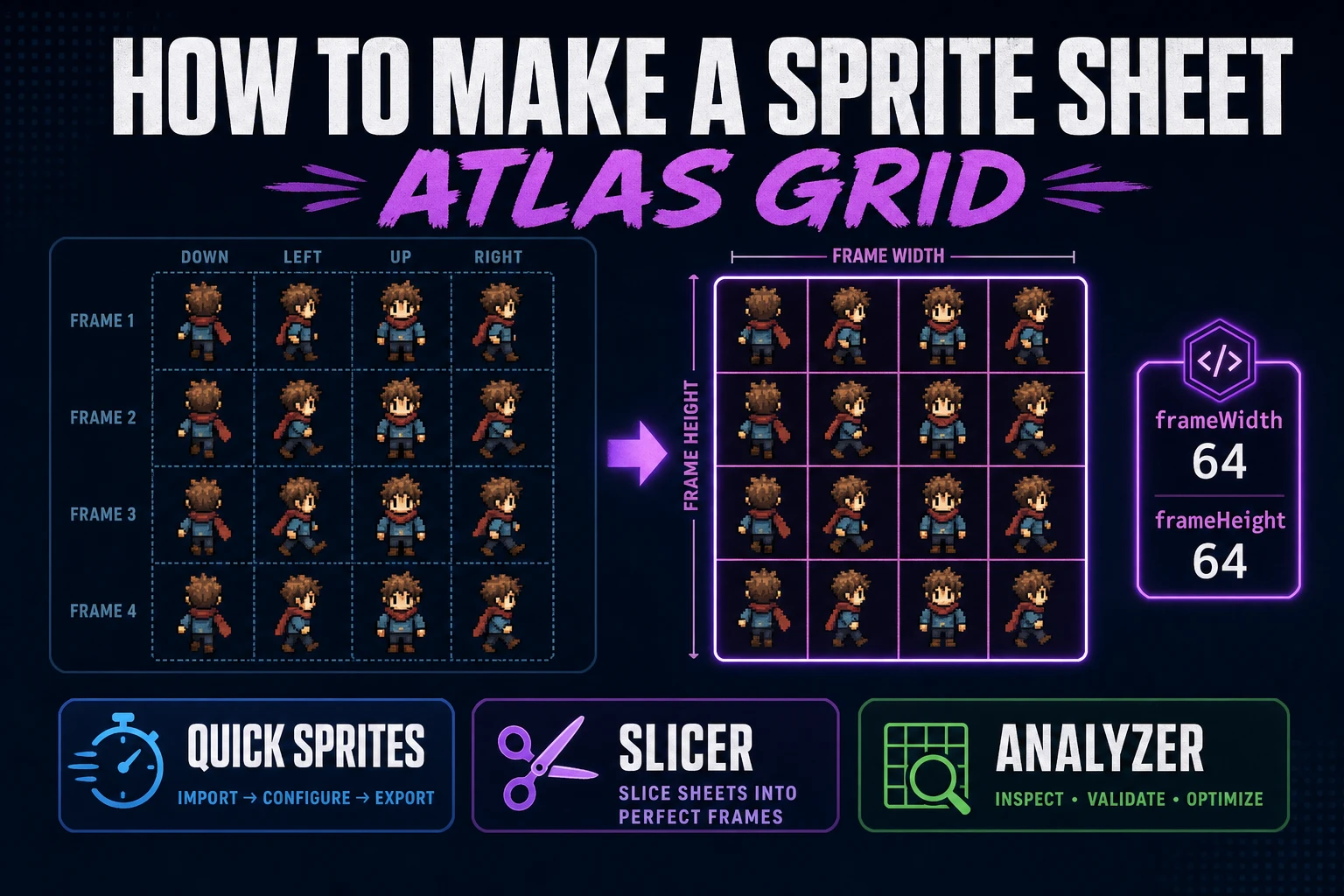
Pack How to Make a Sprite Sheet (Atlas Grid)

By Arron R.8 min read
How to make a sprite sheet starts with locked frame size and row grammar. Generate a fixed-grid walk pack in Quick Sprites (9 credits, rd-animation), preview in

A playable cast dies in the gap between "I drew a character" and "the engine can animate it." How to make a sprite sheet is the missing contract: same frame size, same row order, one PNG the loader can slice without guessing. This guide packs that atlas in the browser with Quick Sprites, preview timing in Sprite Analyzer, and clean custom grids in Slicer when a hand layout needs surgery. Credit costs and animation styles below were verified against src/app/quick-sprites/page.tsx on July 22, 2026.
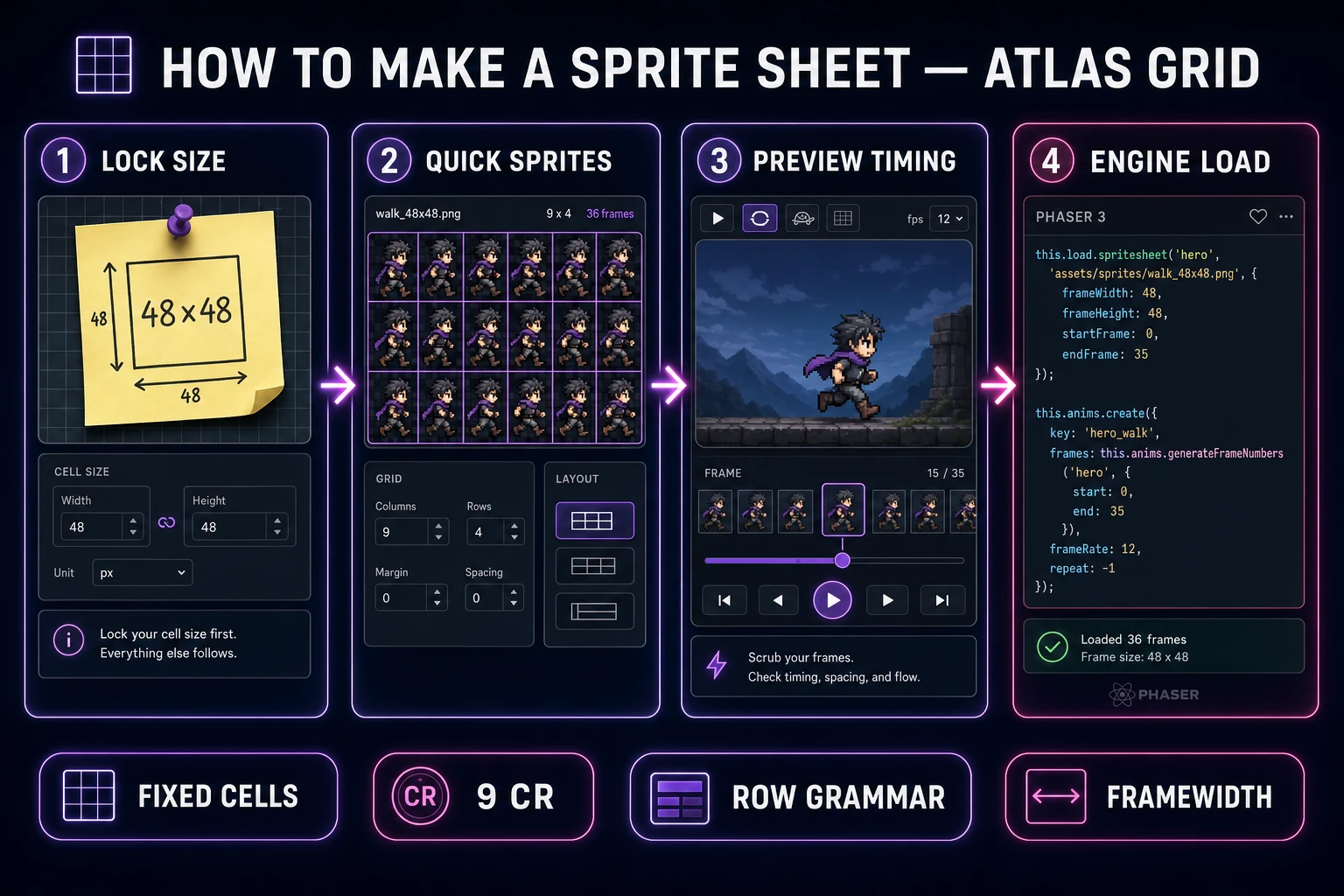
How to make a sprite sheet workflow from locked frame size through Quick Sprites walk pack to Phaser load
Lock frame size first, generate a fixed-grid walk pack second, preview timing third, then load the sheet with known frameWidth and frameHeight.

What how to make a sprite sheet must lock first

DataForSEO lists how to make a sprite sheet at 590 monthly searches with KD 2 in research-supplement.md, verified July 22, 2026. Sibling tails like how to make a sprite sheet for godot or how to make a sprite sheet in aseprite already have their own posts; this page owns the engine-agnostic head term: a fixed-size frame atlas you can drop into any 2D runtime.

Wikipedia’s sprite sheet / texture atlas page (live-checked July 22, 2026) describes an image that stores many smaller images so the GPU treats them as one unit. For games that definition tightens: every cell shares width and height, rows encode direction or state, and columns encode time. A sprite is still a 2D bitmap composited into a larger scene—if your cells disagree about size, the compositor cannot save you.

Write three decisions on a sticky note before you generate anything:

  • Frame size: 32×32, 48×48, or 64×64 for the hero—pick one and keep props on the same modulus.
  • Row grammar: which row is idle, walk-down, walk-left, walk-right, walk-up—write it once and never invent a fifth convention mid-jam.
  • Transparency rule: true alpha on a clean matte, or one keyed color—never mixed mattes inside one sheet.

Those three lines are the atlas contract. Skip them and you will “finish” a walk cycle, then redraw when the enemy sheet arrives at a different cell size, then redraw again when the UI icon refuses to sit next to either. The redo tax is what makes people quit sprite packing—not the first hour of careful frames.

Also decide what you will not animate yet. A how-to-make-a-sprite-sheet session that tries to invent walk, run, attack, hurt, and death in one sitting almost always ships muddy compromises. One idle column set and one four-direction walk pack is a complete first milestone.

Choose fixed frames vs packed atlas

Engines speak two dialects. A fixed sprite sheet uses uniform cells addressed by integer indices. A texture atlas packs irregular regions addressed by names. Phaser’s loader docs draw the line clearly (verified July 22, 2026 on docs.phaser.io): this.load.spritesheet expects every frame to be the exact same size, while a texture atlas packs frames to minimize empty space and references them by name.

For indie jams, start with fixed frames. Uniform grids are easier to generate, easier to debug, and easier to hand-edit when one pose fails. Packed atlases win later when you have dozens of uneven UI icons and you care about GPU memory. Do not optimize packing before you have a readable walk cycle.

Quick Sprites is built for the fixed-grid dialect. It returns a PNG spritesheet (toggle on by default) with rows of directional frames at a locked pixel size. That matches what LoaderPlugin#spritesheet wants: you pass frameWidth and frameHeight, then animate with frame numbers. If you later need irregular crops—logo fragments, HUD chips, mixed prop sizes—route that image through Slicer instead of forcing everything into one walk grammar.
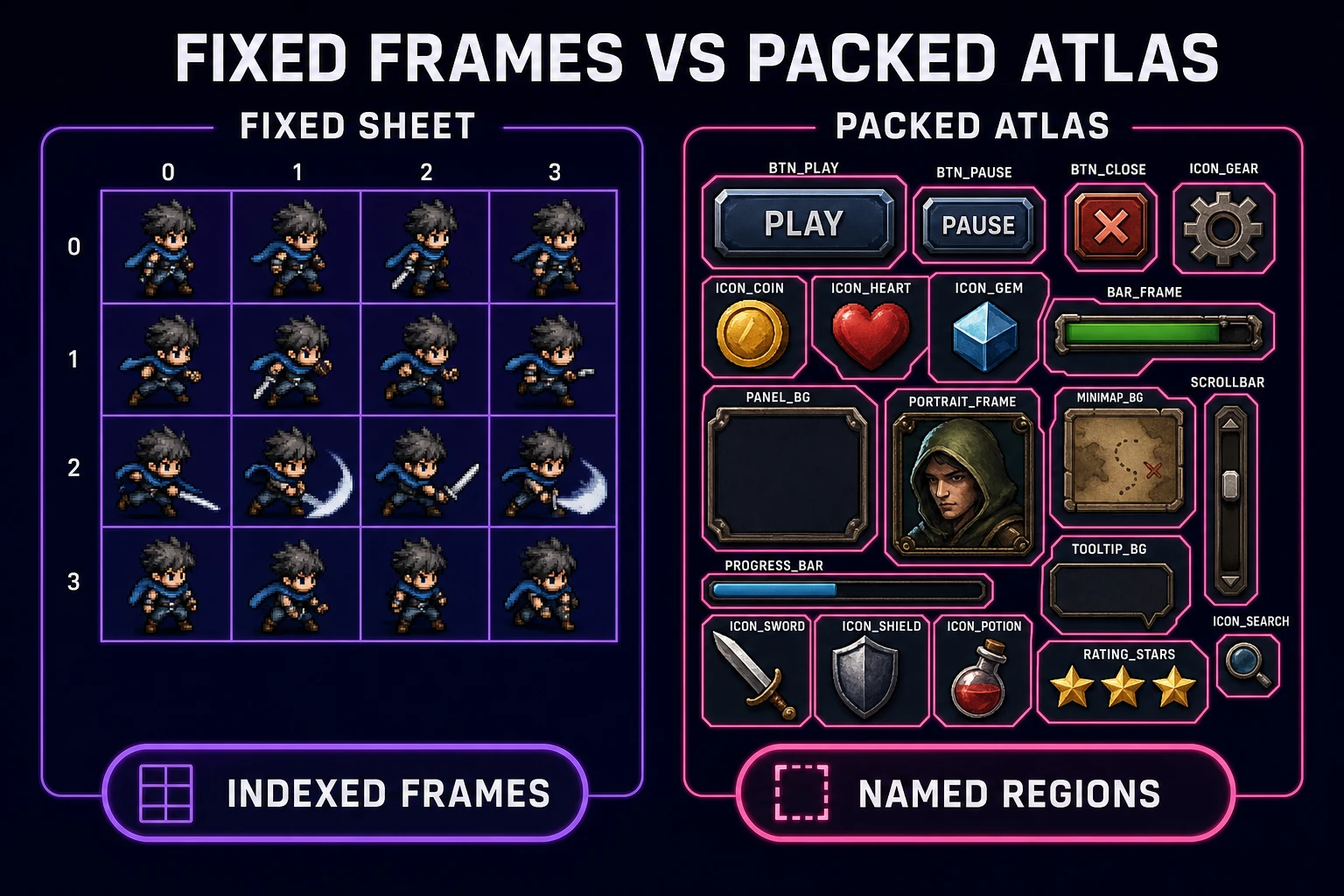
Scorecard comparing fixed-size sprite sheets versus packed texture atlases for game engines
Fixed cells for walk cycles; packed atlases for uneven UI. Pick the dialect before you generate.

Generate a walk pack in Quick Sprites

Open Quick Sprites when you need simple retro-style pixel characters and effects as ready grids. The page uses model retro-diffusion/rd-animation at 9 credits per generation (CREDITS_PER_GEN in source, verified July 22, 2026). Keep Spritesheet (PNG) selected so you get an atlas instead of a lone GIF preview.

Pick a style that matches your locked frame size:

  • Four Angle Walking — consistent 4-direction, 4-frame walking for humanoids at 48×48 only.
  • Small Sprites — 4-direction walking plus arm movement, looking, surprised, and laying down at 32×32 only.
  • VFX Effects — fire, explosions, lightning, and similar hits at 64×64 (source notes 24–96px 1:1 for this style).

Prompt like a sheet, not like a portrait. Name the job, the silhouette, and the motion: “chunky knight, round shield, four-direction walk, flat colors, no soft anti-alias.” Avoid cinematic lighting language that invents soft gradients the engine will blur further. Quick Sprites is honest about its lane: simple retro pixel sprites—not painterly concept art. If you already have a painted hero and only need quantization, pivot to True Pixel and assemble the grid afterward.

Generate one style at a time. Batching four conflicting moods in one credit burn wastes the 9-credit unit. When a sheet lands, download the PNG with the spritesheet toggle still on, then name the file with the contract baked in: hero_walk_48_4dir.png. Future-you will thank present-you when three sheets collide in the assets folder.
Preview timing in Sprite Analyzer

A sheet that looks fine as a still often fails as motion. Open Sprite Analyzer (Pro badge in the home catalog) and step frame-by-frame at the size your game camera will actually show. Watch for foot slides, bobbing that fights the intended walk, and rows that were meant to be left/right but swapped during generation.

Quick Sprites can hand a completed sheet straight into Sprite Analyzer via the in-app transfer path—use it. Set the grid columns and rows to match the style you chose (for Four Angle Walking, expect four directional rows with four frames each). Play the loop at 8–12 FPS first; most jam characters read better slightly slow than slightly frantic.

Kill frames that smear. If frame 3 of the down-walk collapses the silhouette into a blob, regenerate that style once with a clearer prompt rather than painting over every pixel. One clean regen is cheaper than an hour of micro-surgery on a bad motion idea. Keep a reject folder so you do not accidentally ship the soft version.

Slice custom regions in Slicer when needed

Not every sheet arrives as a perfect walk grammar. Marketing key art, mixed icon pages, and AI grids with uneven padding need surgery. Slicer (Pro) cuts regions out of any image—AI grids, icon sheets, artwork—so you can rebuild a fixed atlas from pieces that started life as chaos.

Use Slicer when:

  • You have a contact sheet with uneven gutters and need equal cells before the engine load.
  • You want to extract a single idle pose from a larger collage and paste it into a new 4×4 walk template.
  • You are converting a GIF-derived grid (see also Grid a GIF to Sprite Sheet) and need to drop empty pads.

Export each crop at the locked frame size with nearest-neighbor scaling. Then reassemble into a blank canvas whose width = frameWidth × columns and height = frameHeight × rows. That reassembled PNG is what the engine should see—not the original messy collage.

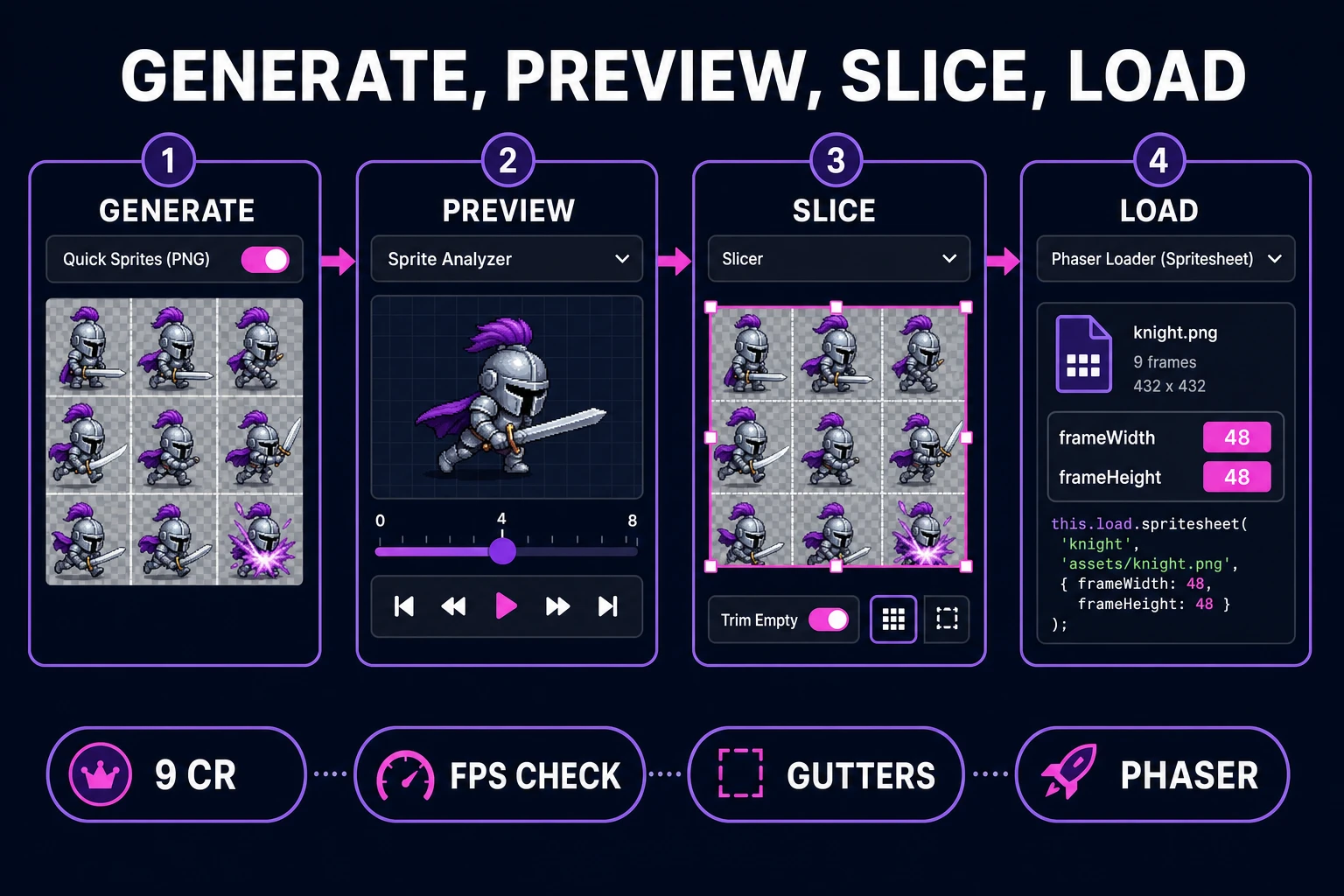
Pipeline from Quick Sprites PNG through Sprite Analyzer timing check and Slicer crops into a Phaser spritesheet load
Generate, preview, slice only when needed, then load with explicit frameWidth and frameHeight.

Load the sheet in a browser engine

Phaser’s loader (docs live-verified July 22, 2026) queues a fixed sheet like this:

function preload () {
  this.load.spritesheet('hero', 'assets/hero_walk_48_4dir.png', {
    frameWidth: 48,
    frameHeight: 48
  });
}

The file is queued, not instantly usable—wait for the scene load to finish before creating animations. Build animation keys that mirror your sticky-note grammar: hero-walk-down frames 0–3, hero-walk-left frames 4–7, and so on. If your sheet uses a different row order, change the numbers—do not change the sticky note after the fact without renaming the file.

Disable image smoothing when you upscale pixel characters for a crisp look. MDN’s canvas pixel-manipulation guide (live-checked July 22, 2026) documents imageSmoothingEnabled = false for nearest-neighbor zoom; the same idea applies in engine cameras and CSS image-rendering: pixelated. Soft filtering turns a perfect atlas into muddy oatmeal at play scale.

Drop the sheet into a one-screen playtest before you generate the attack set. Walk into a wall, turn corners, and stand idle for ten seconds. If the silhouette fails any of those, fix the sheet—do not add particles to hide it. For a broader AI sprite angle after this atlas lands, see Use an AI Sprite Generator (Game-Ready Sheet).

Cost math and revision loops

Budget in credit units you can feel. Quick Sprites charges 9 credits per generation. A disciplined first pass looks like:

  • 1× Four Angle Walking hero sheet (9 credits)
  • 1× Small Sprites or second hero variant if the silhouette fails (9 credits)
  • 1× VFX hit spark once locomotion reads (9 credits)

That is 27 credits for a cast that can actually move—before you burn a stack on attack flourishes. Starter accounts receive signup credits on the Sorceress stack; spend them on the walk contract first, not on five conflicting art directions. Slicer and Sprite Analyzer sit on Pro badges in the home catalog—use them to protect the credits you already spent by catching bad timing before another generation.

Revision rule: change one variable per regen. If feet slide, tighten the prompt’s foot language; do not also change palette, weapon, and scale in the same burn. If the engine load fails, verify frameWidth/frameHeight against the PNG pixel size with an image inspector before you blame the model. Most “broken sheets” are mismatched math, not bad art.

When the atlas survives a one-screen playtest, stop. Ship the loop. Expand the sheet only when a new verb (attack, climb, swim) is load-bearing for the next playable minute. How to make a sprite sheet is a packing skill; the win is a grid the engine trusts, not an infinite gallery of poses.

Frequently Asked Questions

What is the difference between a sprite sheet and a texture atlas?

Both store many smaller images in one file. Phaser treats a sprite sheet as fixed-size cells addressed by numbers, and a texture atlas as packed irregular frames addressed by names. For walk cycles, start with fixed cells so frameWidth and frameHeight stay simple.

How many credits does Quick Sprites cost per sheet?

Nine credits per generation (CREDITS_PER_GEN in src/app/quick-sprites/page.tsx, verified July 22, 2026) on model retro-diffusion/rd-animation. Keep the Spritesheet (PNG) toggle enabled to download an atlas instead of only a GIF preview.

Which Quick Sprites style should I pick first?

Four Angle Walking (48×48) for a standard humanoid hero, Small Sprites (32×32) for tighter top-down casts, and VFX Effects (64×64) for hits and explosions. Match the style size note to the frame size on your sticky note.

How do I load a sprite sheet in Phaser?

In preload, call this.load.spritesheet(key, url, { frameWidth, frameHeight }) with the exact cell size of your PNG. After load completes, create animations from contiguous frame ranges that match your row grammar. Loader behavior verified against docs.phaser.io on July 22, 2026.

When should I use Slicer instead of regenerating?

Use Slicer when art is mostly right but gutters, crops, or collage layout are wrong. Regenerate when silhouette or motion idea is wrong—Slicer cannot invent a better walk cycle, only rebuild a cleaner grid from existing pixels.

Sources

  1. Sprite sheet / texture atlas — Wikipedia
  2. Phaser LoaderPlugin#spritesheet — Phaser docs
  3. Pixel manipulation with canvas — MDN
  4. Sprite (computer graphics) — Wikipedia
Written by Arron R.·1,854 words·8 min read

Related posts