Tint an AI Recolor (Sprite Palette Swap 2026)

By Arron R.8 min read
Ai recolor in 2026 is a four-step browser pipeline: lock a base sprite, generate palette variants in AI Image Gen with a reference image, quantize colors in Tru

Multiplayer prototypes die in art review when every player needs a distinct team color but you only painted one hero. Searchers typing ai recolor into Google want a reversible path: upload a base sprite, generate crimson, cobalt, and gold variants that share the same silhouette, then export indexed palettes their engine can tint at runtime. Generic photo recolor tools optimize for portraits — they flatten pixel-art shading, ignore transparent backgrounds, and cannot keep a four-frame walk cycle on-model across variants. The 2026 answer is a browser pipeline where AI Image Gen locks pose with a reference image, True Pixel quantizes every variant to a shared indexed palette, Canvas fixes one-pixel edge halos, and WizardGenie scaffolds Phaser 4.2 tint keys for team selection. Phaser 4.2.0 (released June 19, 2026, verified against the official GitHub release tag on July 9, 2026) ships setTint and TintModes.MULTIPLY_TWO for runtime color swaps when your atlas shares palette slots. Everything below was checked against the Sorceress source on the same date.
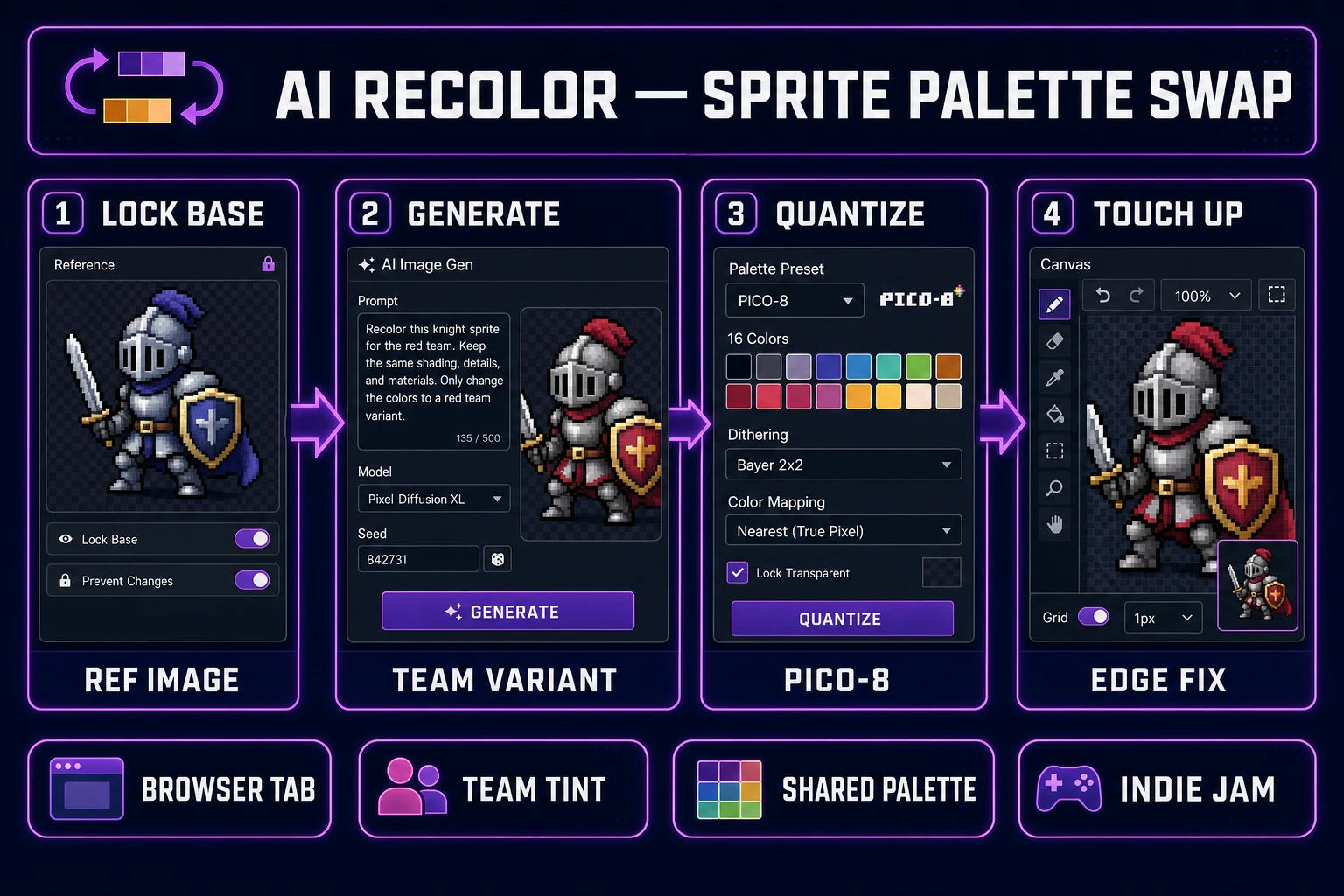
Ai recolor pipeline diagram — four numbered panels for base sprite lock, AI Image Gen team variant, True Pixel palette quantization, and Canvas edge touch-up
The 2026 ai recolor pattern: one browser account turns a locked base sprite into team-color variants on a shared indexed palette — not a global hue slider, but files your prototype can tint tonight.

What ai recolor outputs for game sprites

Searchers typing ai recolor fall into two camps. Live-service designers want red-team and blue-team skins without doubling animation work. Jam devs want rarity tiers — common gray, rare purple, legendary gold — from one hand-painted hero. A useful ai recolor pipeline for games produces variants that share line weight, pose, and frame count while swapping local color relationships. Transparent backgrounds stay clean, and every output snaps to the same indexed palette your runtime can reference.

Global hue shifts in desktop editors recolor shadows and highlights uniformly, which breaks the deliberate shading pixel artists bake into each cluster. Photo recolor APIs optimize for skin tones and fabric, not 32×32 silhouettes with three-color cel shading. That is why the honest ai recolor path in 2026 lives inside a game-dev stack: reference-locked generation plus palette quantization plus pixel touch-up plus runtime wiring in one Sorceress account. The indexed color model is what lets engines tint sprites cheaply — every variant maps to the same color slots.

Why global hue shifts fail as sprite palette swaps

Dragging a hue slider across a walk-cycle sheet feels fast until you import the result. Shadows on the boots turn neon, metal trim picks up skin-tone bleed, and the outline color shifts so the sprite no longer matches your tileset contrast. Worse, a global shift cannot target “armor only” while preserving skin and weapon hues — the exact split team-color variants need.

Screen-recorded before/after comparisons also fail the transparency test. Many recolor filters flatten alpha to a checkerboard fringe. When you quantize those frames in True Pixel, halos appear around every edge and your Phaser scene shows colored boxes instead of clean silhouettes.

Reference-locked ai recolor solves the targeting problem. Upload the base sprite as a reference image, prompt the palette change in natural language, and the image-to-image model regenerates local color while preserving pose and line weight. True Pixel then snaps output to PICO-8 or SWEETIE-16 presets so every variant shares slot indices — the difference between a meme filter and a shippable team-swap atlas.

The Sorceress ai recolor pipeline in four steps

The Sorceress answer to ai recolor is four layers, each mapped to a real tool verified in the repository on July 9, 2026:

  1. Lock layer — export a clean base sprite with transparent background and fixed frame dimensions.
  2. Generate layer — upload the base as a reference in AI Image Gen and prompt each team-color variant.
  3. Quantize layer — run every variant through True Pixel with the same palette preset.
  4. Touch-up layer — fix edge pixels in Canvas, then wire tint keys in Phaser 4.2 via WizardGenie.

For walk-cycle generation before you recolor, see the ai sprite animation post. For static sprite creation without variants, the free ai sprite generator guide covers atlas-first workflows.
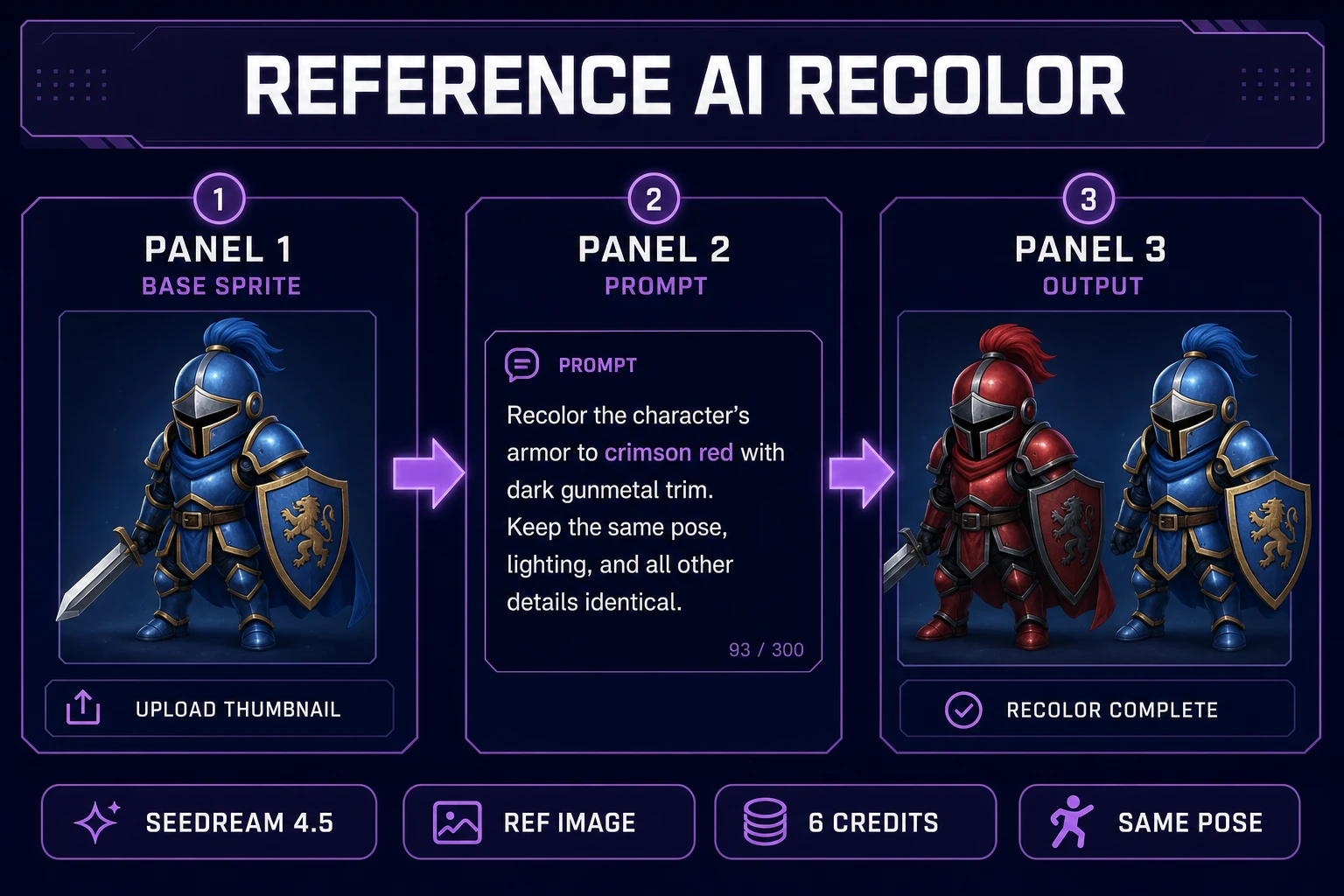
AI Image Gen ai recolor reference workflow — base blue knight upload, crimson armor prompt, red and blue variant output side by side
Reference-locked ai recolor in AI Image Gen: upload the base sprite, prompt the target palette, download variants that preserve pose and line weight.

Step 1 — lock a clean base sprite

Ai recolor fails when the reference image carries noise. Before opening AI Image Gen, confirm your base meets four rules:

  • Transparent background — no flat color matte; run through background removal if the export shipped with a gray slab.
  • Fixed dimensions — “48×48 pixels, side view, feet anchored at row 44” written in your brief.
  • Consistent outline color — one dark pixel ring so variants do not drift edge contrast.
  • Named exportsprites/hero/base_blue.png so every regeneration pass references the same file.

Store the brief in your WizardGenie project folder. Consistency is what separates a random filter output from ai recolor variants your playtesters recognize across three team colors in a four-player lobby.

Step 2 — generate palette variants in AI Image Gen

Open AI Image Gen and select Seedream 4.5 or Nano Banana — both support reference images through image-to-image edit mode (verified in src/lib/models.ts on July 9, 2026). Each generation costs 6 credits.

Workflow for ai recolor image variants:

  1. Upload your base sprite as a reference image (Seedream 4.5 accepts up to 14 references; Nano Banana accepts up to 3).
  2. Set aspect ratio to 1:1 for square sprites.
  3. Prompt structure: “Same [character type], identical pose and outline, [target palette description], game sprite, transparent background, no text, no UI, pixel art shading preserved.”
  4. Generate three variants — crimson team, cobalt team, gold rare — and download each to sprites/hero/team_[color].png.

Example prompts that work for ai recolor:

  • “Same pixel knight, identical pose, crimson armor with gold trim, blue cape unchanged, transparent background.”
  • “Same pixel knight, identical pose, cobalt armor with silver trim, transparent background, game sprite.”
  • “Same pixel knight, identical pose, gold armor legendary skin, warm highlight accents, transparent background.”

If a variant drifts pose, tighten the prompt with “exact same silhouette, do not change weapon angle” and regenerate. Reference-locked edit mode is the ai recolor advantage over text-only generation — the model sees the pixels you want preserved.

Step 3 — quantize every variant in True Pixel

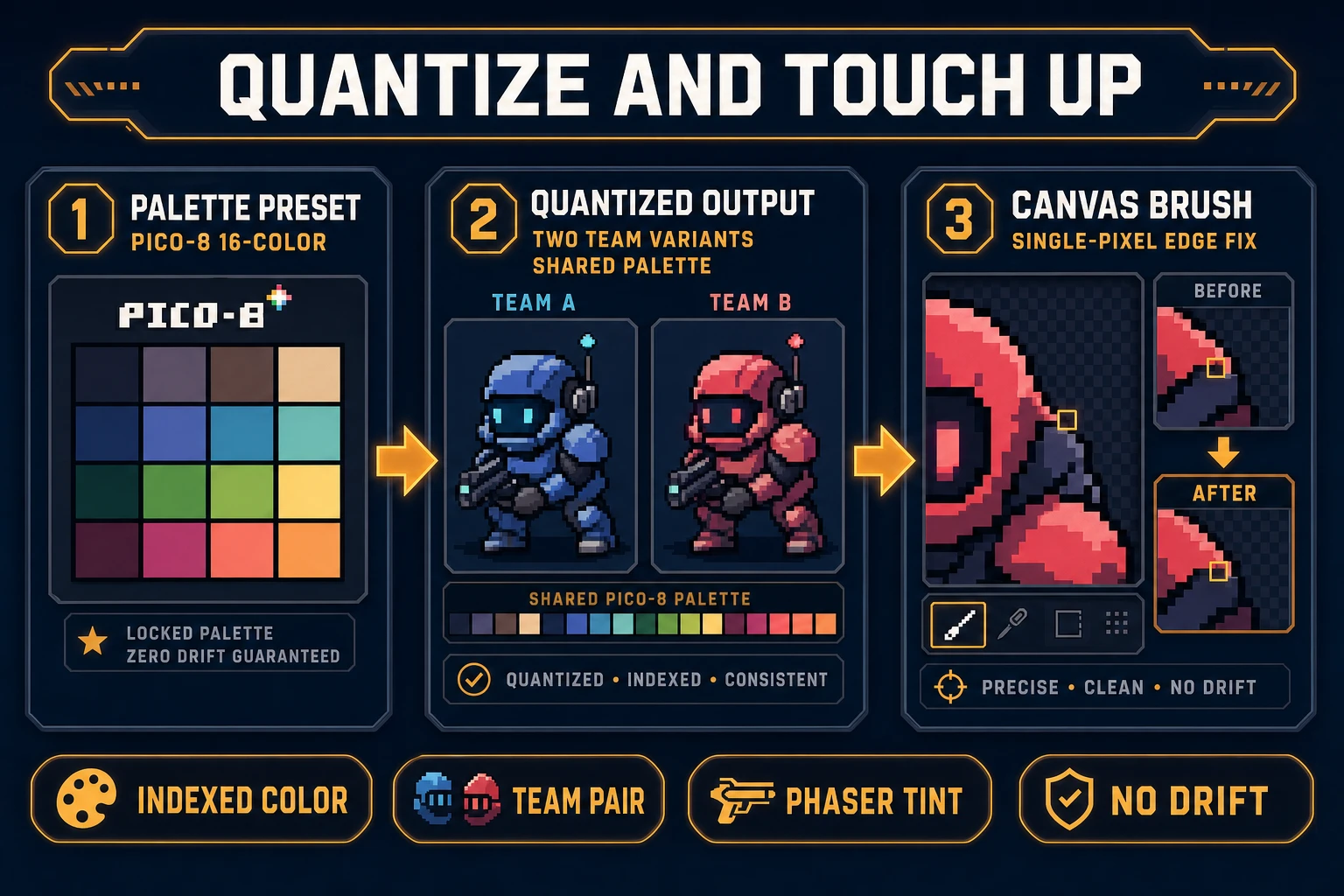
True Pixel is where ai recolor variants become engine-safe. Upload each team-color PNG, select a shared palette preset — PICO-8 (16), SWEETIE-16, or Endesga 32 (verified in src/app/pixel-art/page.tsx on July 9, 2026) — and export quantized frames.

Why quantization matters for ai recolor: image models output thousands of RGB values per sprite. Game engines and palette-limited art styles need every variant mapped to the same indexed slots so Phaser setTint or shader swaps behave predictably. Processing red-team and blue-team sprites through the identical True Pixel preset guarantees slot 7 always means “highlight gold” across both files.

For photo-to-pixel conversion before recolor, the image to pixel art ai guide covers downscale settings that pair well with this step.

True Pixel and Canvas ai recolor workflow — PICO-8 palette preset, two team variants on shared indexed colors, single-pixel Canvas edge fix zoom
True Pixel plus Canvas: shared palette preset across variants, then one-pixel edge fixes before Phaser import — the quantization step standalone ai recolor tools skip.

Step 4 — touch edge pixels in Canvas and wire Phaser tints

Quantization introduces one-pixel halos where ai recolor output met the palette boundary. Open Canvas, import each variant, zoom to 800%, and paint edge pixels with the picker tool so outlines match the base sprite exactly. Canvas supports layered editing with brush, eraser, and fill tools (verified in src/app/canvas/page.tsx on July 9, 2026).

Shipping is where amateur ai recolor pipelines die. WizardGenie can scaffold a Phaser 4.2 scene that loads team atlases and applies runtime tints. Phaser 4.2.0 (June 19, 2026) adds TintModes.MULTIPLY_TWO for shader-friendly color multiplication — verified on July 9, 2026 against docs.phaser.io and the official release notes.

Ask WizardGenie: “Generate a Phaser 4.2 lobby scene with three team buttons. Load hero_red.png, hero_blue.png, and hero_gold.png from assets/sprites/hero/. On team select, tint the preview sprite and store the choice in game registry.” Example tint call:

const sprite = this.add.sprite(240, 180, 'hero-red');
sprite.setTint(0xff4444); // runtime accent when using shared atlas slots

WizardGenie’s model lineup — Claude Opus 4.7, Claude Sonnet 4.6, GPT-5.5, Gemini 3.1 Pro, DeepSeek V4 Pro, Kimi K2.5, Grok 4.2, MiniMax M2.7 (verified in src/app/_home-v2/_data/tools.ts) — means you can put Gemini 3.1 Pro on the tint-architecture pass and DeepSeek V4 Pro on bulk loader JSON. That Planner-plus-Executor split keeps an ai recolor session affordable when you are iterating four team skins before a playtest.

Team variants versus runtime tint: when to ai recolor each way

Three rules keep ai recolor sessions from wasting credits:

  1. Pre-bake when silhouettes differ — if crimson armor adds highlights gold armor lacks, generate separate PNGs with ai recolor rather than relying on a single atlas plus runtime tint.
  2. Runtime tint when slots align — if variants differ only by hue on the same indexed slots, one atlas plus Phaser setTint is cheaper than three reference generations.
  3. Always quantize before import — skip True Pixel and your engine loads 24-bit PNGs that break palette shaders and inflate memory on mobile web builds.

For GIF pitch loops of each team variant, pair this workflow with the gif sprite sheet maker post — export Animated GIF per team color for Discord showcases while PNG atlases ship in the build.

What ai recolor costs on Sorceress in 2026

Pricing verified July 9, 2026 against src/app/plans/page.tsx (LIFETIME_PRICE = 49). Sorceress base unlock is $49 one-time for the full tool suite including Pro tools like True Pixel and Canvas. AI credits are pay-as-you-go: Starter $10 for 1,000 credits, Creator $20 for 2,000, Plus $50 for 5,000, Studio $100 for 10,000.

One hero with three team-color ai recolor variants at 6 credits each (18 credits), plus two regeneration passes for pose drift (12 credits), typically burns 30–45 Sorceress credits total — roughly $0.30–$0.45 on a Starter pack atop the lifetime unlock. True Pixel quantization and Canvas touch-ups add no per-export credit cost. A four-character roster with three team skins each lands around 72 credits if you generate two passes per variant. WizardGenie coding runs on your own API keys, so the Phaser tint scaffold pass stays under your model provider billing.

Open the full stack on the tools guide, compare tiers on plans, and start your first ai recolor pass at AI Image Gen with a reference-locked team variant tonight.

Frequently Asked Questions

What does ai recolor output for game sprites?

Ai recolor for games produces palette-swapped variants of the same silhouette — red team versus blue team enemies, seasonal skins, or rarity tiers — without redrawing every frame. Sorceress maps that to AI Image Gen with a reference image (Seedream 4.5 edit mode locks pose), True Pixel for indexed palette quantization, and Canvas for one-pixel edge fixes before Phaser import.

How is ai recolor different from manual hue shift in Photoshop?

Global hue shifts in Photoshop recolor shadows and highlights uniformly, which breaks pixel-art shading. Ai recolor with a reference image (170/mo, KD 0 per DataForSEO probe verified July 9, 2026) regenerates local color relationships while preserving line weight and pose. True Pixel then snaps output to a shared 16-color palette so every variant reads as the same art style.

Which Sorceress tool handles ai recolor fastest?

AI Image Gen at /generate with Seedream 4.5 or Nano Banana in image-to-image mode. Upload your base sprite as a reference image, prompt the target palette ('same knight, crimson armor, gold trim, transparent background'), and generate. Each edit costs 6 credits (verified in src/lib/models.ts on July 9, 2026). True Pixel and Canvas are Pro-tier tools with no per-export credit charge.

Can True Pixel keep all team variants on one shared palette?

Yes. True Pixel at /pixel-art exports frames with preset palettes like PICO-8, SWEETIE-16, and Endesga 32 (verified in src/app/pixel-art/page.tsx on July 9, 2026). Process each ai recolor variant through the same preset so red-team and blue-team sprites share indexed color slots — critical when your engine tints sprites at runtime with Phaser setTint.

What does a full ai recolor session cost on Sorceress?

Verified July 9, 2026 against src/app/plans/page.tsx (LIFETIME_PRICE = 49). Base unlock is $49 one-time. One hero with three team-color variants at 6 credits each (18 credits), plus two regeneration passes (12 credits), typically burns 30–45 Sorceress credits ($0.30–$0.45 on a Starter pack). True Pixel quantization and Canvas touch-ups add no per-export credit cost. WizardGenie coding runs on your own API keys.

Sources

  1. Indexed color — Wikipedia
  2. Sprite (computer graphics) — Wikipedia
  3. Phaser — Official documentation
  4. Color theory — Wikipedia
Written by Arron R.·1,716 words·8 min read

Related posts


