Glyph a Pixel Font Generator (Game UI Type 2026)

By Arron R.7 min read
Pixel font generator in 2026 is a four-step browser pipeline: lock a glyph grid size, generate a monospace atlas in AI Image Gen, clean edge pixels in Canvas, t

HUD mockups look finished until you drop real damage numbers into the build and every digit sits on a different baseline. Searchers typing pixel font generator into Google want monospace glyphs that align on an 8×8 or 16×16 grid — not a vector TTF that smears when scaled to pixel-perfect resolution. Generic font sites ship smooth curves; game UI needs bitmap cells where “W” and “1” occupy identical width so health bars, shop prices, and dialogue boxes never drift. The 2026 answer is a browser pipeline where AI Image Gen outputs a full charset atlas, Canvas snaps anti-aliased strokes to the grid, and WizardGenie scaffolds Phaser 4.2 BitmapText loaders for runtime HUD labels. Phaser 4.2.0 (released June 19, 2026, verified against the official GitHub release tag on July 9, 2026) ships BitmapText for texture-based fonts that stay crisp at native pixel scale. Everything below was checked against the Sorceress source on the same date.
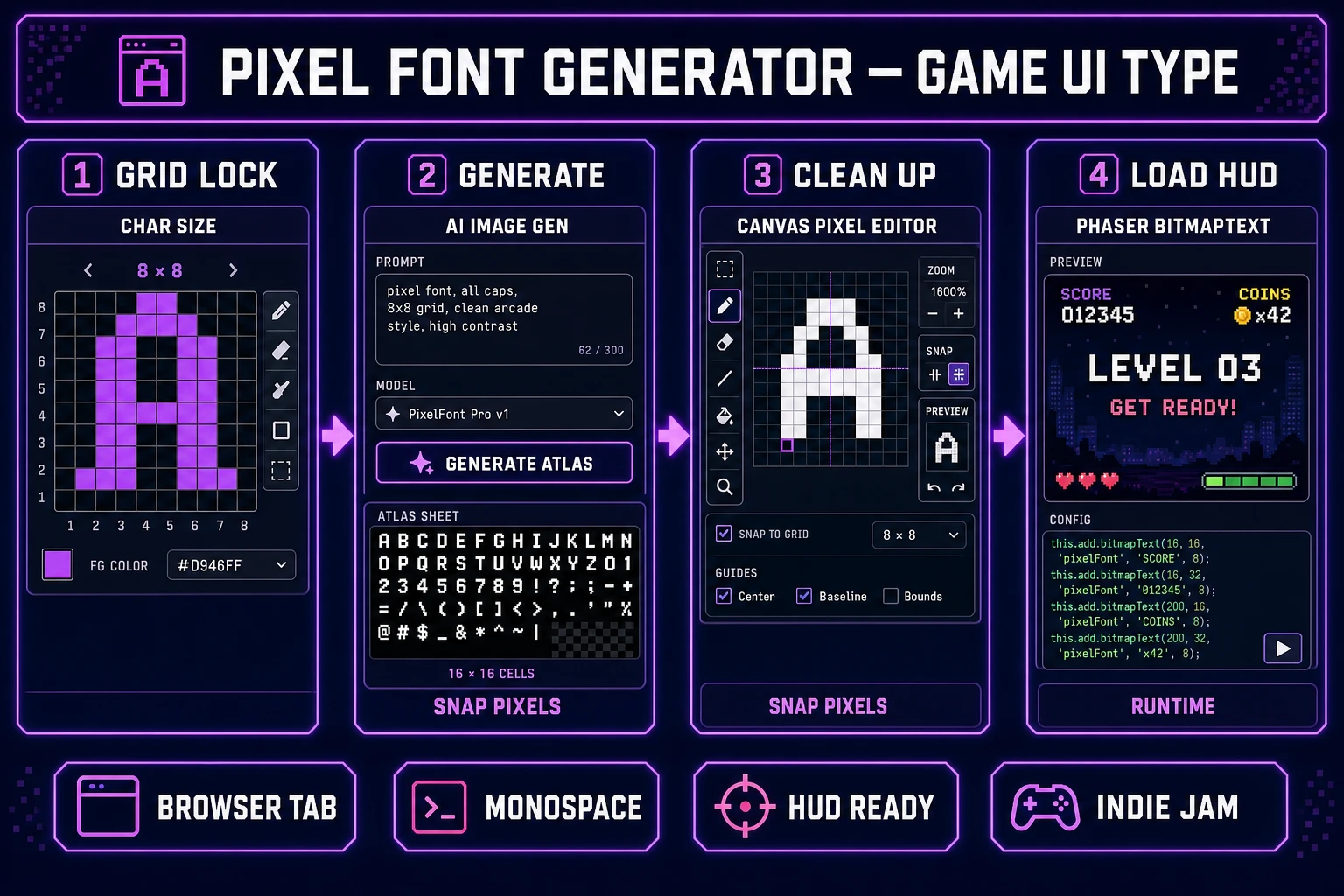
Pixel font generator pipeline diagram — four numbered panels for glyph grid lock, AI Image Gen atlas generation, Canvas pixel cleanup, and Phaser BitmapText HUD load
The 2026 pixel font generator pattern: one browser account turns a monospace glyph brief into a grid-aligned HUD atlas — not a blurred web font, but PNG cells your engine loads tonight.

What a pixel font generator outputs for game UI

Searchers typing pixel font generator usually need one of three deliverables. Jam devs want a retro 8×8 monospace sheet for score counters. RPG builders want a wider 16×16 charset with punctuation for inventory labels. Mobile web prototypes want digits-only damage floats that never clip the health bar frame. A useful pixel font generator for games produces a single PNG atlas where every glyph shares cell width, sits on a transparent background, and reads at 1× scale without sub-pixel blur.

Vector font converters and “pixel art font generator” filters optimize for social posts — they anti-alias edges and export at arbitrary DPI. Game engines expect bitmap fonts: fixed cell size, hard edges, and a character map your loader can index. That is why the honest pixel font generator path in 2026 lives inside a game-dev stack: atlas generation plus grid cleanup plus engine wiring in one Sorceress account instead of five disconnected tabs.

Why generic font tools break grid-aligned HUD text

Downloading a free TTF and scaling it to 16 px feels fast until you wire it into Phaser. Sub-pixel positioning makes “HP: 100” wobble when the camera scrolls. Kerning tables designed for prose push currency symbols away from digits. Worse, bilinear filtering turns one-pixel stems into gray halos — unreadable on dark UI panels.

Desktop bitmap font editors like Littera or old Codehead tools work, but they assume you already drew every glyph by hand. AI image models can draft the full charset in one pass if your prompt locks grid size, stroke weight, and charset list. The gap is cleanup: models love soft edges. Canvas closes that gap with pixel-level brush and picker tools before you export.

The Sorceress pixel font generator pipeline in four steps

The Sorceress answer to pixel font generator is four layers, each mapped to a real tool verified in the repository on July 9, 2026:

  1. Grid layer — lock cell size (8×8, 12×12, or 16×16), charset, and stroke color in a written brief.
  2. Generate layer — prompt a monospace atlas in AI Image Gen on a 1:1 canvas with transparent background.
  3. Clean layer — snap anti-aliased pixels in Canvas with brush and picker at 800% zoom.
  4. Load layer — export PNG, pair with a character-width map, and wire Phaser 4.2 BitmapText via WizardGenie.

For palette-limited HUD art that shares colors with your sprites, pair this workflow with the ai recolor guide so font accent colors match team tints. For broader pixel UI elements — hearts, stars, mana orbs — Canvas also covers quick icon touch-ups documented in the tools guide.
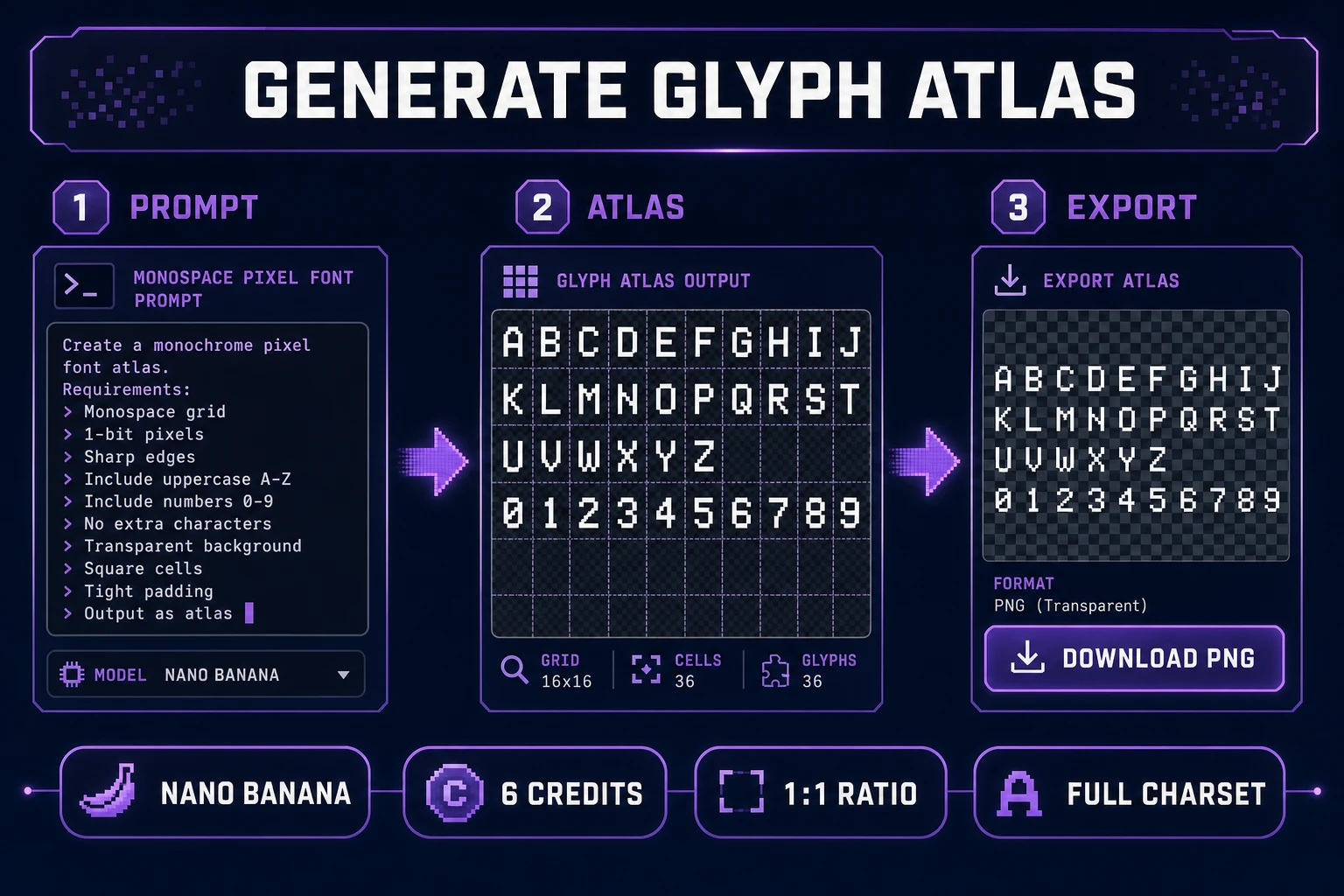
AI Image Gen pixel font generator workflow — monospace atlas prompt, A through Z glyph grid output, transparent PNG export
AI Image Gen pixel font generator pass: one prompt produces the full charset atlas on a transparent 1:1 sheet before Canvas grid cleanup.

Step 1 — define your glyph grid and character set

Pixel font generator sessions fail when the brief is vague. Before opening AI Image Gen, write four constraints:

  • Cell size — “8 pixels wide × 10 pixels tall per glyph, 1-pixel padding between cells.”
  • Charset — uppercase A–Z, digits 0–9, and . , ! ? : - for HUD labels.
  • Stroke rule — “1-pixel-wide vertical stems, no anti-aliasing, no gradients.”
  • Palette — “White glyphs on transparent background” or “PICO-8 off-white (#fff1e8) on transparent.”

Store the brief in your WizardGenie project folder as docs/ui-font-brief.md. Monospace width is non-negotiable — if “I” and “W” share the same cell width, your shop price strings align without custom kerning tables.

Step 2 — generate glyph sheets in AI Image Gen

Open AI Image Gen and select Nano Banana or Seedream 4.5 (both support 1:1 aspect ratio; verified in src/lib/models.ts on July 9, 2026). Each generation costs 6 credits.

Workflow for a pixel font generator atlas:

  1. Set aspect ratio to 1:1 and resolution to 2K — enough pixels for a 10×6 glyph grid at 16×16 cells.
  2. Paste a structured prompt (see example below).
  3. Generate two passes — one tight grid, one slightly bolder stroke — and pick the cleaner sheet.
  4. Download the winner as assets/fonts/hud_atlas_v1.png.

Example prompt that works for pixel font generator output:

“Monospace pixel font atlas, game UI type, 8×8 pixel cells, uppercase A through Z and digits 0 through 9 in a neat grid, punctuation period comma exclamation question colon hyphen, 1-pixel white strokes on transparent background, no anti-aliasing, no shadows, no 3D, retro NES style, evenly spaced grid, no watermark, no UI chrome.”

If glyphs bleed together, add “each character in its own bordered cell, equal column width” and regenerate. Seedream 4.5 edit mode accepts up to 14 reference images if you want to lock style from an existing HUD screenshot — useful when your pixel font generator pass must match an established tileset palette.

Step 3 — clean anti-aliasing in Canvas

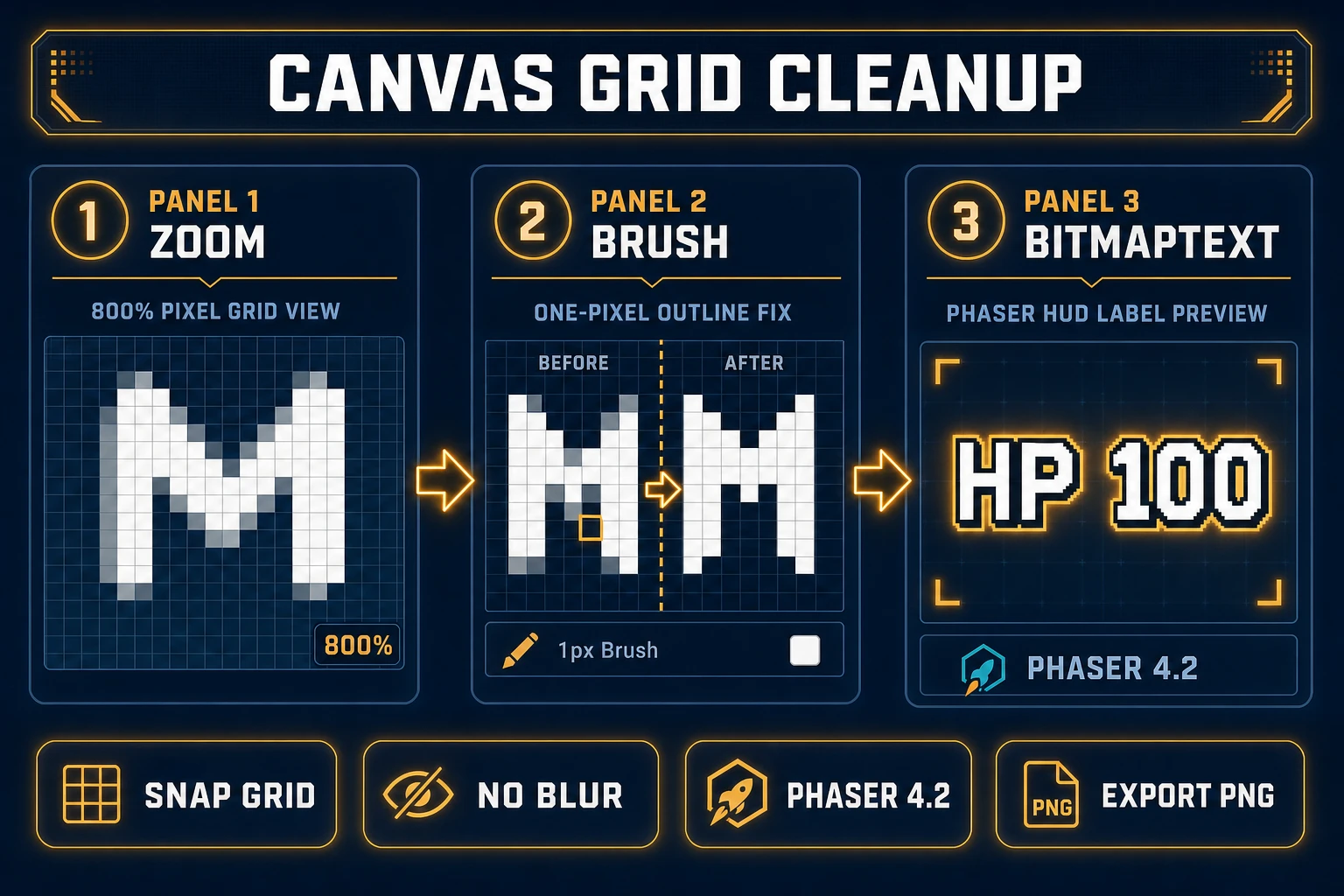
Canvas is where pixel font generator output becomes engine-safe. Import the atlas, zoom to 800%, and inspect every glyph edge. Canvas exposes brush, eraser, fill, and picker tools plus layered editing (verified in src/app/canvas/page.tsx on July 9, 2026).

Cleanup checklist:

  • Remove gray fringe — paint stray #808080 pixels to pure white or transparent with the picker.
  • Equalize cell height — capitals and digits should share the same baseline row.
  • Verify monospace width — overlay a grid guide mentally; “1” and “8” must occupy identical horizontal slots.
  • Export PNG — download requires the $49 lifetime unlock (LIFETIME_PRICE verified in src/app/plans/page.tsx).

For photo-sourced lettering that needs downscaling before you build a font, the image to pixel art ai post covers True Pixel presets that pair well with this step — run the atlas through True Pixel if the model output needs palette quantization to PICO-8 or SWEETIE-16.

Canvas pixel font generator cleanup — 800 percent zoom grid snap, one-pixel brush fix on letter M, Phaser BitmapText HP 100 HUD preview
Canvas grid cleanup: snap one-pixel strokes, equalize cell width, then export the atlas PNG that Phaser 4.2 BitmapText loads at runtime.

Step 4 — wire BitmapText in Phaser 4.2 via WizardGenie

Shipping is where amateur pixel font generator pipelines stall. You have a PNG but no loader. WizardGenie can scaffold a Phaser 4.2 scene that registers your atlas and renders HUD strings. Phaser 4.2.0 (June 19, 2026) keeps BitmapText as the standard path for texture fonts — verified on July 9, 2026 against docs.phaser.io and the official release notes.

Ask WizardGenie: “Generate a Phaser 4.2 preload scene that loads assets/fonts/hud_atlas_v1.png as a bitmap font with JSON character widths for A–Z and 0–9. Add a HUD label that displays HP: 100 using BitmapText at the top-left corner.” Example runtime call:

this.add.bitmapText(16, 16, 'hudFont', 'HP: 100', 16);

WizardGenie’s model lineup — Claude Opus 4.7, Claude Sonnet 4.6, GPT-5.5, Gemini 3.1 Pro, DeepSeek V4 Pro, Kimi K2.5, Grok 4.2, MiniMax M2.7 (verified in src/app/_home-v2/_data/tools.ts) — means you can put Gemini 3.1 Pro on the font-loader architecture and DeepSeek V4 Pro on bulk JSON width tables. That Planner-plus-Executor split keeps a pixel font generator session affordable when you are iterating three HUD styles before a playtest.

Monospace rules that keep pixel font generator output readable

Three rules separate shippable HUD type from pretty thumbnails:

  1. Digits first — if damage floats clip, regenerate digits 0–9 alone on a tighter grid before redoing the full alphabet.
  2. Disable smoothing — set pixelArt: true in your Phaser game config so BitmapText textures skip bilinear filtering.
  3. Test longest strings — “999,999 GOLD” and “WAVE 12/12” expose width drift that “HP: 10” hides.

For dialogue boxes that mix this font with portrait art, see the ai dialogue generator post — it covers text layout patterns that assume you already own a monospace HUD face.

What a pixel font generator session costs on Sorceress in 2026

Pricing verified July 9, 2026 against src/app/plans/page.tsx (LIFETIME_PRICE = 49). Sorceress base unlock is $49 one-time for the full tool suite including Canvas export. AI credits are pay-as-you-go: Starter $10 for 1,000 credits, Creator $20 for 2,000, Plus $50 for 5,000, Studio $100 for 10,000.

One full monospace atlas with two regeneration passes at 6 credits each typically burns 12–18 Sorceress credits — roughly $0.12–$0.18 on a Starter pack atop the lifetime unlock. Canvas cleanup and PNG export add no per-export credit cost once lifetime is active. A three-font HUD set (title, body, damage) lands around 36–54 credits if you generate two passes per style. WizardGenie coding runs on your own API keys, so the Phaser BitmapText scaffold pass stays under your model provider billing.

Open the full stack on the tools guide, compare tiers on plans, and start your first pixel font generator atlas at AI Image Gen with a locked 8×8 grid brief tonight.

Frequently Asked Questions

What does a pixel font generator output for game UI?

A pixel font generator for games produces a monospace glyph atlas — every character sits on the same grid width so HUD labels, damage numbers, and dialogue boxes align without kerning drift. Sorceress maps that to AI Image Gen for the atlas sheet, Canvas for pixel cleanup, and Phaser 4.2 BitmapText for runtime rendering.

How is a pixel font generator different from Google Fonts or DaFont?

Web font directories ship vector TTF files that blur when scaled to 8× or 16× pixel sizes. A pixel font generator (1,300/mo, KD 6 per DataForSEO probe verified July 9, 2026) outputs bitmap glyphs drawn on a fixed grid. Canvas enforces one-pixel strokes so your HUD reads crisp at native resolution instead of smearing anti-aliased edges.

Which Sorceress tool handles pixel font generator work fastest?

AI Image Gen at /generate with Nano Banana or Seedream 4.5. Prompt a full monospace atlas on a transparent background — uppercase A–Z, digits 0–9, and punctuation in one sheet. Each generation costs 6 credits (verified in src/lib/models.ts on July 9, 2026). Canvas handles grid touch-up; export requires the $49 lifetime unlock.

Can I load a custom pixel font into Phaser 4.2?

Yes. Phaser 4.2.0 (released June 19, 2026, verified against the official GitHub release tag on July 9, 2026) ships BitmapText for texture-based fonts. Export your cleaned atlas PNG from Canvas, pair it with a character-width JSON descriptor, and WizardGenie can scaffold the preload and BitmapText scene code.

What does a pixel font generator session cost on Sorceress?

Verified July 9, 2026 against src/app/plans/page.tsx (LIFETIME_PRICE = 49). Base unlock is $49 one-time. One full atlas with two regeneration passes typically burns 12–18 Sorceress credits ($0.12–$0.18 on a Starter pack). Canvas export is included with lifetime; WizardGenie coding runs on your own API keys.

Sources

  1. Bitmap font — Wikipedia
  2. Pixel art — Wikipedia
  3. Phaser — Official documentation
  4. HTML canvas element — MDN
Written by Arron R.·1,599 words·7 min read

Related posts


