
Drift a Parallax AI Generator (2.5D Game Backgrounds 2026)

By Arron R.9 min read
Parallax ai in 2026 is a four-step browser pipeline: split sky, mid, and foreground in a brief, paint depth-separated plates in AI Image Gen, widen edges in Ima

Side-scrollers live or die on depth. Your character jumps, combat reads clearly, and then the background is one flat PNG that slides at the same speed as the foreground — no illusion of distance, no sense that the world extends beyond the screen edge. Searchers typing parallax ai into Google want a shortcut: upload a photo, get layered depth. Most free tools deliver a single wallpaper with no layer separation, no horizontal repeat constraint, and no scroll metadata your engine can load. The 2026 answer is a browser pipeline where AI Image Gen paints sky, midground, and foreground plates, Image Expander widens narrow winners for wide camera pans, Canvas exports the final PNG stack, and WizardGenie scaffolds a Phaser 4.2 scene with independent scroll factors per layer. Phaser 4.2.0 (released June 19, 2026, verified against the official GitHub release tag on July 9, 2026) is the honest runtime for shipping those backgrounds in a browser tab. Everything below was checked against the Sorceress source on the same date.
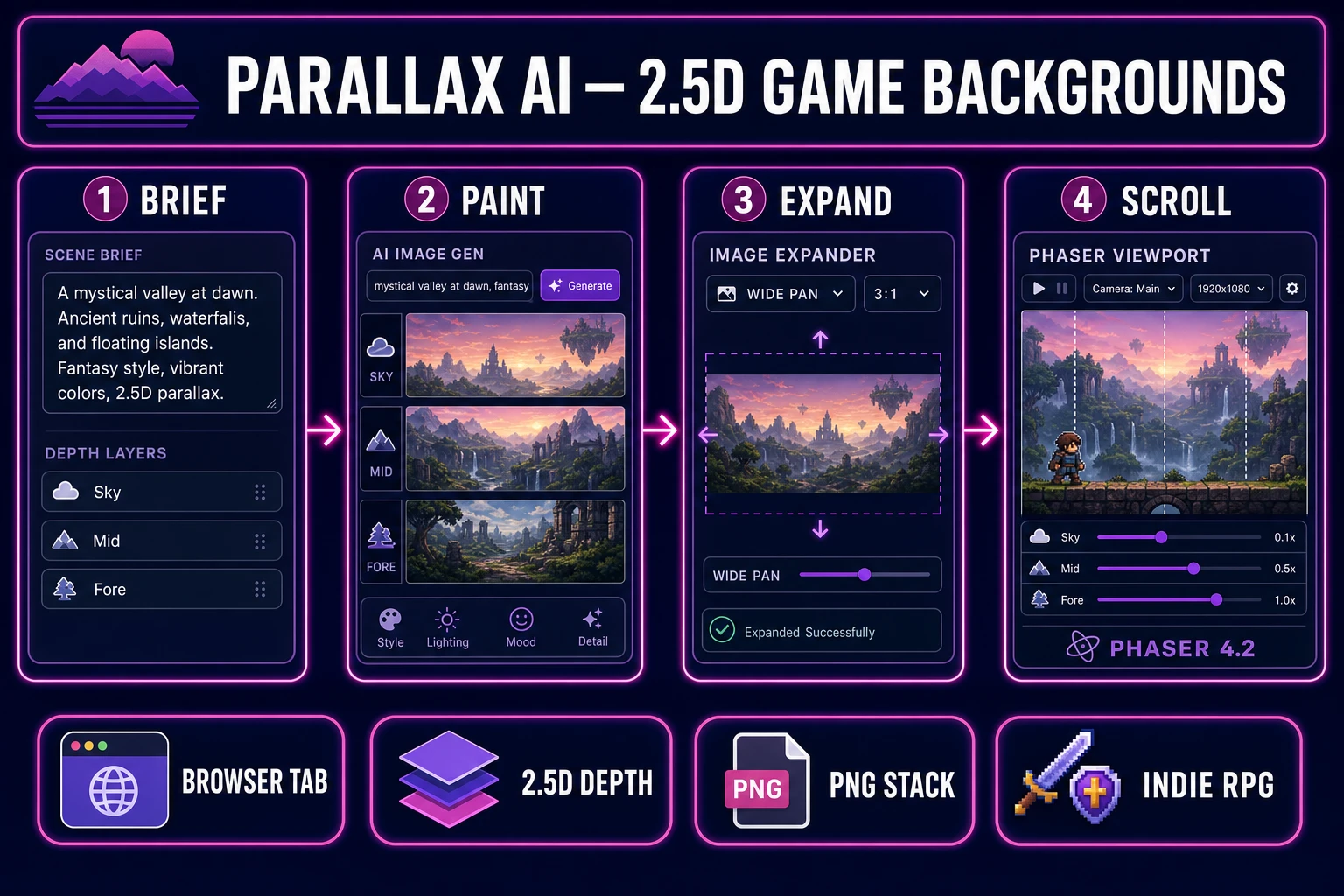
Parallax ai pipeline diagram — four numbered panels for depth brief, AI Image Gen plates, Image Expander wide pan, and Phaser 4.2 scroll output
The 2026 parallax ai pattern: one browser account turns depth briefs into separated plates, wide pans, and a Phaser scroll table — not a wallpaper, but files your camera can drift through tonight.

What parallax ai layers actually add to 2D games

Searchers typing parallax ai into Google fall into two camps. Digital artists want a single scenic illustration with a fake-depth effect for social posts. Indie devs want a layer stack — sky, distant hills, midground trees, foreground silhouettes — each sized for horizontal repeat and independent scroll speed. The second camp is who this post serves.

A useful parallax ai workflow for games produces horizontally tileable layers at predictable aspect ratios (16:9 for sky pans, 4:1 strips for midground), transparent foreground elements that do not obscure the player sprite, and filenames your scroll loader can reference. It does not produce a 4K desktop wallpaper that breaks when you scroll past the right edge. Generic image-to-parallax converters optimize for illustration quality, not engine format. They rarely export layer separation, never enforce tile seams, and cannot scaffold scroll logic. That is why the honest parallax ai path in 2026 lives inside a game-dev stack: paint plus widen plus export plus runtime in one account.

The parallax scrolling technique dates to arcade side-scrollers, but the modern 2.5D interpretation layers painted depth planes behind a 2D sprite — depth without a full 3D camera rig. Your parallax ai output should match that structure: three to five PNG files per biome, each with a scroll factor your scene config can read.

Why flat single-plane backgrounds feel static

Opening a general image generator and asking for “game background” feels fast until you try to scroll. Single-plane art has no depth registry, no layer repeat constraint, and no connection to your scroll-factor JSON. You download a PNG, paste it behind your scene, and wonder why the horizon jitters when the camera pans at max speed.

Flat backgrounds also fail the contrast test. Without a slow-moving sky layer and a faster foreground silhouette, the player sprite visually merges with the scenery. Parallax ai fixes this structurally: each depth plane moves at a different rate, creating motion cues that keep the character readable even on busy painted backgrounds.

An integrated parallax ai pipeline collapses the manual hops. AI Image Gen holds your biome and mood briefs across three to five layers, Image Expander extends winning plates horizontally without regenerating from scratch, Canvas composites and exports the final stack, and WizardGenie can scaffold a parallax scene that reads a layer config keyed by biome ID. The difference is structural: a wallpaper tool gives you art; a game-native pipeline gives you a background pack — layer folder, scroll JSON, camera bounds, ready to drop into assets/backgrounds/.

The Sorceress parallax ai pipeline in four steps

The Sorceress answer to parallax ai is four layers, each mapped to a real tool verified in the repository on July 9, 2026:

  1. Brief layer — define biome mood, palette, and depth count before opening any generator.
  2. Paint layer — render sky, midground, and foreground strips in AI Image Gen with Z-Image for fast iteration or Nano Banana Pro for hero vistas.
  3. Expand layer — widen narrow winners in Image Expander for wide camera pans without regenerating from scratch.
  4. Ship layer — composite final PNG stacks in Canvas and wire scroll factors into a Phaser 4.2 parallax scene via WizardGenie.

For broader landscape coverage that includes tiled ground strips, see the ai landscape generator post — it shares AI Image Gen but targets walkable terrain via Tileset Forge rather than pure 2.5D depth planes. For 3D environment maps rather than side-scrolling vistas, the skybox generator pipeline covers cubemap export for Three.js scenes.
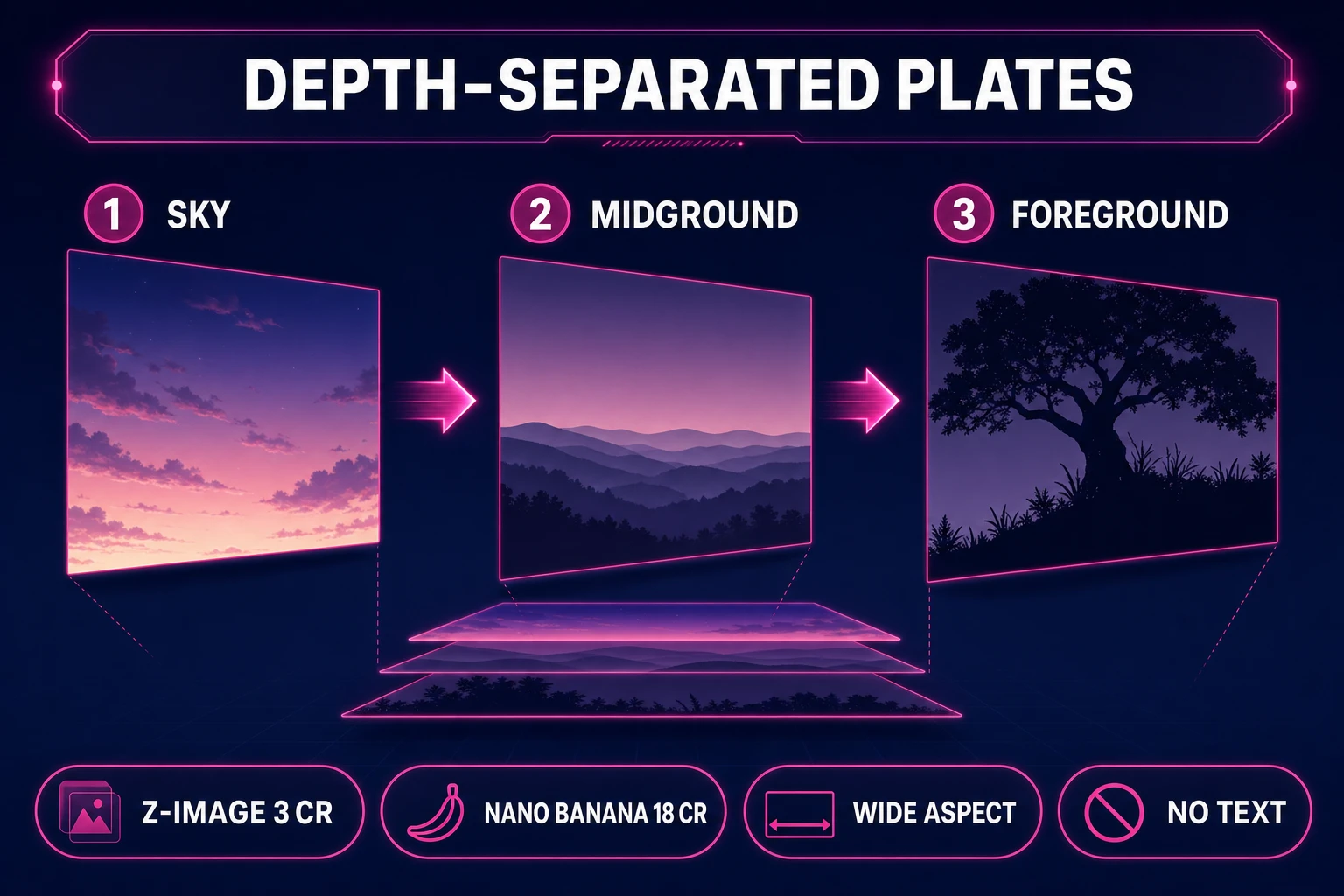
AI Image Gen depth-separated plates for parallax ai workflow — sky gradient, rolling hills midground, and tree silhouette foreground
Depth-separated plates in AI Image Gen: sky, midground hills, foreground silhouettes — the paint step most standalone parallax ai tools stop at.

Step 1 — split foreground, mid, and sky in the brief

Parallax art fails when the prompt is vague. Before touching AI Image Gen, write a one-line brief per layer:

  • Sky — “Gradient dusk sky, no clouds at horizon line, warm orange to deep purple, 1920×540, tileable horizontally.”
  • Midground — “Rolling hills silhouette, desaturated blue-green, no detail smaller than 8px, 1920×400.”
  • Foreground — “Pine tree silhouettes, transparent PNG, varied heights, darkest layer, 1920×300.”

Store these in a text file inside your WizardGenie project folder so every regeneration pass references the same palette. Consistency is what separates a random scenic wallpaper from parallax ai output your players recognize across three biomes. Assign scroll factors in the brief too — sky at 0.1, midground at 0.4, foreground at 0.8 — so the paint pass and the runtime config stay aligned.

Step 2 — generate depth-separated plates in AI Image Gen

Open AI Image Gen and run layout passes per layer. Z-Image costs 3 credits per render (verified in src/lib/models.ts on July 9, 2026) and is the honest iteration model — generate five sky gradients before committing. When a layer reads clearly at 50% zoom, lock hero vistas with Nano Banana Pro at 18 credits for 1K/2K resolution on midground hills and foreground foliage.

Prompt structure that works for a parallax ai pass: “Side-scrolling game background layer, [layer type: sky/midground/foreground], [mood and palette], flat color regions, no text, no UI, no characters, horizontally tileable, fantasy RPG biome [forest/desert/snow].” Generate three variants per layer, pick the strip that tiles cleanly when duplicated side-by-side in a preview, and download each PNG into backgrounds/[biome]/ with predictable names — sky.png, hills.png, trees.png.

Use the 21:9 ultrawide aspect preset when your camera pan range exceeds a standard 16:9 strip. AI Image Gen supports multiple aspect ratios per model; Z-Image and Nano Banana Pro both handle wide layouts. If a midground layer is strong but too narrow, send the winner to Image Expander in Step 3 rather than burning credits on full regeneration.

Step 3 — expand edges with Image Expander

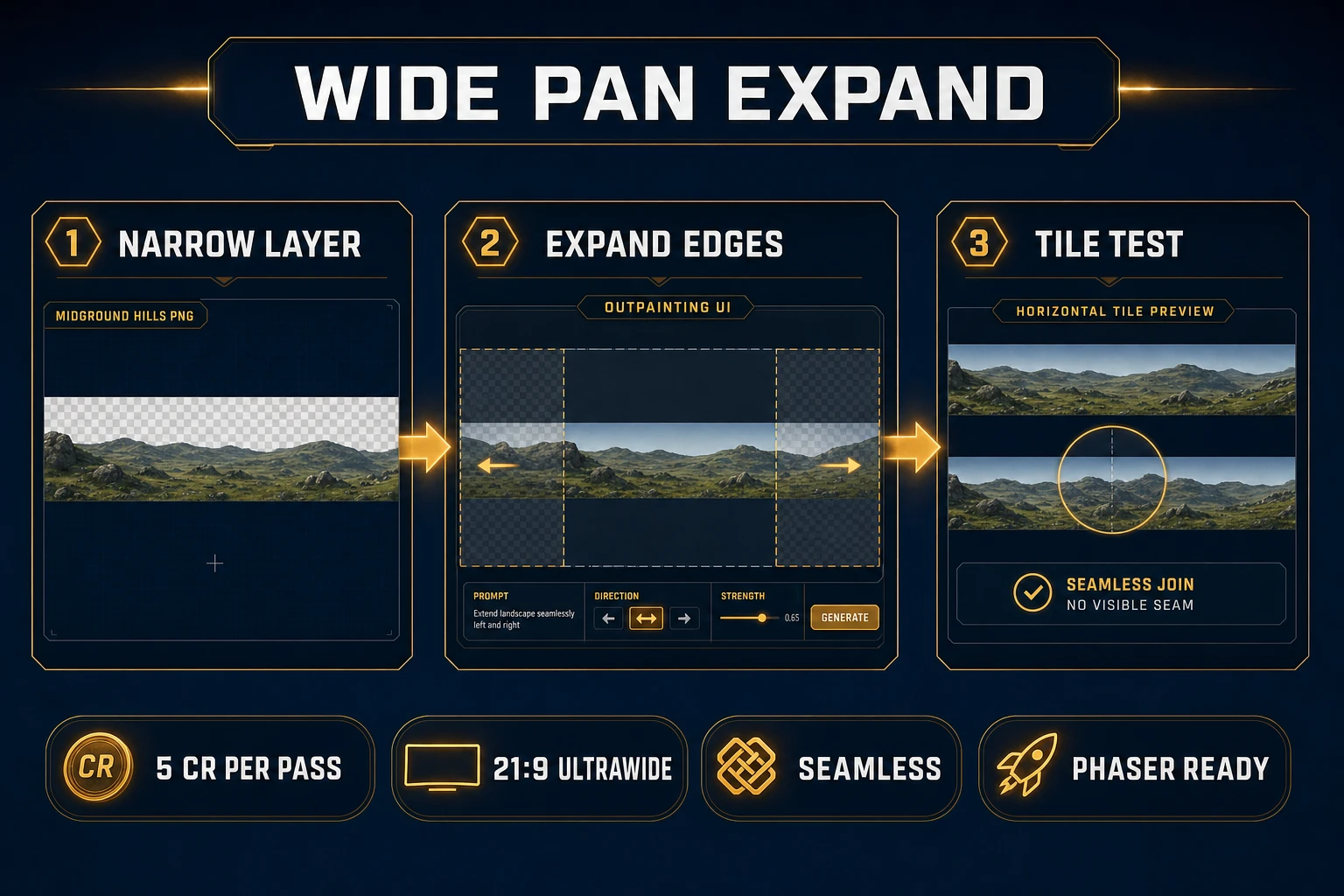
Image Expander at /expander is where most parallax ai workflows win or lose. A painted midground strip that looks perfect at 1920px wide may show a visible seam when your camera pans 4000px across a level. Outpainting extends the winning layer horizontally while preserving style continuity — 5 credits per pass (verified in src/app/expander/page.tsx line 13 on July 9, 2026).

Workflow: upload the narrow winner, select the 21:9 ultrawide or 2:1 panoramic preset, write a continuation prompt that matches the original brief (“continue rolling hills silhouette, same desaturated blue-green palette, no new objects, seamless horizontal extension”), and run the expand pass. Duplicate the result three times horizontally in Canvas to verify the seam before committing.

For sky layers that need vertical gradient extension rather than horizontal width, use the 16:9 landscape preset and expand top or bottom edges. Image Expander supports aspect ratio presets from 16:9 through 21:9 ultrawide — pick the ratio that matches your camera pan geometry before expanding.

Image Expander wide pan pipeline for parallax ai — narrow midground layer, outpainting UI with extended canvas, and seamless horizontal tile test
Wide pan expand in Image Expander: one strong midground plate in, seamless horizontal strip out — the step that turns parallax ai art into camera-ready backgrounds.

Step 4 — export PNG stacks for Phaser scroll factors

Canvas at /canvas closes the gap between expanded plates and engine-ready files. Import your sky, midground, and foreground PNGs as separate layers, verify alignment at the horizon line, trim excess transparent padding, and export each layer individually. Canvas supports 2:1 panoramic presets (2048×1024) that match common parallax strip dimensions — verified in src/app/canvas/page.tsx on July 9, 2026.

Shipping is where amateur pipelines die. WizardGenie can scaffold a Phaser 4.2 scene that loads your layer stack, applies independent scroll factors, and pins the ground collision layer if you add one later. Phaser 4.2.0 (June 19, 2026) adds Mesh2D and stencil rendering for advanced atmospheric effects — verified on July 9, 2026 against docs.phaser.io and the official release tag. Ask WizardGenie explicitly: “Generate a Phaser 4.2 scene with parallax layers loading assets/backgrounds/forest/, scroll factors 0.1 for sky, 0.4 for hills, 0.8 for trees.”

Example scroll config shape:

{
  "biome": "forest",
  "layers": [
    { "file": "sky.png", "scrollFactor": 0.1, "depth": 0 },
    { "file": "hills.png", "scrollFactor": 0.4, "depth": 1 },
    { "file": "trees.png", "scrollFactor": 0.8, "depth": 2 }
  ]
}

WizardGenie’s model lineup — Claude Opus 4.7, Claude Sonnet 4.6, GPT-5.5, Gemini 3.1 Pro, DeepSeek V4 Pro, Kimi K2.5, Grok 4.2, MiniMax M2.7 (verified in src/app/_home-v2/_data/tools.ts) — means you can put Opus or Gemini 3.1 Pro on the parallax architecture pass and DeepSeek V4 Pro or Kimi K2.5 on bulk scroll-config generation. That Planner-plus-Executor split keeps a parallax ai session affordable when you are iterating camera bounds across twelve rooms.

Parallax depth and readability on painted backgrounds

Three playtest checks catch most parallax ai failures before players do:

  1. Tile test — duplicate each layer horizontally three times in Canvas. If seams are visible, rerun Image Expander with a tighter continuation prompt.
  2. Contrast test — place your player sprite at center screen. If foreground trees obscure the character, lighten the foreground layer or reduce tree density.
  3. Scroll test — pan the camera at max speed. If layers appear to slide at the same rate, adjust scroll factors — sky should move slowest, foreground fastest.

Run these checks inside the same WizardGenie project so fixes diff against the same scroll JSON instead of restarting from a blank scene. For sprite animation loops that share the same parallax stage, see the ai sprite animation post — it covers walk-cycle generation that pairs naturally with drifting backgrounds.

What a parallax ai session costs on Sorceress in 2026

Pricing verified July 9, 2026 against src/app/plans/page.tsx (LIFETIME_PRICE = 49). Sorceress base unlock is $49 one-time for the full tool suite. AI credits are pay-as-you-go: Starter $10 for 1,000 credits, Creator $20 for 2,000, Plus $50 for 5,000, Studio $100 for 10,000.

A three-biome set with four Z-Image drafts per layer (roughly 108 credits across nine layers), three Nano Banana Pro hero locks (54 credits), three Image Expander passes (15 credits), and optional Canvas touch-ups typically burns 350–550 credits total — roughly $3.50–$5.50 on a Starter pack atop the lifetime unlock. WizardGenie coding runs on your own API keys, so the parallax scaffold pass cost stays under your model provider billing, not Sorceress credits.

Compare that to licensing stock background packs or subscribing to three separate art tools with no parallax integration. The integrated parallax ai path wins on iteration speed: add a new desert biome, paint three layers, expand one strip, update scroll config, reload — done in an afternoon. Browse the full stack at Sorceress Tools Guide or see plans for credit tiers.

Frequently Asked Questions

What does parallax ai output for game dev?

Parallax ai for games produces a stack of depth-separated PNG layers — sky, distant hills, midground foliage, foreground silhouettes — each sized for horizontal repeat and independent scroll speed. Sorceress pairs AI Image Gen for painting those plates, Image Expander for widening narrow winners, and Canvas for final layer export before WizardGenie scaffolds a Phaser 4.2 scene with scroll factors per layer.

How is parallax ai different from a wallpaper generator?

Wallpaper tools optimize for one 4K desktop image. Parallax ai (110/mo, KD 0 per DataForSEO probe verified July 9, 2026) optimizes for engine format: repeatable horizontal strips, transparent foreground elements, and filenames your scroll loader can reference. The Sorceress stack handles painting, widening, and export in one account instead of three disconnected apps.

Which Sorceress tools power a parallax ai workflow?

AI Image Gen at /generate paints sky, midground, and foreground plates. Image Expander at /expander costs 5 credits per outpainting pass (verified in src/app/expander/page.tsx on July 9, 2026) and widens layers for wide camera pans. Canvas at /canvas composites and exports final PNG stacks. WizardGenie wires scroll factors into Phaser 4.2.

Can WizardGenie wire parallax ai layers into Phaser scroll logic?

Yes. Ask WizardGenie for a Phaser 4.2 scene with TileSprite or layered Container setup where each background PNG scrolls at a different speed. Phaser 4.2.0 shipped June 19, 2026 (verified against the official GitHub release tag on July 9, 2026). Use Claude Opus 4.7 or Gemini 3.1 Pro for parallax architecture, then DeepSeek V4 Pro or Kimi K2.5 for bulk scroll-config JSON.

What does a full parallax ai session cost on Sorceress?

Verified July 9, 2026 against src/app/plans/page.tsx (LIFETIME_PRICE = 49). Base unlock is $49 one-time. A three-biome set with five Z-Image drafts per layer, two Nano Banana Pro hero locks, three Image Expander passes, and one WizardGenie iteration typically burns 350–550 Sorceress credits ($3.50–$5.50 on a Starter pack). WizardGenie coding runs on your own API keys.

Sources

  1. Parallax scrolling (Wikipedia)
  2. Phaser — Official documentation
  3. 2.5D (Wikipedia)
  4. Side-scrolling video game (Wikipedia)
Written by Arron R.·1,926 words·9 min read

Related posts


