Flip a GIF Sprite Sheet Maker (Browser Loop Export 2026)

By Arron R.8 min read
A gif sprite sheet maker in 2026 is a four-step browser pipeline: lock frame size and loop length, generate walk cycles in Quick Sprites as GIF or PNG grid, sli

Prototype reviews stall when your hero is a static PNG and the only motion you can show is a screen recording with desktop chrome in the corner. Searchers typing gif sprite sheet maker into Google want a reversible path: turn a sprite sheet into a looping GIF for Discord pitches, or turn a GIF back into uniform frames their engine can load. Most free converters optimize for meme sharing — variable frame sizes, lossy palettes, no transparent PNG export, no grid metadata. The 2026 answer is a browser pipeline where Quick Sprites generates walk cycles as animated GIF or PNG grid, Slicer slices uploaded GIFs into cells, Sprite Analyzer validates frame timing and exports atlas JSON, and WizardGenie scaffolds a Phaser 4.2 scene that plays those loops at the correct fps. Phaser 4.2.0 (released June 19, 2026, verified against the official GitHub release tag on July 9, 2026) is the honest runtime for shipping validated loops in a browser tab. Everything below was checked against the Sorceress source on the same date.
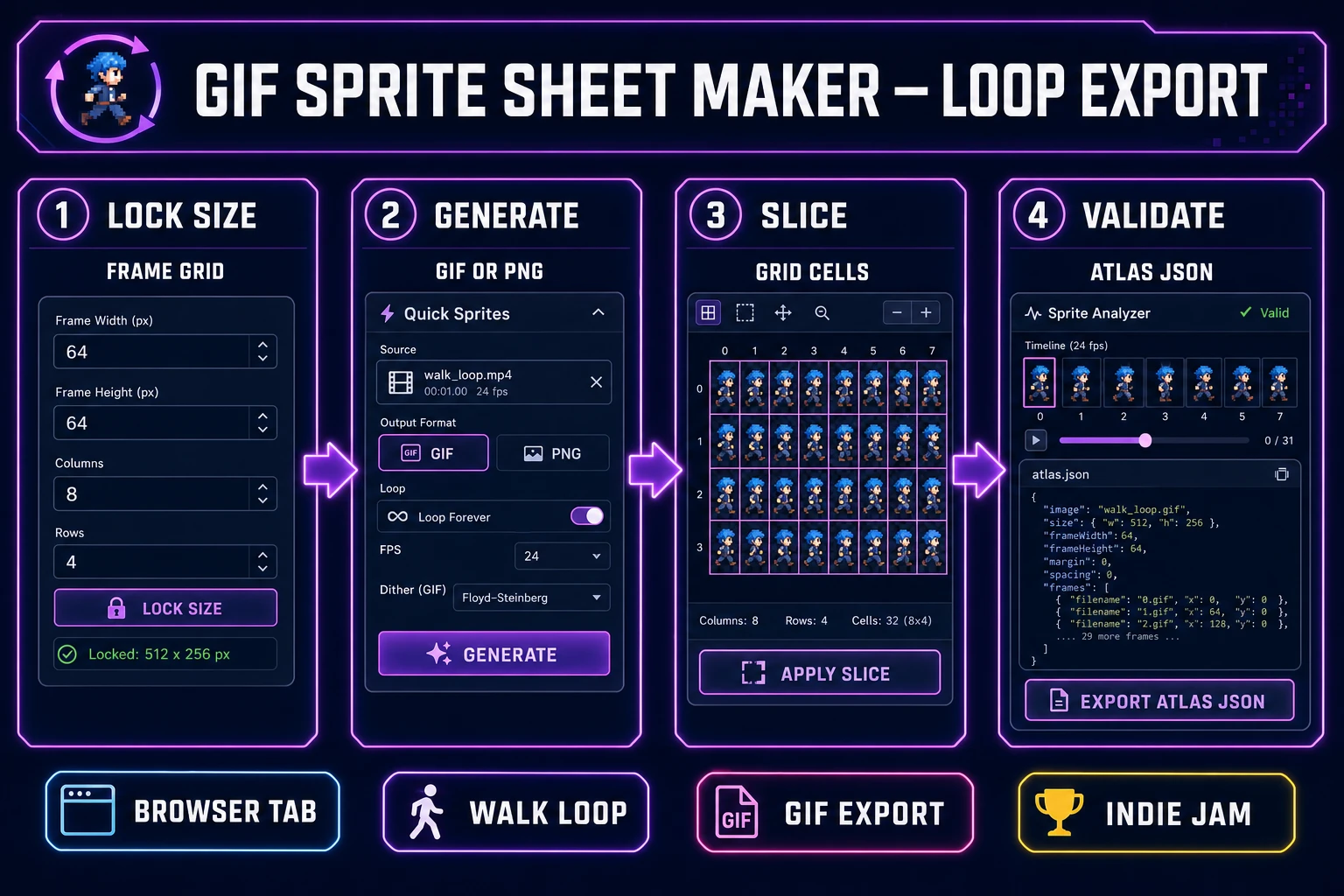
Gif sprite sheet maker pipeline diagram — four numbered panels for frame lock, Quick Sprites GIF export, Slicer grid slice, and Sprite Analyzer validation
The 2026 gif sprite sheet maker pattern: one browser account turns locked frame grids into shareable GIF loops or engine-ready PNG atlases — not a screen recording, but files your prototype can play tonight.

What a gif sprite sheet maker outputs for prototypes

Searchers typing gif sprite sheet maker fall into two camps. Social sharers want a looping GIF for an itch.io page or a Discord #showcase thread. Indie devs want a bidirectional pipeline: export a GIF for pitches, then slice that same loop back into uniform PNG frames when the prototype graduates to a real atlas. A useful gif sprite sheet maker for games produces both outputs from the same source frames — transparent backgrounds, consistent cell dimensions, predictable filenames, and optional JSON your loader can reference.

Generic online converters optimize for file size on social feeds. They rarely preserve alpha channels, never enforce a grid layout your Slicer can re-import, and cannot scaffold Phaser AnimationManager keys. That is why the honest gif sprite sheet maker path in 2026 lives inside a game-dev stack: generate plus slice plus validate plus runtime in one Sorceress account. The GIF format handles short loops well for pitches; the texture atlas PNG grid is what your engine actually loads at ship time.

Why screen-recorded GIFs fail as game loops

Recording your prototype window feels fast until you import the GIF into a sprite tool. Screen captures carry variable frame dimensions, compression banding on flat pixel art, cursor flicker, and UI chrome your Slicer cannot cleanly grid. Worse, the fps is whatever your laptop managed during recording — not the 8–12 fps your side-scroller needs for readable footwork.

Screen-recorded GIFs also fail the transparency test. Most recorders flatten alpha to a desktop background color. When you slice those frames into cells, halos appear around every sprite edge and your Phaser scene shows a colored box instead of a clean silhouette. A purpose-built gif sprite sheet maker generates frames at fixed dimensions with transparency baked in from the first pass.

An integrated pipeline collapses the manual hops. Quick Sprites holds your character brief and outputs either Animated GIF or Spritesheet (PNG) from the same generation. Slicer accepts GIF uploads and overlays a grid for cell export. Sprite Analyzer confirms frame count, fps, and loop seams before you commit to atlas JSON. WizardGenie can scaffold a Phaser 4.2 loader that reads those validated frames — the difference between a pitch clip and a shippable animation state.

The Sorceress gif sprite sheet maker pipeline in four steps

The Sorceress answer to gif sprite sheet maker is four layers, each mapped to a real tool verified in the repository on July 9, 2026:

  1. Lock layer — define frame size, loop length, and walk direction before opening any generator.
  2. Generate layer — render walk cycles in Quick Sprites, choosing Animated GIF for pitches or Spritesheet (PNG) for engine work.
  3. Slice layer — import GIF or PNG grids into Slicer, set grid lines, and export individual cells or the full sheet.
  4. Validate layer — confirm frame timing in Sprite Analyzer and wire atlas JSON into Phaser 4.2 via WizardGenie.

For broader walk-cycle coverage that includes Auto-Sprite video cleanup, see the ai sprite animation post. For static grid packing without GIF export, the ai sprite sheet generator guide covers atlas-first workflows.
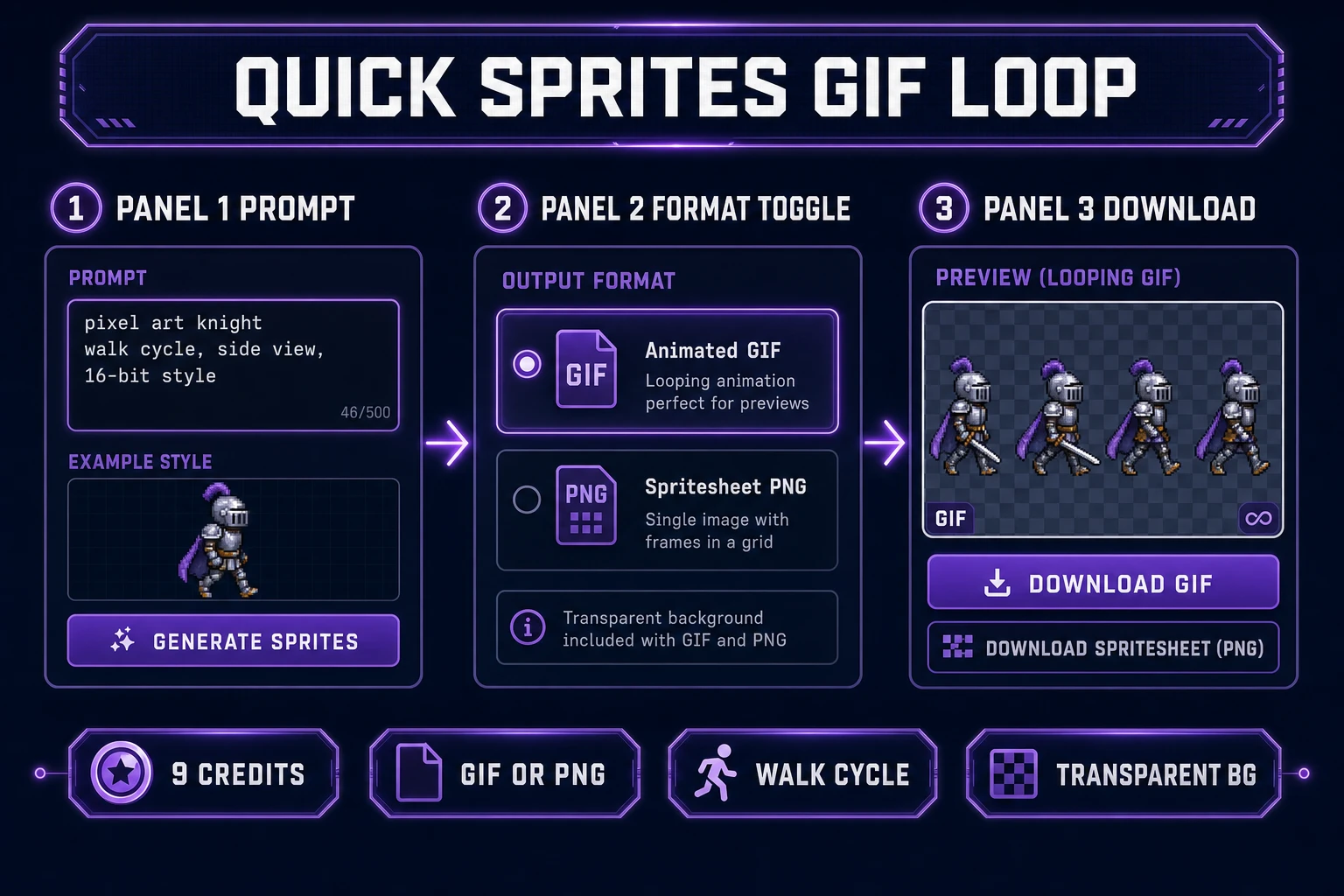
Quick Sprites gif sprite sheet maker output — prompt field, Animated GIF format toggle, and looping walk cycle download preview
Quick Sprites format toggle: Animated GIF for pitch loops, Spritesheet (PNG) when Slicer and Sprite Analyzer need a grid to validate.

Step 1 — lock frame size and loop length

GIF sprite sheets fail when the prompt is vague. Before touching Quick Sprites, write a one-line brief:

  • Frame size — “48×48 pixels, side view, feet anchored at row 44.”
  • Loop length — “Four-frame walk cycle, seamless loop, no root motion drift.”
  • Export target — “Animated GIF for Discord pitch” or “PNG grid for Phaser atlas.”

Store the brief in your WizardGenie project folder so every regeneration pass references the same silhouette. Consistency is what separates a random looping meme from gif sprite sheet maker output your playtesters recognize across three enemy types. Assign fps in the brief too — 10 fps for retro platformers, 8 fps for chunky 32×32 jams — so the Sprite Analyzer validation pass has a target to check against.

Step 2 — generate walk cycles in Quick Sprites

Open Quick Sprites and set your style preset. Four Angle Walking outputs direction grids; Small Sprites targets 32×32 walk rows. Each generation costs 9 credits through Retro Diffusion rd-animation (verified in src/app/quick-sprites/page.tsx line 21 on July 9, 2026).

The Output Format toggle is the gif sprite sheet maker fork:

  • Animated GIF — downloads a ready loop for itch.io GIF banners, Discord embeds, and publisher pitch decks. Use when stakeholders need motion before engine integration exists.
  • Spritesheet (PNG) — downloads a uniform grid your Slicer and Sprite Analyzer can slice and validate. Use when you are skipping the pitch clip and heading straight to Phaser.

Prompt structure that works: “Pixel art [character type], side-view walk cycle, [N] frames, transparent background, no text, no UI, game sprite, seamless loop.” Generate three variants, pick the loop whose feet land on the same baseline at frame zero and frame N−1, and download into sprites/[character]/walk.gif or walk.png depending on your export target.

Step 3 — slice and validate frames in Slicer

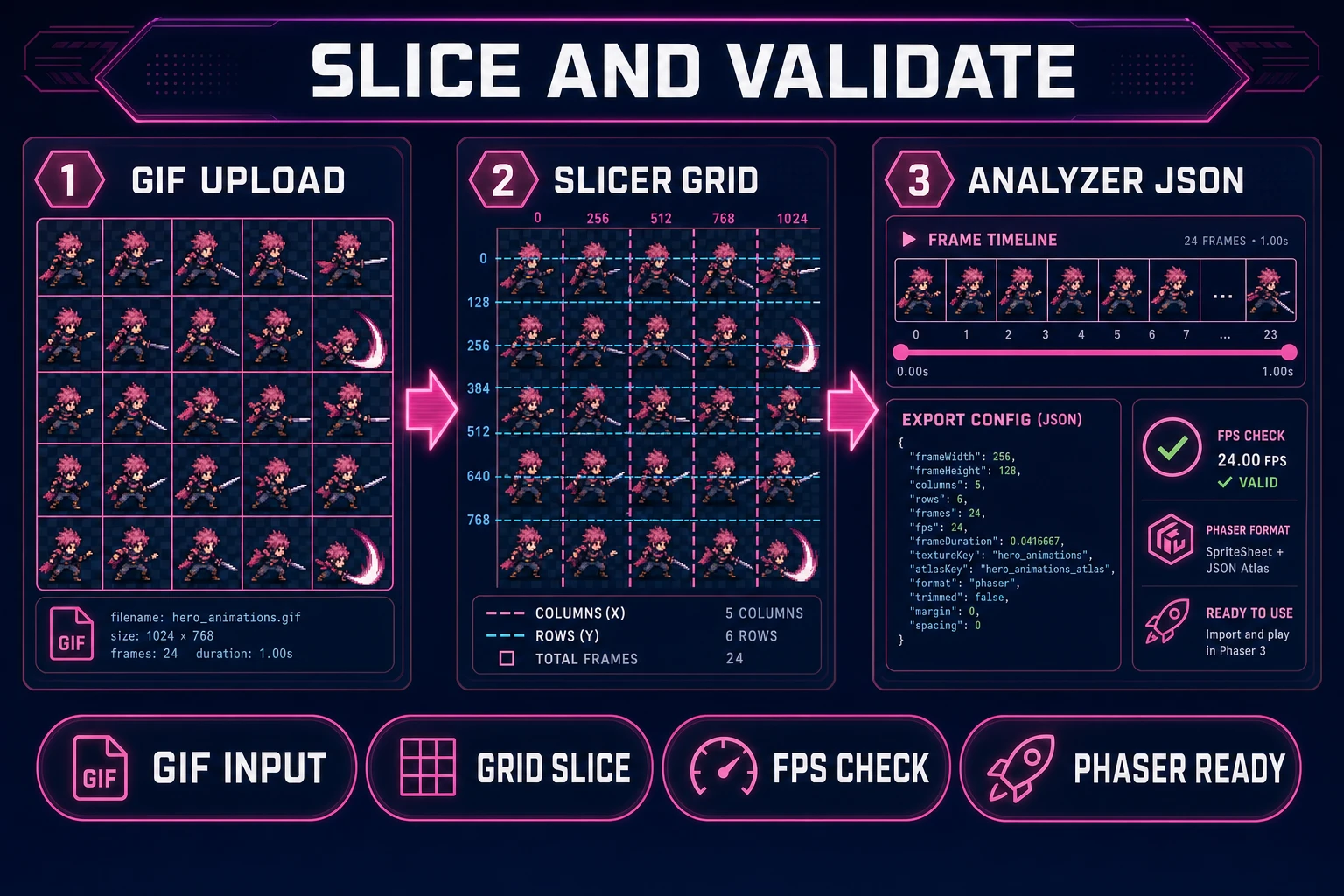
Slicer is where gif sprite sheet maker workflows become reversible. Upload accepts PNG, JPG, and GIF (verified in src/app/slicer/page.tsx line 949 on July 9, 2026). Drop your Quick Sprites GIF or an external sprite sheet, switch to grid selection mode, and drag horizontal and vertical slice lines until each cell frames one pose.

Workflow for GIF input:

  1. Upload the animated GIF or PNG grid.
  2. Set grid lines to match the frame columns and rows Quick Sprites generated.
  3. Click Slice & Download to export all grid cells as individual PNGs or the recomposed sheet.
  4. Drag the result into Sprite Analyzer for frame-order validation.

Sprite Analyzer at /spritesheet-analyzer detects grid layout automatically, lets you define animation sections (start, middle loop, end), set per-section fps, and export a JSON config with frame indices your coding agent can consume. The tool includes an agent integration prompt that explains how to slice sheets and wire animation sections — copy it into WizardGenie when scaffolding your Phaser loader.

Slicer and Sprite Analyzer gif sprite sheet maker validation — GIF upload with grid overlay, slice lines, and exported atlas JSON timeline
Slicer plus Sprite Analyzer: GIF in, validated grid and atlas JSON out — the slice step most standalone gif sprite sheet maker tools skip entirely.

Step 4 — wire validated loops into Phaser 4.2

Shipping is where amateur gif sprite sheet maker pipelines die. WizardGenie can scaffold a Phaser 4.2 scene that loads your atlas PNG, reads the Sprite Analyzer JSON, and plays walk at 10 fps with loop enabled. Phaser 4.2.0 (June 19, 2026) adds Mesh2D and stencil rendering for advanced effects — verified on July 9, 2026 against docs.phaser.io and the official GitHub release tag.

Ask WizardGenie explicitly: “Generate a Phaser 4.2 scene loading assets/sprites/hero/walk.png with frameWidth 48, frameHeight 48, walk animation frames 0–3 at 10 fps looping.” Example loader shape:

this.load.spritesheet('hero-walk', 'assets/sprites/hero/walk.png', {
  frameWidth: 48,
  frameHeight: 48
});
this.anims.create({
  key: 'walk',
  frames: this.anims.generateFrameNumbers('hero-walk', { start: 0, end: 3 }),
  frameRate: 10,
  repeat: -1
});

WizardGenie’s model lineup — Claude Opus 4.7, Claude Sonnet 4.6, GPT-5.5, Gemini 3.1 Pro, DeepSeek V4 Pro, Kimi K2.5, Grok 4.2, MiniMax M2.7 (verified in src/app/_home-v2/_data/tools.ts) — means you can put Opus or Gemini 3.1 Pro on the animation architecture pass and DeepSeek V4 Pro or Kimi K2.5 on bulk frame-index JSON. That Planner-plus-Executor split keeps a gif sprite sheet maker session affordable when you are iterating four enemy walk loops before a jam deadline.

GIF export versus PNG atlas: when to flip each direction

Three rules keep gif sprite sheet maker sessions from wasting credits:

  1. Pitch first, atlas second — export Animated GIF from Quick Sprites for stakeholder reviews. Once approved, regenerate the same prompt with Spritesheet (PNG) selected rather than trying to upsample the GIF.
  2. Never screen-record your own prototype — the compression and chrome defeat Slicer grid detection. Always generate or slice from source PNG/GIF assets.
  3. Validate before Phaser import — run every sheet through Sprite Analyzer so frame indices in JSON match the PNG grid. Skipping validation produces the classic “animation plays wrong frames” bug that costs another regeneration pass.

For sprite GIF loops that share a parallax stage, pair this workflow with the parallax ai post — backgrounds drift while your gif sprite sheet maker output handles character motion in the foreground layer.

What a gif sprite sheet maker session costs on Sorceress in 2026

Pricing verified July 9, 2026 against src/app/plans/page.tsx (LIFETIME_PRICE = 49). Sorceress base unlock is $49 one-time for the full tool suite including Pro tools like Slicer and Sprite Analyzer. AI credits are pay-as-you-go: Starter $10 for 1,000 credits, Creator $20 for 2,000, Plus $50 for 5,000, Studio $100 for 10,000.

A hero walk loop with three Quick Sprites variants (27 credits), one GIF export, Slicer grid slice (no per-slice credit cost), Sprite Analyzer validation (no export credit cost), and one WizardGenie iteration typically burns 40–80 Sorceress credits total — roughly $0.40–$0.80 on a Starter pack atop the lifetime unlock. A four-enemy roster with walk GIF pitches plus PNG atlas ship files lands around 108 Quick Sprites credits if you generate three variants per enemy. WizardGenie coding runs on your own API keys, so the Phaser scaffold pass stays under your model provider billing.

Compare that to hiring a pixel animator for a single walk cycle or subscribing to three separate GIF tools with no grid validation. The integrated gif sprite sheet maker path wins on iteration speed: regenerate one enemy, re-slice, re-export JSON, reload — done before lunch. Browse the full stack at Sorceress Tools Guide or see plans for credit tiers.

Frequently Asked Questions

What does a gif sprite sheet maker output for game dev?

A gif sprite sheet maker for games produces either a looping animated GIF for Discord pitch clips and itch.io previews, or a uniform PNG grid your engine can atlas. Sorceress maps that to Quick Sprites for prompt-to-loop generation, Slicer for slicing uploaded GIFs into cells, and Sprite Analyzer for validating frame dimensions and exporting JSON configs WizardGenie can wire into Phaser 4.2.

How is a gif sprite sheet maker different from a screen recorder?

Screen-recorded GIFs carry variable frame sizes, compression artifacts, and desktop UI chrome. A gif sprite sheet maker (40/mo, KD 0 per DataForSEO probe verified July 9, 2026) locks frame dimensions, preserves transparent backgrounds, and exports predictable filenames. The Sorceress stack handles generation, slicing, and validation in one account instead of three disconnected apps.

Which Sorceress tool generates GIF loops fastest?

Quick Sprites at /quick-sprites costs 9 credits per generation (verified in src/app/quick-sprites/page.tsx on July 9, 2026) and offers an Output Format toggle: Spritesheet (PNG) or Animated GIF. Pick Animated GIF for pitch clips, Spritesheet (PNG) when you need Slicer or Sprite Analyzer to validate grid layout before Phaser import.

Can Slicer turn a GIF into individual sprite frames?

Yes. Slicer at /slicer accepts PNG, JPG, and GIF uploads (verified in src/app/slicer/page.tsx on July 9, 2026). Set grid lines over the GIF sprite sheet, slice cells, and download individual frames or the full grid. Drag the result into Sprite Analyzer to confirm frame timing and export atlas JSON.

What does a full gif sprite sheet maker session cost on Sorceress?

Verified July 9, 2026 against src/app/plans/page.tsx (LIFETIME_PRICE = 49). Base unlock is $49 one-time. A hero walk loop with three Quick Sprites variants (27 credits), one GIF export, Slicer and Sprite Analyzer validation (Pro tools, no per-slice credit cost), and one WizardGenie iteration typically burns 40–80 Sorceress credits ($0.40–$0.80 on a Starter pack). WizardGenie coding runs on your own API keys.

Sources

  1. GIF — Wikipedia
  2. Sprite (computer graphics) — Wikipedia
  3. Phaser — Official documentation
  4. Texture atlas — Wikipedia
Written by Arron R.·1,792 words·8 min read

Related posts


