Every indie who has ever tried to floor a Godot scene with a grass texture or wallpaper a Unity room with wood runs into the same problem inside the first hour: the texture tiles, but the seams show. Two pixels of dark bark repeat every 512, a single bright blade of grass forms a lattice across the whole plane, and the illusion of a continuous surface dies. Solving that is exactly what a seamless texture generator exists to do. In 2026 the honest answer to which one you should reach for has shifted — the legacy desktop tools are still fine, but the browser-native option is a genuinely faster loop. This piece walks the honest 2026 stack for a seamless texture generator that lives entirely in a browser tab, with every Sorceress product claim verified against live source (src/app/tileset-generator/page.tsx, src/lib/models.ts, src/app/_home-v2/_data/tools.ts, and src/app/plans/page.tsx) on July 4, 2026.
What a seamless texture generator has to do (and where legacy tools break)
A seamless texture generator is not the same thing as an AI image generator, even though the surface behaviour looks identical. The bar is stricter: the output has to tile. When you paste four copies of the same image edge-to-edge in a 2×2 grid, the four seams have to disappear. When you paste sixteen copies in a 4×4 grid, the eye has to see a continuous surface, not a repeating stamp. That single tiling constraint eliminates 95 percent of every off-the-shelf AI image model, because their training data is dominated by non-tileable photos and illustrations. Historically the term traces back to the ability of a texture map to wrap around a UV surface without a visible break — the same core requirement that has driven surface art since the id Tech era.
The legacy solutions each break in a specific place. Substance Sampler and Substance Designer are the professional-grade option and still the AAA-pipeline default, but they carry a heavy desktop install, a per-seat license, and a learning curve measured in weeks. Materialize is the open-source alternative, still Windows-only, still maintained, but visibly aging against modern AI-first tooling. Photoshop’s offset filter is the manual path — move, clone-stamp, move back, repeat — ten minutes per tile, but the workflow scales poorly past a dozen surfaces. What none of the legacy options do well is iterate. A prompt-driven seamless texture generator lets an indie try eight moss variations, four bark variations, and two wet-cobblestone variations inside a lunch break, at zero marginal cost per attempt. That iteration speed is the real 2026 shift.
Why a seamless texture generator belongs in the browser now
Three developments landed in 2025 and 2026 that make browser-native tiling viable where it wasn’t two years ago. First, frontier image models learned to handle explicit tiling instructions inside the prompt — asking for a “seamless repeating tile with matching left-right and top-bottom edges” now reliably produces edge-continuous output where the same prompt in early 2024 produced obvious seams. Second, the arrival of 2K and 3K native output resolutions from models like Seedream and Imagen removed the last resolution ceiling that had forced desktop artists to upscale after generation. Third, browser Canvas 2D got fast enough on integrated GPUs to render a live 3×3 or 4×4 tiled preview at full resolution without stuttering — which is the make-or-break UI feature for any seamless texture generator, because visual verification is how you know it worked.
The Sorceress Seamless Tile Gen tool sits at exactly that intersection. The tool loads one page in a browser, exposes the four best image models for tiling behind a single prompt field, renders every result against a live tiled preview canvas, and downloads a PNG or WebP that drops directly into a game engine. No install, no license seat, no per-hour GPU rental. The card in the Sorceress home grid describes it as “AI-powered seamless textures and tiling patterns” at href="/tileset-generator" with badge AI Credits (verified src/app/_home-v2/_data/tools.ts on July 4, 2026), and the underlying page identifier is TileMaker (verified usePageTitle("TileMaker") in src/app/tileset-generator/page.tsx line 51).
The Seamless Tile Gen workflow — from prompt to game-ready loop
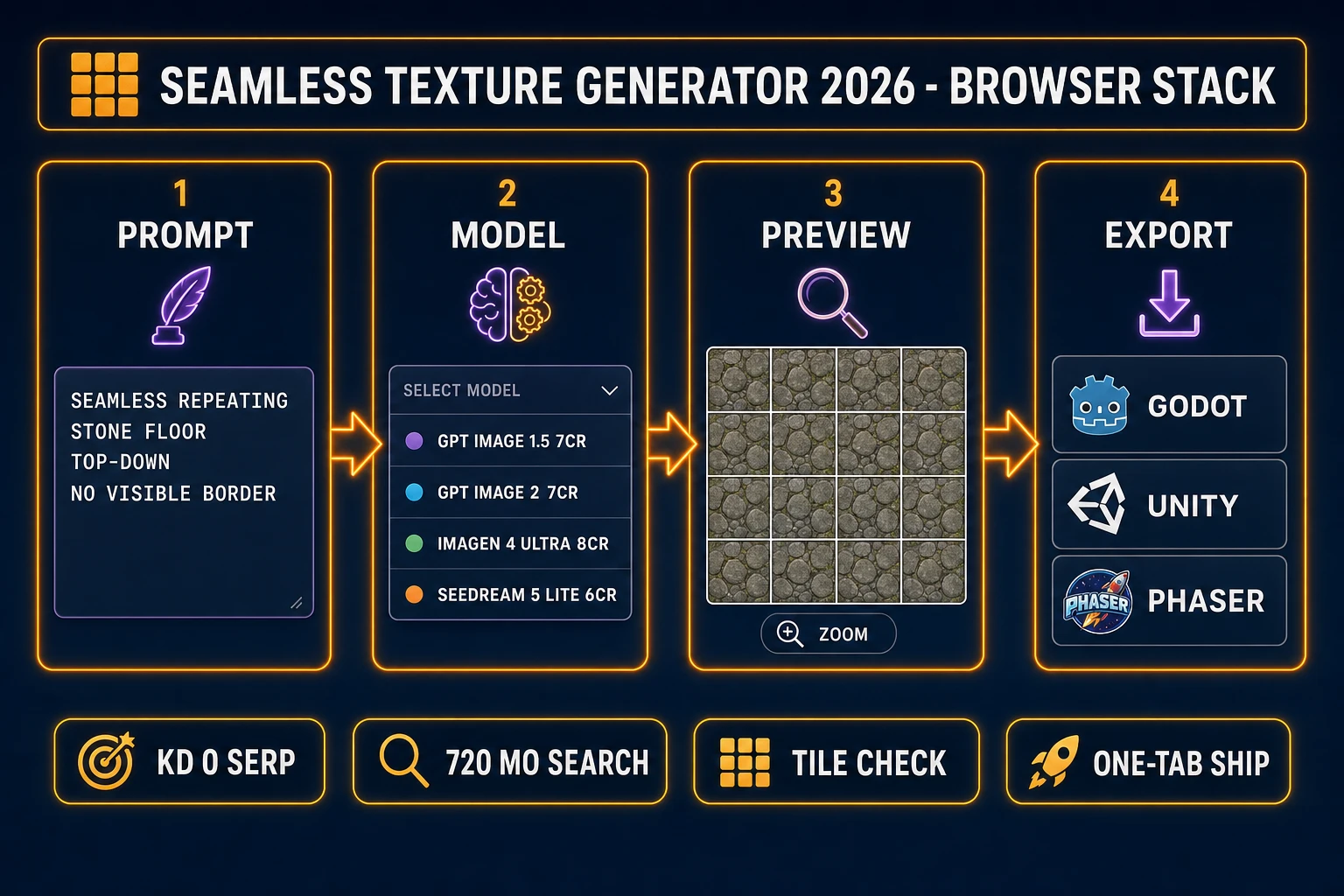
The end-to-end loop inside the tool is deliberately short. Open /tileset-generator in a browser. The default prompt template is three lines — seamless repeating forest terrain tile, consistent lighting, pixel art (verified in the page source at the useState(prompt) initial value on July 4, 2026). Rewrite those three lines to describe the surface you actually need. The prompt field accepts voice input via the browser’s built-in Web Speech API — the microphone toggle at the top of the field flips between recording and typed states (the two Mic and MicOff lucide icons imported at the top of the page component).
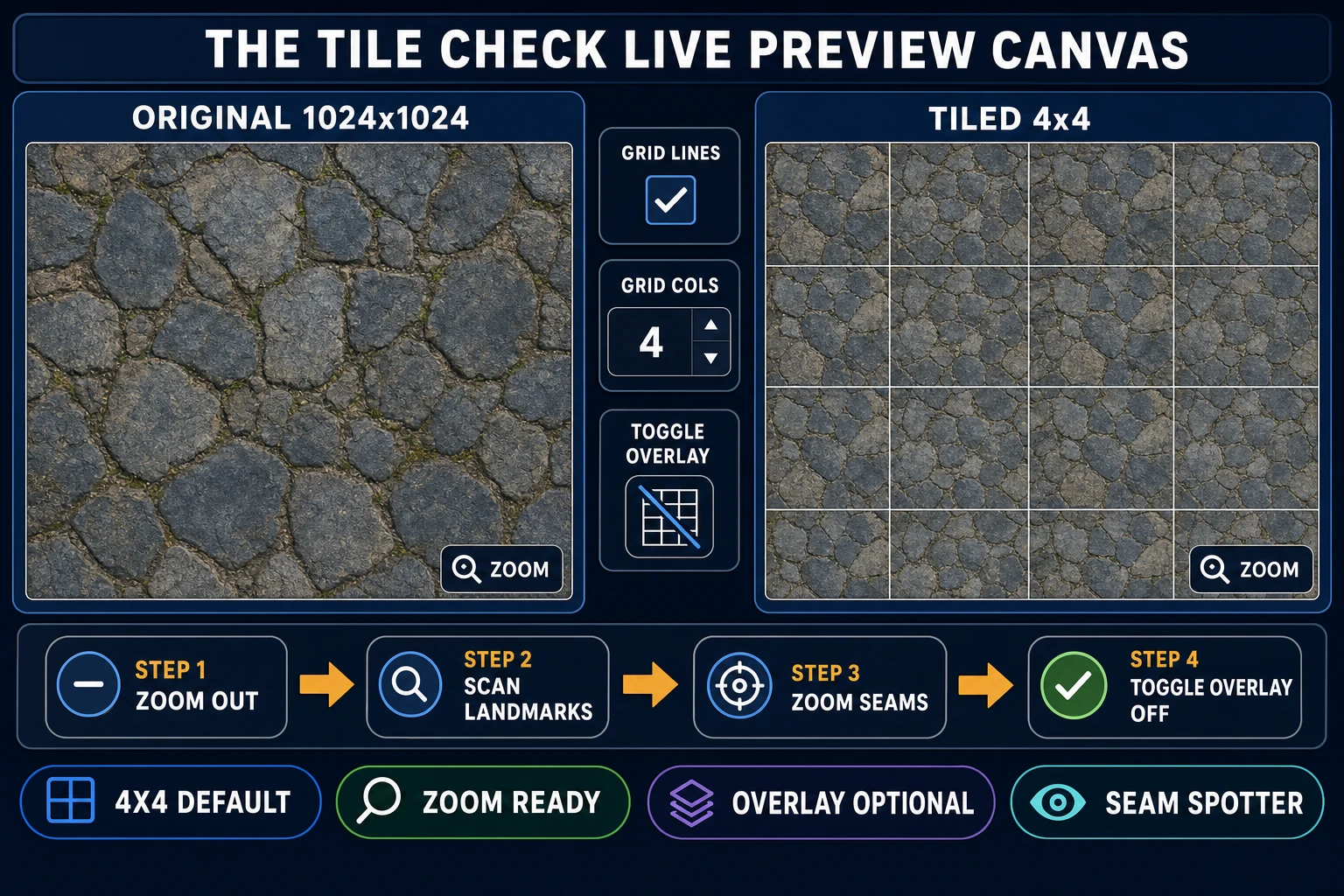
Below the prompt sits a model picker (default checked: gpt-image-1.5) with four supported models, an aspect-ratio switcher, a batch-size input (up to a batch of multiple generations per click), and a reference-image drop zone. Click generate, wait roughly twenty to sixty seconds depending on model, and the result lands in the results panel. The result panel is where the tile-check happens — two side-by-side canvases show the raw single-tile output on one side and the live tiled preview on the other, with adjustable grid columns and an optional grid-line overlay to make edge alignment easy to spot. If the seams show, iterate the prompt (usually one word matters: “matching edges”, “continuous surface”, “no visible border”) or switch to a different model and regenerate. When the tile passes the eye test, download the PNG or WebP. That’s the whole loop.
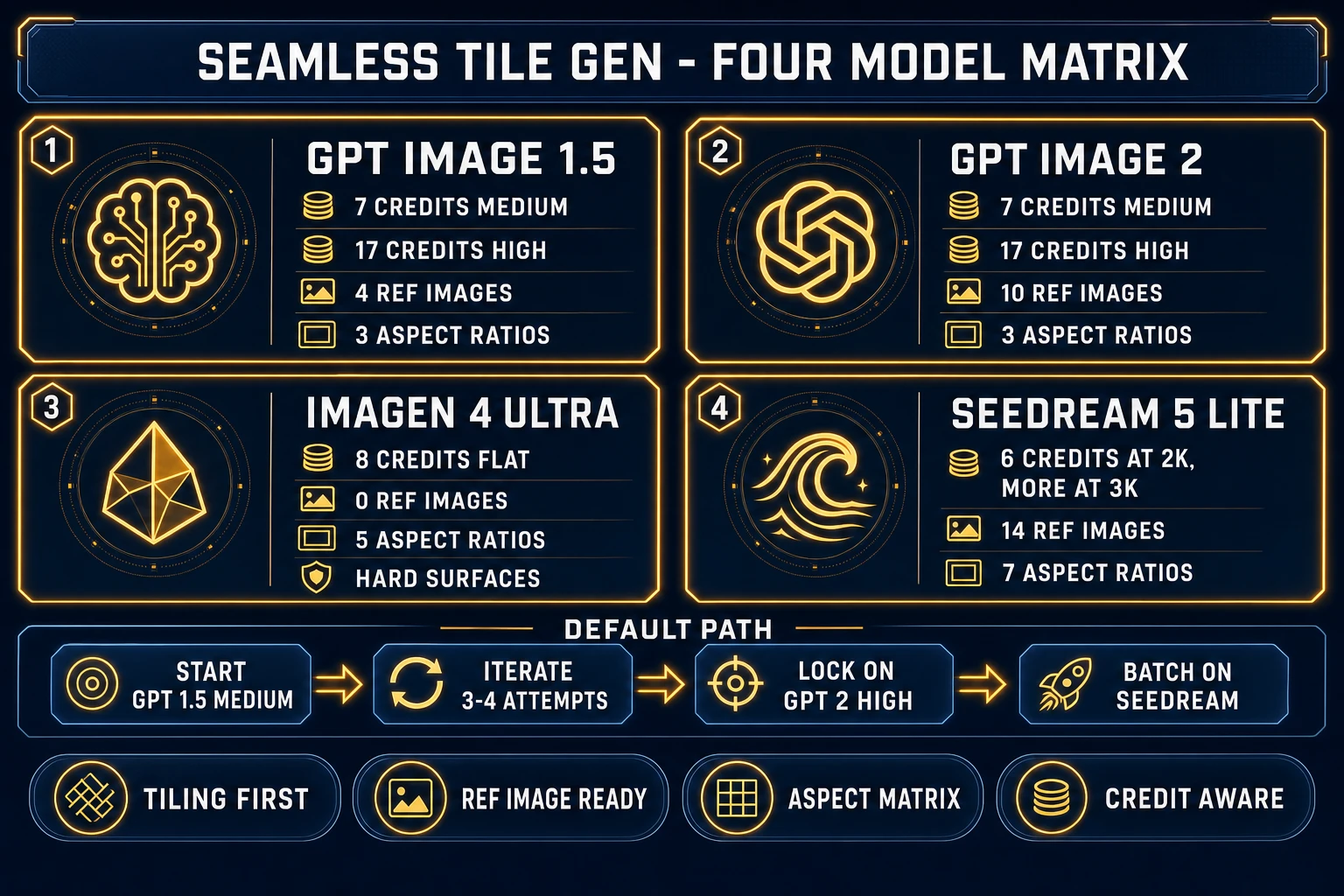
src/lib/models.ts on July 4, 2026. Every model outputs directly to the tiled preview canvas — the same UI, four different personalities on how they handle edge continuity.Choosing a model for a seamless texture generator (four honest picks)
Four models power the current seamless texture generator inside Sorceress. All four ship in the same dropdown, and the honest recommendation depends on the surface you need.
GPT Image 1.5 (7 credits medium, 17 credits high) is the default and the workhorse. It accepts up to four reference images, supports three aspect ratios (1:1, 3:2, 2:3), and produces surprisingly clean tileable output on prompted phrasing like “seamless repeating stone floor, top-down, no visible border”. Its quality parameter switches between medium (7 credits) and high (17 credits) at the same resolution; the high setting matters most on organic surfaces like grass and moss where edge continuity is subtle.
GPT Image 2 (7 credits medium, 17 credits high) is the sibling model and the newer generation. Same credit costs as 1.5, same aspect ratios, but the reference-image cap climbs to ten images per generation (verified refImages.max: 10 in src/lib/models.ts). If you want to lock a specific art direction across an entire texture pack — the same painterly brushwork, the same colour palette — feed the reference-image slots up to their cap. GPT Image 2 tends to hold style consistency better across a batch than 1.5.
Imagen 4 Ultra (8 credits, flat) is Google’s frontier model and the widest aspect-ratio support (1:1, 3:4, 4:3, 9:16, 16:9). It doesn’t accept reference images in this tool, so its role is prompt-only exploration on new surface concepts. Excellent on hard surfaces (stone, tile, concrete, metal); slightly weaker on translucent surfaces (glass, water) where the tiling constraint fights the model’s natural tendency to produce depth.
Seedream 5 Lite (6 credits at 2K, more at 3K) is ByteDance’s tileable-friendly model and the cheapest of the four. It supports the widest aspect-ratio matrix (seven ratios) and the deepest reference-image cap (fourteen references per generation, verified refImages.max: 14). Use it when you need a large batch of stylistic variations at low cost per attempt. The 3K native output is a genuine upgrade over 2K on high-frequency detail like fabric weave and stone grain.
Pragmatic default: start on GPT Image 1.5 medium, iterate three or four attempts, jump to GPT Image 2 high once the prompt is dialled, and reach for Seedream when you need a stylistically-locked batch.