Hang How to Make Hangman (Browser Letter Grid 2026)

By Arron R.13 min read
How to make hangman in 2026: pick a categorized word bank, wire letter guesses and six lives in WizardGenie, then add AI Image Gen gallows stages, SFX Gen corre

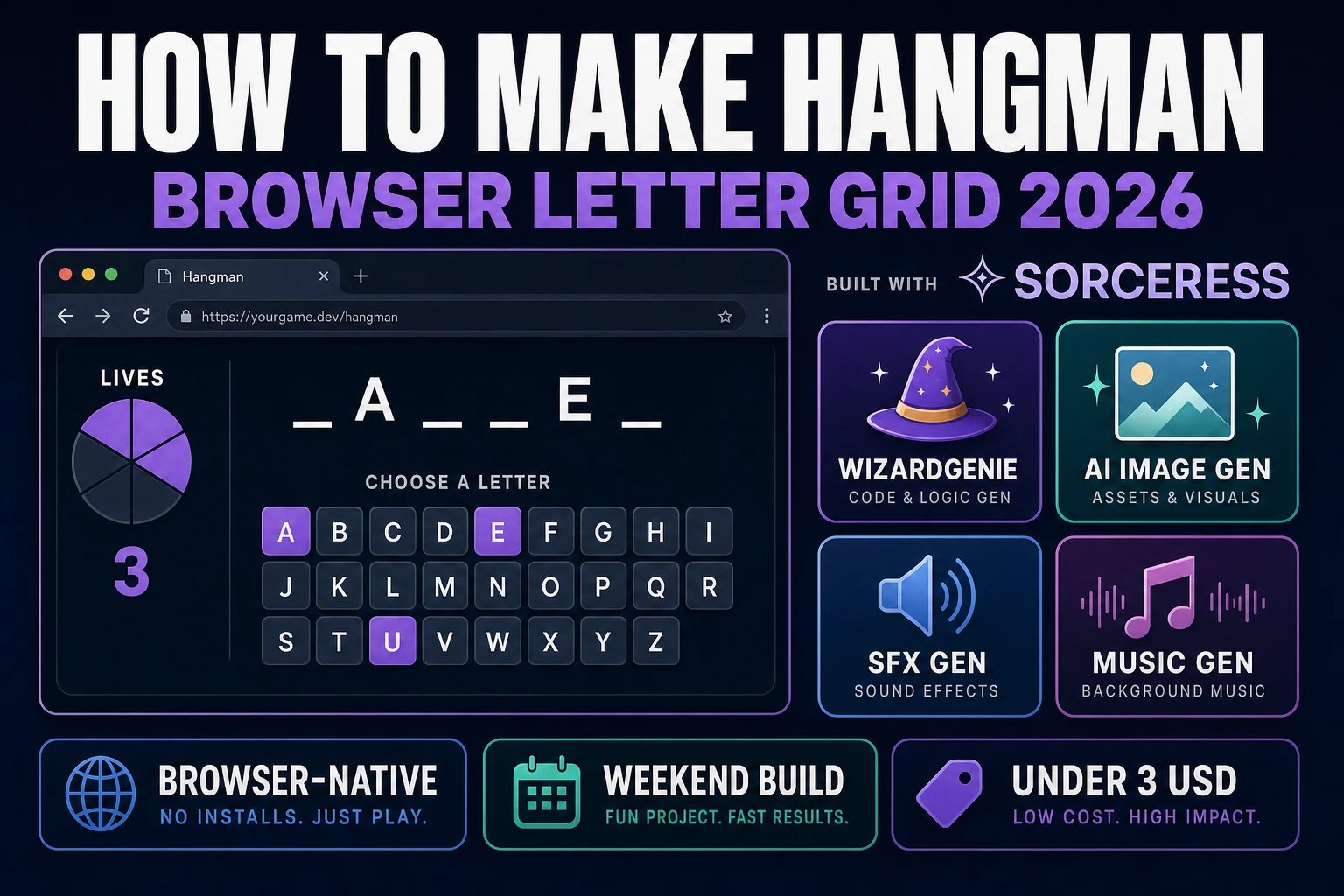
How to make hangman is one of the cleanest browser weekenders in 2026: a secret word, a row of blanks, twenty-six letter keys, and six lives that fill a tally when a guess misses. The paper game Alice Gomme recorded in 1894 as Birds, Beasts, and Fishes had no gallows at all — players just counted attempts — and a 1902 Philadelphia Inquirer write-up later added the hanging-man drawing that most people now expect. Almost every tutorial for how to make hangman still stops at a hardcoded word array and an alert() on lose. The 2026 pipeline is different. A coding agent scaffolds the word bank, letter grid, and win/lose screens from one prompt, and AI generation covers the stage art and audio. In a browser, that means WizardGenie for the game loop, Sorceress AI Image Gen for gallows or classroom-safe tally stages, SFX Gen for correct and wrong stings, and Music Gen for a quiet puzzle bed. This guide is the honest end-to-end for how to make hangman in 2026, in a browser, in a weekend.
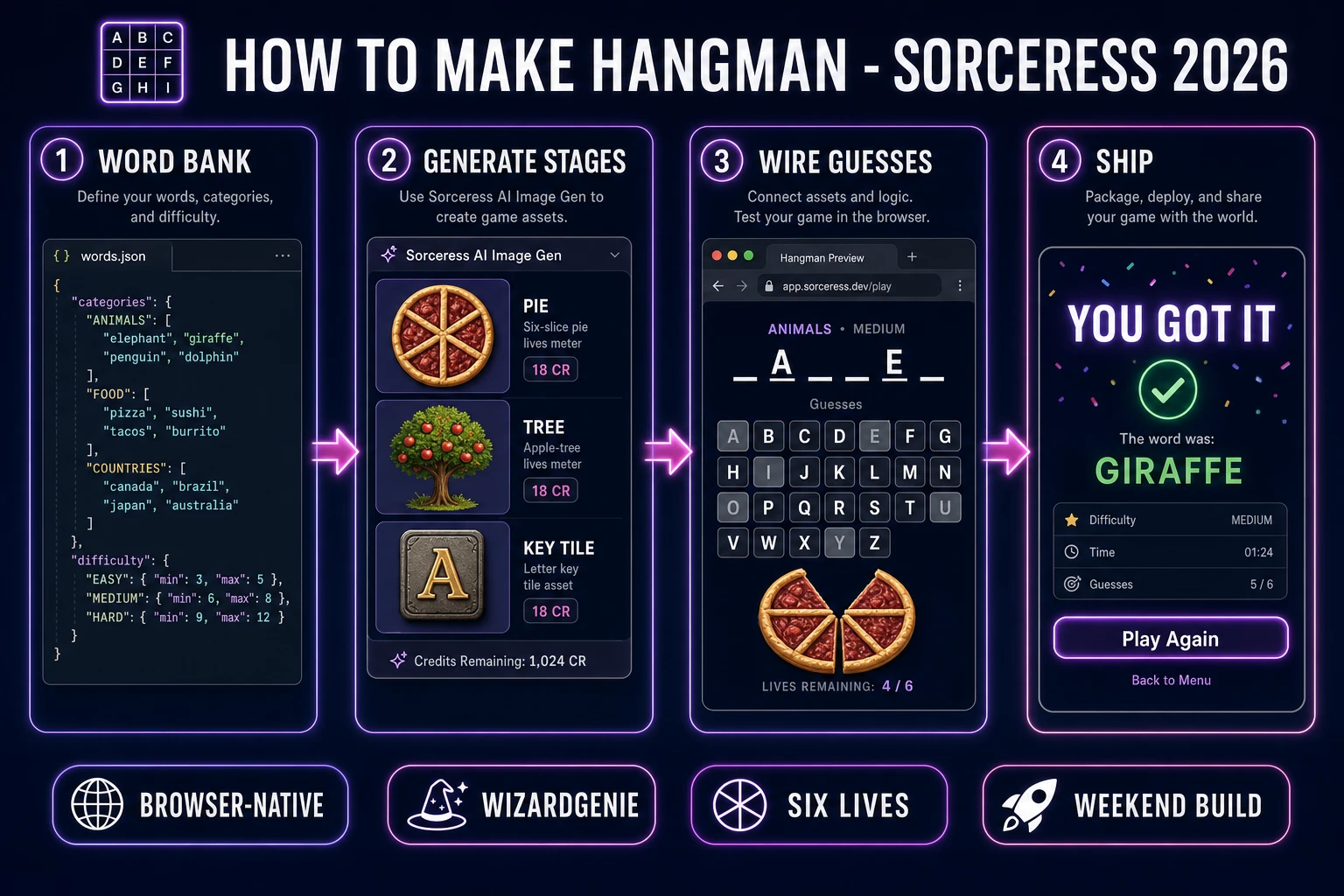
How to make hangman browser pipeline: build the word bank, generate gallows stages, wire letter guesses and lives in WizardGenie, and ship a browser build
The 2026 how to make hangman browser recipe: shape a categorized word bank, generate six stage frames in Nano Banana Pro, wire letter guesses and lives in WizardGenie, then add correct/wrong stingers and a music bed.

What how to make hangman actually means in 2026

The query “how to make hangman” hides three intents. Some searchers want a printable classroom worksheet — blanks on paper, a teacher calling letters, vocabulary from this week’s unit. A second intent is a two-player hot-seat: one player types a secret word, the other guesses, no bank required. That is a one-hour toy. The third intent, and the one this guide targets, is a single-player browser hangman game: a categorized word list, an on-screen letter grid plus keyboard input, six lives, a stage drawing that advances on misses, and a streak saved between sessions. That is a weekend build, it demos the whole Sorceress toolset, and it is the format most first-time hangman builders actually want — including teachers who later swap the bank for a custom vocabulary list.

The presentation contract is small and strict. A title screen shows the game name, a Play button, a Category picker (Animals, Food, Places, Mixed), a Difficulty picker (Easy, Medium, Hard), and a Theme toggle (Classic gallows / Classroom tally). The play screen shows the stage art on the left, a row of letter blanks in the center, a 26-key grid below, remaining lives as a number, and the list of missed letters. On a win, the completed word highlights, a short flourish plays, and a results card shows guesses-used plus Play Again. On a lose, the stage completes, the secret word reveals, and the same results card offers another round. The Hangman (game) Wikipedia page is still the cleanest rules summary: fill every blank before the figure is complete, and a guessed letter that appears more than once is written in every matching slot on that turn.

The hangman loop in one minute (pick, guess, reveal, check)

Five moving parts and nothing else, in strict order per letter. First, pick — draw a secret word from the active category and difficulty, using a crypto-backed index so the same short bank cannot feel rigged. Second, guess — accept one unused a–z letter from the on-screen grid or from a KeyboardEvent keydown. Third, reveal or strike — if the letter occurs in the secret, write it into every matching blank and play the correct sting; if not, decrement lives, advance the stage frame, append the miss list, and play the wrong sting. Fourth, check — win when every unique letter in the secret is in the guessed set; lose when lives hit zero. Fifth, result — freeze input, show the word, update streak and best-streak, and wait for Play Again. Wikipedia also allows a whole-word guess at any time; treat a correct word guess as an instant win and a wrong word guess as one strike.

Autosave the current secret, guessed set, missed letters, remaining lives, category, theme, and streak to localStorage under a key like hangman.session, using the Web Storage API. On page load, if a session exists, offer Resume next to New Game. Under a second key like hangman.best, keep the longest win streak and the fewest misses on a win. That is the entire game. Five steps, executed per letter, driven by a plain JavaScript state machine. Everything else — a Hint button that shows a definition, a “one unique letter left” pulse, a used-letter grey-out, category streaks — is polish. Keep the core loop tight, ship one full round end-to-end, and only then layer polish. A first hangman game that ships six honest lives and a fair word pick will teach you more than a half-built word arcade with twelve unfinished modes.
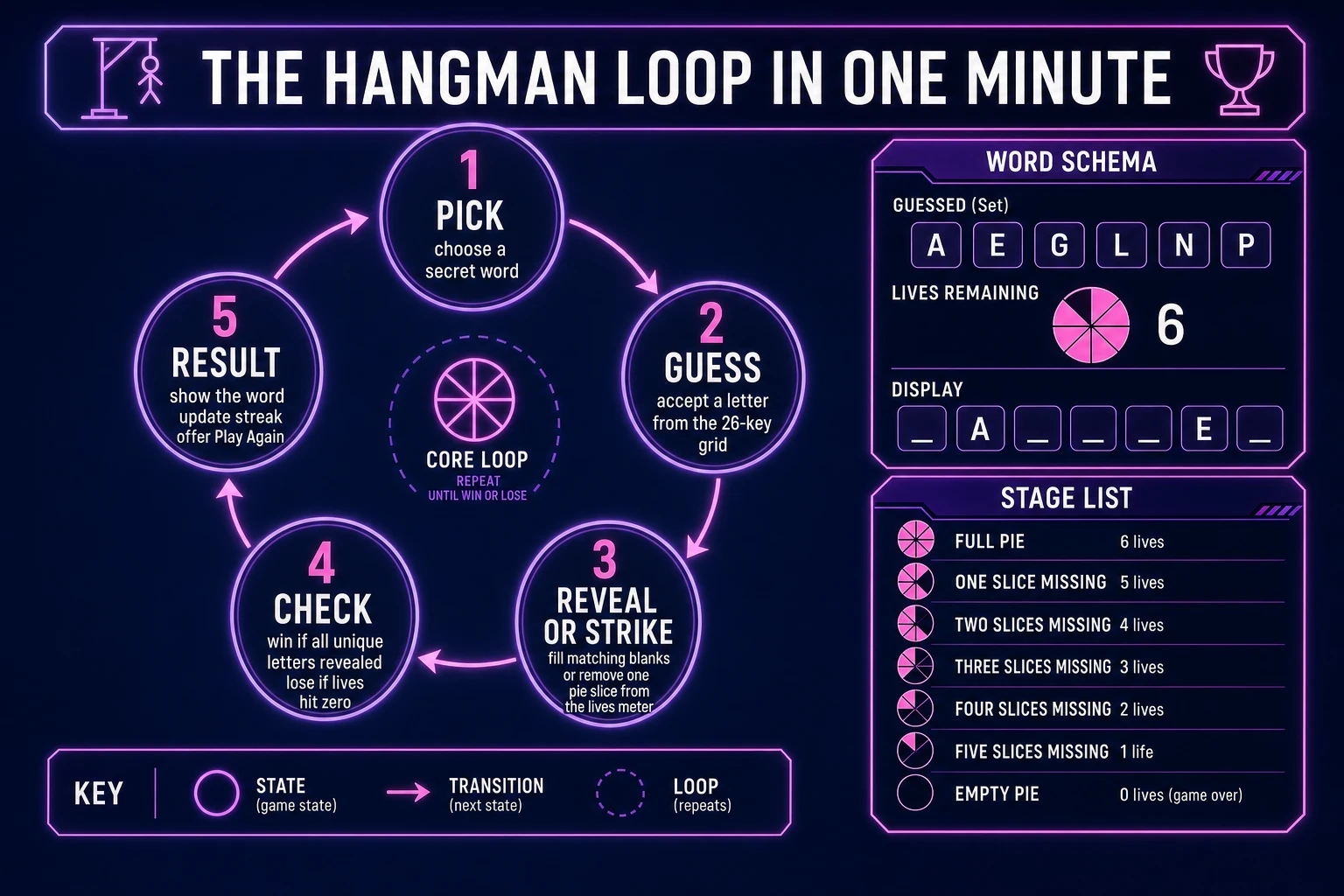
Hangman game loop state machine diagram showing pick, guess, reveal or strike, check, and result nodes with a word schema and six stage list
The hangman loop: pick a secret word, accept a letter, reveal matches or add a strike, then check win or lose before the results card.

Pick your engine for how to make hangman: vanilla DOM, canvas, or WizardGenie

Three good browser targets in 2026, each with a different trade-off. Vanilla JavaScript with a DOM letter grid is the honest default and the pick this guide recommends for a first build. Hangman is a row of spans or buttons for blanks, a CSS grid of twenty-six letter keys, an <img> for the current stage, and a small state object. Total code footprint for a working hangman game is under 400 lines and ships as a single static HTML file. No engine to install, no build step, deploys to GitHub Pages, Netlify, or Vercel with a drag-and-drop. This is the stack most javascript hangman and html5 hangman tutorials should have started with.

Canvas becomes the right pick if you want the stage drawing itself to be the product: a line-by-line gallows that animates each limb, a pie that loses a slice, or a tree that drops an apple. You still keep the letter grid in the DOM so tap targets stay accessible; canvas only owns the tally. The cost is hit-testing and a resize handler you would not need with six stacked PNGs.

Phaser 4.1.0 (verified 2026-08-18 on the official API docs) becomes the right pick if you want particle bursts on a correct vowel, a tweened limb drawing, or integrated audio timelines so the wrong sting crossfades with the lose sting. Phaser’s Scene lifecycle maps onto title-play-results if you scale up to themed packs (space hangman, ocean hangman). For a first letter-grid game, Phaser is optional weight — use it when motion is the product, not when the product is a fair word bank and a correct lives counter. The hangman canvas searchers who land here usually want that animated tally; give them stacked stage images first, then offer Phaser as the upgrade path.

WizardGenie is not a separate rendering engine — it scaffolds whichever of the three you pick, from a single natural-language prompt. WizardGenie is the Sorceress game-native coding agent. It ships as both a desktop app (Windows installer with auto-update, available to Early Access supporters and above) and a no-install web build at the same URL. Its coding-model lineup covers Claude Opus 4.7, GPT-5.5, Gemini 3.1 Pro, DeepSeek V4 Pro, Kimi K2.5, Grok 4.2, and MiniMax M2.7 (verified 2026-08-18 in src/app/_home-v2/_data/tools.ts). For hangman, any frontier model scaffolds the word bank and guess handler in one prompt. If you want to run cheap, pair a frontier planner (Claude Opus 4.7 or GPT-5.5) with a budget executor (DeepSeek V4 Pro or Kimi K2.5) and let the executor do the typing — the Dual-agent planner-and-executor pattern is why WizardGenie exists, and it lands most projects at roughly one-fifth the single-frontier cost.

Step 1 — build the word bank and difficulty tiers

Nothing else in the pipeline matters if the hangman word list is thin or biased. Ship JSON, not a hardcoded array in the guess file. Group entries by category and difficulty, and keep every beginner word lowercase a–z with no spaces, hyphens, or proper nouns. Easy is 4–6 letters and at least two vowels. Medium is 7–9 letters. Hard is 10+ letters, or a short word that dodges common letters — Wikipedia cites a 2010 Wolfram Research pass that flagged words such as jazz and buzz as unusually stubborn. You do not need that study to ship; you need a bank of at least forty words per category so New Game does not repeat inside a sitting.

{
  "animals": {
    "easy": ["otter", "panda", "eagle"],
    "medium": ["panther", "manatee"],
    "hard": ["axolotl", "ptarmigan"]
  }
}

Implement pick as a pure function: filter the active category and difficulty, drop any word already used this session, then choose an index with crypto.getRandomValues — not Math.floor(Math.random() * n) if you can avoid it, and never Array.sort(() => Math.random() - 0.5). Return the secret string plus a Set of its unique letters. The display row is derived: map each character to itself if that letter is in the guessed set, otherwise an underscore. Persist the bank separately from session state so a teacher can drop in this week’s vocabulary without touching the guess loop. That is the whole educational hangman game upgrade path, and it is why how to make hangman for kids is mostly a content problem once the loop is honest.

Before you draw a single gallows pixel, unit-test the picker: every easy word is 4–6 letters, no duplicates inside a filtered list, a used-word is not returned on the next pick, and a secret whose unique-letter set is already fully guessed reports a win. Those four asserts catch the bugs that make a classroom demo embarrassing — empty banks, immediate repeats, and a win check that forgets a repeated letter was already filled.

Step 2 — wire letter keys, lives, and win/lose screens in WizardGenie

With the word bank solid, open WizardGenie. Drop in a bare index.html with containers for title, play, and results. Give the agent one paragraph: Build a browser hangman game. Load a JSON word bank grouped by category and difficulty. On New Game, pick a leftover word with crypto.getRandomValues. Show blanks for each letter. Accept guesses from a 26-key grid and from keydown using event.key, lowercase a–z only, ignore event.repeat and already-guessed letters. A hit fills every matching blank. A miss decrements lives from 6 and advances the stage image. Win when all unique letters are guessed. Lose at 0 lives and reveal the word. Optional whole-word guess costs one life if wrong. Autosave session, streak, and theme to localStorage. Theme can swap gallows PNGs for classroom tally PNGs. Feed that to any coding model in the lineup and the interpreter scaffolds in under three minutes.

The remaining hour is polish via follow-ups. Add a used-key grey-out so the letter grid and the keyboard stay in sync. Add a Hint that reveals a one-line definition without spending a life — Wikipedia notes definition-first hangman as a language-learning variant. Add a one-letter-left pulse on the remaining unique blank. Add a false-key ignore when the round is already over. Keep the guess handler pure:

function applyGuess(state, letter) {
  const L = letter.toLowerCase();
  if (!/^[a-z]$/.test(L) || state.guessed.has(L) || state.over) return state;
  const next = {
    ...state,
    guessed: new Set(state.guessed).add(L),
  };
  if (state.secret.includes(L)) {
    next.won = [...new Set(state.secret)].every((ch) => next.guessed.has(ch));
  } else {
    next.lives = state.lives - 1;
    next.missed = [...state.missed, L];
    next.lost = next.lives <= 0;
  }
  next.over = next.won || next.lost;
  return next;
}

Each follow-up is a prompt, and the whole hangman game comes together over a Saturday afternoon. Keep lives as a constant. Feed the handler a board that is one unique letter short of a win and a board that just completed, plus a miss that should hit zero. That catch list eliminates the classic “I guessed the last letter and it still said lose” bug.

Step 3 — AI Image Gen gallows stages, SFX Gen correct/wrong, Music Gen bed

Open Sorceress AI Image Gen for the visual set first. A hangman game needs six matched stage frames for the default lives count, plus letter-tile chrome for the 26-key grid. Nano Banana Pro at 18 credits per generation (verified 2026-08-18 in src/lib/models.ts line 303 as credits: 18) holds a consistent style across the set. Prompt the empty gallows (or empty pie, or full apple tree) first. Then generate each next stage with that image as a reference so the post and line weight do not drift. Register like “hangman stage art, centred, painted flat vector, soft shadow, transparent background, no text, cohesive puzzle palette.” Six stages at 18 credits is 108 credits or 1.08 USD.

Letter-tile chrome is one asset used twenty-six times: a square key plate, unused and used variants. Two variations at 18 credits is 36 credits or 0.36 USD. Optional: one title-screen overlay (16:9, quiet study or chalkboard feel, no text) at 18 credits or 0.18 USD. Total AI Image Gen for the visual set is roughly 162 credits or 1.62 USD — still a lean asset budget because the same stages wrap every round. If you ship hangman for kids, generate the classroom tally pack as a second six-frame set and swap it with the Theme flag; do not fork the guess code.

Now the audio. Open SFX Gen. SFX Gen bills 1 credit per second (verified 2026-08-18 in src/app/sfx-gen/page.tsx line 23 as SEED_AUDIO_CREDITS_PER_SECOND = 1). Four clips cover a first hangman game: correct (0.4 seconds, soft chime), wrong (0.5 seconds, dry buzz), win (2 seconds, bright flourish), and lose (2 seconds, low resolve). Total roughly 6 credits or 0.06 USD. Add one 20-second ambient bed — quiet room tone or soft synth pad — at 20 credits or 0.20 USD. Wire each sting as a one-line new Audio(path).play() on the matching event.

Open Music Gen. Music Gen bills 10 credits per generation (verified 2026-08-18 in src/app/music-gen/page.tsx line 28 as MUSIC_CREDIT_COST = 10). Two tracks cover a first hangman game: a title-and-menu loop (warm, curious, 60 seconds) and a play bed (steady, non-distracting, 90 seconds) under the guesses. Two or three generations per track, so budget 40 to 60 credits (0.40 to 0.60 USD). Add 2 credits per WAV render if you want lossless (WAV_CREDIT_COST = 2, same file line 31); MP3 is fine for browser delivery.

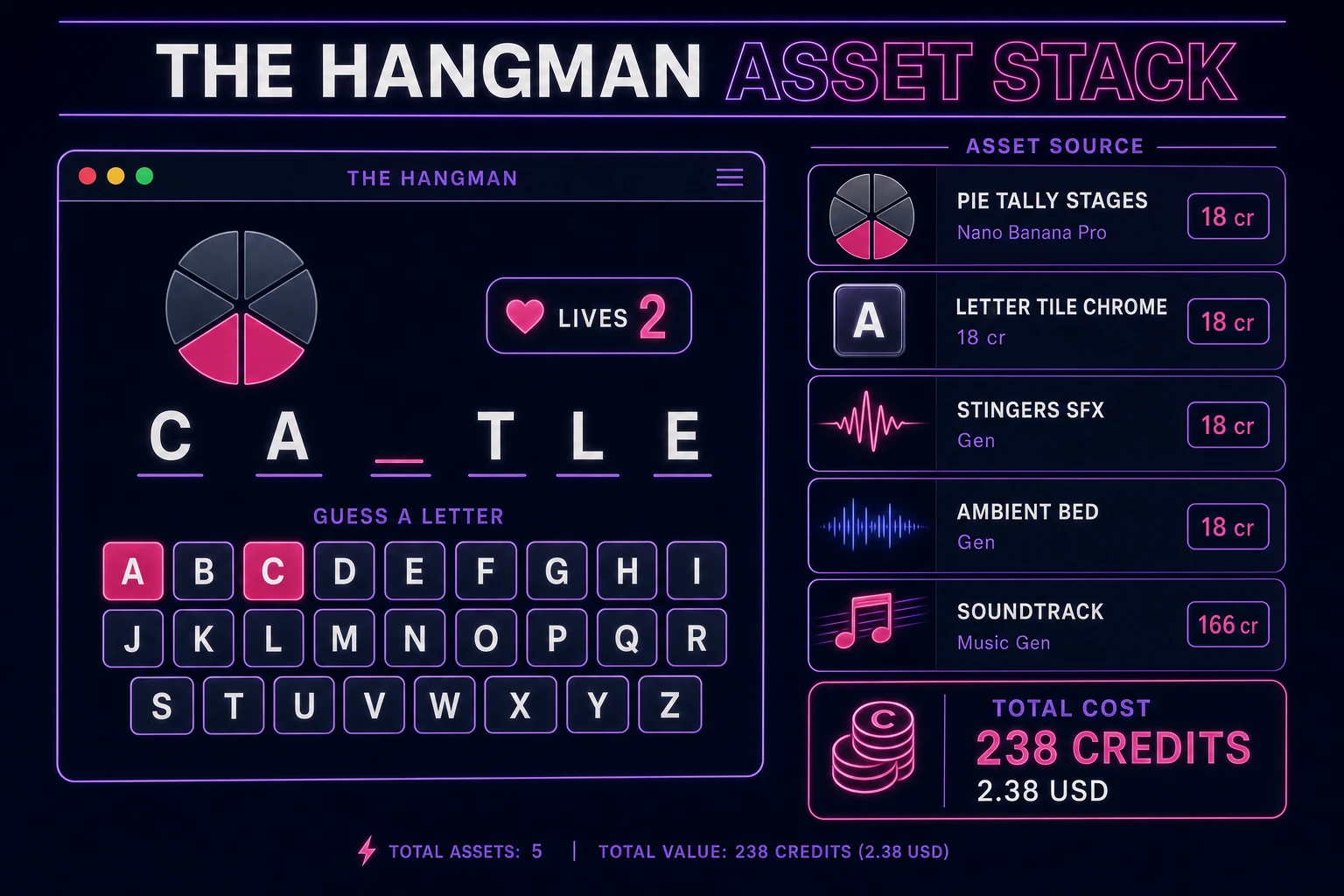
Hangman game asset stack showing a browser letter grid and gallows next to asset tiles for stages, letter chrome, stingers, ambient bed, and music tracks
The hangman asset stack: six stage frames and letter-tile chrome from AI Image Gen, four short stingers plus an ambient bed from SFX Gen, and two music tracks from Music Gen — the whole visual and audio set costs under three dollars.

What a how to make hangman project costs on Sorceress in 2026

Concrete asset and generation budget for a browser hangman game — categorized word bank, 26-key grid, six lives, stage art, streak save — from empty repo to zip-and-ship playable, all numbers verified 2026-08-18 against local Sorceress source:

  • Gallows or classroom tally stages (AI Image Gen): 6 frames at Nano Banana Pro 18 credits per generation = 108 credits (1.08 USD). Transparent backgrounds, matched palette, reference-locked so line weight stays stable.
  • Letter-tile chrome (AI Image Gen): 2 variations at 18 credits each = 36 credits (0.36 USD). Unused and used key plates.
  • Title overlay (AI Image Gen): 1 background at 18 credits = 18 credits (0.18 USD). 16:9 painted, no text.
  • Stingers (SFX Gen): 4 clips at 1 credit per second, roughly 6 seconds total = 6 credits (0.06 USD). Correct, wrong, win, lose.
  • Ambient bed (SFX Gen): 1 clip at 20 seconds = 20 credits (0.20 USD). Room tone or soft pad.
  • Background music (Music Gen): 2 tracks at 10 credits per generation, 2 to 3 tries each = 40 to 60 credits (0.40 to 0.60 USD). Add 2 credits per WAV render if you need lossless.
  • WizardGenie coding time: effectively free on the Sorceress side. Model-side API cost for a 2-to-4-hour prompt session on a cheap Executor like DeepSeek V4 Pro is typically under 0.50 USD.
  • Total for one complete browser hangman game: roughly 228 to 248 credits, or roughly 2.28 to 2.48 USD in Sorceress credits, plus under 0.50 USD in model API time. Under 3 USD end-to-end for a first hangman game with a fair bank, six lives, and full guess audio.

Sorceress bills 100 credits per dollar at the standard rate (CREDITS_PER_DOLLAR = 100 in src/lib/models.ts line 69). New accounts start with 100 free credits (SIGNUP_GRANT = 100 in src/app/api/admin/credits/route.ts line 12), which covers all four stingers, the ambient loop, one music track, and two stage frames outright — enough to prototype before you top up. The Sorceress Lifetime tier at 49 USD one-time (LIFETIME_PRICE = 49 in src/app/plans/page.tsx line 51) covers unlimited SFX Gen and Music Gen use forever, which matters if you plan themed variants (classroom vocabulary nights, seasonal word packs, language-learning definition mode) — each extra theme reuses the coding scaffold and pays only for new stage art and bank rows.

For related browser-game pipelines that share this design-first-generate-assets-scaffold-the-loop spine, the closest reads are Guess How to Make Wordle (Browser Guess Grid 2026) for the sibling letter-grid word game, Quiz How to Make a Trivia Game (Browser Question Loop 2026) for the short-session party cousin, Bingo How to Make a Bingo Game (Browser Card Grid 2026) for another grid weekender, and Sum How to Make a Math Game (Browser Quiz Loop 2026) for the classroom-adjacent loop. The Sorceress Tools Guide is the master index for every tool this guide referenced. Under three dollars, one weekend, and how to make hangman is a done deal.

Frequently Asked Questions

How many lives should a first hangman game use?

Ship six wrong guesses as the default. That maps onto the classic stick figure: head, torso, left arm, right arm, left leg, right leg. Wikipedia’s hangman overview treats the completed figure as the lose condition, and six is the count most players already expect from paper versions. Draw the empty gallows as stage zero so the board never looks blank. If you want a gentler classroom mode, start at eight lives by counting two gallows pieces before the head. If you want a harder mode, drop to five and skip one limb. Expose the count as a constant (MAX_WRONG = 6) so a follow-up prompt can change it without rewriting the guess handler. Never hide remaining lives — show them as empty stage slots or a numeric Lives: 4 so the player can plan vowel guesses.

How do I pick a fair hangman word in JavaScript?

Keep a JSON word bank grouped by category and difficulty, with every entry already lowercase a–z and no spaces, hyphens, or proper nouns in the beginner list. On New Game, filter the active category, then pick an index with crypto.getRandomValues rather than Math.random, the same way you would shuffle a bingo ball pool. Reject any word already used in the current session so a short bank cannot repeat immediately. Store the secret as a string plus a Set of unique letters; the display row is derived by mapping each character to itself if guessed, or an underscore if not. Persist the bank separately from session state so teachers can drop in a vocabulary list without touching the guess loop. For kids and classroom play, add a Hint button that reveals a one-line definition — Wikipedia notes that definition-first hangman is a common language-learning variant.

Should hangman accept keyboard input or only on-screen letters?

Both. Render a 26-key letter grid so phones and tablets can play, and also listen for keydown on document using KeyboardEvent.key (MDN). Normalize to lowercase, ignore non a–z keys, and ignore repeats of a letter already guessed — do not spend a life on a duplicate. Disable the matching on-screen key after each guess so the two input paths stay in sync. Skip auto-repeat (event.repeat) so a held key cannot burn several lives. After win or lose, stop listening until the player clicks Play Again. This dual path is what makes a browser hangman feel like a real game rather than a form, and it is the first follow-up worth adding after the core loop works.

Is the hanging-man drawing required, or can I use a classroom-safe tally?

The hanging figure is traditional, not mandatory. Wikipedia documents classroom-safe tallies such as crossing apples off a tree or removing slices from a pie — same six-strike math, different art. If you ship for kids or schools, generate those stages in AI Image Gen instead of a gallows and keep the word “hangman” only in the title. The guess handler does not care what the stages depict; it only indexes into an array of seven images (empty plus six strikes). Offer a Theme toggle (Classic / Classroom) on the title screen and store it in localStorage. That single flag swaps the stage art pack without a second codebase, which is the cleanest way to keep an educational hangman game welcome in a classroom.

How much does it cost to build hangman on Sorceress?

A first-project browser hangman budgets like this against the 2026 Sorceress rate card (all constants verified against local source on 2026-08-18). Six gallows or classroom-tally stages at Nano Banana Pro 18 credits each is 108 credits or 1.08 USD (src/lib/models.ts line 303 credits: 18). Letter-tile chrome with two variations is 36 credits or 0.36 USD. One title overlay at 18 credits is 0.18 USD. Four SFX clips at 1 credit per second (src/app/sfx-gen/page.tsx line 23 SEED_AUDIO_CREDITS_PER_SECOND) — correct, wrong, win, lose — are roughly 6 credits or 0.06 USD. One 20-second ambient bed is 20 credits or 0.20 USD. Two music tracks at 10 credits per generation (src/app/music-gen/page.tsx line 28 MUSIC_CREDIT_COST) with two or three tries each is 40 to 60 credits or 0.40 to 0.60 USD. Total roughly 228 to 248 credits, or 2.28 to 2.48 USD, plus under 0.50 USD in coding-model API time. The free 100-credit signup grant (src/app/api/admin/credits/route.ts line 12 SIGNUP_GRANT) covers the stingers, ambient bed, first music track, and two stage frames outright.

Sources

  1. Hangman (game) - Wikipedia
  2. MDN - KeyboardEvent (letter-key guesses)
  3. MDN - Web Storage API (streak and session save)
  4. MDN - Crypto.getRandomValues (fair word pick)
  5. Phaser 4.1.0 API Documentation
Written by Arron R.·2,942 words·13 min read

Related posts