Top How to Make a Shooter Game (Browser Top-Down 2026)

By Arron R.13 min read
How to make a shooter game in 2026: pick a top-down twin-stick arena (not an FPS), scaffold player, bullets, and wave tables, then wire collision and power-ups

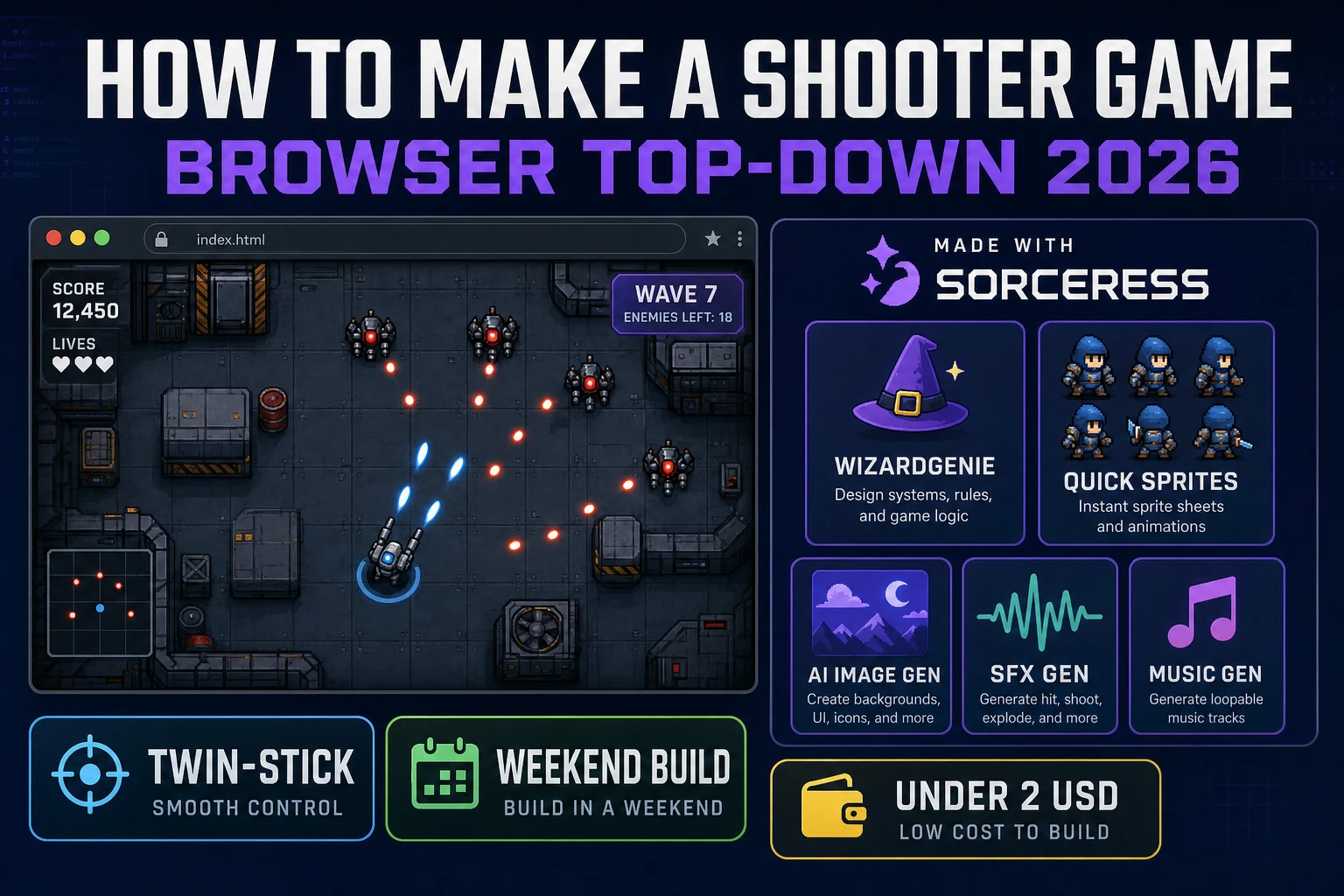
Wikipedia’s shoot ’em up page still starts with Spacewar! (1962) and then credits Taito’s Space Invaders (1978) with locking the genre template: multiple enemies that fire back, extra lives, a climbing high score. Asteroids (1979) added 360-degree movement. Robotron: 2084 (1982) split move and fire onto two sticks. What did not stay still is the search query. People who type how to make a shooter game in 2026 often mean three different games: a 3D first-person shooter, a bullet-hell specialist title, or a top-down arcade arena you can finish in a weekend. This guide is the third. In a browser that means WizardGenie for the loop, Quick Sprites for the walk sheets and explosions, Sorceress AI Image Gen for the arena, SFX Gen for shots and hits, and Music Gen for a combat bed. This is the honest end-to-end for how to make a shooter game in 2026, in a browser, in a weekend.
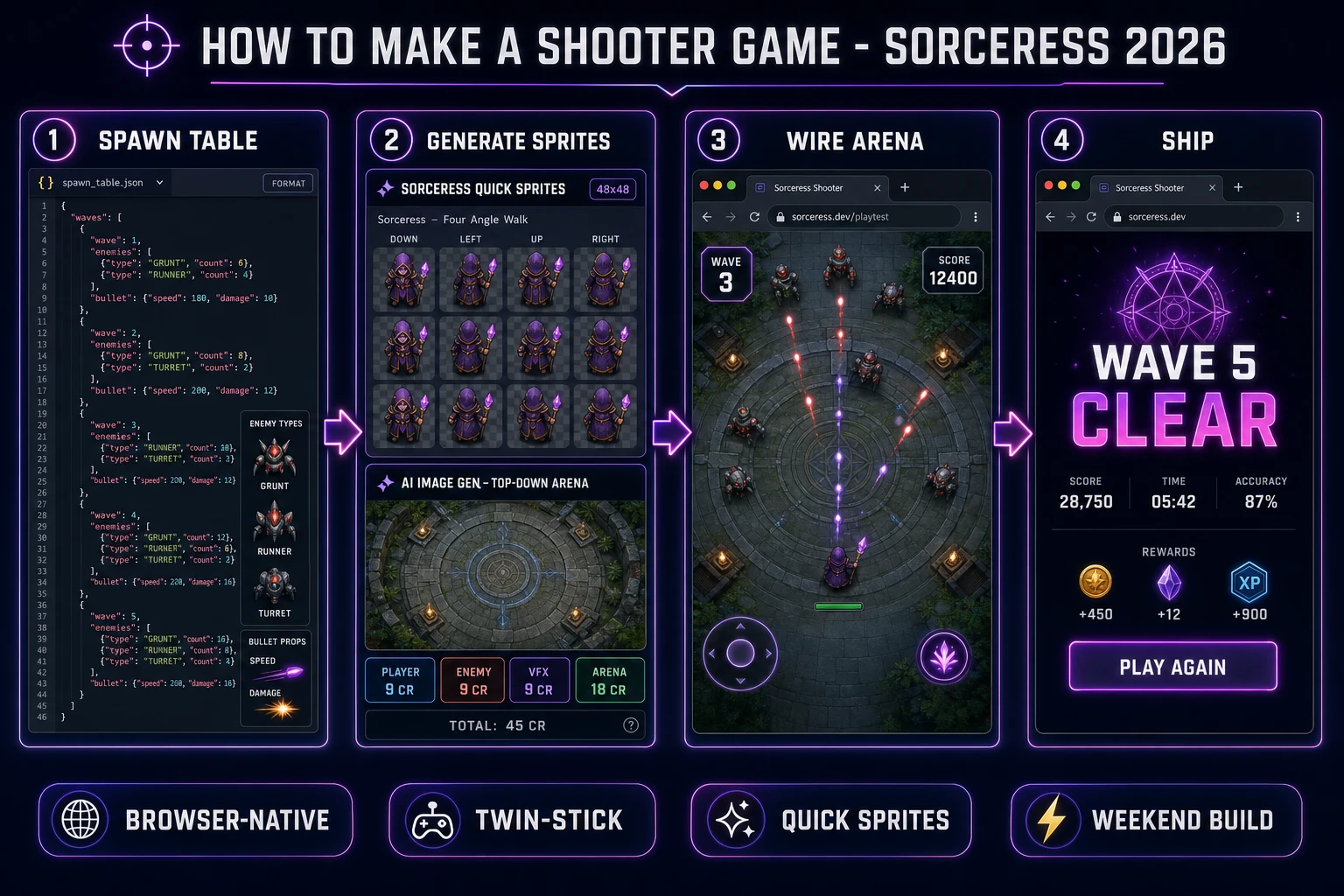
How to make a shooter game browser pipeline: model a spawn table, generate sprites and arena art, wire the twin-stick arena in WizardGenie, and ship a browser build
The 2026 how to make a shooter game browser recipe: shape a wave table, generate Quick Sprites walk sheets plus an arena, wire move-aim-fire in WizardGenie, then add shots and a combat music bed.

What how to make a shooter game actually means in 2026

The query “how to make a shooter game” hides three intents. Some searchers want a first-person shooter: pointer lock, a 3D camera, hitscan or projectile weapons. That is a different weekend and a different article — start with Aim How to Make a First Person Shooter Game (Browser 2026) and stay in Three.js. A second intent is a bullet hell beginner project: curtain-fire patterns, a tiny hitbox, memorized routes. Wikipedia groups that as a mid-1990s offshoot of scrolling shooters, not as a first build. The third intent, and the one this shooter game tutorial targets, is a single-player top down shooter: an arena viewed from above, WASD to move, mouse to aim, a bullet pool, three enemy types, five waves, a score, and a Play Again card. That is a weekend javascript shooter. It demos the whole Sorceress toolset. It is the format most first-time arcade shooter tutorial readers actually want.

The presentation contract is small and strict. A title screen shows the game name, a Play button, and a mute toggle. The play screen is a square arena, a player sprite, incoming enemies, a HUD with HP, current wave, and score. Mouse aim is independent of facing so the ship or soldier can strafe while firing, the browser version of a twin stick shooter. Wikipedia’s twin-stick shooter page names Robotron: 2084 as the arcade template and notes that keyboard and mouse may replace either stick. A results card shows wave reached, kill count, and Play Again. A first browser shooter that ships that loop honestly will teach you more than a half-built campaign with twelve unfinished maps.

The shooter loop in one minute (move, aim, fire, spawn, score)

Five moving parts and nothing else, in parallel every frame. First, move — read a Set of currently held keys, add a unit vector, scale by speed and dt so 144 Hz monitors do not make the player twice as fast. Second, aim — pointer position minus player position, normalize, that is the fire heading. Third, fire — if the pointer button is down and cooldown is zero, spawn a bullet from a pool with that heading, then reset cooldown. Fourth, spawn — when the live enemy count hits zero, increment the wave index and drop the next row from the table. Fifth, score — on overlap, subtract HP, play a hit sting, and if HP is zero return the enemy to the pool and add its score. That is a top down shooter. Everything else — a boss on wave five, a weapon pickup, a dash — is polish.

Drive the tick with requestAnimationFrame, not setInterval. MDN marks rAF Baseline widely available since July 2015 and warns you to use the callback timestamp so the sim stays frame-rate independent. Keep movement keys in a Set updated from KeyboardEvent keydown and keyup (also Baseline since July 2015). Read event.code (KeyW, KeyA) rather than event.key so a Dvorak layout does not remap strafe. Never use the obsolete keypress event. Autosave mute, best wave, and high score to localStorage. Keep the core loop tight, ship one full wave end-to-end, and only then layer polish. A first browser shooter that ships three honest enemy types and a fair cooldown will outplay an arena with forty undrawn guns.
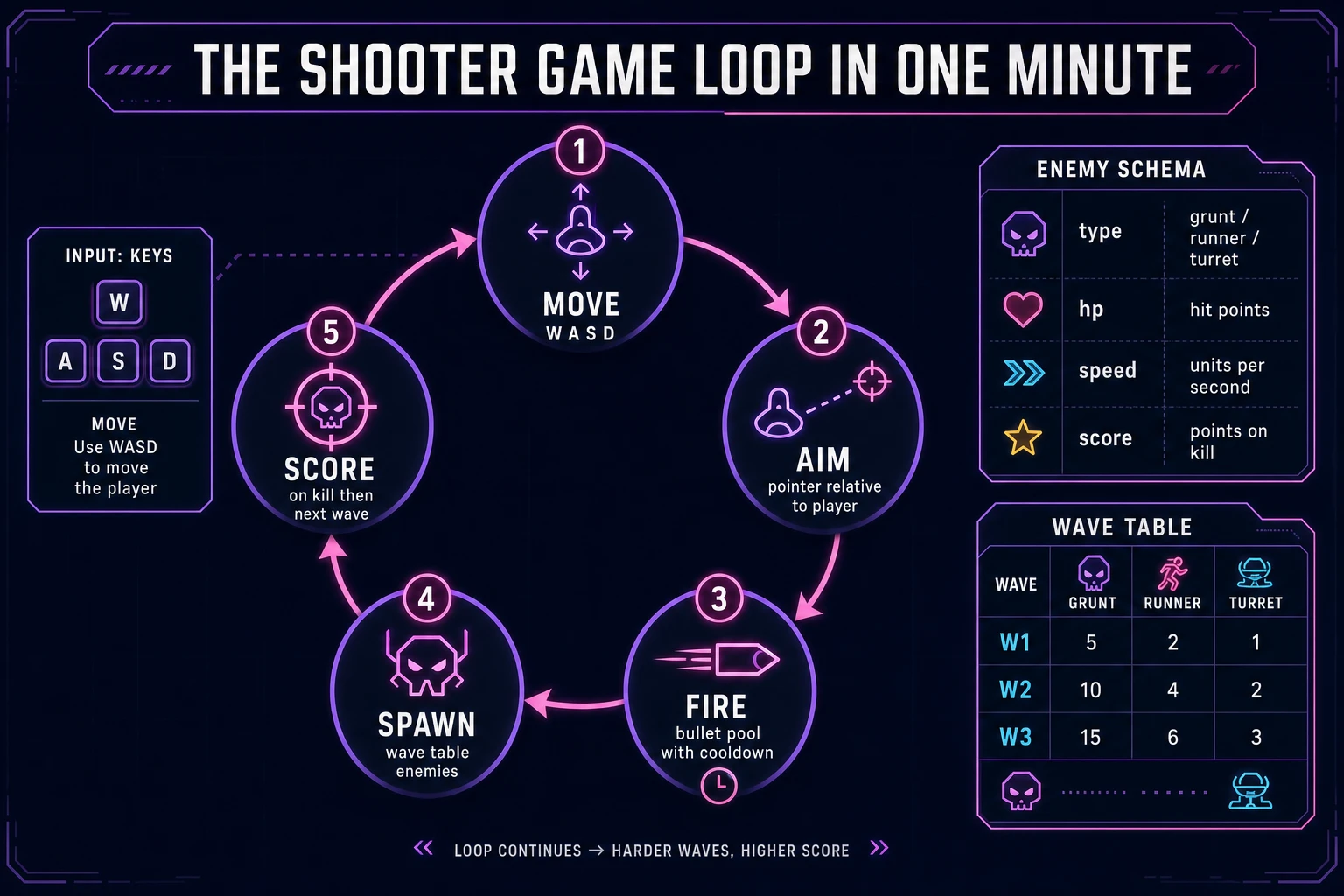
Shooter game loop state machine diagram showing move, aim, fire, spawn, and score nodes with an enemy schema and wave table
The shooter game loop: move on a keys set, aim with the pointer, fire from a bullet pool, spawn the next wave row, then score on overlap.

Pick your engine for how to make a shooter game: vanilla Canvas, Phaser 4, or WizardGenie

Three good browser targets in 2026, each with a different trade-off. Vanilla JavaScript with Canvas is the honest default and the pick this guide recommends for a first build. A top down shooter is a background blit, a player sprite, a bullet pool, and circle overlap checks. Total code footprint for a working browser shooter is under 600 lines and ships as a static HTML file. No engine to install, no build step, deploys to GitHub Pages, Netlify, or Vercel with a drag-and-drop. This is the stack most javascript shooter and arcade shooter tutorial pages should have started with. The vector cousin of this loop — wrap-around rocks instead of waves — is covered in Blast How to Make Asteroids (Browser Vector Loop 2026).

Phaser v4.2.1 “Giedi” (released 9 July 2026, verified 2026-08-18 on the official stable download page) becomes the right pick if you want Arcade Physics bodies, group overlap callbacks, particle explosions, or a Scene lifecycle that maps onto title-arena-results. Phaser’s Arcade Sprite is a sprite plus an AABB or circle body; once the body exists you set velocity and listen for overlap instead of writing the pool math by hand. For a first twin stick shooter browser build, Phaser is optional weight — use it when motion and particles are the product, not when the product is a fair wave table and a correct cooldown. Searchers who land here for a phaser shooter usually want those overlap callbacks; give them a hand-rolled pool first, then offer Phaser as the upgrade path.

WizardGenie is not a separate rendering engine — it scaffolds whichever of the two you pick, from a single natural-language prompt. WizardGenie is the Sorceress game-native coding agent. It ships as both a desktop app (Windows installer with auto-update, available to Early Access supporters and above) and a no-install web build at the same URL. Its coding-model lineup covers Claude Opus 4.7, Claude Sonnet 4.6, GPT-5.5, Gemini 3.1 Pro, DeepSeek V4 Pro, Kimi K2.5, Grok 4.2, and MiniMax M2.7 (verified 2026-08-18 in src/app/_home-v2/_data/tools.ts). For a shooter, any frontier model scaffolds the wave table and bullet pool in one prompt. If you want to run cheap, pair a frontier planner (Claude Opus 4.7 or GPT-5.5) with a budget executor (DeepSeek V4 Pro or Kimi K2.5) and let the executor do the typing — the Dual-agent planner-and-executor pattern is why WizardGenie exists, and it lands most projects at roughly one-fifth the single-frontier cost. Never put Opus, GPT-5.5, Gemini 3.1 Pro, or Sonnet on the typing side.

Step 1 — scaffold player, bullets, and enemy spawn tables

Nothing else in the pipeline matters if every wave dumps the same three grunts in a line. Ship JSON, not a hardcoded array in the tick file. Each enemy needs an id, display name, HP, speed, score value, and a count per wave. Each bullet type needs speed, radius, cooldown, and damage. The player needs max HP, move speed, and a fire cooldown. Waves should escalate count and mix, not invent a new enemy every row. A dash or a second weapon is a later pickup, not a first-weekend feature.

{
  "player": { "hp": 5, "speed": 220, "fireCooldownMs": 140, "bulletSpeed": 520 },
  "enemies": {
    "grunt":  { "hp": 2, "speed": 70,  "score": 50,  "radius": 14 },
    "runner": { "hp": 1, "speed": 160, "score": 80,  "radius": 12 },
    "turret": { "hp": 4, "speed": 0,   "score": 120, "radius": 16 }
  },
  "waves": [
    { "grunt": 4, "runner": 0, "turret": 0 },
    { "grunt": 5, "runner": 2, "turret": 0 },
    { "grunt": 4, "runner": 3, "turret": 1 },
    { "grunt": 6, "runner": 4, "turret": 2 },
    { "grunt": 8, "runner": 6, "turret": 3 }
  ]
}

Implement spawn as a pure function: read waves[waveIndex], clone that many of each type at positions around the arena rim (never on top of the player), and return the live list. Turrets stay put and fire on their own cooldown; grunts walk at the player; runners strafe. Persist the table separately from session state so a later “night arena” pack can swap rows without touching the tick. That is the whole twin stick shooter browser upgrade path too: a second table is a second mode, not a fork.

Before you draw a single bullet pixel, unit-test the spawner: wave 1 never includes a turret, wave 3 actually includes one, a grunt spawned inside the player radius is rejected and retried, and a dead enemy returned to the pool does not keep firing. Those four asserts catch the bugs that make an arena demo embarrassing — a wave that never ends, a turret that spawns on the player, and a corpse that still shoots.

Step 2 — wire collision, waves, and power-ups in WizardGenie

With the table solid, open WizardGenie. Drop in a bare index.html with a canvas and containers for title, arena, and results. Give the agent one paragraph: Build a browser top-down shooter. Load a JSON wave table. Move the player with a Set of KeyW/KeyA/KeyS/KeyD from keydown and keyup. Aim with pointer position relative to the player. Fire on pointerdown with a cooldown, bullets from a pool. Enemies: grunt chases, runner strafes, turret stays and fires. Overlap uses circle vs circle. On enemy HP zero, add score and return to pool. When live enemies hit zero, spawn the next wave. Player HP zero shows results. Autosave mute, best wave, and high score to localStorage. Use requestAnimationFrame with the timestamp for dt. Ignore the obsolete keypress event. Feed that to any coding model in the lineup and the interpreter scaffolds in under three minutes.

The remaining hour is polish via follow-ups. Add a hurt flash of 120 ms after the player takes a hit so the HP drop is readable. Add a wave banner for 800 ms at the start of each row. Add a health pickup that spawns on a 12 percent chance after a turret dies. Keep the overlap step pure:

function stepArena(state, keys, pointer, dt) {
  const dir = vecFromKeys(keys);
  const pos = add(state.player.pos, scale(dir, state.player.speed * dt));
  const aim = norm(sub(pointer, pos));
  let cooldown = Math.max(0, state.player.cooldown - dt);
  const bullets = state.bullets.map((b) => ({ ...b, pos: add(b.pos, scale(b.vel, dt)) }));
  if (pointer.down && cooldown === 0) {
    bullets.push({ pos, vel: scale(aim, state.player.bulletSpeed), r: 4, dmg: 1 });
    cooldown = state.player.fireCooldownMs / 1000;
  }
  return { ...state, player: { ...state.player, pos, cooldown }, bullets };
}

Each follow-up is a prompt, and the whole arcade shooter tutorial comes together over a Saturday afternoon. Keep fire cooldown, bullet speed, and enemy HP as table constants. Feed the stepper a frame where the player should die, a frame where a grunt should die, and a wave row that should refuse to spawn on top of the player. That catch list eliminates the classic “I shot it and it still counted” bug.

Step 3 — AI Image Gen + Quick Sprites atlas, SFX Gen shots, Music Gen combat bed

Open Quick Sprites for the character set first. Quick Sprites bills 9 credits per generation (verified 2026-08-18 in src/app/quick-sprites/page.tsx line 21 as CREDITS_PER_GEN = 9) and exposes three styles from that same file: four_angle_walking (48×48, four directions, four frames), small_sprites (32×32 walk plus arm, look, surprise, and lay-down rows), and vfx (square effects from 24 px to 96 px). For a top down shooter, generate the player as Four Angle Walking, two enemy types as Four Angle Walking, and one explosion as VFX at 64×64. Four generations at 9 credits is 36 credits or 0.36 USD. Prompt like “pixel soldier, top-down readable silhouette, limited palette, no text.” Do not invent idle or attack rows — those styles are not in the tool. Slice the returned sheet on a 48×48 (or 64×64 for VFX) grid and map up/right/down/left to the aim vector’s dominant axis.

Open Sorceress AI Image Gen for the arena chrome. A first browser shooter needs a top-down floor, a pickup icon, and a title overlay. Nano Banana Pro at 18 credits per generation (verified 2026-08-18 in src/lib/models.ts line 303 as credits: 18) holds a consistent style across the set. Prompt the floor first (painted concrete, grid scuffs, no text, top-down). Then generate the health pickup with that image as a palette reference so the HUD chip matches the floor. Register like “top-down arena tile, centred, painted flat, no text, cohesive bunker palette.” Three images at 18 credits is 54 credits or 0.54 USD.

Now the audio. Open SFX Gen. SFX Gen bills 1 credit per second (verified 2026-08-18 in src/app/sfx-gen/page.tsx line 23 as SEED_AUDIO_CREDITS_PER_SECOND = 1). Six clips cover a first shooter: shot (0.3 seconds), hit (0.3 seconds), enemy death (0.8 seconds), pickup (0.5 seconds), wave sting (1 second), player hurt (0.6 seconds). Total roughly 4 seconds billed up to about 6 credits or 0.06 USD if you leave a little headroom on the death clip. Wire each sting as a one-line new Audio(path).play() on the matching event; do not loop the shot clip.

Open Music Gen. Music Gen bills 10 credits per generation (verified 2026-08-18 in src/app/music-gen/page.tsx line 28 as MUSIC_CREDIT_COST = 10). Two tracks cover a first top down shooter: a title loop (low pulse, 60 seconds) and a combat bed (steady, non-distracting, 90 seconds) under the arena. Two or three generations per track, so budget 40 to 60 credits (0.40 to 0.60 USD). Add 2 credits per WAV render if you want lossless (WAV_CREDIT_COST = 2, same file line 31); MP3 is fine for browser delivery.

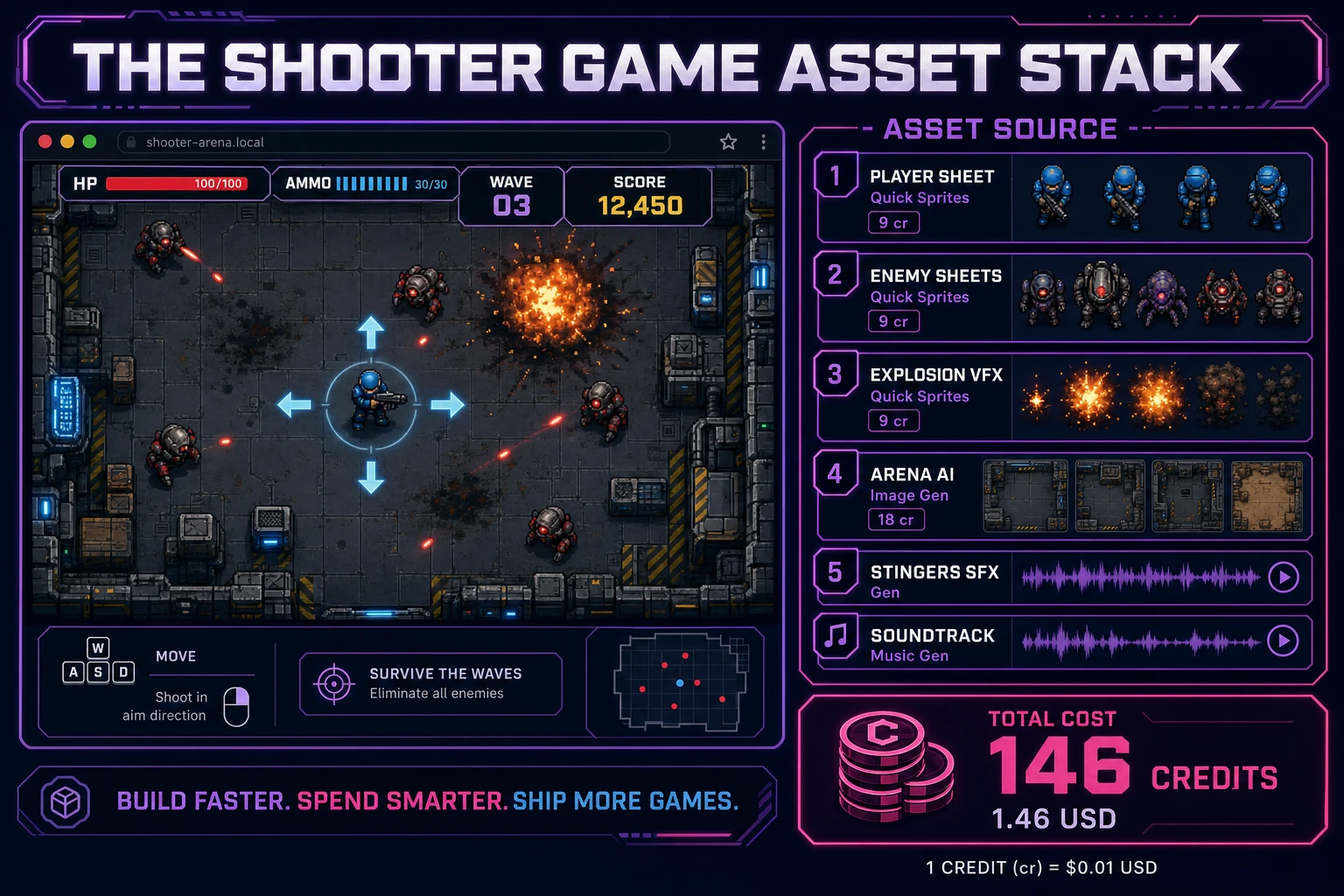
Shooter game asset stack showing a browser top-down arena next to asset tiles for Quick Sprites sheets, arena art, stingers, and music tracks
The shooter game asset stack: player and enemy walk sheets plus explosion VFX from Quick Sprites, arena chrome from AI Image Gen, six short stingers from SFX Gen, and two music tracks from Music Gen — the whole visual and audio set costs under two dollars.

What a how to make a shooter game project costs on Sorceress in 2026

Concrete asset and generation budget for a browser shooter — wave table, twin-stick move-and-aim, bullet pool, five waves — from empty repo to zip-and-ship playable, all numbers verified 2026-08-18 against local Sorceress source:

  • Character sheets (Quick Sprites): player + 2 enemies at Four Angle Walking, plus 1 explosion VFX, 9 credits each = 36 credits (0.36 USD). 48×48 walk grids and a 64×64 burst, transparent backgrounds.
  • Arena floor (AI Image Gen): 1 top-down tile at Nano Banana Pro 18 credits = 18 credits (0.18 USD).
  • Pickup chrome (AI Image Gen): 1 health/ammo chip at 18 credits = 18 credits (0.18 USD).
  • Title overlay (AI Image Gen): 1 background at 18 credits = 18 credits (0.18 USD). 16:9 painted, no text.
  • Stingers (SFX Gen): 6 clips at 1 credit per second, roughly 6 seconds billed = 6 credits (0.06 USD). Shot, hit, death, pickup, wave, hurt.
  • Background music (Music Gen): 2 tracks at 10 credits per generation, 2 to 3 tries each = 40 to 60 credits (0.40 to 0.60 USD). Add 2 credits per WAV render if you need lossless.
  • WizardGenie coding time: effectively free on the Sorceress side. Model-side API cost for a 2-to-4-hour prompt session on a cheap Executor like DeepSeek V4 Pro is typically under 0.50 USD.
  • Total for one complete browser shooter: roughly 136 to 156 credits, or roughly 1.36 to 1.56 USD in Sorceress credits, plus under 0.50 USD in model API time. Under 2 USD end-to-end for a first how to make a shooter game project with a fair table, a twin-stick rig, and five waves.

Sorceress bills 100 credits per dollar at the standard rate (CREDITS_PER_DOLLAR = 100 in src/lib/models.ts line 69). New accounts start with 100 free credits (SIGNUP_GRANT = 100 in src/app/api/admin/credits/route.ts line 12), which covers the Quick Sprites roster, all six stingers, and one music track outright — enough to prototype before you top up. The Sorceress Lifetime tier at 49 USD one-time (LIFETIME_PRICE = 49 in src/app/plans/page.tsx line 51) covers unlimited SFX Gen and Music Gen use forever, which matters if you plan themed variants (night arena, ice bunker, a later bullet-hell pack) — each extra theme reuses the coding scaffold and pays only for new sheets and table rows.

For related browser-game pipelines that share this design-first-generate-assets-scaffold-the-loop spine, the closest reads are Aim How to Make a First Person Shooter Game (Browser 2026) when the query was actually FPS, Blast How to Make Asteroids (Browser Vector Loop 2026) for the multidirectional cousin, Court How to Make a Fighting Game (Browser Combo Loop 2026) for another one-screen combat loop, and Wrap How to Make an HTML5 Game (Browser Loop 2026) for the static-file deploy. The Sorceress Tools Guide is the master index for every tool this guide referenced. Under two dollars, one weekend, and how to make a shooter game is a done deal.

Frequently Asked Questions

Is a top-down shooter the same as an FPS?

No. A first-person shooter is a 3D camera-behind-the-gun game: pointer lock, WASD relative to yaw, hitscan rays or projectile meshes. The Sorceress sibling Aim How to Make a First Person Shooter Game covers that loop. A top-down shooter (this guide) is a 2D arena viewed from above. Wikipedia’s shoot ’em up page groups those games as top-down or side-view action with ranged weapons, reaction time, and patterned enemies — Space Invaders (1978), Asteroids (1979), Robotron: 2084 (1982). If you landed here searching how to make a shooter game and you actually want a browser FPS, switch articles. If you want a weekend javascript shooter that ships as one HTML file, stay here.

Should a first shooter be a bullet hell?

No. Wikipedia defines bullet hell (danmaku) as a mid-1990s offshoot with crowded curtain-fire patterns and collision boxes smaller than the sprite. That is a specialist genre, not a first project. A bullet hell beginner who starts with Touhou-density patterns will spend the weekend on spawn geometry instead of a working fire-and-die loop. Ship a twin-stick arena first: WASD to move, mouse to aim, one bullet type, three enemy archetypes, five waves. Once that loop is honest you can add a dense-pattern mode as a later pack. Searchers who type phaser shooter or arcade shooter tutorial almost always want Geometry Wars energy, not a pattern bible.

How do twin-stick controls work in a browser?

Wikipedia’s twin-stick shooter page defines the scheme as one stick for movement on a plane and a second stick for firing independently. Keyboard and mouse may replace either stick. In a browser that means a Set of currently held keys from KeyboardEvent keydown and keyup (WASD or arrows), plus pointer position relative to the player for aim. Fire while the pointer button is down, or on a short cooldown after click. MDN’s KeyboardEvent page (Baseline widely available since July 2015) is the right reference: listen to keydown and keyup, never the obsolete keypress event, and read event.code (KeyW, KeyA) rather than event.key if you want layout-stable movement. Keep a keys Set so holding W and D together strafes instead of overwriting the last key.

Should I start with Phaser or vanilla Canvas for a top down shooter?

Vanilla Canvas for a first build. A top down shooter is a player blit, a bullet pool, enemy sprites, and circle-or-AABB overlap checks — a few hundred lines, one static HTML file, no build step. Phaser v4.2.1 “Giedi” (released 9 July 2026, verified 2026-08-18 on phaser.io/download/stable) is the right upgrade when you want Arcade Physics bodies, group overlap callbacks, particle explosions, or a Scene stack for title-arena-results. Searchers looking for a phaser shooter usually want those overlap callbacks; give them a hand-rolled pool first, then move the same spawn table into a Phaser Scene. WizardGenie scaffolds either path from one prompt, so the engine pick is a rendering choice, not a coding-agent choice.

How much does it cost to build a shooter game on Sorceress?

A first-project browser shooter budgets like this against the 2026 Sorceress rate card (all constants verified against local source on 2026-08-18). Quick Sprites player plus two enemy walk sheets plus one explosion VFX at 9 credits each is 36 credits or 0.36 USD (src/app/quick-sprites/page.tsx line 21 CREDITS_PER_GEN = 9). Arena floor, pickup chrome, and a title overlay at Nano Banana Pro 18 credits each add 54 credits or 0.54 USD (src/lib/models.ts line 303 credits: 18). Six SFX clips at 1 credit per second (src/app/sfx-gen/page.tsx line 23 SEED_AUDIO_CREDITS_PER_SECOND) — shot, hit, death, pickup, wave sting, player hurt — are roughly 6 credits or 0.06 USD. Two music tracks at 10 credits per generation (src/app/music-gen/page.tsx line 28 MUSIC_CREDIT_COST) with two or three tries each is 40 to 60 credits or 0.40 to 0.60 USD. Total roughly 136 to 156 credits, or 1.36 to 1.56 USD, plus under 0.50 USD in coding-model API time. The free 100-credit signup grant (src/app/api/admin/credits/route.ts line 12 SIGNUP_GRANT) covers the Quick Sprites roster, the stingers, and one music track outright.

Sources

  1. Shoot 'em up - Wikipedia
  2. Twin-stick shooter - Wikipedia
  3. Window: requestAnimationFrame() method - MDN Web Docs
  4. KeyboardEvent - MDN Web Docs
  5. Phaser v4.2.1 Giedi download
Written by Arron R.·2,926 words·13 min read

Related posts