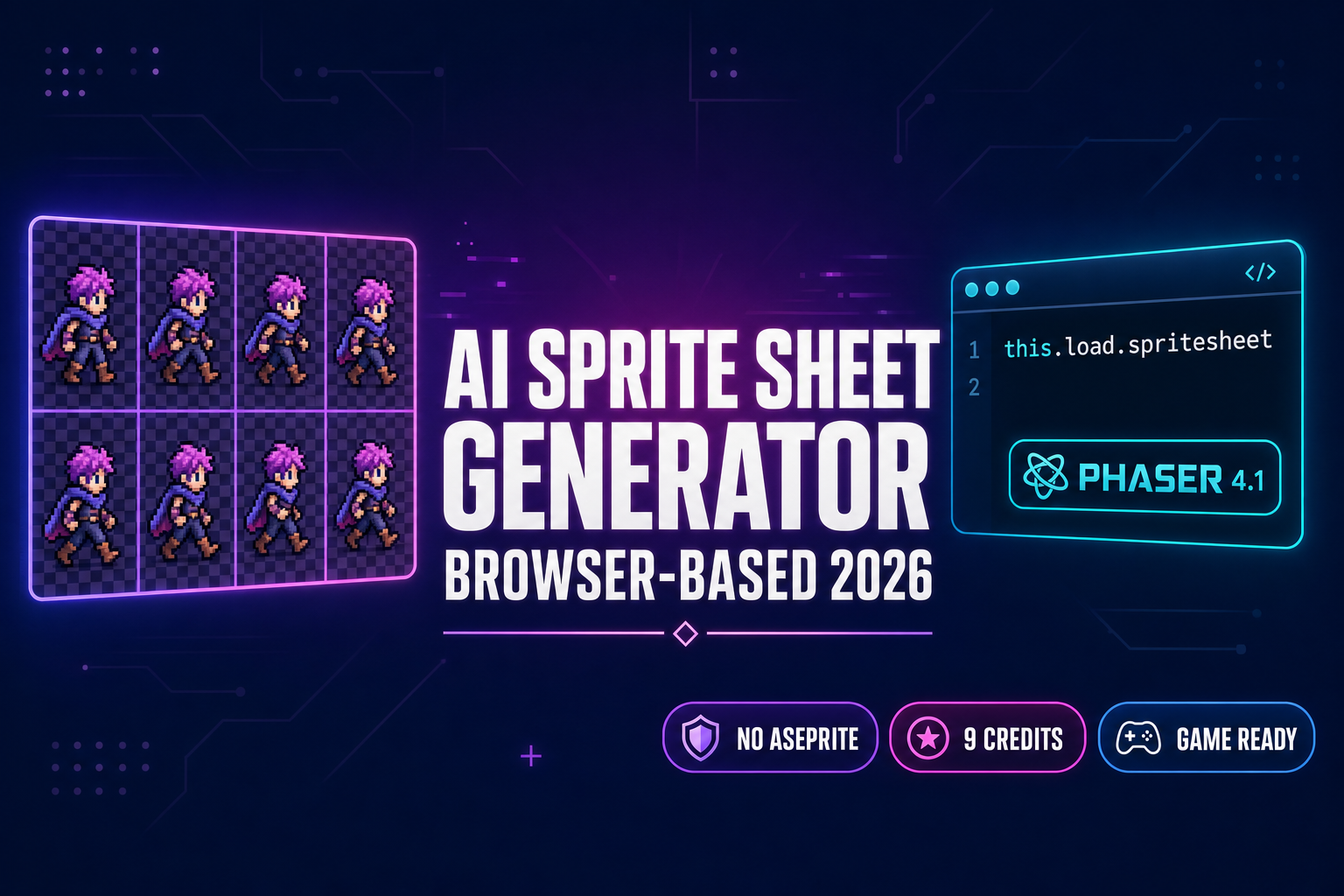
Spin Up an AI Sprite Sheet Generator (Browser-Based)

By Arron R.11 min read
An AI sprite sheet generator outputs a packed PNG atlas, not a single portrait. Sorceress Quick Sprites runs the Retro Diffusion rd-animation model in your brow

An AI sprite sheet generator is not the same product as an AI sprite generator, and conflating the two ships a broken pipeline. A sprite generator outputs one image per call. An AI sprite sheet generator outputs a packed PNG atlas — a uniform grid of frames the engine reads with a single loader call — which is the format Phaser 4, PixiJS, GameMaker, and every modern HTML5 engine actually expects. The 2026 field has five free options worth knowing about (OpenArt, PixelLab, CGDream, Komiko, SpriteLab) and one in-browser pipeline that drops the sheet straight into a working game scene without an Aseprite license: Quick Sprites running the Retro Diffusion rd-animation model on Replicate at 9 credits per pack, plus Spritesheet Analyzer for FPS preview and ZIP export. This guide compares every meaningful AI sprite sheet generator on the open web, walks the five-step browser workflow inside Sorceress, and shows the exact Phaser 4.1 “Salusa” (April 30, 2026) loader call that turns the AI sprite sheet generator output into a playable hero. Verified May 20, 2026 against each vendor’s live documentation, the Sorceress source code in src/app/quick-sprites/page.tsx, and the Phaser v4.1.0 release notes.
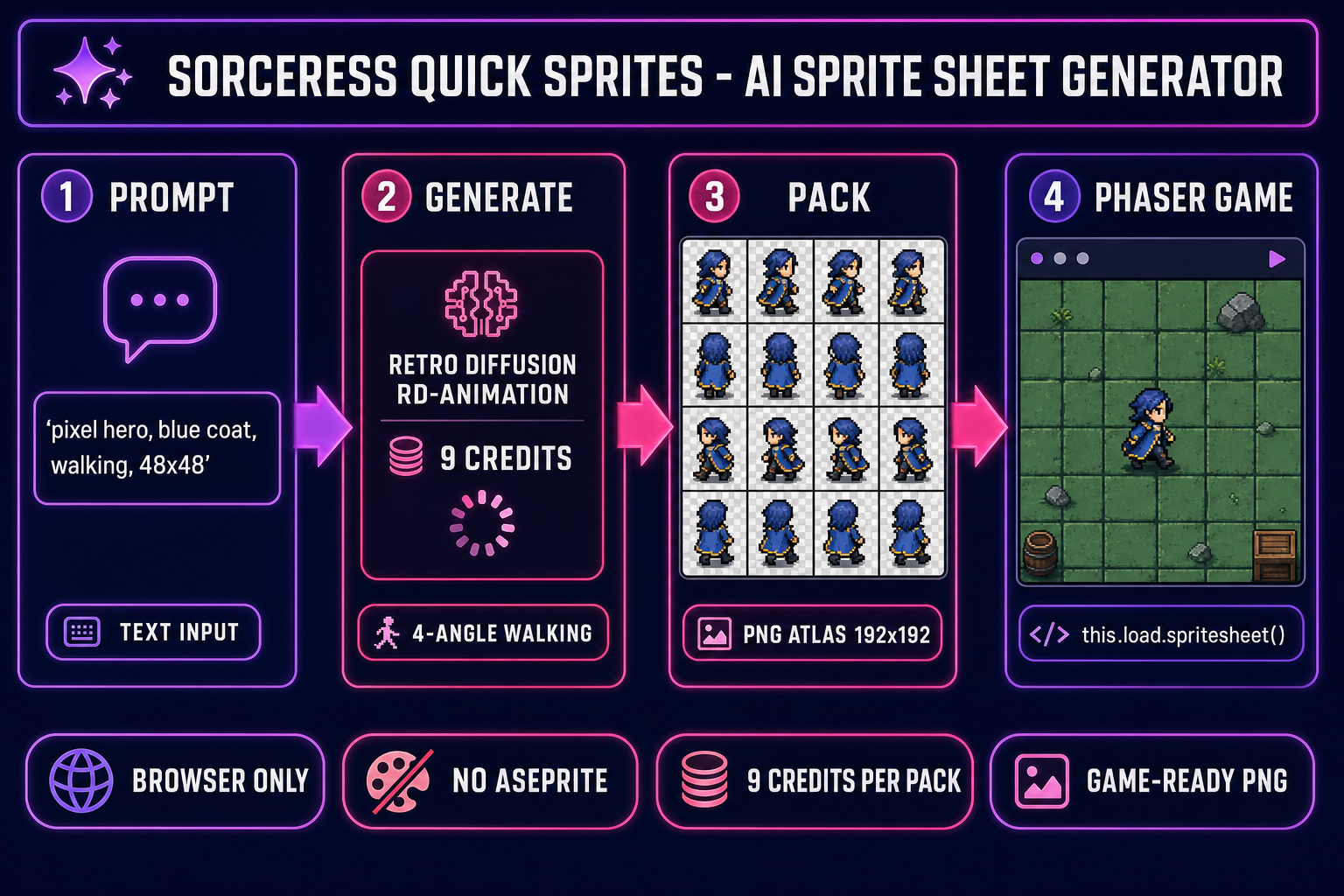
AI sprite sheet generator pipeline diagram showing four numbered panels (1 prompt, 2 generate via Retro Diffusion rd-animation at 9 credits, 3 pack into a 4x4 PNG atlas, 4 load into a Phaser 4 game scene) on a dark navy background with purple and magenta accents
The browser-based AI sprite sheet generator pipeline inside Sorceress. Prompt → rd-animation generates 16 frames in a packed grid → the PNG atlas drops into Phaser 4 with one loader call. Verified May 20, 2026.

What an AI sprite sheet generator actually does in 2026

The phrase AI sprite sheet generator is doing two jobs at once and the distinction matters. It refers to a generative model trained to emit multiple frames of the same character in a uniform layout (so frame 0 is the same hero as frame 7) and a packing pass that lays those frames out in a grid the engine can index. Without both halves of that definition, the deliverable is just “a folder of single sprites you have to align by hand”, which is what most of the AI image generators marketed as sprite tools actually ship.

A real sprite sheet has four properties: a uniform grid (most commonly 4×2 for an eight-frame walk, 4×4 for a sixteen-frame loop, or a 6-row pose layout for a top-down RPG); identical pixel dimensions per cell; transparent background on every cell; and a predictable read order (left-to-right, top-to-bottom). When all four properties hold, the engine loads the sheet with one call and animates the character with a frame-index range. When any one of them breaks, the engine sees a slideshow of jittery characters — the eye reads the drift as a glitch at twelve frames per second. A useful AI sprite sheet generator has to deliver all four at once.

The 2026 generation of AI sprite sheet generators handles the “identity stays consistent across frames” problem with one of two strategies: a model trained explicitly on multi-frame sprite-sheet datasets (the Retro Diffusion rd-animation approach, which Sorceress Quick Sprites runs), or a reference-image-pinning workflow on a general-purpose diffusion model (the approach OpenArt, PixelLab, and CGDream use, with mixed results depending on how aggressively the front-end enforces the reference). Trained-on-sheets always wins on identity consistency. Pinning-based workflows win on stylistic flexibility. Both ship a packed grid PNG; the gap is in how clean the frame-to-frame match looks.

The 2026 free AI sprite sheet generator field, ranked honestly

Five standalone AI sprite sheet generators are worth knowing in 2026, plus the in-browser Sorceress pipeline. Each is verified May 20, 2026 against the live product page; vendor links are omitted intentionally per the Sorceress editorial policy of not pushing readers to competitor product pages.

PlatformFree tier (verified 2026-05-20)Sheet-output handlingEngine integration
OpenArtFree with sign-in, limited credits per daySingle-frame outputs primarily; sheet alignment by handManual packing required
PixelLabFree tier with daily quota8/16-bit color palette control, sprite sheet support, slow per-packManual import to engine
CGDreamFree, signup requiredFree text-to-sprite-sheet, customizable settings, looser frame alignmentManual import to engine
KomikoFreeOne of the few free tools that auto-generates sprite sheets vs single spritesManual import to engine
SpriteLabSquire tier — 25 starter credits + 5 dailyText-to-sprite, image-to-pixel, animation, rotation; built-in pixel editorManual import to engine
Sorceress Quick Sprites100 starter credits at signup — 11 packs at 9 credits eachRetro Diffusion rd-animation ships a packed PNG atlas natively (returnSpritesheet flag = true by default)One this.load.spritesheet() call into Phaser 4

Two patterns are visible. First, every standalone AI sprite sheet generator ships a packed PNG of some kind — the field has converged on the right output format. Second, none of them close the loop into the engine; the user is responsible for getting the PNG into Phaser, PixiJS, or GameMaker by hand. The Sorceress pipeline is the only one that ships the sheet plus the engine integration as a single workflow.
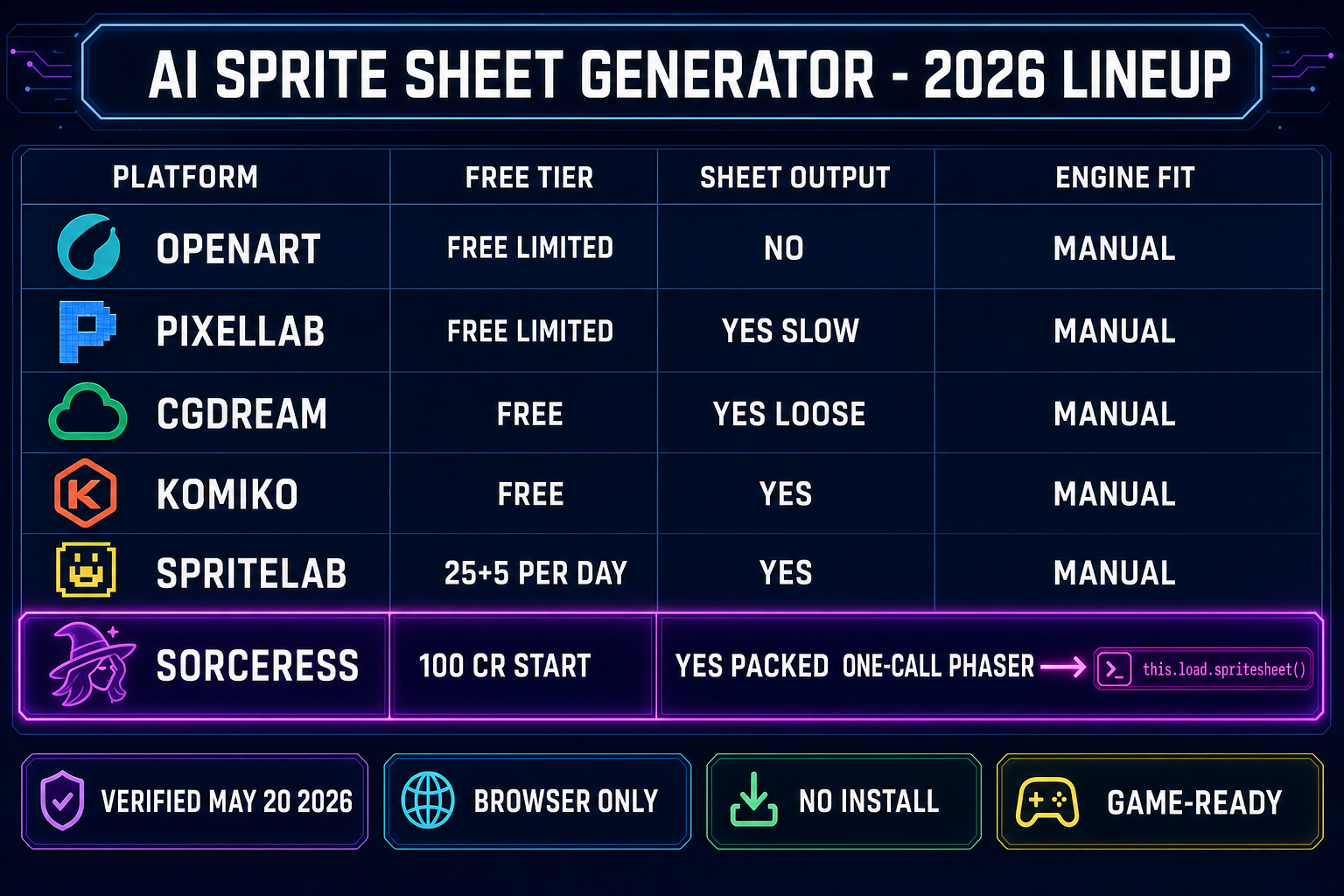
Comparison table infographic showing five free AI sprite sheet generators (OpenArt, PixelLab, CGDream, Komiko, SpriteLab) with their free tier, sheet output, and engine fit columns, with the Sorceress row highlighted in purple as the only platform with one-call Phaser integration on a dark navy background
Five standalone AI sprite sheet generators ship a packed PNG. Only the Sorceress pipeline closes the loop with one this.load.spritesheet() call into Phaser 4. Verified May 20, 2026.

The browser-based AI sprite sheet generator inside Sorceress (Quick Sprites + rd-animation)

Quick Sprites is the Sorceress AI sprite sheet generator. Verified May 20, 2026 against src/app/quick-sprites/page.tsx lines 19–41: the tool routes prompts to the Retro Diffusion rd-animation model (MODEL_ID = 'retro-diffusion/rd-animation') hosted on Replicate, charges CREDITS_PER_GEN = 9 credits per pack, and ships returnSpritesheet: true as the default toggle — so the output is a packed PNG atlas, not a folder of separate frames or an animated GIF. The toggle exposes an animated-GIF mode for designers who want a preview-friendly format, but the default is the engine-ready sheet.

The model exposes three styles, each tuned for a different game-asset shape:

  • Four Angle Walking — 48×48 px per frame, four-direction walk cycle (up, right, down, left) at four frames per direction. Sixteen frames laid out in a 4×4 grid. Locked to humanoid characters; the model has been trained against humanoid silhouettes specifically.
  • Small Sprites — 32×32 px per frame, six-row layout (right, left, arms, look, surprise, lay-down). Useful for top-down RPG NPCs where the four-angle walk plus reaction frames cover the dialogue + idle states.
  • VFX Effects — 24 to 96 px configurable, square aspect, eye-catching animations for fire, explosions, lightning, and impact effects. Not a character format; meant for the spell graphics in an RPG or the muzzle-flash in a shooter.

The math on the free tier is clean: a fresh Sorceress account ships with 100 starter credits (verified against src/app/_home-v2/page.tsx), and each Quick Sprites generation costs 9 credits. That works out to eleven complete sprite sheet packs out of the starter grant before any paid top-up is required. For most weekend jam projects that is enough hero, NPC, and effect coverage to ship a playable build.
The five-step AI sprite sheet generator workflow inside Sorceress

The end-to-end workflow that turns a one-line prompt into a working Phaser 4 walk cycle:

  1. Open Quick Sprites and pick a style. Navigate to Quick Sprites. The default is Four Angle Walking at 48×48 px, which is the right pick for most platformer and action-RPG heroes. Switch to Small Sprites for top-down NPCs or VFX for spell effects.
  2. Write the prompt. Keep it specific: silhouette, color palette, primary garment, and accessory. “Pixel hero, late teens, silver chin-length hair, fitted dark blue coat with brass buttons, walking, transparent background” reads cleanly to rd-animation because every clause narrows the latent-space cloud. Avoid ambiguous adjectives (“cool”, “awesome”); they degrade pixel art faster than they degrade photoreal.
  3. Optional: pin a reference image. If you have a canonical character portrait already (generated upstream in Sorceress AI Image Gen against the seven-model rail with reference-image pinning), hand it to Quick Sprites as the input image. The rd-animation model anchors the generated frames against that portrait, so the same character carries from the image generator into the sprite sheet generator without redrawing the design language.
  4. Generate. One click. The model runs on Replicate; the call typically completes in 20–60 seconds for the Four Angle Walking style. The output is a single PNG laid out as a uniform grid — sixteen frames at 192×192 px total for the 48×48 four-direction layout.
  5. Download the PNG and drop it into your project. Click download. The file naming convention is sprite-{style}-{id}.png; rename it for clarity (hero_walk.png) and drop it into the engine’s asset folder. The next section walks the Phaser 4 loader call.

End-to-end clock: roughly two minutes from prompt to atlas on a healthy connection. The 9-credit cost matches one cup of coffee’s worth of compute, with eleven packs before the starter credits run out.

From the AI sprite sheet generator output to a Phaser 4 game scene

Phaser 4.1.0 “Salusa” (released April 30, 2026, verified against the official phaser.io news page on 2026-05-20) is the canonical browser engine for an AI-generated sprite sheet workflow. The loader API has not changed shape between Phaser 3 and Phaser 4 — the SpriteSheetFile class in the v4.1.0 documentation accepts the same (loader, key, url, frameConfig) signature it has shipped with for years — so the integration code below works against both Phaser 3 and Phaser 4 projects.

The full walk-cycle integration in roughly twenty lines of Phaser 4 code:

// Phaser 4.1 "Salusa" - load and play a Quick Sprites walk cycle
class GameScene extends Phaser.Scene {
  preload() {
    // Load the AI sprite sheet generator output: 4x4 grid at 48x48
    this.load.spritesheet('hero', 'assets/hero_walk.png', {
      frameWidth: 48,
      frameHeight: 48,
    });
  }

  create() {
    // Build a four-frame walk-down animation from frames 8-11
    this.anims.create({
      key: 'walk-down',
      frames: this.anims.generateFrameNumbers('hero', { start: 8, end: 11 }),
      frameRate: 8,
      repeat: -1,
    });

    // Drop the hero into the scene and play the cycle
    const hero = this.add.sprite(160, 120, 'hero');
    hero.play('walk-down');
  }
}

That is the entire bridge. The this.load.spritesheet() call parses the packed atlas into individual frames the engine indexes by number; this.anims.generateFrameNumbers() turns a frame range into an animation; hero.play() plays it. For the four-angle walk cycle the frame ranges are predictable: frames 0–3 walk up, 4–7 walk right, 8–11 walk down, 12–15 walk left. The Quick Sprites style label tells the engine which range to play.

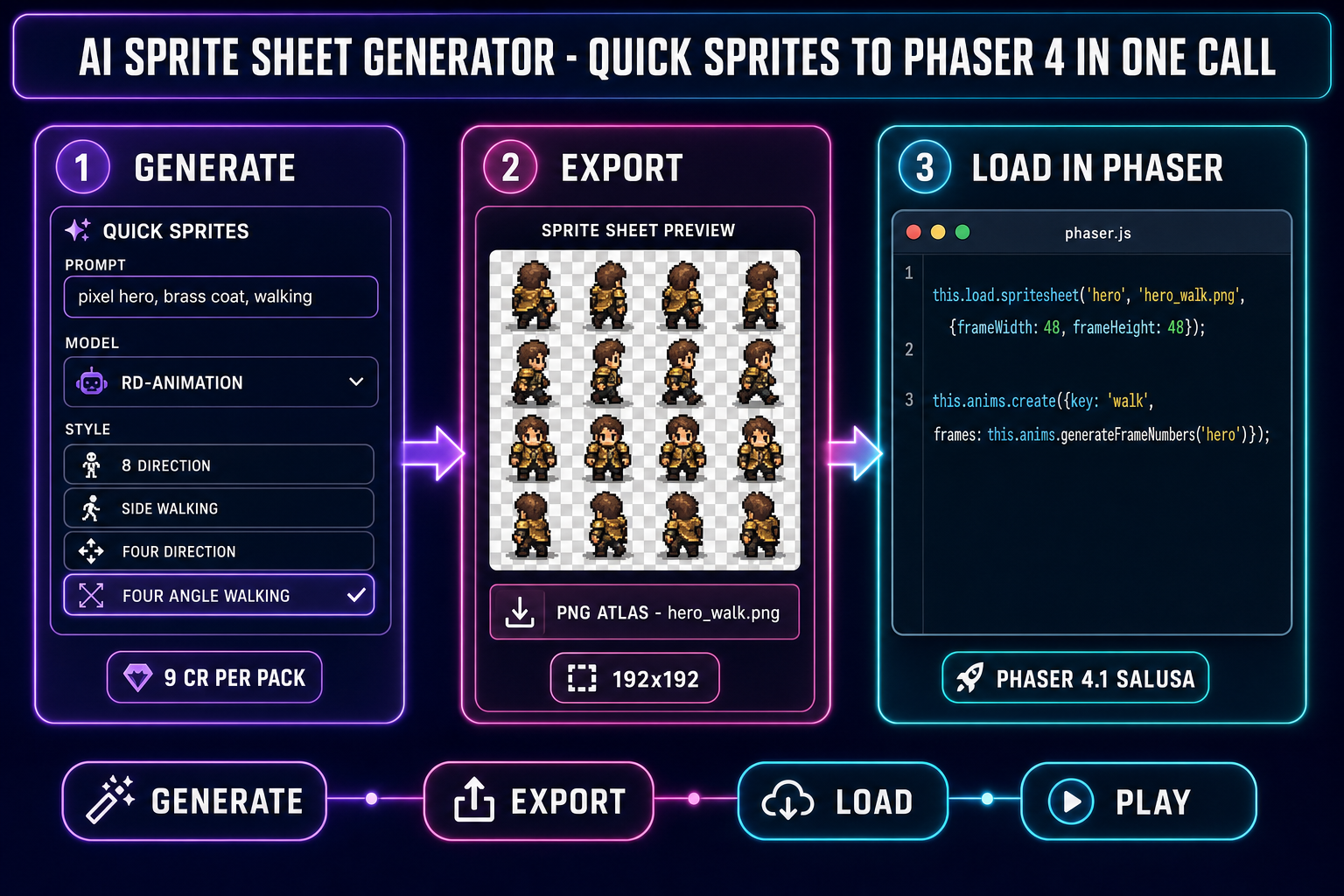
Three-panel diagram showing the AI sprite sheet generator handoff into Phaser 4 (panel 1 generate via rd-animation at 9 credits, panel 2 export the packed PNG atlas at 192x192, panel 3 load into Phaser 4 with this.load.spritesheet and animate with generateFrameNumbers) on a dark navy background with purple, magenta, and cyan accents
Generate → export → load. The AI sprite sheet generator output is one loader call away from a playable hero in Phaser 4 “Salusa”. Verified May 20, 2026.

Tighten the atlas with Spritesheet Analyzer

The Quick Sprites output is engine-ready, but production projects often need additional polish: trim a frame that came out off-model, preview the cycle at the exact frame rate the game uses, or pack multiple sheets into a single ZIP for a build pipeline. Spritesheet Analyzer handles all three. The tool accepts a packed PNG, auto-detects the grid (cols, rows, frame width, frame height), exposes an FPS preview slider so the animation plays at the actual in-game speed, and exports the trimmed output as either a re-packed PNG or a JSZip archive of individual frames.

The companion tool, Slicer, handles the inverse problem: an existing sprite sheet downloaded from somewhere else with a non-standard grid that needs re-slicing into a clean atlas. Slicer ships four selection modes (Square, Free, Polygon, Grid) plus Grid Snap presets at 1, 5, 10, 20, and 50 px (verified 2026-05-20 against src/app/slicer/page.tsx) so a messy 7-frame walk cycle from a community pack converts cleanly to a 4-row uniform grid the engine can read.

The AI sprite sheet generator pipeline does not need either tool for the happy path — Quick Sprites’s default output is already a clean grid. They are the polish layer for cases where a frame needs trimming, a sheet needs re-slicing, or the build pipeline expects a ZIP.

Five mistakes that ruin AI sprite sheet generator outputs

Five recurring failure modes from production projects in 2026, with the fix for each:

  1. Vague prompts. “A hero character” produces visual noise; rd-animation guesses too many silhouettes at once. The fix is to lock silhouette + color palette + primary garment in the prompt, plus “transparent background” explicitly so the model leaves alpha intact.
  2. Skipping the reference-image pin. When a project needs the same hero in a sprite sheet plus a 3D model plus a key art, generating each step independently produces three different-looking heroes. The fix is to generate the canonical portrait once in AI Image Gen with reference-image pinning, then hand that portrait to every downstream tool (Quick Sprites, 3D Studio) as the input image.
  3. Using the wrong style for the use case. Four Angle Walking is humanoid-only; trying to generate a quadruped pet with that style produces awkward results because the model has not been trained on quadruped silhouettes in that layout. For non-humanoid characters use Small Sprites or hand-prompt a custom layout in AI Image Gen and re-pack with Spritesheet Analyzer.
  4. Not seed-locking across regenerations. Re-rolling the prompt without a fixed seed value means every regeneration starts at a different latent-space point; identity drifts even with the same prompt text. The fix is to set the seed field explicitly and reuse it for every regeneration of the same character.
  5. Loading the sheet without the right frameConfig. A 4×4 grid at 48×48 px loads with frameWidth: 48, frameHeight: 48; a 6-row 32×32 grid loads with frameWidth: 32, frameHeight: 32. Mismatching the frameConfig produces a slideshow of half-characters. The fix is to read the actual pixel dimensions from the AI sprite sheet generator output (or the Spritesheet Analyzer detection panel) before writing the loader call.

The verdict — when an AI sprite sheet generator is the right pick

An AI sprite sheet generator is the right pick when the project needs uniform multi-frame character animation, the developer has not built sprite art before (or has built it but does not want to push pixels in a pixel art editor for ten hours), and the deliverable is a browser game in Phaser, PixiJS, or raw Canvas. The Sorceress Quick Sprites path closes the loop fastest because the rd-animation model was trained on multi-frame sprite sheets explicitly, the output ships as a packed PNG by default, and the integration into Phaser 4 is one loader call. The five free standalone alternatives are real and worth knowing for community-model variety (SpriteLab, CGDream) or palette accuracy (PixelLab), but every one of them leaves the engine integration to the user.

For production projects that need extra polish, layer the Spritesheet Analyzer on top for FPS preview and ZIP export, or pull in Slicer for re-slicing community sheets. For a complete character pipeline that goes beyond the sprite sheet, bridge into AI Image Gen for the canonical hero portrait and 3D Studio for the matching 3D mesh. The whole pipeline runs in one browser tab, with no Aseprite license, no traditional sprite-animation pipeline, and no installer.

The 2026 standard is: an AI sprite sheet generator in the browser, a packed PNG out, one engine-loader call. Anything more elaborate than that is yesterday’s workflow. Quick Sprites ships that standard today.

Frequently Asked Questions

What is an AI sprite sheet generator and how does it differ from an AI sprite generator?

An AI sprite sheet generator outputs a packed grid PNG with multiple frames of the same character laid out in a uniform layout the engine reads with one function call — verified May 20, 2026 against the Phaser 4.1.0 LoaderPlugin spritesheet documentation. An AI sprite generator (singular) outputs one image per generation. The distinction matters because game engines expect the sheet format. Phaser 4, Three.js, GameMaker, and PixiJS all parse a sheet with a single loader call (this.load.spritesheet for Phaser); they cannot natively assemble eight separate images into a walk cycle. The standalone AI sprite generators on the open web (OpenArt, PixelLab, CGDream, SpriteLab) handle this gap with varying success — Komiko was specifically called out in 2026 reviews as one of the few free tools that auto-generates sprite sheets rather than single frames. Sorceress Quick Sprites runs the Retro Diffusion rd-animation model with the returnSpritesheet flag set true by default, so the output drops directly into a Phaser scene without an intermediate packing step.

What is the best free AI sprite sheet generator in 2026?

Depends on the deliverable. For a generic four-frame walk cycle in pixel art with zero credit-card friction, the free Sorceress account (100 starter credits, enough for eleven full sprite sheet packs at 9 credits each) is the cleanest path because the AI sprite sheet generator output drops directly into a Phaser 4 scene with one loader call — verified May 20, 2026 against src/app/quick-sprites/page.tsx lines 19-21 (MODEL_ID retro-diffusion/rd-animation, CREDITS_PER_GEN 9). For a community-model sandbox with thousands of LoRAs to explore, SpriteLab's Squire tier gives 25 starter credits plus 5 daily credits but caps the sheet output at lower fidelity than the rd-animation model. CGDream is genuinely free with customizable settings but the sheet alignment is looser. PixelLab focuses on 8/16-bit color palette accuracy at the cost of a slower generation pipeline. OpenArt is the simplest UX but offers limited frame control. Komiko is one of the few free tools that automatically generates sheets instead of single sprites. The honest 2026 ranking depends on whether the project values sheet alignment (Sorceress / Komiko win), palette accuracy (PixelLab wins), community models (SpriteLab / Tensor.Art wins), or zero-friction (CGDream / OpenArt win).

Can an AI sprite sheet generator output drop directly into Phaser 4 or Unity?

Phaser 4 yes, with one loader call — verified May 20, 2026 against the Phaser v4.1.0 Salusa documentation released April 30 2026. The signature is this.load.spritesheet(key, url, frameConfig) where frameConfig sets frameWidth and frameHeight; the engine then exposes the frames via this.anims.create with this.anims.generateFrameNumbers(key, {start, end}). The Quick Sprites four-angle-walking output at 48x48 px loads with frameWidth 48 frameHeight 48; the small-sprites output at 32x32 px loads with frameWidth 32 frameHeight 32. Unity is not on the supported engine list for any Sorceress pipeline because Unity is referenced in plain text only per Hard Rule 13 — Sorceress targets browser engines (Phaser, Three.js, raw Canvas, Pixi). For Unity workflows, the same packed-PNG output the AI sprite sheet generator produces does feed into the Unity Sprite Editor's Multiple slice mode by hand, but Sorceress does not document or support that path. Stick to the browser engine if you want the AI sprite sheet generator pipeline to be one click away from a playable scene.

How do I avoid character drift across frames in an AI sprite sheet generator?

Three rules — verified May 20, 2026 against the Sorceress workflow source code. First, the rd-animation model (verified MODEL_ID retro-diffusion/rd-animation in src/app/quick-sprites/page.tsx line 20) handles frame-to-frame identity internally for the four-angle-walking and small-sprites styles because the model was trained on multi-frame sprite sheets explicitly — so within one Quick Sprites generation the eight or twenty-four frames stay on-model by construction. Second, when the sprite sheet pack needs additional poses beyond the trained styles, send a reference-image-pinned prompt through Sorceress AI Image Gen first (Nano Banana 2 accepts up to 14 reference images per call, GPT Image 2 accepts 10, Flux 2 Pro accepts 8 — verified against src/lib/models.ts) to generate the canonical hero portrait, then hand that portrait to Quick Sprites as the input image so the rd-animation model anchors against the correct character. Third, lock the seed value across regenerations of the same character so the latent-space starting point stays identical — Quick Sprites exposes a seed field in the queue payload (verified line 506 of src/app/quick-sprites/page.tsx). If a frame still drifts, regenerate that single frame with the same seed plus a tighter pose clause; do not re-roll the full pack.

Does the Sorceress AI sprite sheet generator require a paid plan?

No. Verified May 20, 2026 against src/app/quick-sprites/page.tsx and src/app/_home-v2/page.tsx: a fresh Sorceress account ships with 100 starter credits, and Quick Sprites costs 9 credits per generation (CREDITS_PER_GEN constant). That math is eleven full sprite sheet packs out of the starter grant before any top-up is required. Each pack at the four-angle-walking style outputs a 4-direction walk cycle (16 frames in a 4x4 grid) at 48x48 px in PNG format; each pack at the small-sprites style outputs a 6-row pose set (right, left, arms, look, surprise, lay-down) at 32x32 px. The output PNG drops into a Phaser scene with one loader call. Top-ups start at $10 for 1,000 credits — 111 additional sprite sheet packs — when the starter grant is exhausted. The AI sprite sheet generator pipeline is genuinely free at the entry tier; the paid tier is only needed for high-volume production runs.

Sources

  1. Texture atlas (sprite sheet) — Wikipedia
  2. Sprite (computer graphics) — Wikipedia
  3. Phaser v4.1.0 Salusa release notes — phaser.io
  4. Phaser v4.1.0 SpriteSheetFile API — Phaser docs
  5. Diffusion model — Wikipedia
  6. Animation in video games — Wikipedia
  7. PNG (Portable Network Graphics) — Wikipedia
Written by Arron R.·2,487 words·11 min read

Related posts