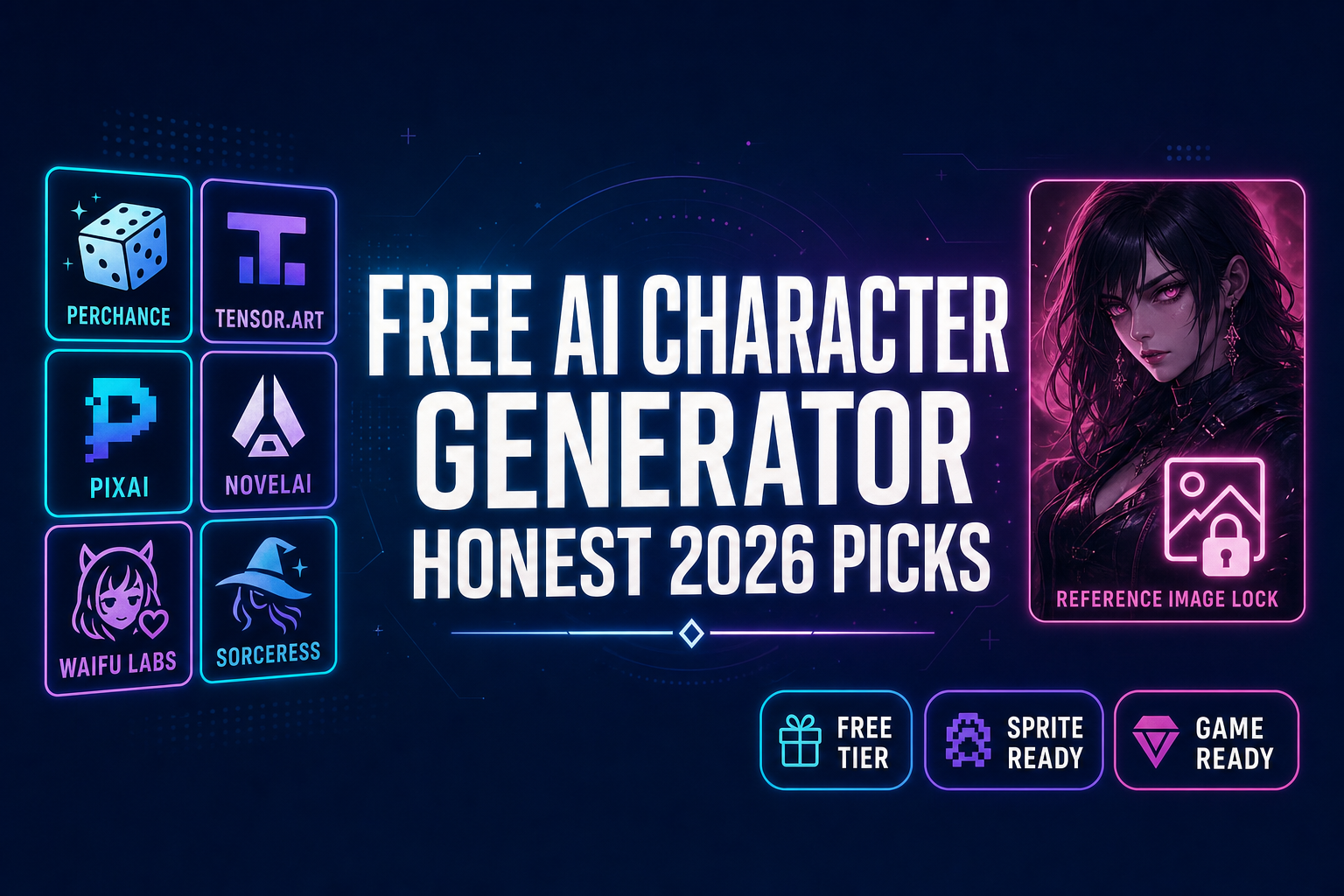
Try a Free AI Character Generator (Honest 2026 Picks)

By Arron R.13 min read
A free AI character generator gets you a portrait in thirty seconds. Most stop there. Perchance, Tensor.Art, and PixAI ship strong free tiers but no sprite atla

Every "free AI character generator" search result in 2026 sells a different definition of free. Perchance at perchance.org is genuinely free with no login and no daily cap, but the workflow ends at a single 512×768 PNG. Tensor.Art ships 100 free credits a day, which is enough for a hundred standard images but never enough to build a sprite atlas. PixAI advertises 10,000 daily credits, which sounds dramatic until you read the per-generation cost. NovelAI gives you 30 trial images and then the meter starts at $10 a month. Waifu Labs is free and beautiful, but the visual-selection interface only outputs portraits. Picrew is free but it is not actually AI — it is a layered avatar maker with about 600×600 PNG output. For a hobby illustration any of the above is fine. For an indie game project — visual novel, JRPG, anime fighter, RPG, side-scroller — the project does not actually need a portrait. It needs eight reference-locked poses laid out in a sprite atlas, plus optionally a 3D version of the same hero for any 3D scene. The honest comparison below ranks every meaningful free AI character generator on the field as of May 19, 2026, then walks through the only browser-based free-tier workflow that closes the loop — Sorceress AI Image Gen with 100 starter credits on signup, plus Quick Sprites for the atlas and 3D Studio for the mesh. Verified against the Sorceress source code in src/app/_home-v2/_data/tools.ts, src/lib/models.ts, and src/app/quick-sprites/page.tsx; verified against each external vendor’s live documentation today.
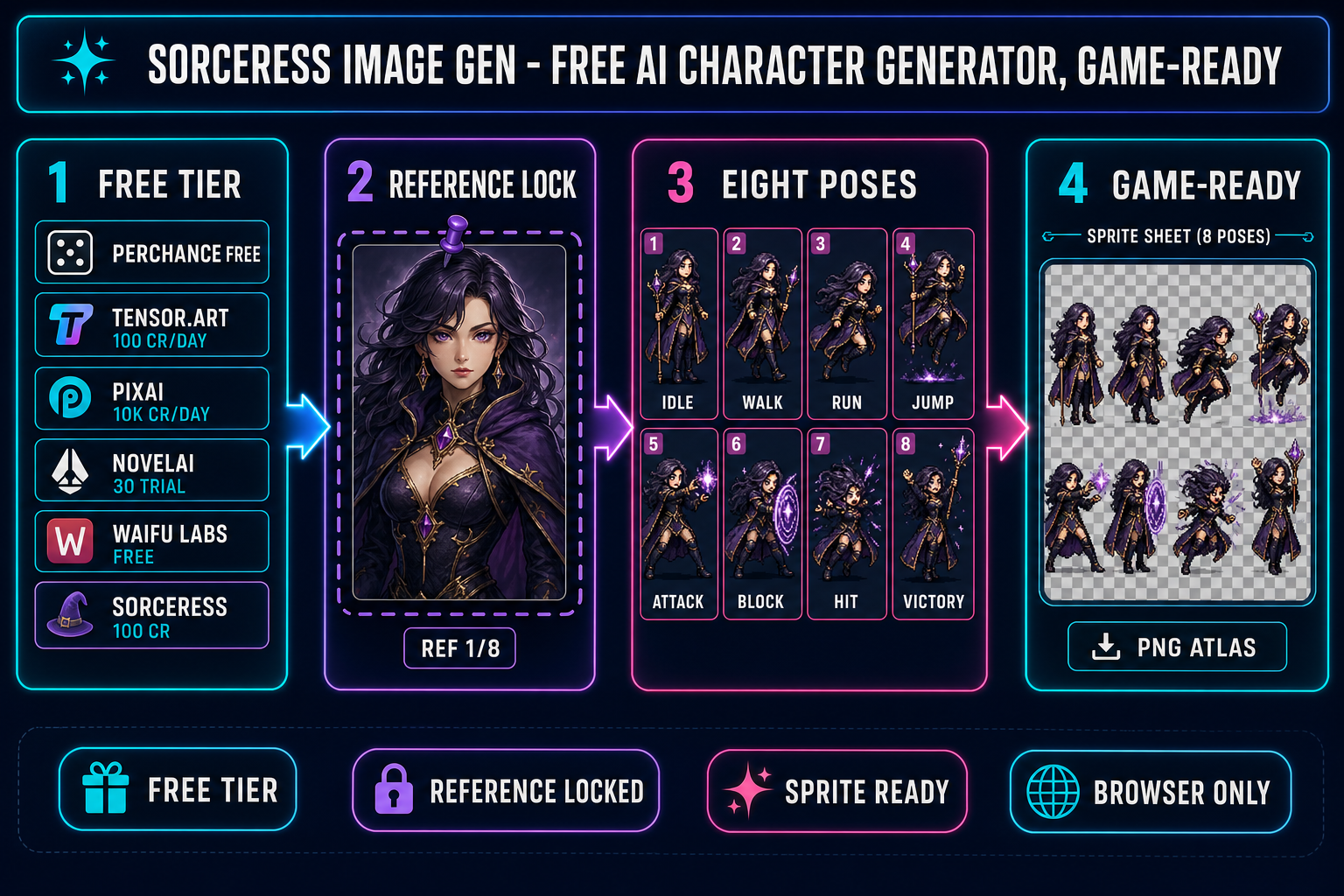
Free AI character generator workflow diagram showing six platform free-tier chips at the start (Perchance, Tensor.Art, PixAI, NovelAI, Waifu Labs, Sorceress), then a reference-image lock step, then an eight-pose grid of the same character, then a game-ready sprite sheet output, on a dark navy background with cyan magenta and purple accents
The reference-locked free AI character generator workflow. Six platforms compared at the front of the pipeline; one closes the loop all the way to a game-ready sprite atlas. Verified May 19, 2026.

What “free” actually means for an AI character generator in 2026

Six different definitions of free are in active use on the open web in 2026, and conflating them is the first mistake every newcomer makes. The accurate taxonomy:

  • Free unlimited, no login. The user gets unlimited generations forever with no account. The platform monetizes via display ads or absorbs the cost. Perchance is the canonical example.
  • Free daily credits. The user gets a fixed credit allowance per UTC day that resets at midnight. Tensor.Art (100 credits/day) and PixAI (10,000 credits/day) both work this way; the per-generation cost determines how many images that allowance actually buys.
  • Free trial. The user gets a one-time pool of generations on signup, with no daily refresh. NovelAI’s 30-image trial is this pattern; after exhaustion the paid plan starts.
  • Free starter credits. The user gets a one-time credit grant on signup that exceeds the cost of a typical project, with paid top-ups for power users. Sorceress AI Image Gen ships 100 starter credits on signup — verified against src/app/_home-v2/page.tsx line 241 and src/app/_home-v2/_components/HomeHero.tsx line 701.
  • Free with feature gating. The user generates for free but specific features (Turbo Mode, video gen, LoRA training, commercial-use rights, high resolutions) are locked behind a paid tier. PixAI uses this pattern at the membership tier level.
  • Free non-AI. The tool is not actually a generative model at all; it is a deterministic asset assembler with creator-licensed parts. Picrew is the canonical example — layered drag-drop avatar maker, no model inference happens. Counted in the “free AI character generator” SERP for legacy SEO reasons but technically not AI.

The right free AI character generator for a given project depends on which definition of free aligns with the project’s actual constraint. A weekend visual-novel jam needs a different free than a six-month commercial RPG.

The honest 2026 free AI character generator field

An honest snapshot of every meaningful free AI character generator on the open web, verified May 19, 2026 against each vendor’s live documentation. The Sorceress row is included for completeness and is the only entry that closes the loop into a game-asset pipeline.

PlatformFree tier (verified 2026-05-19)Account requiredUnderlying techSprite-sheet path
PerchanceUnlimited generations, no quotaNoStable Diffusion (SDXL + SD 1.5 + community LoRAs)None
Tensor.Art100 credits/day, reset 00:00 UTCGoogle sign-in10,000+ Stable Diffusion checkpointsNone
PixAI10,000 credits/day, reset 00:00 UTCEmail signupSDXL + custom anime modelsNone
NovelAI30 trial images, no refreshEmail signupNovelAI Anime V4 diffusionNone
Waifu LabsUnlimited, freeNoCustom GAN by Sizigi StudiosNone
PicrewUnlimited, free (not generative AI)No (creator: yes)Layered SVG/PNG assemblerNone
Sorceress AI Image Gen100 starter credits on signup, top-up afterEmail signup7-model rail (Nano Banana Pro/2, GPT Image 2, Seedream 5 Lite, Flux 2 Pro, Z-Image Turbo, Grok Imagine)Yes — Quick Sprites + 3D Studio bridge

The pattern is clean: every standalone free AI character generator stops at the portrait. The Sorceress free tier is the only one that ships the downstream tools as part of the same browser session.

Why most free AI character generators stop at the portrait

The standalone platforms above are creative tools, not game-asset pipelines. Their target user is a hobbyist illustrator who wants a single shareable character image, not a developer who needs the same character to appear in eight matching frames of a walk cycle plus a 3D model in a cutscene. The gap shows up in three concrete places.

No sprite-sheet packer. A sprite sheet is a single PNG laid out as a uniform grid (most commonly 4×2 for an eight-frame walk cycle, or 4×4 for a sixteen-frame loop). Each cell is exactly the same pixel size, the background is transparent, and the engine reads the sheet with one function call. None of the standalone free AI character generators ship this. Perchance, Tensor.Art, PixAI, NovelAI, Waifu Labs, and Picrew all output one image per generation; aligning eight outputs into a grid is the user’s problem.

No frame-to-frame identity lock by default. Even with a reference-image input pinned where the platform supports one, the standalone tools tend to let small details drift across generations: eye color shifts by one shade, hair length grows or shrinks by ten percent, jacket color brightens. For a single illustration this is invisible; for a sprite sheet where eight frames play at twelve frames per second, the eye reads the drift as a glitch. The reference-image input is the steering mechanism, but it has to be pinned and the prompt has to stay identical across the pose set, and the model has to stay locked for the whole pack.

No 3D bridge. If the game ever cuts to a 3D scene the same character has to render as a 3D mesh. Bridging from one portrait to a textured rigged 3D mesh requires an image-to-3D model, an auto-rigging pass, and an export to glTF 2.0 binary. The standalone free AI character generators ship none of those steps.
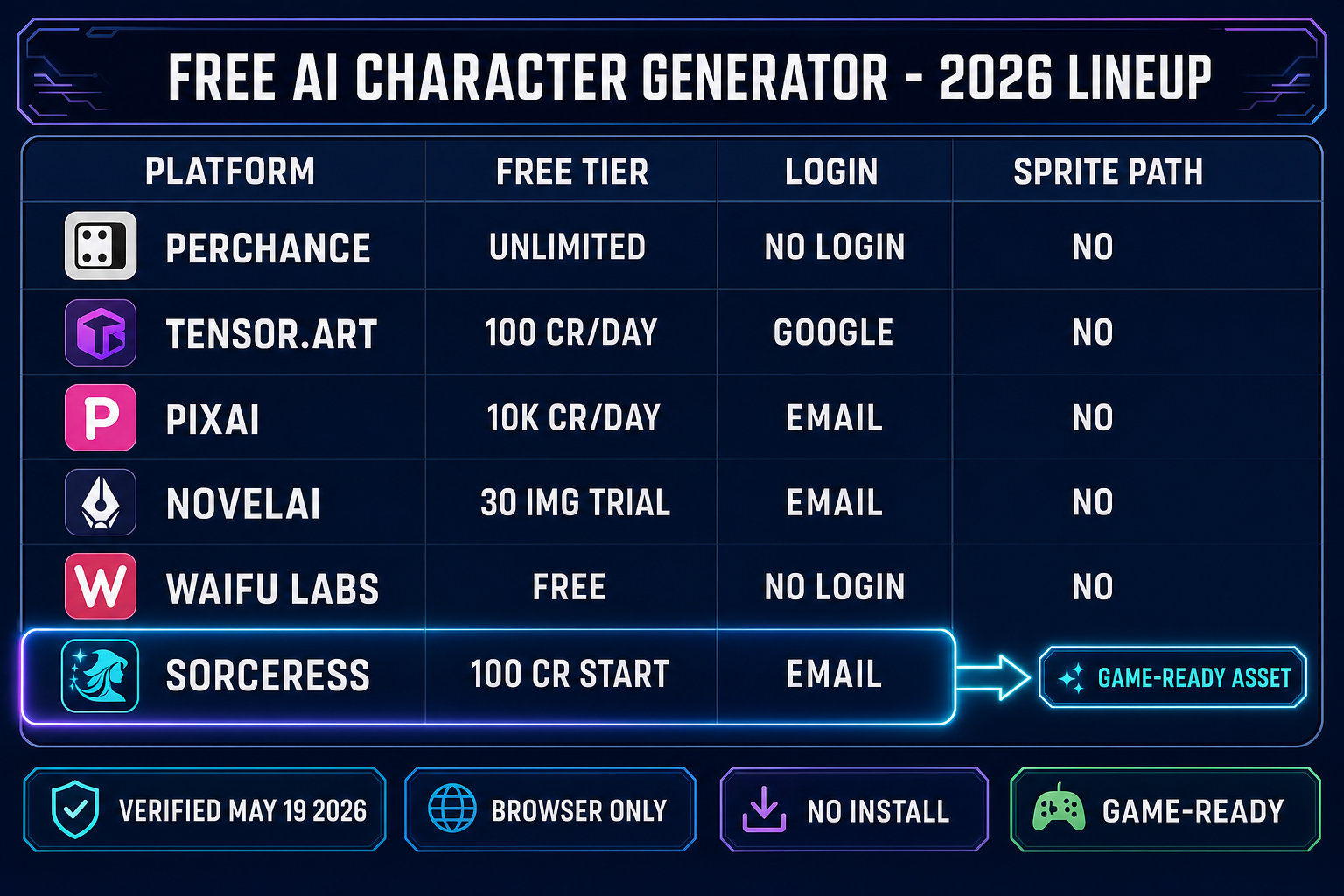
Comparison table infographic showing six free AI character generator platforms (Perchance, Tensor.Art, PixAI, NovelAI, Waifu Labs, Sorceress) with their free tier, login requirement, and sprite path columns, with the Sorceress row highlighted in cyan as the only platform with a YES in the sprite path column pointing to a game-ready asset chip, on a dark navy background
Side-by-side: every standalone free AI character generator outputs a portrait and stops. Only the Sorceress free-tier path closes the loop to a sprite sheet and a 3D mesh.

Use a free AI character generator as the start of a game-ready workflow with Sorceress AI Image Gen

The Sorceress AI Image Gen rail (verified May 19, 2026 against src/app/_home-v2/_data/tools.ts lines 669–676) ships seven image models on the picker. For a free-tier character workflow the sweet-spot pick is Nano Banana 2 at 2K resolution — high enough fidelity to read as crisp character art, low enough credit cost (12 credits at 2K) that an eight-pose pack lands inside the 100 starter credits a new account ships with. The full lineup with the credit costs and reference-image caps that matter for character work, all verified against src/lib/models.ts:

ModelProviderMax ref imagesCredits (default)Best for free-tier character work
Nano Banana 2Google149 (1K) / 12 (2K) / 17 (4K)Workhorse for eight-pose packs — cheap and ref-friendly
Nano Banana ProGoogle818 (2K) / 33 (4K)Hero portrait at 4K for menu / key art
GPT Image 2OpenAI103 (low) / 7 (medium) / 17 (high)Stylized characters with crisp line work
Seedream 5 LiteByteDance146 (2K) / 8 (3K)Mature / horror genres (uncensored)
Flux 2 ProBlack Forest Labs8 (+3 cr per ref)~9 + 3 per refPainterly characters, cel-shaded illustration
Z-Image TurboTongyi-Mai5~2Ultra-fast iteration during prompt design
Grok ImaginexAI5~6Looser creative-style variants

The four-step workflow that turns this rail into a reference-locked free AI character generator inside the 100-starter-credit free tier:

  1. Generate one canonical hero at high fidelity. Open Sorceress AI Image Gen, pick Nano Banana Pro at 2K resolution (18 credits), and write a tight character prompt: “a young hero, late teens, chin-length silver hair with an asymmetric fringe, large bright blue eyes, fitted dark blue coat with brass buttons and high collar, standing front-facing, neutral expression, transparent background”. The detail density narrows the latent-space cloud until the output is the specific hero you want. Save the result as the canonical reference.
  2. Pin the canonical reference into every follow-up generation. Drop the saved hero portrait into the reference-image slot. Switch the model to Nano Banana 2 at 2K (12 credits) — same Google family, lower cost per pose. Nano Banana 2 accepts up to fourteen reference images per call (verified against src/lib/models.ts line 235), and the anchor portrait occupies the first slot for every generation in the pose set.
  3. Run seven follow-up prompts at 2K with the reference pinned. Keep the prompt prefix identical, change only the pose clause: “same hero, walking to the right, side view, transparent background”, “same hero, running to the right, transparent background”, and so on through jump, attack, block, hit-react, victory. Eight reference-locked outputs anchored to the canonical portrait. Total cost: 18 + (7 × 12) = 102 credits, two credits over the starter pack — one credit-card top-up of $10 buys 1,000 more credits, enough for nine more full character packs.
  4. Pack the eight outputs into a sprite sheet. Hand the pack to Quick Sprites for transparent-background cleanup and grid alignment.

The full eight-pose hero pack runs in roughly 102 credits and about ten minutes end-to-end inside the browser. The hero stays on-model because every generation after the first is anchored to the same reference image — the same capability the standalone free AI character generator tools above expose but never close the loop on.
From the free AI character generator output to a sprite sheet

The eight reference-locked outputs are already pose-consistent and identity-consistent; the remaining job is grid alignment. Quick Sprites handles this step end-to-end — verified May 19, 2026 against src/app/quick-sprites/page.tsx lines 20–41: MODEL_ID = 'retro-diffusion/rd-animation', CREDITS_PER_GEN = 9, animation styles include four_angle_walking at 48×48 px and small_sprites at 32×32 px, plus a configurable vfx mode at 24–96 px. For a side-scrolling platformer or fighter, the four-angle walking style produces a four-direction walk cycle the engine animates with frame indices; for a top-down RPG, the small-sprites style packs six rows of poses (right, left, arms, look, surprise, lay-down).

The Phaser 4 integration is one function call against the PNG atlas the Quick Sprites step produces:

// Phaser 4 - load and play the hero walk cycle
this.load.spritesheet('hero', '/assets/hero_walk.png', {
  frameWidth: 48,
  frameHeight: 48,
});

this.anims.create({
  key: 'hero-walk-right',
  frames: this.anims.generateFrameNumbers('hero', { start: 0, end: 7 }),
  frameRate: 12,
  repeat: -1,
});

const hero = this.physics.add.sprite(100, 100, 'hero');
hero.play('hero-walk-right');

That is the full engine-side integration. The Quick Sprites output rides a clean transparent background, frames are aligned to the same pixel grid, and Phaser’s generateFrameNumbers walks the atlas in row-major order. For a deeper sprite-sheet walkthrough, see the sprite-sheet how-to; for the canonical reference-image character workflow, see the on-model character workflow; for brand-anchored free AI character generator comparisons, see the Canva comparison, the Perchance comparison, and the Imagineart comparison.

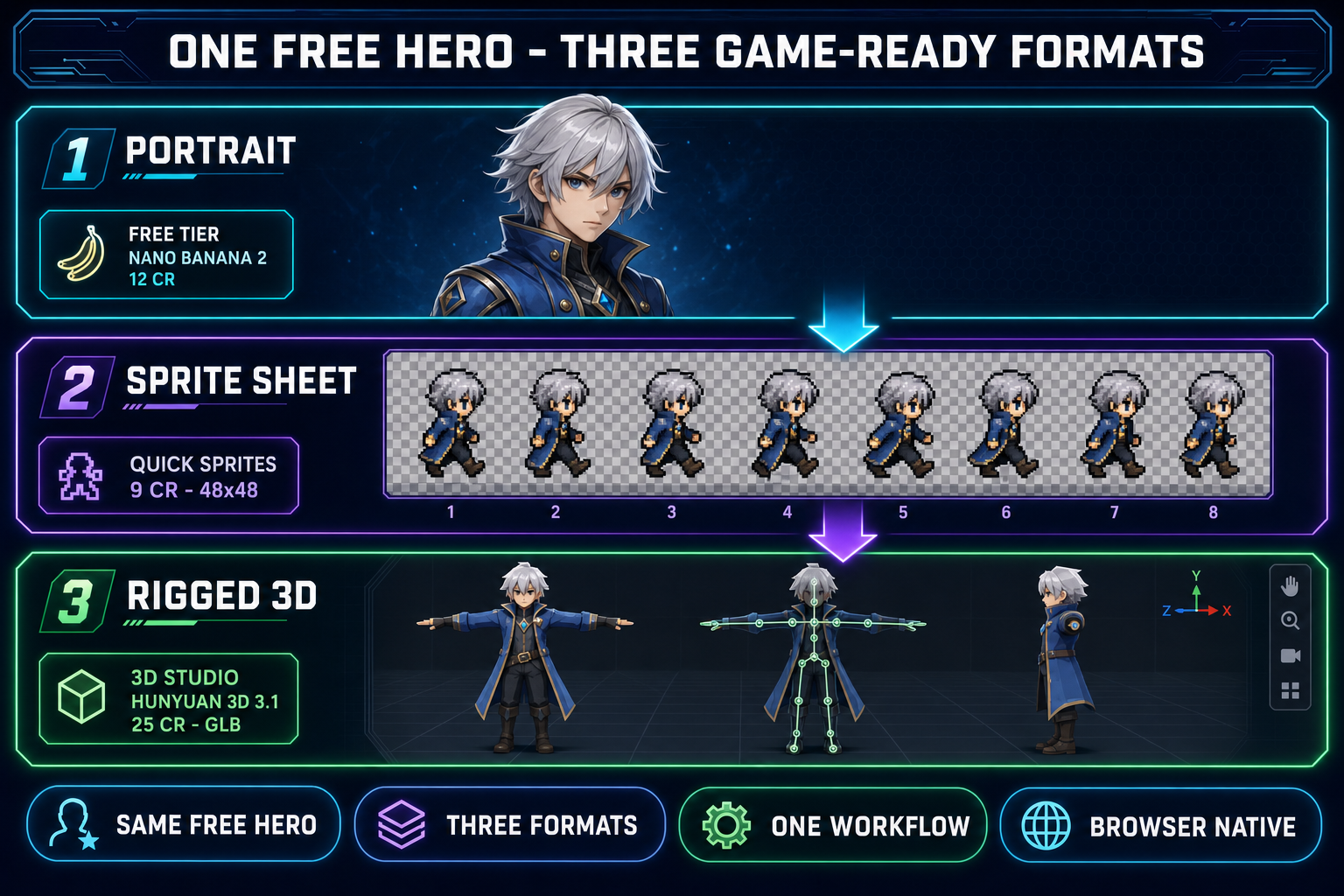
Three-panel diagram showing the same silver-haired hero exported as three game-ready formats from the same canonical free AI character generator portrait, a high-resolution portrait from Nano Banana 2 at 12 credits, an eight-frame walk cycle sprite sheet from Quick Sprites at 9 credits per generation, and a rigged 3D model in T-pose from 3D Studio using Hunyuan 3D 3.1 at 25 credits, on a dark navy background with cyan purple and emerald accents
One canonical hero from the free AI character generator step, three game-ready exports. The reference image anchors identity across all three formats.

From the free AI character generator output to a 3D character

If the game ever needs a 3D version of the same hero — an RPG cutscene, a fighter stage, a 3D platformer world — the canonical portrait flows into Sorceress 3D Studio through the same reference-image input. The six 3D models available (verified May 19, 2026 against THREED_MODEL_ORDER in src/lib/threed-models.ts lines 212–219: Hunyuan 3D 3.1, Meshy 6, TRELLIS 2, TRELLIS, Rodin 2.0, Tripo v3.1) each accept a single image and output a textured glTF binary mesh.

The recommended default for character work is Hunyuan 3D 3.1 (25 credits per generation). Hunyuan ships enable_pbr: true by default and a configurable face-count slider that runs from 40,000 to 1.5 million faces. For stylized characters the high face-count setting holds the soft cel-shaded textures better than the low setting; optimize the mesh down for engine import via the Sorceress optimization tools after generation. Send the canonical portrait, wait roughly two minutes, and the 3D Studio viewer renders the result. From there click Rig for the browser-based auto-rigging pass, then click Animate for the text-to-motion pass. The whole portrait-to-rigged-animated-3D path runs in about five minutes inside a browser tab. For an end-to-end view see the image-to-3D pipeline overview and the 3D character generator how-to.

Five mistakes that burn your free AI character generator credits

  1. Prompting with the trope instead of the look. “A magical girl” is millions of possible characters. “A teenage magical girl with chin-length silver hair tied in two low pigtails, large bright blue eyes, a fitted dark blue sailor uniform with white trim, a star-shaped pendant at the collar, holding a crystal wand” is the specific magical girl you want. Each adjective narrows the cloud. On a free tier this matters double — vague prompts burn credits on misses.
  2. Treating “the outfit matches” as character consistency. Sprite-sheet consistency means the face is the same. Stand two free AI character generator outputs side by side and cover everything below the chin. If the faces are clearly different people with similar costumes, the outfit match is cosmetic. Re-roll the divergent frame with a tighter reference lock.
  3. Skipping the reference image after the canonical portrait. The Sorceress rail exposes a reference slot on every model. Perchance has seed lock plus tag pool. NovelAI has dedicated reference input. Tensor.Art has seed ID. Leaving these tools empty for pose iterations is the single fastest way to ship eight different-looking heroes in eight different poses on a free tier and waste the whole daily allowance.
  4. Re-rolling at different resolutions across the same pose set. A 4K render and a 1K render of the same prompt sample different detail layers of the diffusion model — the line work, eye highlights, and hair-strand density read differently at each resolution. Pick one resolution for the whole eight-pose set. Nano Banana 2 at 2K is the sweet spot for free-tier character work; downscale at export time.
  5. Mixing platforms within one character pack. Don’t generate four poses on Perchance and four poses on NovelAI for the same hero — the line work will not match because each platform’s underlying model has a distinct style fingerprint. Pick one free AI character generator for a given character’s pose set and stay there.

The verdict — when each free AI character generator is the right pick

For a one-shot character portrait with zero friction and zero cost, Perchance at perchance.org wins. No login, batch of twelve, 5–10 second turnaround, 60-plus art styles. The 512×768 resolution cap and the absence of a true reference-image input on the basic generator pages rule it out for a sprite-sheet workflow, but for a one-off illustration or a quick concept it is the fastest path on the open web.

For a daily quota of generic AI character experimentation with access to 10,000-plus community Stable Diffusion checkpoints, Tensor.Art’s 100 free credits per day is the deepest standalone free tier — the seed-ID consistency mechanism plus character-focused model selection get reasonable results inside the daily allowance. PixAI’s 10,000-credit daily allowance trades a higher per-generation cost for the headline number; practical free-tier image count comes out similar to Tensor.Art.

For anime-specific portraits at high fidelity with explicit commercial-use rights, NovelAI’s 30-image free trial gets you to the Anime V4 model long enough to evaluate; the actual long-term path is the $10/month Tablet plan or the $15/month Scroll plan for unlimited generation.

For a stylized character portrait with no prompt input at all, Waifu Labs is still operational and free, generating through a four-step visual-selection flow. Output is portrait-only.

For a non-AI layered avatar from artist-created parts, Picrew is free and unique on the field — it is the only entry that is not generative AI at all, and the artistic style of the output is fully determined by which Image Maker template you pick.

For an actual game project — visual novel, JRPG, anime fighter, RPG, side-scrolling platformer, dating sim — the right pick is Sorceress AI Image Gen running as a reference-locked free AI character generator on the 100 starter credits a new account ships with, feeding into Quick Sprites for the sprite atlas and 3D Studio for the optional 3D mesh. The seven-model rail covers the same stylistic ground the standalone free AI character generator tools cover (Flux 2 Pro for cel-shaded illustration, Nano Banana 2 for crisp line work, Seedream 5 Lite for the mature sub-genres the family-friendly tools filter out), the reference-image input on every model is what keeps the eight-pose pack on-model, and the downstream pipeline closes the loop on the asset all the way to engine import. One browser tab, one canonical hero, one game-ready atlas plus a rigged 3D mesh, all inside the 100-credit starter pack or a single $10 top-up. Verified May 19, 2026.

Frequently Asked Questions

What is the best free AI character generator in 2026?

Depends on the deliverable. For a single anime portrait with zero friction and zero cost, Perchance at perchance.org wins: no login, unlimited generations, batch of up to twelve, 5-10 second turnaround, 60-plus art styles including a dedicated anime tag pool, Stable Diffusion under the hood (SDXL plus SD 1.5 with community LoRAs). For a daily quota of generic AI character work with access to 10,000-plus community Stable Diffusion checkpoints, Tensor.Art's 100 free credits per day is the deepest free tier on the open web — verified May 19, 2026 against the platform's credit-system documentation. For an indie game project that has to end in a sprite sheet plus a rigged 3D mesh, the Sorceress AI Image Gen free tier (100 starter credits on signup, verified against src/app/_home-v2/page.tsx line 241) is the only free AI character generator that ships the full pipeline. PixAI's 10,000 daily credits sound dramatic but their credit costs per generation are higher, so the practical free-tier image count is similar to Tensor.Art. NovelAI is paid-only with a 30-image free trial.

Can I use a free AI character generator commercially in my indie game?

The answer depends on the underlying model's license, not on the front-end platform — verified May 19, 2026. Stable Diffusion outputs under the CreativeML Open RAIL-M license permit commercial use of outputs with use-case restrictions documented in the license text. Flux 2 Pro grants commercial-output rights through its Pro tier license. OpenAI's GPT Image 2 grants commercial-output rights through the standard OpenAI terms. Google's Nano Banana family routes through Google's commercial output terms. The platforms that wrap these models grant commercial rights at varying tiers: NovelAI grants commercial use on its paid Tablet plan and above, Tensor.Art grants commercial use on its paid tiers, Perchance documents client-side processing with no commercial-use restriction on its basic AI generator pages, and PixAI grants commercial use to non-members on certain content (review their terms). Picrew is a layered avatar maker with per-creator usage rights — each Image Maker template specifies whether outputs can be used commercially. The Sorceress AI Image Gen rail documents commercial-output terms per model in the lineup. For a Steam release or a paid mobile launch, the safer practice is to generate on a paid plan or a clearly commercially-licensed free tier, keep a record of the prompts plus generation timestamps, and re-read the platform's commercial-use clause on the day you ship — terms shift.

How do I keep characters consistent across a free AI character generator's outputs?

Three rules. First, generate one canonical reference portrait at the highest fidelity the free tier allows, and never regenerate that step casually — that one image defines the character for the rest of the project. Second, pin that reference image into every follow-up generation's reference slot. Inside the Sorceress AI Image Gen rail this is the same drag-drop slot every model exposes (Nano Banana 2 accepts up to 14 reference images, GPT Image 2 ten, Flux 2 Pro eight, verified against src/lib/models.ts lines 200-310). On Perchance the closest equivalent is the seed lock plus the Danbooru tag pool. On NovelAI the dedicated reference-image input. On Tensor.Art the seed ID plus character-focused model selection. On Waifu Labs the visual-selection interface forces consistency through the four-step pick-tune-detail-pose flow. Third, lock to one model for the entire character's pose set — switching from Nano Banana 2 to Seedream 5 Lite mid-pack shifts the style fingerprint visibly. If the character starts looking like a different person across a four-frame walk cycle, one of these three rules has been broken; the fix is always to step back, re-anchor on the canonical portrait, and re-roll the divergent frame.

Is there a free AI character generator with no signup or login?

Yes. Verified May 19, 2026: Perchance at perchance.org/ai-character-generator and perchance.org/ai-text-to-image-generator runs entirely in the browser with no signup, no email, no credit card, and no daily quota — the JavaScript executes client-side and nothing leaves the tab beyond the model inference call. Picrew at picrew.me also requires no signup for using existing Image Maker templates (registration is only required to create your own template). Waifu Labs at waifulabs.com requires no account for the four-step character generation flow either. Tensor.Art, PixAI, and NovelAI all require account creation (Google sign-in on Tensor.Art and PixAI, email-plus-password on NovelAI). The Sorceress AI Image Gen rail at /generate is browser-based but requires a Sorceress account for credit tracking; the 100 starter credits on signup remove the credit-card requirement until you exceed them.

Can a free AI character generator output a sprite sheet directly?

Almost never. Verified May 19, 2026: none of the standalone free AI character generators above (Perchance, Tensor.Art, PixAI, NovelAI, Waifu Labs, Picrew) output a sprite sheet directly. A sprite sheet needs frame alignment, identical character identity across eight-plus poses, transparent backgrounds, and a uniform grid the engine reads with one function call. The standalone tools output one image per generation; aligning eight outputs into a grid is the user's problem. The two-step workaround inside the Sorceress workflow is: first lock the canonical character portrait inside AI Image Gen with reference-image pinning, then hand the eight reference-locked outputs to Quick Sprites at /quick-sprites which pulls them into a 48x48 four-angle walk cycle or a 32x32 small-sprites pack at 9 credits per generation (verified against src/app/quick-sprites/page.tsx lines 20-41). The deliverable is one PNG atlas the engine reads with one function call. The Sorceress pipeline is the only browser-based free-tier path that closes the loop from a free AI character generator's portrait to a sprite sheet without leaving the tab.

Sources

  1. Stable Diffusion — Wikipedia
  2. Diffusion model — Wikipedia
  3. Flux text-to-image model — Wikipedia
  4. Texture atlas (sprite sheet) — Wikipedia
  5. Picrew — Wikipedia
  6. glTF 2.0 specification — Khronos
  7. Anime — Wikipedia
Written by Arron R.·2,947 words·13 min read

Related posts