Most indie devs discover the gap the hard way: the quest system works, the combat loop feels fine, and then every NPC opens their mouth with the same three placeholder strings. A standalone ai dialogue generator was supposed to fix that — paste a character brief, get a page of lines — but the free tools scattered across the web output screenplay paragraphs, not game-ready barks. The 2026 fix is a browser pipeline where WizardGenie writes branching dialogue from your actual quest state, Speech Gen renders each speaker’s voice, and AI Image Gen locks the portrait so the lines feel like they belong to someone on screen. Phaser 4.2.0 (released June 19, 2026, verified against the official GitHub release notes on July 6, 2026) is the honest runtime for shipping those lines in a browser tab. Everything below was checked against the Sorceress source on the same date.
What an ai dialogue generator actually outputs (and what it is not)
Searchers typing ai dialogue generator into Google fall into two camps. Tabletop DMs want sample lines for a session handout. Indie devs want JSON nodes, CSV sheets, or Ren'Py script blocks their engine can parse tonight. The second camp is who this post serves. A useful ai dialogue generator for games produces short, speakable units — greetings, shop loops, quest offers, failure barks, victory reactions — each tagged with a speaker ID, an emotion flag, and optional branch conditions. It does not produce a 400-word monologue that will never fit in a dialogue box.
Free standalone generators (QuillBot-style rewriters, Perchance randomizers, Toolbaz one-shots) optimize for prose length, not engine format. They rarely export structured data, never render audio, and cannot read your save-state flags. That is why the honest ai dialogue generator workflow in 2026 lives inside a game-dev stack: writing plus voice plus portrait in one account, with output shaped for Phaser, Ren'Py, or a custom HTML5 UI from the first prompt.
Why generic chat tools fail as game dialogue generators
Opening ChatGPT and asking for “NPC dialogue” feels fast until you try to ship it. Generic chat has no memory of your quest graph, no speaker registry, no batch TTS, and no consistent portrait lock across iterations. You copy lines into a spreadsheet, paste them one at a time into a voice tool, lose tone between sessions, and manually reformat everything for your engine. Three hours later you have twelve lines for one merchant and no JSON schema your Phaser scene can consume.
An integrated ai dialogue generator collapses those hops. WizardGenie holds campaign or quest context in a project folder, emits dialogue nodes in the format you specify, and pairs naturally with Speech Gen because both tools share the same Sorceress credit pool and asset library. The difference is structural: chat gives you paragraphs; a game-native pipeline gives you a dialogue pack — script file, audio folder, portrait PNG, ready to drop into assets/npc/merchant_01/.
The Sorceress ai dialogue generator pipeline in four steps
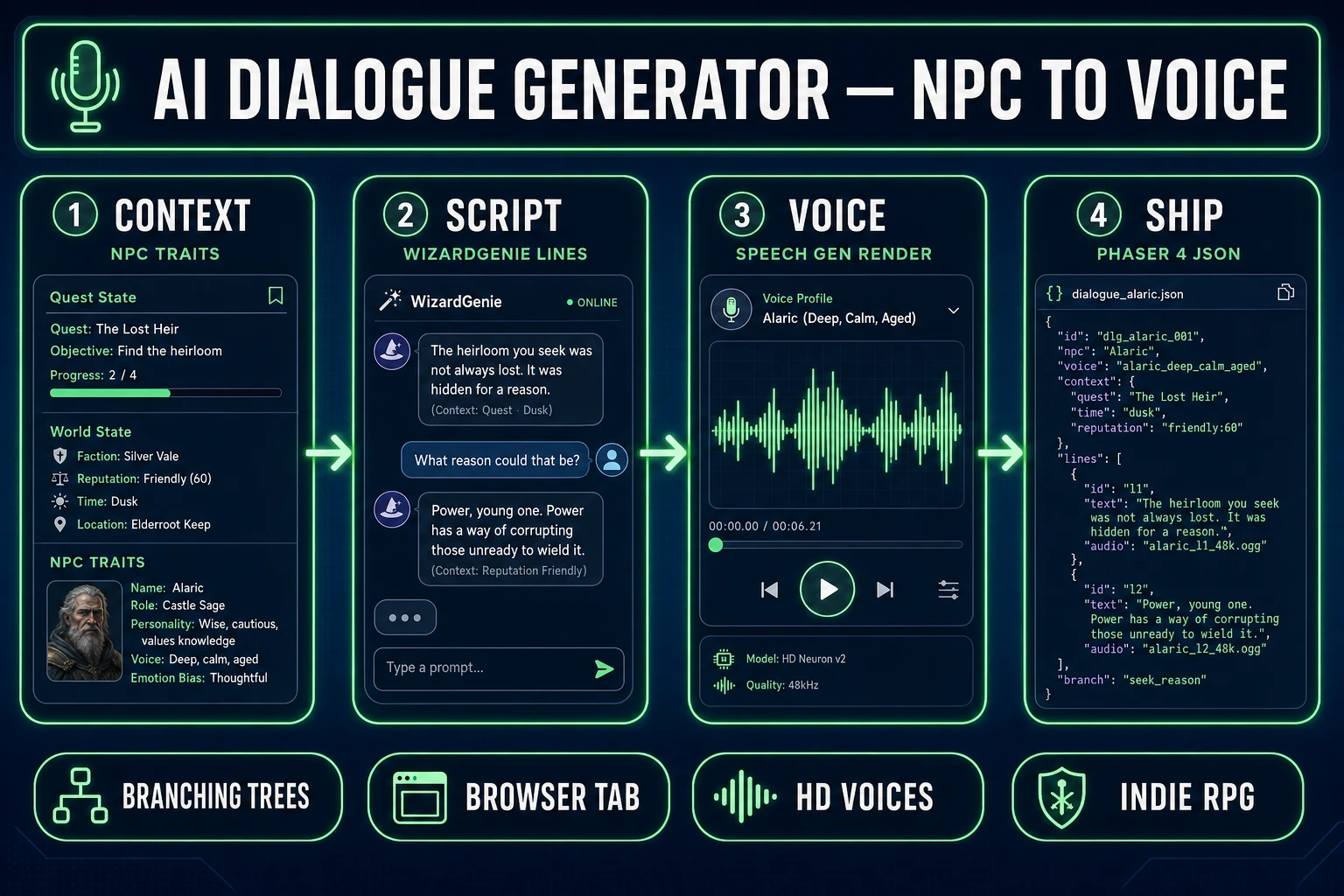
The Sorceress answer to ai dialogue generator is four layers, each mapped to a real tool verified in the repository on July 6, 2026:
- Context layer — paste quest state, faction relationships, and personality bullets into WizardGenie.
- Script layer — batch dialogue lines with speaker tags, branch keys, and emotion flags as JSON or CSV.
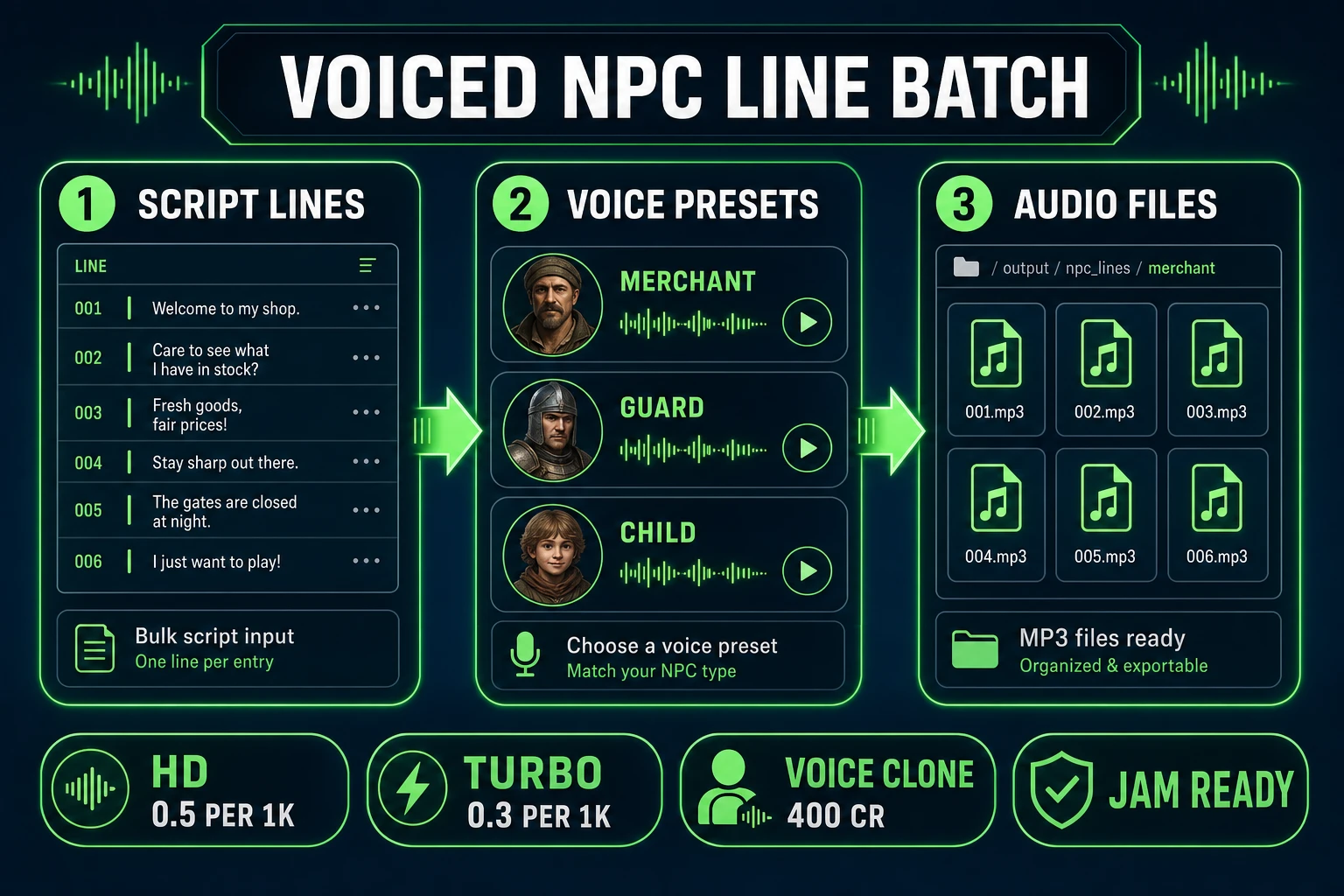
- Voice layer — render each line in Speech Gen with HD or Turbo TTS, optionally cloning a reference sample.
- Ship layer — wire the JSON plus MP3 paths into a Phaser 4.2 dialogue UI or export Ren'Py-compatible blocks.
AI Image Gen sits adjacent to the pipeline: generate one bust portrait per speaker so the dialogue box shows a face that matches the voice. For a deeper tabletop-oriented NPC pass (stat blocks plus 5e formatting), see the dnd npc generator post — it shares WizardGenie and Speech Gen but targets DM prep rather than shipped-game dialogue trees.
Step 1 — build NPC context in WizardGenie
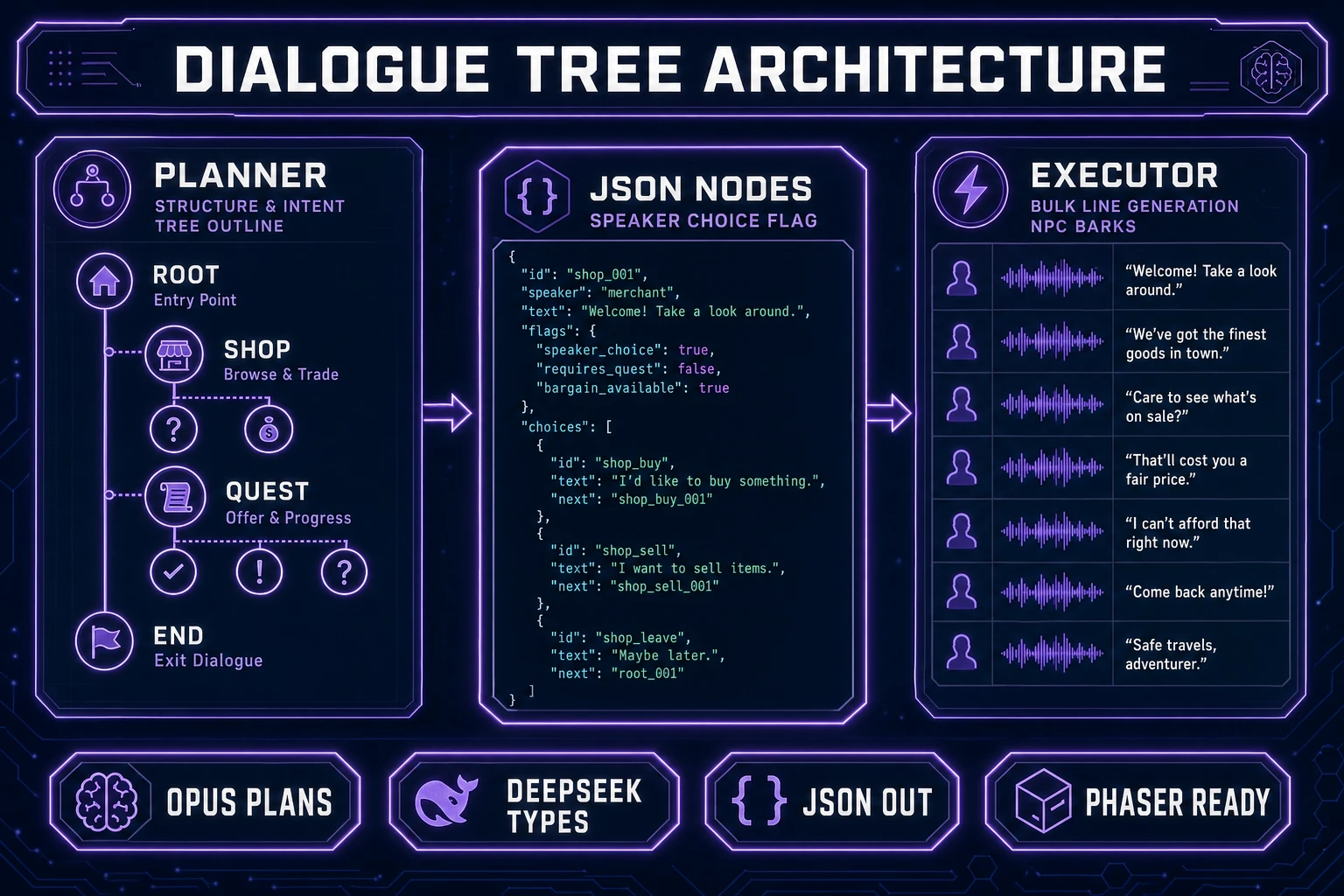
Open WizardGenie and start with context, not “write me dialogue.” A strong opener looks like: “I am building a Phaser 4.2 RPG. NPC ID merchant_elara runs a potion shop in the swamp hub. Party reputation with swamp factions is stored in flags.swamp_rep (0–100). Elara is wary but fair, speaks in short sentences, never uses fantasy filler words. Generate a dialogue tree JSON with nodes for: greeting (branch on swamp_rep < 30 vs ≥ 30), shop open, shop closed (quest incomplete), haggle success, haggle fail, and post-quest thank-you.”
WizardGenie’s model lineup — Claude Opus 4.7, Claude Sonnet 4.6, GPT-5.5, Gemini 3.1 Pro, DeepSeek V4 Pro, Kimi K2.5, Grok 4.2, MiniMax M2.7 (verified in src/app/_home-v2/_data/tools.ts lines 734–742) — means you can put Opus or Gemini 3.1 Pro on the tree-architecture pass and DeepSeek V4 Pro or Kimi K2.5 on bulk line generation. That Planner-plus-Executor split is the cost logic every ai dialogue generator workflow should follow: expensive reasoner designs the graph, cheap fast model fills the leaves.