Match the Best AI for Unreal Engine Blueprints (2026)

By Arron R.15 min read
Best AI for Unreal Engine Blueprints in 2026 is any MCP-compatible coding agent that plugs into the experimental Unreal MCP plugin in UE 5.8. Claude Code and Cu

Search intent for best ai for unreal engine blueprints in 2026 is dominated by one specific question: which AI coding tool actually edits a Blueprint graph, and which one just claims to. The honest 2026 answer changed on June 17 when Epic Games shipped Unreal Engine 5.8 with an experimental Model Context Protocol plugin that embeds a local MCP server inside the Unreal Editor and exposes Blueprints, assets, levels, materials, and meshes as MCP tools. Any MCP-compatible coding agent — Claude Code, Cursor, the MCP Inspector, VS Code, Gemini, Codex — can now drive the Blueprint editor over a local HTTP connection, not by generating Blueprint text, but by calling structured tool operations that the editor executes. That is the real 2026 answer to the query. The rest of this article covers the AI models that pair best with the MCP client layer, the Sorceress modules that feed the same Unreal project on the C++ and asset sides, and the honest workflow for shipping an indie Unreal game with AI assistance in 2026. Every fact below is verified against either the live Sorceress source or a neutral Wikipedia reference on July 1, 2026.
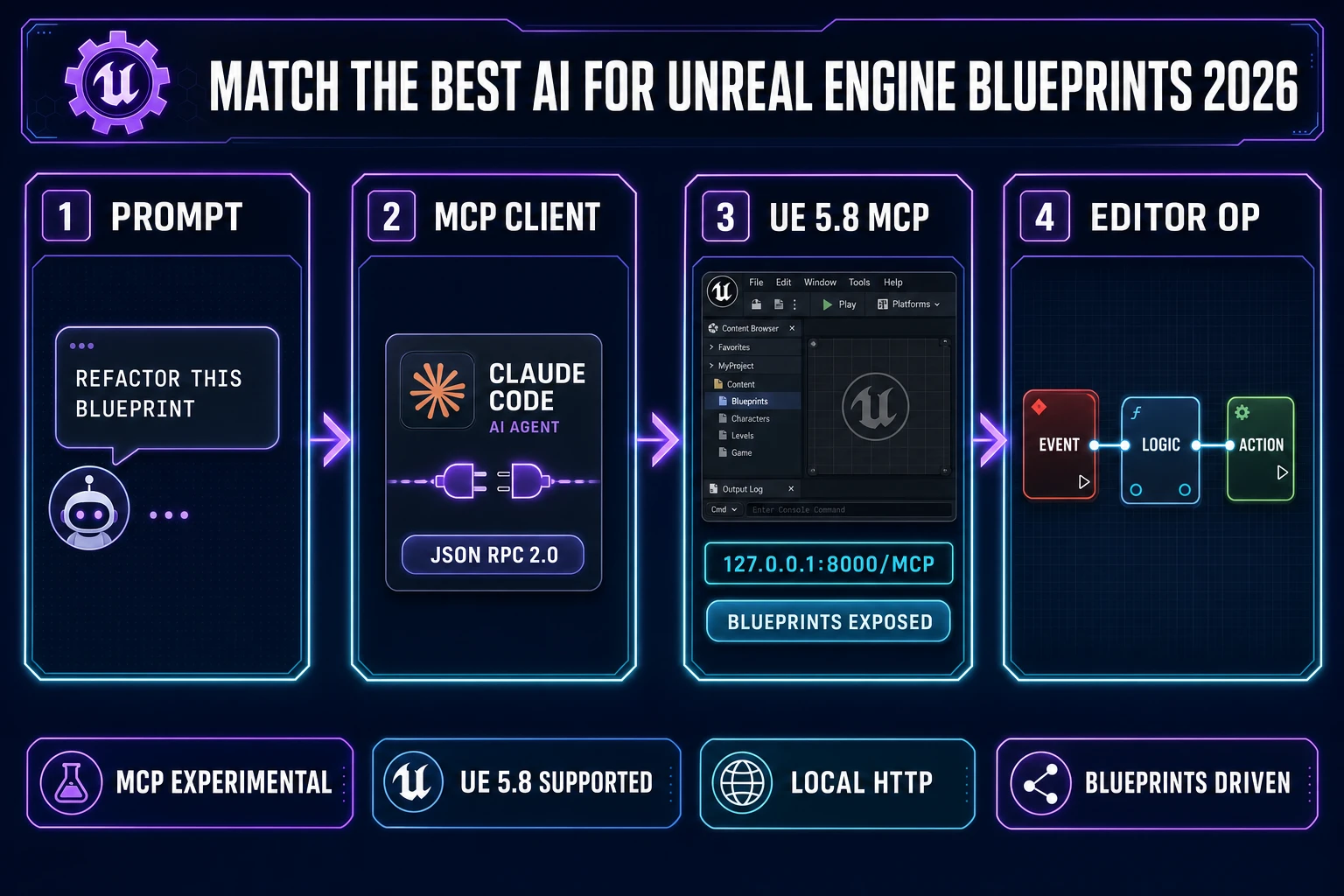
Match the best ai for unreal engine blueprints - four-panel flow from prompt to MCP client to UE 5.8 MCP plugin to Blueprint editor operation
The 2026 pipeline for the best ai for unreal engine blueprints work: a prompt lands in an MCP-compatible coding client (Claude Code, Cursor, VS Code), which speaks JSON-RPC 2.0 to the Unreal MCP plugin running on http://127.0.0.1:8000/mcp, which then edits Blueprints, spawns actors, and wires nodes directly inside Unreal Editor.

What “best ai for unreal engine blueprints” actually means for game devs in 2026

The query best ai for unreal engine blueprints collapses two very different questions that used to have very different answers. The first question is “which AI coding model writes the best Blueprint graphs.” That question was effectively unanswerable before UE 5.8 because Blueprints are node-based visual scripting per the Visual programming language Wikipedia entry — a graph structure with typed connection edges between nodes, not a linear text serialization that a large language model can produce token-by-token. Every “AI plugin for Unreal” that shipped before 2026 either generated approximate Blueprint text that a developer then had to hand-translate into the visual editor, or used a proprietary bridge that only worked with one vendor’s model. Neither approach scaled.

The second question is “which AI coding agent can drive the Unreal Editor to edit Blueprints on my behalf.” That question is answerable in 2026 because the Unreal MCP plugin turns Blueprint editing into a series of tool calls that any MCP-compatible client can invoke. The best AI for Unreal Engine Blueprints under this framing is not one model — it is a stack: a top-tier reasoning model (Claude Opus 4.7, GPT-5.5, Gemini 3.1 Pro) hosted inside a general-purpose MCP client (Claude Code, Cursor), pointed at the local Unreal MCP server. The model reasons about which Blueprint edits to make, the client calls the corresponding MCP tools, and the Unreal Editor executes them. The output is a live edited Blueprint graph, not a text file.

For an indie in 2026 evaluating “best AI for Unreal Blueprints” against a specific project, the practical decision has three axes: which MCP client to install (Claude Code and Cursor are the two most-documented setups), which model to point that client at (Opus 4.7 for reasoning-heavy refactors, GPT-5.5 for balanced iteration, DeepSeek V4 Pro for cost-sensitive routine work), and which additional Sorceress modules to plug into the same project for the parts of the game that are not Blueprint logic (3D character assets, 2D sprites, tilesets, music, SFX). The rest of this article walks that decision.

Why AI models used to struggle with Blueprints (visual scripting is graph-native)

The core mismatch between AI models and Blueprints is structural, not a matter of model quality. Large language models produce sequences of tokens per the Large language model Wikipedia entry — they are trained on text corpora (source code, natural language, documentation) and generate one token at a time conditioned on the previous tokens. That architecture is a perfect fit for text-based programming languages like C++, Python, JavaScript, GDScript, and Verse, because every program in those languages has a canonical linear serialization the model saw thousands or millions of times during training.

Blueprints do not have that canonical linear serialization at training scale. A Blueprint graph is a directed graph of typed nodes (event nodes, function calls, variable reads, control-flow branches) connected by typed execution and data edges. Unreal serializes Blueprints internally as a binary asset format (with a text-diff-friendly variant), but that serialization is not what appears in Unreal tutorials, in code review, or in GitHub — those all show screenshots of the visual editor. So during training, an LLM saw effectively zero examples of the canonical Blueprint text form, but tens of thousands of screenshots and prose descriptions of Blueprint graphs. That is why pre-2026 AI attempts at Blueprint generation produced either English pseudocode (“spawn an actor, then set its location, then call OnBeginOverlap with a print string”) or C++ that approximates the same logic. Neither of those was actually a Blueprint.

The MCP plugin fixes this by inverting the direction. Instead of asking the model to produce Blueprint output, the plugin exposes each Blueprint editing operation as a callable tool (spawn actor, wire node, set property, compile Blueprint). The model reasons about which tools to call in which order, and the editor performs each operation itself. The model never has to serialize a Blueprint — it only has to plan a sequence of edits. That maps cleanly onto how LLMs actually work.

The MCP breakthrough — UE 5.8 lets AI agents drive the Blueprint editor directly

The Unreal MCP plugin shipped experimental with Unreal Engine 5.8 on June 17, 2026 per Epic’s State of Unreal 2026 announcement. The plugin embeds a Model Context Protocol server inside the Unreal Editor process, and when Auto Start Server is enabled in Editor Preferences under General > Model Context Protocol, the server binds to http://127.0.0.1:8000/mcp on editor launch. Setup takes about five minutes on a new project.
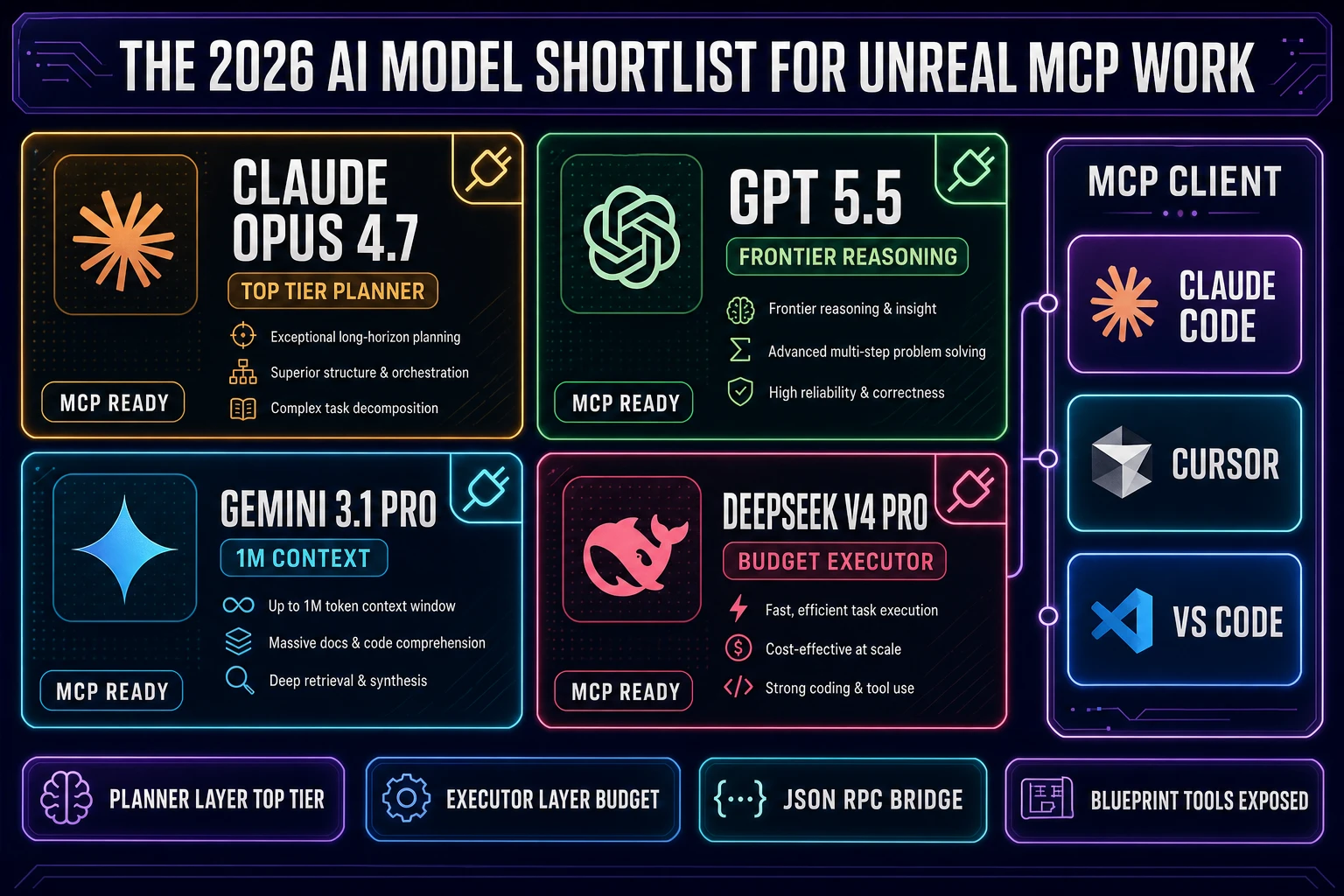
The 2026 AI model shortlist for Unreal MCP work - Claude Opus 4.7, GPT-5.5, Gemini 3.1 Pro, DeepSeek V4 Pro paired with MCP clients Claude Code, Cursor, and VS Code
The shortlist of AI models that pair well with the Unreal MCP plugin in 2026. Frontier models on the reasoning side (Claude Opus 4.7, GPT-5.5, Gemini 3.1 Pro) drive high-quality Blueprint refactors; the same reasoning-model choice is available through WizardGenie for the browser-native side of the same project.

The setup steps for the Unreal MCP plugin on a fresh UE 5.8 project are: open the Plugin Browser (Edit > Plugins), search for “Unreal MCP,” check the enable box, restart the editor when prompted. Then in Editor Preferences (Edit > Editor Preferences), scroll to General > Model Context Protocol and enable Auto Start Server. Finally, open the editor console (backtick key) and run the command ModelContextProtocol.GenerateClientConfig All. That generates a .mcp.json config file in the project root that any MCP-compatible client can read. The Toolset Registry plugin dependency is enabled automatically. The server has no authentication layer and binds to localhost only — it is not designed for remote or multi-user use.

The plugin ships with built-in exposure to core Unreal systems: Blueprints, assets, levels, materials, meshes, Slate widgets, and automation tests. Each exposed operation is registered as an MCP Tool, and clients discover the available tools via JSON-RPC 2.0 per the JSON-RPC Wikipedia entry during the standard MCP initialization handshake. Custom tools can be added by extending the plugin’s C++ API — the plugin is split into three modules (ModelContextProtocol, ModelContextProtocolEngine, ModelContextProtocolEditor) with clean extension points.

The Model Context Protocol itself is an open standard introduced by Anthropic in November 2024 and subsequently adopted by OpenAI and Google DeepMind per the Model Context Protocol Wikipedia entry. It uses a host-client-server architecture with tools, resources, and prompts as its three core primitives. The Unreal plugin is a server implementation; the AI agent (Claude Code, Cursor) is the host that runs a client to connect to that server. Because MCP is model-agnostic by design, the plugin does not care which model the client is running — the same setup works with Claude Opus 4.7, GPT-5.5, Gemini 3.1 Pro, or a smaller executor like DeepSeek V4 Pro or Kimi K2.5.

The 2026 AI model shortlist for Unreal MCP work (which models to plug in)

The model choice for Unreal MCP work matters most for two tasks: reading the current Blueprint state to plan an edit, and reasoning about complex multi-step refactors. Both are context-window and reasoning-quality problems. For 2026, the shortlist that most indies converge on is:

  • Claude Opus 4.7 (Anthropic, top-tier reasoning) — the strongest planner for multi-step Blueprint refactors. Best when the task is “convert this monolithic Level Blueprint into properly decomposed Component Blueprints with clean interfaces.” Pricier per token, but the total token count on Blueprint work is small compared to full-repo refactors, so cost is manageable.
  • GPT-5.5 (OpenAI, frontier) — balanced reasoning and speed. Best for medium-complexity iteration where response latency matters. Cursor’s default when configured with an OpenAI key.
  • Gemini 3.1 Pro (Google, 1M context) — the right pick when the project is large enough that the model needs to reason across many Blueprints simultaneously. The 1M-token context window lets it hold a full mid-sized Unreal project in a single conversation.
  • DeepSeek V4 Pro (DeepSeek, cost-sensitive) — the right executor for routine work: renaming variables, adding print-string debugging nodes, wiring simple event graphs, fixing null-check patterns. Roughly one-fifth the cost of a frontier model per Mtok, and the accuracy gap on well-scoped small tasks is negligible.
  • Kimi K2.5 (Moonshot, 256K coding context) — a strong long-context alternative to Gemini when the workflow benefits from Moonshot’s specific coding-tuned behavior.

The full Sorceress WizardGenie model lineup (Claude Opus 4.7, Claude Sonnet 4.6, GPT-5.5, Gemini 3.1 Pro, DeepSeek V4 Pro, Kimi K2.5, Grok 4.2, MiniMax M2.7 per src/app/_home-v2/_data/tools.ts CODING_MODELS lines 734-742 verified July 1, 2026) matches the same shortlist. That is not a coincidence — the criteria for “good model for Unreal MCP” and “good model for browser-native game code” overlap almost completely, because both are structured code-editing workflows with tool use.

When pairing a reasoner with an executor (Planner+Executor patterns are worth using for larger Blueprint refactors), keep the reasoner on the top-tier side and the executor on a genuinely cheap model. Acceptable executor picks are DeepSeek V4 Pro, Kimi K2.5, MiniMax M2.7, Gemini 3.1 Flash, and GPT-5.5 Mini. Never put Sonnet, Opus, GPT-5.5, or Gemini 3.1 Pro on the executor side — the cost math stops making sense at that point. The right cost ratio is roughly one-fifth of single-frontier cost when the executor is a true cheap model, and Sorceress’s dual-agent flagship pattern (documented in the how-to-make-a-video-game-with-AI pillar) applies unchanged to Unreal MCP work.
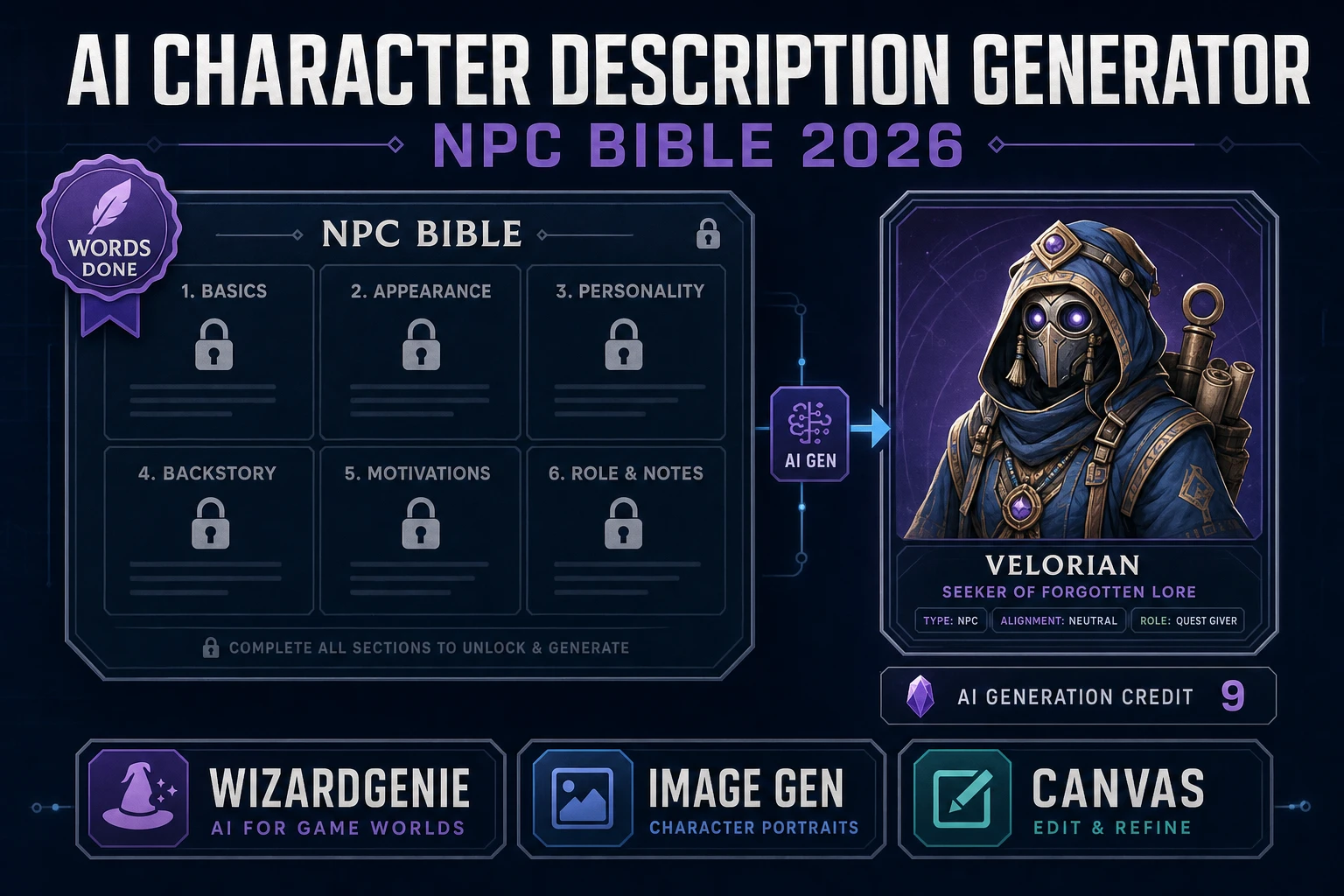
Sorceress Code models for the C++ and Python side of Unreal

Unreal supports two text-native programming languages that AI models handle natively: C++ (the primary gameplay language for the engine itself and for gameplay classes) and Python (editor scripting only, not gameplay). The Sorceress Code module at /code exposes five coding models with bring-your-own-key support per src/app/code/page.tsx CODING_MODELS lines 1101-1147 verified July 1, 2026: Claude Opus 4.6 (input $15 / output $75 per Mtok), DeepSeek Reasoner ($0.55 / $2.19), GPT-5 Nano ($0.05 / $0.40), GPT-5.2 Codex ($1.75 / $14), and Kimi K2.5 through NVIDIA NIM (free trial, $0 / $0).

For an Unreal C++ workflow, the right Sorceress Code pick depends on the task shape. Gameplay class scaffolding (a new AActor subclass with a Tick function, replicated properties, and an OnBeginOverlap handler) is a well-scoped small task that GPT-5.2 Codex handles cleanly at low cost. Complex subsystem work (a new UGameInstanceSubsystem with async loading and shared memory patterns) is a reasoning-heavy task that Claude Opus 4.6 handles best, though DeepSeek Reasoner is a strong alternative at roughly one-thirtieth the cost. Editor Python scripting (batch-renaming assets, generating content browser filters, running validation passes) is straightforward text-generation work that any of the five models handles well; GPT-5 Nano at $0.05 input / $0.40 output is the cheapest reasonable pick.

The Sorceress Code interface is a Monaco editor with a chat panel and file tree, running in a browser tab. It is not a replacement for a full Unreal C++ IDE (Rider, Visual Studio) — it is the AI-first place to draft new code that gets copied into the IDE and compiled. That workflow matters because Unreal C++ has enough engine-specific patterns (UPROPERTY, UFUNCTION, TSubclassOf, delegates) that a fresh conversation with the model benefits from having the source code available in the same panel for the model to reference.

WizardGenie as the browser-native alternative when you want AI to write code instead of graphs

WizardGenie is Sorceress’s AI-native game engine and it is deliberately not an Unreal integration. WizardGenie targets browser-native game stacks — Phaser for 2D per the Phaser game framework Wikipedia entry, three.js for 3D per the Three.js Wikipedia entry, HTML5 Canvas for lightweight cases — and drives them with the full coding-model lineup (Claude Opus 4.7, Sonnet 4.6, GPT-5.5, Gemini 3.1 Pro, DeepSeek V4 Pro, Kimi K2.5, Grok 4.2, MiniMax M2.7). WizardGenie ships on both desktop (Windows installer with auto-updater) and web (browser tab at /wizard-genie/app).

The relevant question here is when to pick WizardGenie over Unreal + MCP. Three cases favor WizardGenie. First, the game concept fits inside a browser tab (roguelike, puzzle, turn-based RPG, casual arcade, prototyping and jam builds) — the total shipping-loop time is measured in hours, not weeks. Second, the target platform is web or PWA rather than PC/console — skipping platform-specific certification is a real cost reduction. Third, the team is small enough that the ceremony of a full Unreal project (source control setup, engine version pinning, compile times, editor workflows) is more overhead than the game requires.

Three cases favor Unreal + MCP over WizardGenie. First, the target platform is AAA-fidelity 3D on PS5/Xbox/PC where Nanite, Lumen, and MegaLights are structurally advantageous. Second, the team already has an Unreal codebase and asset library the game must integrate with. Third, the game design leans on physics, animation retargeting, or lighting workflows that Unreal handles first-class and browsers do not. Neither tool is a superset of the other — they solve different jobs. For an indie starting fresh in 2026, WizardGenie is often the honest first pick because the ship rate is faster; for a team with Unreal-specific expertise, MCP-driven Unreal is the honest first pick.

Sorceress asset tools that feed any Unreal project (3D Studio, Auto-Sprite, Tileset Forge, Music Gen)

Sorceress is browser-native and does not itself run inside the Unreal Editor, but four Sorceress modules produce assets that import cleanly into any Unreal project.

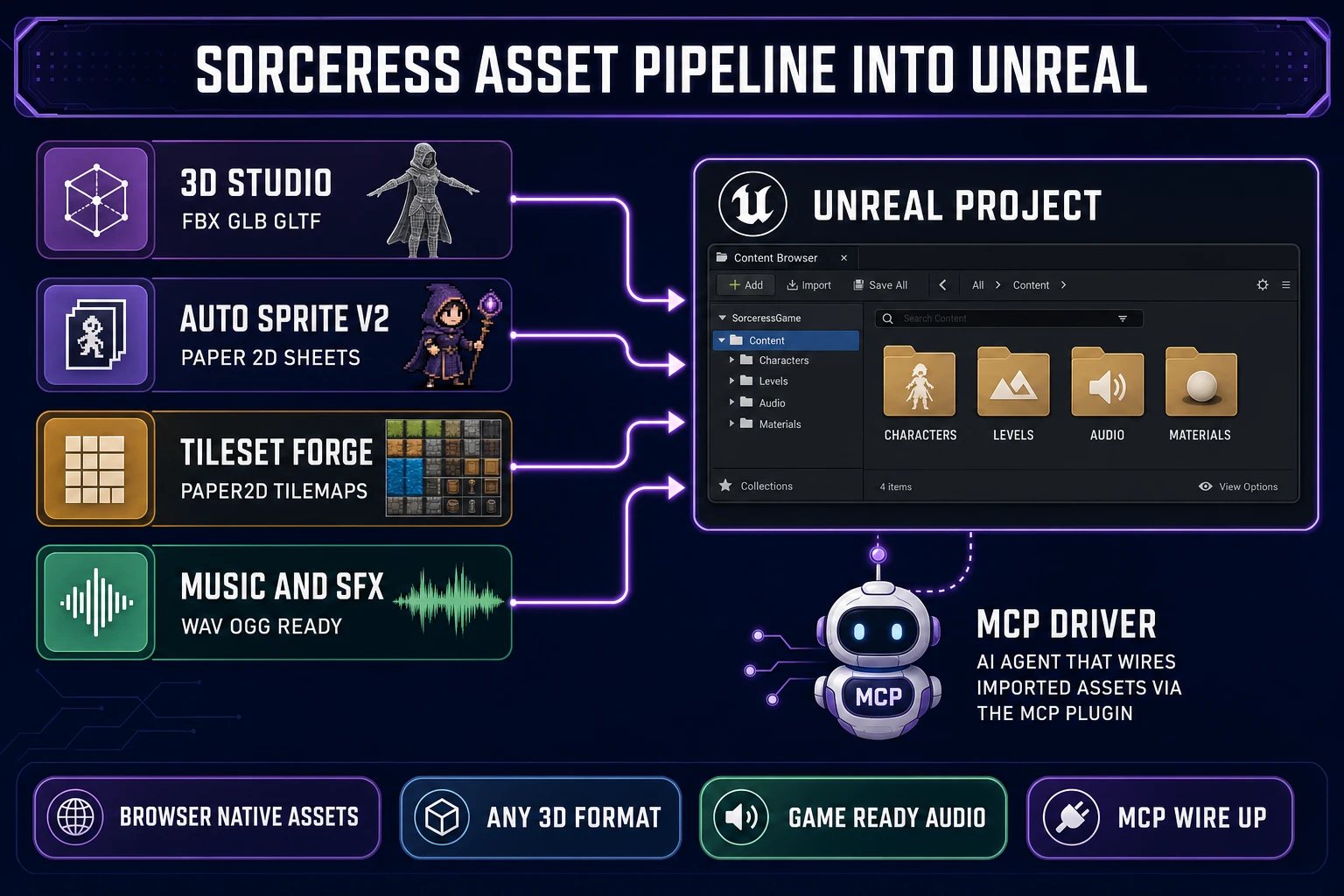
Sorceress asset pipeline into Unreal - 3D Studio, Auto-Sprite v2, Tileset Forge, and Music Gen feeding a central Unreal project content browser wired by MCP
The Sorceress asset pipeline into an Unreal project: 3D Studio for rigged 3D characters, Auto-Sprite v2 for 2D sprite sheets, Tileset Forge for Paper2D tilemaps, and Music Gen for game-ready audio. The Unreal MCP plugin ties the imported assets into levels and Blueprints on the AI side.

3D Studio at /3d-studio chains AI image generation, single-image to textured 3D, humanoid auto-rigging with weight-paint refinement, and text-to-animation into a single pipeline that outputs FBX, GLB, or GLTF. All three formats import into Unreal via the standard content browser (Skeletal Mesh import for FBX, Datasmith or glTF Importer for GLB and GLTF). The rig is a humanoid skeleton that plugs into Unreal’s Retarget Manager for downstream animation reuse. For an indie who needs a hero character, three NPCs, and a boss for a small Unreal project, 3D Studio produces the four rigged meshes in roughly 30 minutes of active time.

Auto-Sprite v2 at /autosprite-v2 produces 2D sprite sheets from a prompt, using AI image generation and AI video generation followed by a sprite-ify pass that packs the animation into a game-ready sheet. The output is a PNG sprite sheet with a JSON metadata sidecar. That format imports into Unreal Paper2D via the Paper Flipbook workflow (import PNG as Texture2D, create Sprite assets, group into Flipbook). Tileset Forge at /tileset-creator produces tile-based level art in the same format-friendly output for Paper2D’s Tile Map workflow. AI Image Gen at /generate is the upstream general-purpose image tool for concept art, marketing screenshots, and one-off asset generation with the seven-model lineup (Nano Banana Pro, Nano Banana 2, GPT Image 2, Seedream 5 Lite, Flux 2 Pro, Z-Image Turbo, Grok Imagine).

Music Gen and Sound Studio produce game-ready audio as WAV or OGG files that drop directly into Unreal’s Sound Cue and MetaSound systems. A typical indie soundtrack (menu music, exploration loop, combat loop, boss theme, victory sting) is a 15-minute session in Music Gen followed by a five-minute Metasound patching session in Unreal. The whole audio pipeline runs in a browser tab; the Unreal side is just import and reference.

What changes when Unreal Engine 6 ships (Verse and Scene Graph in late 2027)

Epic Games announced at State of Unreal 2026 that Unreal Engine 6 will introduce a new gameplay framework called Scene Graph, powered by a new programming language called Verse. UE6 Early Access is targeted for the end of 2027, with the full release coming 12 to 18 months later. Blueprints and Actors will remain available in early UE6 versions with conversion tools to migrate projects into Scene Graph, but will be deprecated over the UE6 lifetime. UE 5.8 (released June 17, 2026) is the last planned major UE5 release per the Unreal Engine Wikipedia entry, though Epic has reserved the option to ship a UE 5.9 if circumstances warrant.

The practical read for an indie shipping in 2026, 2027, or 2028 is: build on UE 5.8 with Blueprints and C++ for anything shipping in that window. Verse and Scene Graph will not be production-ready until 2028 or 2029, and the conversion tools Epic promised will only be useful once UE6 hits full release. The MCP plugin is protocol-based, so a Verse-and-Scene-Graph replacement in UE6 will presumably ship a similar MCP surface for its own primitives — the plugin architecture survives even if Blueprints do not. The AI-driven workflow (MCP client + reasoning model + Unreal editor) will keep working; only the underlying editor operations change.

For long-lived projects (multi-year AAA-style development), the risk is not that AI-driven Blueprint work will stop working — it is that a project heavily invested in Blueprints will face a Verse migration in 2028 or 2029 that costs meaningful engineering time. The mitigation is to keep gameplay logic in C++ where possible and use Blueprints for the last-mile designer-facing configuration, which is the general Unreal best practice regardless of AI tooling. For short-lived projects (jam builds, prototypes, indie ships in 12-18 months), the migration question is not relevant — ship on 5.8 with Blueprints, do not future-proof for a language that does not exist yet.

The verdict on best ai for unreal engine blueprints for indie game devs in 2026

The verdict on best ai for unreal engine blueprints for indie game devs in 2026 is that the model choice matters less than the client and plugin choice. The stack that works is: Unreal Engine 5.8 with the experimental Unreal MCP plugin enabled and Auto Start Server active, an MCP-compatible coding agent (Claude Code, Cursor, MCP Inspector, VS Code, Gemini, or Codex) configured against the local 127.0.0.1:8000/mcp endpoint, and a top-tier reasoning model (Claude Opus 4.7, GPT-5.5, or Gemini 3.1 Pro) driving the agent. That stack edits Blueprints, spawns actors, wires materials, and runs automation tests directly in the editor over local HTTP, which is the actual thing the query was asking for.

The Sorceress ecosystem pairs with that stack rather than replacing it. Sorceress Code handles the C++ and Python side of the same Unreal project with the same coding-model lineup at bring-your-own-key pricing. 3D Studio, Auto-Sprite v2, Tileset Forge, and Music Gen produce the assets that feed the Unreal content browser. WizardGenie is the browser-native path when the game concept does not need Unreal at all — for the roughly 60% of indie games that ship to web or PWA rather than PC/console, WizardGenie is often the faster and cheaper first pick.

The wider Sorceress tools guide covers the adjacent pieces of the AI-driven game dev pipeline that connect to both Unreal MCP work and browser-native WizardGenie work. The lifetime USD 49 Sorceress purchase unlocks the Pro-tier tools; credit packs cover the AI generation passes ($10 / 1000 Starter, $20 / 2000 Creator, $50 / 5000 Plus, $100 / 10000 Studio). For an indie shipping in 2026, the honest total cost is the Sorceress lifetime plus a modest coding-model API budget through Claude Code or Cursor, which comes in well below the cost of a professional 3D artist and gameplay programmer combined. Sibling engine-side ships for the same evaluation are the best AI for Unreal Engine head, best AI for Unity, best AI for Godot, and the underlying best AI model for coding roundup that all four engine picks derive from.

Frequently Asked Questions

What is the best AI for Unreal Engine Blueprints in 2026?

The best AI for Unreal Engine Blueprints in 2026 is whichever Model Context Protocol (MCP) compatible coding agent plugs into the experimental Unreal MCP plugin that ships with Unreal Engine 5.8 (released June 17, 2026). The plugin embeds a local MCP server inside the Unreal Editor process at http://127.0.0.1:8000/mcp and exposes Blueprints, assets, levels, materials, and meshes as MCP tools that any MCP-compatible client can invoke. The documented compatible clients are Claude Code, Cursor, the MCP Inspector, VS Code, Gemini, and Codex. The generic answer “pick the best coding model your MCP client supports” is honest here because MCP is model-agnostic by design. In practice, most indies pair Claude Code with Claude Opus 4.7 for the reasoning-heavy plan-a-Blueprint-refactor loop, or Cursor with GPT-5.5 or Gemini 3.1 Pro for the same. For cost-sensitive iteration, DeepSeek V4 Pro and Kimi K2.5 both work through MCP clients that expose them. The choice of model matters less than the choice of MCP client because the client is what actually calls the Unreal MCP tools; the model is the reasoning layer behind that client.

How does the Unreal MCP plugin in UE 5.8 actually let AI edit Blueprints?

The Unreal MCP plugin uses the open Model Context Protocol standard (created by Anthropic in November 2024 and adopted by OpenAI and Google DeepMind per the Model Context Protocol Wikipedia entry) to expose Unreal Editor functionality as MCP Tools. The plugin embeds a local MCP server inside the Unreal Editor process; when Auto Start Server is enabled in Editor Preferences > General > Model Context Protocol, the server binds to http://127.0.0.1:8000/mcp automatically on editor launch. Setup takes about five minutes: enable the Unreal MCP plugin in the project’s Plugin Browser, restart the editor, enable Auto Start Server in preferences, and run `ModelContextProtocol.GenerateClientConfig All` in the editor console to generate the `.mcp.json` config file that MCP-compatible clients read. The plugin ships with built-in exposure to Blueprints, assets, levels, materials, meshes, Slate widgets, and automation tests. The MCP client (Claude Code, Cursor, MCP Inspector) then discovers the available tools via JSON-RPC 2.0 and can call them on the user’s behalf to spawn actors, wire Blueprint nodes, configure lighting, create material instances, and run automation tests. The 5.8 plugin is explicitly experimental — it has no authentication layer, runs on localhost only, and executes tool calls serially on the Unreal game thread — but it is production-installable and works with real projects.

Should I use AI to write Unreal Blueprints or C++?

Both, for different jobs. Blueprints are Unreal’s visual scripting system — a node-graph-based language where each node represents a function call, variable read, or control-flow branch, wired together with connection edges. Large language models are text-native by design; they were trained on text corpora and produce token sequences, not graph structures. That mismatch is why AI struggled with Blueprints for years before the UE 5.8 MCP plugin arrived: an LLM cannot “write” a Blueprint the way it writes a Python function, because Blueprints have no canonical textual serialization the model was trained on. The MCP plugin sidesteps that by exposing Blueprint editor operations as callable tools rather than asking the model to produce Blueprint text: the model reasons about what nodes to add, then calls MCP tools like `spawn_actor` or `wire_blueprint_node` to actually edit the graph. For pure C++ or Python (Unreal supports both, with Python for editor scripting), AI models write code natively and productively. The honest workflow: use MCP-driven AI for Blueprint editing (spawning actors, adjusting lighting, wiring simple event graphs), use Sorceress Code with Claude Opus 4.6 or GPT-5.2 Codex for the C++ side (gameplay classes, subsystems, editor tools), and use both together when a feature spans engine layers.

Which Sorceress tools help with Unreal Engine work in 2026?

Sorceress is browser-native and does not itself run inside the Unreal Editor, but four Sorceress modules feed assets into any Unreal project. First, 3D Studio at /3d-studio produces rigged, animated 3D characters exportable as FBX, GLB, or GLTF — all three formats import cleanly into Unreal via the standard content browser. Second, Auto-Sprite v2 at /autosprite-v2 produces 2D sprite sheets for stylized-2D or paper-2D Unreal projects. Third, Tileset Forge at /tileset-creator produces tile-based level art for Paper2D. Fourth, Music Gen and Sound Studio produce game-ready audio (music tracks and SFX) that drop into Unreal’s Sound Cue and Metasound systems as WAV or OGG. On the code side, Sorceress Code at /code exposes Claude Opus 4.6, DeepSeek Reasoner, GPT-5 Nano, GPT-5.2 Codex, and Kimi K2.5 through NVIDIA NIM (verified against src/app/code/page.tsx CODING_MODELS lines 1101-1147 on July 1, 2026) with bring-your-own-key support — the same coding models an Unreal C++ developer would use for gameplay class scaffolding. WizardGenie at /wizard-genie/app is a separate track: it drives web-native games (Phaser, three.js, HTML5), so it is not the tool for shipping to Unreal, but it is the browser-native alternative when the goal is a game rather than specifically an Unreal game.

Will Unreal Blueprints be deprecated in Unreal Engine 6?

Yes, eventually. Epic Games announced at State of Unreal 2026 that Unreal Engine 6 will introduce a new gameplay framework called Scene Graph, powered by the Verse programming language, and that both Blueprints and Actors will be deprecated in favor of Scene Graph over the UE6 lifetime. UE6 Early Access is targeted for the end of 2027, with the 1.0 release coming 12 to 18 months later. Blueprints will remain in early UE6 versions with conversion tools to migrate projects into Scene Graph. UE 5.8 (June 17, 2026) is the last planned major UE5 release, and Epic has reserved the option to ship a UE 5.9 if circumstances warrant. For an indie starting a new Unreal project in 2026, the practical read is: build on UE 5.8 with Blueprints and C++, plan on a Verse migration in 2028 or 2029 when Scene Graph is production-ready, and treat the Blueprints AI workflow (MCP plugin + Claude Code or Cursor) as a real 2026-through-2028 productivity tool rather than a doomed transitional technology. The MCP plugin itself is protocol-based, so a Verse-and-Scene-Graph replacement in UE6 would presumably ship a similar MCP surface for its own primitives — the plugin architecture survives even if Blueprints do not.

Can I use AI to build a full game without touching Unreal Engine at all?

Yes, if the target platform is browser or PWA-installable web. WizardGenie at /wizard-genie/app is the Sorceress path for building complete browser-native games with AI: describe the game, and WizardGenie writes, runs, and iterates on the code in real time using any of the leading coding models (Claude Opus 4.7, Sonnet 4.6, GPT-5.5, Gemini 3.1 Pro, DeepSeek V4 Pro, Kimi K2.5, Grok 4.2, MiniMax M2.7 per src/app/_home-v2/_data/tools.ts CODING_MODELS lines 734-742 verified July 1, 2026). WizardGenie ships on both desktop (Windows installer with auto-updater) and web (browser tab at /wizard-genie/app). The stack it produces is JavaScript-native (Phaser for 2D, three.js for 3D, HTML5 Canvas for lightweight cases) which runs directly in a browser and can be wrapped as a PWA for installable mobile. That path skips Unreal entirely and skips the platform-specific certification cost that native mobile / console shipping requires. For indies whose game concept fits into browser or PWA delivery (roguelikes, puzzle games, turn-based RPGs, casual arcade), WizardGenie is often a better fit than Unreal + Blueprints because the total shipping-loop time is measured in hours rather than weeks. For AAA-fidelity 3D shipping to PS5, Xbox, or PC, Unreal + Blueprints (with the MCP plugin for AI acceleration) remains the correct choice.

Sources

  1. Unreal Engine (Wikipedia)
  2. Model Context Protocol (Wikipedia)
  3. Visual programming language (Wikipedia)
  4. JSON-RPC (Wikipedia)
  5. Large language model (Wikipedia)
  6. Phaser (game framework) (Wikipedia)
  7. Three.js (Wikipedia)
Written by Arron R.·3,474 words·15 min read

Related posts