Court How to Make a Fighting Game (Browser Combo Loop 2026)

By Arron R.15 min read
How to make a fighting game in 2026: model each character as a small state machine (idle, walk, jump, attack, block, hitstun), attach one hitbox and one hurtbox

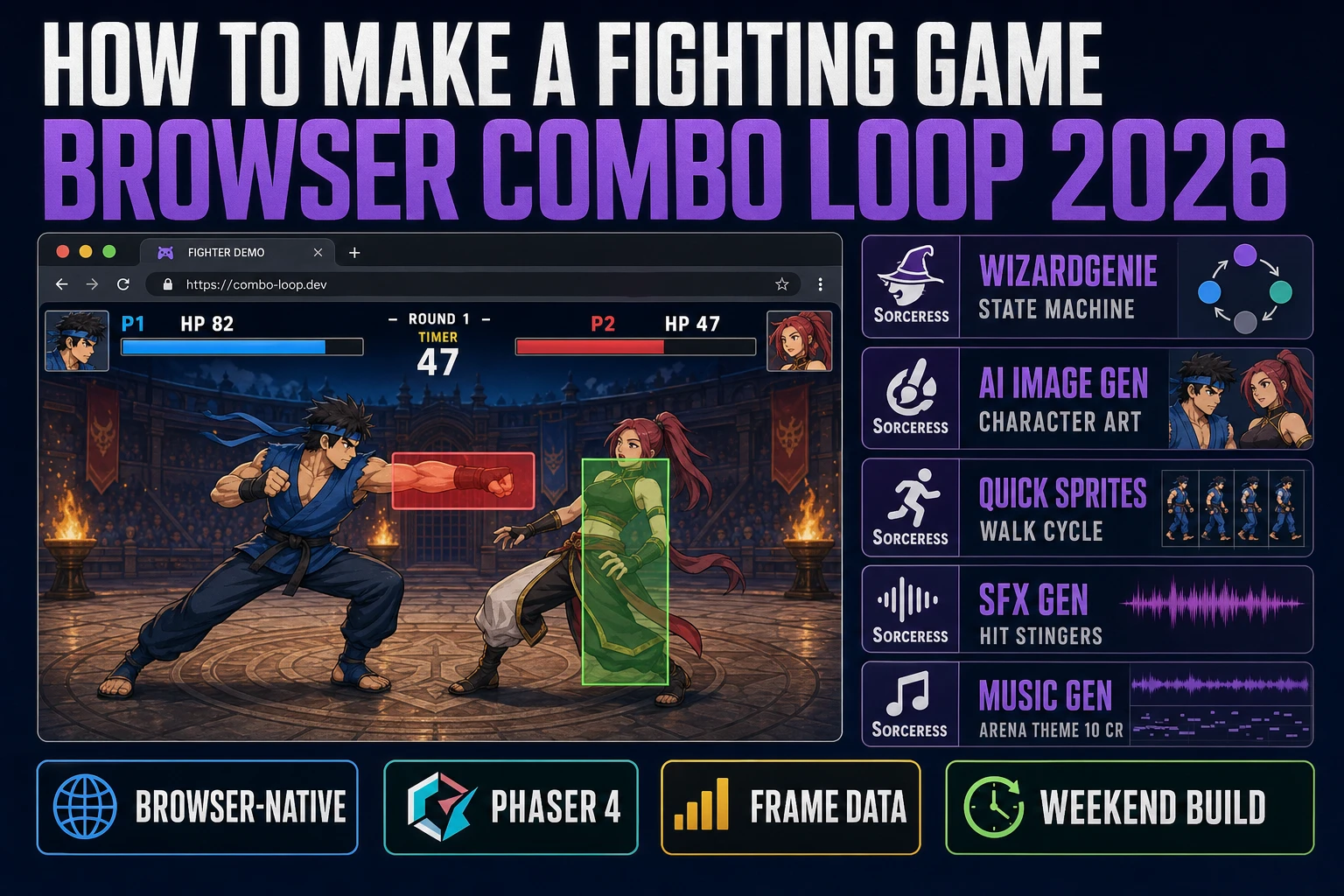
Karate Champ hit arcades in 1984 and Street Fighter II blew the doors off the genre in 1991 (verified against en.wikipedia.org/wiki/Fighting_game on 2026-08-12), and every hobbyist who wants to make one now runs into the same wall: rendering two silhouettes on a screen is trivial, but the state machine, the frame data table, the hitbox and hurtbox pairs, and the input buffer that turn those two silhouettes into a fighting game are a genuine engineering problem. Most first-time attempts at how to make a fighting game bail out somewhere between the third animation and the first punish combo. The 2026 pipeline is very different: a coding agent scaffolds the six-state character controller in one prompt, a shared frame data table balances the roster in a spreadsheet, and the whole build ships in a browser tab. That means WizardGenie to scaffold the state machine and hitbox loop, Sorceress AI Image Gen for the character portraits and stage backgrounds, Quick Sprites for the walk cycles and idle stances, SFX Gen for the punch impacts and blocks, and Music Gen for the arena theme. This guide is the honest end-to-end for how to make a fighting game in 2026.
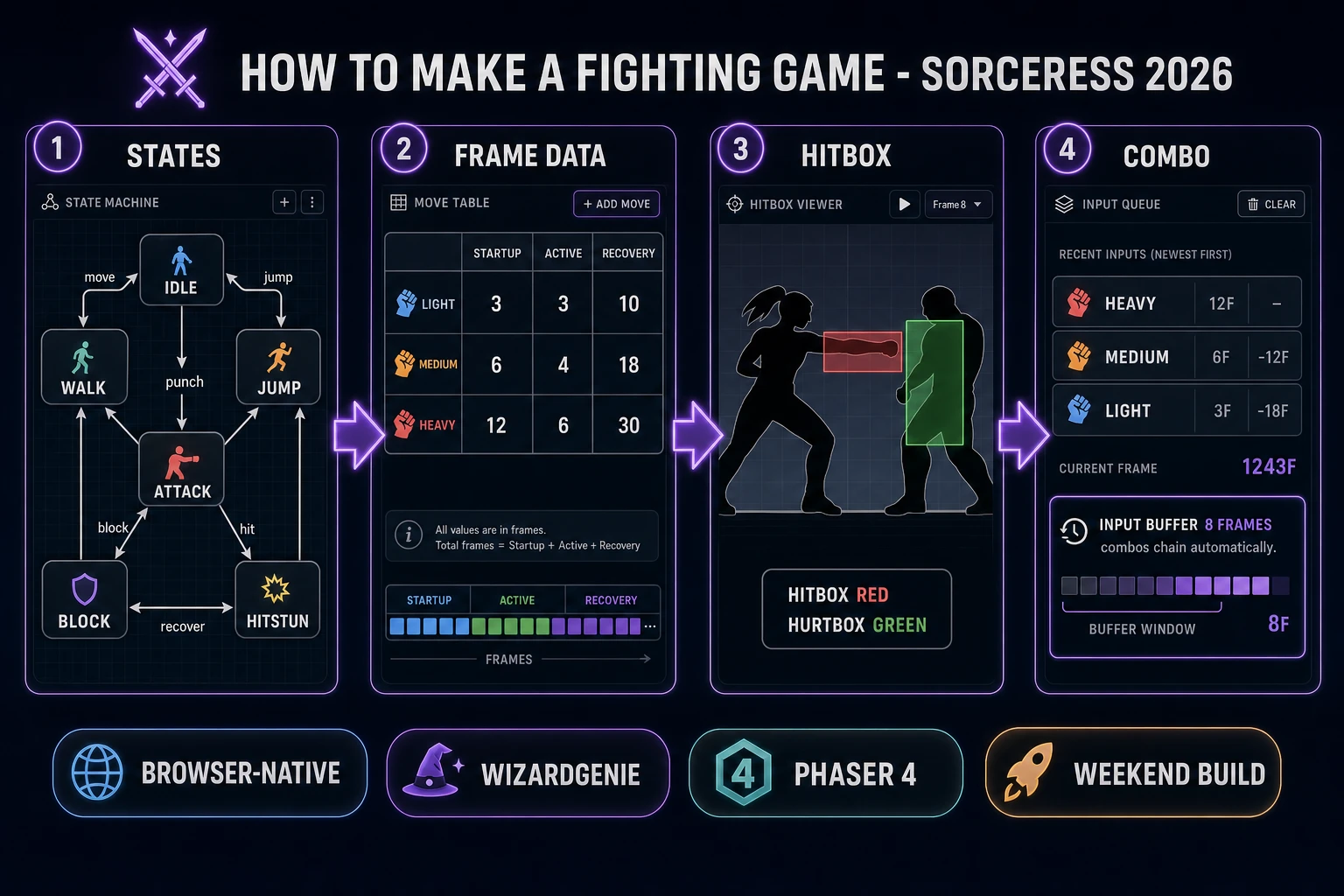
How to make a fighting game browser pipeline: character state machine, frame data table, hitbox and hurtbox pairs, input buffer, and combo loop with WizardGenie and the Sorceress toolset
The 2026 how to make a fighting game recipe: six-state character controller, a frame data table with startup / active / recovery per move, a hitbox versus hurtbox check every frame, and an input buffer so combos land on lenient timing.

What “how to make a fighting game” actually means in 2026

The query “how to make a fighting game” hides three very different requests. Some searchers want a traditional 2D one-on-one fighter on a single screen — two characters, a health bar each, a round timer, a light-medium-heavy attack layer. Some searchers want a platform fighter (Super Smash Bros style, percentage-based knockback, multiple platforms, off-stage recovery, ledge grabs). Some searchers want an arena 3D fighter (Tekken, Soul Calibur, Virtua Fighter) with sidestep, a camera that follows the action, and 3D collision. This guide targets the traditional 2D one-on-one build first because it is roughly one-quarter the code of a platform fighter and one-eighth the code of a 3D arena fighter, and the core systems (state machine, frame data, hitbox versus hurtbox, input buffer) are exactly the same in every genre. Ship the 2D single-screen build; port the systems up to a bigger genre in a v2.

Four systems separate a fighting game from a generic 2D action game. The character state machine is the outer loop; every character is in exactly one state per frame (idle, walk, jump, attack, block, hitstun) and every transition is explicit. The frame data table is the balance sheet; every move publishes its startup, active, and recovery frame counts, plus damage and on-block advantage. The hitbox versus hurtbox check is the collision system; every character has one or two hurtboxes (the body that can be hit), and every attack turns on one or more hitboxes (the fist arc, sword tip, or projectile) during its active frames. The input buffer is the accessibility layer; the last several frames of keyboard input are stored in a queue and replayed against the current state every frame so combos land on lenient timing. Get these four right and the game feels like a real fighter on a first pass, even if the sprites are stick figures.

The fighting game loop in one minute (input, state, hitbox, advance)

Four moving parts and nothing else, in a strict order per frame, sixty times per second. First, read player input and push it to a small ring buffer (last 10 keyboard events, tagged with the frame index they arrived on). Second, evaluate state transitions for both players against the buffer — if the current state allows a new action (idle or the final recovery frames of the previous move) and the buffer contains the right input, transition to the new state and reset the state frame counter. Third, advance the state frame counter, and if the current state is an attack, check whether this frame falls inside the startup, active, or recovery window per the frame data table. If active, turn on the hitboxes for this move. Fourth, collide every active hitbox against every hurtbox on the opposing character — if any pair overlaps, apply damage, push the opponent into HITSTUN for the on-hit frame count, and reset the buffer so the hit does not cascade into a chain the player did not input.

That is the entire game. Four steps, driven by a fixed 60 hertz timer using requestAnimationFrame with a delta-accumulator so the logic stays stable on any refresh rate. Everything else — the arena background, the health bars, the round timer, the announcer voice on ROUND 1 FIGHT, the K.O. screen, the character-select roster, the win-pose animation, the arcade endings — is polish layered on top of these four steps. If you keep the loop deterministic (same inputs plus same starting state equals same outcome), you get replays, ghost fights, and eventually rollback netcode for free later. Fight the temptation to add cinematic supers or interactive stages on the first pass. Ship the pure four-step loop with two characters and three moves each, then extend.
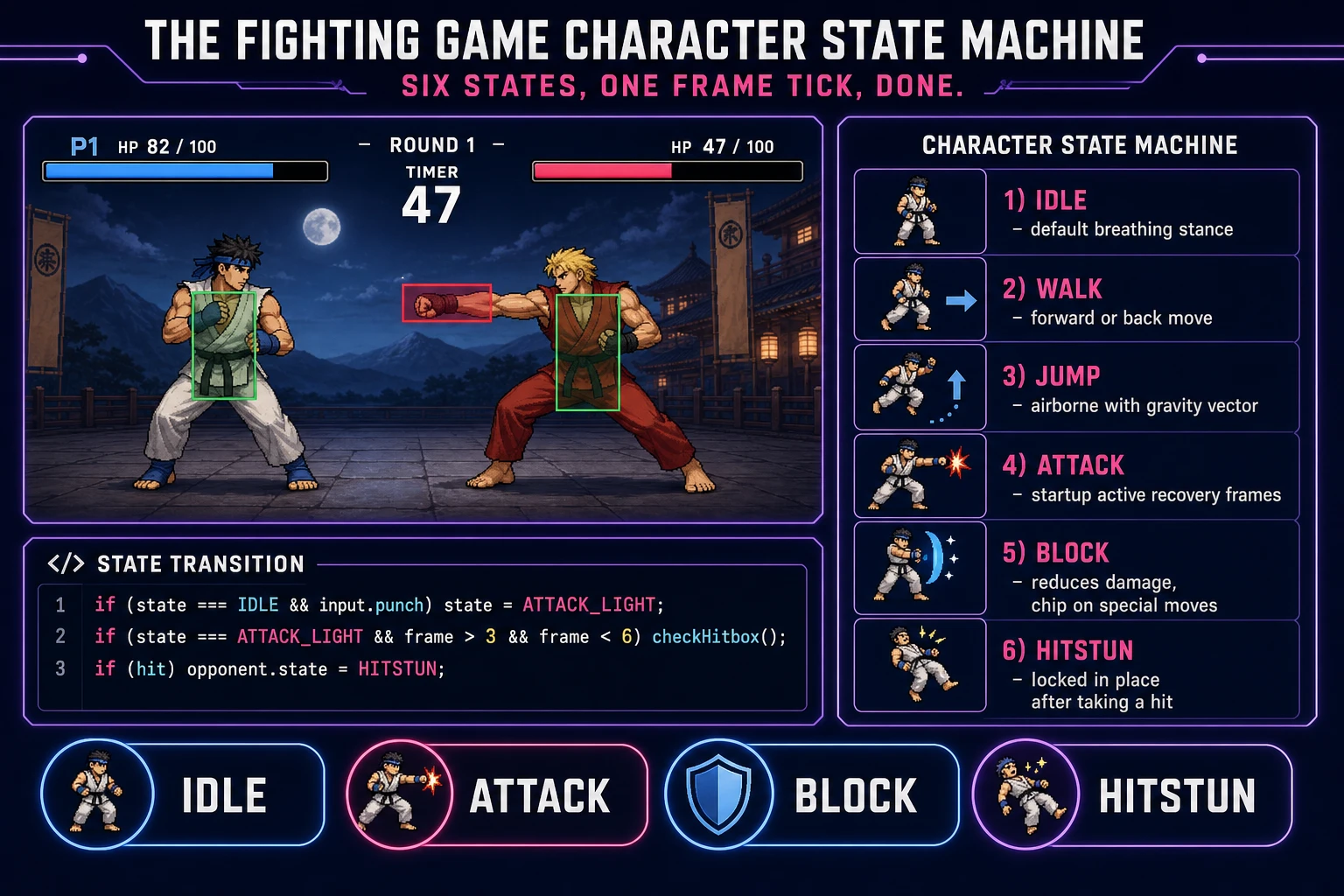
Character state machine cheat sheet for a 2D fighting game: idle, walk, jump, attack, block, hitstun states with transition rules and a hitbox versus hurtbox illustration
The six-state character controller in a how to make a fighting game build: idle, walk, jump, attack, block, hitstun. Every frame runs one state; transitions are explicit. Hitboxes are red, hurtboxes are green — the same convention every serious 2D fighter uses.

Pick your engine for how to make a fighting game: Phaser 4, vanilla Canvas, or WizardGenie

Three good browser targets in 2026, each with a very different trade-off. Phaser 4.2.1 “Giedi” (released 9 July 2026, verified against phaser.io/download/stable on 2026-08-12) is the honest default and the one this guide recommends for a first fighting game build. Phaser ships Scene management, an asset loader, sprite atlases, input, and audio playback in one file — roughly 900 KB minified, which is fine for a mobile browser build. Its Arcade Physics system is enough for the flat-arena gravity and the ground collider; you do not need a heavyweight physics engine for a fighter because most of the collision is hitbox-versus-hurtbox rectangles that you write yourself. The sprite animation system is exactly what a fighter needs: frame-indexed animations with per-frame callbacks so you can turn hitboxes on and off on specific frames.

Vanilla HTML5 Canvas plus a small JavaScript state model is the right pick if you want to understand every line and keep the total build size under 100 KB. A working two-character single-screen fighter is roughly 800 lines of JavaScript. You render sprites with CanvasRenderingContext2D.drawImage, read input with keydown / keyup events on the KeyboardEvent API, and tick the game at 60 Hz with requestAnimationFrame. Everything is under your control, which matters if you have specific rendering ideas (a scanline shader, a CRT filter, a chromatic-aberration K.O. flash) that would be awkward in Phaser. It is also the pick for a code-teaching build where the goal is to show every part of the pipeline.

WizardGenie is not a separate rendering engine — it scaffolds whichever of the above you pick, from a single natural-language prompt. WizardGenie is the Sorceress game-native coding agent. It ships as both a Windows desktop app (installer with auto-update, available to Early Access supporters and above) and a no-install web build at the same URL, and its coding-model lineup (verified 2026-08-12 in src/app/_home-v2/_data/tools.ts lines 734 to 743) covers Claude Opus 4.7, Claude Sonnet 4.6, GPT-5.5, Gemini 3.1 Pro, DeepSeek V4 Pro, Kimi K2.5, Grok 4.2, and MiniMax M2.7. For a fighting game with a small roster, any of the frontier models can scaffold the entire six-state character controller plus the frame data loop plus the hitbox check in one prompt. If you want to run cheap on a longer session, pair a frontier planner (Claude Opus 4.7 or GPT-5.5) with a budget executor (DeepSeek V4 Pro or Kimi K2.5) — the planner writes the frame data table and the state machine spec, the executor types the code. That pairing runs at roughly one-fifth the cost of a single-frontier session.

What about Three.js for a 3D arena fighter? Three.js r185 (verified against threejs.org on 2026-08-12) is a fine 3D renderer, but a 3D fighter is a season-long project on its own. Ship the 2D single-screen build in this guide first, then read a dedicated 3D-fighter deep-dive when you are ready. If you already have a 3D fighter in mind and cannot resist, at minimum finish the 2D state machine and frame data on a paper design doc before you write a line of 3D code — those two systems are identical in 2D and 3D, and getting them right without the 3D rendering complexity is a much faster first pass.
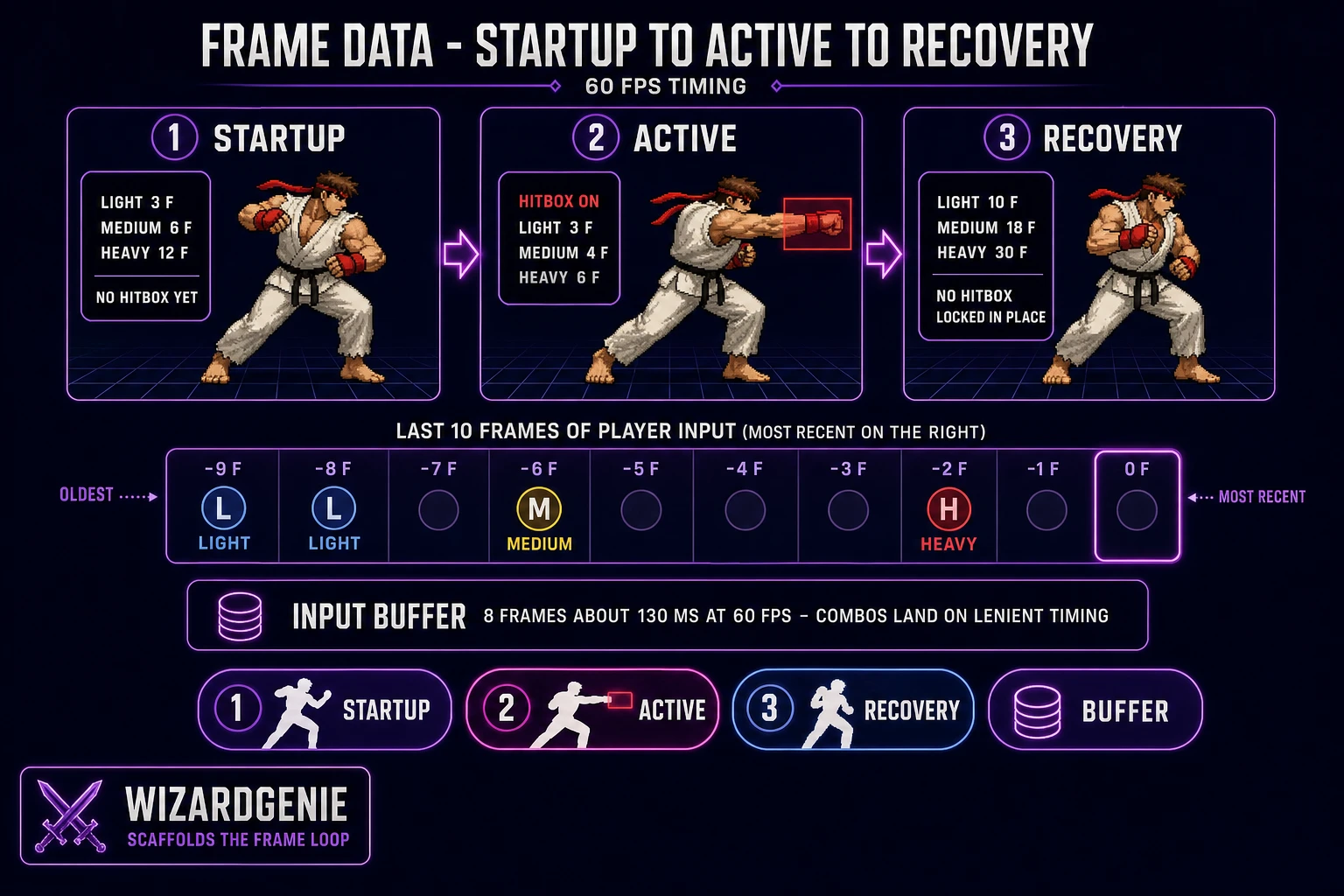
Frame data and input buffer diagram for a browser fighting game: startup, active, and recovery phases with hitbox on / off, plus an input buffer strip showing the last few frames of player input
Every fighting-game move has three phases: startup (wind-up, hitbox off), active (hitbox on, can connect), recovery (locked in place, hitbox off). Publish these three numbers per move in a shared frame data table, and add a 6- to 8-frame input buffer so combos land.

Step 1 — build the character state machine (idle, walk, jump, attack, block, hitstun)

Open a fresh Phaser 4 project (or a blank Canvas HTML file) with a 640-by-360 game viewport. Load two placeholder sprites for now — a simple silhouette per character is fine; you replace them in Step 3. Add a flat floor at y = 300 and gravity of 800 pixels per second squared. Model each character in state as a small object: { x, y, vx, vy, facing, state, stateFrame, health, meter }. Define the six states as string constants: IDLE, WALK, JUMP, ATTACK, BLOCK, HITSTUN. Start both characters in IDLE facing each other.

Write one update(character, input) function that runs every frame. Inside, use a switch on character.state and handle transitions per case. From IDLE, left or right arrow moves to WALK, up arrow moves to JUMP with an initial upward velocity, punch button moves to ATTACK, and holding back-arrow while an opponent attack is active moves to BLOCK. From WALK, releasing the arrow returns to IDLE. From JUMP, apply gravity every frame until y hits the floor, then return to IDLE. From ATTACK, increment stateFrame every tick and check the frame data table (Step 2) to decide when to turn hitboxes on and when to return to IDLE. From BLOCK, take reduced damage (or zero, plus chip damage on specials) on hit and return to IDLE when the block button releases. From HITSTUN, ignore all player input and return to IDLE after the hitstun duration expires.

Two testers on one keyboard is the fastest sanity check. Reserve W-A-S-D plus F, G, H for player 1 (light, medium, heavy) and the arrow keys plus J, K, L for player 2. Read both input sets in the same frame, run update on both characters, and render both to the screen. Add two health bars at the top of the screen and a round timer. Play the build with a friend or with two hands on one keyboard. The characters should walk, jump, and punch cleanly. There is no combat yet — punches are just animations that pass through the opponent — but the movement should feel responsive. If it does not, tune the jump velocity and gravity together (a good starting pair is 500 pixels per second initial jump and 1400 pixels per second squared gravity) until the arc feels right. Everything else scales from a good jump feel.

Step 2 — design the frame data table (startup, active, recovery) and input buffer

Frame data is the balance sheet of a fighting game. Every move publishes three numbers at 60 fps: startup (wind-up before the hitbox turns on), active (how long the hitbox stays on), and recovery (how long the character is locked in place after the hitbox turns off). Standard 2D fighter targets are 3 to 5 frames startup for a light jab, 6 to 8 for a medium, and 12 to 20 for a heavy uppercut; 2 to 4 active frames for a normal and 6 to 12 for a heavy; and 8 to 15 recovery frames on a light and 25 to 40 on a heavy. The trade-off is universal — faster startup means shorter reach and lower damage, longer recovery means the move is punishable if blocked. Put the whole roster's frame data in a spreadsheet or a JSON file and treat it as the single source of truth. When testers complain that a character feels broken, the fix is usually a two-frame edit in the table, not a code change.

Open WizardGenie and drop your working state machine and a starter frame data JSON file in as the seed. Give the agent one paragraph: “Extend this fighting game. Read the frame data table on every ATTACK transition to configure the hitbox windows for the move. During startup frames, the character sprite is in the wind-up animation and no hitbox is active. During active frames, turn on the move''s hitbox rectangle (defined per move in the table as x offset, y offset, width, height, relative to the character origin). During recovery frames, no hitbox is active and the character is locked out of input. After recovery, transition back to IDLE and re-enable input. Every frame, run a hitbox-versus-hurtbox check between every active hitbox and the opponent''s hurtboxes; on overlap, apply damage per the table, push the opponent into HITSTUN for the on-hit frames, and set a hit flag so the same active window cannot deal damage twice.” Feed that to any coding model in the lineup and you get the collision system in under two minutes.

The input buffer is next. “Add a ring buffer of the last 10 keyboard events per player, each tagged with the frame index. Every state transition check reads the buffer for a matching input within the last 6 to 8 frames (about 100 to 130 milliseconds at 60 fps). Also add motion inputs: quarter-circle forward is down, down-forward, forward within 12 frames; half-circle back is forward, down-forward, down, down-back, back within 20 frames. On motion match, transition to the special move state (a hadouken-style projectile is a good first test) instead of the regular attack. Consume the matching inputs from the buffer so a single motion does not chain into itself.” Twenty more lines of code and the game has real combos. Test with a light-light-medium-heavy chain on one character — the chain should feel natural at any reasonable pace, not require frame-perfect timing.

Step 3 — character art, walk cycles, hit stingers, and an arena theme

Two silhouettes on a flat floor is enough to test the loop, but a browser fighter that looks like a browser fighter needs three asset packs: character sprite sheets, sound effects, and an arena theme. Sorceress covers all three in about twenty minutes.

Character portraits and stage backgrounds first. Open AI Image Gen and prompt for a full-length character silhouette in a specific fighting-game pose (light punch, medium kick, heavy uppercut, jump, block, hitstun). Two characters, six poses each, is 12 static sprites and roughly 60 to 240 credits (depending on the model tier). Then prompt for an arena background — a dojo, a rooftop at sunset, a subway platform — another 5 to 20 credits per image. For smoother-looking walk cycles and idle stances, switch to Quick Sprites. Quick Sprites bills 9 credits per generation (verified 2026-08-12 in src/app/quick-sprites/page.tsx line 21 as CREDITS_PER_GEN = 9) and produces a Four-Angle Walking or Small Sprites sheet per prompt. Two characters times two poses (idle and walk) is 4 generations, so 36 credits total.

Audio next. Open SFX Gen. SFX Gen bills 1 credit per second (verified 2026-08-12 in src/app/sfx-gen/page.tsx line 23 as SEED_AUDIO_CREDITS_PER_SECOND = 1). The classic fighter audio pack is six clips. A light hit thwack (0.3 seconds), a heavy hit thud (0.5 seconds), a block clang (0.3 seconds), a jump swoosh (0.4 seconds), a footstep tap (0.15 seconds), and a K.O. announcer stinger (1 second). Roughly 3 credits total, so 3 to 6 cents. Fire the right clip on every state transition. Add an arena theme via Music Gen. Music Gen bills 10 credits per generation (verified 2026-08-12 in src/app/music-gen/page.tsx line 28 as MUSIC_CREDIT_COST = 10). Prompt “driving 4-on-the-floor rock arena theme, 90 seconds seamless loop, minor key, 120 BPM, aggressive guitar riff, no vocals”. Add 2 credits for WAV (WAV_CREDIT_COST = 2, same file line 31) if you want lossless. Two or three generations to nail the loop, so budget 20 to 30 credits.

What a how to make a fighting game project costs on Sorceress in 2026

Concrete asset and generation budget for a browser 2D fighting game with a two-character roster and a single arena, from empty repo to zip-and-ship playable, all numbers verified 2026-08-12 against local Sorceress source:

  • Character portraits (AI Image Gen): 5 to 20 credits per image, 12 images (two characters, six poses each), so 60 to 240 credits (0.60 to 2.40 USD).
  • Arena background (AI Image Gen): 5 to 20 credits per image, one arena to start, so 5 to 20 credits (0.05 to 0.20 USD). Add more if you want a roster of stages.
  • Walk cycles and idle animations (Quick Sprites): 9 credits per generation (CREDITS_PER_GEN = 9), 4 generations (two characters, idle plus walk), so 36 credits (0.36 USD).
  • SFX pack (SFX Gen): 1 credit per second, 6 clips averaging 0.4 seconds each, so 3 credits (0.03 USD).
  • Arena theme (Music Gen): 10 credits per generation, 2 to 3 tries typical, so 20 to 30 credits (0.20 to 0.30 USD). Add 2 for WAV lossless.
  • WizardGenie coding time: effectively free on the Sorceress side (bring your own model API key, or use one of the built-in trial-key options for the smaller models). Model-side API cost for a 3-to-4-hour prompt session on a cheap Executor like DeepSeek V4 Pro is typically under 0.60 USD.
  • Total for one complete browser 2D fighting-game build: 124 to 329 credits, or roughly 1.24 to 3.29 USD in Sorceress credits, plus under 0.60 USD in model API time. Under 4 USD end-to-end for a first playable two-character fighter.

Sorceress bills 100 credits per dollar at the standard rate (CREDITS_PER_DOLLAR = 100 in src/lib/models.ts line 69). New accounts start with 100 free credits (SIGNUP_GRANT = 100 in src/app/api/admin/credits/route.ts line 12), which covers the SFX pack, the arena theme, and a portrait or two with room to spare. The Sorceress Lifetime tier at 49 USD one-time (LIFETIME_PRICE = 49 in src/app/plans/page.tsx line 51) covers unlimited Music Gen and SFX Gen use, which matters if you plan to make this the first entry in a series of arena themes and character rosters (a common progression is a two-character prototype, then a four-character roster with two stages, then a full eight-character release with an announcer and story mode). For a single-roster build, the free grant plus a small top-up covers everything.

For related browser-game pipelines that share this state-machine plus frame-loop plus asset-pack spine, the closest reads are Brace How to Make a 2D Fighting Game (One Screen) for the same genre with a single-screen focus, Aim How to Make a First Person Shooter Game (Browser 2026) for another combat-loop browser game with a different perspective, Mate How to Make a Chess Game (Browser AI Loop 2026) for another two-player browser build with a strict turn structure, and Sweep How to Make Minesweeper (Browser Flag Grid 2026) for the same weekend budget on a single-player classic. The Sorceress Tools Guide is the master index for every tool the guide referenced. Under four dollars, one weekend, and how to make a fighting game is a done deal.

Frequently Asked Questions

What is the difference between a hitbox and a hurtbox in a fighting game?

A hurtbox is the region of a character that can be hit (usually the whole body, including the head and torso). A hitbox is the region of an attack that can hit the opponent (the fist arc of a punch, the sword tip of a slash, the flame plume of a projectile). A hit connects when any active hitbox from one character overlaps any active hurtbox of the other during the same frame. Every serious 2D fighter separates these two boxes so a low-attack hitbox can safely pass through the high-attack hurtbox of a jumping opponent. Most 2D fighters draw hitboxes in red and hurtboxes in green in their frame data documentation - a convention borrowed from Street Fighter III training tools per the technical description on en.wikipedia.org/wiki/Fighting_game verified 2026-08-12. For a browser build, model each box as a simple axis-aligned rectangle (x, y, width, height) tied to a specific frame index of the current animation. A single character usually has one or two hurtboxes (torso plus limbs) and zero to two hitboxes active per frame.

How long should startup, active, and recovery frames be for a browser fighting game?

Frame data is measured at sixty frames per second and every move has three phases. Startup is the wind-up before the hitbox turns on (a light jab is 3 to 5 frames, a heavy uppercut is 12 to 20 frames). Active is how long the hitbox stays on (usually 2 to 6 frames for a normal, 8 to 12 for a heavy). Recovery is how long the character is stuck after the hitbox turns off (a light is 8 to 15 frames on whiff, a heavy is 25 to 40 frames). The trade-off is universal: faster startup means shorter reach and lower damage, longer recovery means the move is punishable if blocked. For a browser fighter targeting a small roster, publish a frame data table with these three numbers plus damage per move and put it in your GitHub README so testers can balance the roster together. Standard 2D fighter balance targets 3 frame light attacks, 5 to 7 frame mediums, and 10 to 14 frame heavies, per the frame data documentation aggregated on community wikis for Street Fighter, Guilty Gear, and Killer Instinct verified 2026-08-12 against en.wikipedia.org/wiki/Fighting_game.

Do I need an input buffer to make a fighting game feel good?

Yes, and it is the single change that separates a fighting game prototype that feels sluggish from one that feels responsive. An input buffer stores the last few frames of player input in a queue, and every frame the game replays that queue against the current character state to see if any move can now execute. Without a buffer, the player has to press attack on the exact frame the character finishes recovery from the previous move, which is inhumanly precise. With a 6 to 8 frame buffer (about 100 to 130 milliseconds at 60 fps), a light-medium-heavy chain feels natural at any reasonable pace. Modern fighters use a buffer of 4 to 10 frames for normals and 12 to 20 frames for special-move motion inputs (quarter-circle, half-circle) - the longer buffer for specials is why quarter-circle punches feel lenient in Street Fighter 6. For a browser build, one queue of the last 10 keyboard events plus a check on every state-transition is enough. Ten more lines of code and combos feel real.

Which fighting game genre is easiest to build first: platform fighter, traditional 2D, or arena 3D?

Traditional 2D on a single screen is by far the easiest for a first browser fighter, and it is what this guide recommends. One screen means no camera work, no scrolling, no arena management - just two characters at fixed z-order on a flat floor. Add gravity, jump, and a knockback vector on hit and you have the core 90 percent of the genre in a few hundred lines. Platform fighters (Super Smash Bros style, percentage-based knockback, multiple platforms, ledge grabs) are the next step up, roughly twice the code, because ledge detection and off-stage recovery are their own state machines. Arena 3D fighters (Tekken, Soul Calibur, Virtua Fighter) are the highest difficulty because you have to add a third movement axis (sidestep), a camera that follows the action, and 3D collision on top of everything a 2D fighter has. If your first fighting game project is a 3D arena fighter, budget four to eight times the time of a 2D fighter. A 2D single-screen build is a two-to-four-weekend project; a 3D arena is a season.

How do I add a second player, local co-op, or online play to my browser fighting game?

Local co-op on one keyboard is trivial: reserve one set of keys for player 1 (WASD plus F/G/H for light-medium-heavy) and another for player 2 (arrows plus J/K/L). Read both sets in the same frame, run both character state machines side by side, and the game just works. Two USB gamepads is one more step - use the browser Gamepad API (well documented on developer.mozilla.org/en-US/docs/Web/API/Gamepad_API verified 2026-08-12) to read stick and button state on each frame, mapping each pad to a player index. Online play is a very different problem and orders of magnitude harder than the offline build. Fighting games use rollback netcode (predict the opponent's inputs each frame and roll back if wrong) because delay-based netcode feels awful at more than 60 ms of ping. A rollback implementation for a browser fighter is a project on its own - start with a proven library like ggpo-web or write a delay-based fallback for the initial launch. For a first fighting-game build, ship local play only, put a note in the README that online is v2, and iterate on offline balance until the game is fun on one couch. Adding weak netcode to an unbalanced fighter is a common trap that consumes months without helping the game.

Sources

  1. Fighting game - Wikipedia
  2. Phaser 4 - HTML5 Game Framework
  3. MDN - CanvasRenderingContext2D
  4. MDN - KeyboardEvent
Written by Arron R.·3,315 words·15 min read

Related posts