Sweep How to Make Minesweeper (Browser Flag Grid 2026)

By Arron R.14 min read
How to make Minesweeper in 2026: render a grid of clickable cells on HTML5 Canvas or plain DOM, seed the mines after the first click so the opener is always saf

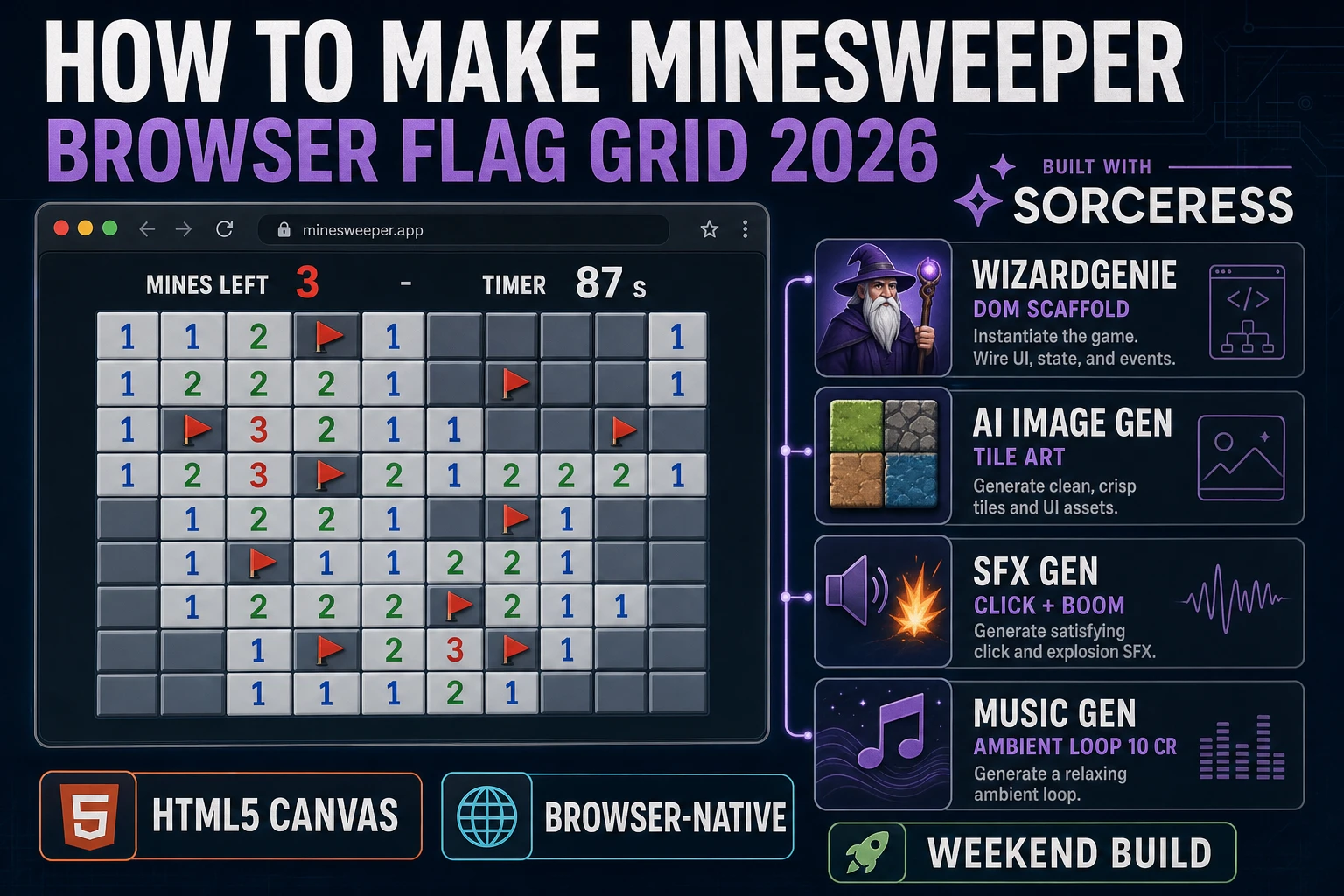
Microsoft Minesweeper first shipped in the 1990 Windows Entertainment Pack for Windows 3.11 and stayed bundled in every Windows release until Windows 8 in 2012 (verified against en.wikipedia.org/wiki/Minesweeper_(video_game) on 2026-08-12). Almost every browser-game weekender who wants to relearn the classics starts with how to make Minesweeper, gets the grid rendering fine, then hits a wall on the flood-fill reveal or the first-click safety guarantee, and quietly abandons the project. The 2026 pipeline is very different: plain DOM renders the flag grid for free with a CSS grid of buttons, a coding agent scaffolds the four states in one prompt, and the whole game ships in a weekend. In a browser, that means WizardGenie to scaffold the grid, seed logic, and flood-fill reveal already wired, Sorceress AI Image Gen for optional custom tile numerals or a themed skin, SFX Gen for the tile-click blip and the mine-boom, and Music Gen for an ambient background loop that keeps tension without distracting from the puzzle. This guide is the honest end-to-end for how to make Minesweeper in 2026.
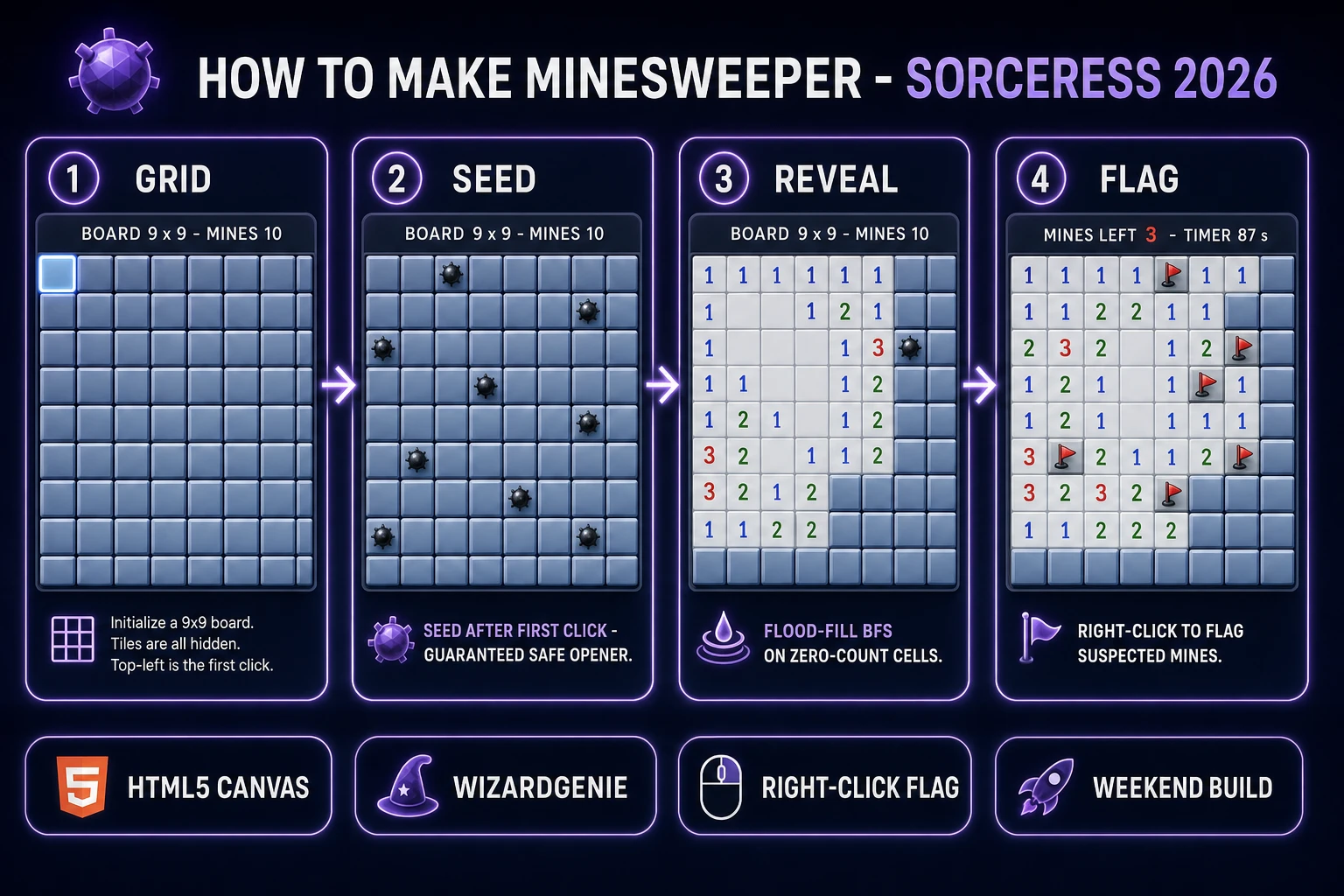
How to make Minesweeper browser pipeline: 9x9 flag grid, first-click safety, flood-fill reveal, and right-click flag with WizardGenie and the Sorceress toolset
The 2026 how to make Minesweeper browser recipe: render the grid, seed mines after the first click so the opener is always safe, flood-fill reveal on zero-count cells, right-click to flag, and layer the audio from SFX Gen and Music Gen.

What “how to make Minesweeper” actually means in 2026

The query “how to make Minesweeper” hides two very different requests. Some searchers want an honest tribute to the 1990 Microsoft original — the beveled gray tiles, the yellow smiley face reset button, the seven-segment red-LED timer and mine counter, and the specific number colors (1 blue, 2 green, 3 red, 4 dark blue, 5 dark red, 6 teal, 7 black, 8 gray). Some searchers want a modernised interpretation — flat cells, custom themes, animated cascades, achievements, and a daily seed. This guide targets the mechanic first and lets you style either way, because the mechanic is what the query is really about. The Microsoft aesthetic is a specific commercial product; the flag-grid pattern is a game-design pattern that predates Microsoft by seven years (Ian Andrew’s Mined-Out on the ZX Spectrum, 1983, per the Eurogamer history archived on en.wikipedia.org/wiki/Minesweeper_(video_game), verified 2026-08-12).

A quick trademark note before the technical section starts. Microsoft owns the Microsoft Minesweeper trademark, the specific bitmap art assets from every Windows release, and the branded reset-smiley icon set. You cannot name your game Minesweeper on a store page or use any Microsoft-owned art. The core mechanic — a grid of clickable cells, hidden mines, adjacent-count numbers, right-click flags, and flood-fill reveal on zero-count cells — is a game-design pattern, and game-design patterns are not protected by copyright or trademark. Dozens of published clones since 1983 (Mined-Out on the ZX Spectrum, Tom Anderson’s SunOS Mines in 1987 ported to XWindows in 1990, KDE’s KMines, GNOME’s Mines, Palm OS Mines, and countless browser rewrites) built on the same mechanic under different names. Pick a different name for your build (Flag Grid, Sweep, MineHunt, Field), draw your own art, write your own code, and you stand on the same fair-use footing.

The Minesweeper game loop in one minute (click reveal flag win)

Four moving parts and nothing else, in a strict order per player action. First, on left-click of an unopened non-flagged cell, if this is the first click of the game, seed the mines now (avoiding the clicked cell and its eight neighbors) and compute the adjacent-mine count for every non-mine cell. Second, reveal the clicked cell — if it is a mine, freeze the loop, flip every remaining mine to visible with the clicked mine drawn in red, and show GAME OVER. If it is not a mine and its adjacent-count is greater than zero, just reveal the number. If it is not a mine and its adjacent-count is zero, flood-fill reveal every unrevealed non-flagged neighbor via breadth-first search until every zero-count cell in the connected region is opened. Third, on right-click of an unopened cell, toggle the flag state (or cycle unopened → flagged → question → unopened if you want the classic three-state cycle). Fourth, after every reveal, check win — if the count of revealed non-mine cells equals total-cells minus mine-count, freeze the loop, auto-flag the remaining mines, and show YOU WIN with the elapsed timer.

That is the entire game. Four steps, driven by two mouse events (click and contextmenu) on a CSS grid of buttons or a single Canvas element with a hit-test on click coordinates. Everything else — the yellow smiley face reset button that turns to a frown on death and shades on click, the seven-segment red-LED mine counter and timer, the beginner/intermediate/expert board presets, the chord click (both mouse buttons at once to auto-reveal neighbors of a fully-flagged number), the daily-seed rotation, the local high-score board — is polish layered on top of these four steps. If you keep the loop tight and first-click safety in place, the browser build feels like Windows 95 even on a mid-range phone. Fight the temptation to write animated cascades or particle explosions on the first pass. Ship the pure four-step loop, then extend.
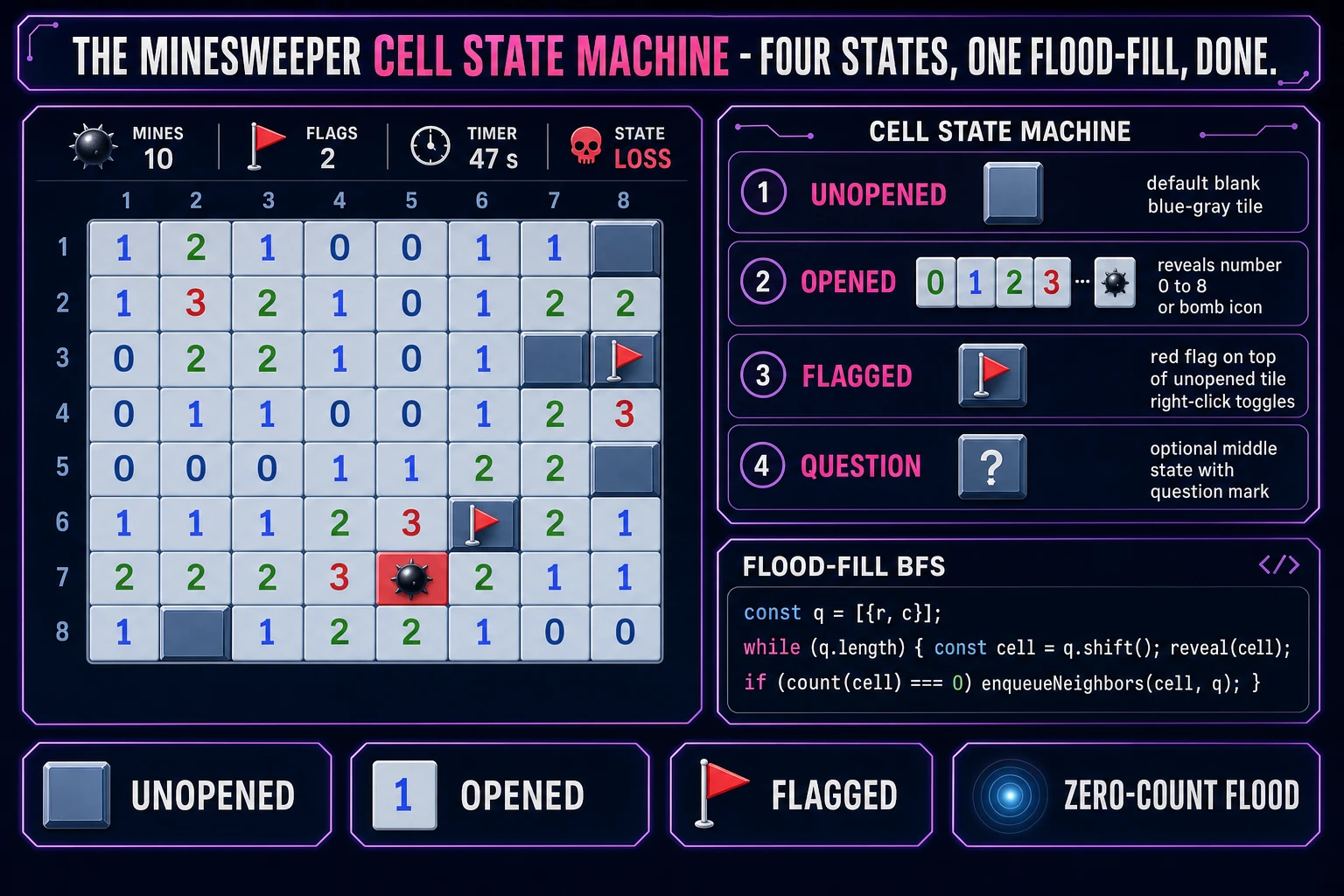
Minesweeper cell state machine cheat sheet: unopened, opened, flagged, question, with flood-fill BFS pseudo-code
The four cell states in a how to make Minesweeper build: unopened (default), opened (reveals a number or a mine), flagged (right-click toggles), and the optional question-mark middle state. Flood-fill reveal is a fifteen-line BFS.

Pick your engine for how to make Minesweeper: React, vanilla DOM, or Phaser 4

Three good browser targets in 2026, each with a very different trade-off. Plain DOM (a CSS grid of <button> elements) plus a small JavaScript state model is the honest default and the one this guide recommends for a first build. Minesweeper is a grid of clickable rectangles with a small number and a fixed color per state, which is exactly what the DOM was designed to render. A working build is roughly 250 lines of JavaScript and 40 lines of CSS. Right-click flagging is a one-line event.preventDefault() call on the contextmenu event. Using real buttons means you get keyboard focus, tab navigation, and screen-reader accessibility for free — a genuine win over Canvas.

React is the right pick if you already know it or if you plan to hoist the game inside a larger app (a game portal, a game jam entry that shares nav with other games, a daily-puzzle site with a leaderboard). The Minesweeper state is a two-dimensional grid of cell objects; every click computes a new grid and setState triggers a rerender. React 19 handles this pattern comfortably at 30x16 Expert board size. Do not use React just because it is the framework you happen to have installed; the DOM version is smaller and faster for a standalone game.

Phaser 4.2.1 “Giedi” (released 9 July 2026, verified against phaser.io/download/stable on 2026-08-12) is the right choice if you plan to extend the game with animated tile reveals, particle explosions on the mine hit, a smooth-scrolling infinite grid, or a custom theme system that swaps sprite sheets at runtime. Phaser bundles Scene management, an asset loader, input, and audio playback in one file — roughly 900 KB minified, which is fine for a mobile browser build. It is also the pick if you have already used Phaser on a previous project and know the framework; there is no advantage to switching to plain DOM just because Minesweeper is small.

WizardGenie is not a separate rendering engine — it scaffolds whichever of the above you pick, from a single natural-language prompt. WizardGenie is the Sorceress game-native coding agent. It ships as both a desktop app (Windows installer with auto-update, available to Early Access supporters and above) and a no-install web build at the same URL. Its coding-model lineup (verified 2026-08-12 in src/app/_home-v2/_data/tools.ts lines 734 to 743) covers Claude Opus 4.7, Claude Sonnet 4.6, GPT-5.5, Gemini 3.1 Pro, DeepSeek V4 Pro, Kimi K2.5, Grok 4.2, and MiniMax M2.7. For a Minesweeper-scale project, any of the frontier models scaffolds the whole game in one prompt. If you want to run cheap, pair a frontier planner (Claude Opus 4.7 or GPT-5.5) with a budget executor (DeepSeek V4 Pro or Kimi K2.5) and let the executor do the typing.
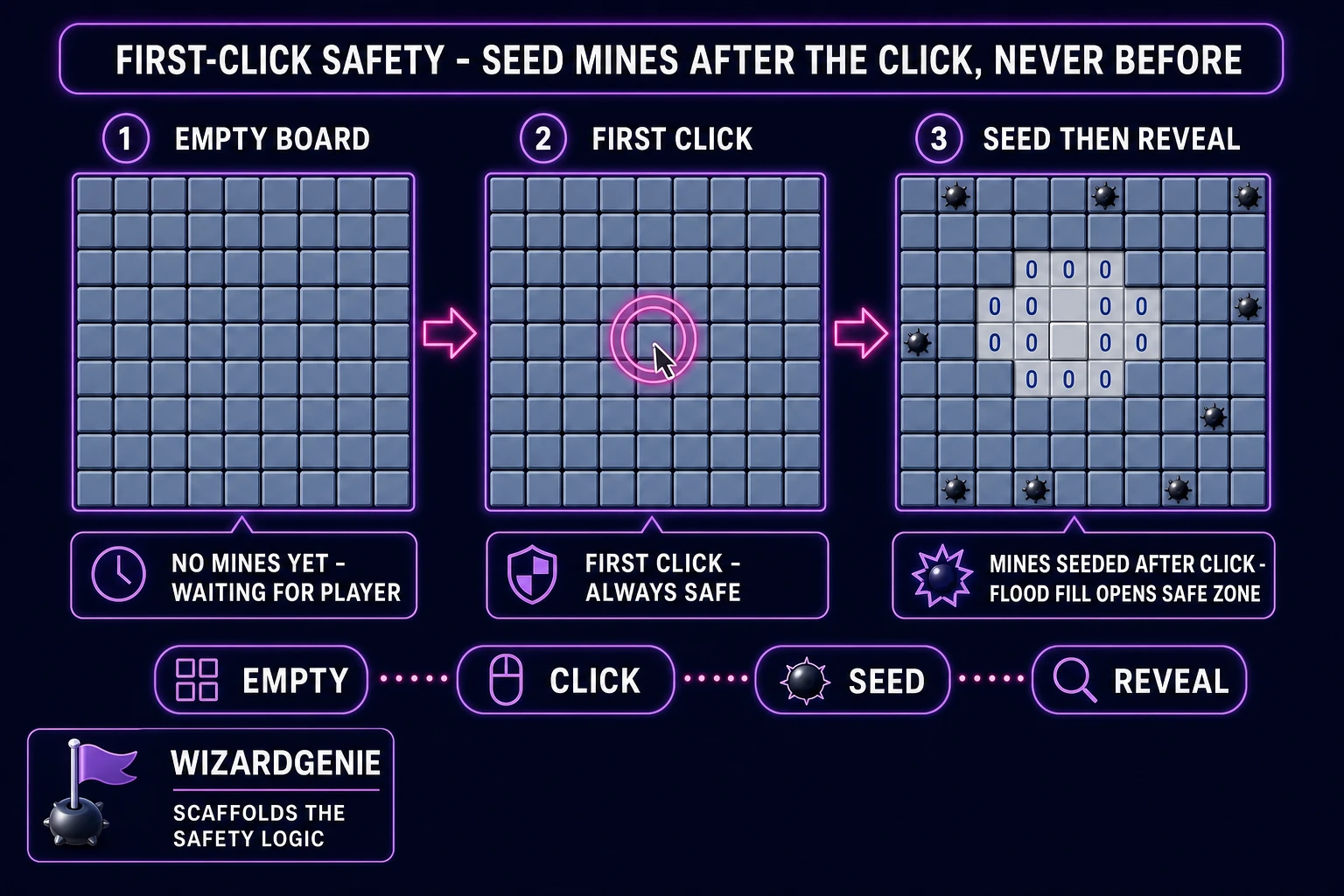
Minesweeper first-click safety diagram showing empty board, first click, mines seeded after click avoiding clicked cell and neighbors, then flood-fill reveal
First-click safety: seed the mines after the first click, never before. The clicked cell and its eight neighbors are excluded from the seed, so the first click always opens a small flood-fill region.

Step 1 — build the grid, seed mines (post-first-click safety), and compute neighbour counts

Open a fresh HTML file with a <div id="board">. Style it with display: grid; grid-template-columns: repeat(9, 32px) for Beginner (9x9), or repeat(30, 24px) for Expert (30x16). For each cell, append a <button> element with a data-row and data-col attribute. Store the game state as a two-dimensional array of cell objects: { mine: false, revealed: false, flagged: false, count: 0 }. Attach one delegated click handler on the board div and one contextmenu handler for right-click.

The first-click-safety pattern is the single most important thing to get right. Do not seed mines on game start. Seed on the first left-click, and exclude the clicked cell plus its eight neighbors from the mine pool so the first click always opens a small flood-fill region. Concretely: on first click, build an array of all grid coordinates, remove the clicked coordinate and its eight neighbors, shuffle the array (Fisher-Yates), take the first N entries (10 for Beginner, 40 for Intermediate, 99 for Expert per the standard board configurations verified against en.wikipedia.org/wiki/Minesweeper_(video_game) on 2026-08-12), and mark those cells as mines. Then, for every non-mine cell, compute the adjacent-mine count by looking at its up-to-eight neighbors. Finally, call the reveal function on the clicked cell — which will flood-fill a nice open region because it is guaranteed to be a zero-count.

Play the build. Left-click any cell on a fresh board. The game should seed mines instantly and reveal a small open area with numbers around the edge. Left-click a numbered cell — nothing else opens. Left-click a mine (only possible after the first click) — the game should end with all mines revealed and the clicked mine drawn in red. If the game feels slow to seed on Expert (30x16 with 99 mines), the Fisher-Yates shuffle is doing 480 swaps on a 480-cell array — still under a millisecond on any device. Any lag you notice is repaint, not seed.

Step 2 — wire click-reveal, right-click-flag, and flood-fill for zero-count cells in WizardGenie

Open WizardGenie and drop your working grid-and-seed HTML file in as the seed. Give the agent one paragraph: “Extend this Minesweeper prototype. Add a reveal function that opens a cell. If the cell is a mine, freeze the game loop, reveal every remaining mine, draw the clicked mine in red, and show GAME OVER with a New Game button. If the cell is not a mine, mark it revealed and show its adjacent-mine count (or nothing if the count is zero). If the count is zero, flood-fill reveal every unrevealed non-flagged neighbor via breadth-first search: push the cell onto a queue, while the queue is not empty, pop a cell, reveal it, and if its count is zero, push every unrevealed non-flagged neighbor. Use an explicit queue array, not recursion, to avoid stack overflow on large Expert-mode reveals.” Feed that to any coding model in the lineup and you get the reveal system in under two minutes.

Right-click flagging is the next paragraph. “Add a contextmenu handler on the board that calls event.preventDefault() and toggles the flag state of the clicked cell (unopened → flagged → unopened). Do not allow flagging a revealed cell. Update a mines-left counter in the HUD that shows total-mines minus flagged-cells (allow it to go negative if the player over-flags). Style flagged cells with a red flag icon on top of the unopened tile background. Do not open a flagged cell on left-click — the flag protects it. Optionally, add a middle state on second right-click for a question-mark cell (unopened → flagged → question → unopened) as the 1990 Microsoft version did.” Twenty more lines of code and the game is fully playable.

Win detection and the timer come last. “After every reveal, check whether the count of revealed non-mine cells equals total-cells minus mine-count. If yes, freeze the loop, auto-flag every remaining unrevealed mine (they must all be mines by definition), show YOU WIN with the final elapsed time, and offer a New Game button. Add a timer that starts on the first click, updates once per second, and freezes on win or loss. Add a smiley-face reset button in the HUD that starts a new game (fresh empty grid, no mines seeded until first click).” Fifteen more lines and the game is ship-ready.

Tuning happens after the scaffold. Play the build, notice that opening a large zero-count region on Expert feels laggy because each cell reveal triggers a DOM repaint. “Batch the reveal DOM updates by using requestAnimationFrame and a document fragment.” Play again, notice that the right-click browser context menu still flashes for a millisecond before the game handler kicks in. “Add pointer-events none on the flag icon so the click passes through to the button.” Play again, notice that clicking outside the grid drops the focus. “Add keyboard navigation: arrow keys move a focus ring across cells, space to reveal, F to flag.” Each pass is a natural-language iteration; the agent edits the code, the browser reloads. Ten or fifteen passes and the game feels professional. This is vibe coding for game dev in one sitting.

Step 3 (bonus) — tile numerals, click and boom SFX, and an ambient bed

Minesweeper without audio feels quiet in a good way — it is a puzzle, not an arcade shooter — but two well-placed sounds add a huge amount of feel. Your browser build gets those two for pennies from Sorceress in about five minutes.

Open SFX Gen. Sorceress SFX Gen bills at 1 credit per second (verified 2026-08-12 in src/app/sfx-gen/page.tsx line 23 as SEED_AUDIO_CREDITS_PER_SECOND = 1). The classic Minesweeper audio pack is three clips. First, a soft tile-click blip — prompt “short soft mechanical tile click, 0.15 seconds, dry with tiny plastic tap”. Fire on every reveal. One credit (SFX Gen rounds up to the minimum). Second, a flag-place tap — prompt “quick fabric-flag flick sound, 0.15 seconds, muted”. Fire on right-click flag toggle. One credit. Third, a boom on mine-click — prompt “short cartoon land-mine boom, 0.6 seconds, dry with a low thump tail”. Fire on game-loss. One credit. Total under 5 credits (5 cents) for the full audio pack.

The optional final audio touch is the ambient bed. Open Music Gen. Music Gen bills 10 credits per generation (verified 2026-08-12 in src/app/music-gen/page.tsx line 28 as MUSIC_CREDIT_COST = 10). Prompt “calm ambient synth pad, 30 seconds seamless loop, minor key, 50 BPM, contemplative puzzle-game background, no percussion”. Add 2 credits for WAV (WAV_CREDIT_COST = 2 in the same file line 31) if you want lossless. Two or three generations to nail the loop, so budget 20 to 30 credits. A single 30-second ambient loop is enough for the whole build — do not overthink the music track. Add a mute toggle in the HUD; some players prefer silence for how to make Minesweeper builds.

Optional: custom tile numerals via AI Image Gen. The default is CSS text with the classic Microsoft number colors, which is free and looks correct. If you want a themed skin (pixel-art numerals, hand-drawn chalk, glowing neon), generate an 8-cell strip once and reference each numeral by CSS background-position. One image, roughly 5 to 20 credits. Skip this for a first build and add it in a v2 pass.

What a how to make Minesweeper project costs on Sorceress in 2026

Concrete asset and generation budget for a browser Minesweeper-inspired flag-grid game, from empty repo to zip-and-ship playable, all numbers verified 2026-08-12 against local Sorceress source:

  • Grid, tiles, HUD art: zero credits. Plain DOM buttons with CSS gradients render every game state; the classic look is free. This is the biggest cost saving vs. sprite-heavy browser classics.
  • Optional custom tile numerals or themed skin (AI Image Gen): 5 to 20 credits per asset, 0 to 2 optional assets, so 0 to 40 credits (0.00 to 0.40 USD). Skip entirely for the pure DOM look and you save the whole line item.
  • Audio pack (SFX Gen): 3 clips at 1 credit per second, average clip 0.15 to 0.6 seconds each, so 3 credits total (0.03 USD). Cheapest audio pack in the entire browser-classic series.
  • Optional ambient loop (Music Gen): 10 credits per generation, 2 to 3 tries typical, so 20 to 30 credits (0.20 to 0.30 USD). Add 2 more credits if you want WAV. Skip this entirely and the game is fine.
  • WizardGenie coding time: effectively free on the Sorceress side (bring your own model API key, or use one of the built-in trial-key options for the smaller models). Model-side API cost for a 2-to-3-hour prompt session on a cheap Executor like DeepSeek V4 Pro is typically under 0.40 USD.
  • Total for one complete browser Minesweeper-inspired build: 3 to 73 credits, or roughly 0.03 to 0.73 USD in Sorceress credits, plus under 0.40 USD in model API time. Under 1.15 USD end-to-end for a first Minesweeper-style flag-grid game.

Sorceress bills 100 credits per dollar at the standard rate (CREDITS_PER_DOLLAR = 100 in src/lib/models.ts line 69). New accounts start with 100 free credits (SIGNUP_GRANT = 100 in src/app/api/admin/credits/route.ts line 12), which covers the audio pack, the ambient loop, and a custom tile skin with room to spare. The Sorceress Lifetime tier at 49 USD one-time (LIFETIME_PRICE = 49 in src/app/plans/page.tsx line 51) covers unlimited Music Gen and SFX Gen use, which matters if you plan to make this the first of a series of Windows-95-era desktop-puzzle ports (a common progression is Minesweeper, then Solitaire, then FreeCell, then Hearts). For a single-game build the free grant plus a small top-up covers everything.

For related browser-game pipelines that share this generate-the-assets-prompt-the-coder-ship-the-browser-build spine, the closest reads are Guess How to Make Wordle (Browser Guess Grid 2026) for the same daily-puzzle grid-based pattern on a modern classic, Recall How to Make a Memory Game (Browser Match Grid 2026) for another public-domain grid-click game with a similar reveal cascade, Stack How to Make Tetris (Browser Falling Blocks 2026) for another zero-shipped arcade classic in the same weekend budget, and Tally How to Make a Clicker Game (Browser Score Loop 2026) for another single-input browser game that pairs with a save-state layer. The Sorceress Tools Guide is the master index for every tool the guide referenced. Under a dollar fifty, one weekend, and how to make Minesweeper is a done deal.

Frequently Asked Questions

Do I need permission from Microsoft to make a Minesweeper clone?

Minesweeper as a game-design pattern is not owned by Microsoft. The Microsoft branded release (Microsoft Minesweeper, first shipped in the 1990 Windows Entertainment Pack, written by Robert Donner and Curt Johnson, verified against en.wikipedia.org/wiki/Minesweeper_(video_game) on 2026-08-12) is a specific commercial product with its own art assets and code, but the mechanic - a grid of clickable cells, hidden mines, adjacent-count numbers, right-click flags, and flood-fill reveal on zero-count cells - predates Microsoft by seven years. Ian Andrew's Mined-Out shipped on the ZX Spectrum in 1983, and Tom Anderson wrote a SunOS version called Mines in 1987 that was ported to XWindows in 1990. Ship your build under a different name (Flag Grid, Sweep, MineHunt), draw your own art, write your own code, and you stand on the same fair-use footing every clone since 1983 has stood on. Do not name your game Minesweeper on a store page, do not bundle Microsoft-owned bitmap art, and do not claim any affiliation with Microsoft on the store page or in the credits.

Should I use HTML5 Canvas, plain DOM, or Phaser 4 for a browser Minesweeper clone?

Plain DOM (a CSS grid of buttons or divs) is the honest default because Minesweeper is a grid of clickable rectangles with a small number and a fixed color per state, which is exactly what the DOM was designed to render. A working build is roughly 250 lines of JavaScript and 40 lines of CSS. Right-click flagging is a one-line preventDefault call on the contextmenu event, well documented on developer.mozilla.org. HTML5 Canvas is the pick if you want a pixel-perfect retro look, an animated reveal cascade, or a smooth-scrolling infinite grid; Canvas gives you full control over every pixel at the cost of rewriting all the event handling by hand. Phaser 4.2.1 Giedi (released 9 July 2026, verified against phaser.io/download/stable on 2026-08-12) is the right pick if you plan to extend the game beyond the classic loop with power-ups, seasonal skins, or animated background layers, or if you have already used Phaser on a previous project and know the framework. For a first Minesweeper build, plain DOM ships in a weekend and gets you a fully accessible keyboard-navigable game for free. Pick the simplest of the three that satisfies the vision you have for the game.

How do I make the first click guaranteed safe?

The trick every good Minesweeper implementation borrows from the Windows Vista release is to seed the mines after the first click, not before. In code: initialize an empty grid, wait for the first click, then randomly place mines in every cell except the clicked cell (and, if you want extra generosity, except the eight neighbors of the clicked cell so the first click always reveals a small open area via flood-fill). Then compute the adjacent-mine count for every non-mine cell, and finally run the flood-fill reveal on the clicked cell. This is called first-click safety and it is the difference between a Minesweeper build that feels fair and one that feels like a coin flip. The classic 1990 Microsoft version did not have this guarantee, but the 2007 Windows Vista rewrite added it (documented on the Authoritative Minesweeper reference site archived at minesweeper.com and referenced in the Wikipedia entry, verified 2026-08-12). Every modern browser clone should implement first-click safety - it is fifteen extra lines of code and removes the number-one complaint from first-time players.

How does flood-fill reveal on zero-count cells work?

Flood-fill is the trademark Minesweeper trick that opens a large safe area in one click when the clicked cell has no adjacent mines. The algorithm is a breadth-first search: put the clicked cell on a queue, and while the queue is not empty, pop a cell, mark it as revealed, look at its neighbor count, and if the count is zero, push every unrevealed non-flagged neighbor onto the queue. If the count is greater than zero, reveal the cell (show the number) but do not enqueue its neighbors. The recursion terminates because each cell is enqueued at most once (guarded by the revealed flag). Depth-first search with a call stack works too, but on a large grid (say 30x16 Expert or bigger) recursion can blow the stack in some browsers - use an explicit queue or stack array to be safe. In JavaScript the queue version is fifteen lines. This is the single most satisfying moment in Minesweeper: click a zero-count cell in the middle of a safe region and watch dozens of cells cascade open in one click.

How do I detect win and loss conditions?

Loss is trivial: on any left-click that reveals a mine, freeze the loop, reveal every remaining mine on the board (with the clicked mine drawn in red to show which one you hit, a convention borrowed from the 1990 Microsoft version), and show a GAME OVER banner with a restart button. Win is only slightly harder: after every reveal, check whether the count of revealed non-mine cells equals the total number of non-mine cells (grid width times grid height minus mine count). If yes, freeze the loop, auto-flag every remaining mine (another convention borrowed from Microsoft's version), show YOU WIN with the final timer, and offer a new-game button. Do not check win by counting flagged mines - the player might not have flagged them, and forcing flag placement is a bad user experience. Beginner is usually 9x9 with 10 mines, Intermediate is 16x16 with 40 mines, Expert is 30x16 with 99 mines (per the standard board configurations verified against en.wikipedia.org/wiki/Minesweeper_(video_game) on 2026-08-12). Ship all three difficulties plus a custom mode where the player sets rows, columns, and mine count.

Sources

  1. Minesweeper (video game) - Wikipedia
  2. Phaser 4 - HTML5 Game Framework
  3. MDN - CanvasRenderingContext2D
  4. MDN - contextmenu event (right-click)
Written by Arron R.·3,135 words·14 min read

Related posts