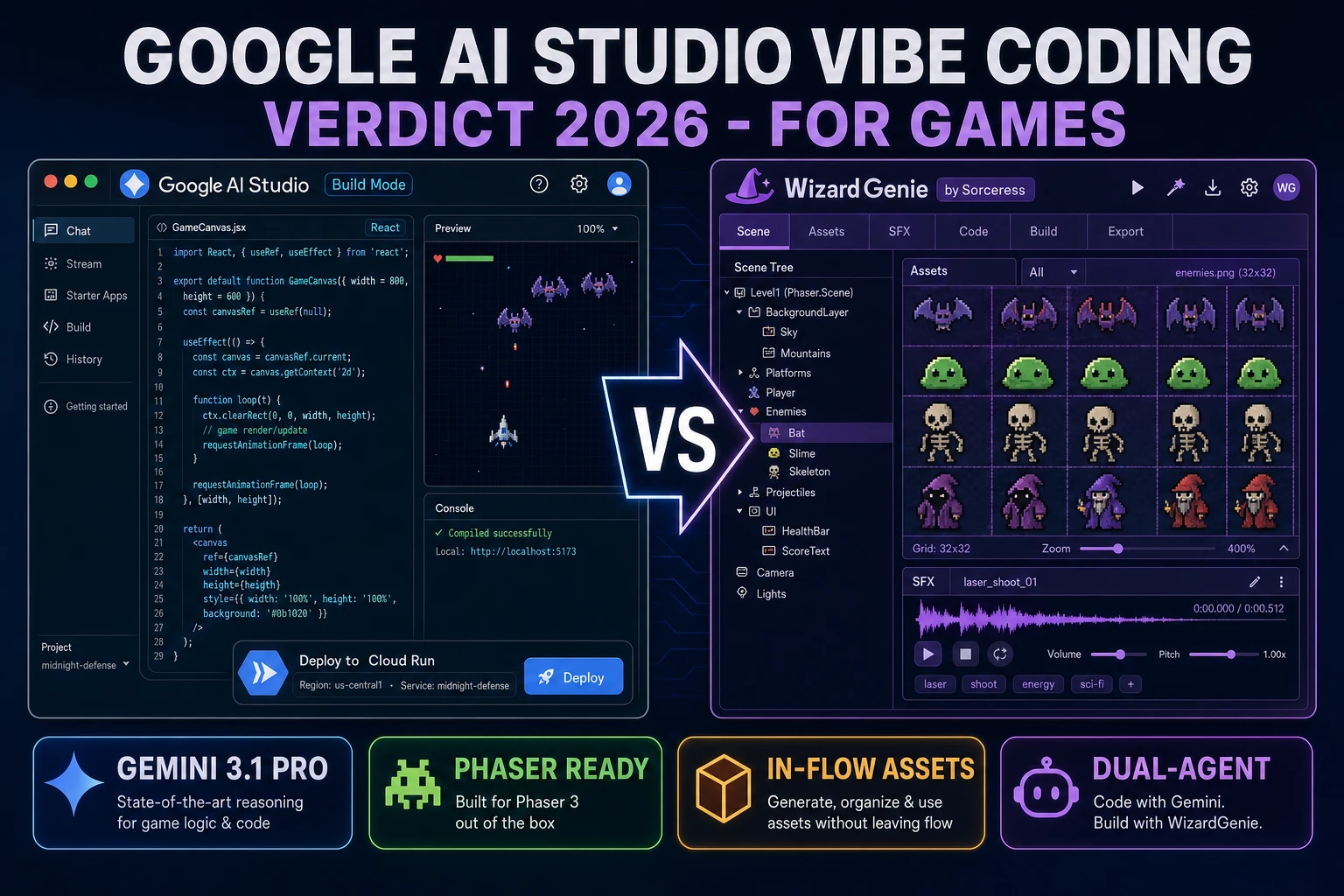
Most beginners who search "google ai studio vibe coding" want the same thing they liked about the ChatGPT canvas and the Claude artifact preview - a browser tab where you describe an app in plain English, watch a working React frontend and a Node.js backend appear beside the prompt, click a live preview to try it, and iterate by asking the agent to patch what did not work - not a full IDE, not a git repository, and not a deployment pipeline to sign into. Google shipped exactly that experience inside Google AI Studio in 2026, wired to the Gemini 3 family (Gemini 3.1 Pro for reasoning, Gemini 3.5 Flash for speed, Gemini 3.1 Flash-Lite for high-volume tasks - verified 2026-08-31 on the Gemini 3 model page inside AI Studio) and paired with a free Google Cloud Starter Tier that publishes up to two live apps without asking for a credit card, backed by Cloud Run, Firebase Authentication, Firestore, and Cloud SQL for PostgreSQL (verified 2026-08-31 in the official Starter Tier documentation on the Google Cloud docs site). That combination reads as one of the strongest one-shot prompt-to-app builders on the market for CRUD web apps. For game development specifically, the picture is more mixed - and this article is the honest end-to-end comparison of google ai studio vibe coding against a game-focused agent stack like Sorceress WizardGenie, so you can pick the right tool for the build in front of you.
What google ai studio vibe coding actually means in 2026
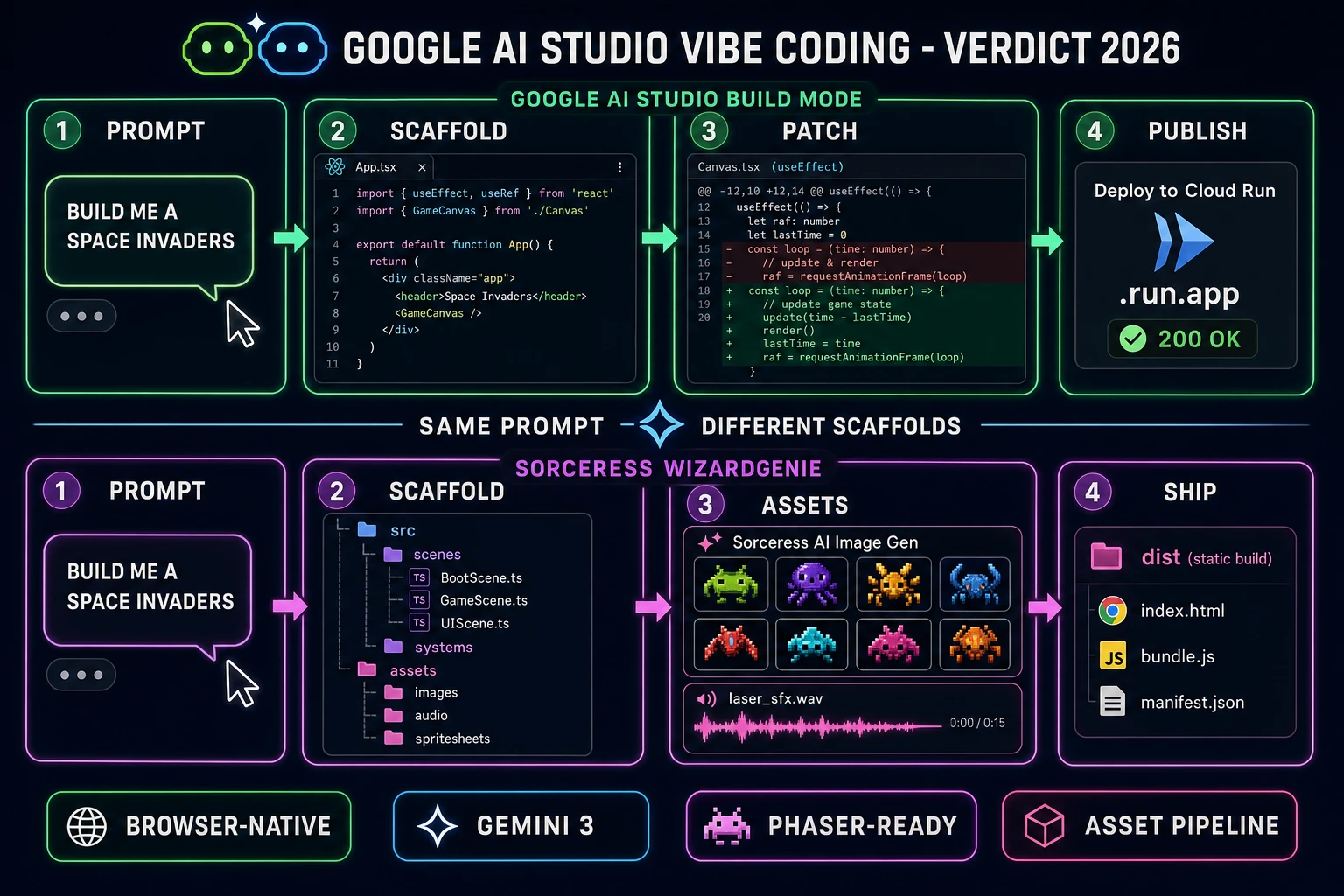
The phrase "google ai studio vibe coding" collapses three separate things into one query. The first is Build Mode inside Google AI Studio - the prompt-first surface where a developer types "build me a snake game" or "build me a habit tracker" and the browser agent scaffolds a React frontend plus a Node.js backend with a live preview panel to the right of the chat. The second is the Gemini API surface that Build Mode calls under the hood - the same API keys that expose Gemini 3.1 Pro, Gemini 3.5 Flash, and Gemini 3.1 Flash-Lite, verified 2026-08-31 on the Gemini 3 model page inside AI Studio, and paired with grounding via Google Search, code execution, URL context, and file search. The third is the deploy step - Publish inside Build Mode packages the app into Cloud Run behind Firebase Authentication and Firestore or Cloud SQL for PostgreSQL, and the Google Cloud Starter Tier grants an individual account up to two published apps with no billing setup (verified 2026-08-31 on the Google Cloud Starter Tier documentation page).
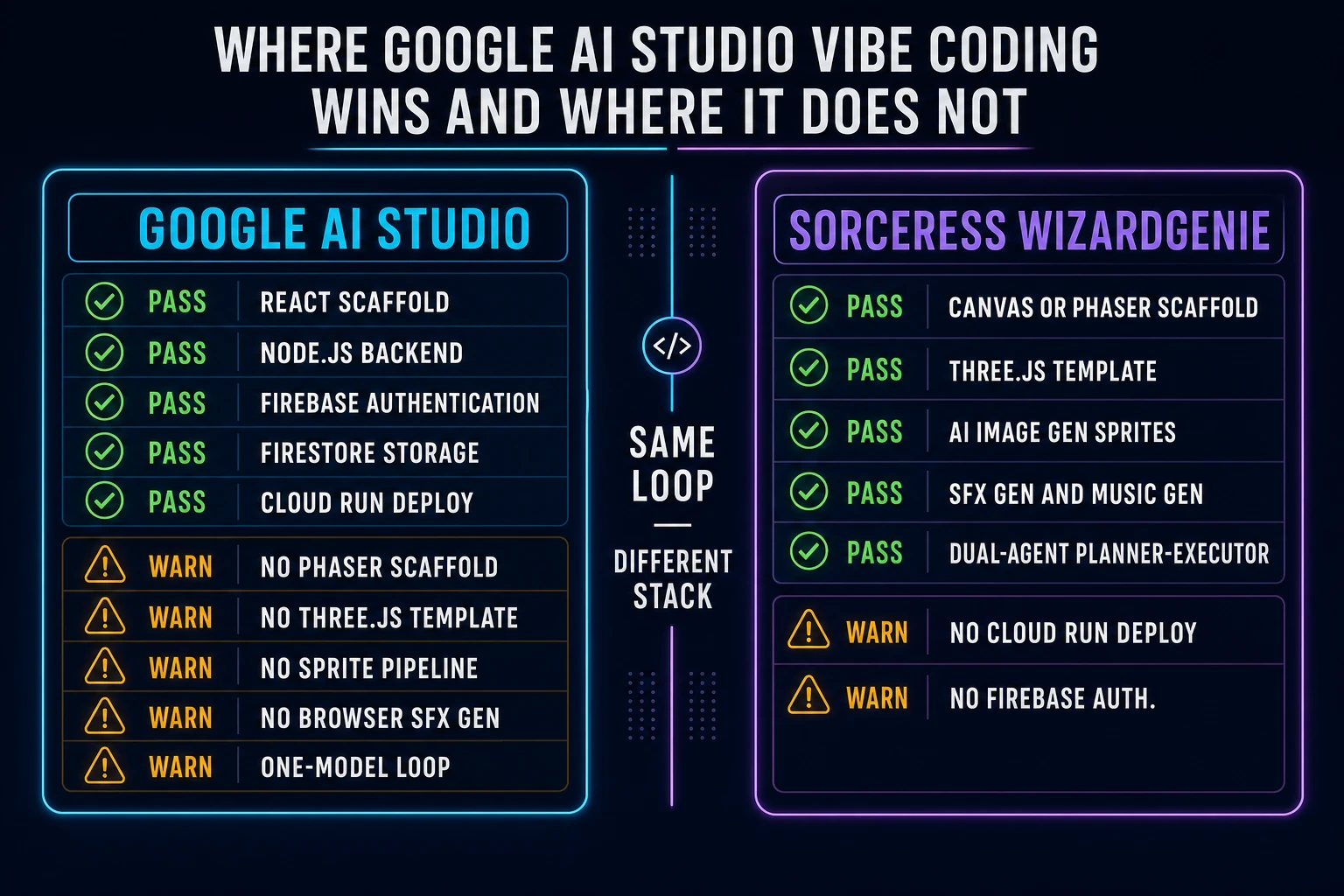
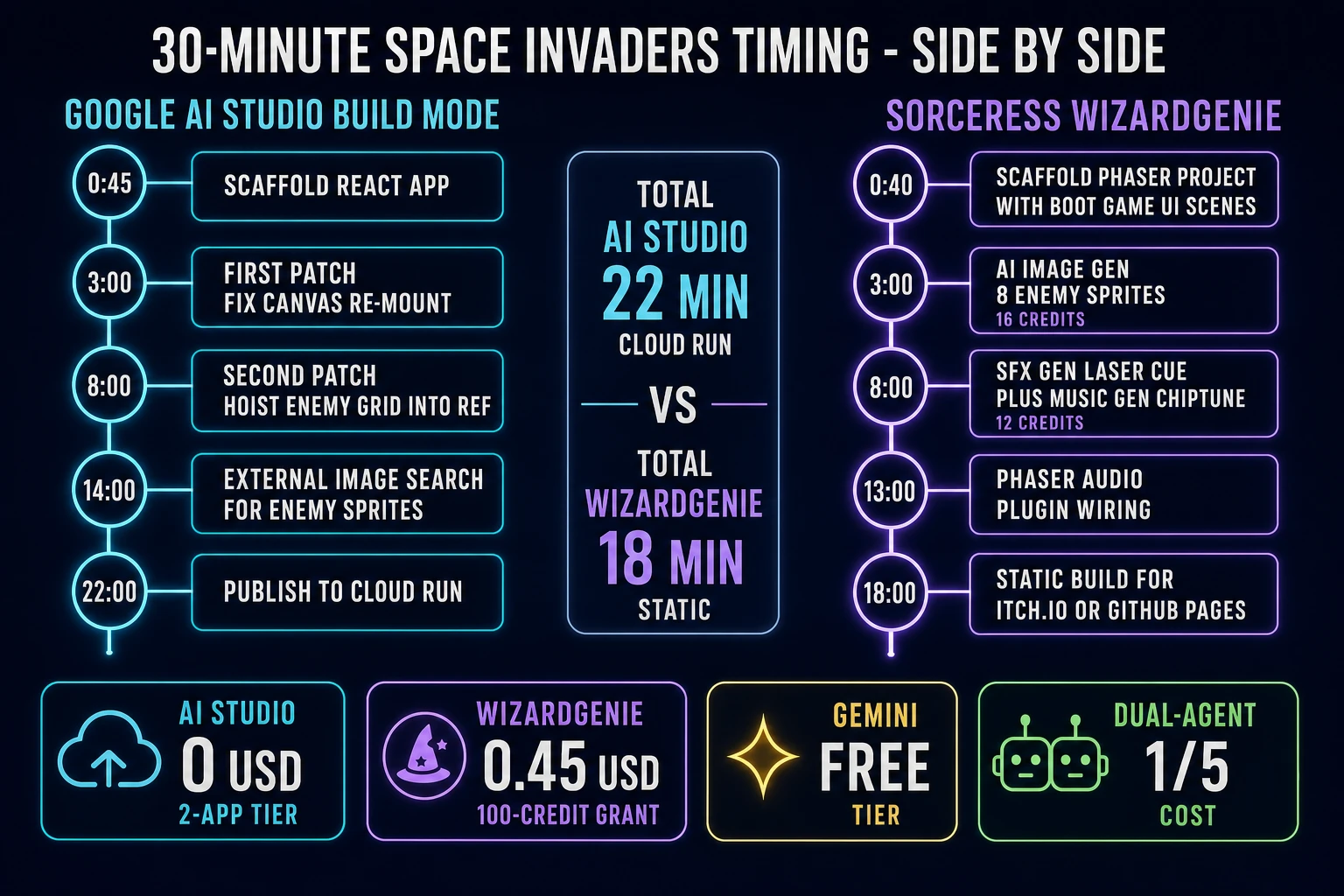
Set against the broader vibe-coding landscape the sibling choose a vibe coding tool guide walks through, the shape is familiar - describe intent, get a working app, patch by asking for changes, click Publish. What is new is the vertical integration - Google owns the model, the code execution sandbox, the auth, the database, and the compute in one flow. For a developer building an internal admin tool, a habit tracker, or a two-sided marketplace prototype, that is a genuine strength. The interesting question is whether it holds up when the prompt is "build me a Space Invaders in Phaser with a scrolling starfield background and eight enemy sprites."
The google ai studio vibe coding loop (prompt, run, patch, run)
Four moves per iteration. First, prompt - open Build Mode in Google AI Studio, type or paste the intent in natural language, and Build Mode picks Gemini 3.1 Pro (the coding-tuned reasoner) for the scaffold pass. Second, run - the live preview panel renders the React frontend inside an iframe against a preview Node.js backend that runs in a sandbox tied to the session; the developer clicks around, checks the layout, tests the happy path. Third, patch - the developer types the next instruction in the same chat ("add a login screen backed by Firebase Auth", "wire the leaderboard to Firestore", "make the character move on WASD"), and the agent edits the affected files in place, with a diff shown alongside. Fourth, run again - the live preview hot-reloads and the loop restarts. When the app is ready, Publish deploys it to Cloud Run under the Starter Tier.
The rhythm is the same beat every hosted agent surface uses in 2026, and it works. What is easy to miss is the ceiling built into the surface: the app is always React on the frontend and Node.js on the backend, wired to a specific Google Cloud stack. For a CRUD web app that is a feature, not a limit - it means the deploy path is one click. For a game project that wants a Phaser Scene manager, a Canvas tight-loop render, or a Three.js WebGL renderer, the same wiring is a hard steer away from the tools the browser-game ecosystem is actually built on.
Where google ai studio vibe coding wins
Four places Google AI Studio pulls ahead honestly. First, the free Starter Tier is a real free tier. Two published apps with no credit card, no time limit, and no throttle at zero traffic (Cloud Run scales to zero when idle, verified 2026-08-31 on the official Starter Tier documentation) - that is a stronger no-billing offer than any other hosted vibe-coding surface currently ships. Background on the underlying model family is documented on the Gemini language model page on Wikipedia (verified 2026-08-31), which traces Gemini 1 through the current Gemini 3 lineup as the successor to Google's Bard and PaLM 2 systems. For a prototype the developer wants to link on a resume or in a Discord DM, the friction cost is genuinely zero.
Second, Gemini 3.1 Pro is a legitimate frontier coding model, and Gemini 3.5 Flash is fast enough that most patch passes complete in under three seconds - the interactive loop feels responsive in a way that some competing agent surfaces do not. Third, the code-execution tool inside the Gemini API means the model can run its own Python or JavaScript for one-shot data tasks (parse this CSV, transform this JSON, chart these numbers) without a separate sandbox setup - useful when the app has a data-import step. Fourth, grounding with Google Search and URL context means the agent can pull live docs into the answer, which reduces the fabrication rate on library APIs that changed since training - a real GEO win for tutorial-driven builds.
None of this is a small deal for CRUD web apps. The point is that the same wins do not automatically translate to a game project.