Convert Image to 3D Model (Browser, GLB Out)

By Arron R.15 min read
Convert image to 3D model in 2026: one image into a flow-matching transformer, textured mesh out in 30 seconds. Sorceress 3D Studio runs six of these models in

Convert image to 3D model is the 2026 alternative to the pipelines that ran the last twenty years of real-time 3D content. You opened Blender (free but punishing), or you opened Maya (paid and even more punishing), and you sculpted a humanoid for a week. Or you photographed an object from eighty angles, fed the photos to RealityCapture or Reality Composer, and waited four hours for a noisy mesh that still needed retopology. The 2026 version of the same work is a single image, a single click, and a textured GLB in under a minute. This guide walks the browser pipeline end-to-end, every step verified May 22, 2026 against the live 3D Studio source.
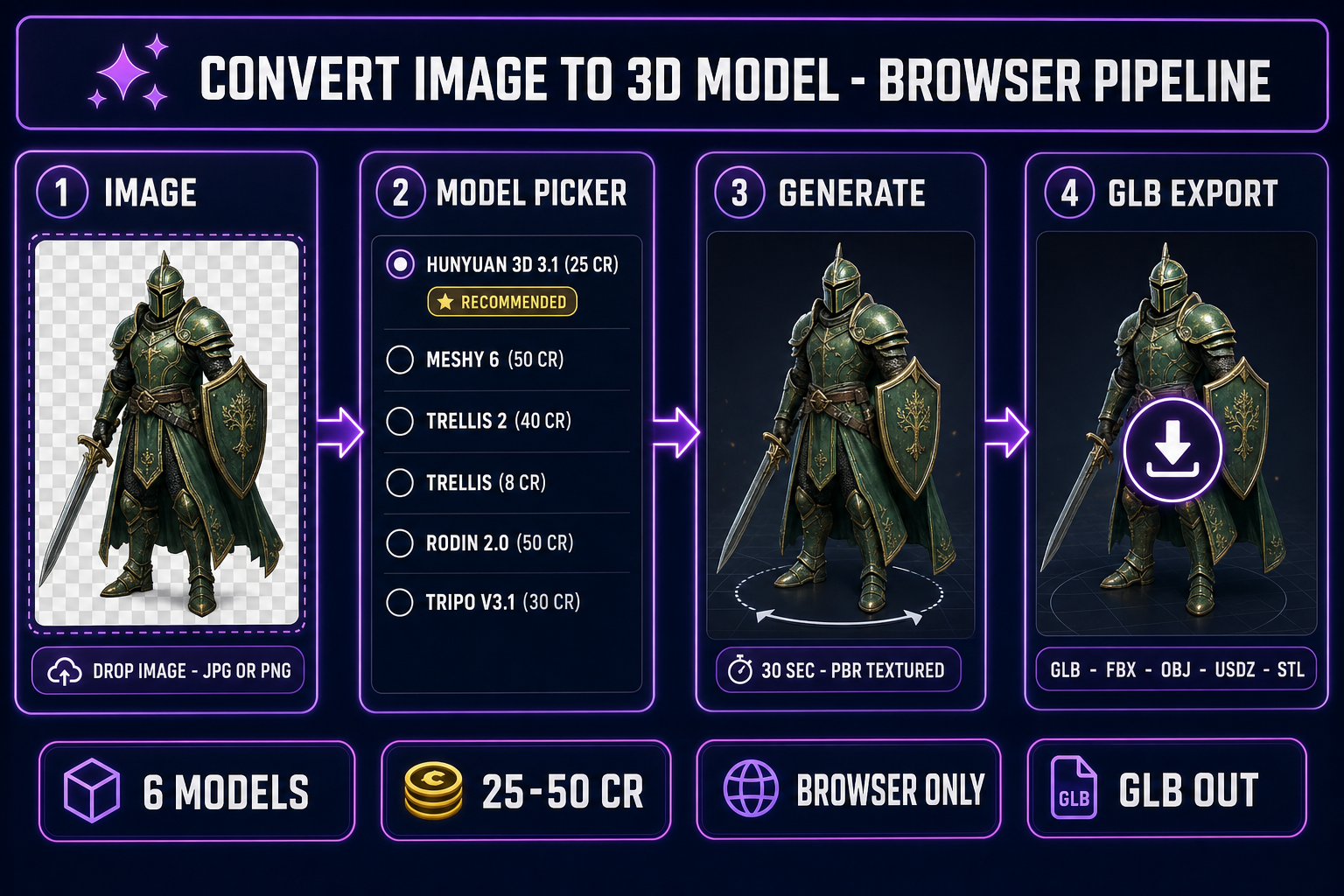
Convert image to 3D model browser pipeline: image upload to model picker to generate to GLB export with six 2026 models inside Sorceress 3D Studio
The four-stage browser pipeline to convert image to 3D model. Image upload, model picker, generate, GLB export — all inside 3D Studio in under 90 seconds.

What convert image to 3D model actually means in 2026

The phrase covers a single workflow with a sharp boundary. The input is exactly one image — a photograph, a concept-art illustration, a screenshot, a generated AI character render. The output is a real 3D mesh: vertices, faces, UV coordinates, plus a baked color texture, often a full PBR set (base color, metallic, roughness, normal, sometimes AO and emission), exported as GLB, FBX, OBJ, USDZ, or STL. The mesh is watertight or near-watertight, loads in any major game engine without a plugin, and renders correctly under whatever lighting the engine throws at it. That is the entire promise of the 2026 convert image to 3D model workflow.

The boundary that matters is the count of input images. Convert image to 3D model takes exactly one — that is the headline. Photogrammetry takes 30 to 200 images of the same object from different angles and reconstructs the geometry by triangulating the camera positions and the visible features across the image set. Multi-view 3D reconstruction (which Meshy 6 multi-image-to-3D and Tripo Multi View both support) takes 2 to 4 images — usually front, back, side — for a cleaner reconstruction than a single front-view shot. NeRF / Gaussian Splatting takes a video or a dense photo set and produces a volumetric representation rather than a polygon mesh. Convert image to 3D model is the single-image, polygon-mesh-out variant — the one the 2026 generative-3D models specifically target.

The technology under the hood is a flow-matching or diffusion transformer trained on millions of paired image-and-mesh examples. The model learns to invent the back of the object from learned 3D priors when the input image only shows the front. The priors are strongest on common subjects (humanoid characters, animals, vehicles, furniture, weapons) and weakest on rare or asymmetric assemblies. The 4-billion-parameter TRELLIS 2 model from Microsoft Research is the strongest 2026 prior in the panel — its O-Voxel architecture handles open surfaces (clothing, leaves), non-manifold geometry, and sharp features that the older iso-surface methods cannot.

The six models to convert image to 3D model in 2026 (inside 3D Studio)

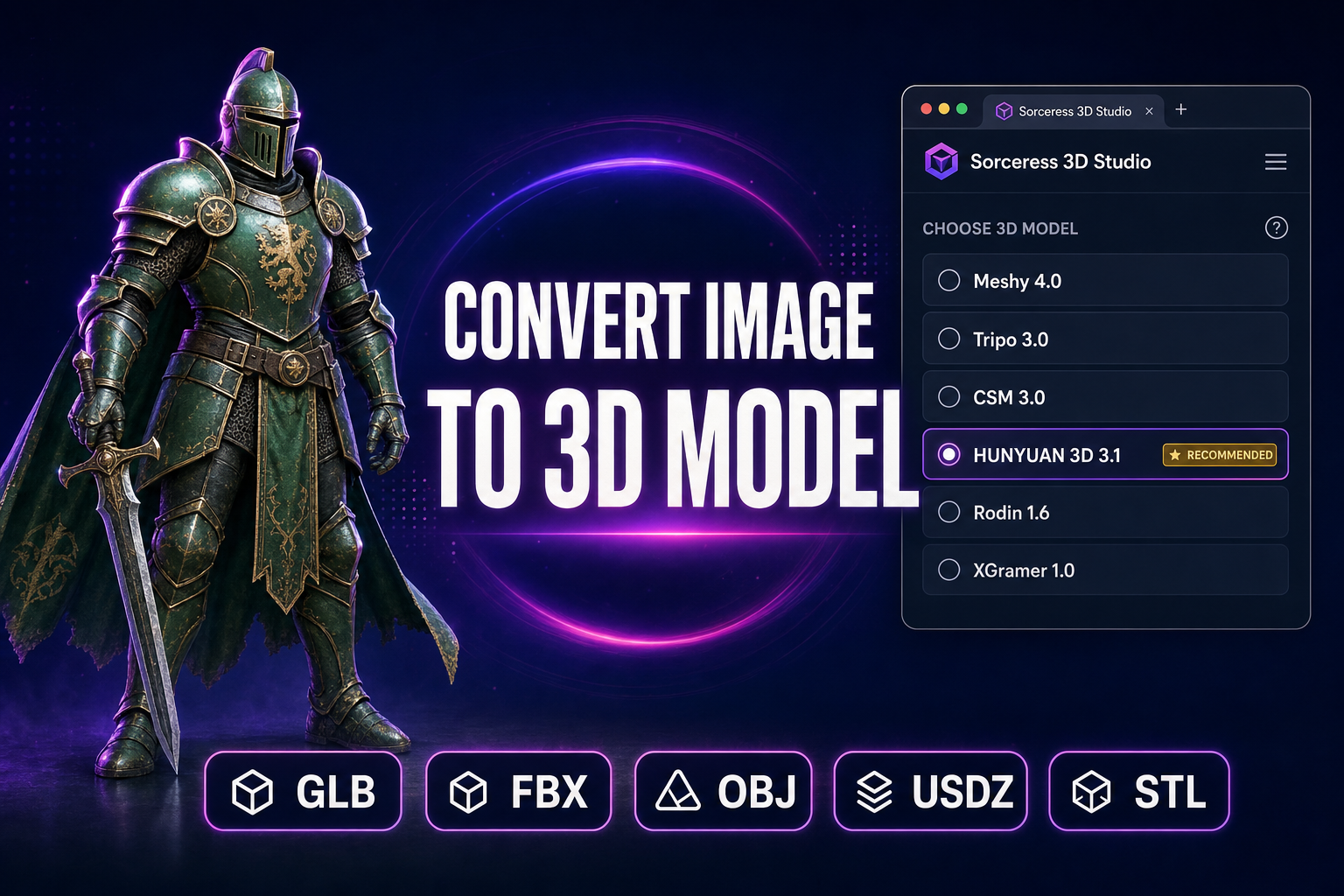
Sorceress 3D Studio ships six image-to-3D models in a single model picker, verified against the THREED_MODEL_ORDER array on lines 212-219 of src/lib/threed-models.ts on 2026-05-22. Each model has distinct strengths; the right pick depends on the input image and the downstream use case.
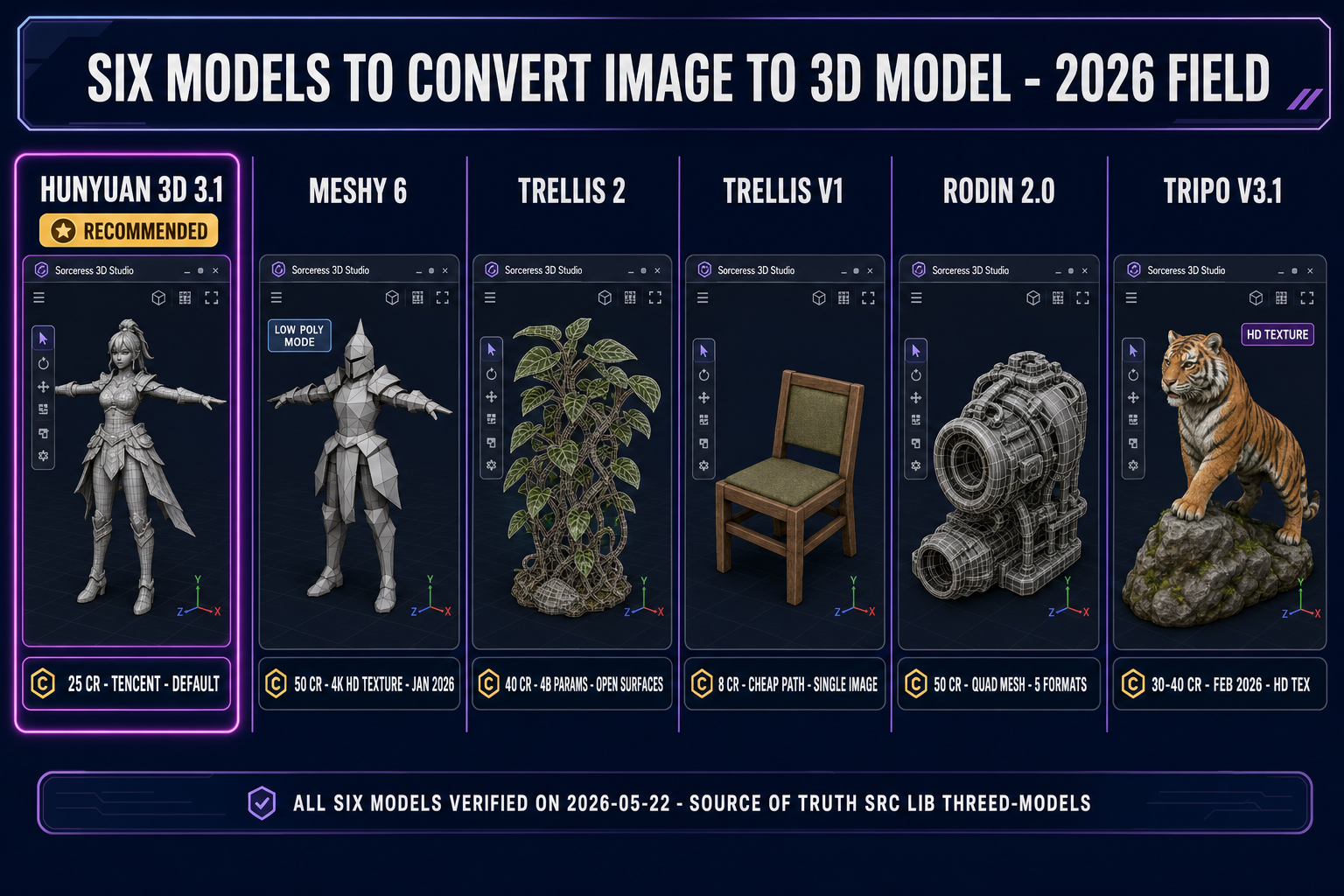
Convert image to 3D model field comparison in 2026: six models inside Sorceress 3D Studio — Hunyuan 3D 3.1, Meshy 6, TRELLIS 2, TRELLIS v1, Rodin 2.0, Tripo v3.1
The six models that ship today inside 3D Studio to convert image to 3D model. Hunyuan 3D 3.1 is the recommended default at 25 credits per generation.

Hunyuan 3D 3.1 is the Tencent generative-3D model, verified active on Replicate at replicate.com/tencent/hunyuan-3d-3.1 on 2026-05-22. It is the default recommended pick inside 3D Studio — the only model in the RECOMMENDED_MODELS set on line 221 of src/lib/threed-models.ts. The cost is 25 credits per generation, verified against line 202. It supports both image-to-3D and text-to-3D input modes. PBR materials are enabled by default. The face_count parameter ranges from 40,000 to 1.5 million, with the default at the maximum for the best texture quality (verified against line 207). It is the right pick for the first run on any new input image — the geometry-plus-texture balance is the strongest in the panel at the lowest credit cost.

Meshy 6 — the texture-quality pick (50 credits base, plus 25 for texture, plus 13 for remesh)

Meshy 6 was released on January 18, 2026 — verified against meshy.ai/blog/meshy-6-launch on 2026-05-22. The launch announcement names the headline improvements: cleaner geometry for characters and organic models, sharper edges and clearer silhouettes for mechanical models, a dedicated Low Poly Mode for game developers, and multi-color 3D printing with 3MF export. The model wins when texture quality matters more than budget. The Sorceress 3D Studio cost is 50 credits base plus 25 credits for textures plus 13 credits for remesh — verified against the getCredits function on lines 48-53 of src/lib/threed-models.ts. Meshy 6 is the only model in the panel that exposes the 4K hd_texture base color (verified against docs.meshy.ai); the standard texture is 2K and PBR maps are always 2K. The remove_lighting parameter (defaults true) strips baked highlights from the input image for cleaner results under the game engine lighting.

TRELLIS 2 — the complex-topology pick (40 credits at 1024p default)

TRELLIS 2 is the Microsoft Research generative-3D model, 4 billion parameters — verified against github.com/microsoft/TRELLIS.2 + huggingface.co/microsoft/TRELLIS.2-4B + paper arxiv 2512.14692 (published December 16, 2025) on 2026-05-22. The model uses a novel field-free sparse voxel structure called O-Voxel — distinct from the SDF and Flexicubes iso-surface methods the older generation relied on. The O-Voxel structure handles three input categories the older models struggle with: open surfaces (clothing, leaves), non-manifold geometry, and internal enclosed structures, all without lossy conversion. Generation speed on an H100 GPU runs roughly 3 seconds at 512 cubed resolution, 17 seconds at 1024 cubed (the default in Sorceress 3D Studio), and 60 seconds at 1536 cubed. The Sorceress cost scales with resolution: 35 credits at 512p, 40 credits at 1024p, 45 credits at 1536p — verified against the getCredits function on lines 154-162 of src/lib/threed-models.ts. PBR materials including transparency and translucency are supported natively.

TRELLIS v1 — the cheap-path pick (8 credits)

The original TRELLIS model from Microsoft Research, routed through Replicate via firtoz/trellis. The Sorceress cost is 8 credits per generation — the cheapest path in the panel, verified against line 111 of src/lib/threed-models.ts. Image-to-3D only (no text-to-3D). The parameter surface exposes structure sampling steps, latent sampling steps, structure guidance, latent guidance, texture size (512 to 2048), and mesh simplification (0.90 to 0.98). TRELLIS v1 is the right pick when iterating fast on prompts or budget matters more than precision — 12 generations on the starter allowance vs 4 generations on Hunyuan 3D 3.1.

Rodin 2.0 — the quad-mesh pick (50 credits)

Rodin 2.0 (Hyper3D Gen-2) is routed through Replicate via hyper3d/rodin. The Sorceress cost is 50 credits — verified against line 91 of src/lib/threed-models.ts. The model wins on two specific features that none of the other five expose. First, the Mesh Mode toggle lets the user pick Quad (clean quadrilateral faces, ideal for subdivision and animation rigging) vs Raw (triangle mesh, standard game-engine format). Quad mode at High density produces 50K faces, Medium 18K, Low 8K, Extra-Low 4K. Second, the geometry_file_format parameter exposes five output formats from the single job: GLB (default), FBX, OBJ, USDZ (Apple AR), STL (3D printing) — no other model in the panel exports USDZ or STL directly without a conversion step. The Material toggle picks PBR (full texture set), Shaded (single base-color texture with baked lighting, stylized), All (both), or None (geometry only).

Tripo v3.1 — the HD-texture pick (30 cr no texture, 40 cr with HD)

Tripo v3.1 was released on February 11, 2026 — verified against runware.ai/docs/models/tripo-v3-1 on 2026-05-22. The Sorceress 3D Studio cost is 30 credits image-to-3D without texture, 40 credits with HD texture, plus 5 credits for the optional Quad Mesh surcharge — verified against the getCredits function on lines 190-195 of src/lib/threed-models.ts. The model_version on the Tripo v2/openapi/task endpoint is v3.1-20260211, matching the release date. The HD texture path is the headline differentiator vs the standard texture — the v3.1 release was specifically a texture-quality update. Tripo 3.1 Multi View was introduced March 11, 2026 (separately) for multi-image-to-3D reconstruction. Both image-to-3D and multi-image-to-3D modes are exposed inside 3D Studio.

The browser-based convert image to 3D model pipeline (no install, no GPU at home)

The entire convert image to 3D model pipeline runs in a single browser tab. No local install, no GPU at home, no upstream account at Meshy or Tripo or Hyper3D. The Sorceress 3D Studio panel handles all six upstream providers through one unified credit budget on the Sorceress account. Every signed-in user gets 100 starter credits — verified against src/app/_home-v2/page.tsx line 241 plus src/app/_home-v2/_components/HomeHero.tsx line 701 on 2026-05-22. At Hunyuan 3D 3.1 pricing (25 credits per generation), the starter allowance covers exactly 4 generations. At TRELLIS v1 pricing (8 credits), the starter allowance covers 12 generations. The honest budget for the first day of work is somewhere in between: one Hunyuan 3D 3.1 pass for the headline-quality mesh, then several TRELLIS v1 iterations to refine the input image prompt before re-running the higher-cost models.

The architecture is intentionally narrow. The 3D Studio panel does one thing: it accepts an image, runs it through the chosen model, and returns a downloadable mesh. Texturing, rigging, retargeting, and animation are downstream steps in adjacent Sorceress tools — Auto-Rigging for the humanoid skeleton, 3D Studio Animate for text-to-motion clips, Material Forge for PBR refinement, 3D to 2D for rendering the mesh back out as a sprite sheet. Each tool composes with the convert image to 3D model output without a manual file-format conversion step. The end-to-end pipeline from image to rigged, animated, exported character is covered separately in the full image-to-3D pipeline guide; this article focuses on the convert step specifically.
The five-step convert image to 3D model workflow

Five steps in a single browser tab. Every step is interactive, every step is undoable, every step except the generation itself is free.

Step 1 — Upload the image (or generate one)

Open 3D Studio. The left rail shows the input dropzone. Drop a JPG or PNG. Three things matter for clean output. First, isolate the subject — a white or transparent background works far better than a busy scene. The convert image to 3D model models are trained to lock onto a single foreground subject; a cluttered background bleeds into the geometry. Second, frame the subject head-on or slightly off-axis — a three-quarter view (35-45 degrees off front) gives the model the most information about both the front and a hint of the side. Pure profile views work worse because they hide the front entirely. Third, choose a resolution between 1024x1024 and 2048x2048 — the models downsample anything larger and upscale anything smaller, so the sweet spot is somewhere in the middle.

If you do not have an input image, generate one first with AI Image Gen using a high-quality model (Nano Banana Pro, GPT Image 2, or Flux 2 Pro). A prompt like a chunky green orc warrior in T-pose, full body, plain white background, concept art style produces an image that the convert image to 3D model models handle cleanly. Push the generated image through BG Remover for a perfect alpha mask before sending it to 3D Studio.

Step 2 — Pick the model

The model picker is the second panel. Six radio buttons: Hunyuan 3D 3.1 (recommended default, 25 credits), Meshy 6 (50 credits), TRELLIS 2 (40 credits at 1024p), TRELLIS (8 credits), Rodin 2.0 (50 credits), Tripo v3.1 (30 credits no texture, 40 credits with HD texture). For the first run on any new image, leave Hunyuan 3D 3.1 selected — it is the recommended default for a reason. Switch to Meshy 6 only if the input has fine surface detail that the default pass missed. Switch to TRELLIS 2 if the subject has complex topology (clothing folds, leaves, hair). Switch to Tripo v3.1 if the texture quality is the bottleneck. Switch to TRELLIS v1 if you are iterating on the prompt and burning credits on the high-cost models would be wasteful.

Step 3 — Set the parameters (or accept the defaults)

Each model exposes its own parameter set. For Hunyuan 3D 3.1, the meaningful knobs are Generate Type (Normal or Geometry) and PBR Materials (default on). Leave both at defaults for the first pass. For Meshy 6, the meaningful knobs are Pose Mode (force A-pose or T-pose for rigging-ready characters), Topology (Triangle for game engines, Quad for subdivision), and the should_remesh toggle. For TRELLIS 2, the meaningful knob is Resolution (512, 1024, 1536) — bump to 1536 for hero assets, drop to 512 for fast iteration. For Tripo v3.1, the meaningful knob is Texture (no, standard, HD) — HD costs the same as standard upstream so it is almost always the right pick.

Step 4 — Generate (30-90 seconds, 8-50 credits)

Click Generate. The job queues, the upstream provider runs, and the mesh appears in the gallery on the right with a live 3D preview. Total wall-clock time depends on the model: TRELLIS 2 returns in 3-60 seconds depending on the resolution, Hunyuan 3D 3.1 in 30-60 seconds, Meshy 6 in 30-90 seconds depending on whether hd_texture is on, Tripo v3.1 in 20-45 seconds. Inspect the preview from multiple angles — rotate the mesh with the orbit controls, zoom in on the back of the head or the underside of the object to check the priors held up. If the back is malformed, the right next step is either to generate a back-view image and re-run with Meshy 6 multi-image-to-3D or Tripo Multi View, or to switch to TRELLIS 2 which has the strongest single-image prior.

Step 5 — Export the GLB

Click Export. The default format is GLB — the binary container for glTF 2.0 from the Khronos Group spec. The other format options on the Rodin 2.0 and Meshy 6 jobs are FBX (Unreal-native), OBJ (universal but text-only, no animations or materials), USDZ (Apple AR), STL (3D printing, no textures), and 3MF (multi-color 3D printing, Meshy 6 only). For 99% of game-engine workflows, GLB is the right pick. Download the file. The convert image to 3D model output is now a single binary blob on your local disk, ready for any engine.

From convert image to 3D model output to Three.js r184 (and the other engines)

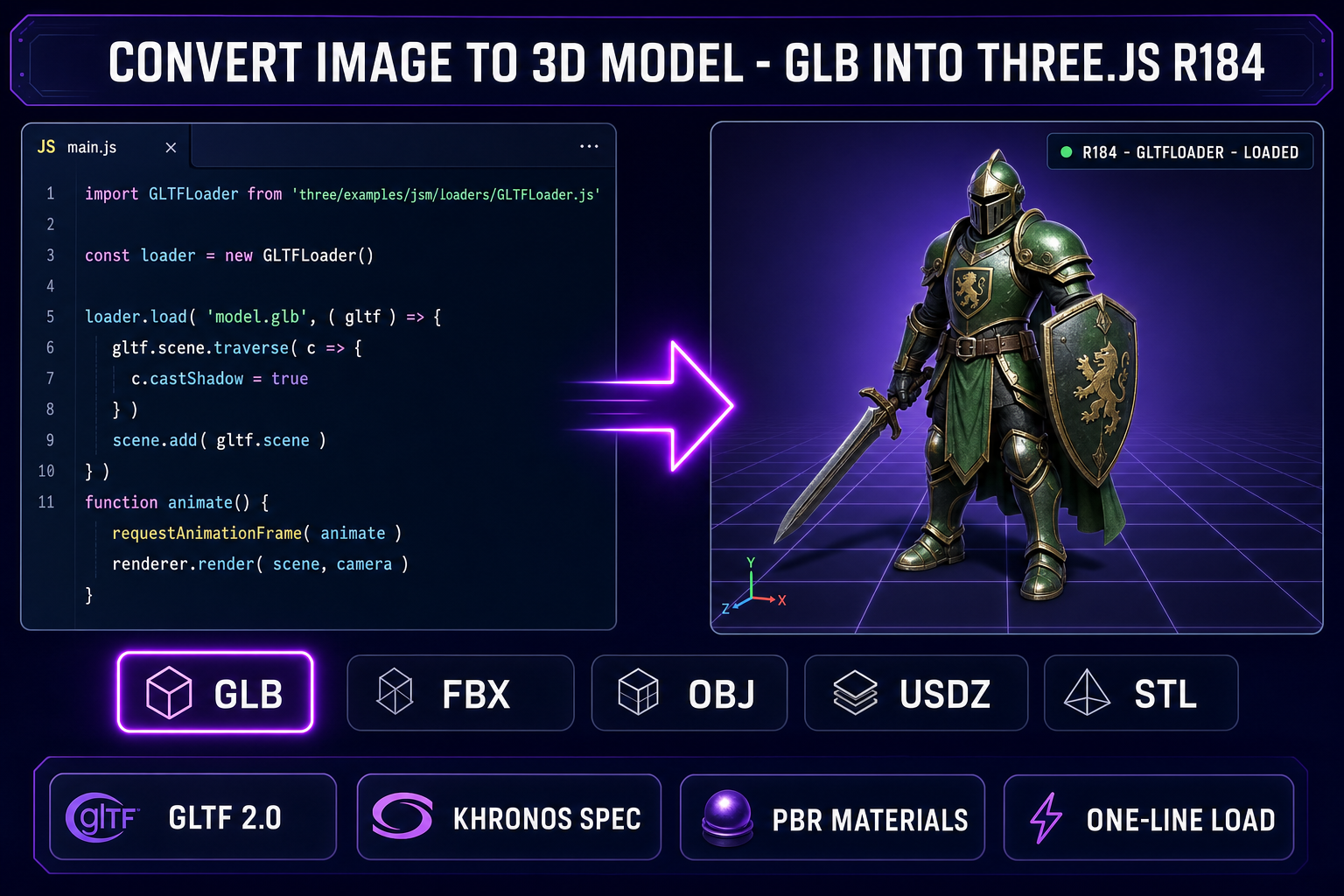
Three.js r184 (released April 16, 2026) loads the GLB output of the convert image to 3D model pipeline in one line, using the GLTFLoader from the three.js examples. Verified against threejs.org/docs on 2026-05-22:

// Load the GLB from the convert image to 3D model export
import { GLTFLoader } from 'three/addons/loaders/GLTFLoader.js';

const loader = new GLTFLoader();
loader.load('models/character.glb', (gltf) => {
  scene.add(gltf.scene);
});

That is the entire integration. The GLB carries the geometry, the UV layout, the PBR materials, and any baked animations in a single file. Three.js parses the file, builds the scene graph, attaches the materials to the meshes, and the next render frame draws the character correctly under whatever lighting the scene defines. For a character that needs to play a walk cycle, add an AnimationMixer from the gltf.animations array and call mixer.update(delta) inside the render loop — the same pattern documented in the Three.js r184 examples.

Convert image to 3D model GLB export loaded into a Three.js r184 scene with GLTFLoader, PBR materials, and the green-armored knight character mesh on a grid floor
The GLB export from the convert image to 3D model pipeline loads in one line with the Three.js r184 GLTFLoader. The PBR materials, the UV layout, and any baked animations all ship inside the single binary file.

For Unity 6, drag the GLB into the Assets panel and Unity imports it as a prefab with materials and meshes already wired. Unity 6 supports glTF natively via the com.unity.cloud.gltfast package — no FBX conversion step. For Unreal 5.6, the glTF Importer is built in since 5.0; drop the GLB into the Content Browser and Unreal generates the static mesh plus material instances. For Godot 4, drop the GLB into the FileSystem panel and Godot imports it as a PackedScene with embedded materials. All four engines treat the GLB from the convert image to 3D model pipeline as a first-class asset.

Five mistakes that ruin convert image to 3D model results

  1. Feeding a cluttered background. The convert image to 3D model models lock onto whatever the strongest contiguous foreground region is. If the character stands in front of a forest, the closer trees become part of the mesh. Push the input through BG Remover first — a clean alpha mask on a transparent background produces a clean mesh.
  2. Using a profile view as the only input. Pure side-views hide the front of the subject entirely. The single-image priors invent both the front and the back of the object, and the result is often a flat or doubled mesh. Use a front-facing or three-quarter view for the convert image to 3D model input. If you must work from a profile, use multi-image-to-3D (Meshy 6 or Tripo Multi View) with at least one front view added.
  3. Picking the wrong model for the subject type. Hunyuan 3D 3.1 is the strongest default, but it is not the strongest for every subject. Hard-surface mechanical objects (vehicles, weapons, tools) run cleaner on Meshy 6 with the sharper-edges path. Open-topology subjects (clothing with cloth flaps, plants with leaves) run cleaner on TRELLIS 2 with the O-Voxel field-free structure. Stylized characters that need a Quad mesh for rigging run cleaner on Rodin 2.0 in Quad mode.
  4. Skipping the pose-mode toggle on Meshy 6. The Pose Mode parameter on Meshy 6 lets the user force the generated character into A-pose or T-pose. If the input character is in a dynamic action pose (mid-jump, mid-swing), and you want a rig-ready mesh, set Pose Mode to t-pose explicitly. The model will reorient the geometry into a T-pose at generation time, which is what Auto-Rigging needs as input.
  5. Burning credits on iteration with the high-cost models. Convert image to 3D model results vary run-to-run. The first pass on Hunyuan 3D 3.1 might miss a detail; rerunning it costs another 25 credits. If you are iterating on the input prompt or refining the source image, switch to TRELLIS v1 (8 credits) for the iteration loop, then return to Hunyuan 3D 3.1 or Meshy 6 for the final hero pass.

The verdict — when convert image to 3D model is the right pick

The convert image to 3D model workflow is the right pick when three conditions hold. First, you have exactly one image (or two to four images for the multi-image path) of the subject — not 30+ photos for photogrammetry. Second, the subject is a class the 2026 priors handle well: humanoid characters, animals, vehicles, common props. Third, you want a polygon mesh out (not a volumetric NeRF, not a Gaussian splat), exported as GLB or FBX, ready to drop into Unity, Unreal, Godot, or Three.js.

It is not the right pick when (1) you need millimetre-accurate geometry for engineering or 3D printing of a real-world part (photogrammetry or a 3D scanner wins), (2) the subject is asymmetric and the back-view matters and you only have a front view (generate the back-view first, then use multi-image-to-3D), or (3) you need a fully retopologized, animation-ready quad mesh straight from the model (use Rodin 2.0 in Quad mode for the closest approximation, but plan for a Blender retopology pass on hero assets).

For the core game-development use case — taking a concept art illustration or a generated character render and turning it into a textured mesh that loads in an engine — the Sorceress 3D Studio convert image to 3D model pipeline is the cleanest browser-based path in May 2026. Six models, one credit budget, one click, one GLB. Compare that to the time investment of hand-modeling the same character in Blender (4-20 hours depending on skill) or running a photogrammetry rig with a turntable (30-60 minutes of photo capture plus an hour of reconstruction), and the convert image to 3D model path is the right on-ramp for any project that needs characters in the engine this week, not next month.

For deeper background on the related image-to-3D topics, see the full image-to-3D pipeline guide, the how-to-turn-an-image-into-a-3d-model walkthrough, the Meshy deep-dive, the Tripo deep-dive, the six-model comparison post, and the Makerworld GLB-path guide. For a tour of the rest of the Sorceress toolset, see the tools guide.

Frequently Asked Questions

What does convert image to 3D model actually mean in 2026?

It means feeding a single 2D image into a generative 3D model and getting back a watertight or near-watertight textured mesh in a single API call. The mesh has real geometry — vertices, faces, UVs — plus a baked color texture, often a full PBR set (base color, metallic, roughness, normal), and exports as GLB, FBX, OBJ, USDZ, or STL. The five workhorse 2026 models inside Sorceress 3D Studio are Hunyuan 3D 3.1 (Tencent), Meshy 6 (released January 18, 2026; verified against meshy.ai/blog/meshy-6-launch on 2026-05-22), TRELLIS 2 (Microsoft Research 4B parameters; verified against github.com/microsoft/TRELLIS.2 plus huggingface.co/microsoft/TRELLIS.2-4B plus paper arxiv 2512.14692 published December 16, 2025), TRELLIS v1 (the original Microsoft model), Rodin 2.0 / Hyper3D Gen-2 (routed via Replicate hyper3d/rodin), and Tripo v3.1 (released February 11, 2026; model_version v3.1-20260211). The distinction from photogrammetry matters: photogrammetry needs 30 to 200 photos of the same object from different angles and a server-side reconstruction step; convert image to 3D model needs exactly one photo or one illustration, and the model invents the back of the object from learned 3D priors.

Which is the best model to convert image to 3D model in 2026?

There is no single best — there is a best-for-your-input. Hunyuan 3D 3.1 (25 credits in Sorceress 3D Studio, verified against src/lib/threed-models.ts line 202 on 2026-05-22) is the default recommended pick (RECOMMENDED_MODELS set, verified line 221) because it ships the strongest geometry-plus-texture balance at the lowest cost in the panel. Meshy 6 (50 base credits plus 25 texture plus 13 remesh) wins when you need the Low Poly Mode optimized for real-time game performance or the 4K hd_texture base color (the latter only available on Meshy 6 plus latest per docs.meshy.ai). TRELLIS 2 (40 credits at 1024p default, 35 at 512p, 45 at 1536p) is the right pick when your input image has open surfaces (clothing, leaves), non-manifold geometry, or fine sharp features — the O-Voxel structure handles all three without lossy iso-surface conversion. Rodin 2.0 (50 credits) wins when you want a Quad mesh topology for clean subdivision and animation rigging. Tripo v3.1 (30 cr no-texture, 40 cr with HD texture) wins when you want HD textures specifically — the v3.1-20260211 release is texture-quality focused. TRELLIS v1 (8 credits) is the cheap path when budget matters more than precision.

How long does it take to convert image to 3D model in the browser?

The wall-clock time depends on the model and the input image. TRELLIS 2 generation on H100 GPUs takes approximately 3 seconds at 512 cubed resolution, 17 seconds at 1024 cubed (the default in Sorceress 3D Studio), and 60 seconds at 1536 cubed (verified against 3dtrellis.com on 2026-05-22). Hunyuan 3D 3.1 typically returns inside 30 to 60 seconds via the Replicate endpoint. Meshy 6 is similar — 30 to 90 seconds depending on whether you enable hd_texture (4K base color) and the remesh phase. Tripo v3.1 is the fastest of the texture-rich models — typically 20 to 45 seconds for the standard texture path. The Sorceress UI queues the job, polls the upstream provider, and shows a live preview when the mesh arrives. The total convert image to 3D model wall-time including the file-upload step is usually under 90 seconds for any of the six models.

Do I need a paid Meshy or Tripo account to convert image to 3D model?

Not through Sorceress 3D Studio. The 3D Studio panel routes every generation through one unified credit budget on the Sorceress account — there is no Meshy account, no Tripo account, no Hyper3D account, no Hugging Face token, no Replicate billing setup required from the user. Every signed-in user gets 100 starter credits (verified against src/app/_home-v2/page.tsx line 241 plus src/app/_home-v2/_components/HomeHero.tsx line 701 on 2026-05-22). At Hunyuan 3D 3.1 pricing (25 credits per generation, verified against src/lib/threed-models.ts line 202), the starter allowance covers exactly 4 generations. At TRELLIS v1 pricing (8 credits, verified line 111), the starter allowance covers 12 generations. The fastest free convert image to 3D model path inside Sorceress is therefore Hunyuan 3D 3.1 for the headline-quality first run, then TRELLIS v1 for cheap iteration. Direct accounts at Meshy (starter tier at meshy.ai) or Tripo (per-generation pricing at tripo3d.ai) are alternatives for users who want to bypass Sorceress, but the unified-billing convenience of 3D Studio is the typical win.

What is the GLB format and why is it the default convert image to 3D model output?

GLB is the binary container for glTF 2.0 — the Khronos Group royalty-free, vendor-neutral 3D asset format. A GLB file is a single binary blob that holds the mesh geometry (vertices, faces, normals, UVs), the textures (base color, metallic, roughness, normal, AO, emission), the materials (PBR descriptors), the rig (skeleton plus skin weights if present), and the animations (clips plus keyframes). Everything ships in one file the game engine loads with a single API call. Sorceress 3D Studio defaults every convert image to 3D model job to GLB output because (1) Unity 6, Unreal 5.6, and Godot 4 all import GLB natively without a plugin, (2) Three.js r184 (verified against threejs.org docs on 2026-05-22) loads GLB in one line with GLTFLoader, (3) the Apple USDZ pipeline and the Microsoft 3D Viewer both accept GLB as a source, and (4) the single-file delivery makes hosting on Backblaze B2 or any static CDN trivial. The other formats — FBX, OBJ, USDZ, STL, 3MF — are all available from the same Meshy 6 or Rodin 2.0 job by setting target_formats; GLB is just the default.

Will the convert image to 3D model output have a clean back when the input only shows the front?

Sometimes — that is the honest answer. Single-image convert image to 3D model models invent the back of the object from learned 3D priors. The priors are strongest on humanoid characters (heads, bodies, full-body characters in T-pose or A-pose), animals, vehicles, and common props (furniture, tools, weapons). The priors weaken on rare objects, asymmetric assemblies, and reflective surfaces. TRELLIS 2 has the strongest 4B-parameter prior in the 2026 lineup (verified against the paper arxiv 2512.14692 on 2026-05-22) — it generates plausible back-views on a wider range of inputs than the older models. Meshy 6 multi-image-to-3D and Tripo Multi View (released March 11, 2026) let you upload front plus back plus side views together for a much cleaner reconstruction when you have multiple references — both are exposed in Sorceress 3D Studio under the multi-image-to-3d input mode. For a single-image input where the back-view matters (a character with detailed clothing on the back, a weapon with engravings on both sides), the right play is to generate the back-view with AI Image Gen first, then feed both views to Meshy 6 or Tripo Multi View as a multi-image job.

Sources

  1. Meshy 6 launch announcement (Meshy)
  2. TRELLIS 2 GitHub (Microsoft Research)
  3. TRELLIS.2-4B model card (Hugging Face)
  4. Hunyuan 3D 3.1 on Replicate (Tencent)
  5. glTF 2.0 specification (Khronos Group)
  6. Three.js GLTFLoader documentation
  7. glTF (Wikipedia)
  8. Photogrammetry (Wikipedia)
Written by Arron R.·3,401 words·15 min read

Related posts