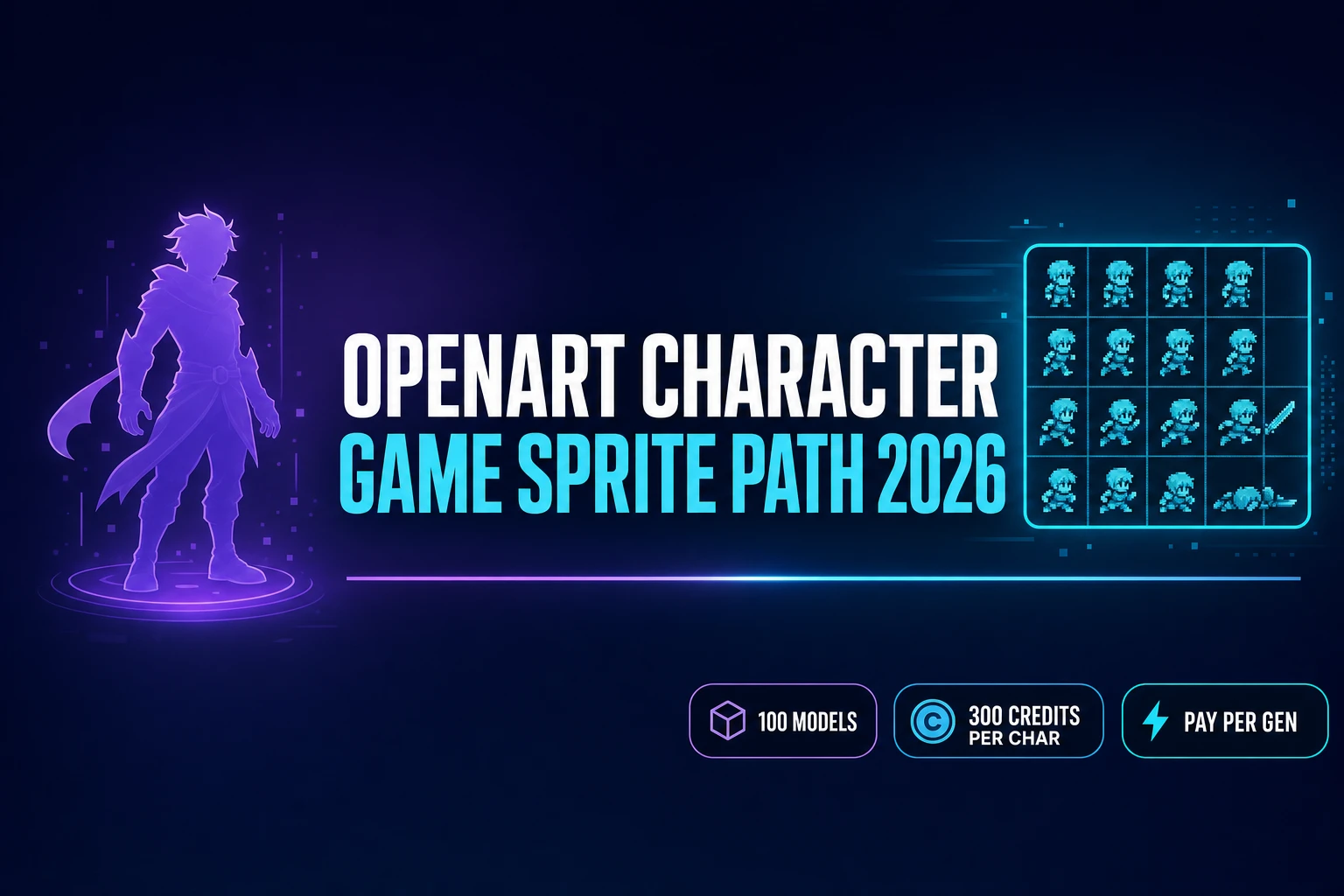
Vet OpenArt AI Character Generator (Game Sprite Path 2026)

By Arron R.14 min read
The OpenArt AI character generator bundles 100+ AI models at $7 per month (annual) for illustration, with 300 credits per consistent character. Sorceress runs t

The search intent for openart ai character generator in 2026 is almost always the same underlying question: is the OpenArt platform the right tool for creating game characters, or does the pipeline stop at the illustration and leave a game developer stuck? The honest answer is that OpenArt is a strong all-in-one subscription platform for illustration and short-form video work, and the OpenArt AI character generator (openart.ai/features/ai-character) does exactly what its marketing says — it builds a consistent character from a text brief or reference images, saves the character to a library, and reuses that character across future generations. What it does not do is turn the character into a sprite sheet, a rigged 3D mesh, or any other game-ready asset. This article vets the OpenArt AI character generator against a game-development workflow, walks the honest pricing math verified live on July 2, 2026, and shows the Sorceress AI Image Gen + Auto-Sprite v2 path that solves the missing steps. No outbound links to competitor domains — every fact below is verified against either the Sorceress source code or a neutral technical reference.
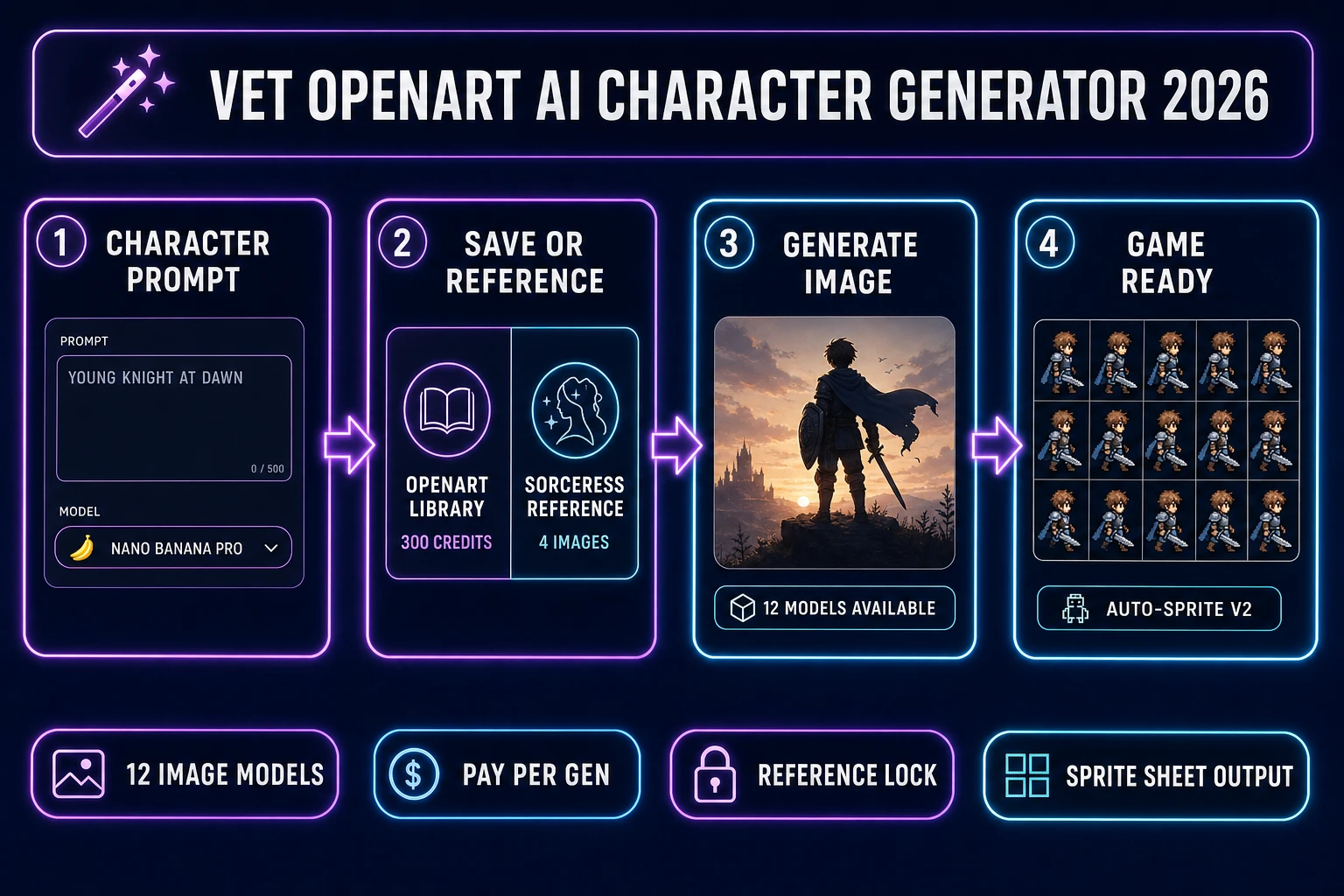
Vet OpenArt AI character generator - four-panel pipeline from prompt to save-or-reference to model choice to game-ready sprite sheet
The 2026 comparison at a glance: the OpenArt AI character generator saves consistent characters to a library at 300 credits each; the Sorceress path renders the same top-tier models pay-per-generation at AI Image Gen, then hands the output to Auto-Sprite v2 for a game-ready sprite sheet. Both paths render in a browser tab; only one exports game assets.

What the OpenArt AI character generator actually does in 2026

The OpenArt AI character generator is a feature inside the broader OpenArt platform, not a standalone product. OpenArt itself is a generative-AI subscription service that bundles 100+ premium image, video, and audio models under one account. The consistent-character feature specifically lets you build a character from a text brief or reference images, save that character to a personal library, and then invoke the same character across future generations. Verified against the openart.ai homepage on July 2, 2026, the platform lists Nano Banana Pro, Seedream 5.0, Seedance 2.0, Google Veo 3, GPT Image 2, Sora 2, Kling 3.0 Omni, Grok Imagine, MiniMax Hailuo, and HappyHorse as the headline models, plus dozens more on the marketplace side.

The consistent-character page (openart.ai/features/ai-character) calls out Nano Banana Pro, Seedream 4.0, and Kling 3.0 Omni as the models specifically optimized for consistent-character generation. The workflow is: create a character from a text description or up to a handful of reference images, name and save the character, then tag that character in any future image or video prompt to have the same face, hair, and outfit persist. This solves the biggest practical problem in AI illustration — the same character drifting across scenes when you re-prompt from scratch each time. Consistent characters are a genuinely useful primitive for comics, marketing content, storyboards, and social media, all of which are exactly the audiences OpenArt targets.

What the OpenArt AI character generator is not: a game-development tool. There is no walk-cycle extraction, no sprite-sheet atlas layout, no pixel-grid snap, no rigged 3D mesh export, no engine-specific asset format. That is a factual statement about the product surface, not a criticism — illustration platforms and game-asset platforms are different jobs, and OpenArt has never claimed to be the latter. The mismatch shows up when a game developer picks OpenArt for character work and then hits the wall at the illustration boundary. This article’s job is to name that boundary honestly and show what to do next.

OpenArt AI character generator pricing: what each plan buys you (verified 2026-07-02)

The pricing is a five-tier subscription plus a Team plan, all credit-based, with an annual discount of approximately 50%. Every number below is verified against openart.ai pricing on July 2, 2026 and cross-checked against three independent 2026 pricing breakdowns. The Free plan ships 40 one-time trial credits, valid for 7 days, with 4 parallel generations and no credit card required. Joining OpenArt’s Discord adds 50 more credits. Completing the five onboarding tasks (first image, first video, first audio, first character, first One-Click Story) adds 50 credits per task plus a 500-credit bonus for completing all five — roughly 950 total credits available before spending a dollar. That trial is enough to meaningfully test the consistent-character feature (which costs 300 credits per character) and generate 40+ standard images.

The paid tiers stack from there. Essential is $14 per month or $7 per month billed annually with 4,000 credits, 8 parallel generations, up to 13 consistent characters, up to 13 personalised models, and up to 5 One-Click Stories per month. Advanced is $29 per month or $14.50 per month annually with 12,000 credits, 16 parallel generations, up to 40 consistent characters, and unlocks add-on credit packs plus commercial usage rights on outputs. Infinite is $56 per month or $28 per month annually with 24,000 credits, 32 parallel generations, up to 80 consistent characters, unlimited generation on select models, and priority support. Wonder is $240 per month or $120 per month annually with 106,000 credits, 32 parallel generations, and up to 353 consistent characters. Team is $35 per seat per month or $17.50 per seat annually with 12,000 pooled credits per seat.

The credit conversions matter more than the raw plan price. Verified July 2, 2026: 1 credit equals 1 standard image, 80 credits equal 1 video generation, 300 credits equal 1 consistent character creation, 300 credits equal 1 custom model training, and 150 credits equal 1 One-Click Story. Add-on credit packs cost $15 per 5,000 credits and are unlocked at the Advanced tier and above. So the practical read on Essential ($7 annual): 4,000 credits per month buys either 4,000 standard images, or roughly 13 consistent characters, or roughly 50 video generations, or some mix. If a game project needs 30 consistent characters (typical for a full NPC cast in a mid-size indie), the math forces an Advanced-tier upgrade or add-on credit packs.
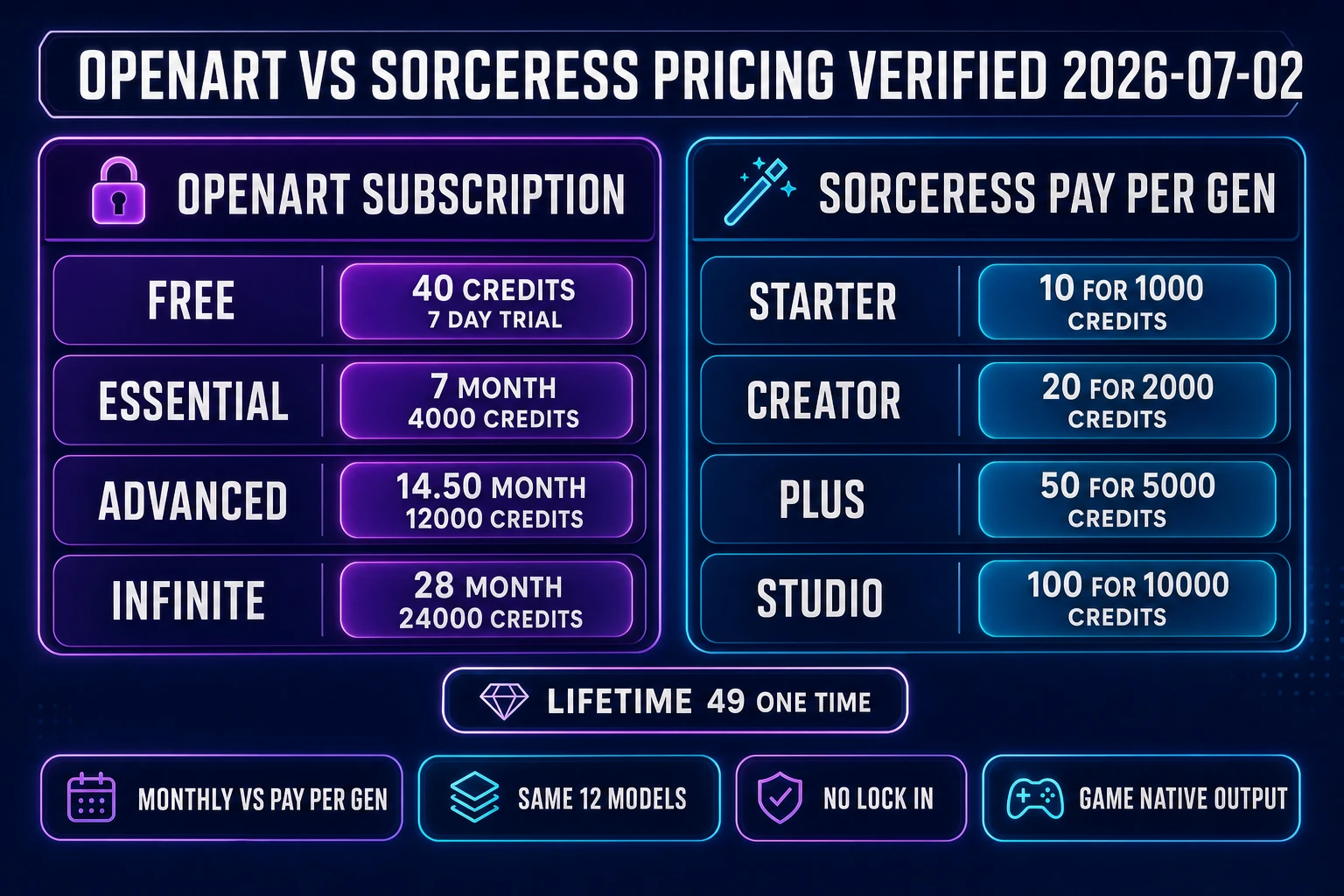
OpenArt vs Sorceress pricing comparison - OpenArt subscription tiers on the left with monthly credit allocations, Sorceress pay-per-generation credit packs on the right with per-credit rates
OpenArt’s subscription math versus the Sorceress plans page: OpenArt is $7 to $120 per month annual for a monthly credit bucket, Sorceress is a one-time $10 to $100 top-up that never expires. A $49 lifetime unlock covers the non-AI-generative tools (3D Studio, Auto-Rigging, Text-to-Animation) forever.

Where the OpenArt AI character generator falls short for game-ready sprites

The OpenArt AI character generator produces single character images. This is exactly right for illustration — a comic panel needs a single hero pose, a marketing banner needs a single character portrait, a storyboard frame needs a single beat. It is not enough for a game character. A game character needs multiple views (front, back, side), multiple states (idle, walk, attack, hit, death), a fixed image size, aligned frames on a sprite-sheet atlas, a locked palette if the art is pixel-based, and an engine-specific output format. None of that is part of the OpenArt AI character generator’s job description, and no combination of the 100+ models OpenArt bundles turns illustration output into any of those game-ready shapes.

The specific gaps show up in five places. First, walk cycles. A 2D character in an indie game needs at least a 4-frame walk cycle per direction, often 8 frames for smoother motion. OpenArt renders characters in a single pose; extracting a walk cycle from that single image is not a supported workflow. Second, pixel-perfect grid alignment. Pixel-art games render sprites on an integer grid (32×32, 64×64, 128×128), and AI-generated images almost never land on that grid without a post-processing pass per the Sprite (computer graphics) Wikipedia entry. OpenArt output needs manual export, resizing, and grid-snapping in an external tool.

Third, sprite-sheet atlas layout. Modern game engines expect frames laid out on a fixed grid inside a single texture atlas, with metadata describing which sub-rectangle is which frame. Building that atlas by hand from OpenArt output is doable but tedious — it is genuinely the “how do I ship this?” step that turns AI art into shippable assets. Fourth, rigged 3D output. If the game is 3D, the character needs a mesh, a texture, a skeleton, and skinning weights. OpenArt renders 2D images (and short videos), not textured meshes or rigs. Fifth, engine-specific formats. Unity wants FBX or GLB for 3D, PNG for 2D. Godot wants GLB or DAE for 3D, PNG or WebP for 2D. Unreal wants FBX. OpenArt outputs PNG and MP4. Every game-project format conversion falls on the developer.

The point is not that OpenArt is broken. OpenArt is a strong platform for what it targets. The point is that a game developer picking OpenArt for character work owns every downstream conversion — and in a small indie project with a 15-character NPC cast, that downstream conversion work adds up to more time than the initial character generation. This is the practical reason the honest 2026 game-dev pipeline needs a different upstream tool.
The Sorceress AI character generator alternative: same 12 models, pay-per-generation

Sorceress AI Image Gen at /generate ships 12 image models pay-per-generation, verified against src/lib/models.ts on July 2, 2026. The models are Z-Image (3 credits per generation), Wan 2.7 Image (5 credits), Flux 2 Pro (6 credits), Seedream 4.5 (6 credits), Seedream 5 Lite (6 credits), Nano Banana (6 credits), Grok Imagine (6 credits), GPT Image 1.5 (7 credits), GPT Image 2 (7 credits), Nano Banana 2 (9 credits), Wan 2.7 Image Pro (10 credits), and Nano Banana Pro (18 credits). Every credit costs $0.01 at the Starter tier ($10 for 1,000 credits per src/app/plans/page.tsx CREDIT_TIERS line 49), so a single character render on Nano Banana Pro is $0.18 and a single render on Z-Image is $0.03.

The overlap with OpenArt’s model catalog is substantial. Nano Banana Pro, GPT Image 2, Grok Imagine, Seedream (both platforms ship a Seedream generation) are on both. The difference is the billing shape. On OpenArt, using Nano Banana Pro for a consistent-character creation costs 300 credits from the monthly bucket — roughly $0.53 at Essential annual pricing ($7 for 4,000 credits) or $0.13 at Wonder annual ($120 for 106,000 credits) if you actually consume the full bucket every month. On Sorceress, the same Nano Banana Pro generation costs 18 credits — $0.18 flat, with no monthly commitment and no expiration on the credits.

The billing shape difference matters most for two profiles. A game developer who ships one indie project per quarter and needs 30 character generations for that project pays $0.18 × 30 = $5.40 on Sorceress with no ongoing cost. On OpenArt the same 30 characters cost 30 × 300 = 9,000 credits, which requires the Essential plan at minimum (4,000 credits per month plus add-on packs, so about $7 annual plus $15 for 5,000 add-on credits, total $22 before the credits reset next month). The math flips at high volume: 500 characters per month on Sorceress is 500 × 18 = 9,000 credits = $90; on OpenArt Advanced ($14.50 annual, 12,000 credits) it is $14.50 with room to spare. OpenArt’s subscription wins on high volume; Sorceress’s pay-per-generation wins on episodic use.

The billing shape is the smaller half of the story. The bigger half is what happens after the character is rendered. On Sorceress the output flows into a downstream game-native pipeline. On OpenArt the output is a PNG and the developer owns everything after that. The next two sections cover both halves in detail.

Consistent characters: OpenArt library vs Sorceress reference-locked pipeline

OpenArt’s consistent-character feature stores each character as a named library entry, verified against openart.ai/features/ai-character on July 2, 2026. Create a character (300 credits), give it a name (“Queen of Ashes,” “Blacksmith Kaspar”), and any future prompt on Nano Banana Pro, Seedream 4.0, or Kling 3.0 Omni can tag that character to pull the same face, hair, and outfit. The library persists across sessions. For a comic creator building 200 panels featuring five recurring characters, this is the correct shape — five 300-credit up-front investments, then unlimited reuse.

Sorceress takes a different approach: the reference-image slot on every generation. AI Image Gen accepts up to 4 reference images per generation (verified against getMaxRefImages in src/lib/models.ts on July 2, 2026), and the reference-locked pipeline uses the actual pixel content of the reference to hold the character on-model. There is no saved “character library” concept — the reference is the concept art or the first-frame render, and each downstream generation feeds that same reference back in. For a game project, this often maps better onto the actual asset pipeline because the reference image already exists (it is the concept art, or the character sheet, or the first render), and shipping the reference into every generation is the same shape as shipping the reference into the game engine as the canonical hero.

Which approach is better depends on the job. A comic creator with 200 panels and 5 recurring characters: OpenArt’s library is cleaner. A game developer with 15 NPCs each rendered as a sprite sheet: Sorceress’s reference-image slot is more direct. The point is that both approaches are legitimate primitives for consistent-character generation — the diffusion-model conditioning that makes both work is described in general terms in the Diffusion model Wikipedia entry. The mechanism is the same; the storage and workflow shape differ.

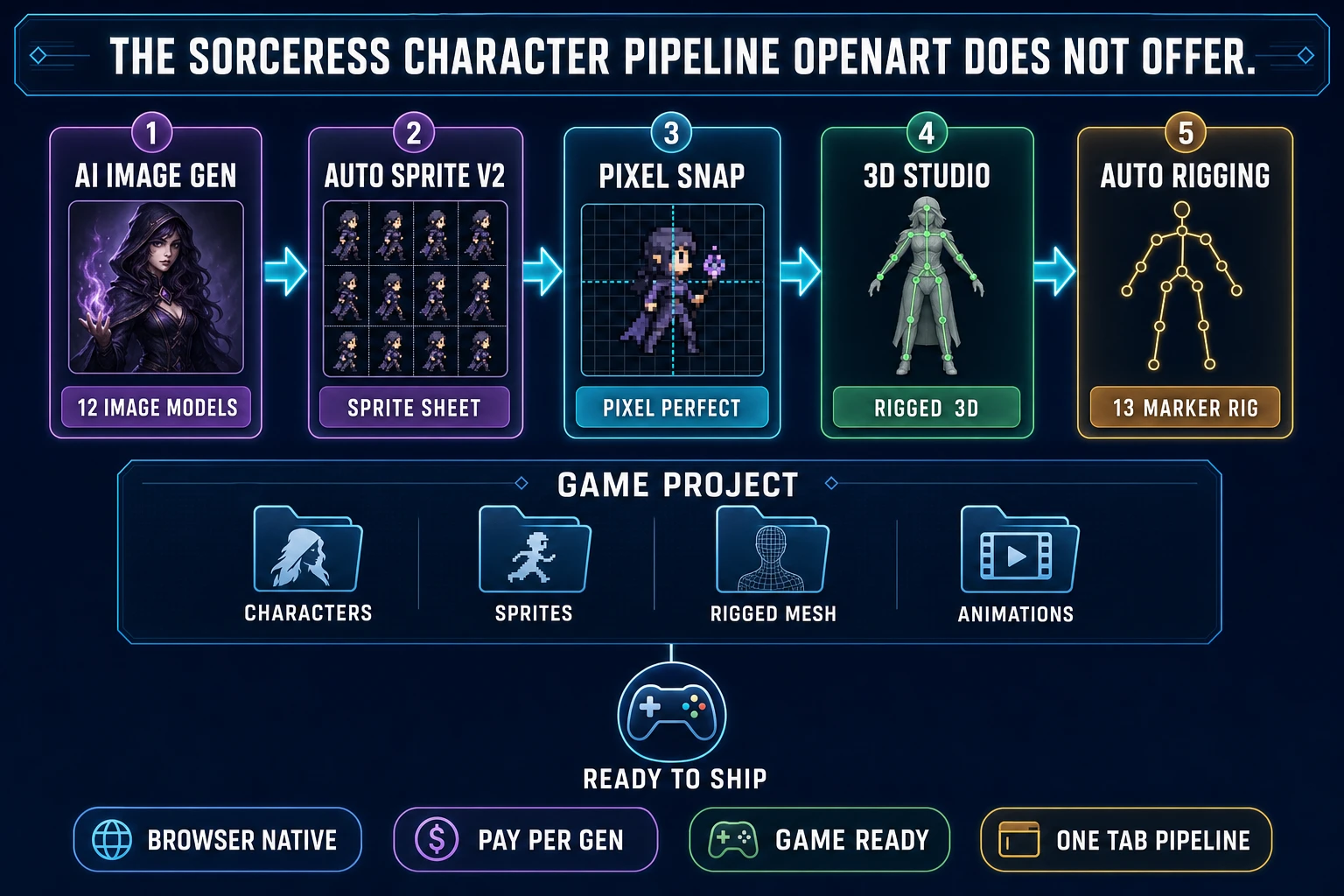
The Sorceress character pipeline - AI Image Gen, Auto-Sprite v2, Pixel Snap, 3D Studio, and Auto-Rigging feeding a single game project folder with characters, sprites, rigged meshes, and animations
The full Sorceress game-character pipeline: AI Image Gen renders the character, Auto-Sprite v2 turns it into a sprite sheet, Pixel Snap locks the frames to a pixel grid, 3D Studio turns the same character into a 3D mesh, and Auto-Rigging ships it rigged. Every layer is browser-native and every layer exports what a game engine expects. OpenArt does not offer these downstream layers.

From character to sprite sheet to rig: the game-dev pipeline OpenArt does not offer

The Sorceress downstream pipeline is what makes the character-generation math work for a game project. Auto-Sprite v2 at /autosprite-v2 takes the AI-rendered character and runs it through a three-stage flow verified against src/app/_home-v2/_data/tools.ts lines 56-88 on July 2, 2026: step one generates the character with AI image generation, step two animates it with AI video generation, step three converts the animation into a clean sprite sheet. The final export is a standard PNG atlas sized to whatever grid the game engine expects, ready to drop into Unity, Godot, Unreal, or any browser engine.

For pixel-art specifically, Pixel Snap at /spritely takes AI-generated frames and locks them to a true square-pixel grid, cleans backgrounds, extracts video frames, aligns animation frames, previews the result, and exports game-ready sprite sheets (verified against the Pixel Snap featured-tool entry in tools.ts). This is the specific step that most AI-illustration platforms leave to the developer — the pixel-grid math is easy to describe and tedious to do by hand, and Pixel Snap turns it into a click.

For 3D characters, 3D Studio at /3d-studio takes the same character concept and produces a rigged, textured 3D mesh through the four-step pipeline described in tools.ts: AI image generation, single-image to textured 3D, humanoid auto-rigging with weight-paint refinement, and AI text-to-animation. Auto-Rigging at /rigging runs the 13-marker guided placement flow with auto-mirror to produce a Mixamo-compatible skeleton, verified against src/lib/rigging/types.ts REQUIRED_MARKERS on July 2, 2026. The output is a rigged GLB or FBX that imports into any 3D engine.

None of these downstream layers exist on the OpenArt platform. A game developer using OpenArt for the initial character generation still needs a sprite-sheet tool, a pixel-snap tool, a 3D-conversion tool, and a rigging tool from somewhere else. Each of those tools is another subscription (or another manual pass), and the character has to survive the format hops without visual drift. In practice this is the point where the OpenArt-first workflow either becomes a Sorceress-second workflow, or becomes a hand-crafted single-image asset that the game engine renders as a static portrait instead of an animated sprite.

The verdict: when OpenArt makes sense (illustration) vs Sorceress (game sprites)

The honest verdict on the openart ai character generator for 2026 splits by job. For high-volume illustration — comic creators shipping 200 panels a month, marketing artists producing weekly campaign banners, content creators building storyboards for short-form video — OpenArt is a genuinely strong choice. The $7 annual entry price, the 100+ model bundle, the consistent-character library, the video and audio tools all in one subscription, and the freemium onboarding that hands out ~950 trial credits make the platform easy to evaluate and cheap to run. The consistent-character feature at 300 credits per character amortizes across dozens of reuses. For that audience, this article’s recommendation is: try the OpenArt free tier honestly, and if the workflow fits, subscribe at whichever tier matches monthly output.

For game development, the recommendation flips. The character generation is one link in a chain that also needs sprite sheets, pixel-grid alignment, 3D rigging, and engine-specific export. The Sorceress stack at AI Image Gen + Auto-Sprite v2 + Pixel Snap + 3D Studio + Auto-Rigging covers every link in that chain in one browser tab, with pay-per-generation billing (no monthly subscription lock-in) and a one-time $49 lifetime supporter unlock that covers the non-AI-generative tools forever. The same 12 top-tier image models OpenArt features are available on Sorceress at 3 to 18 credits per generation, and every generation flows directly into the downstream game-native pipeline. For an indie developer building a full video game with a 15-character NPC cast, the Sorceress path saves both the subscription cost and the format-conversion time.

The one honest middle path is worth naming. If a game project needs a large volume of concept art (100+ character portraits for a card game, a story game, or a visual novel) and also needs a game-ready sprite pipeline, use OpenArt for the high-volume portrait generation and hand the finalists to Sorceress for the game-asset conversion. The workflows compose cleanly: an OpenArt-generated character portrait is a valid input to the Sorceress AI Image Gen reference slot, and from there Auto-Sprite v2 takes over. This is the correct decomposition when the volume math on Sorceress alone would exceed the OpenArt subscription cost — and it is a legitimate way to use both platforms rather than choose between them. The rule of thumb: use whichever tool solves the specific step, and let the character survive the hops with the same reference image at every stage. That is what generative AI for characters actually looks like in production in 2026 — not one platform for everything, but a small stack of specialists that each do one link well and hand off cleanly. Explore the full Sorceress tool catalog to see which layers you already have and which you need. This whole comparison and every price above was verified live on July 2, 2026 — the OpenArt tier structure and the Sorceress credit costs both change from quarter to quarter, so if you are reading this six months later, spot-check against openart.ai and against Sorceress plans before locking a decision.

Frequently Asked Questions

What is the OpenArt AI character generator and who is it for?

The OpenArt AI character generator (openart.ai/features/ai-character) is a feature inside OpenArt's all-in-one generative AI platform that lets you create a consistent character from a text brief or reference images, save that character to a personal library, and reuse the same character across future image and video generations. OpenArt itself is a subscription platform that bundles 100+ AI models — Nano Banana Pro, Seedream 5.0, Seedance 2.0, Google Veo 3, GPT Image 2, Sora 2, Kling 3.0 Omni, Grok Imagine, MiniMax Hailuo, HappyHorse, and dozens more (verified against openart.ai homepage on July 2, 2026). The consistent-character feature specifically pulls from Nano Banana Pro, Seedream 4.0, and Kling 3.0 Omni. It is aimed at illustrators, marketers, comic creators, and anyone who needs the same face across many scenes without hiring a human artist. It is not aimed at game developers who need the character rendered as a multi-frame sprite sheet, a rigged 3D mesh, or an in-game asset.

How much does the OpenArt AI character generator actually cost in 2026?

Verified against openart.ai pricing on July 2, 2026: OpenArt runs a five-tier subscription plus a Team plan. Free ships 40 one-time trial credits (valid 7 days, 4 parallel generations, +50 for joining Discord, up to about 950 total via onboarding tasks). Essential is $14 per month or $7 per month billed annually and includes 4,000 credits, 8 parallel generations, 13 consistent characters, and 13 personalised models. Advanced is $29 per month or $14.50 per month annually with 12,000 credits, 16 parallel, 40 consistent characters, and unlocks add-on credit packs plus commercial usage rights. Infinite is $56 per month or $28 annually with 24,000 credits, 32 parallel, 80 consistent characters, and unlimited generation on select models. Wonder is $240 per month or $120 annually with 106,000 credits, 32 parallel, and 353 consistent characters. Team is $35 per seat per month ($17.50 annual) with 12,000 pooled credits per seat. Credit conversions: 1 credit equals 1 standard image, 80 credits equal 1 video, 300 credits equal 1 consistent character or 1 custom model training, and 150 credits equal 1 One-Click Story. Add-on packs cost $15 per 5,000 credits and are unlocked at Advanced tier and above.

Can the OpenArt AI character generator export a game-ready sprite sheet?

No — and this is the honest reason a game developer needs a different path. The OpenArt AI character generator outputs single character images (and short videos through the video model bundle), which is the right shape for illustration, comic panels, or social content. It does not extract per-frame walk cycles, snap the output to a fixed pixel grid, extract sprites from a rendered animation, or align frames on a sprite-sheet atlas. The Sorceress path solves the missing steps: AI Image Gen renders the character at /generate, then Auto-Sprite v2 at /autosprite-v2 runs the character through an AI video generation pass and turns the resulting animation into a game-ready sprite sheet in the same browser tab. For pixel-art specifically, Pixel Snap at /spritely locks the AI-generated frames to a true square-pixel grid. OpenArt is a great illustration platform; it is not built for game-development pipelines and does not claim to be.

What are the alternatives to the OpenArt AI character generator for game development?

The two honest alternatives for game developers in 2026 are pay-per-generation image platforms with a game-ready downstream pipeline, and specialised sprite tools. Sorceress AI Image Gen at /generate is the pay-per-generation option that bundles the same top-tier models OpenArt uses — Nano Banana Pro, Nano Banana 2, GPT Image 2, GPT Image 1.5, Grok Imagine, Seedream 4.5, Seedream 5 Lite, Flux 2 Pro, Z-Image, Wan 2.7 Image, and Wan 2.7 Image Pro (12 models verified against src/lib/models.ts on July 2, 2026) — at 3 to 18 credits per generation with no monthly subscription. Sorceress then hands the output to Auto-Sprite v2 for sprite sheets, 3D Studio at /3d-studio for a rigged 3D mesh, or Pixel Snap at /spritely for pixel-art conversion. Traditional single-model competitors (Canva AI, Perchance, Fotor, ImagineArt) each ship one image path but no game-native downstream. Character.ai is a chatbot product and is not a character-image generator despite the naming confusion. For game dev, the choice reduces to Sorceress if the character needs to actually appear in a game.

How does OpenArt's consistent-character feature compare to Sorceress reference images?

OpenArt's consistent character feature builds a saved character in your library from a text brief or up to a few reference images, then reuses that character across future generations by tagging it (verified against openart.ai/features/ai-character on July 2, 2026). The library keeps the character available across sessions and across models — Nano Banana Pro, Seedream 4.0, and Kling 3.0 Omni are the models called out as consistent-character-optimised. Each consistent character costs 300 credits to create. Sorceress AI Image Gen takes a different approach: the reference-image slot on every generation accepts up to 4 images (verified against getMaxRefImages in src/lib/models.ts on July 2, 2026), and the reference-locked pipeline uses the actual pixel content of the reference to hold the character on-model rather than a saved library entry. For a game project the reference-image approach is often more useful because the reference is the actual concept art or the actual first-frame render, which is what game engines end up shipping. For a comic project the OpenArt library approach is more useful because a saved character with a name is easier to tag across 200 panels. Different jobs, different shapes.

When does OpenArt make sense over Sorceress for character generation?

OpenArt makes clean sense in three scenarios. First, high-volume general-purpose illustration: at $7 per month on annual billing you get 4,000 credits, which is 4,000 standard images or roughly 13 consistent characters plus 50 videos. A comic creator, marketing artist, or content producer who ships 50-plus images per day gets more raw output for the money than any pay-per-generation platform. Second, bundled video and audio: the same OpenArt subscription includes Seedance 2.0, Kling 3.0 Omni, Google Veo 3, and Sora 2 for video, which is a fair bundle if you also produce video content weekly. Third, One-Click Stories and personalised model training if your workflow uses them. Sorceress AI Image Gen makes sense when the character needs to appear inside a game — because Sorceress ships the game-native downstream (sprite sheets, rigged 3D, pixel-art snapping, tileset alignment) that OpenArt does not include. The honest rule of thumb: OpenArt for content, Sorceress for game assets.

Sources

  1. Character (arts) (Wikipedia)
  2. Generative artificial intelligence (Wikipedia)
  3. Sprite (computer graphics) (Wikipedia)
  4. Diffusion model (Wikipedia)
  5. Video game (Wikipedia)
  6. Freemium (Wikipedia)
Written by Arron R.·3,121 words·14 min read

Related posts