People searching best ai for godot in 2026 already own the engine, already know GDScript, and already know Claude Code or Cursor exist. They are asking a narrower question: which AI coding stack actually understands Godot 4.7's scene tree, node system, and GDScript idioms well enough to be useful during a real project, and which is still shipping generic Python-shaped autocompletes that break the moment they touch a Node2D.
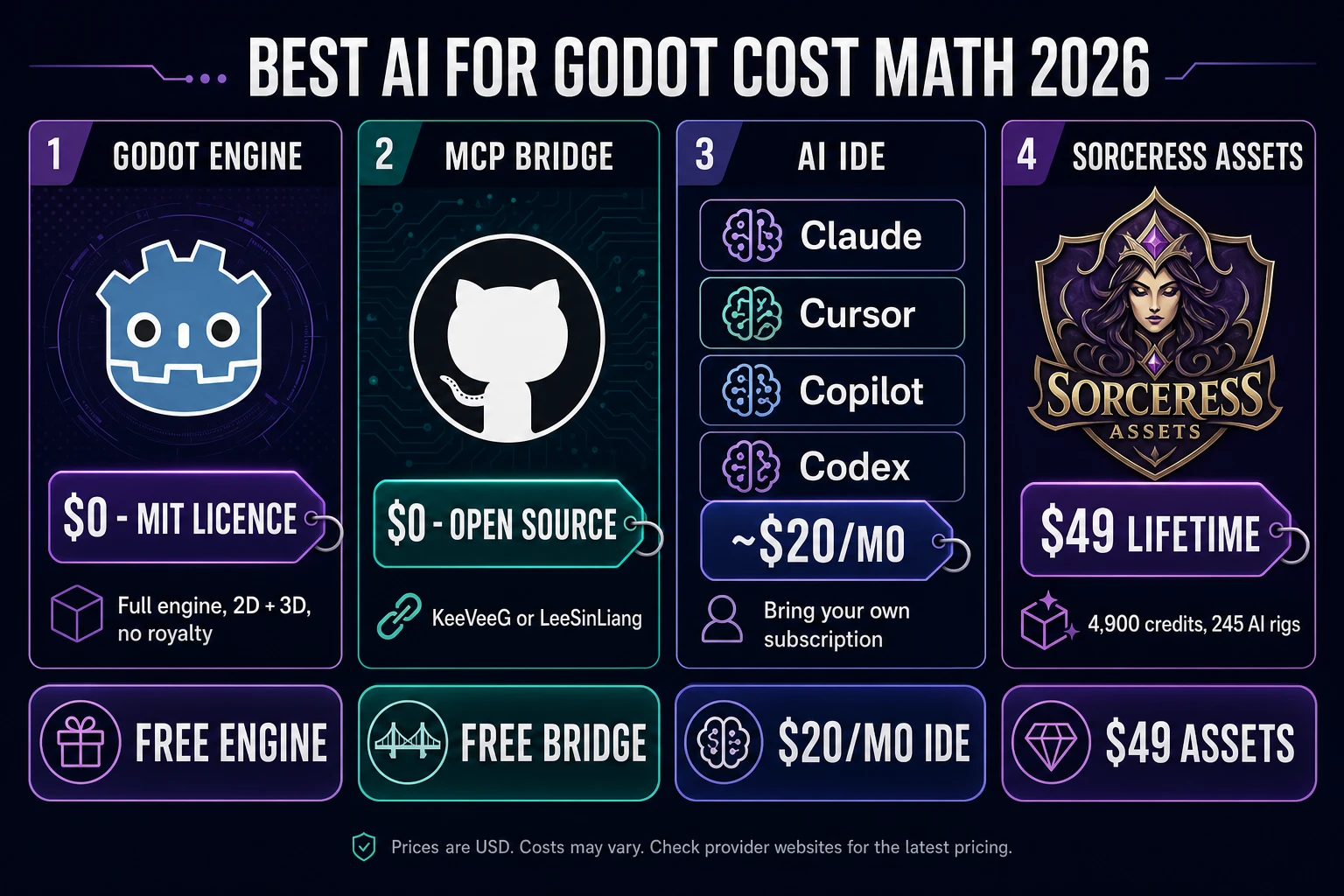
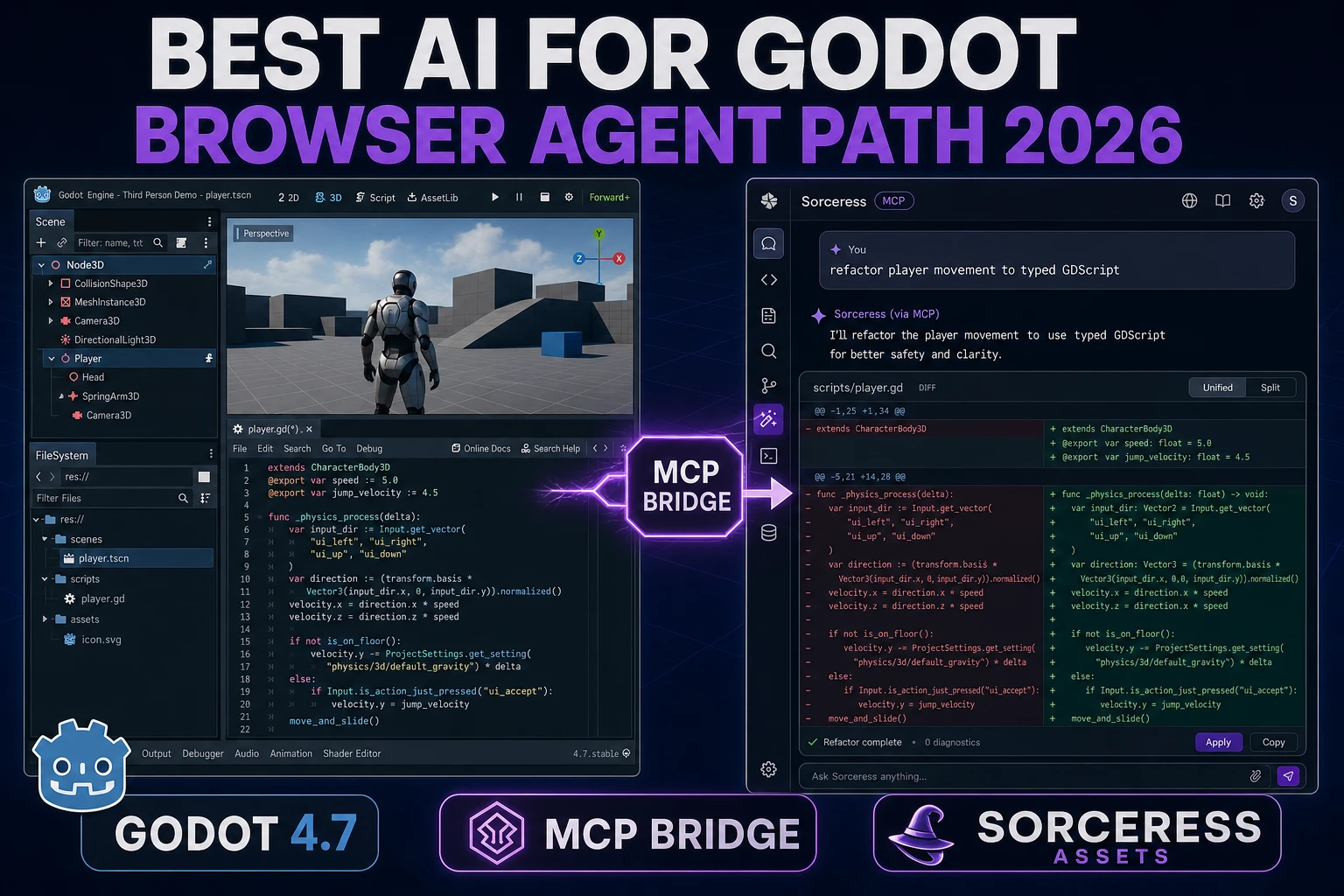
The honest short answer for 2026 is that Godot itself does not ship a built-in AI (verified 2026-08-04 against the Godot 4.7 official documentation), but the community has built two mature Model Context Protocol (MCP) bridges plus one dedicated Agent Skill that turn any modern AI IDE into a Godot-fluent pair-programmer. This piece walks the best ai for godot options that actually exist today, then explains the asset-side gap the Sorceress pipeline fills for GDScript devs who need characters, 3D models, sprites, and music the AI IDE cannot generate. All AI-IDE facts verified 2026-08-04 against each project's official GitHub repository.
What a best AI for Godot search actually wants in 2026
The phrase best ai for godot clusters with three overlapping intents. First, indie devs and jam participants who have Godot installed and want the same "explain this scene, refactor that script, generate a state machine" flow that Cursor and Claude Code already provide for web dev. Second, students moving from Unity or Unreal to Godot 4.7 who want an AI that speaks GDScript's specific syntax (@export, func _ready(), signal, await) instead of guessing Python. Third, small studios who want an AI that can drive the Godot editor itself — create nodes, wire signals, run the scene — not just edit script files on disk.
The intent overlap matters because the "best" answer changes depending on which of those three roles the reader is in. A student debugging a physics body wants inline autocomplete inside the code editor. A jam dev racing a Friday deadline wants an agent that can spin up a whole scene, wire the input map, and run the game to verify. A studio wants remote-debugger integration so the AI can read live variables during play. No single tool wins all three, which is why the section below is a comparison, not a "here is the one right answer" verdict.
Search intent is transactional in all three cases. Nobody types "best ai for godot" while writing an essay. They want a stack they can install today, on Godot 4.7 (released 14 July 2026, verified 2026-08-04 against the official Godot Windows download page), that talks GDScript and does not require them to hand-copy scene files into a chat window.
Why in-engine AI is the wrong question and MCP-bridged IDEs are the right one
Godot 4.7 does not ship a first-party AI plugin. The engine's scripting focus is GDScript and C# (via .NET builds), plus GDExtension for compiled languages. The core team's stance historically has been to leave the AI layer to editor add-ons and external tools — a design choice that turns out to be a strength in 2026 because the MCP standard (specified at modelcontextprotocol.io) landed exactly the kind of open bridge Godot's plugin architecture was built to serve.
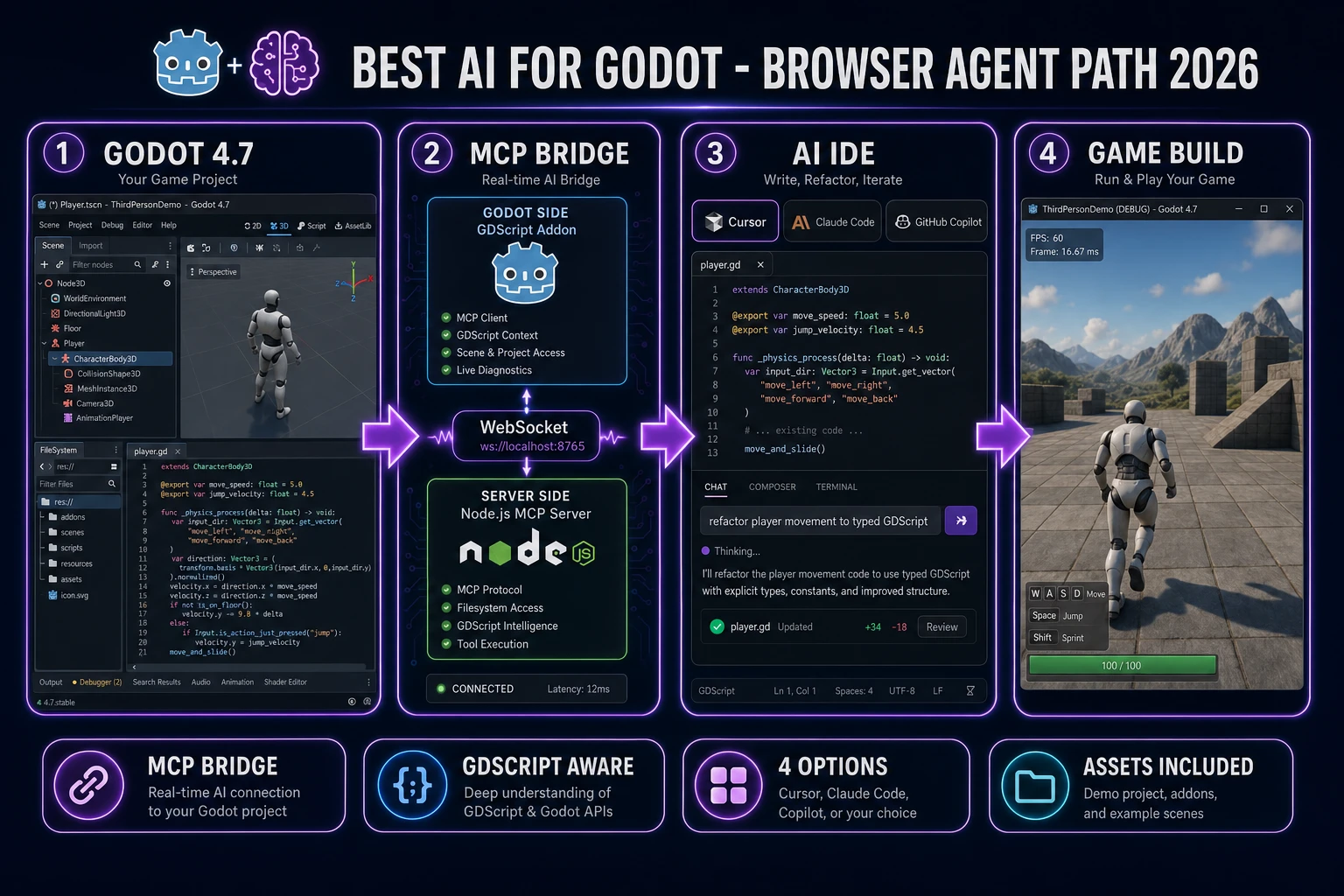
The pattern that emerged is the same in every serious Godot AI setup: a small GDScript addon runs inside the Godot editor and exposes the scene tree, node properties, and a GDScript execution channel over a local WebSocket. A Node.js MCP server translates AI-IDE tool calls into those WebSocket messages. The AI client (Claude Desktop, Cursor, VS Code Copilot, OpenCode, Codex) then talks to Godot through the standard MCP tools/list and tools/call flow. From the AI's perspective, Godot becomes a set of tools it can call directly — create_node, set_property, run_script, capture_screenshot. From Godot's perspective, an external process is driving the editor.
This is fundamentally different from copy-pasting a script into a chatbot. The AI reads the actual scene, sees the actual node types, and executes changes in place. When it breaks something, it can screenshot the result, read the error console, and try again. That closed loop is what "AI for Godot" has to mean in 2026 to be worth a subscription. Anything that only edits .gd files on disk without editor context is a generic code AI with a Godot syntax highlighter — useful, but not the same tool.
The four options below all sit somewhere on that spectrum: full-editor MCP bridge, Agent Skill with editor awareness, in-engine plugin, and in-editor script-only autocomplete. Each has an honest use case.
The best ai for Godot options in 2026 — four honest picks
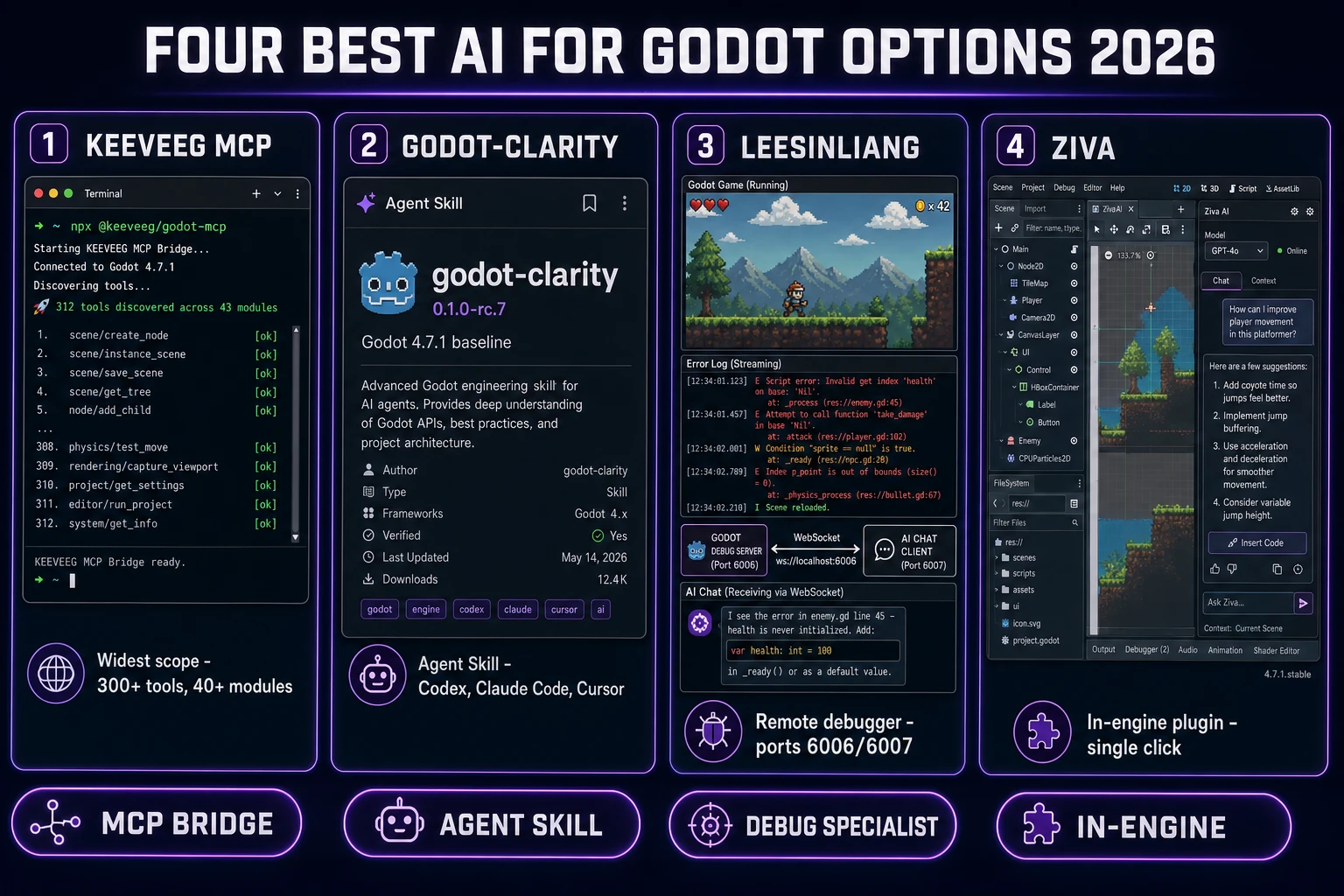
Here is the field, verified 2026-08-04 against each project's official repository, in the order they matter for a 2026 GDScript workflow:
1. Godot MCP (KeeVeeG/godot-mcp) — the widest-scope bridge
The KeeVeeG Godot MCP server (verified 2026-08-04 against its official GitHub repository) exposes 300+ tools across 40+ modules to any MCP-compatible AI client. Supported clients include Claude Desktop, Cursor, VS Code Copilot, OpenCode, and any other MCP client. Tested with Godot 4.x including 4.7. The architecture is a Node.js MCP server plus a Godot editor plugin communicating over WebSocket + JSON-RPC 2.0.
Feature surface is broader than any other option: scene construction, node manipulation, runtime GDScript execution inside a running game, input recording, physics setup, animation authoring, project export, addon management, debugging, screenshot capture, signal watching. The runtime autoload (mcp_runtime.gd) means the AI can read and write properties during gameplay, not just at edit time. Best fit for: agentic workflows where the AI drives the whole project end-to-end, not just script authoring.
2. Godot-Clarity (AKDworks/Godot-Clarity) — the Agent Skill approach
Godot-Clarity (verified 2026-08-04 against its official GitHub repository) is a 0.1.0-rc.7 release candidate open-source Agent Skill for Godot 4 workflows. The reference and CI baseline is Godot 4.7.1. First-class installer targets are Codex, Claude Code, Cursor, and Google Antigravity. It directly supports Godot 4.7.x with GDScript in 2D and 3D, and offers best-effort support for Godot 4.0–4.6 using version-specific documentation.
The Agent Skill format (versus a raw MCP server) means the AI client already knows how to invoke it — no separate WebSocket server, no port to manage. Instead, the client's own tool loop uses the Skill as a reusable behaviour bundle for creating, extending, debugging, reviewing, and verifying Godot projects. The deterministic runtime suite ships 14 broken-baseline/reference-solution fixtures so the Skill can prove it caught known regressions before promoting to a full 0.1.0 release. Best fit for: Codex / Claude Code / Cursor users who prefer the Agent Skill workflow over spinning up a local MCP server.
3. LeeSinLiang/godot-mcp — the remote-debugger specialist
The LeeSinLiang variant (verified 2026-08-04 against its official GitHub repository) has a narrower focus than KeeVeeG's but nails the debug loop. It connects the AI (Claude Code, Cursor, Codex) to Godot's built-in remote debugger on the default ports 6006/6007, so the AI can capture real-time output while a game is running in editor — print statements, errors, warnings, and stack traces all stream back to the AI client. Additional tools cover scene creation, node addition, sprite loading, mesh library export, and UID Management for Godot 4.4+.
The installer is a one-shot Python script that asks for your Godot executable path, offers to configure Claude Desktop, Claude Code, and Cursor, and writes the config files automatically. Best fit for: devs who want zero setup ceremony and mostly care about "AI reads my running game's errors and fixes them."
4. Ziva (in-engine agent) — when you want the AI in the editor itself
Ziva is an in-engine agent plugin that lives directly in the Godot editor rather than bridging to an external AI IDE. Native scene, node, and debugger awareness are baked in; the tradeoff is that you commit to whichever underlying model Ziva ships with rather than picking your own via Cursor or Claude Code. Best fit for: devs who prefer a single "click AI panel in Godot" workflow over installing a separate AI IDE alongside the engine.