People searching how to make a metroidvania in 2026 want two very specific answers most tutorials skip: how to design the interconnected map so it actually feels like a metroidvania and not a linear platformer with backtracking, and how to structure the code so a new ability retroactively opens up rooms the player has already seen. Everything else — sprite art, tilesets, boss encounters, save systems — is standard 2D platformer work. This guide covers both metroidvania-specific problems honestly, then walks the recipe end-to-end using the Sorceress asset stack for art and audio and WizardGenie for the code loop.
How to make a metroidvania in 2026: the ingredients most tutorials skip
Metroidvania is a 2D exploration-platformer subgenre where the world is one large interconnected map, the player character starts with limited abilities, and new abilities (double jump, bomb, dash, wall cling, dive) both open new areas and reveal that previously visible walls, ledges, and passages were secretly gates the whole time. The name is a portmanteau of Metroid (Nintendo, 1986) and Castlevania: Symphony of the Night (Konami, 1997), according to the Metroidvania entry on Wikipedia. The modern indie canon — Hollow Knight, Ori and the Blind Forest, Axiom Verge, Blasphemous, Guacamelee, Animal Well — all obey the same three rules: one continuous map, an ability-gated graph of rooms, and a save system that respects backtracking.
What separates a real metroidvania from a linear platformer is not the art style or the pixel-count. It is the map. In a linear platformer the player enters level 1, clears it, enters level 2, clears it, and never returns. In a metroidvania the player wanders a hub, tries to enter every corridor, hits three or four ability gates on the first pass, comes back to each one after earning the required ability, and the world visibly opens up. Every ability, once earned, must unlock at least two rooms the player has already seen and could not enter — that is the design rule that makes the genre feel alive. Skip it and you have a platformer with fast-travel.
The metroidvania game loop in one minute (explore gate backtrack unlock)
Every metroidvania runs the same core loop, and understanding it in one minute is the difference between a real project and a stalled prototype:
- Explore phase. Player controls the hero through platforming rooms — run, jump, attack, take damage from enemies, kill enemies, pick up small pickups (health, currency). Rooms are single screens or scrolling areas; camera clamps to the current room edges.
- Gate encounter. Player reaches a wall, ledge, ceiling, or door that requires an ability they do not yet have. The game does not block them harshly — it just does not let them progress. A bombable wall shows small cracks; an unreachable ledge is visible above; a locked door has a colored keyhole.
- Ability acquisition. Player finds a boss or a chest deeper in the reachable area that grants a new ability (double jump, bomb, dash, wall cling, dive). A cutscene or a screen-flash confirms the pickup, and the ability icon appears on the HUD.
- Backtrack + unlock. Player returns to a previously visible gate, uses the new ability, and enters the newly-reachable area. The world visibly expands. This is the beat that makes the genre feel like a metroidvania.
- Save + escalate. Player finds a save point (bench, campfire, save-room). Enemy difficulty ramps up in the newly-unlocked area. Loop repeats until every ability is earned and the final boss becomes reachable.
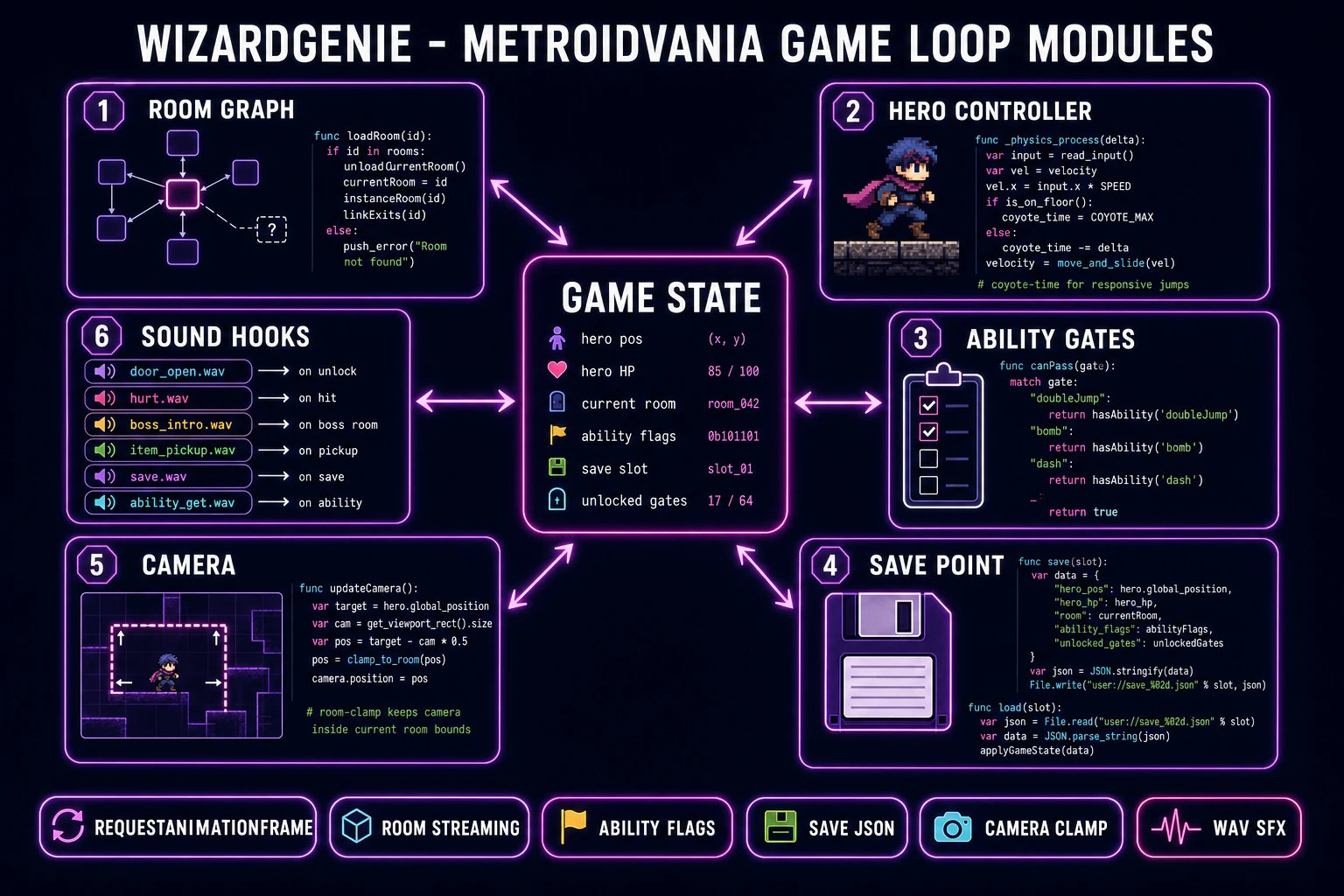
Every per-frame update runs off the browser-standard animation loop. The requestAnimationFrame API documented on MDN fires roughly 60 times per second in sync with the display refresh; every tick, the hero controller reads input, updates position with the current ability flags, checks room-edge triggers to load the next room, and runs enemy AI within the current room only. Rooms outside the current one are frozen or unloaded to keep the browser build responsive.
Pick your engine in 2026: Godot 4, Phaser 4, or WizardGenie
The engine question decides how much boilerplate you write vs how much you skip. Three honest 2026 answers, ranked by "playable slice in two weekends":
- WizardGenie (recommended for a first project). AI-powered game engine that runs in the browser and, on desktop, ships as a Windows installer. You paste the room graph and ability list into a paragraph; WizardGenie writes, runs, and iterates on the code in real time using its dual-agent Planner+Executor loop. The Planner (a top-tier reasoner) breaks the metroidvania loop into tasks. The Executor (a cheap fast typer like DeepSeek V4 Pro) writes the actual JavaScript. Model lineup verified 2026-08-05 in
src/app/_home-v2/_data/tools.ts: Claude Opus 4.7, Claude Sonnet 4.6, GPT-5.5, Gemini 3.1 Pro, DeepSeek V4 Pro, Kimi K2.5, Grok 4.2, MiniMax M2.7 — bring your own key or use the fallback trial key. - Godot 4. Free open-source engine, currently at Godot 4 released 14 July 2026 per the official Godot Windows download page verified 2026-08-05. Godot’s scene tree naturally models a metroidvania room (each room is a scene, the game swaps scenes on transition),
CharacterBody2Dplusmove_and_slide()handles platformer movement, and GDScript is friendly for solo devs. Best if you want to hand-write the game and understand every collision check. - Phaser 4. Popular 2D HTML5 game framework, currently at Phaser v4.2.1 "Giedi" released 9 July 2026 per the official Phaser download page verified 2026-08-05. Tilemap support for the rooms, arcade physics for platformer movement, group management for enemies and pickups. Best if you want a pure JavaScript build that ships as a single HTML bundle.
The rest of this guide assumes WizardGenie for the code side. Every step still applies unchanged if you swap in Godot 4 or Phaser 4 by hand — the "AI writes the loop" step becomes "you write the loop against the design doc." GameMaker 2024 is also a legitimate metroidvania engine (Nuclear Throne and Undertale used the older GameMaker Studio) but it is a paid commercial product and outside the browser-first scope of this recipe.
Step 1 — design the room graph and ability list on paper first
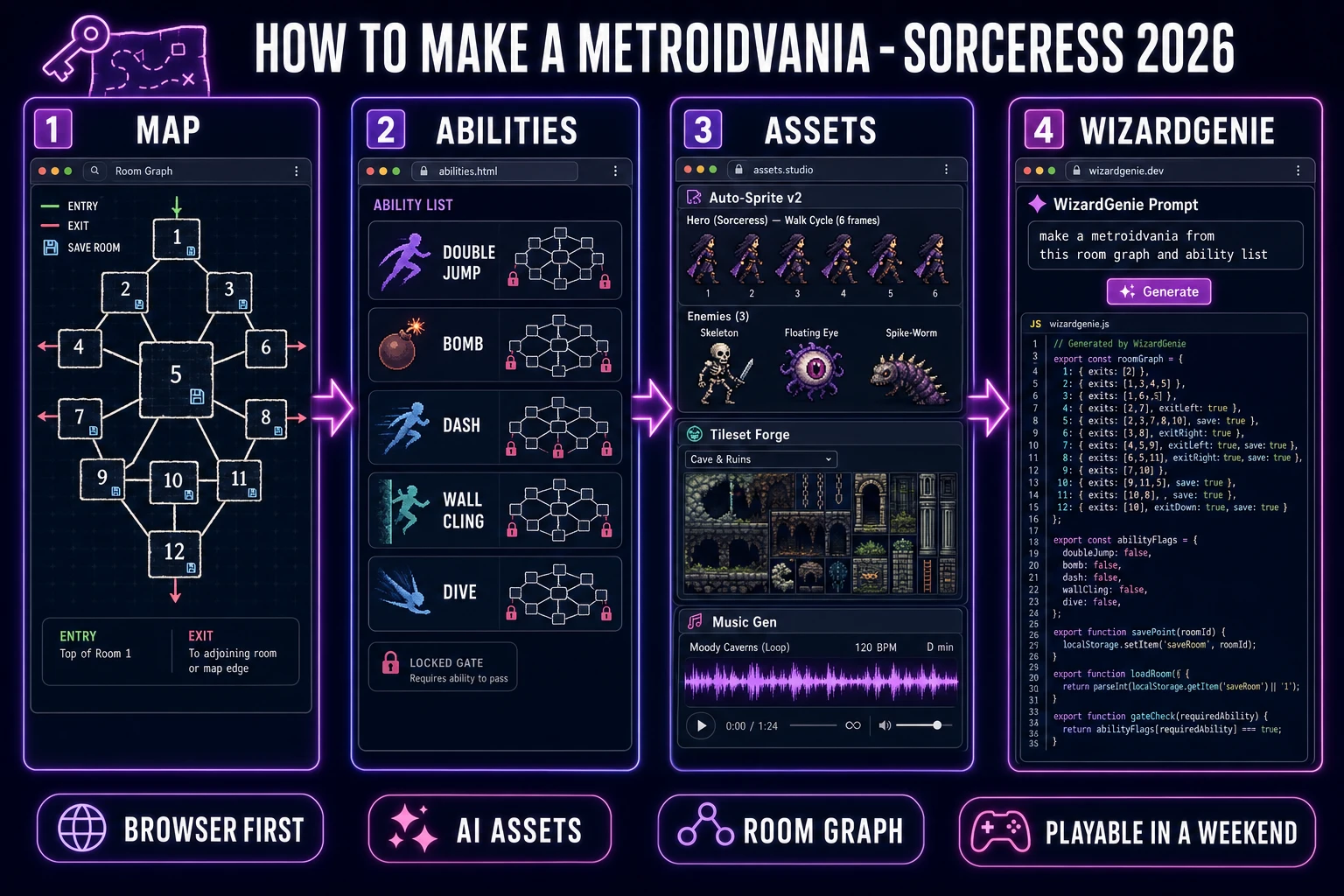
Skip this step and you will rewrite the metroidvania four times. This is the one genre where the design doc must be finished before the code starts, because every new ability retroactively changes the reachability graph. Do the design in 45 minutes on paper (or in a text file) and the AI code generation halves. The design doc needs four sections:
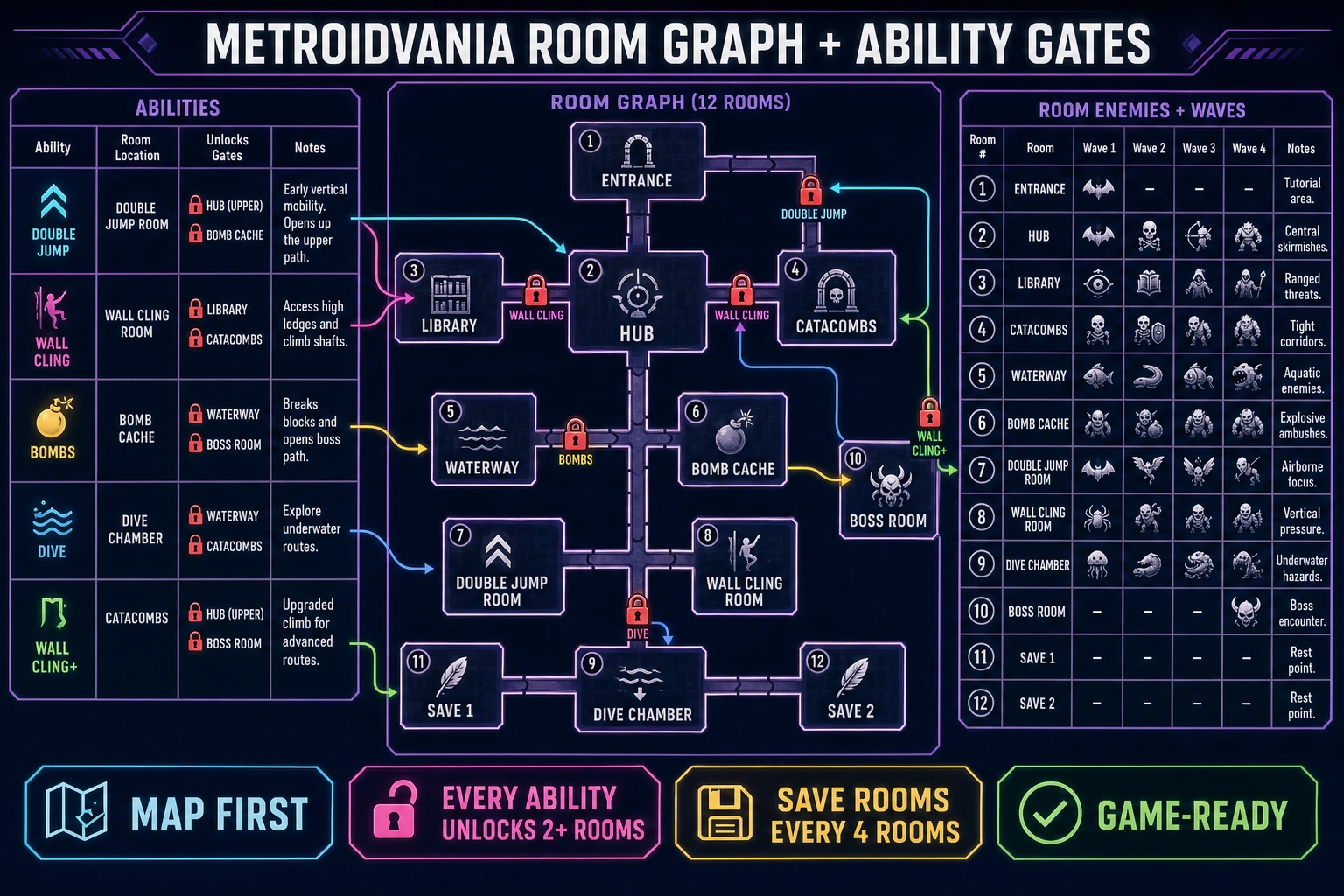
- Room graph. A directed graph of every room as a node and every corridor as an edge, as described in the directed graph entry on Wikipedia. For a first metroidvania, 12 rooms is enough: one entrance, one central hub, three biomes with three rooms each (say caves / library / waterway), two save rooms, and one boss room. Each room has a name, a list of connected rooms, and a list of enemies. Draw it on paper. This is not optional.
- Ability list. 3–5 abilities for a first pass. Typical set: double jump (reach higher ledges), bomb (break cracked walls), dash (cross wide gaps), wall cling (climb vertical shafts), dive (enter underwater passages). Each ability has a room where it is earned and a list of at least two gates it unlocks. If any ability unlocks only one gate, either delete the ability or add another gate — a single-unlock ability wastes the design beat.
- Gate placement. On the room graph, mark every corridor edge that requires an ability. Colored padlocks work: red for bomb, blue for dive, green for double jump. Confirm the first-pass reachable subgraph (starting from the entrance with zero abilities) touches the room where the first ability lives. Confirm each subsequent ability, once picked up, expands the reachable subgraph by at least two rooms.
- Save + loot table. Two save points for a 12-room map (one near the hub, one deeper in). Every room lists the enemies that spawn (2–4 per room) and any pickups (small health, small currency, or the ability itself for one room per ability).
That is the whole design doc. Put it in a markdown file with the room graph as an indented list and the ability list as a table. WizardGenie parses this structure well and will use it to seed the room manager, the ability flags, and the gate checks. A great reference for the same "design doc first, code second" pattern applied to a different genre is Fortify How to Make a Tower Defense Game, which uses the same approach for wave and tower tables.