Dome a Skybox Generator (3D Game Env Maps 2026)

By Arron R.12 min read
A skybox generator for 3D games in 2026 is a four-step browser pipeline: lock horizon and sun in WizardGenie, generate wide equirect drafts in AI Image Gen, fix

A skybox generator turns a written world brief into the six square faces a real-time 3D engine expects—not a single wallpaper JPEG you paste behind the camera. For browser games built with Three.js, that means cubemap faces in the correct order, horizon continuity that survives a 360° look-around, and lighting cues that match your ground materials. Sorceress stitches that path together across AI Image Gen, Image Expander, and export steps you can repeat every time you ship a new biome. If you already use Shade for distant landscapes or Tile for ground loops, treat this dome workflow as the ceiling that ties the scene together. New to the stack? Start from the tools guide, or open Wizard Genie when you want prompts assembled for you. For broader scene assembly, see Depth’s browser-game walkthrough; for surface detail on props and floors, Material Forge sits one click away.
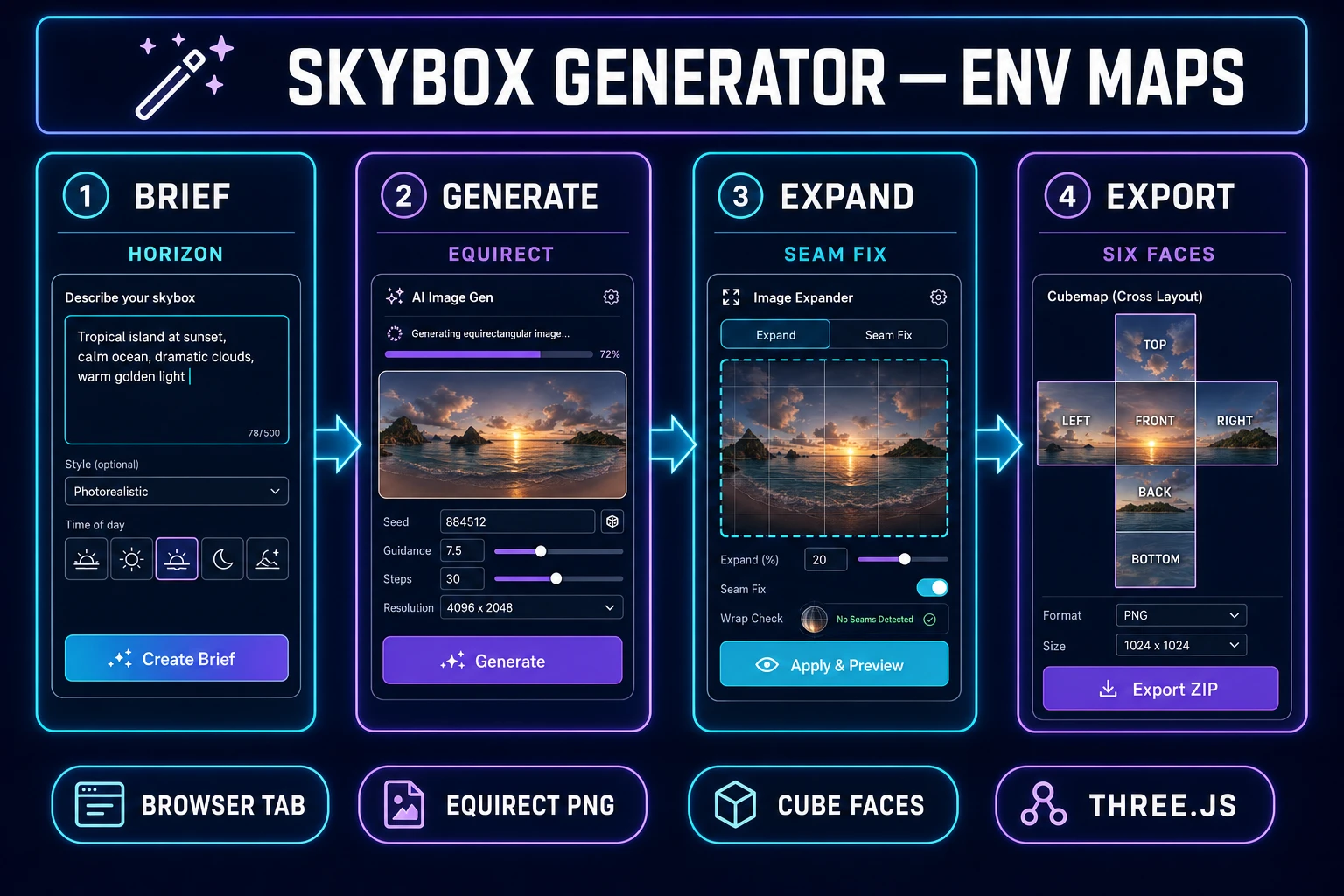
Equirectangular sky draft converted to six cubemap faces for a Three.js skybox
From one equirectangular draft to six engine-ready faces—the skybox generator workflow on Sorceress.

What a skybox generator actually outputs for 3D games

Ask ten artists what a “skybox” is and you will hear ten slightly different answers. In production terms, a skybox generator should deliver assets your renderer can load without manual guessing: six square images that form the interior of a cube around the player, or—less commonly for WebGL—a single equirectangular map consumed by an environment shader. The cube format remains the lingua franca for Three.js CubeTextureLoader and for asset libraries like Poly Haven, where each face is authored independently yet must align at every edge.

Those faces are not arbitrary thumbnails. Each one is typically power-of-two (512, 1024, or 2048 pixels square) and shares an identical horizon line height across all four side faces. The top face captures zenith—cloud tops, aurora, or a hard sci-fi ceiling panel. The bottom face is often dark ground haze or a stylized void; many teams tint it to match fog color so the floor plane never reads as a cardboard cutout. A competent skybox generator documents which convention it uses for face naming and axis orientation, because “pos-x” in one tool is not always “right” in your engine until you verify once.

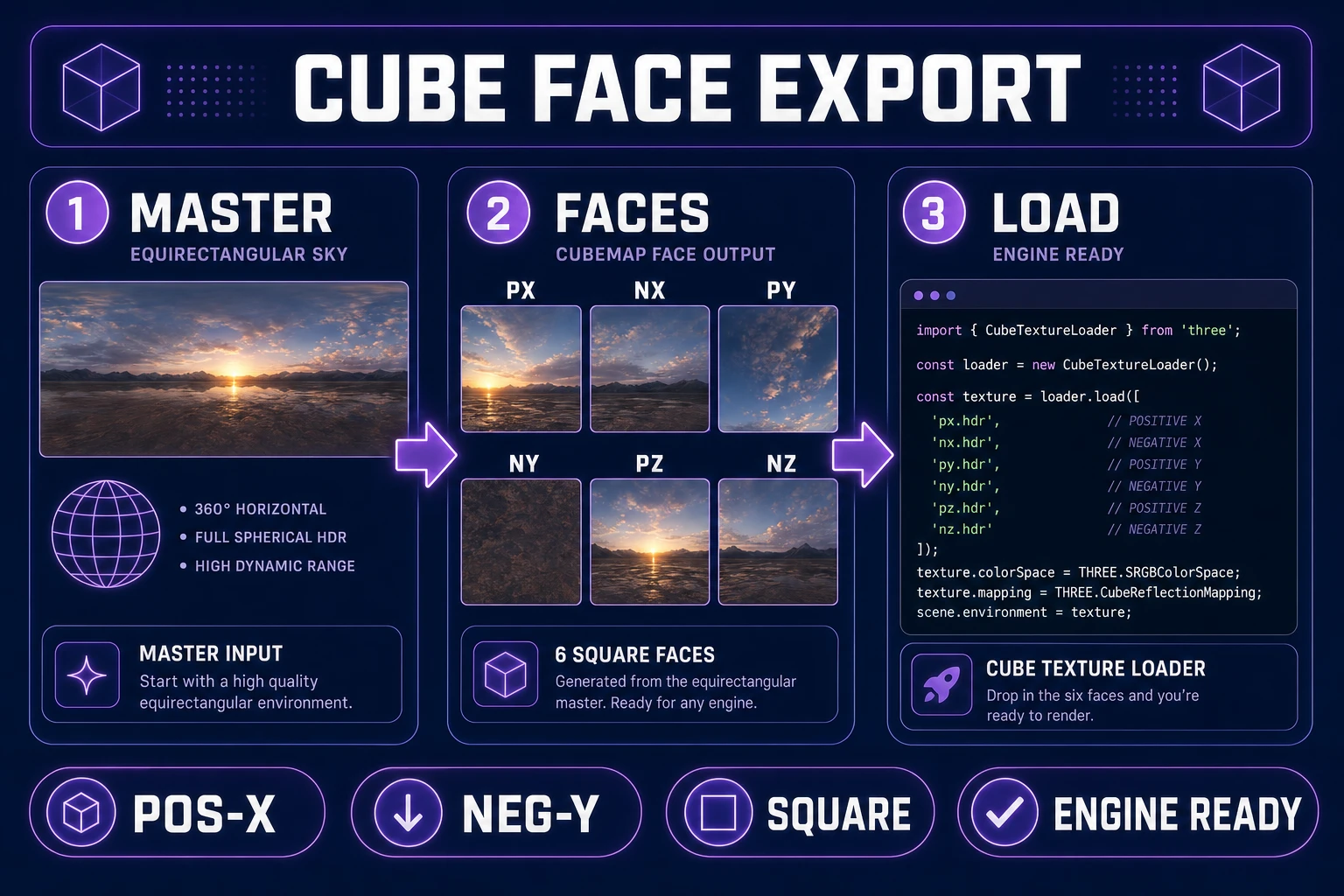
Sorceress targets the cubemap export path first. You still generate in equirectangular space—models excel at wide panoramas—but the pipeline’s job is to land you on six PNGs ready for CubeTextureLoader with the order Three.js documents: pos-x, neg-x, pos-y, neg-y, pos-z, neg-z. That sequence maps to right, left, top, bottom, front, and back in a right-handed scene when you follow common glTF-style camera defaults. Lock it on a sticky note once; future you will not re-debug upside-down suns.

Environment maps also drive image-based lighting when you use a PMREM pass or an equivalent prefilter step. Even if your sky is flatly emissive in the fragment shader, the same six faces can feed a blurred radiance map for metallic props. That is why a skybox generator belongs in the same conversation as Material Forge: the sky sets the key fill direction your metals expect.

Teams sometimes debate LDR PNGs versus HDR EXR for domes. For stylized browser titles, eight-bit faces with a gentle gradient in the zenith are enough; for PBR-heavy scenes, an HDR equirect source before cubemap split preserves sun disk intensity for bloom thresholds. Pick one lane per project and stay in it—mixing formats across biomes makes exposure tuning a weekly chore.

Why single flat panoramas fail as engine skyboxes

A gorgeous 2:1 equirectangular JPEG looks finished in a viewer. Drop it straight into a game and the seams argue with themselves. Equirectangular projections compress pole detail and stretch horizons; generative models often drift hue at the left-right wrap line because that is where training data hides discontinuities. When you sample that panorama inside a cube shader without remapping, you inherit those faults as a vertical scar at ±X.

Single panoramas also confuse scale. Players do not stand at the center of a photographic sphere—they stand inside a box whose walls must meet at ninety degrees. A cloud bank that curves naturally in equirect space can look pinched on the cubemap corners unless you expand and reproject with headroom at the seams. Engines that accept only cubemaps force you to split anyway; doing it late means painting fixes by hand.

Resolution is the other trap. A 2048-wide equirect gives roughly 512 pixels per face if you split naively—fine for mobile, thin for desktop. Upscale after the fact and you smear stars; upscale before split and you pay twice. The fix is deliberate: generate wide, expand selectively at the horizon belt, then export faces at the target size your browser game budget allows.

Finally, legal and pipeline hygiene matter. A random panorama from an image search carries no metadata about commercial use. A skybox generator session on Sorceress keeps prompts, seeds, and exports in one place so you can rebuild the dome when art direction shifts from “rust belt dusk” to “teal vaporwave noon.”

Some tutorials suggest dropping a equirect texture on an inverted sphere instead of a cubemap. That can work in prototypes, but you still fight pole distortion and you pay a sphere draw with custom UVs. Cubemaps align with hardware sampling paths and with the asset habits artists already learned from Poly Haven—standardize early and your shader code stays boring in the best way.
Side-by-side comparison of equirectangular seam artifacts versus clean cubemap edges
Equirectangular wrap seams become corner tears once you cube-map without expansion.

The Sorceress skybox generator pipeline in four steps

Think of the Sorceress skybox generator as four locked stations on an assembly line—no secret fifth step hidden behind a menu. You anchor art direction, draft equirectangular skies in AI Image Gen, widen problem zones in Image Expander, then export cubemap faces for Three.js. Each station has a clear credit cost and a clear artifact you can drop into version control.

Step 1 is creative control: horizon height, sun vector, palette, and forbidden motifs written down before you spend credits. Step 2 is bulk generation—two or three equirect drafts at 2:1 using models tuned for wide scenes. Step 3 is surgical expansion at the left-right seam and sometimes the zenith disk, where generative models love to wobble. Step 4 is cubemap export with consistent naming so your loader code never branches per biome.

Optional accelerators exist. Wizard Genie can assemble prompts when you would rather describe mood in plain language than memorize negative prompts for “lens flare clutter.” The tools guide links every station if you forget which URL you bookmarked. The pipeline deliberately avoids DCC tools you do not need for a WebGL shipping path—if you already live in Blender for meshes, import the six PNGs there for a sanity spin, but that is validation, not dependency.

Repeat the same four steps for every biome: desert noon, overcast harbor, neon midnight. Consistency beats heroics; your players notice when the sky and ground share a sun direction, not when cloud puff seventeen is unique.

Step 1 — lock horizon, sun, and palette before you render

Before any skybox generator run, write a quarter-page brief you can paste into every prompt variant. State horizon line height as a fraction of frame (“horizon at 42% from bottom”), sun azimuth and elevation (“sun 15° left of center, 25° above horizon”), and a palette of three hex values with roles: key sky, cloud shadow, haze. Add negatives: no birds, no text, no border vignette, no fisheye circle. Models obey negatives inconsistently, but omitting them guarantees surprises.

Match your ground plane. If Tile produced warm sand, a cyan sky reads as color grading error unless that is the joke. Pull fog color from the same haze swatch you will later assign in Three.js scene.fog so the world box feels sealed.

Pick target face resolution now. Mobile WebGL often ships 512-per-face cubemaps; desktop demos can afford 1024. Your equirect draft should be at least double the face size in width—2048 minimum for 1024 faces—so downsampling hides compression. Note the aspect: equirectangular is always 2:1 width to height.

Document axis intent. “Front face shows the main landmark” prevents you from exporting a cubemap where the hero spire sits on the back wall. One sentence in the brief saves a reorder pass in code.

Sun consistency is the hidden boss fight. If your level geometry implies afternoon shadows stretching northeast, but the skybox sun sits due west at noon, every screenshot looks composited. Sketch a top-down arrow on the brief matching your directional light in Three.js—one source of truth for both the dome and the key light on meshes.

Step 2 — generate equirect drafts in AI Image Gen

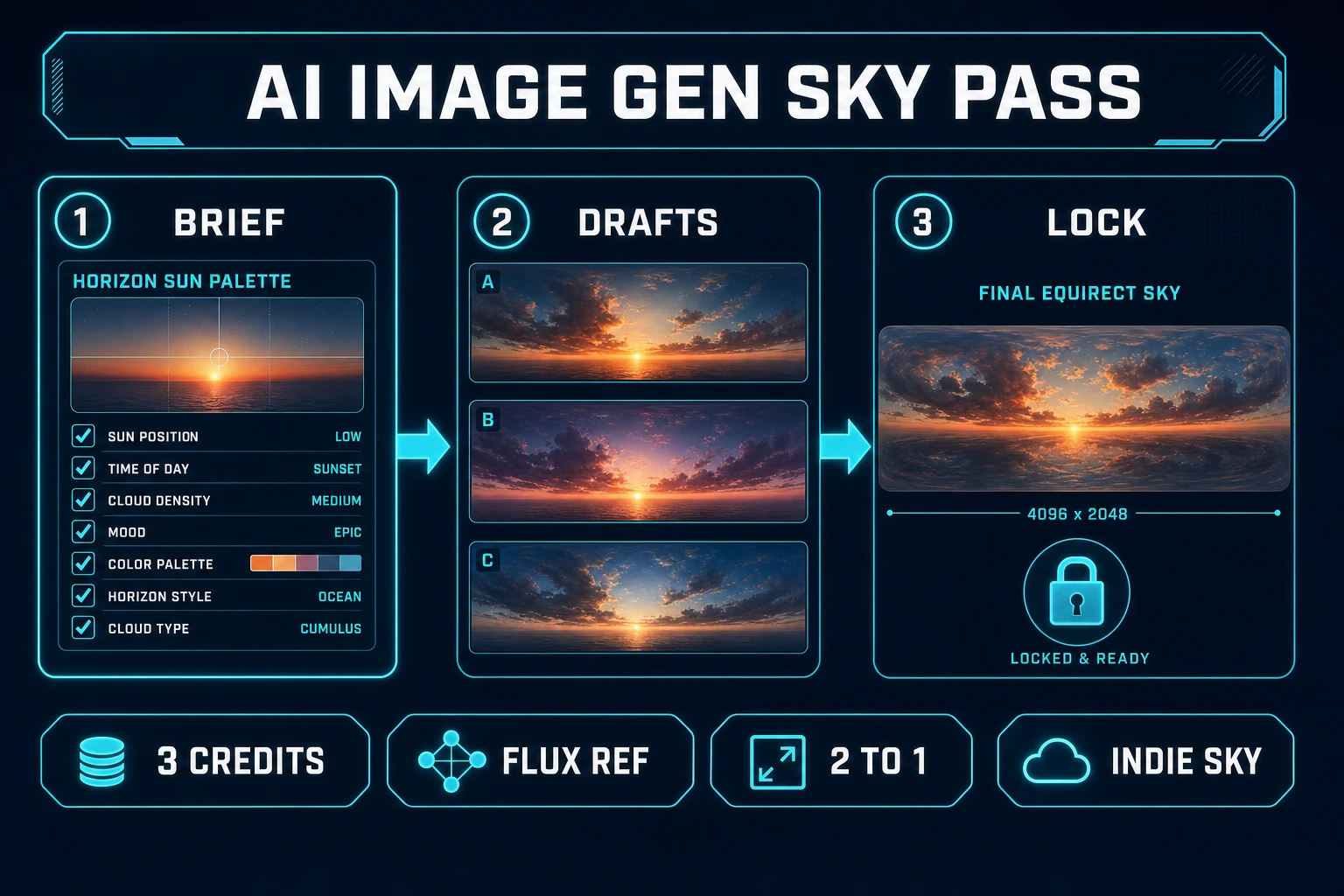
Open AI Image Gen and create a batch of equirectangular drafts. On Sorceress as of July 8, 2026, model credits are priced as follows: Z-Image at 3 credits, Flux 2 Pro at 6 credits, GPT Image 2 at 7 credits, and Nano Banana Pro at 18 credits. For skies, start with Flux 2 Pro or Z-Image for exploration; escalate to Nano Banana Pro when you need crisp cloud structure or hard-edged stylization.

Prompt skeleton that behaves:

  • Lead with medium: “seamless equirectangular 360 skybox environment map, 2:1, no ground terrain.”
  • Insert your locked sun and palette language verbatim.
  • Describe motion as static: “frozen clouds, no motion blur, no stars streaking.”
  • Close with quality guards: “photoreal haze gradient, no black letterboxing, no watermark.”

Generate at least two variants per biome. Skies are cheap relative to character sheets; variance is your friend. Compare wrap seams in a viewer by scrolling horizontally—if magenta or hard vertical lines appear at the merge, flag that draft for Step 3 even if the center composition sings.

Keep seeds and prompts in a notes file. When art direction returns next sprint, you will rerun with one word changed—“ash” instead of “sand”—instead of rediscovering the magic sentence.

Resolution tiers matter as much as model choice. Draft at 2048×1024 when iterating; promote a winner to 4096×2048 before cubemap export if desktop GPUs are your audience. Z-Image at 3 credits is ideal for those cheap wides; Flux 2 Pro at 6 credits balances detail and spend; GPT Image 2 at 7 credits can rescue tricky atmospheric perspective when others flatten depth; Nano Banana Pro at 18 credits is the polish pass for trailer biomes.

Step 3 — widen seams with Image Expander

Image Expander is the seam mechanic’s bench. Each expansion costs 5 credits on Sorceress (EXPANDER_CREDITS=5 as of July 8, 2026). Use it where equirectangular wraps hurt: the vertical meridian, occasionally the top third if zenith stars cluster unnaturally, rarely the bottom if you want a soft ground fog band to continue across the nadir.

Workflow: load the chosen draft, expand horizontally on both sides of the seam in modest increments rather than one heroic slab. Re-check in a panorama viewer. You are not trying to invent new composition—you are giving the cubemap splitter continuous pixels so the left and right edges of every side face agree.

Do not expand the entire canvas “just because.” Each expansion spends credits and can soften fine cloud edges if overdone. Target the belt around the horizon first; that is where players spend most of their look time. If Shade supplied distant mountains, ensure their silhouette altitude still matches after expansion—adjust prompt re-rolls before you expand if the ridge line drifted.

When the panorama scrolls cleanly, stop. Perfectionists can chase invisible gains; shippers export.

Image Expander widening the equirectangular seam before cubemap export
Horizontal expansion at the equirect seam prevents cubemap corner mismatches.

Step 4 — export cubemap faces for Three.js

Export six square faces from your finished equirect map at the resolution you locked in Step 1. Name them predictably—px.png, nx.png, py.png, ny.png, pz.png, nz.png—or whatever your asset pipeline expects, but keep the mapping stable across biomes.

In Three.js, load with CubeTextureLoader and pass URLs in this exact order: pos-x, neg-x, pos-y, neg-y, pos-z, neg-z. A minimal loader snippet:

const loader = new THREE.CubeTextureLoader();
const sky = loader.load([
  'sky/px.png', // pos-x
  'sky/nx.png', // neg-x
  'sky/py.png', // pos-y
  'sky/ny.png', // neg-y
  'sky/pz.png', // pos-z
  'sky/nz.png', // neg-z
]);
scene.background = sky;

If the sky appears inside-out, flip your material’s side or invert the mesh normals of a skydome—do not reorder faces randomly; fix orientation in code once. If the sun sits on the wrong wall, rotate the skybox mesh on Y or swap front/back in the exporter settings rather than repainting.

Consider PMREM for IBL: run the same cubemap through PMREMGenerator so metal props from Material Forge pick up consistent highlights. Tune exposure separately for background versus IBL if your renderer allows split intensities—bright skies blow out metals if you use one global multiplier.

Package assets with gzip-friendly PNGs or WebP if your CDN supports content negotiation; either way, keep all six faces the same bit depth and color profile to avoid banding mismatches at edges.

Validation checklist before you merge: load all six faces in a cubemap preview tool, look at each edge where faces meet, and spin 360° on Y. Then import into a blank Three.js scene with a gray floor plane and compare fog color to the bottom face. Two minutes of QA prevents a seam bug filed as “graphics broken on Safari.”

What a skybox generator session costs on Sorceress in 2026

Pricing is transparent enough to budget a biome in a spreadsheet. As of July 8, 2026, Image Expander charges 5 credits per expansion. AI Image Gen charges per model: Z-Image 3 credits, Flux 2 Pro 6 credits, GPT Image 2 7 credits, Nano Banana Pro 18 credits. A Starter pack gives 1000 credits for $10; a Lifetime plan is $49 (LIFETIME_PRICE=49) if you ship skyboxes regularly across projects.

Example frugal session: three Z-Image drafts (9 credits), two Flux 2 Pro finals (12 credits), three targeted expansions (15 credits)—roughly 36 credits, well under a dollar at Starter rates. Premium session: two Nano Banana Pro finals (36 credits), four expansions (20 credits), plus a GPT Image 2 experimental pass (7 credits)—about 63 credits for a hero biome that anchors a trailer.

The skybox generator does not hide fees in export steps—cubemap slicing is organizational labor on your machine or a Sorceress export action that does not add model surcharges beyond the generation and expansion you already paid for. Track credits in the dashboard the same way you track draw calls: small leaks compound.

If you are credit-starved, bias toward Z-Image for iteration and one Flux 2 Pro or Nano Banana Pro final. If you are time-starved, skip straight to Nano Banana Pro with tighter prompts—money replaces rerolls.

Second biome math: a muted interior skybox for dungeon courtyards might be four Z-Image passes (12 credits), one Flux 2 Pro lock-in (6 credits), and two expansions (10 credits)—28 credits total. Ship three biomes that way and you have still spent less than 100 credits, leaving plenty of headroom in a Starter wallet for Tile ground work and Material Forge props.

Common issues

Vertical seam still visible after expansion. Expand both sides of the meridian in equal steps, then re-roll generation with “seamless horizontal wrap” emphasized. Some drafts are unsalvageable; do not burn ten expansions on a bad seed.

Upside-down or rotated sun. Verify CubeTextureLoader order before touching art. Then check whether your skydome mesh inherits a negative scale from a parent glTF node.

Corner sparkles or color spikes. Usually extreme HDR values in a single texel—downsample one mip or clamp in an image editor before export. Equirectangular poles concentrate pixels; zenith artifacts map to all four side corners.

Sky fights fog. Set scene.fog.color to your locked haze swatch from Step 1. If fog is exponential, match density so geometry fades before the cubemap edge reads.

IBL blows out materials. Lower PMREM intensity or use a separate blurred copy for lighting while keeping the background visually bright.

Mobile bandwidth. Ship 512 faces, test on a mid-tier phone, and defer 1024 loads until you detect WebGL2 and spare GPU memory.

Palette drift between biomes. Reuse the same prompt footer for negatives and grading language. Skies feel “off” faster when hue shifts without cloud shape changing.

Stars duplicated at corners. Often a sign you split before expanding the meridian. Return to Image Expander, patch the wrap, and re-export—do not paint six faces by hand unless you enjoy suffering.

A skybox generator is not a novelty filter—it is the fastest way to close the visual box around a WebGL level. Lock direction once, run the four Sorceress steps, load six faces in the documented Three.js order, and get back to gameplay. When the ground, props, and sky share one sun story, players stop inspecting pixels and start exploring—and that is the whole point of shipping domes instead of flat backdrops.

Frequently Asked Questions

What does a skybox generator output for 3D games?

A skybox generator for 3D games should produce either a seamless equirectangular (lat-long) panorama or six square cube faces (pos-x, neg-x, pos-y, neg-y, pos-z, neg-z) you can load with Three.js CubeTextureLoader. Sorceress maps that to AI Image Gen for drafts, Image Expander for wrap/outpaint fixes, then a cube-face export step documented in Three.js docs (verified July 8, 2026).

Is a free HDRI download the same as a skybox generator?

No. Libraries like Poly Haven ship excellent photographic HDRIs, but they rarely match your game palette, sun direction, or art style. A skybox generator on Sorceress invents a matching sky from a brief — same horizon, same fog color, same silhouette language as your prop art — then exports engine faces. Use stock HDRIs when you need photoreal IBL; use a skybox generator when the sky must look authored.

Which Sorceress model should I use for a skybox generator session?

Start with Z-Image at 3 credits per render for fast equirect drafts (src/lib/models.ts verified July 8, 2026). Promote winners with Flux 2 Pro at 6 credits using a reference image to lock sun position, then finalize hero maps with Nano Banana Pro at 18 credits when you need 2K edge clarity. Image Expander costs 5 credits per extend pass (EXPANDER_CREDITS in src/app/expander/page.tsx).

What cube face order does Three.js expect in 2026?

Three.js CubeTextureLoader (https://threejs.org/docs/#api/en/loaders/CubeTextureLoader, verified July 8, 2026) expects six URLs in order: pos-x, neg-x, pos-y, neg-y, pos-z, neg-z. Faces should be square. Because Three.js is right-handed while classic cubemaps are left-handed, environment maps effectively swap pos-x and neg-x relative to some DCC exporters — test reflections once after load.

What does a full skybox generator session cost on Sorceress?

Verified July 8, 2026 against src/app/plans/page.tsx (LIFETIME_PRICE = 49), src/lib/models.ts, and src/app/expander/page.tsx (EXPANDER_CREDITS = 5). Budget about nine Z-Image drafts (27 credits), two Flux reference passes (12 credits), one Nano Banana Pro lock (18 credits), and two Expander seam fixes (10 credits) — roughly 65–70 credits (.65–.70 on a Starter pack at 1000 credits/) before free WizardGenie brief work.

Sources

  1. Three.js — CubeTextureLoader
  2. Skybox (video games) — Wikipedia
  3. Cube mapping — Wikipedia
  4. Equirectangular projection — Wikipedia
  5. Poly Haven — HDRIs
Written by Arron R.·2,776 words·12 min read

Related posts


