Bump a Normal Map Generator (Browser PBR Maps 2026)

By Arron R.10 min read
A normal map generator for games in 2026 is a four-step browser pipeline: lock surface type, generate albedo in AI Image Gen, derive free tangent-space normals

A normal map generator turns a flat color photo into the purple-tinted RGB texture that fools a real-time light into seeing grooves, brick mortar, and wood grain—without adding a single triangle. For browser games built with Three.js MeshStandardMaterial, that means a tangent-space normal PNG, a matching albedo, and usually roughness and AO siblings so the surface reads as PBR instead of plastic. Sorceress stitches that path across AI Image Gen for base color and Material Forge for free client-side derive. If you already use Etch for full PBR packs or Tile for seamless ground loops, treat this bump workflow as the depth pass that makes those albedos believable under a moving sun. New to the stack? Start from the tools guide, or open Wizard Genie when you want surface briefs assembled for you. For sky lighting that matches your floors, see Dome’s skybox pipeline; for credit packs and Lifetime Pro, check plans.
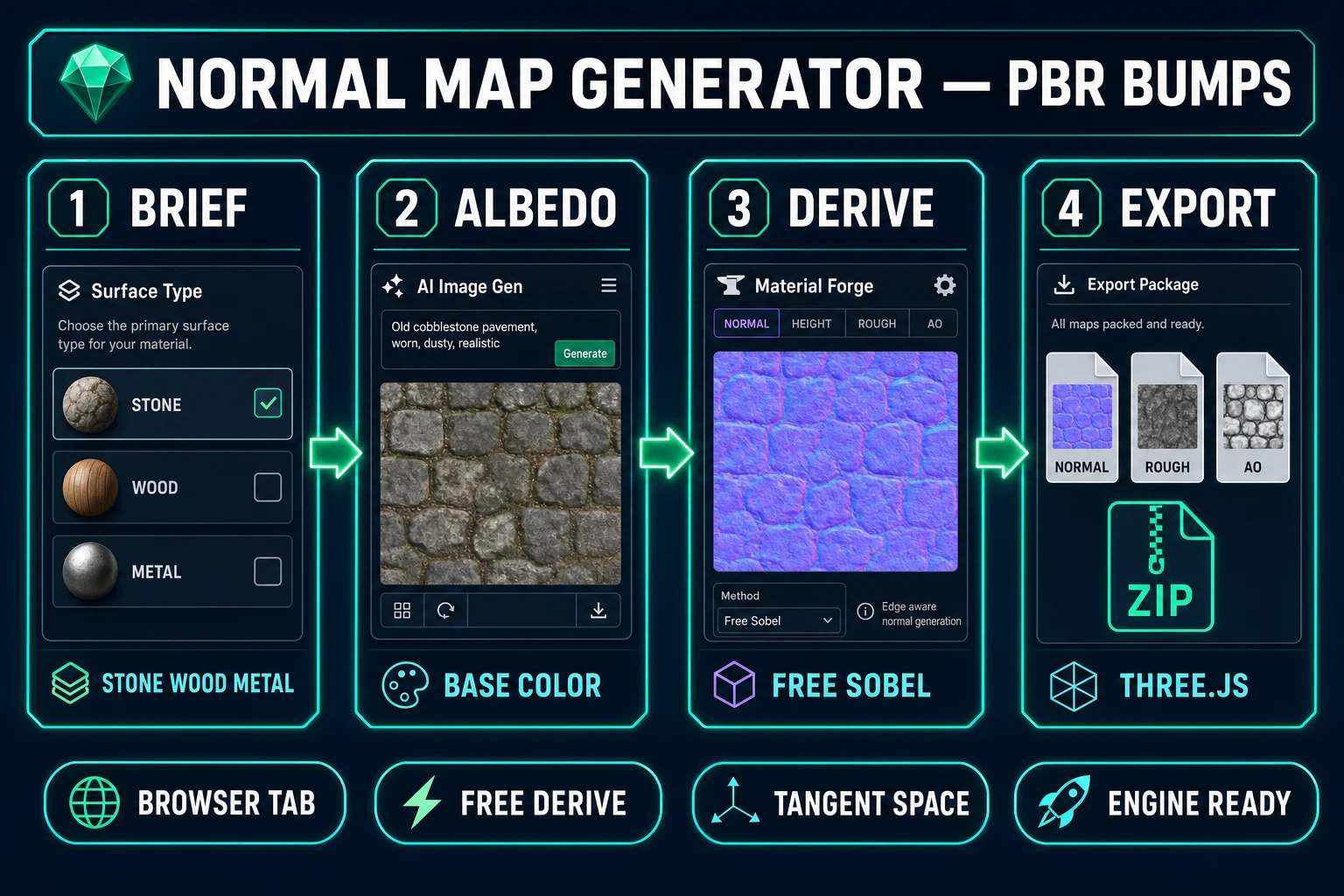
Normal map generator pipeline from albedo brief to Material Forge derive to Three.js export
From albedo brief to free tangent-space derive—the normal map generator workflow on Sorceress.

What a normal map generator actually outputs for games

Ask ten artists what a “normal map” is and half will show you a purple PNG, half will confuse it with a grayscale bump. In production terms, a normal map generator should deliver a tangent-space RGB texture whose channels encode X, Y, and Z components of the surface normal relative to the tangent frame of each triangle. The classic look is blue-to-purple because the Z channel stays bright while X and Y encode left-right and up-down slopes. Wikipedia’s normal mapping article (verified July 8, 2026) and LearnOpenGL’s tangent-space walkthrough remain the clearest primers: the map does not change the mesh silhouette—only the lighting response.

Those maps are not arbitrary art. Engines expect consistent handedness, power-of-two resolution when you care about mipchains, and usually a sibling set: albedo (base color), roughness (or glossy), ambient occlusion, and metallic when the material needs it. A competent normal map generator documents whether it outputs OpenGL-style or DirectX-style green-channel polarity, because flipping Y after export is a weekly support ticket otherwise. Three.js defaults to tangent-space normals on MeshStandardMaterial and treats the map as non-color data—see the official MeshStandardMaterial.normalMap docs verified July 8, 2026.

Sorceress targets the full PBR pack, not a solitary purple filter. You generate or upload a base-color image, then Material Forge runs deriveMapsFromBaseColor in the browser—zero API cost—as documented in src/lib/material-forge/derive-maps.ts. Default derive settings enable normal at strength 0.8, roughness with bias 0.5, and AO at strength 1.0; metallic and emissive stay off until you ask. Export lands in a textures ZIP with files named baseColor, normal, roughness, metallic, emissive, and ao via exportTexturesZip—the same slots artists already expect from library sites like Poly Haven.

Resolution is a project-level decision. Mobile WebGL often ships 512 or 1024 normals; desktop demos can afford 2048. Derive from an albedo that already matches your target size so you are not upscaling noise into fake microdetail. Keep the normal as a lossless PNG; JPEG compression invents chromatic ripples that read as sparkling dirt under specular light.

Object-space normals exist—they store world-ish directions and look more rainbow than purple—but they do not travel well with skinned or rotated props. For almost every indie game in 2026, tangent-space is the correct default. If a tool dumps object-space without saying so, reject the pack and regenerate.

Why bump and height maps are not the same as normals

A bump map is usually a single-channel height field: bright pixels are “up,” dark pixels are “down.” Historically, engines converted bump to temporary normals in the shader. A modern normal map generator skips the middleman and stores the converted vectors directly so the fragment shader only unpacks RGB. Height maps still matter for parallax and displacement—Material Forge’s luminance buffer is conceptually related—but shipping height alone into a PBR slot labeled normal will light wrong.

Photoshop’s “Generate Normal Map” filter trained a generation of artists to treat purple as a magic filter they run once and forget. That is fine for a mockup. It fails when you need tunable strength, a live lit preview, and matching roughness so wet stone is not specular soup. Online one-click converters often bake openGL polarity you cannot see until the green channel flips under a moving light. Treat them as toys; treat a normal map generator with preview as the shipping path.

Another trap: painting detail into albedo that should live in normals. Dark mortar lines drawn into diffuse look like dirty paint under a key light, while the same information in a normal map generator output preserves color purity and still catches grazing specular. When in doubt, keep albedo flat-ish and push crevices into normals + AO—exactly what Material Forge’s AO derive is for.

Displacement and tessellation are a third family. They move vertices. Normals fake lighting. Do not expect a normal map generator to fix silhouette roundness on a cylinder; bump the mesh or accept the flat profile. Indie budgets almost always prefer normals + cheap geometry over tessellation on mid-range phones.
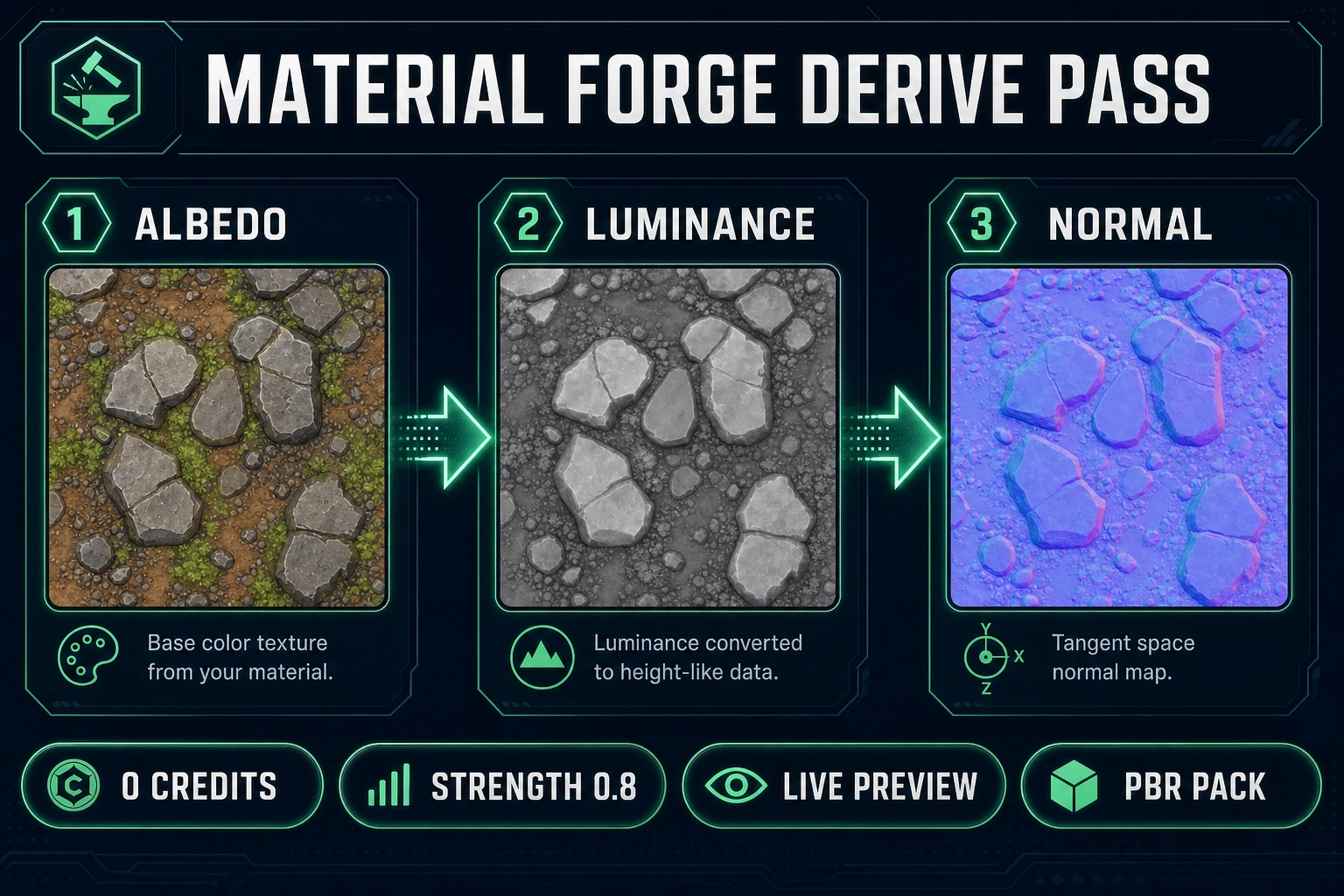
Albedo to luminance buffer to purple tangent-space normal map derive
Material Forge derives normals from albedo luminance at zero credits—strength defaults to 0.8.

The Sorceress normal map generator pipeline in four steps

Think of the Sorceress normal map generator as four locked stations—no secret fifth step buried in a menu. You lock surface intent, produce albedo in AI Image Gen (or upload your own), derive the normal and sibling maps in Material Forge, then export and wire into Three.js. Each station has a clear artifact you can drop into version control.

Step 1 is creative control: material class (stone, wood, metal, fabric, water), target scale (is this a 1m tile or a 0.1m badge?), and polarity notes. Step 2 is albedo work—generation costs credits; upload is free. Step 3 is derive—always free, always local, always re-runnable when you tweak strength. Step 4 is export + engine wiring with NoColorSpace and normalScale.

Optional accelerators exist. Wizard Genie drafts surface briefs when you would rather describe “damp cellar brick, worn edges” than memorize negative prompts for “text watermark, UI chrome.” Seamless Tile Gen helps when the albedo must tile without a seam before you derive. The tools guide links every station if you forget which URL you bookmarked.

Repeat the same four steps for every surface family: dungeon stone, scrap metal, painted wood, wet asphalt. Consistency beats heroics; your players notice when every material shares a believable light response, not when brick 47 has unique noise.

Step 1 — lock base color and surface type before you derive

Before any normal map generator run, write a half-page brief. State the material class in plain language, the real-world scale of one UV tile, whether the surface should feel raised (cracked plaster) or inset (engraved runes), and the lighting environment it will live under—directional sun, neon bounce, or soft overcast. These choices drive derive strength more than vanity adjectives.

Match Material Forge’s preset guidance from the system brief (verified in source July 8, 2026): organic rock likes normal strength around 0.6–1.0; smooth plastic 0.3–0.5; fabric 0.3–0.4; stone/masonry 0.8–1.2; water should stay low (0.2–0.4) with metallic forced off. Starting near those bands saves twenty failed derives.

Decide tiling now. If the ground planes tile, albedo must already be seamless before derive—otherwise the normal will inherit a bright seam as a fake ridge. Pair this step with Tile’s seamless workflow when the floor is infinite. Props can ignore wrap; floors cannot.

Document polarity intent. Note “OpenGL green-up” on a sticky. Three.js / glTF conventions usually expect a specific green channel; if your reference library from Poly Haven looks inverted, flip Y once and record it instead of flipping randomly per asset.

Finally, separate hero materials from filler. Heroes deserve more albedo variants and a Nano Banana Pro lock; filler dungeon trim can stay on Z-Image drafts. The normal map generator pipeline scales; your credit wallet does not if everything is “hero.”

Step 2 — paint or generate albedo in AI Image Gen

Open AI Image Gen when you need a fresh base color. On Sorceress as of July 8, 2026, model credits are priced as follows (verified against src/lib/models.ts): Z-Image at 3 credits, Flux 2 Pro at 6 credits, GPT Image 2 at 7 credits, Nano Banana Pro at 18 credits. For textures, explore with Z-Image or Flux; escalate when you need crisp mortar or stylized illustration edges.

Prompt skeleton that behaves for albedo:

  • Lead with medium: “tileable PBR albedo texture, top-down orthographic, no lighting baked, no shadows, no text.”
  • Insert your locked material class and scale language verbatim.
  • Ask for flat color: “diffuse only, soft lighting removed.”
  • Close with guards: “seamless edges if tiling, no watermark, no UI frames.”

Baked lighting in the albedo is the enemy of a good normal map generator session. If the photo already has strong shadows, luminance-based derive thinks those shadows are height and invents false ridges. Prefer even, flat captures. Photo uploads work beautifully when they are diffuse-lit; phone photos of brick in hard noon sun often do not.

Generate at least two albedo variants per surface. Normals inherit albedo contrast, so a muddy draft yields muddy bumps. Keep prompts and seeds in a notes file—when art direction returns next sprint, you will change one adjective instead of rediscovering the magic sentence.

Resolution tiers matter. Draft at 1024 for exploration; promote winners to 2048 before final derive if desktop is the audience. Pair seamless needs with Seamless Tile Gen before Material Forge so the derive pass never sees a wrap scar.

Step 3 — derive normals in Material Forge (free client-side)

Open Material Forge and load the albedo into the base color slot. Derivation runs automatically in the browser via canvas processing—no Replicate call, no credit deduction. The algorithm builds a luminance buffer, then central-difference slopes into a tangent-space RGB normal (see deriveNormalMap in derive-maps.ts). Default normal strength is 0.8; raise it when the preview looks flat, lower it when edges buzz.

Use the live 3D preview. Rotate the light. If specular highlights crawl incorrectly across bumps, either strength is too high or albedo still contains baked shadow. Tweak normalIntensity on the material (range 0–10, default 1.0) separately from derive strength—one is map generation, the other is material scale at render time.

Enable AO derive for crevice shading and keep metallic disabled unless you are truly authoring chrome. Water/liquid materials must keep metallic at 0.0 and lower normal + AO—Material Forge’s own guidance flags dark watery patches when metallic leaks into liquids.

Re-run derive after every albedo change. Because the pass is free, iteration is the whole point of a browser normal map generator. Save when the lit preview matches your brief, not when the purple PNG “looks cool” in isolation.

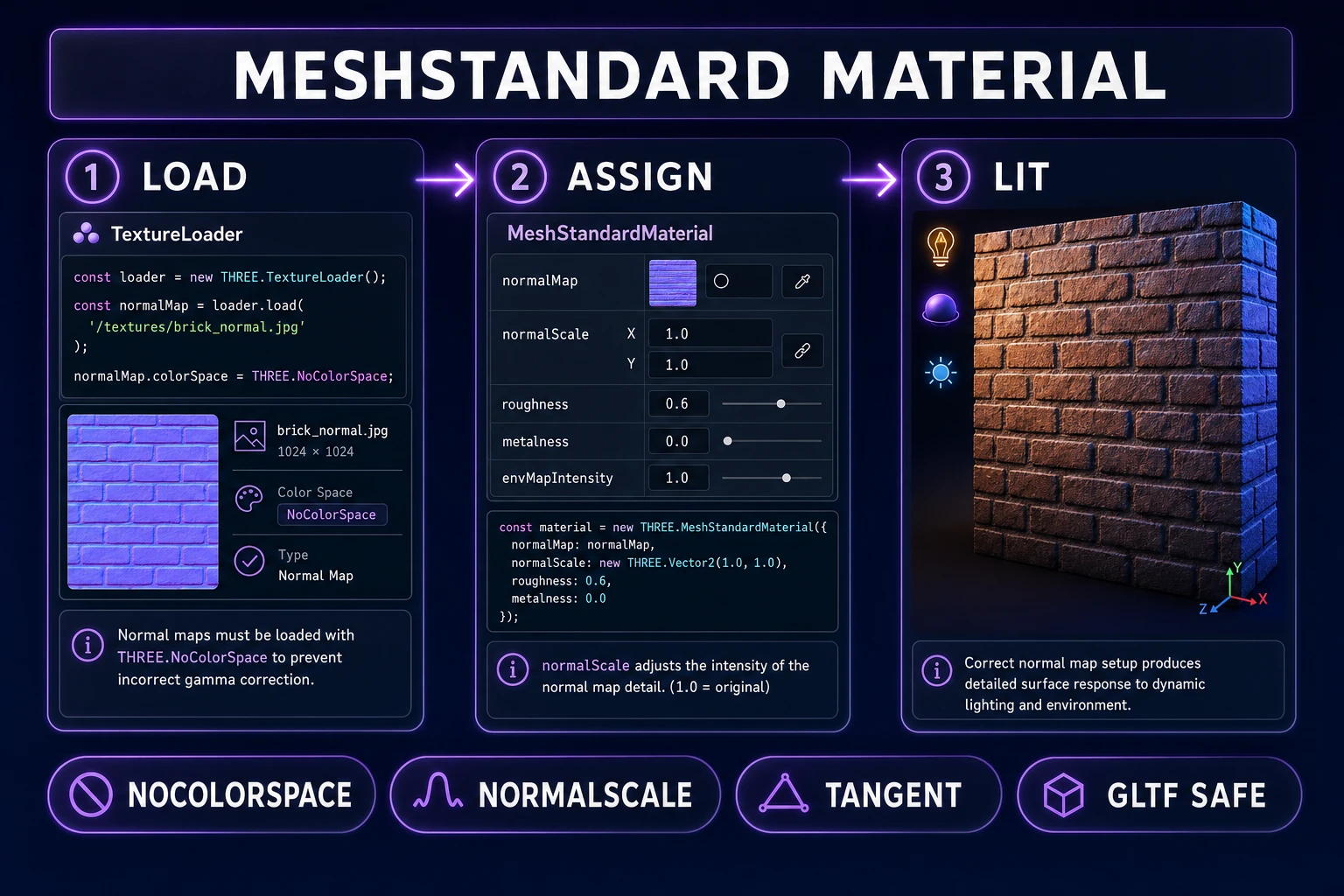
Three.js MeshStandardMaterial normalMap assignment with NoColorSpace
Load normals as non-color data, assign to normalMap, dial normalScale—then light the mesh.

Step 4 — export PBR packs and wire into Three.js

Export the textures ZIP from Material Forge. You should see sibling files for baseColor, normal, roughness, AO, and optional metallic/emissive. Drop them beside your glTF or load them manually. For Three.js (docs verified July 8, 2026):

const loader = new THREE.TextureLoader();
const normalMap = loader.load('/materials/brick_normal.png');
normalMap.colorSpace = THREE.NoColorSpace; // non-color data

const mat = new THREE.MeshStandardMaterial({
  map: albedo,
  normalMap,
  roughnessMap,
  aoMap,
  normalScale: new THREE.Vector2(1, 1),
});

If the geometry came from glTF and lacks tangents, you may need to negate normalScale.y for left-handed authored maps—Three.js community guidance and the MeshStandardMaterial notes cover this handedness case. Test once under a moving directional light; freeze the normalScale that reads correct, then apply it project-wide.

Name files consistently: surface_normal.png, surface_baseColor.png. Engines and artists alike punish clever names. Commit the ZIP or unpacked PNGs with the brief so future you can rebuild when art direction shifts from “dry brick” to “mossy brick.”

Optional: import the same pack into a DCC for a second opinion, but browser shipping does not require it. The normal map generator path on Sorceress is complete when Three.js lights correctly—not when Blender also opens the file.

What a normal map generator session costs on Sorceress in 2026

Verified July 8, 2026 against src/app/plans/page.tsx (LIFETIME_PRICE = 49) and src/lib/models.ts. Derivation in Material Forge is always 0 credits. Credits only burn on albedo generation:

  • Six Z-Image albedo drafts × 3 = 18 credits
  • Two Flux 2 Pro reference locks × 6 = 12 credits
  • Optional one Nano Banana Pro hero × 18 = 18 credits

A typical filler-surface session lands around 30 credits (~$0.30 on a Starter pack of 1000 credits / $10). A trailer hero surface with Nano Banana Pro can reach ~50 credits. Uploading your own photos and deriving only is free beyond any prior generation. Lifetime Pro at $49 unlocks the suite; monthly credit packs restock exploration.

Compare that to the hidden cost of guessing polarity in three different online converters and re-baking each time art direction changes. A documented normal map generator pipeline—brief, albedo, free derive, export—compounds. Pair materials with matching skies and tileable grounds so the whole scene shares one light story.

When you are ready, open Material Forge, drop in an albedo, and watch the purple map appear at zero credit cost—that is the normal map generator moment that turns flat textures into lit world surfaces.

Frequently Asked Questions

What does a normal map generator output for games?

A normal map generator for games should produce a tangent-space RGB normal PNG (purple-dominant) that perturbs lighting without changing mesh geometry, plus usually the sibling PBR maps (roughness, AO, metallic) that ship with a full material. On Sorceress, Material Forge derives those maps client-side from base color at zero API cost (src/lib/material-forge/derive-maps.ts, verified July 8, 2026), then exports them in a textures ZIP with baseColor, normal, roughness, metallic, emissive, and ao filenames.

Is a free online bump converter the same as a normal map generator?

Not if all it does is a one-click purple filter with no strength control, no live 3D preview, and no roughness/AO siblings. Material Forge is a full normal map generator session: you tune derive normal strength (default 0.8), normalIntensity on the material (0–10), and preview lighting on a mesh before you export. That is the difference between a conversion trick and an art pipeline.

Do normal maps cost credits on Sorceress?

Derivation itself is free and runs in the browser from luminance gradients (deriveMapsFromBaseColor). Credits only apply when you generate a new base-color texture through AI Image Gen models — for example Z-Image at 3 credits, Flux 2 Pro at 6, GPT Image 2 at 7, Nano Banana Pro at 18 (src/lib/models.ts verified July 8, 2026). Uploading your own albedo and deriving normals costs zero credits.

How do I load the normal map in Three.js in 2026?

Assign the PNG to MeshStandardMaterial.normalMap and keep texture.colorSpace = THREE.NoColorSpace because normal maps are non-color data (Three.js MeshStandardMaterial docs, verified July 8, 2026). Use normalScale to dial intensity; if the mesh came from glTF without tangents and the map uses a left-handed convention, negate the Y component of normalScale.

What does a full normal map generator session cost on Sorceress?

Verified July 8, 2026 against src/app/plans/page.tsx (LIFETIME_PRICE = 49) and src/lib/models.ts. Budget roughly six Z-Image albedo drafts (18 credits), two Flux reference locks (12 credits), optional one Nano Banana Pro hero (18 credits), and zero credits for Material Forge derive passes — about 30–50 credits ($0.30–$0.50 on a Starter pack at 1000 credits/$10) before free WizardGenie brief work.

Sources

  1. Normal mapping — Wikipedia
  2. LearnOpenGL — Normal Mapping
  3. Three.js — MeshStandardMaterial
  4. OpenGL Tutorial 13 — Normal Mapping
  5. Poly Haven — Textures
Written by Arron R.·2,210 words·10 min read

Related posts


