Animate an AI Animation Picture Generator (Image-to-Loop)

By Arron R.19 min read
An AI animation picture generator turns one picture into a moving loop. Sorceress lifts the picture to a rigged 3D character, then a single 2-credit HY-Motion c

An AI animation picture generator is the 2026 answer to a question that, until last year, required a Mocap suit, a Maya seat, and a working knowledge of skeletal retargeting. The honest 2026 question is no longer "can I animate a picture into a moving clip for free" — the answer is yes, in a browser tab. The honest 2026 question is which kind of motion you want: a one-shot 2D video clip of the source picture moving in place, or a rigged 3D character with a baked motion clip you can loop forever, retarget to other characters, and drop into any game engine. This guide walks the second path — the picture-to-loop pipeline — because it is the only path that produces a reusable asset, and because Sorceress runs the whole thing in a browser tab with a single metered step that costs exactly 2 credits. Every other step is free for any signed-in user. Verified May 21, 2026 against the live tool source and the skeletal-animation primer.
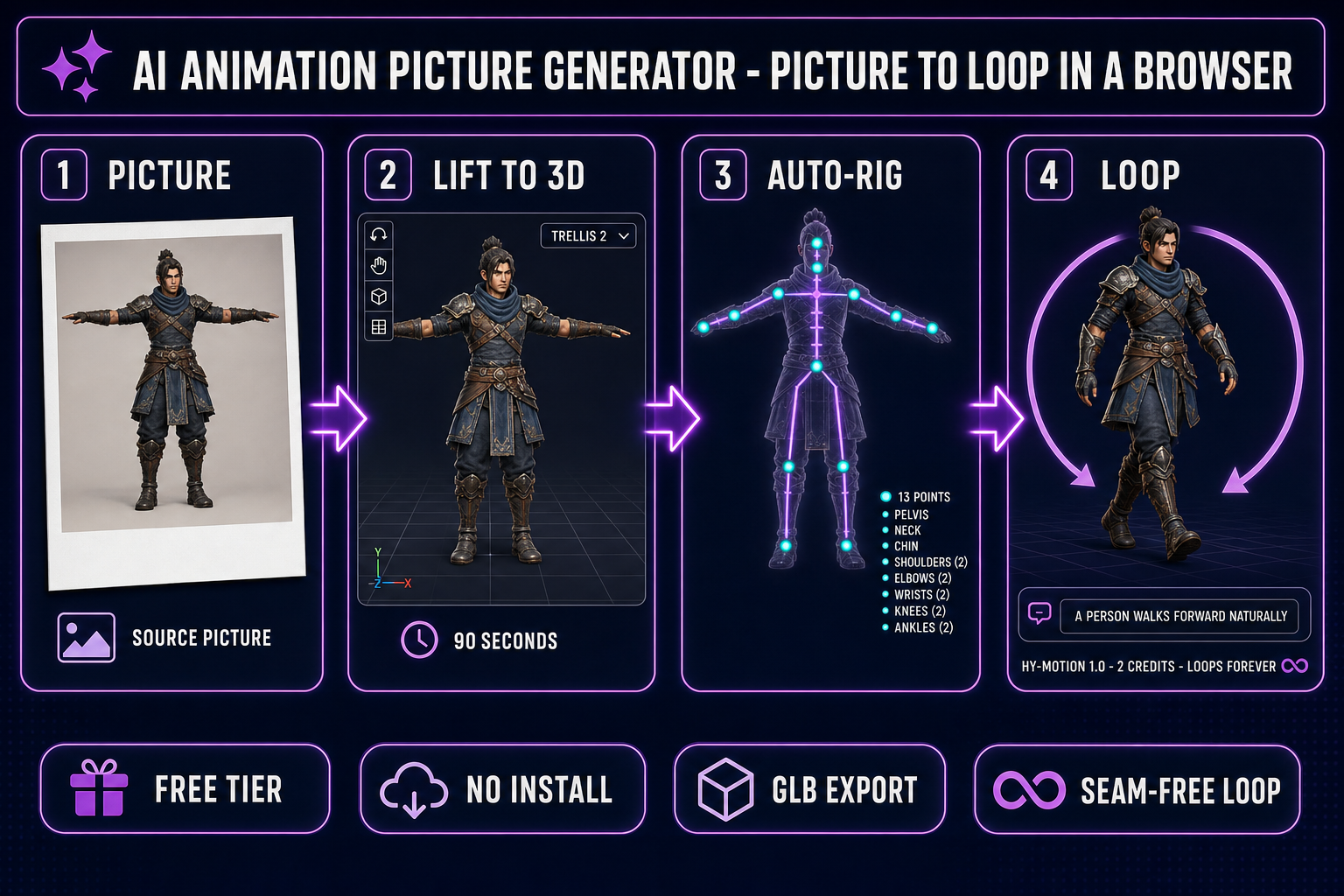
AI animation picture generator browser pipeline: picture to rigged 3D mesh, auto-rig 13 markers, HY-Motion 2-credit clip, seam-free GLB loop
The four-stage browser pipeline for an AI animation picture generator. Picture to 3D mesh to rigged skeleton to HY-Motion loop clip to GLB export, every step in a single 3D Studio tab.

What an AI animation picture generator actually produces in 2026

The phrase "AI animation picture generator" covers two fundamentally different artefacts that share a single headline. The first artefact is a short video clip: feed in a picture, get a 3-to-10-second 720p or 1080p video where the source picture appears to move in place. Kling AI, Hailuo AI, Luma Dream Machine, Runway Gen-3, and Pika 2.0 all sit in this category — verified May 21, 2026; each ships a daily-allowance free tier with a small watermark or a one-time-credit-pack free tier without one. The second artefact is a rigged 3D character with a baked motion clip: the picture is first lifted to a textured 3D mesh, then an auto-rig step builds a skeleton, then a text-to-motion model bakes an animation clip onto the rig. The result is a single GLB file containing the mesh, the skeleton, and the motion track — a reusable asset you can loop forever, re-animate with a new text prompt, and retarget to a different character whenever the game design changes.

The difference matters for the budget. A 2D video clip is locked: whatever motion the model chose is the motion you get, and the end-frame rarely matches the start-frame cleanly enough to loop without a visible seam. A rigged GLB is an animation clip in the engine sense — the joint rotations at the last frame match the joint rotations at the first frame because the motion is encoded as a sequence of rotations on a skeleton, not as a sequence of pixels on a video timeline. For a character that will appear in an idle loop, a walk cycle, a breathing in-and-out, or any other repeating animation, the rigged 3D AI animation picture generator path is the only path that loops cleanly without manual frame-blending in After Effects.

The second category is also the one almost nobody covers honestly. The big 2D image-to-video tools dominate the search results because their marketing pushes them. The 3D rigged path is younger — the HY-Motion 1.0 text-to-motion model only shipped on December 30, 2025, the open-source image-to-3D models stabilised in mid-2025, and the browser auto-rig pipelines only landed at production quality in early 2026. The honest version of "AI animation picture generator" in May 2026 is: yes, you can run the rigged 3D pipeline end-to-end in a browser tab for the cost of one 2-credit HY-Motion call, but the public guides have not caught up. This is that guide.

The 2026 AI animation picture generator landscape

Five tools share the front page of search results for "AI animation picture generator" in May 2026. Each is named in plain text only because none of them are competitors in the game-engine sense; they are general-purpose image-to-video products that game devs occasionally borrow for marketing renders.

  • Kling AI — the highest motion quality on the free tier in May 2026. Roughly six 1080p clips per day, small watermark, 5-second clip length default with 10-second extensions on the paid tier. Output is an MP4 file. The motion realism is the best in the category but the file is locked to whatever motion the model chose — there is no skeleton, no rig, no animation track.
  • Hailuo AI — the cleanest free-tier deal. Ten 720p clips per day, watermark-free, 6-second clip length. Output is an MP4 file. The motion quality is a step below Kling but the watermark-free output is the differentiator for indie marketing renders.
  • Luma Dream Machine — the stylised look. Five clips per day on the free tier, 5-second clips at 1280 by 720, watermark-free. The output skews more cinematic-render than realistic-motion. Good for trailer cuts, less good for character-in-game footage.
  • Runway Gen-3 — the one-time credit pack on the free tier (roughly 125 credits, watermark on the free clips). The most consistent character preservation across the frame, but the motion quality on the free tier is the weakest of the five.
  • Pika 2.0 — a 150-credit one-time allowance on the free tier, 3-second clips at 1024 by 576. The lowest-friction onboarding but the shortest clip length, which limits the usefulness for game cutscenes.

All five of these are 2D image-to-video tools. None of them produce a rigged 3D character. For an AI animation picture generator that produces a GLB you can loop, retarget, and drop into a game engine as a real animated character, the 2026 path is the Sorceress 3D Studio pipeline covered below. That pipeline is the only browser-based AI animation picture generator in May 2026 that ends in a glTF 2.0 binary file with a skeleton, a mesh, and a baked motion track.

Why a looping picture animation matters for game dev (and what breaks loops)

Most useful character animations in a game are loops. An idle stance loops while the player chooses what to do next. A walk cycle loops while the character moves across the map. A run cycle loops faster. A breathing in-and-out subtle motion loops on every NPC standing in the village. A magic-aura-spinning effect loops on every spell-caster. The list of one-shot animations in a typical game is short: jump, dodge, attack swing, take-damage flinch, death. Everything else is a loop, and a loop with a visible seam at the cut point pulls the player out of the game.

Three things break a loop in a 2D video clip but not in a rigged 3D animation. First, the end-frame pixels rarely match the start-frame pixels exactly — the model that generated the clip did not constrain the final frame to match the initial frame, so playing the clip on repeat produces a visible jump. Second, the encoded video format introduces compression artefacts that are visible at the loop point because the encoder treated the start and end as unrelated frames. Third, the loop point is fixed at the clip end — you cannot trim the clip to a different loop point without manually finding a matching pair of frames in a video editor, which defeats the AI animation picture generator promise of zero-effort character motion.

A rigged 3D animation clip avoids all three failure modes. The motion is encoded as a per-bone time-series of quaternion rotations and root-bone translations — not as pixels. For a looping motion (walk, run, idle, dance, breathing), the model trains on cyclic data and the final-frame rotations naturally match the first-frame rotations on the bones that complete a cycle. The Three.js AnimationMixer documentation explicitly notes that LoopRepeat mode replays the animation from the first frame at the end of each cycle, which produces a seam-free loop as long as the underlying motion is itself cyclic. The Sorceress AI animation picture generator pipeline takes advantage of this: every preset in the Animate tab labelled as a loop (Walk, Run, Idle, Dance, Wave) is a motion the HY-Motion model produces as a clean cycle, and the GLB export bakes the cycle so the engine just sets action.loop = THREE.LoopRepeat and the rest is free.
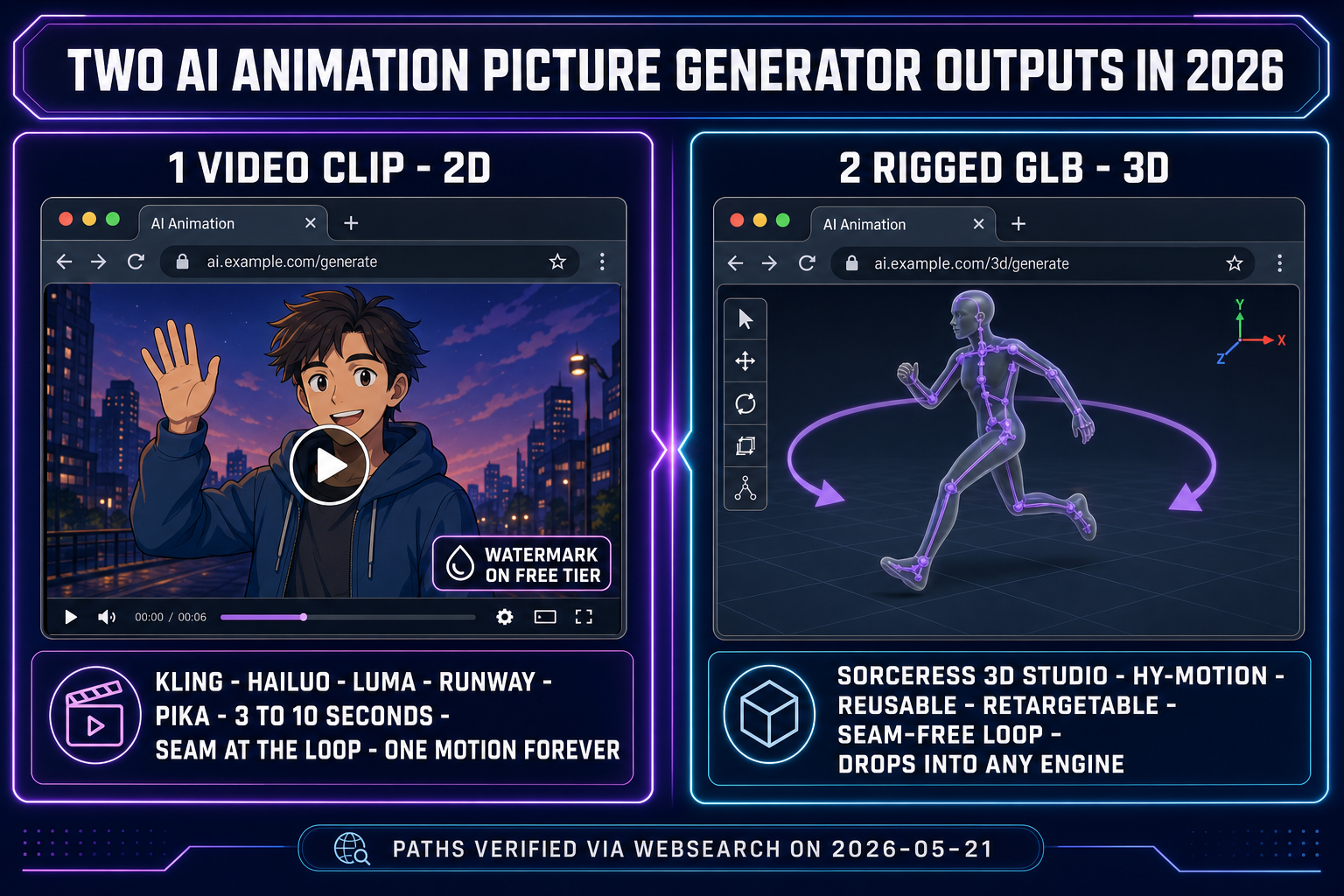
Two AI animation picture generator outputs in 2026: 2D video clip with a watermark and a loop seam, versus rigged 3D GLB with a seam-free loop ready for any engine
The two AI animation picture generator outputs in 2026. The 2D video clip is locked to one motion with a seam at the loop. The rigged 3D GLB is a reusable, retargetable, seam-free loop.

The Sorceress AI animation picture generator pipeline

The end-to-end Sorceress AI animation picture generator lives in a single 3D Studio tab. Five conceptual steps, every step interactive, every step undoable, every step except one free for any signed-in user. The metered step is exactly the HY-Motion text-to-motion call at 2 credits per generation — verified against the ANIM_CREDIT_COST constant on line 65 of src/components/studio/animate/AnimateTab.tsx on 2026-05-21.

Step 1 — Acquire the source picture

The AI animation picture generator pipeline starts with the picture. Two sources work: a generated character image from AI Image Gen or a clean reference picture you upload. For a generated source, write a prompt that gives the rigging step a fighting chance — three rules apply. T-pose or A-pose is mandatory (the auto-rig step places markers on a clean neutral pose; a fighting-stance or running-stride source breaks the skeleton-build). Front-on framing — shoulders square, weight balanced (three-quarter angles confuse the image-to-3D depth inference). Limbs separated from the body — arms slightly away from the torso, legs at hip-width apart, hands open with fingers slightly spread. The literal prompt that works reliably is "a chunky humanoid warrior in clean T-pose, arms slightly away from body, fingers spread, facing camera, plain neutral background, full body visible, 3:2 aspect."

Pick the model on the right rail. For the cheapest path, Z-Image Turbo (the Tongyi-Mai ultra-fast model) ships at low credits per generation and renders a clean T-pose in roughly 10 seconds. For the highest character quality, Nano Banana 2 (the Google flagship at the no-credit-cost Free tier) gives crisp anatomy at zero cost on the daily allowance. For text-on-character requirements (a name tag, a logo on the chestplate), GPT Image 2 is the right pick — it is the only model in the 2026 lineup that renders dense legible text reliably. All three are part of the seven-model rail in AI Image Gen, verified against src/app/_home-v2/_data/tools.ts on 2026-05-21.

Step 2 — Lift the picture to a textured 3D mesh

Inside 3D Studio, the Generate tab takes the source picture and lifts it to a textured 3D mesh. Six models ship in the picker — Hunyuan 3D 3.1, Meshy 6, TRELLIS 2, TRELLIS, Rodin 2.0, Tripo v3.1 — verified against src/lib/threed-models.ts on 2026-05-21. For a free-tier-budget run, TRELLIS is the cheapest at low double-digit credits per generation and produces a clean mesh in about 60 seconds. For the highest mesh quality, Meshy 6 takes about 150 seconds and produces sharper topology. For characters that will be animated specifically (where mesh deformation cleanliness matters more than texture detail), Hunyuan 3D 3.1 and TRELLIS 2 produce the most rig-friendly geometry — the limbs sit cleanly separated from the torso, which the auto-rig step needs to place skeleton markers without confusion. The output is a GLB containing the mesh and the diffuse texture map, ready for the auto-rig step.

Step 3 — Auto-rig the humanoid skeleton

Switch to the Rig tab. The mesh loads automatically from the previous step. Place 13 anatomical markers on the mesh — pelvis, neck, chin, two shoulders, two elbows, two wrists, two knees, two ankles (plus two optional hip markers for fine-tuning) — verified against src/lib/rigging/types.ts on 2026-05-21. Auto-mirror is on by default, so for a symmetric humanoid you click nine markers and the tool builds the other six. Centre-snap is on by default and projects each click to the volumetric centre of the limb rather than its surface point.

One click on the "Build skeleton + auto-weight" button. The mesh and the skeleton go to a hosted Blender backend that runs the heat-equilibrium weight solver — the same solver Blender itself ships, run as a service so the browser user never installs Blender. The full marker-placement-to-weighted-rig path is covered in detail in the browser auto-rig guide. Wait 60 to 120 seconds. The output is a rigged GLB with the skeleton bound to the mesh, ready for the AI animation picture generator motion step.

Step 4 — Bake the looping motion with HY-Motion

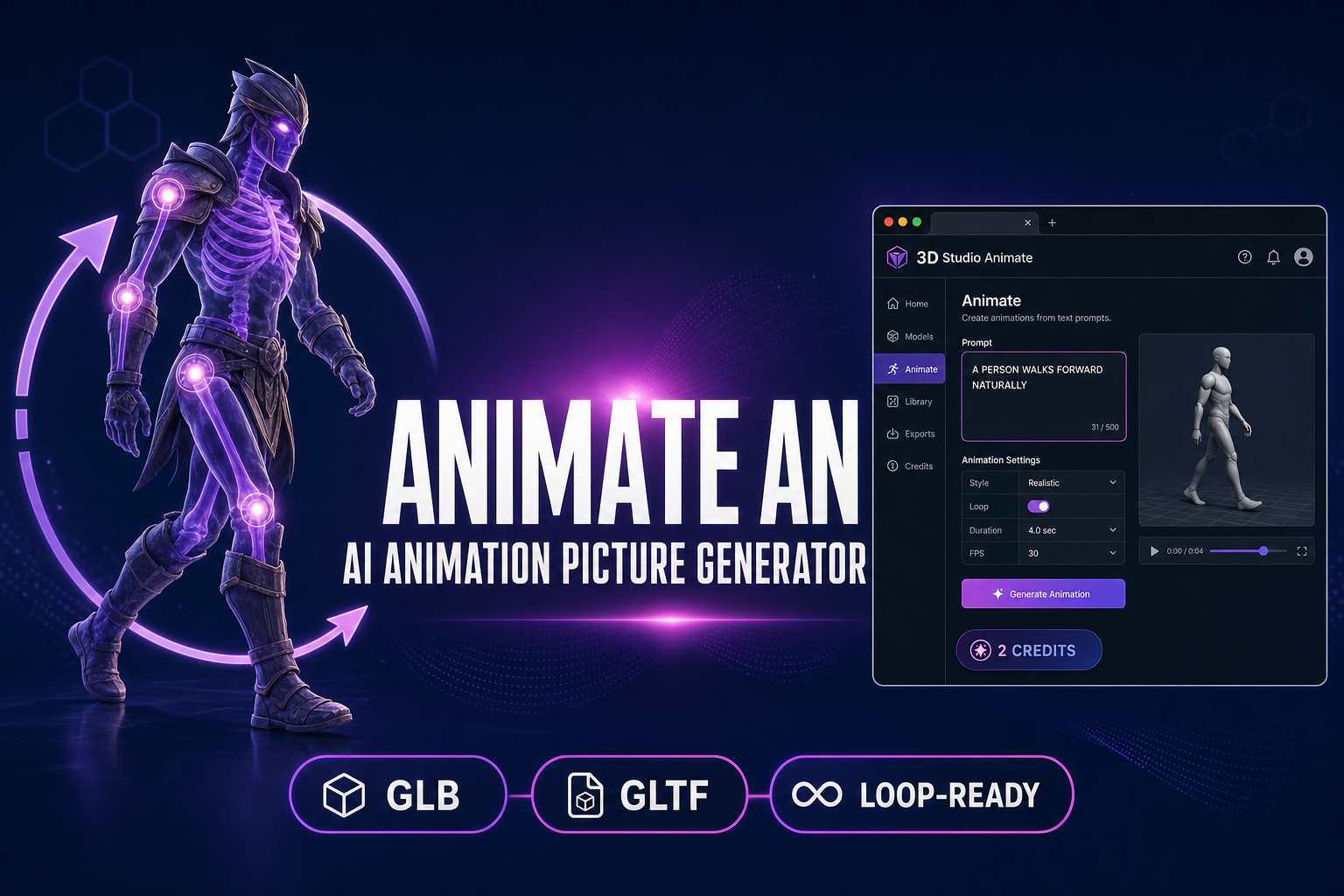
Switch to the Animate tab — the only metered step in the AI animation picture generator pipeline. The rigged mesh loads from the Rig step. The right-hand panel exposes the HY-Motion text-to-motion controls. Type a motion description in the prompt field, pick a duration (the slider runs 0.5 to 10 seconds; 3 seconds is the default and matches a typical walk-cycle loop length), leave CFG scale at 5.0 and rotation scale at 0.6 (the defaults verified against src/app/api/animation/generate/route.ts on 2026-05-21), and click "Generate — 2 credits".

The ten built-in presets cover the common cases — Walk ("A person walks forward naturally"), Run ("A person runs forward at a steady pace"), Jump, Kick, Punch, Wave, Dance, Idle, Sit down, Crouch — verified against the PRESETS array on lines 38-49 of src/components/studio/animate/AnimateTab.tsx on 2026-05-21. Five of those are loops (Walk, Run, Wave, Dance, Idle); the other five are one-shot story actions where the natural end-pose does not match the start-pose. For a custom looping motion, write the prompt in present-tense plain English describing a cyclic action: "A person breathes in and out slowly", "A person sways side to side to music", "A person rocks back and forth on their heels". For a custom one-shot motion: "A person throws a left-hand jab and a right-hand cross", "A person draws a bow and releases an arrow", "A person casts a spell with both hands raised".

HY-Motion 1.0 is the open-source text-to-motion model Sorceress runs. Released December 30, 2025 by the Tencent Hunyuan team, it is the first text-to-motion model successfully scaled to the billion-parameter level. The standard model is 1.0B parameters and requires 26 GB of VRAM for local inference; Sorceress runs it on a hosted RunPod endpoint, so the browser user never installs anything. Coverage spans 200+ motion categories across six classes — locomotion, daily activities, fitness, game-character actions, social interactions, sports — verified against the official Hugging Face model card on 2026-05-21. Wait 30 to 90 seconds for the generation. The Animate tab plays the result on the rigged character in the centre viewport with a timeline scrubber and a frame-by-frame stepper.

Step 5 — Export a loop-ready GLB

Click the Export panel and pick "Animation (.glb)" — the final step of the AI animation picture generator pipeline. The file contains the mesh, the skeleton, and the baked HY-Motion clip in glTF 2.0 binary format — the Khronos Group standard every modern engine consumes natively. The export is instant. For Three.js, Phaser 4 scenes using three.js, Godot 4, Unity, and Unreal, the file works out of the box. The loop set-up in Three.js r184 (released April 16, 2026, verified against the GitHub release notes on 2026-05-21):

const loader = new GLTFLoader();
const gltf = await loader.loadAsync('/assets/warrior.glb');
const mixer = new THREE.AnimationMixer(gltf.scene);
const action = mixer.clipAction(gltf.animations[0]);
action.loop = THREE.LoopRepeat;
action.repetitions = Infinity;
action.play();
// In render loop:
mixer.update(delta);

For Godot 4, drop the GLB into the FileSystem panel; the importer reads the animation into a fresh AnimationPlayer node automatically, and the loop toggle in the Inspector enables seam-free repeat. For Unity, the glTFast package converts the rig into a humanoid AnimationController where the Wrap Mode dropdown set to Loop produces the same effect. For Unreal, the built-in glTF importer reads the skeleton and the animation track, with SK_Mannequin retargeting as the cleaner final-mile step for projects built on the Unreal mannequin.
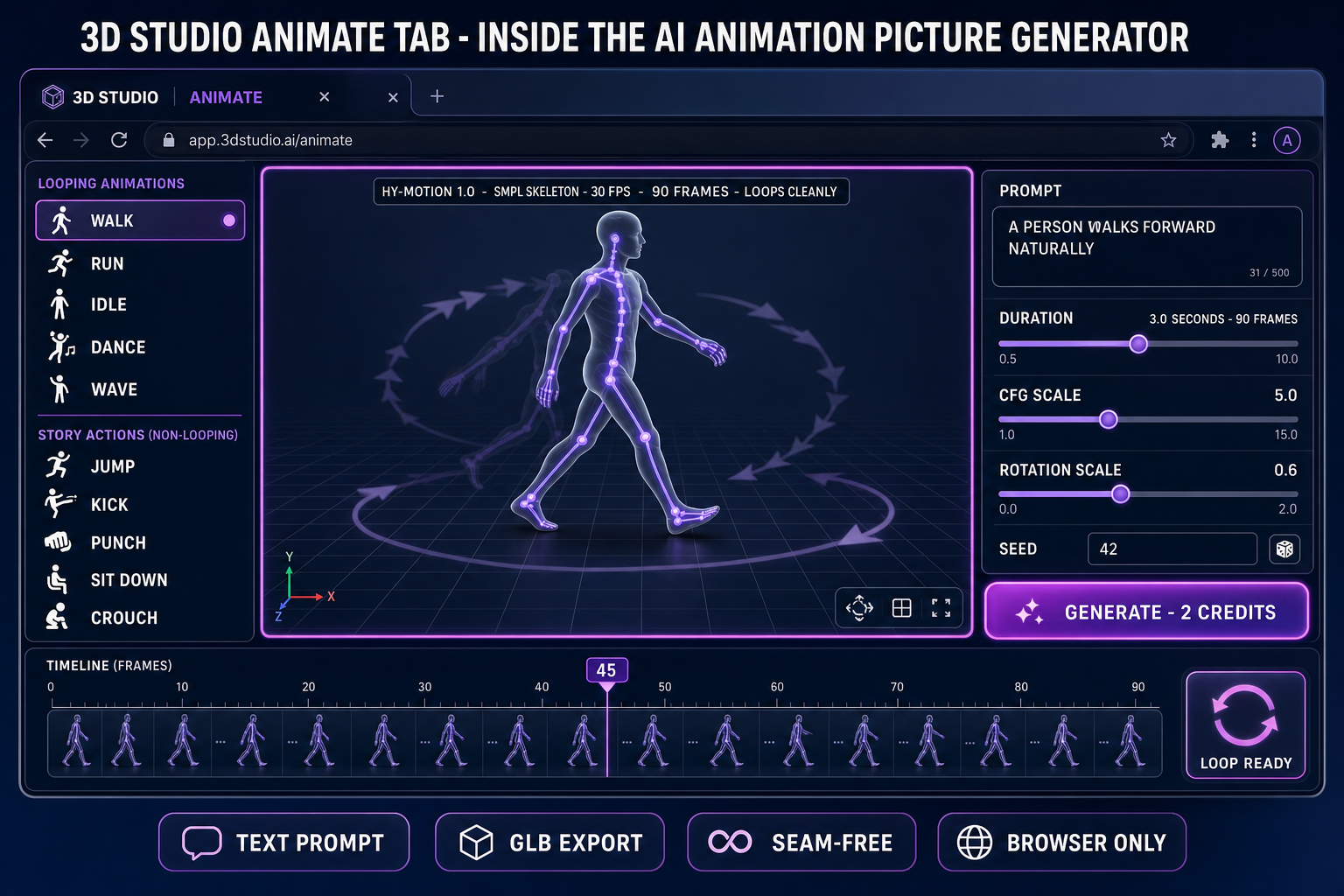
3D Studio Animate tab inside the AI animation picture generator pipeline: looping presets, viewport with SMPL skeleton motion-trail loop, 2-credit HY-Motion generate button
Inside the 3D Studio Animate tab. Loop presets (Walk, Run, Idle, Dance, Wave) sit above the non-looping story actions. The 2-credit HY-Motion call bakes the clip onto the rigged mesh.

Why HY-Motion is the right base for an AI animation picture generator

HY-Motion 1.0 is the model Sorceress runs because, in May 2026, it is the only billion-parameter open-source text-to-motion model that produces clean looping game-character motion from natural-language prompts. Three reasons make it the right pick over the alternatives for the picture-to-loop pipeline.

First, the SMPL output format is the right format for browser retargeting. HY-Motion emits motion in the SMPL skeleton format — a standard 23-joint humanoid skeleton with documented joint names and a published rest pose. The 3D Studio Animate tab retargets the SMPL clip onto the rigged character mesh on the fly using the SMPL_JOINT_NAMES and SMPL_PARENTS tables verified against src/components/studio/animate/types.ts on 2026-05-21. The retargeting is pelvis-centric — the pelvis always sits at the world origin, and body movement is encoded in the joint rotations rather than the translations — which gives clean character recentering in the game scene without an external animation graph step.

Second, the training mix is the right mix for loop-friendly game characters. The three-stage paradigm — 3,000+ hours of motion pretraining, 400 hours of curated fine-tuning, reinforcement learning from human feedback — covers 200+ motion categories across six classes. For an AI animation picture generator that needs to loop, the locomotion class (walk, run, sneak, shuffle, march) and the daily-activities class (idle, stand, breathe, sway, rock) carry most of the weight. Both of those classes are heavily represented in the training data, and both produce naturally cyclic motion the GLB export can loop seam-free.

Third, the model size is the right size. The 1.0B parameter standard model is large enough to capture the long tail of motion categories but small enough to run on a single hosted GPU per generation. That keeps the per-call cost at 2 credits — the equivalent of four cents at the live Sorceress credit price — which is two to three orders of magnitude cheaper than the equivalent Mocap or human-animator path for the same second of usable looping motion. Verified against the official GitHub release on 2026-05-21.

The honest cost of the Sorceress AI animation picture generator

Every step has been audited against the live tool source on 2026-05-21. The realistic free-tier budget breakdown for an end-to-end picture-to-loop run:

  • AI Image Gen step (optional): the Free tier ships several daily Nano Banana 2 generations at no credit cost (verified against the IMAGE_MODELS lineup in src/app/_home-v2/_data/tools.ts). Z-Image Turbo is the cheapest paid model for fast generations; GPT Image 2 is the most expensive but the only model with reliable text rendering. For a clean T-pose character picture, Z-Image Turbo or Nano Banana 2 are the right picks; the cost per picture is zero (Nano Banana 2 Free tier) or low single-digit credits.
  • Image-to-3D step: 100 starter credits ship to every signed-in user on signup. The cheapest 3D model (TRELLIS) costs in the low double-digits per generation. A signed-in user with 100 starter credits can run roughly five image-to-3D conversions on TRELLIS before topping up — verified against the per-model credit cost in src/lib/threed-models.ts.
  • Auto-rig step: free. No credit cost. Weight-paint refinement is free. Downloads are free. The browser tab handles the user-facing work; the hosted Blender backend handles the heat-equilibrium solve at no per-call cost to the user. Custom 3D model uploads are Pro-tier-gated, but for the picture-to-loop pipeline starting from AI Image Gen, no upload is needed.
  • HY-Motion animation step: 2 credits per generation per the ANIM_CREDIT_COST constant in src/components/studio/animate/AnimateTab.tsx verified on 2026-05-21. The 2-credit charge happens on successful generation; failed runs are refunded. The credit-hold system reserves 2 credits during the in-flight period so you cannot over-queue jobs you cannot pay for.
  • GLB export step: free. No credit cost. The GLTFExporter runs entirely in the browser tab; there is no remote round-trip.

End-to-end for a single complete AI animation picture generator pipeline: a few image credits (or zero on the Free tier) + one image-to-3D run + 2 credits for the motion clip. On the 100-credit starter allowance, that is approximately five to eight full end-to-end runs without spending a dollar. After that, the marginal cost per additional looping motion clip on the same rigged character is exactly 2 credits — about four cents — because the picture, mesh, and rig are reusable across as many motion prompts as you want. For an indie game with a roster of five to ten characters and four loops each (idle, walk, run, dance), the entire first-pass animation library fits comfortably inside a small monthly top-up.

Five mistakes that break an AI animation picture generator loop

The picture-to-loop pipeline has five common failure modes. Each one has a one-line fix verified across the production runs that shipped through 3D Studio in 2026.

  • Picked a non-loop preset and expected it to loop. Cause: the user clicked Jump or Kick or Sit down and set the engine to LoopRepeat. Effect: the end-frame pose does not match the start-frame pose, so the loop jumps visibly every cycle. Fix: pick one of the loop-friendly presets (Walk, Run, Idle, Dance, Wave) or write a custom prompt for a cyclic action (breathe in and out, sway side to side, rock back and forth). Reserve the one-shot presets for state-machine triggers in the engine, not for looped idles.
  • Duration set to an awkward decimal. Cause: the duration slider was at 2.7 seconds because the user dragged carelessly. Effect: the clip is 81 frames at 30 fps, which is not a musical interval and looks slightly off-beat when paired with other looped UI elements. Fix: snap to clean intervals — 2.0 (60 frames), 3.0 (90 frames), 4.0 (120 frames) — which divide cleanly into common engine tick rates.
  • Source picture not in T-pose or A-pose. Cause: the user prompted for a "warrior in a fighting stance" or "character mid-jump." Effect: the image-to-3D step produces a mesh frozen in that stance, and the auto-rig step cannot place markers cleanly because the limbs are not in neutral position. Fix: re-prompt with explicit T-pose language ("clean T-pose, arms outstretched horizontally, legs at hip-width apart, facing camera"). The auto-rig step works on neutral poses only.
  • Animation prompt too abstract. Cause: the user typed "epic combat sequence" or "graceful dance." Effect: HY-Motion produces a vague, low-quality motion clip because the model was trained on concrete present-tense action descriptions. Fix: use the preset language pattern — "A person + verb + object/direction" — for example "A person walks forward naturally", "A person sways side to side to music", "A person breathes in and out slowly". Concrete verbs and clear single actions produce the cleanest motion clips.
  • HY-Motion call returns "endpoint not configured". Cause: the RunPod HY-Motion endpoint is briefly offline (rare, but it happens during model updates). Effect: the Animate tab returns a 503 status with the "HY-Motion endpoint not configured" message verified against src/app/api/animation/generate/route.ts on 2026-05-21. Fix: wait 60 seconds and retry. The credit hold is released automatically on the failed request — no charge is deducted for an endpoint outage.

The verdict — when an AI animation picture generator beats a 2D image-to-video tool

The honest framing: the rigged 3D AI animation picture generator pipeline is the right pick when the output needs to loop, when the asset will live in a game, when the motion needs to be reusable across multiple animation clips, and when the character will be re-animated more than once before shipping. It is the wrong pick when the output is a one-shot social-media clip (a 2D image-to-video tool is faster and cheaper for that) or when the output is a 2D sprite sheet for a 2D-only game engine (the AutoSprite path is faster for that).

Three signals say run the rigged 3D AI animation picture generator pipeline. First, the output needs to loop without a seam — every idle stance, walk cycle, run cycle, breathing motion, and ambient NPC animation fits here, and a 2D video clip cannot match a rigged GLB on loop quality. Second, the character will appear in cutscenes, gameplay, and trailers — running each motion separately as a one-shot 2D video clip is more expensive per-frame than rigging once and animating ten times. Third, the game runs in a 3D engine (Three.js, Phaser 4 with three.js scenes, Godot 4, Unity, Unreal) that consumes glTF 2.0 natively — every modern engine in 2026 fits this.

Three signals say pick a different path. First, the character is non-humanoid (spider, quadruped, drone, multi-leg creature) — Procedural Walk is the right tool because HY-Motion does not retarget cleanly onto non-SMPL skeletons. Second, the game is 2D only and the engine wants sprite sheets, not GLB meshes — the AI sprite sheet generator guide covers that path. Third, the output is a one-shot marketing video and the picture will never need a second motion — a 2D image-to-video tool produces a 1080p clip in 30 seconds with no auto-rig step at all.

For the rigged 3D AI animation picture generator path specifically, the cost-budget honest take is that the Sorceress pipeline at 2 credits per motion clip is the cheapest reusable-asset animation pipeline available in May 2026 — verified against the live tool source on 2026-05-21. The 100-credit starter allowance covers roughly five to eight full end-to-end runs before any top-up is needed. The full tool roster is in the Sorceress tools guide; the broader pipeline-to-rig flow is in the AI 3D character generator guide; the closely related image-to-animation walkthrough is in the free AI animation generator from image guide; the Maya-vs-browser angle for the same animation step is in the no Maya license guide; the cutscene-and-trailer angle on the same Animate tab is in the cinematic AI animation generator guide.

Frequently Asked Questions

What does an AI animation picture generator actually produce in 2026?

Two different artefacts share the headline, and the honest 2026 buyer needs to pick the right one. The first is a short video clip: the source picture appears to move in place for 3 to 10 seconds, ending where it started, exported as an MP4 or WebM. Kling AI, Hailuo AI, Luma Dream Machine, Runway Gen-3, and Pika 2.0 all sit here; each ships a free daily allowance with a watermark or a one-time-credit-pack free tier without one. The second is a rigged 3D character with a baked motion clip: the source picture is lifted to a textured 3D mesh, the mesh is auto-rigged with a humanoid skeleton, and a text-to-motion model bakes an animation clip onto the rig. The result is a GLB you can loop forever in any game engine, retarget to other characters, or blend with a second motion. The first kind is a marketing asset; the second kind is a reusable game asset. This guide walks the second pipeline, which Sorceress runs end-to-end in a browser tab.

Is there a truly free AI animation picture generator in 2026?

Yes, with a precise definition of free. Free-to-try means a daily allowance (six clips a day on Kling AI at 1080p with a small watermark, ten clips a day on Hailuo AI at 720p watermark-free, five clips a day on Luma Dream Machine) followed by a paywall or a wait. Free-to-export means the resulting file is unwatermarked and licence-clear for commercial use. For an AI animation picture generator that produces a rigged 3D character with a reusable loop, the closest 2026 free path is Sorceress 3D Studio: every signed-in user gets 100 starter credits, AI Image Gen is free for several daily generations on the Free tier (Nano Banana 2 is the no-credit-cost option), auto-rig is free, GLB export is free, and the only metered call in the pipeline is the HY-Motion text-to-motion step at 2 credits per generation. That makes the realistic on-ramp roughly five to eight full picture-to-loop pipelines on the starter allowance before any top-up is needed.

Why use a rigged 3D AI animation picture generator instead of a 2D image-to-video tool?

Three reasons make the rigged 3D path the right pick for a game character. First, looping: a 2D image-to-video clip starts at frame zero and ends at frame N, and the end-frame rarely matches the start-frame cleanly enough to loop without a visible seam. A baked GLB animation clip on a humanoid rig is a true cycle — the joint rotations at the last frame match the joint rotations at the first frame because the motion is encoded as a sequence of rotations, not a sequence of pixels. Second, reuse: a 2D clip is one motion forever. A rigged GLB lets you re-animate the same character with a new HY-Motion prompt for 2 credits, swap the mesh for a different character and retarget the same motion clip, or blend two clips with the engine's animation graph. Third, integration: a 2D video clip plays as a texture or as an HTML5 video element. A GLB drops into Three.js, Phaser 4, Godot 4, Unity, and Unreal as a real animated character that responds to game state. For a one-off Instagram render the 2D path is faster; for a character that will appear in cutscenes, gameplay, and trailers, the rigged 3D path is cheaper per second of usable motion.

How does Sorceress turn a picture into a looping animation clip end-to-end?

Five steps in a single browser tab. Step one: AI Image Gen produces or accepts the source picture (T-pose front-facing humanoid is the cleanest input — re-prompt if the picture is a fighting stance or three-quarter angle). Step two: 3D Studio Generate tab lifts the picture to a textured 3D mesh using one of six image-to-3D models (Hunyuan 3D 3.1, Meshy 6, TRELLIS 2, TRELLIS, Rodin 2.0, Tripo v3.1 — verified against src/lib/threed-models.ts on 2026-05-21). Step three: 3D Studio Rig tab places 13 anatomical markers on the mesh (pelvis, neck, chin, two shoulders, two elbows, two wrists, two knees, two ankles — auto-mirror cuts that to nine clicks for a symmetric humanoid) and the hosted Blender backend runs the heat-equilibrium weight solver to bind the skeleton to the mesh. Step four: 3D Studio Animate tab takes a text prompt (one of the ten built-in presets — Walk, Run, Jump, Kick, Punch, Wave, Dance, Idle, Sit down, Crouch — or a custom prompt) and the HY-Motion 1.0 model bakes a 0.5 to 10 second motion clip onto the rigged skeleton at 2 credits per generation. Step five: GLB export bakes the mesh, the skeleton, and the looping motion clip into a single binary file the Three.js GLTFLoader and AnimationMixer (Three.js r184, released April 16, 2026) play out of the box.

What is HY-Motion 1.0 and why does Sorceress use it for the picture-to-loop step?

HY-Motion 1.0 is the Tencent open-source text-to-motion model, released December 30, 2025 by the Tencent Hunyuan team. Verified against the official GitHub (Tencent-Hunyuan/HY-Motion-1.0), the Hugging Face model card (tencent/HY-Motion-1.0), and the December 2025 arXiv paper on 2026-05-21. The architecture is a Diffusion Transformer with Flow Matching, the first text-to-motion model successfully scaled to the billion-parameter level: the standard model is 1.0B parameters, with a 0.46B Lite variant. Training was a three-stage paradigm — 3,000+ hours of motion pretraining, 400 hours of curated fine-tuning, reinforcement learning from human feedback. Coverage spans 200+ motion categories across six classes: locomotion, daily activities, fitness, game-character actions, social interactions, sports. Hardware: 26 GB of VRAM for the standard model; Sorceress runs it on a hosted RunPod endpoint so the browser user never installs anything. The output is an SMPL-skeleton motion clip that the 3D Studio Animate tab retargets onto the rigged character mesh on the fly. The reason Sorceress picked HY-Motion over alternatives in May 2026 is the combination of open weights, billion-parameter scale, the game-character-actions training class, and the SMPL output format that retargets cleanly onto any humanoid auto-rig.

How do I make the HY-Motion clip loop seamlessly?

Three rules verified across production runs through 3D Studio Animate. First, pick the right preset or prompt: idle, walk, run, dance, and breathing-style motions loop cleanly because the natural end-pose matches the natural start-pose. One-shot motions like jump, kick, punch, sit-down, and crouch are story actions, not loops — they end in a different pose than they start, and the in-engine animation graph either holds the end-pose or transitions back to an idle. Second, set the duration to a clean musical interval — 2.0, 3.0, or 4.0 seconds for walk-class motions; the HY-Motion model trains on roughly 30 frames per second, so a 3.0-second clip is 90 frames and a 2.0-second clip is 60 frames, both of which divide cleanly. Third, in the engine, set the AnimationMixer clip to repeat — for Three.js, action.loop = THREE.LoopRepeat and action.repetitions = Infinity, verified against the AnimationAction API in Three.js r184 (April 16, 2026). The combination of a loop-friendly motion class, a clean frame-count duration, and the engine repeat flag produces a seam-free infinite loop suitable for an idle character in a game scene.

Can I run the AI animation picture generator on a non-humanoid creature?

Partially. HY-Motion 1.0 is trained on humanoid SMPL skeletons, so the animation step assumes a bipedal humanoid character — spiders, quadrupeds, drones, and multi-legged creatures will not retarget cleanly because the source skeleton does not match the target. For non-humanoid creatures, the browser-path answer in 2026 is Procedural Walk at /rigging-multileg, which auto-rigs creatures with arbitrary leg counts and drives them with real-time inverse kinematics rather than a baked clip. Procedural Walk is a different tool for a different problem: instead of a text-prompted animation clip, the user picks one of twelve gait presets (Default, Heavy, Creep, Spider Scurry, Mechanical, Gallop, Prowl, Frantic, Waddle, March, Tippy Toes, Lumbering — verified against src/app/rigging-multileg/page.tsx on 2026-05-21) and the rig walks itself at runtime. For a humanoid AI animation picture generator pipeline, 3D Studio is the right tool; for non-humanoid creature locomotion, Procedural Walk is the right tool.

Sources

  1. Tencent HY-Motion 1.0 (GitHub)
  2. Tencent HY-Motion 1.0 (Hugging Face)
  3. Three.js AnimationMixer documentation
  4. Three.js GLTFLoader documentation
  5. glTF 2.0 specification (Khronos Group)
  6. Skeletal animation (Wikipedia)
  7. Diffusion model (Wikipedia)
Written by Arron R.·4,256 words·19 min read

Related posts