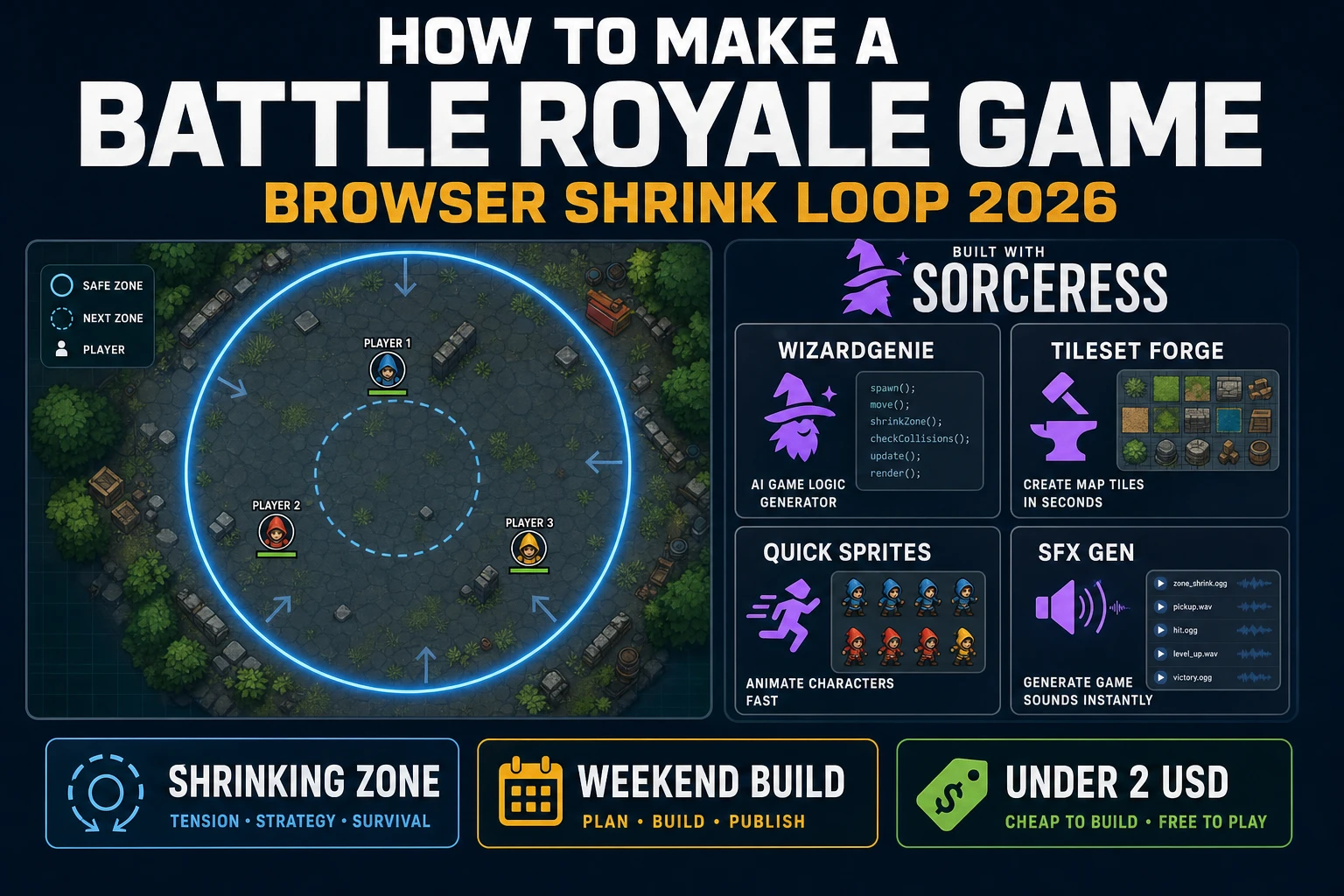
Zone How to Make a Battle Royale Game (Browser Shrink 2026)

By Arron R.12 min read
How to make a battle royale game in 2026: model an arena, loot drops, and a shrinking safe zone in WizardGenie, then add Tileset Forge terrain, Quick Sprites bo

Most beginners who search "how to make a battle royale game" want an arena, a handful of bots, a shrinking safe circle, and a Victory screen when only one survivor is left — not a 100-player netcode mountain on day one. A full Fortnite-scale service with matchmaking, cross-play, and cosmetic economies is a specialist craft. A browser battle royale round is different. A coding agent scaffolds spawn, loot pickup, combat, and the storm-shrink timer from one prompt, and AI generation covers arena tiles, bot sprites, hit cues, and a tension score. On desktop or web, that means WizardGenie for the loop interpreter, Tileset Forge for grass, sand, and rock tiles, Quick Sprites for player, bot, and loot-crate art, SFX Gen for pickup, shoot, and hit clips, and Music Gen for a 30-second tension loop. This guide is the honest end-to-end for how to make a battle royale game in 2026, as a weekend build you can actually finish.
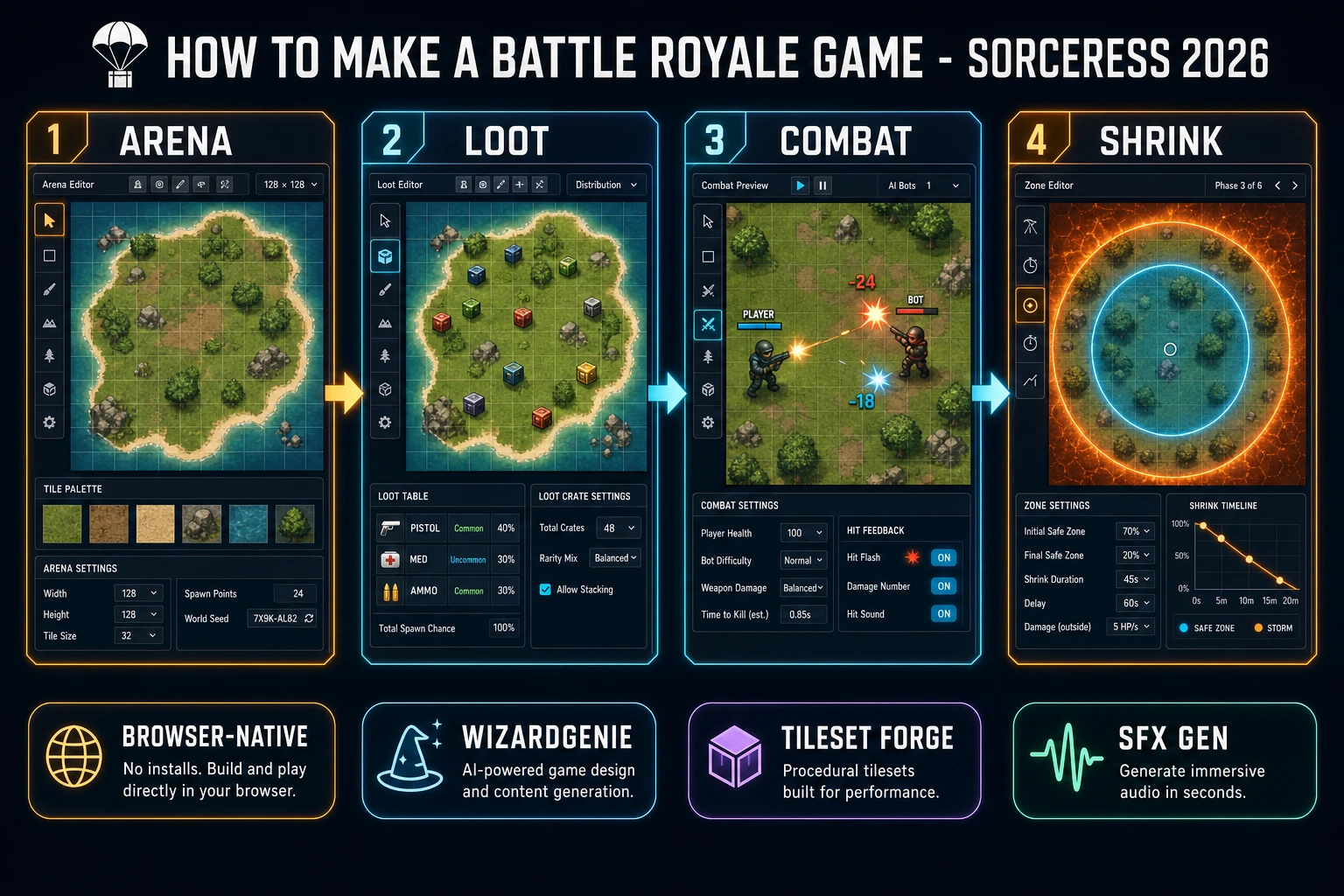
How to make a battle royale game browser pipeline: wire the shrinking zone loop in WizardGenie, then ship a browser last-player-standing round
The 2026 how to make a battle royale game recipe: generate arena tiles and bots, model spawn-loot-combat-shrink in WizardGenie, then add SFX Gen cues and a Music Gen tension loop.

What how to make a battle royale game actually means in 2026

The query "how to make a battle royale game" hides three intents. Some searchers want a commercial live-service engine with matchmaking, anti-cheat, and 100-player netcode — that is a multi-year infrastructure project, not a minimal playable loop. A second intent is a general last-player-standing arena without the shrinking-safe-zone mechanic — that overlaps with a normal deathmatch and is closer to the browser shooter angle from how to make a shooter game. A third intent is a full survival sandbox with base building and hunger meters — that leans into how to make a sandbox game. The intent this guide targets is the browser shrink loop: drop into an arena, scavenge one weapon and one heal, fight bots that are doing the same, and outlive them as the safe zone contracts. That is a weekend build, it demos the Sorceress toolset, and it is the format most javascript battle royale and browser battle royale searchers actually want.

The presentation contract is small and strict. A title screen shows the round name, control hints (WASD or arrow keys to move, mouse to aim, click to shoot, E to pick up), and Play. The play screen shows a top-down arena (say 1280x720), a minimap with the current safe circle and the next one telegraphed, a HUD with HP and current weapon, and a mute toggle. When the shrinking zone reaches its final radius and only one unit is alive, show Victory (or Defeat). The battle royale game overview on Wikipedia (verified 2026-08-29) folds the genre into three primitives — one arena, scavenged loot, shrinking safe zone. Cite that page when you write your itch.io blurb so players know you shipped an honest shrinking zone game round, not a hero-shooter deathmatch with a countdown clock.

The battle royale shrink loop in one minute (spawn, loot, combat, shrink, survive)

Five moving parts, repeated until only one unit is alive. First, spawn — drop the player and N bots at random positions inside the initial safe circle. Second, loot — scatter loot crates on tiles; walking near a crate and pressing E grants a weapon or heal from a small table. Third, combat — when a player or bot has a weapon and a target inside its line of sight and range, fire a hitscan or projectile that subtracts HP. Fourth, shrink — every N seconds, contract the safe-zone radius by a fixed step; units outside the circle take periodic storm damage. Fifth, survive — when only one living unit remains, freeze the world and show Victory or Defeat. Squads, vehicles, gliders, revives, and gulags are polish layered on after one honest last player standing round is readable at sixty frames per second.
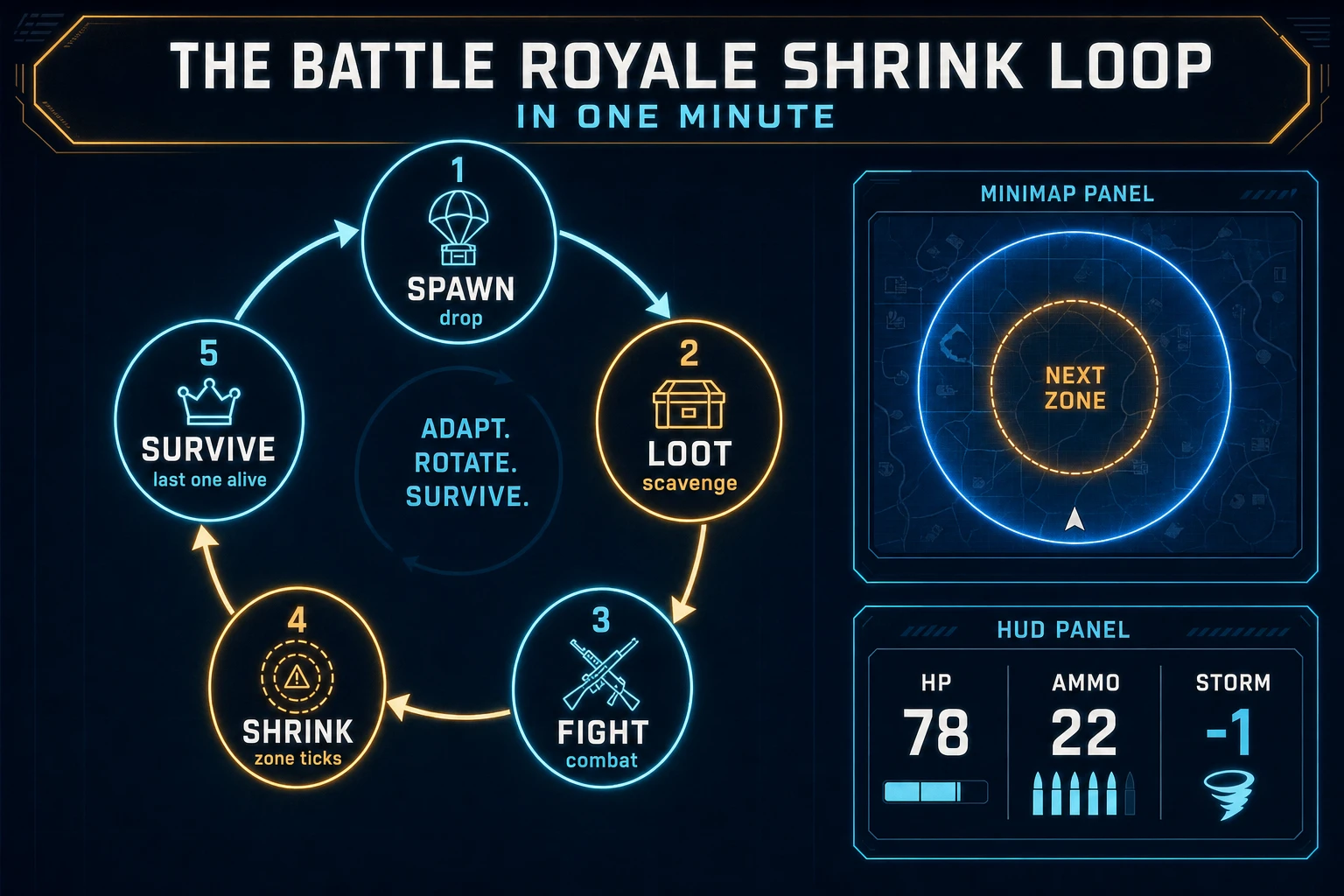
Battle royale game loop state machine diagram showing spawn drop, loot scavenge, fight combat, shrink zone, and survive last one alive
The battle-royale shrink loop: spawn into the arena, scavenge loot, fight, shrink the safe zone, and outlive everyone else.

Pick your engine for how to make a battle royale game: Phaser, Canvas, or WizardGenie

Three good targets in 2026, each with a different trade-off. Vanilla Canvas is the honest default and the pick this guide recommends for a first build. Store the arena as a 2D array of tile types, blit terrain from a tileset image, and draw player, bots, and loot crates as centered sprites in world coordinates. Convert screen clicks to world coordinates with a simple camera offset. The MDN Canvas API docs (verified 2026-08-29) cover everything you need for an html5 battle royale prototype in under 400 lines including a shrinking safe circle, hitscan bullets, and a small bot AI that chases the nearest visible target while staying inside the ring.

Bots versus real multiplayer is the single scope decision that changes the calendar. A local-only round with 7 bots is a weekend. Actual 100-player netcode with authoritative servers, delta compression, and lag compensation is a small engineering team for a year. This guide targets the bot-only case on purpose — it is the version most battle royale tutorial searchers can actually ship. Real-time multiplayer is a fine v3 once the single-player round proves the feel.

Phaser v4.2.1 "Giedi" (released 9 July 2026, verified 2026-08-29 on the official Phaser stable download page) becomes the right pick if you want Scene stacks, a camera that pans a larger arena, tweened bullet arcs, or a lobby-to-round transition. Phaser does not invent your shrink rule — you still need the same spawn-loot-combat-shrink state machine. Use Phaser when Scene stacks and camera work are the product; use raw Canvas when the product is a phaser battle royale tutorial people can read in one sitting. A phaser battle royale campaign with multiple map biomes is a fine v2 once the Canvas prototype proves the fantasy.

WizardGenie is not a separate battle royale engine — it scaffolds whichever of the two you pick from a single natural-language prompt. WizardGenie ships as both a desktop app (Windows installer with auto-update, available to Early Access supporters and above) and a no-install web build. Its coding-model lineup covers Claude Opus 4.7, Claude Sonnet 4.6, GPT-5.5, Gemini 3.1 Pro, DeepSeek V4 Pro, Kimi K2.5, Grok 4.2, and MiniMax M2.7 (verified 2026-08-29 in src/app/_home-v2/_data/tools.ts). For a shrinking zone game loop, any frontier model scaffolds the arena, bot pathing, hitscan combat, and the safe-circle timer in one prompt. Pair a frontier planner with a budget executor like DeepSeek V4 Pro or Kimi K2.5 for the typing pass — the Dual-agent pattern lands most projects at roughly one-fifth the single-frontier cost.
Step 1 — model arena, players, loot, and the shrinking zone

Nothing else in the pipeline matters if the storm damages units inside the ring or the bots ignore the shrinking circle. Start with a small, testable model:

const W = 1280, H = 720;
const CENTER = { x: W / 2, y: H / 2 };
const zone = { cx: CENTER.x, cy: CENTER.y, r: 460 }; // safe circle
const NEXT_R_STEP = 40;       // pixels per shrink
const SHRINK_INTERVAL = 15;   // seconds
const STORM_DPS = 1;          // HP per tick outside the ring

const units = [
  { id: "you",  ai: false, x: 500, y: 380, hp: 100, ammo: 0,  wep: null,     alive: true },
  { id: "bot1", ai: true,  x: 260, y: 300, hp: 100, ammo: 6,  wep: "pistol", alive: true },
  { id: "bot2", ai: true,  x: 900, y: 500, hp: 100, ammo: 4,  wep: "pistol", alive: true },
  { id: "bot3", ai: true,  x: 700, y: 200, hp: 100, ammo: 0,  wep: null,     alive: true },
];

const crates = [
  { x: 340, y: 420, drop: { wep: "pistol", ammo: 12 } },
  { x: 780, y: 360, drop: { heal: 40 } },
  { x: 610, y: 560, drop: { wep: "pistol", ammo: 8 } },
];

let elapsed = 0;
let lastShrink = 0;
let lastStormTick = 0;

function inZone(u) {
  const dx = u.x - zone.cx, dy = u.y - zone.cy;
  return dx * dx + dy * dy <= zone.r * zone.r;
}

function step(dt) {
  elapsed += dt;
  if (elapsed - lastShrink >= SHRINK_INTERVAL && zone.r > 40) {
    zone.r -= NEXT_R_STEP;
    lastShrink = elapsed;
  }
  if (elapsed - lastStormTick >= 1) {
    for (const u of units) {
      if (u.alive && !inZone(u)) {
        u.hp -= STORM_DPS;
        if (u.hp <= 0) u.alive = false;
      }
    }
    lastStormTick = elapsed;
  }
}

function winner() {
  const alive = units.filter(u => u.alive);
  return alive.length === 1 ? alive[0] : null;
}

Unit-test three cases before you generate any art: a unit fully inside the circle takes zero storm damage per tick; a unit fully outside ticks down by exactly one HP per second; and after enough shrinks the last living unit is returned by winner(). Those three tests catch ninety percent of javascript battle royale bugs. Keep combat to a single hitscan pistol on the first build — sniper rifles, grenades, and shotguns are a second afternoon.

Step 2 — wire spawn-loot-combat-shrink in WizardGenie

With the shrink math drafted, open WizardGenie. Drop in a bare index.html shell that loads a 1280x720 canvas, a minimap in the top-right, a HUD for HP and ammo, and mouse-locked aim. Give the agent one paragraph: Build a browser battle royale round on a 1280x720 arena. Grass and sand terrain. One player and three bots spawn inside a safe circle. Three loot crates on the map: pistol+ammo, heal, pistol+ammo. WASD to move the player, mouse to aim, click to shoot when a pistol is equipped, E to pick up a nearby crate. Bots wander until they see a target in line of sight and range, then shoot. Every 15 seconds the safe circle shrinks by 40 pixels. Units outside the circle lose 1 HP per second. When only one unit is alive, freeze the game and show Victory or Defeat. Minimap draws the current circle and the next one. Autosave best survival time to localStorage. Feed that to any coding model in the lineup and the interpreter scaffolds in under ten minutes.

The remaining hour is polish via follow-up prompts. Add a ring-preview animation — the next zone circle draws with a faint outline, then shrinks in place — twelve lines. Add a damage flash — screen edges tint red when the player is hit — six lines. Add a kill feed in the top-left showing bot2 eliminated bot3 — fifteen lines. Add a storm damage indicator under HP so players know why they are losing life — five lines. Each item is a follow-up prompt, and the whole browser battle royale round comes together over a Saturday afternoon.

Optional siblings: if your jam needs a lane-based twin-stick shootout without shrinking zones, that belongs in the browser shooter build; borrow the aim math from how to make a shooter game. For a hex-grid tactics fight with initiative order instead of continuous action, use the loop from how to make a turn based game. For a survival-crafting sandbox that swaps the shrink loop for hunger and base building, borrow the sandbox angle from how to make a sandbox game.

Persist survival times with the MDN localStorage API (verified 2026-08-29) so a refresh still shows the player's best round. Keep the save payload tiny: seed, elapsed seconds, and placement — not a full replay buffer.

Step 3 — Tileset Forge arena, Quick Sprites bots, SFX Gen and Music Gen cues

Flat colored rectangles read as a tech demo even when the shrink math is perfect. Three asset passes cover the whole html5 battle royale experience:

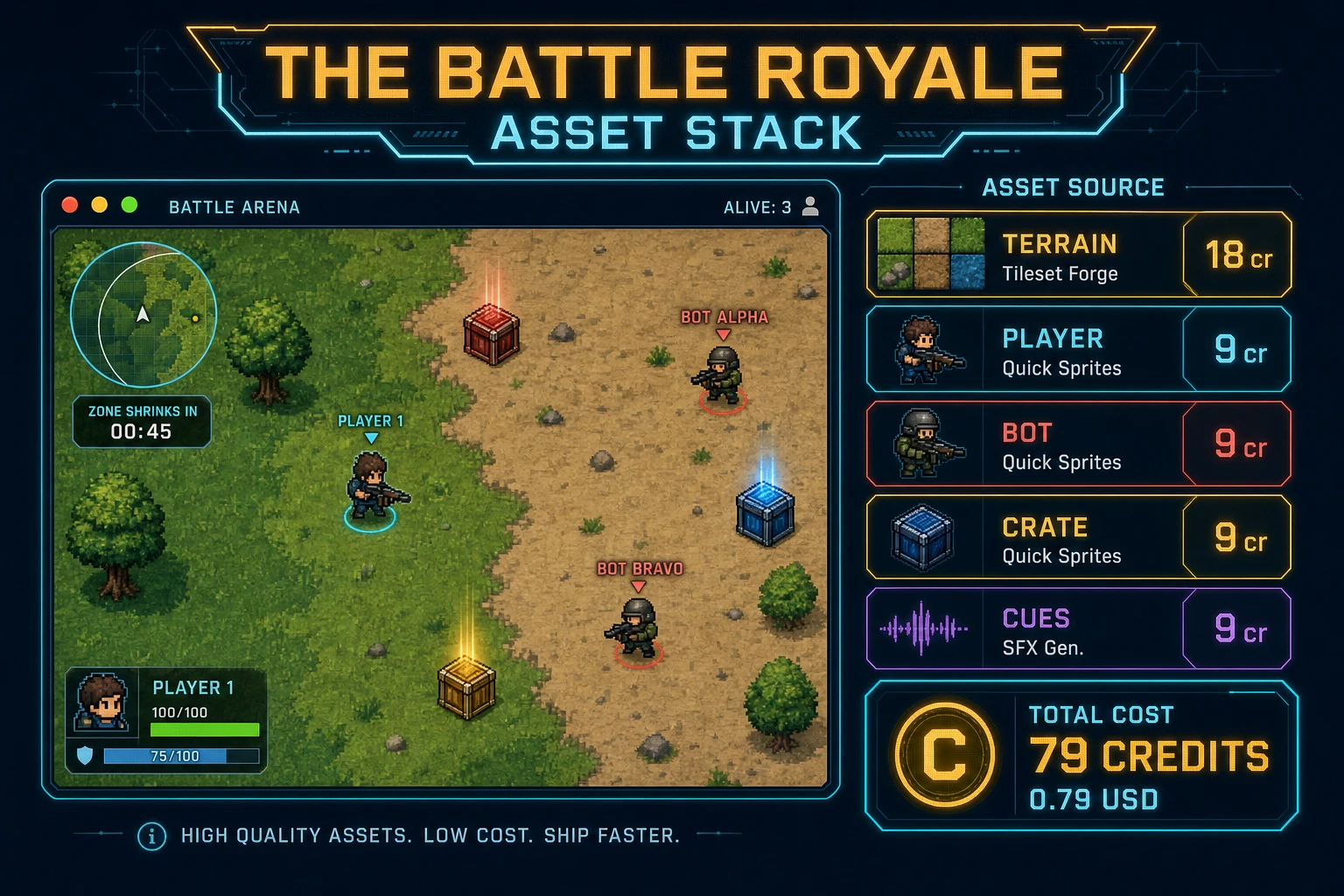
  • Arena tiles — one grass/sand/rock/water sheet from Tileset Forge. Prompt for "top-down island grass sand rock water tiles, seamless 64px game tileset, flat lighting, no text." Generate with Nano Banana Pro at 18 credits per image at 2K resolution (src/lib/models.ts). Keep a second 18-credit retry if edges do not slice cleanly. Blit floor tiles under the loot and unit layers.
  • Unit portraits — three generations from Quick Sprites at 9 credits each (CREDITS_PER_GEN in src/app/quick-sprites/page.tsx): "top-down pixel operator player, transparent background", "top-down pixel enemy bot with red bandana, transparent background", "top-down pixel loot crate with green padlock, transparent background".
  • Optional storm-ring frame — one radial-gradient overlay from AI Image Gen if you want a moodier out-of-zone look (Nano Banana Pro 18 credits). Skip it on the first pass if you are under a one-hour jam clock.

Open SFX Gen, describe each clip in plain language ("soft UI blip on pickup", "short pistol pop on shoot", "sharp body-hit thud", "low storm tick pulse", "rising victory chime"), and export WAV into your assets/audio/ folder. Billing is 1 credit per second of generated audio per src/app/sfx-gen/page.tsx — five short clips land around 6 credits total. Then open Music Gen and describe a 30-second tension loop ("slow synth pulse, sparse percussion, minor key, loopable, no vocals") that fades in when the zone starts shrinking. Mute by default with a toggle — mobile browsers often block autoplay until the first click anyway.

Battle royale game asset stack diagram showing Tileset Forge arena, Quick Sprites player and bot, and SFX Gen and Music Gen cues with 79 credit total
The battle-royale asset stack: Tileset Forge for terrain, Quick Sprites for units, SFX Gen for hit cues, Music Gen for a tension loop — roughly 79 credits total.

Step 4 — playtest the shrink loop like a jam judge

Before you share the build, run a five-minute checklist borrowed from game-jam judging:

  1. Spawn is fair — the player and all bots start inside the initial safe circle, never overlapping a loot crate.
  2. Loot is reachable — every crate can be picked up without pathing through impassable terrain.
  3. Combat is honest — hitscan bullets only land when there is a straight line of sight and the target is inside range.
  4. Shrink is predictable — the next-zone outline draws before the ring contracts; storm damage starts only after the shrink completes.
  5. Win/lose is clear — the round freezes the moment one unit is left, and Victory or Defeat both offer Retry without a page reload.

Log issues as WizardGenie follow-ups, not rewrites. "Give bots a two-second reaction delay when they first spot a target" is one prompt. "Show remaining time until the next shrink under the minimap" is another. The Sorceress tools guide lists every asset tool if you want to swap Quick Sprites for a hand-drawn sheet later.

What how to make a battle royale game costs on Sorceress in 2026

An honest budget for the stack above against the 2026 Sorceress rate card (verified 2026-08-29 against local source):

  • Tileset Forge arena sheet + one retry: 36 credits (0.36 USD)
  • Three Quick Sprites units (player, bot, crate): 27 credits (0.27 USD)
  • Five SFX Gen clips (~6 seconds total): ~6 credits (0.06 USD)
  • One 30-second Music Gen tension loop: ~10 credits (0.10 USD)
  • Coding-model API time with planner + budget executor: under 0.40 USD

Total roughly 79 credits or 0.79 USD in generation, plus a small model bill. The free 100-credit signup grant (SIGNUP_GRANT in src/app/api/admin/credits/route.ts) covers the full asset stack outright. Lifetime Early Access sits at 49 USD (LIFETIME_PRICE in src/app/plans/page.tsx) if you want desktop WizardGenie with auto-update for the next jam. Credits convert at 100 per dollar (CREDITS_PER_DOLLAR in src/lib/models.ts).

That is the whole path for how to make a battle royale game as a browser shrink loop in 2026: prove spawn-loot-combat-shrink on Canvas, let WizardGenie scaffold the interpreter, dress the arena with Tileset Forge and Quick Sprites, and ship the last-player-standing round before the weekend ends. When you are ready for hex tactics turns instead of a shrinking storm, graduate to the turn-based sibling — but finish one honest shrink loop first.

Frequently Asked Questions

What separates a battle royale game from a normal shooter or arena game?

A battle royale game funnels many players (or bots) into one arena, drops them in with nothing, forces them to loot up, and shrinks the safe area over time so the fight is guaranteed to end. Wikipedia's battle royale game entry (verified 2026-08-29) folds those three rules — one arena, scavenged loot, shrinking safe zone — into the genre definition. A normal deathmatch has no zone and no scarcity, so rounds drag. Your first browser battle royale build only needs one arena, one loot table, and one shrinking circle to feel authentic.

Phaser or vanilla Canvas for a first browser battle royale?

Vanilla Canvas plus a 2D grid is the honest default for a first how to make a battle royale game tutorial - click-to-cell math, a simple bot list, and a shrinking radius fit in a few hundred lines. Phaser v4.2.1 Giedi (released 9 July 2026, verified 2026-08-29 on phaser.io/download/stable) is the right pick when you want Scene stacks, a camera that follows the player across a larger map, and tweened bullet arcs. Pick Canvas when the product is a readable battle royale tutorial; pick Phaser when Scene stacks and camera work are the product.

How should the shrinking zone actually work on a first build?

Keep it embarrassingly simple. Store a safe-zone center point and a current radius. Every N seconds, shrink the radius by a fixed step (for example -40 pixels every 15 seconds). Anything outside the circle loses 1 HP per tick. Do not add multi-phase shrinks, moving centers, or storm damage curves until one honest last-player-standing round feels tense. Unit-test three cases: a player fully inside takes zero storm damage, a player fully outside ticks HP down, and when the radius hits zero the last living unit wins.

Why feature Tileset Forge on a battle royale arena?

Tileset Forge (/tileset-creator) generates grass, sand, rock, and water tiles that read as a real arena instead of colored squares. Generate a Nano Banana Pro sheet at 18 credits (src/lib/models.ts) at 2K resolution, slice the tiles, and blit them under the loot and bot layers. Quick Sprites at 9 credits per generation covers player, bot, and loot-crate portraits. The gameplay loop stays the same - art is what makes the browser battle royale feel intentional instead of a tech demo.

How much does it cost to build a battle royale game on Sorceress?

A first-project browser shrink loop budgets like this against the 2026 Sorceress rate card (verified 2026-08-29 against local source). One Tileset Forge arena sheet plus one Nano Banana Pro retry at 18 credits each = 36 credits. Three Quick Sprites units (player, bot, loot crate) at 9 credits each = 27 credits. Five SFX clips at 1 credit per second - pickup, shoot, hit, storm tick, victory - roughly 6 credits. One 30-second Music Gen tension loop under 10 credits. Coding-model API time under 0.40 USD with a planner plus budget executor. Total roughly 79 credits or 0.79 USD. The free 100-credit signup grant covers the full stack outright.

Sources

  1. Battle royale game - Wikipedia
  2. Phaser v4.2.1 Giedi download
  3. MDN - Canvas API
  4. MDN - localStorage
Written by Arron R.·2,617 words·12 min read

Related posts