Write NPC Bios With an AI Character Description Generator

By Arron R.11 min read
An AI character description generator turns vague NPC ideas into game-ready bios in two prompts — lock the role and voice, then add a contradiction that breaks

An AI character description generator is the tool that sits one step before every other character tool you have ever used. It produces text — a paragraph or a structured bio that names the role, the voice, the visual details, the motivations, and the contradictions of a single non-player character. Done well, that paragraph becomes the brief that drives the image prompt, the sprite-sheet prompt, the 3D mesh, the dialogue tree, and the localization file. Done lazily it produces another version of the wise old wizard, the brooding warrior, or the cheerful baker — characters indistinguishable from every other AI-written NPC shipped this year. This post is the honest 2026 read on the AI character description generator category — what it actually does, the two-prompt formula that produces usable text, the free vs Pro tradeoffs, and the four-step bridge from a generated bio to a playable in-engine NPC. Verified May 17, 2026 against the source code in src/app/_home-v2/_data/tools.ts and live tool listings from the writing-tools indexers.
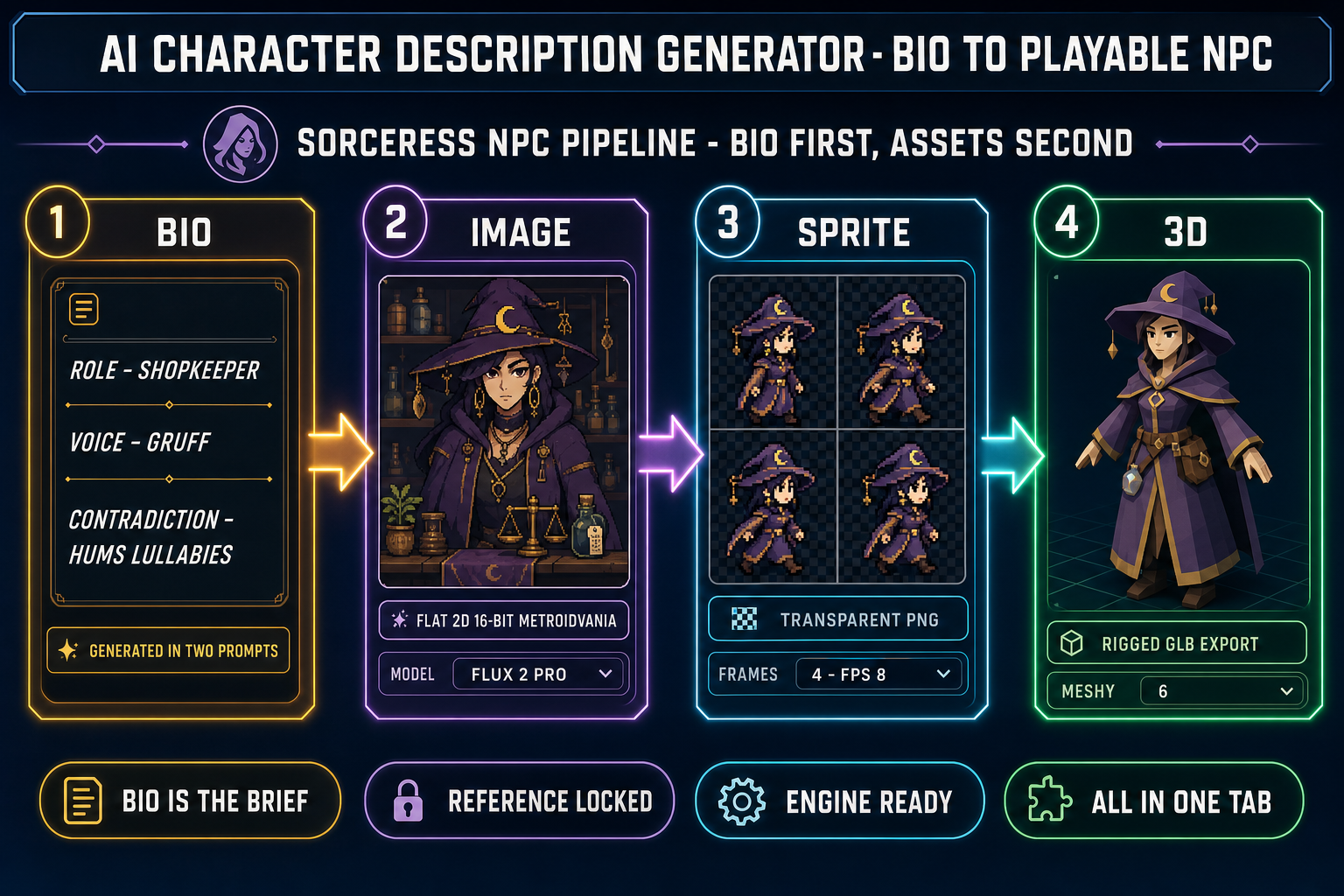
AI character description generator pipeline diagram showing the four steps from a generated NPC bio (role, voice, contradiction) to a reference image, then a transparent sprite sheet, then a rigged 3D mesh, all running in one browser tab
The bio is step one of a four-step pipeline. An AI character description generator that does not bridge to image, sprite, and 3D leaves four jobs unfinished. Verified against the Sorceress source on May 17, 2026.

What an AI character description generator actually does in 2026

An AI character description generator takes a short input — a role, a name, a genre, sometimes only two adjectives — and produces a longer structured text describing that character. The output usually covers physical appearance, personality traits, motivations, flaws, backstory, voice, and sample dialogue. The category sits between two adjacent tools that are often confused with it. An AI character generator (no “description”) usually produces an image — the same character rendered in pixels at a particular style and aspect ratio. A random name generator produces a single name or a roster of names without backstory. The AI character description generator is the bridge between the two: name in, paragraph out, paragraph drives everything downstream.

The category exploded in 2024–2025 because the underlying language models finally got good enough at consistent in-paragraph attribute tracking. A model that forgets the eye color it gave the character in sentence one by the time it writes sentence four is useless for a character bio. A model that holds the eye color, the limp, the regional accent, and the patron-deity reference across a 400-word paragraph is exactly what an NPC writer needs. By May 2026 the category is crowded: writing-assistant suites, generic AI text tools with character-description templates, dedicated dungeon-master tools for tabletop RPGs, and game-engine-adjacent tools that try to wire the text directly to the asset pipeline. They are not interchangeable. The right pick depends on what you are going to do with the paragraph after it lands.

The two-prompt formula for usable NPC bios (the AI character description generator workflow that works)

Most AI character description generator output reads like the median fantasy character because the input was the median fantasy prompt. A two-prompt formula moves the result from generic to genuinely usable. Prompt one locks the role; prompt two adds contradictions. Run them in order and the output starts to feel like a specific person instead of an archetype.

Prompt one — lock the role. Name the world, name the role, name the voice, and demand specifics over adjectives. A working prompt one reads roughly:

You are writing a non-player character for a side-scrolling 16-bit
metroidvania set in a flooded post-industrial city. Generate a bio
for the harbor district's guard captain.

Required fields:
- Role and faction (one line)
- Three visual details that imply class and origin
- Three behavioral details (how they move, how they greet strangers,
  how they react to confrontation)
- A speaking style described through three sample lines of dialogue,
  including one threat and one joke
- No generic adjectives (no "gruff", no "mysterious", no "noble").

Prompt one will land a passable bio on almost any modern AI character description generator. The role is locked, the world is named, the visual details are specific, and the speaking style is shown as dialogue rather than told as adjectives — the show-don’t-tell rule applied to LLM output.

Prompt two — add contradictions. The single line that moves an NPC from forgettable to memorable is a contradiction that breaks the archetype. A guard captain who hums lullabies. A healer who keeps a grudge list. A merchant who refuses to sell to the protagonist’s race. Prompt two reads:

Now rewrite the bio with one trait that contradicts the role.
The contradiction must be:
- Specific (not "secretly soft", but "hums lullabies to wounded
  birds in the courtyard")
- Mechanically usable (the player can encounter it during gameplay,
  not buried in lore the player never sees)
- Believable (the character can hold both the role and the
  contradiction without becoming a parody).

The contradiction rule is the single most-skipped step in the AI character description generator workflow. Without it the model collapses to the training-set median, which for fantasy worlds is the same five archetypes the model has seen ten thousand times. With it the model produces NPCs that the writer remembers, the artist can illustrate, and the player notices.
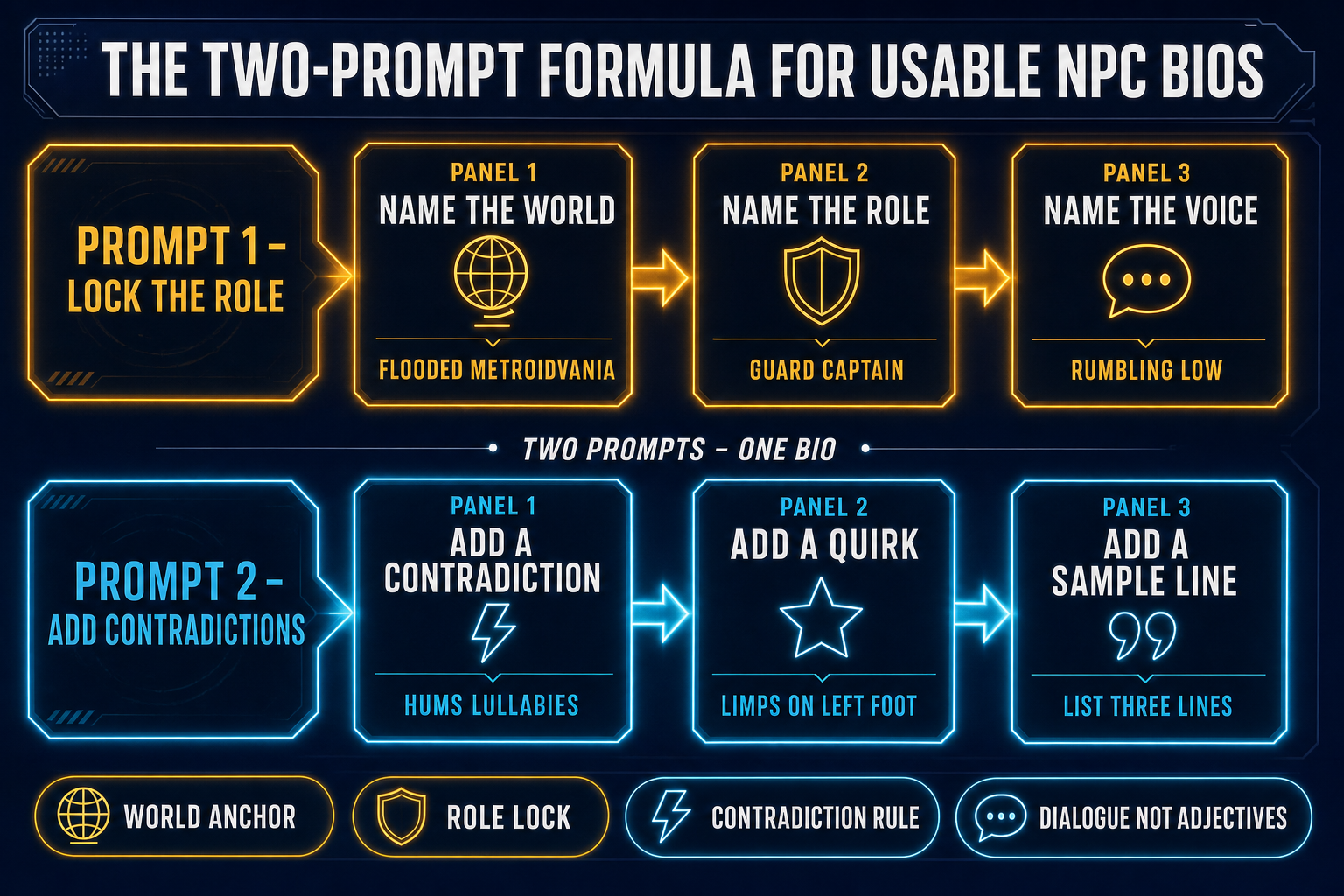
Two-row diagram showing the AI character description generator two-prompt formula — top row locks the world, role, and voice; bottom row adds a contradiction, a quirk, and a sample line of dialogue
Two prompts, one bio. Prompt one locks the role; prompt two adds the contradiction that breaks the archetype.

Free vs Pro AI character description generators (an honest 2026 read)

Several free AI character description generators land usable text in under a minute as of May 2026. QuillBot ships a free AI Character Description Generator in beta that produces a structured profile with traits, backstory, and appearance — the bio is solid and the rate-limit is generous on a free account. Rephrasely runs a character description tool with no signup, free for commercial use, useful for one-off prompts. Easy-Peasy.AI offers a free template with no credit card. WritingTools.ai ships a free generator with output modes specifically labelled RPG-DnD, Villain, Romance Lead, and Casting Sheet — the mode toggles are useful when the bio target is a particular type of NPC. Unifire.ai produces detailed character profiles with physical appearance, personality traits, and backstory in a single pass. None of these tools are bad. Each of them lands a usable paragraph faster than a writer can think.

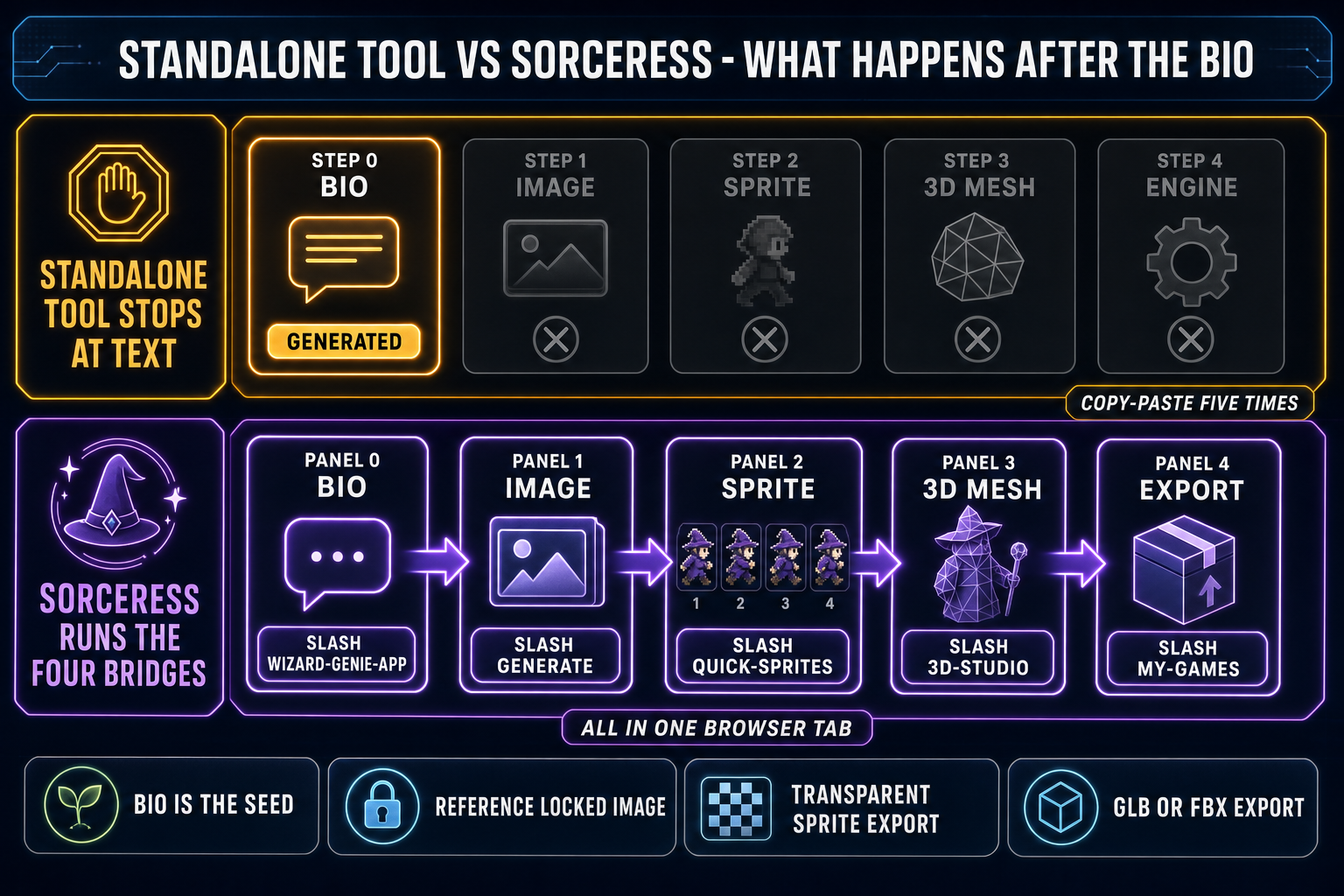
The honest framing for game devs is narrower: an AI character description generator gives you the paragraph. The paragraph is one of five artifacts the game needs per NPC. The other four are an image, a sprite sheet (or a 3D mesh), an audio voice if the character speaks, and a chunk of dialogue text wired to the engine’s dialogue tree. Free standalone generators ship the first artifact and leave the other four for the writer to coordinate by copy-paste. That is fine for a tabletop one-shot or a short story; it is the slow road for a game with twenty NPCs spread across three factions.

Pro tools (paid tiers across the same generators, or a different category of tool entirely — generic AI chat tools running Claude, GPT, or Gemini with a custom-prompt wrapper) score higher on three axes: longer per-bio context (multi-paragraph backstories, faction relationships), batch generation (a roster of fifteen NPCs in one pass with cross-references intact), and integration (the bio is available to other tools without a copy-paste step). The pricing varies but the structure is the same — pay for batch and integration, get the four-artifact pipeline instead of just the paragraph.
Bridge the bio to the playable build — image, sprite, and 3D

The four-step bridge runs in this order: bio, image, sprite or 3D, engine. Skipping a step or starting from the wrong end is the most common cause of NPCs that look great on the design wall and fail in the build. The bio is the seed because every later step references it; an image generated without a bio in hand drifts into the model’s default style; a sprite sheet generated without an image in hand picks the wrong palette and the wrong proportions; a 3D mesh generated without a sprite or a sharpened image in hand picks the wrong silhouette.

Step one — bio. Run the two-prompt formula above through whichever AI character description generator you trust. End with a 200- to 400-word paragraph that names role, three visual details, three behavioral details, one contradiction, and three sample lines of dialogue. Save the paragraph to a text file or paste it into the project’s NPC document. This is the brief.

Step two — image. Paste the visual details into Sorceress AI Image Gen at /generate with reference-image conditioning enabled. The picker as of May 17, 2026 lists eight image models on the homepage rail and ten in the full src/lib/models.ts registry: Nano Banana Pro, Nano Banana 2, GPT Image 2, Seedream 5 Lite, Flux 2 Pro, Z-Image Turbo, Grok Imagine, plus the Pro-tier variants. For a clean character render Flux 2 Pro and Nano Banana Pro are the two safest defaults. Iterate two or three times until the character matches the visual details in the bio.

Step three — sprite or 3D. For a 2D game, feed the locked character image into Quick Sprites at /quick-sprites for a transparent sprite sheet sized for Godot, Unity, Phaser, or RPG Maker — walk cycles, idles, attack frames. For a 3D game, feed the image into 3D Studio at /3d-studio for image-to-3D via Meshy 6, Rodin 2.0, TRELLIS 2, Tripo v3.1, or Hunyuan 3D 3.1, followed by auto-rigging and text-to-motion clips. The glTF 2.0 exports drop into any modern engine.

Step four — engine. Paste the bio into the engine’s dialogue tool, drop the sprite sheet or the GLB into the asset folder, write the scene that spawns the NPC. The bio drove the image; the image drove the asset; the asset and the bio together drove the engine code. Every step references the one before it, which is why the bio cannot be skipped.

Side-by-side comparison of a standalone AI character description generator (top row, only the bio step active, four downstream asset steps grayed out) versus the Sorceress pipeline (bottom row, all five steps active — bio in WizardGenie, image in AI Image Gen, sprite in Quick Sprites, 3D in 3D Studio, export in Publishing)
A standalone AI character description generator ships the bio. Sorceress ships the bio, the image, the sprite, the 3D mesh, and the export — without leaving the browser.

The Sorceress workflow — bio, image, sprite, and 3D in one browser tab

WizardGenie at /wizard-genie/app writes character descriptions out of the box. The model picker as of May 17, 2026 lists eight options verified against src/app/_home-v2/_data/tools.ts: Claude Opus 4.7 (top-tier reasoning), Claude Sonnet 4.6 (fast and smart, the default for narrative writing), GPT-5.5 (frontier), Gemini 3.1 Pro (1M context), DeepSeek V4 Pro (the cheap executor), Kimi K2.5 (256K coding-tuned), Grok 4.2 (2M context), and MiniMax M2.7 (agent-tuned). For a single NPC bio Sonnet 4.6 lands a clean paragraph in two or three turns. For a roster of fifteen interconnected NPCs across a single faction Opus 4.7 handles the cross-references without losing track of who knows whom and who owes whom. We have a longer write-up of the eight-model lineup at Best AI Model for Coding (We Tested All 8 in WizardGenie).

The advantage over running a standalone AI character description generator and then copy-pasting into a chat tool is that the same WizardGenie session can then write the dialogue tree, generate the inventory descriptions, and write the gameplay code that loads the NPC into the level. The bio never has to leave the project. The four-step bridge — bio, image, sprite, 3D — runs in the same browser tab. We covered the image leg in detail at AI Character Generator: Stay On-Model With Reference Images and the 3D leg at AI 3D Character Generator: Prompt to Rigged Mesh. The honest comparison with a generic still-image generator runs through Canva AI Character Generator (vs Game-Ready Pipelines). For the broader vibe-coding context of “describe the thing, get the thing” we ran a separate read on Claude specifically at Claude Vibe Coding (For Games, You Need More Than Code).

Five mistakes that make AI NPC descriptions read like fan-fiction

The same five errors show up in nearly every bad AI-generated character bio. Each has a one-line fix.

1. Adjectives instead of behaviors. “Gruff, mysterious, wise” is filler. The fix is to require three behaviors written in active voice (“spits when she swears, polishes her holy symbol when she lies, sleeps with one eye open”). Behaviors give the artist visual hooks and give the writer dialogue prompts; adjectives give neither.

2. Backstory without a present-tense hook. A character who “lost her village to a flood when she was twelve” is backstory. A character who “rebuilds tiny wooden boats every winter and floats them down the harbor with names painted on the hulls” is a present-tense hook the player can stumble into. Always demand a present-tense gameplay-visible expression of the backstory.

3. The archetype-collapsing prompt. Asking an AI character description generator for “a fantasy guard captain” gets you the fantasy guard captain. Asking for “the guard captain of the harbor district in a flooded 16-bit metroidvania, who hums lullabies and lost her partner in the flood three years ago” gets you a specific person. The world-anchoring rule applies to every NPC in the project, even the ones the player meets for ten seconds.

4. Missing voice samples. A bio without three sample lines of dialogue is not finished. The writer will end up rewriting the bio anyway when they sit down to write the actual dialogue tree, because adjectives like “blunt” do not survive contact with a real conversation tree. Generate the sample lines as part of the bio and the dialogue tool inherits the voice for free.

5. Skipping the contradiction. A character who is exactly the role with no surprise is forgettable. The contradiction rule is the cheapest upgrade in the entire AI character description generator workflow — one line of prompt, fifty words of output, and the NPC roster goes from “generic fantasy world” to “a place with people in it.” Skip it and every NPC is the median; include it and every NPC is themselves.

The verdict

An AI character description generator is the right tool for the bio step and only the bio step. The free options ship usable paragraphs in under a minute; the Pro options ship batches with cross-references. Neither category, on its own, finishes the four jobs that come after the paragraph — the image, the sprite or the mesh, the engine wiring. The workflow that ships a real game runs the bio first, then bridges into AI Image Gen, then Quick Sprites or 3D Studio, then the engine. The Sorceress version of that pipeline runs in one browser tab; the standalone-tool version runs across five tabs with copy-paste between every step. Either way, the bio is the seed. Write it well, add the contradiction, and the rest of the character pipeline inherits the work.

Frequently Asked Questions

What is an AI character description generator and how is it different from an AI character generator?

An AI character description generator produces text — a paragraph or a structured bio describing the character's role, appearance, voice, motivations, and quirks. An AI character generator (without the word description) usually produces an image — the same character rendered in pixels. The two tools sit on opposite ends of the same pipeline. The description generator answers who and why; the image generator answers what they look like. For a game project both are needed: the text is the brief that drives the image prompt, the dialogue tree, the lore wiki entry, and the localization file; the image is what the player actually sees. Treating one as a substitute for the other is the most common mistake — a great image without a bio leaves the writer guessing at backstory, and a great bio without an image leaves the player with an unidentifiable NPC. Run them in the right order: bio first, then feed the bio into the image prompt so the character's traits show up visually.

Is there a free AI character description generator that works well for game NPCs?

Several free options land usable text in May 2026 — QuillBot's AI Character Description Generator (free with a beta label, requires a free account), Rephrasely's character description tool (no signup required, free for commercial use), Easy-Peasy.AI's template (free tier, no credit card), and WritingTools.ai's generator (free, with output modes specific to RPG, villain, romance lead, casting sheet). Each lands a single passable description in under a minute. The catch for game devs: none of them are wired to the asset pipeline. The bio comes out as plain text you then copy into your image prompt, your dialogue tool, your sprite generator, and your engine separately. The honest 2026 read is that free AI character description generators are great for the text step and only the text step. For a game project where the same character needs to exist as a paragraph of lore, a reference image, a transparent sprite sheet, and a rigged 3D mesh, the four-step bridge is where the time savings actually live.

How do I prompt an AI character description generator to avoid generic fantasy-novel filler?

Three additions to the prompt move the output from generic to game-usable. First, name the world or the engine the NPC is meant to live in — "this is a shopkeeper in a side-scrolling 16-bit-style metroidvania set in a flooded post-industrial city" gives the model an aesthetic anchor that produces visual details a generic prompt does not. Second, demand contradictions — "include one trait that contradicts the role" forces the model to write a guard captain who hums lullabies, a healer with a grudge, a merchant who refuses to sell to the protagonist's race. Without that line the output collapses to the median fantasy character (wise old wizard, brooding warrior, cheerful baker). Third, ask for the speaking style as quoted lines, not as adjectives — "give me three sample lines they would actually say, including one threat and one joke" forces the model to produce dialogue the writer can paste straight into the engine. Generic adjectives like "gruff" or "mysterious" disappear; specific verbal tics, regional slang, and rhythm replace them. The combination of those three additions turns the AI character description generator from a backstory factory into a working brief for the actual game.

Can WizardGenie write character descriptions, or do I need a separate AI character description generator?

WizardGenie at /wizard-genie/app can write character descriptions out of the box. The model picker as of May 17, 2026 lists eight options verified against src/app/_home-v2/_data/tools.ts: Claude Opus 4.7 (top-tier reasoning), Claude Sonnet 4.6 (fast and smart, the default for most narrative writing), GPT-5.5 (frontier), Gemini 3.1 Pro (1M context), DeepSeek V4 Pro (the cheap executor), Kimi K2.5 (256K coding-tuned), Grok 4.2 (2M context), and MiniMax M2.7 (agent-tuned). For a single NPC bio, Sonnet 4.6 lands a clean paragraph in two or three turns; for a roster of fifteen interconnected NPCs across a single faction, Opus 4.7 handles the cross-references without losing track. The advantage over a standalone AI character description generator is that the same chat session can then write the dialogue tree, the inventory descriptions, and the gameplay code that loads the NPC into the level. The bio does not have to leave the project to drive everything downstream. Standalone tools win on speed for a single one-off bio with no follow-up writing needed; WizardGenie wins on the full project loop where the bio feeds the dialogue, the dialogue feeds the spec, and the spec feeds the code.

What is the right way to bridge an AI-generated character description to an actual game asset?

Four steps, in order, and the order matters. Step one: lock the bio with the AI character description generator — get a paragraph that names role, three visual details, three behavioral details, and one contradiction. Step two: paste the visual details into AI Image Gen at /generate with a reference-image lock turned on so iteration stays on-model — the eight image models in the picker (Nano Banana Pro, Nano Banana 2, GPT Image 2, Seedream 5 Lite, Flux 2 Pro, Z-Image Turbo, Grok Imagine, and the rest of the lineup) each have a slightly different style; Flux 2 Pro and Nano Banana Pro are the two safest defaults for a clean character render. Step three: feed the locked character image into the asset target — Quick Sprites at /quick-sprites for a transparent sprite sheet sized for Godot, Unity, Phaser, or RPG Maker, or 3D Studio at /3d-studio for an image-to-3D lift via Meshy 6, Rodin 2.0, TRELLIS 2, Tripo v3.1, or Hunyuan 3D 3.1, followed by auto-rigging and text-to-motion. Step four: paste the bio and the asset reference into the engine — into Phaser's preload step, into Godot's scene tree, into Unity's prefab spawn. Skipping the bio step and starting from an image gets you a character without a name; skipping the image step and starting from a sprite-sheet prompt gets you a sprite without a face. The bio is the seed that keeps every downstream step in sync.

Sources

  1. Character description (writing) — Wikipedia
  2. Non-player character — Wikipedia
  3. Sprite (computer graphics) — Wikipedia
  4. glTF 2.0 specification (Khronos Group)
  5. Vibe coding — Wikipedia
  6. Andrej Karpathy on vibe coding (Simon Willison's Weblog, Feb 6 2025)
  7. Show, don't tell — Wikipedia
Written by Arron R.·2,449 words·11 min read

Related posts