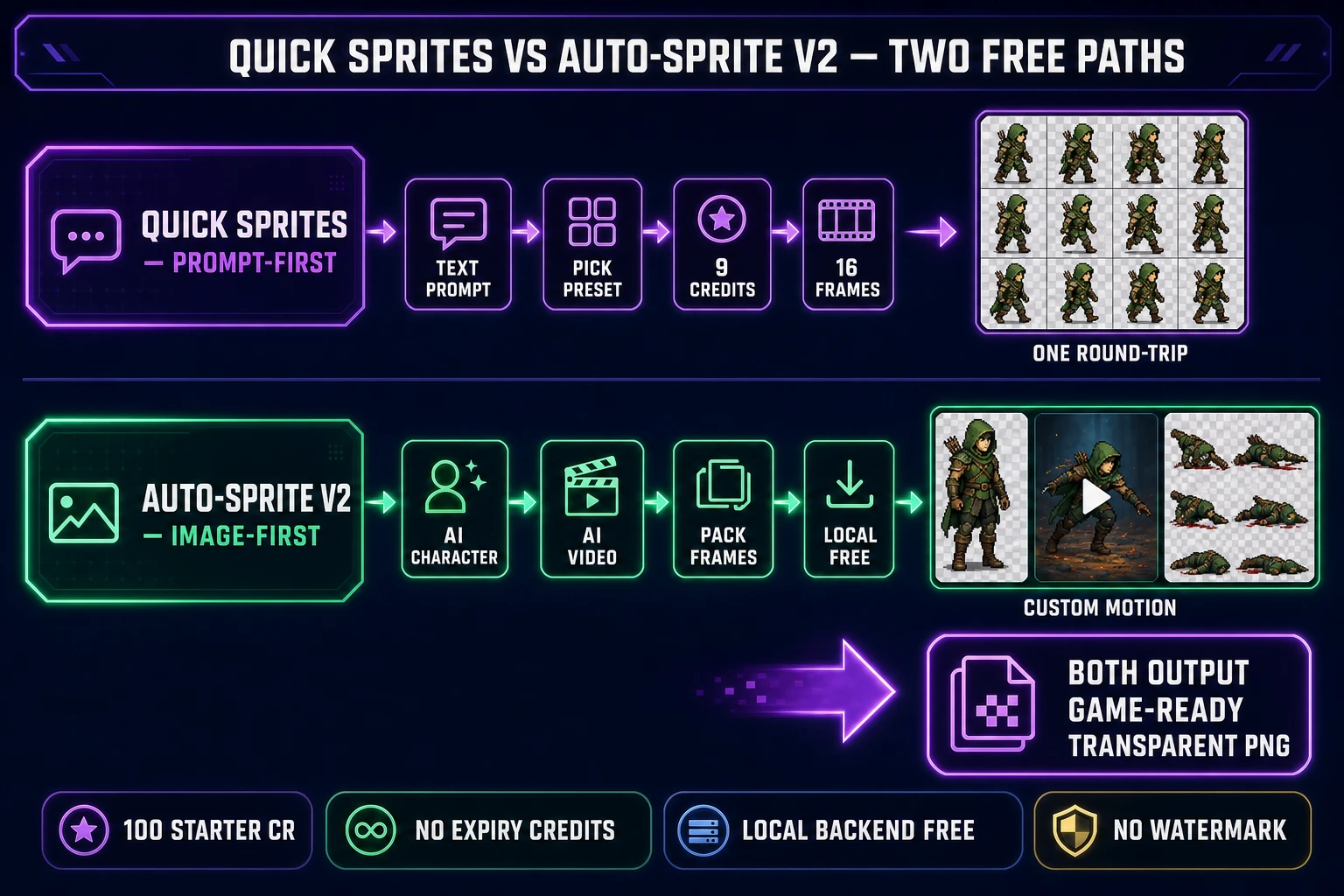
A free AI sprite generator is a real category in 2026, but the word "free" hides four very different deals — and only one of them ships a clean transparent PNG to your downloads folder without a card, a watermark, or a daily cap. Below: the four shapes of "free" in 2026 sprite tooling, the Sorceress path that sits in the honest sign-up-credit bucket (100 starter credits on Google OAuth, 9 credits per generation on Quick Sprites, so eleven game-ready sheets land for zero dollars), and the Auto-Sprite v2 local backend that bills exactly zero credits per frame regardless of how many sprites you pack. Verified June 12, 2026 against src/app/quick-sprites/page.tsx, src/app/autosprite-v2/page.tsx, and the 20260610000001_free_credits_google_signup_only.sql migration.
What "free AI sprite generator" actually means in 2026
The phrase free AI sprite generator shows up about forty times a month on Google in 2026, with a keyword-difficulty score of zero. That combination tells you something specific: hobbyists and first-time game-jam participants are landing on YouTube tutorials, Reddit threads, and itch.io devlogs that mention an "AI sprite generator", and going straight to Google to figure out whether the tool is actually free before they bother signing up. The answer is yes — but only after you understand which of four very different deals each tool offers.
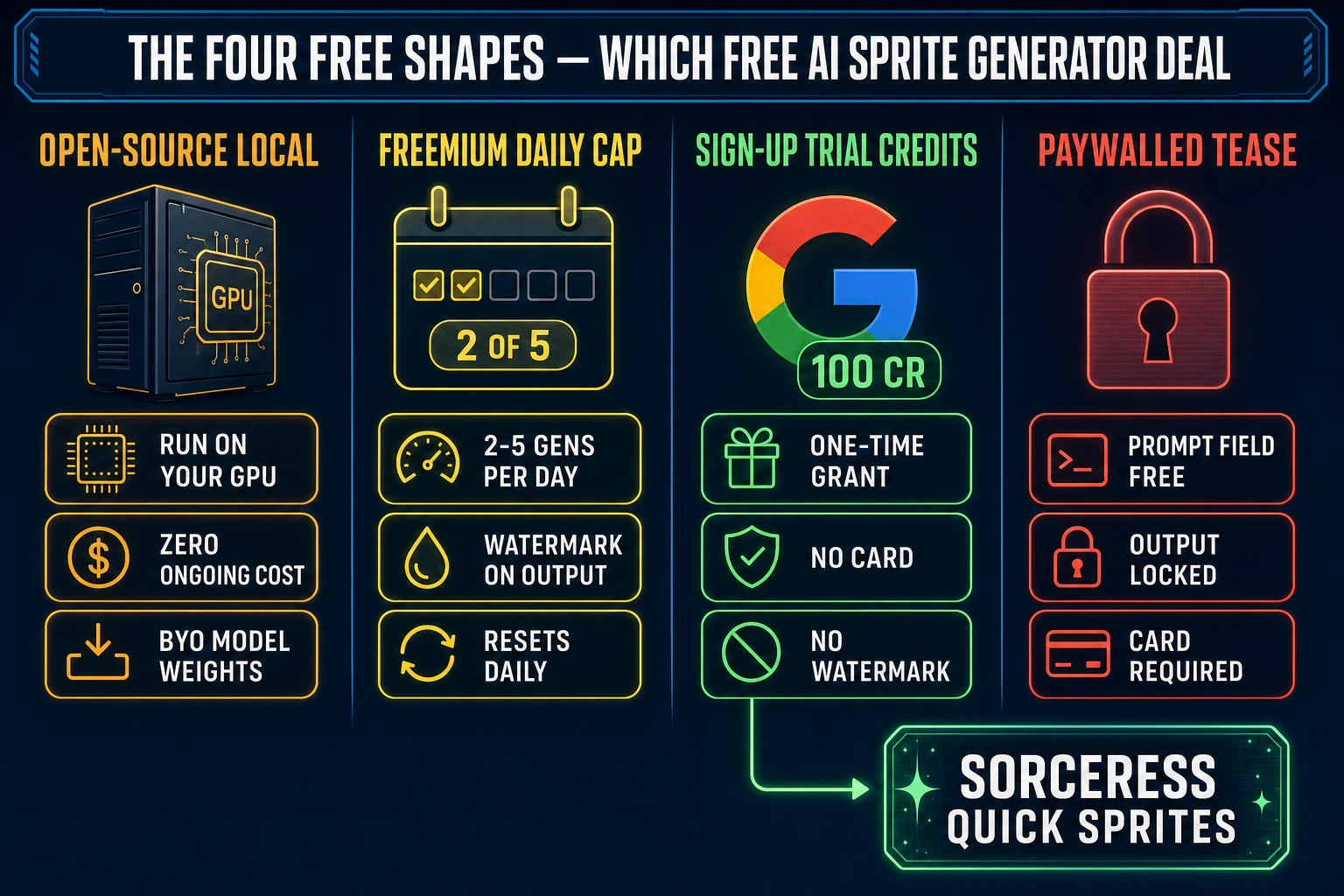
The four shapes of "free" in 2026 sprite tooling — and by extension, the four kinds of free AI sprite generator deals you will encounter — are these. Open-source local is the truly-free option for anyone with a discrete GPU and 8 to 16 gigabytes of free video memory: download the model weights for something like a sprite-tuned diffusion model, run inference on your own machine, and pay nothing forever. The trade is the GPU cost (you bought the card) plus the prompt-tuning learning curve. Freemium with a daily cap is the most common shape: a hosted web tool gives you two to five generations per day with a watermark in the corner, resets at midnight, and gates the no-watermark output behind a paid tier. Sign-up trial credits is a fixed pool of full-quality credits granted at account creation, with no card on file — you spend the pool, you stop unless you top up. "Free to try" with a paywall at the output is the trap: the prompt field is free, the preview is free, the download is gated. Read the page carefully before you spend an hour on a prompt.
This post is the field guide to the third shape, the trial-credit bucket, because that is where a free AI sprite generator is the most honest and the most game-ready. The Sorceress sprite stack sits in this bucket: a 100-credit grant on every Google sign-up, no card, no watermark, and a flat 9-credits-per-sheet price on the closest analog to a "type a prompt, get a sprite sheet" tool. Across the rest of this post, "free AI sprite generator" refers to that specific deal — sign-up trial credits with a no-watermark output — unless explicitly stated otherwise.
The honest free AI sprite generator path inside Sorceress
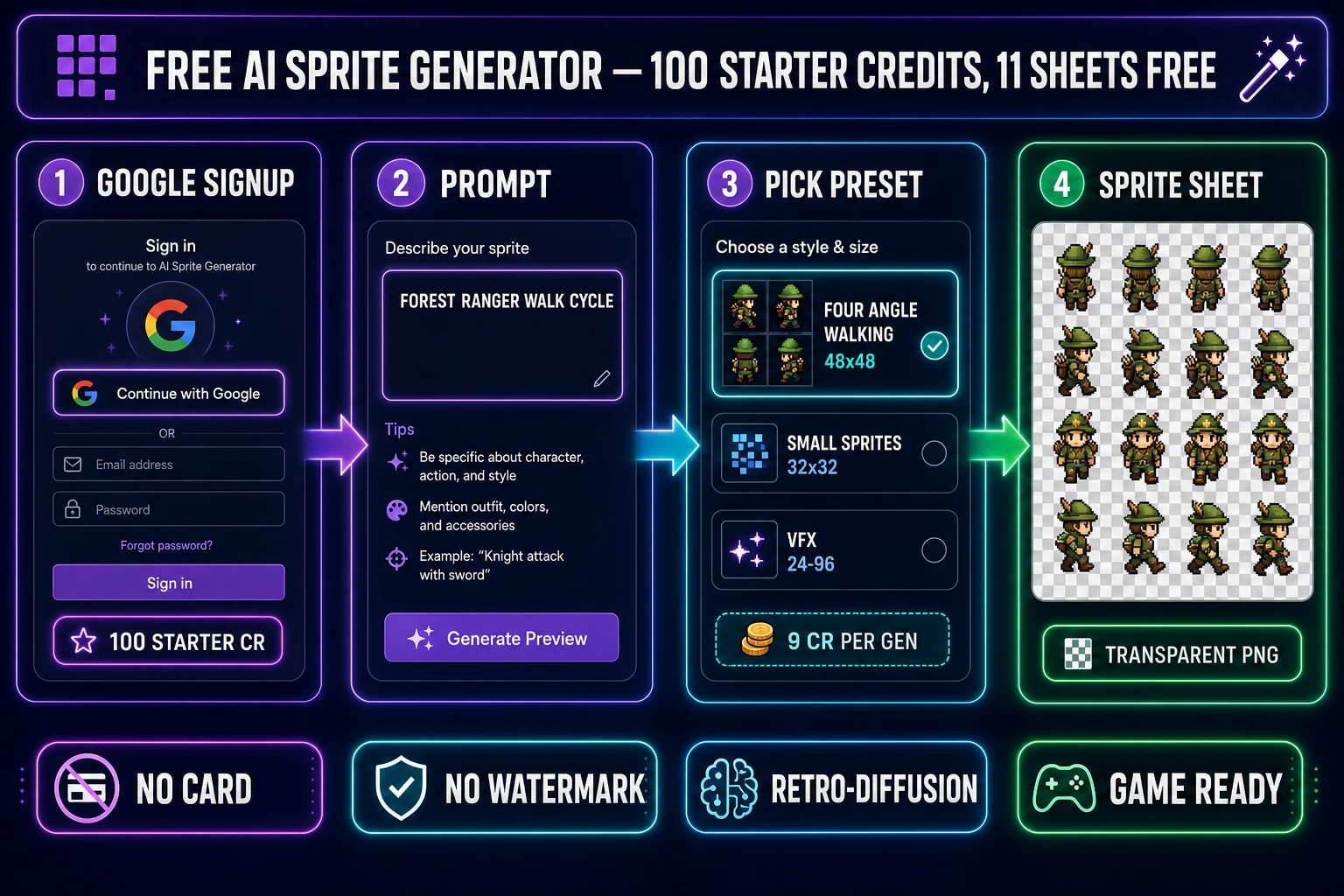
Sorceress runs a no-trickery free AI sprite generator tier through a single mechanism: every account created with the Google OAuth button at sign-up is granted 100 credits, with no card on file, no recurring subscription, and no watermark on outputs. The grant is verifiable in the database migration 20260610000001_free_credits_google_signup_only.sql, which sets starting_credits to 100 when the auth provider on the new profile is google (and to 0 when the provider is plain email/password). So the actual free-tier entry is a one-click Continue-with-Google flow, not a credit-card hold.
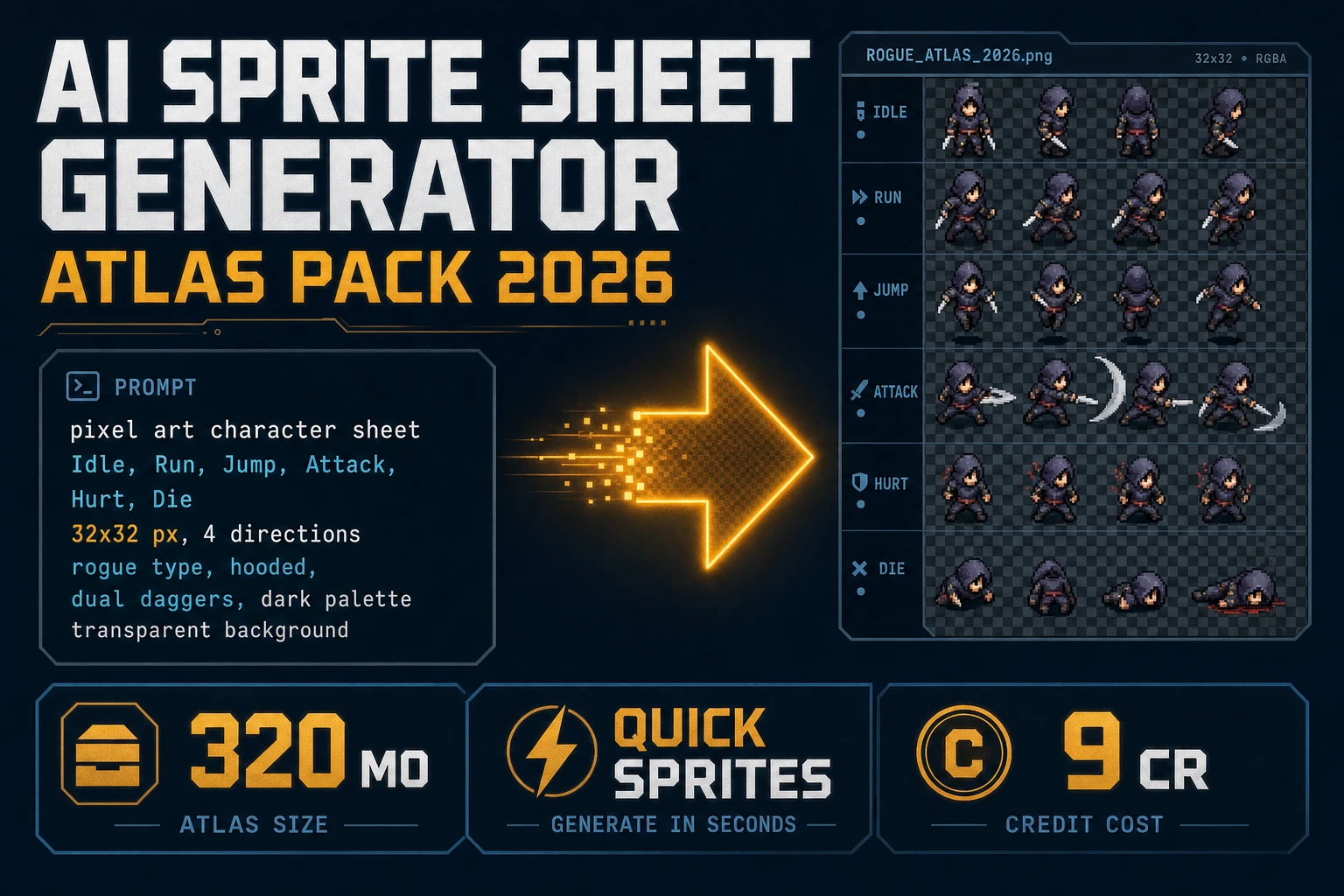
The math from there is straightforward. Quick Sprites charges exactly 9 credits per generation, locked, verified June 12, 2026 against the CREDITS_PER_GEN constant in src/app/quick-sprites/page.tsx. One hundred starter credits cover 11 sprite sheets with 1 credit left over (100 divided by 9 equals 11.11). Eleven sheets is enough for a small game jam: one player character with a four-direction walk cycle, one enemy, one boss, one VFX hit-flash, plus seven extra poses or assets for ambient game content. Past the 11-sheet ceiling, the cheapest no-expiry top-up at the plans page is the Starter pack at 10 dollars for 1,000 credits, which extends the budget to 111 additional sprite sheets without any subscription.
Quick Sprites: the prompt-first free AI sprite generator
The closest direct analog to "type a prompt and get a sprite sheet" inside Sorceress is Quick Sprites. The tool runs on the retro-diffusion/rd-animation model, charges 9 credits per generation, and ships three preset animation styles, verified June 12, 2026 against src/app/quick-sprites/page.tsx lines 35 to 41. The presets are tuned for the classic 16-bit-to-32-bit sprite look that most 2D engines expect.
- Four Angle Walking at 48 by 48 pixels. The output is a sixteen-frame transparent PNG laid out in a four-by-four grid: four directions (up, right, down, left) with four frames each. This is the canonical walk-cycle deliverable for a top-down RPG, a roguelike, or a 2D adventure game. One generation, one credit cost, one drop-in atlas.
- Small Sprites at 32 by 32 pixels. The output is six pose rows: right walk, left walk, arm movement, look, surprise, and lay-down. This preset is sized for the classic Pokémon-style overworld tile, the Stardew Valley scale, and the bullet-hell character footprint. The six poses cover both ambient movement and reaction states.
- VFX Effects at any square size from 24 to 96 pixels. The output is a frame-by-frame animation of fire, an explosion, lightning, a magic burst, a screen-shake hit-flash — whatever the prompt describes. The size is a dropdown; the preset works for both 32 by 32 pixel-perfect FX and 96 by 96 chunky-pixel effects.
The prompt is text only. There is no upload-the-character intermediate step, no reference-image requirement, no manual frame-alignment afterward. Type the brief into the prompt field — "forest ranger archer, side perspective, pixel art, leather armor" — pick a preset, click Generate, and the animation frames come back as a packed PNG with the alpha channel already cleaned. The output drops directly into a Phaser 4 scene as a sprite-sheet atlas (with the row and column counts matching the preset), into a Godot 4 AnimatedSprite2D node as the texture region, or into a GameMaker Studio sprite editor as the base sprite frames.
The brief comparison with other 2026 sprite tools: a single Quick Sprites generation at 9 credits matches what Ludo.ai charges for a comparable animated spritesheet on its Indie plan, but Quick Sprites does it without an annual subscription and with the no-expiry credit shape that follows the buyer across projects. See the dedicated Ludo AI sprite generator comparison for the full credit math.
Auto-Sprite v2: the truly-free AI sprite generator backend
Auto-Sprite v2 is the higher-ceiling pipeline for when you already have an AI-generated character image, you need a non-preset animation, or you want to run the whole pipeline locally for zero credits indefinitely. The three-stage flow runs an AI character image generation step (Sorceress AI Image Gen at /generate, 2 to 6 credits depending on the model), an AI video animation step that produces a motion clip from the still character, and a sprite-sheet packer that converts the clip into a transparent PNG sheet.
The cost of the third stage — the actual sprite packing — depends on which backend you pick. The cloud backend runs on a RunPod GPU and charges 1 credit per 10 frames at frame resolutions up to 512 pixels (the most common sprite size) and 2 credits per 10 frames at hi-res frames over 512 pixels, verified against the getCreditCost function at line 3491 of src/app/autosprite-v2/page.tsx on June 12, 2026. The local backend runs on your own machine via the pip install -U sorcgcs-server && sorcgcs-server command and bills exactly zero credits per frame, regardless of resolution and frame count. The credit-cost UI in the tool literally renders the word Free when the local backend is the active path.
So the truly-free Auto-Sprite v2 deal is: a workstation with a discrete NVIDIA GPU and 8 to 16 gigabytes of free video memory, the sorcgcs-server Python package installed, and the local backend toggled in the Auto-Sprite v2 settings. From that point forward, every frame in every sprite sheet costs nothing. The cloud credits stay reserved for the prompt-to-character upstream (which has its own free option at the lowest tier, covered below).