Flip AI Remover Background (Sprite Matte)

By Arron R.7 min read
An ai remover background search wants a clean cutout. For game sprites, run Sorceress Background Remover (3 credits, 5 MB cap), inspect alpha on a checkerboard,

Searchers typing ai remover background usually want the same job as a background-remover query—strip the backdrop and keep the subject—but game sprites punish soft ecommerce edges. Cut a transparent PNG in Sorceress Background Remover, inspect fringe on a checkerboard at integer zoom, then hand off to True Pixel and Quick Sprites. Credit costs and model wiring below were verified July 26, 2026.
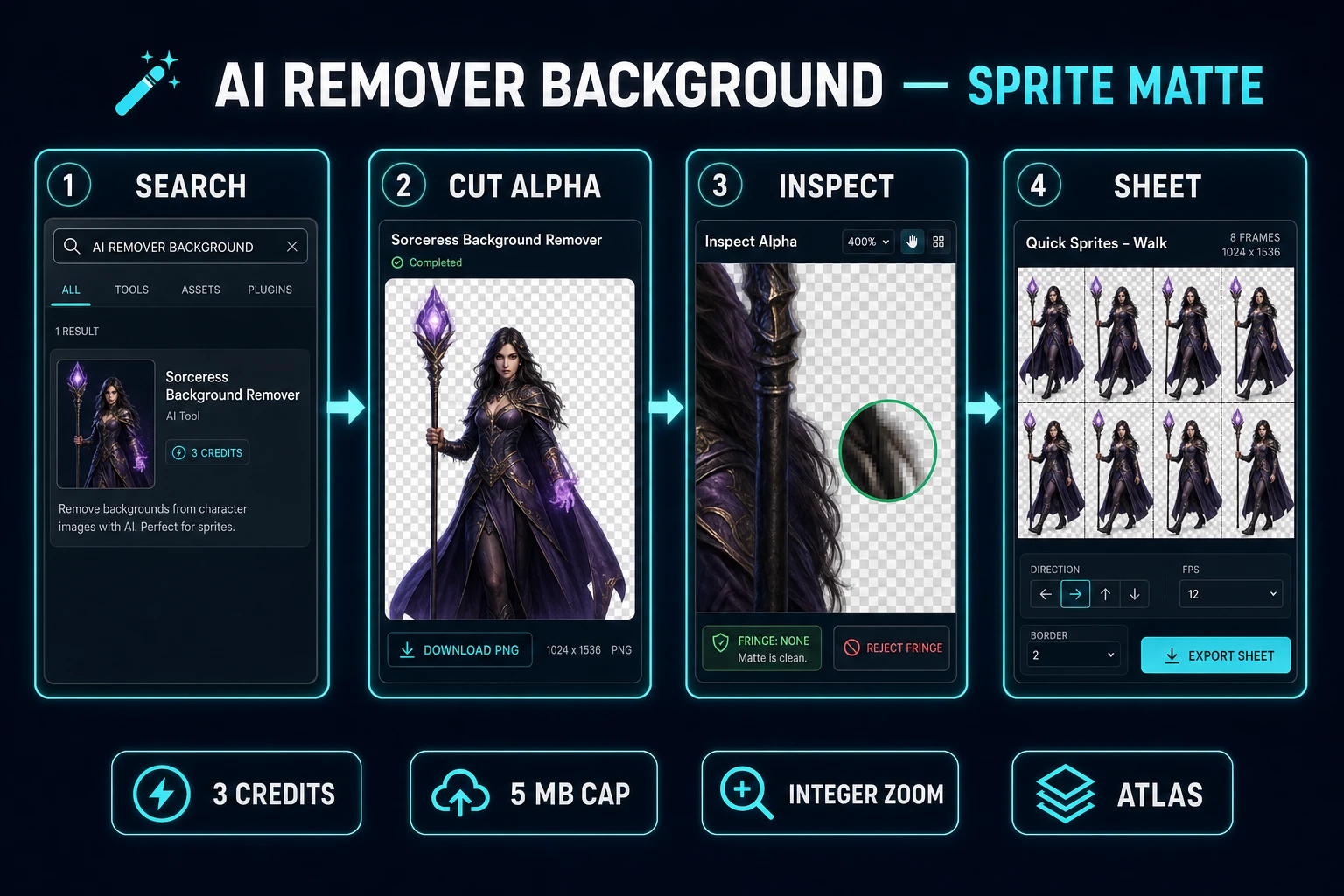
ai remover background pipeline from search cut alpha inspect to sprite sheet
Search, cut, inspect, sheet. An ai remover background win for games is a stable matte, not a soft lifestyle composite.

What an ai remover background search wants

DataForSEO lists ai remover background at 2,400 monthly searches with KD 50 in research-supplement.md, verified July 26, 2026. The inverted word order sits beside siblings like background remover ai (2,400/mo, KD 61) and the much larger head term ai background remover (18,100/mo, KD 51). Those queries share one intent: remove the backdrop. They do not share one finish standard.

A true answer to ai remover background for indie games finishes only when:

  1. The subject is a transparent PNG you can reopen tomorrow.
  2. Edge pixels survive nearest-neighbor zoom without a colored halo.
  3. The crop box is stable enough to pack into a sprite sheet.
  4. The cutout feeds the next tool in your stack instead of dying as a lonely export.

Vendor comparison posts already cover specific ecommerce removers. For a Pixelcut-focused sibling, see Clip Pixelcut AI Background Remover (Game Sprite Path). This article stays on the inverted query and the Sorceress sprite matte path. Name competing apps in plain text when you must; do not treat their marketing sites as destinations.

Write a one-line acceptance bar before you upload anything: “Hard silhouette, zero fringe, feet on the same baseline.” That sentence is the difference between an ai remover background session that ships frames and a folder of soft cutouts that fail in-engine.

Why sprite cutouts reject soft ecommerce edges

Product cutouts optimize for hair that looks natural on a lifestyle backdrop. Game sprites optimize for readable silhouettes at play scale. Soft alpha compositing that flatters a portrait becomes a glow when the camera scales with nearest-neighbor interpolation.

  • Edge policy: ecommerce tolerates feathered rims; sprites prefer inspectable borders on a checkerboard.
  • Color fringe: leftover backdrop hues on edge pixels scream when upscaled. Games reject them; marketplaces often hide them behind drop shadows.
  • Crop stability: listing photos are single frames. Walk cycles punish any bounce between idle and run.
  • Downstream tools: after a product cutout you design a poster. After a sprite cutout you quantize, sheet, and load into a browser runtime.

If your only deliverable is a shop thumbnail, a generic free remover may be enough. If the deliverable is a player atlas, treat the cutout as step one of a pipeline, not the finish line. MDN’s Canvas API docs are a useful reminder that browsers will happily bilinear-filter your art into mush if you let them “help”—your engine must force crisp sampling after the matte is clean.
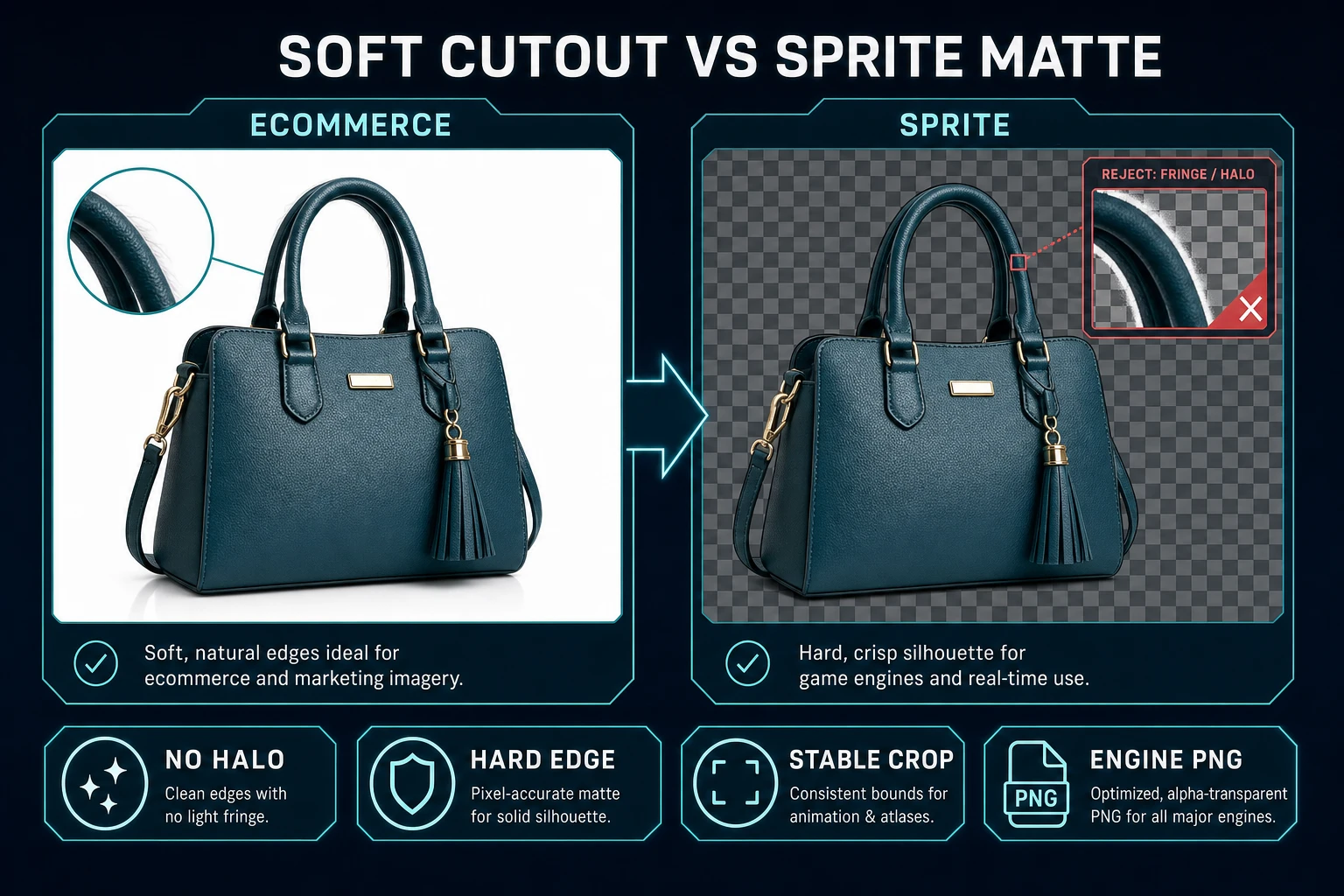
Soft ecommerce cutout versus hard sprite matte for ai remover background
Soft product edges and hard sprite silhouettes fail different QA tests—do not reuse the same acceptance bar.

Prep plates before you cut

Garbage plates waste credits. Before you open Background Remover, enforce a plate contract:

  1. Single subject — one hero, one prop, or one hazard. Crowded scenes confuse subject detection and leave floating crumbs.
  2. Plain backdrop — solid color or simple studio. Busy rooms become fringe factories.
  3. Full silhouette — no cropped feet or clipped weapon tips you will need later.
  4. Consistent lighting — one light direction across a directional set so sheets do not fight.
  5. Named fileshero_front_idle_v1.png, not final_cut.png.

If you lack art, generate a clean plate in AI Image Gen first, then cut. Do not generate, cut, and sheet in the same panicked hour without a written cast list. The tools guide maps adjacent asset tools; this path only needs the three featured ones below.

Reject plates that already have soft studio glow baked into the subject. An ai remover background pass cannot invent a hard outline that was never photographed or prompted.
Run Background Remover at 3 credits

Open Background Remover at /bg-remover. The home card describes it as AI background removal that yields a clean transparent PNG, badge-gated on AI Credits (verified in src/app/_home-v2/_data/tools.ts on July 26, 2026).

Source facts verified the same day in src/app/bg-remover/page.tsx:

  • Cost: BG_REMOVER_CREDITS = 3 per successful removal.
  • Upload cap: MAX_FILE_SIZE_MB = 5 (files over 5 MB are skipped with a modal).
  • Batch: pending files multiply cost by count—useful when you drop eight directional poses at once.
  • Model wiring: bria/remove-background via Replicate (model_key: "replicate-bg-remover").

The Bria RMBG 2.0 model card (live-checked July 26, 2026) describes non-binary masks with fine transparency levels for natural edges. That is excellent for hair in composites. For game sprites, treat soft rims as a warning, not a win—inspect and harden before you sheet.

Workflow for one cast member:

  1. Upload the plate (under 5 MB).
  2. Confirm credit balance covers 3 × file count.
  3. Run removal and download the transparent PNG.
  4. Do not immediately batch the whole cast—cut one, inspect, then batch.

Lifetime Access is $49 one-time (LIFETIME_PRICE in src/app/plans/page.tsx, verified July 26, 2026). It does not make removals free forever; AI removals still draw from the credit pool. Budget the cast like ammo, not like unlimited cloud storage.

Inspect alpha on a checkerboard

Every cut from an ai remover background session needs a two-minute QA pass before it enters a sheet:

  • Integer zoom — view at 100%, 200%, and 400% on a checkerboard. Fringe that hides at fit-to-window becomes obvious at 2×.
  • Color fringe — pink or green edge pixels from the old backdrop. Reject and re-shoot the plate, or re-cut after simplifying the backdrop.
  • Holes — transparent bites inside the silhouette (eyes, windows, mesh). Fill only if gameplay needs them; accidental holes look like damage.
  • Feet baseline — for characters, the bottom opaque row should land on the same baseline across idle and walk frames.
  • Bounding box — measure width/height. If idle is 48×64 and walk is 56×64, the sheet will bounce.

Reject early. Re-rolling one plate costs 3 credits. Shipping a bouncing atlas costs a day of “why does the camera feel wrong” debugging. Keep a reject folder named matte_rejects_YYYYMMDD so you do not re-upload losers by accident.

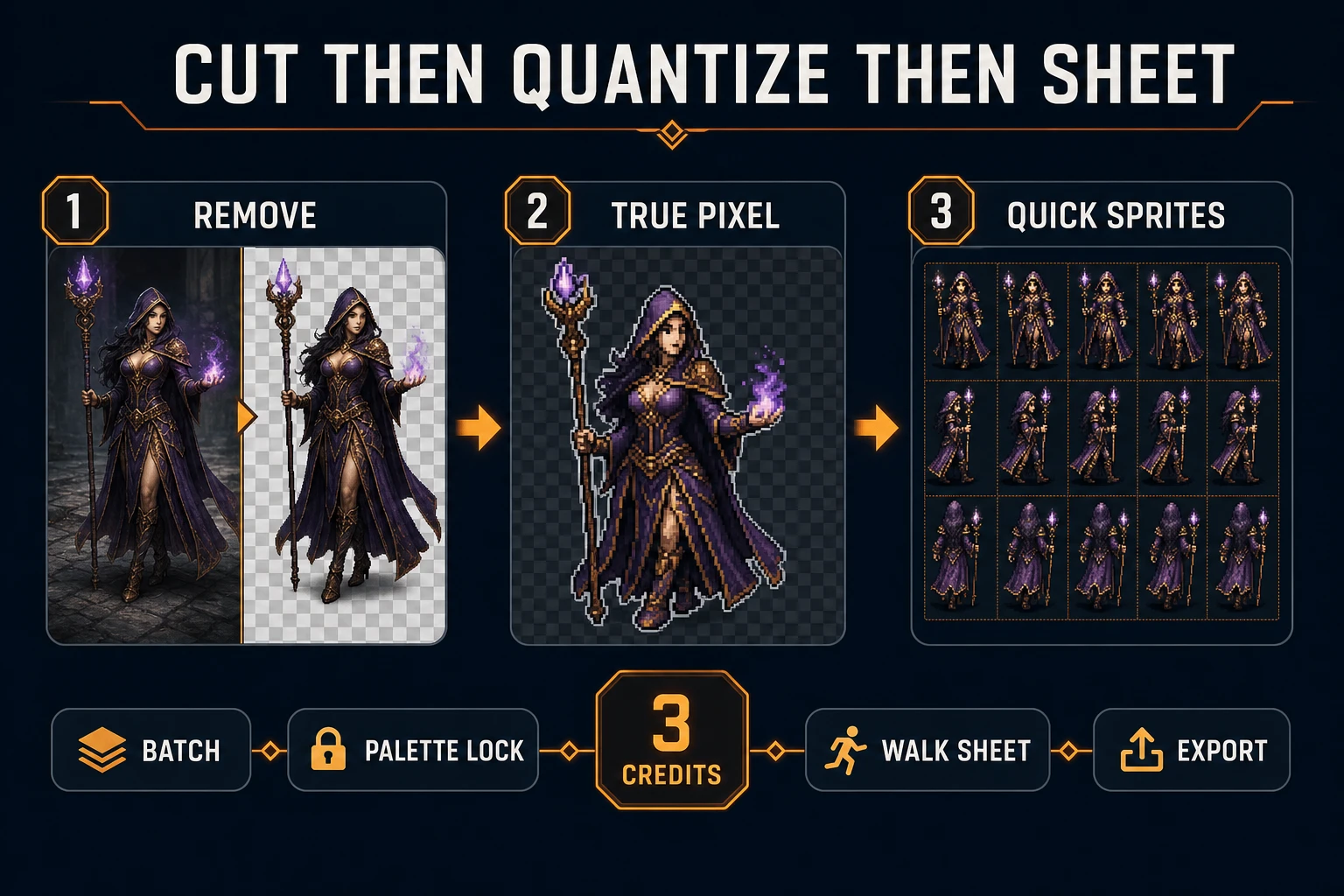
Background Remover to True Pixel to Quick Sprites after ai remover background cut
Cut, quantize, sheet. Clean mattes make True Pixel and Quick Sprites honest instead of fighting fringe.

Hand off to True Pixel and Quick Sprites

Only after the matte passes checkerboard QA do you branch:

True Pixel (/pixel-art) converts an existing image or video into pixel-art frames and sprite sheets with chroma keying and edge cleanup. Use it when you already own plates and need a locked grid and palette. Import the transparent PNG, lock the target pixel size to your jam brief (16×16 or 32×32 tiles), and export a sheet that matches the footprint you already use in code.

Quick Sprites (/quick-sprites) generates animated pixel sheets from prompts. Use it when you need a walk cycle from text instead of cleaning every frame by hand. Keep silhouette family identical across idle, walk, jump, and fall. Feed the same costume keywords you used when generating concept plates so the cast stays coherent.

Do not run both tools on the same hero in the same hour unless you are A/B testing silhouettes. Pick one path per character for pass one. Wire the sheet into your engine only after a 60-second playtest with rectangles has already proven feel—art should not rewrite gravity.

If you came from a vendor remover and only need the sprite finish, the handoff is the same: import the transparent PNG into True Pixel or rebuild the action in Quick Sprites. The Sorceress cut keeps every frame in one library so batch credits and naming stay coherent.

Cost math and stop rules

Budget before you batch. Eight directional poses × 3 credits = 24 credits for one character’s facing set. A four-character cast at the same depth is 96 credits before you touch music or mesh. That math is why an ai remover background workflow starts with one hero, not twelve NPCs.

Stop rules that save money:

  • One plate, one inspect — never batch until the first cut passes fringe QA.
  • Shared palette — lock colors before you multiply poses.
  • Shared footprint — one tile width for the whole cast on pass one.
  • No soft-rim shipping — if you need soft hair for a title-screen portrait, keep that export separate from the in-game sheet.
  • Credit ceiling — write a max credit number for the session and stop when you hit it, even if the folder looks incomplete.

When the matte is clean, the sheet is stable, and the playtest still feels like the graybox, you are done. Extra removers, extra vendors, and extra “just one more pose” passes are how sprite pipelines burn a weekend without shipping a playable minute.

Common issues after an ai remover background cut

  • Problem: Soft halo at 2× camera zoom. Solution: Reject the cut; simplify the plate backdrop; re-cut; inspect on checkerboard before packing.
  • Problem: Upload rejected. Solution: File exceeds 5 MB—compress or crop; the tool skips oversized files.
  • Problem: Batch drained credits with bad plates. Solution: Cut one, inspect, then batch. Credits multiply by pending file count.
  • Problem: Walk cycle bounces. Solution: Normalize bounding boxes before sheeting; do not “fix gravity” to hide crop drift.
  • Problem: Pixel art looks muddy after conversion. Solution: Lock grid size in True Pixel to the jam brief; force nearest-neighbor in the engine.

That is the full path for ai remover background when the deliverable is a game sprite: cut in Background Remover, inspect alpha honestly, then quantize or generate sheets with tools that respect play scale. Soft ecommerce edges can wait for the store page.

Frequently Asked Questions

What does an ai remover background search usually want?

A one-click cutout that leaves a transparent subject. For games that means a PNG with inspectable alpha, hard silhouette edges, and a crop box that stays stable across frames—not a soft ecommerce composite. Sorceress Background Remover outputs a transparent PNG at 3 credits per successful removal (verified July 26, 2026 in src/app/bg-remover/page.tsx).

How much does Sorceress Background Remover cost?

Verified July 26, 2026: BG_REMOVER_CREDITS = 3 per successful removal, MAX_FILE_SIZE_MB = 5. Batch uploads charge 3 credits times the file count. Removals stay on the AI credit pool; Lifetime Access is $49 one-time (LIFETIME_PRICE in src/app/plans/page.tsx) and does not make removals unlimited.

Which model does Background Remover use?

The tool calls bria/remove-background through Replicate (model_key replicate-bg-remover in src/app/bg-remover/page.tsx, verified July 26, 2026). The Bria RMBG 2.0 card describes non-binary masks with fine transparency levels—useful for hair, but you must still reject color fringe and soft halos before packing game sprites.

Why inspect alpha on a checkerboard after an ai remover background cut?

Soft anti-aliased edges that look fine on a white studio mockup glow when nearest-neighbor scaled in a game camera. Checkerboard preview at integer zoom reveals fringe, holes, and semi-transparent rims before you quantize in True Pixel or pack frames in Quick Sprites.

When should I use True Pixel or Quick Sprites after Background Remover?

Use True Pixel when you already have plates and need palette lock or pixel-grid conversion. Use Quick Sprites when you need a fresh directional walk sheet from a prompt instead of cleaning every video frame by hand. Cut alpha first so both tools start from clean mattes.

Sources

  1. Alpha compositing — Wikipedia
  2. Sprite (computer graphics) — Wikipedia
  3. Portable Network Graphics — Wikipedia
  4. Nearest-neighbor interpolation — Wikipedia
  5. Canvas API — MDN Web Docs
Written by Arron R.·1,624 words·7 min read

Related posts