Forge How to Make a Pixel Art Game (Browser Slice)

By Arron R.7 min read
How to make a pixel art game as a one-screen browser slice: lock camera and art grid, scaffold the loop in WizardGenie, convert plates in True Pixel, swap recta

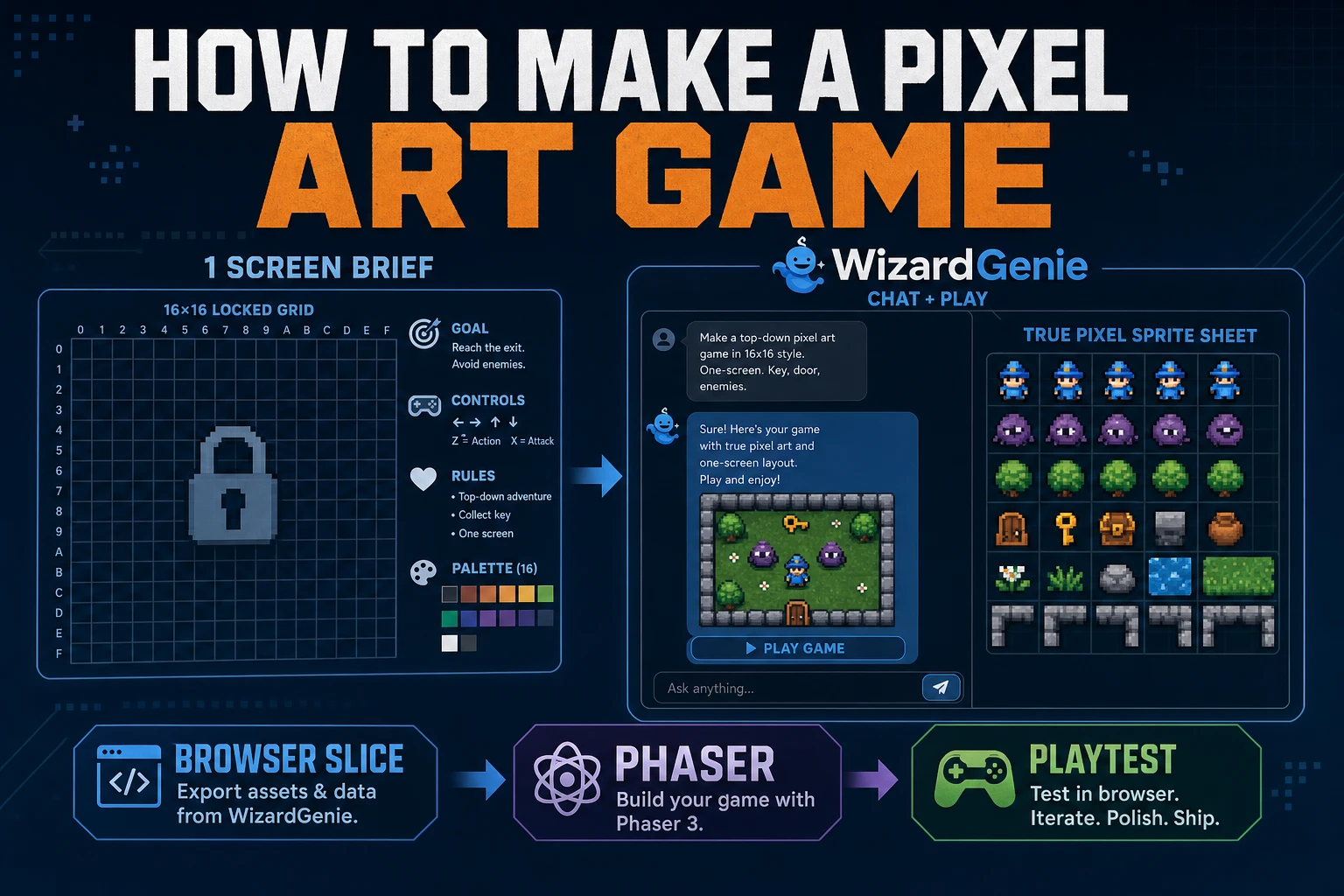
Searchers typing how to make a pixel art game usually want a playable loop with readable sprites, not a gallery of lonely character sheets. Lock one screen and one art grid, scaffold movement in WizardGenie, convert plates in True Pixel, then measure a 60-second playtest before you expand systems. Versions and model lineups below were verified July 26, 2026.
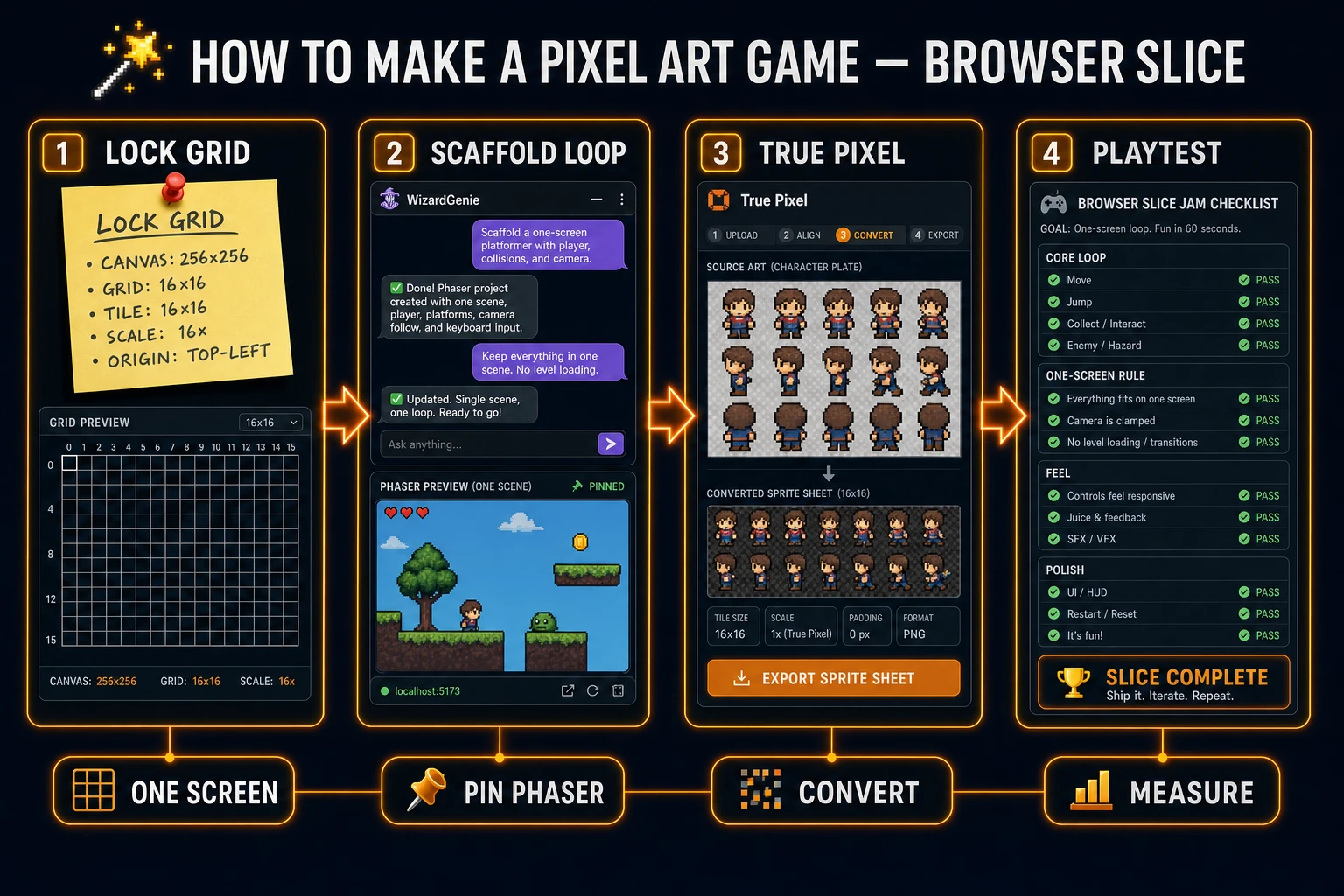
how to make a pixel art game pipeline from locked grid to WizardGenie scaffold to True Pixel playtest
Lock grid, scaffold the loop, convert sheets, playtest. One measured browser slice beats a folder of unused pixel art.

What how to make a pixel art game must define

DataForSEO lists how to make a pixel art game at 110 monthly searches with KD 0 in research-supplement.md, verified July 26, 2026. Sibling phrases like how to make pixel art games (110/mo) and how to make pixel art for games share the same job: ship a game that reads as pixels at play scale. A true answer to how to make a pixel art game finishes only when a stranger can move, collide, fail, and restart in under a minute.

Write four lines in a text file named pixel_jam_brief_v1.txt before you open any tool:

  1. One screen — no scrolling world on pass one.
  2. Art grid — pick 16×16 or 32×32 tiles and do not mix them mid-session.
  3. Win or fail rule — reach a flag, collect three coins, or survive 30 seconds (pick one).
  4. Restart path — R key or a button that resets without a reload mystery.

That brief is the difference between how to make a pixel art game as a shipping workflow and a weekend spent polishing idle frames that never enter a scene. For pure pixel conversion without a playable loop, see Map How to Make Pixel Art (Browser Canvas). This article stays on the game path.

Decide what is out of scope. Trailer cinematics, full RPG inventories, and procedural dungeons belong in later passes. Day-one work proves one camera, one grid, and one feel.

Lock one screen and one art grid

Pixel games die when camera scale and sprite scale disagree. If your tiles are 16×16 but your character sheet was converted at an inconsistent downscale, every jump looks soft or chunky. Lock the contract first:

  • Design resolution — for example 320×180 or 480×270 logical pixels, scaled up with nearest-neighbor.
  • Tile size — 16 or 32, written in the brief and repeated in every prompt.
  • Character footprint — one tile wide, two tiles tall is a classic jam default; change it only once.
  • Palette budget — 8–16 colors for the whole slice so sheets do not fight each other.

Nearest-neighbor scaling matters because the Canvas API will happily bilinear-filter your art into mush if you let the browser “help.” MDN’s Canvas API docs are the baseline for how 2D drawing surfaces behave; your game code must force crisp pixels when you stretch the backbuffer.

Name files with intent: hero_32_idle_v1.png, not final_sprite.png. The next True Pixel batch will thank you when stems need to match.
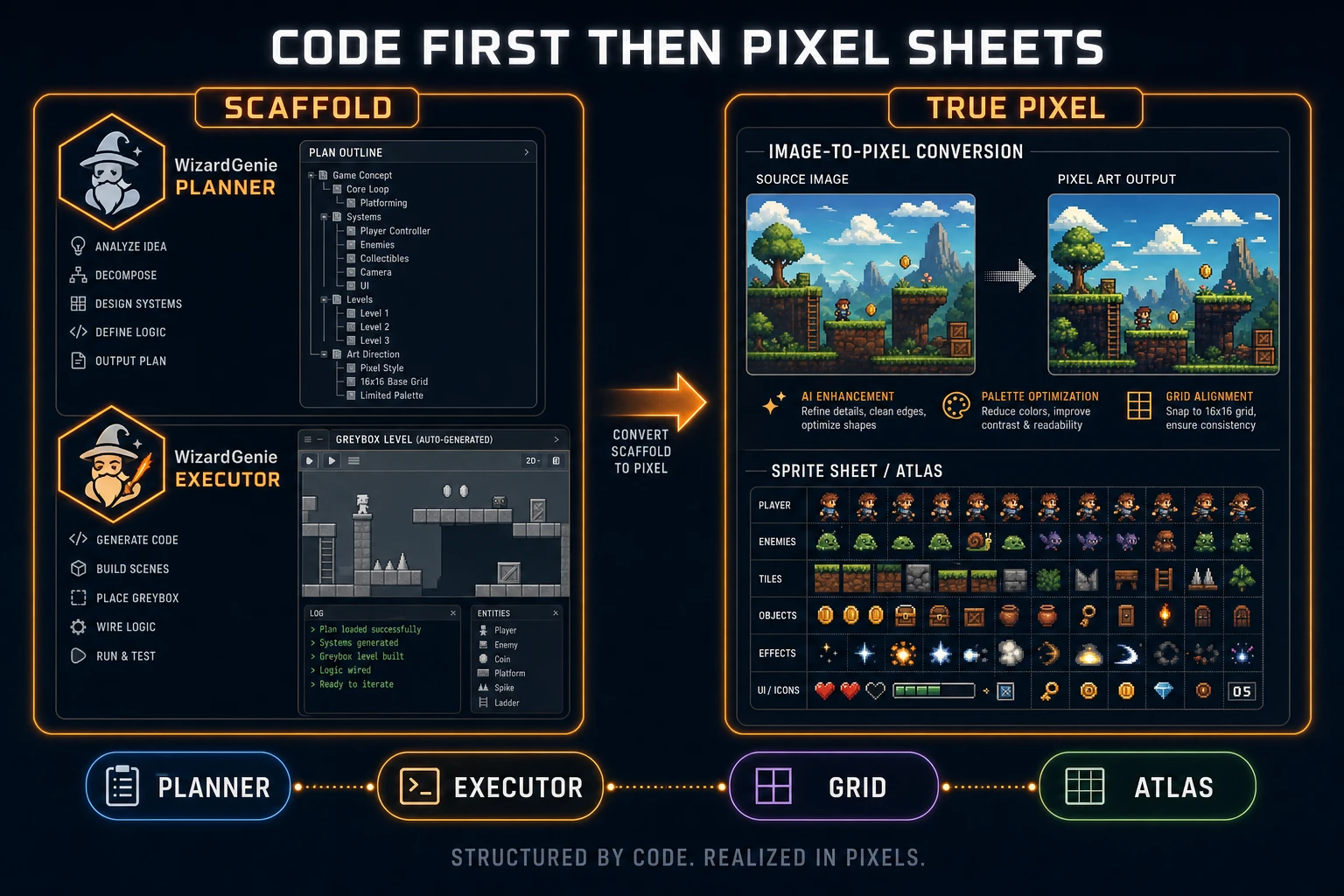
WizardGenie scaffold then True Pixel sheets for how to make a pixel art game
Code first, sheets second. Rectangles prove feel; True Pixel replaces them after the loop passes.

Scaffold the loop in WizardGenie

Open WizardGenie and treat it as the AI-native game engine for the slice. Paste the brief and ask for a one-screen Phaser prototype with rectangle stand-ins. Pin the engine version in the prompt: Phaser v4.2.1 Giedi (released July 9, 2026; live-checked on the GitHub release notes July 26, 2026). Naming the version stops the agent from mixing API assumptions across sessions.

Sorceress CODING_MODELS verified July 26, 2026 in src/app/_home-v2/_data/tools.ts include Claude Opus 4.7, Claude Sonnet 4.6, GPT-5.5, Gemini 3.1 Pro, DeepSeek V4 Pro, Kimi K2.5, Grok 4.2, and MiniMax M2.7. For jam budget discipline:

  • Planner — frontier model for architecture and the first scaffold.
  • Executor — DeepSeek V4 Pro, Kimi K2.5, or MiniMax M2.7 for gravity tweaks, coyote time, and UI nits.

Never put a frontier model on every one-pixel collision edit. That is how “how to make a pixel art game” sessions burn money before a single sprite ships.

Demand these deliverables from the first agent pass:

  1. Player move left/right and jump with keyboard input.
  2. Solid platforms and a death plane or hazard.
  3. Score or flag trigger that ends the run.
  4. Restart that restores start position and counters.

If the agent invents a second scene or a dialogue system, reject it. Sacred constants live in one file: tile size, gravity, jump velocity, design resolution. Mark them sacred in the prompt so later sprite swaps do not rewrite feel.
Convert plates in True Pixel

Only after rectangles feel honest do you open True Pixel. True Pixel converts an image or video into pixel-art frames and sprite sheets with chroma keying, clean outlines, edge cleanup, and batch processing (verified against the Sorceress tools catalog card in src/app/_home-v2/_data/tools.ts on July 26, 2026). Path: /pixel-art.

Workflow that respects how to make a pixel art game budgets:

  1. Generate or shoot a clean plate (front view, plain backdrop) in AI Image Gen if you lack art.
  2. Import into True Pixel and lock the target pixel grid to the same size as your jam brief.
  3. Enable chroma key or background cleanup so matte fringe does not become fake pixels.
  4. Export a sprite sheet (or frame sequence) with consistent frame size.

If you need a walk cycle from a text prompt instead of converting a plate, use Quick Sprites for animated pixel sheets, then keep True Pixel for photo or concept cleanup. Do not run both on the same hero in the same hour unless you are A/B testing silhouettes.

Reject sheets that violate the footprint. A “cool” 64×64 hero in a 16×16 tile world is not a win; it is a camera rewrite.

Swap rectangles for sprite sheets

Back in WizardGenie, ask the executor to replace the player rectangle with your sheet. Keep the physics body size matching the footprint you locked earlier. Visual offsets (draw the sprite a few pixels up so feet sit on the ground) are fine; changing collision mid-swap is not.

Checklist for a clean swap:

  • Frame size matches — loader and animation config use the exported frame width/height.
  • Origin / anchor — feet on the ground; no floating or sunk sprites.
  • Idle vs run — only add a second animation after idle reads at play scale.
  • Enemy / coin placeholders — swap one prop at a time so you can blame the right sheet when something breaks.

If the loop felt good with rectangles and feels worse with art, the art is wrong or the body size drifted. Fix the sheet or the body; do not “tune gravity” to hide a bad footprint. That habit turns how to make a pixel art game into an endless feel chase.

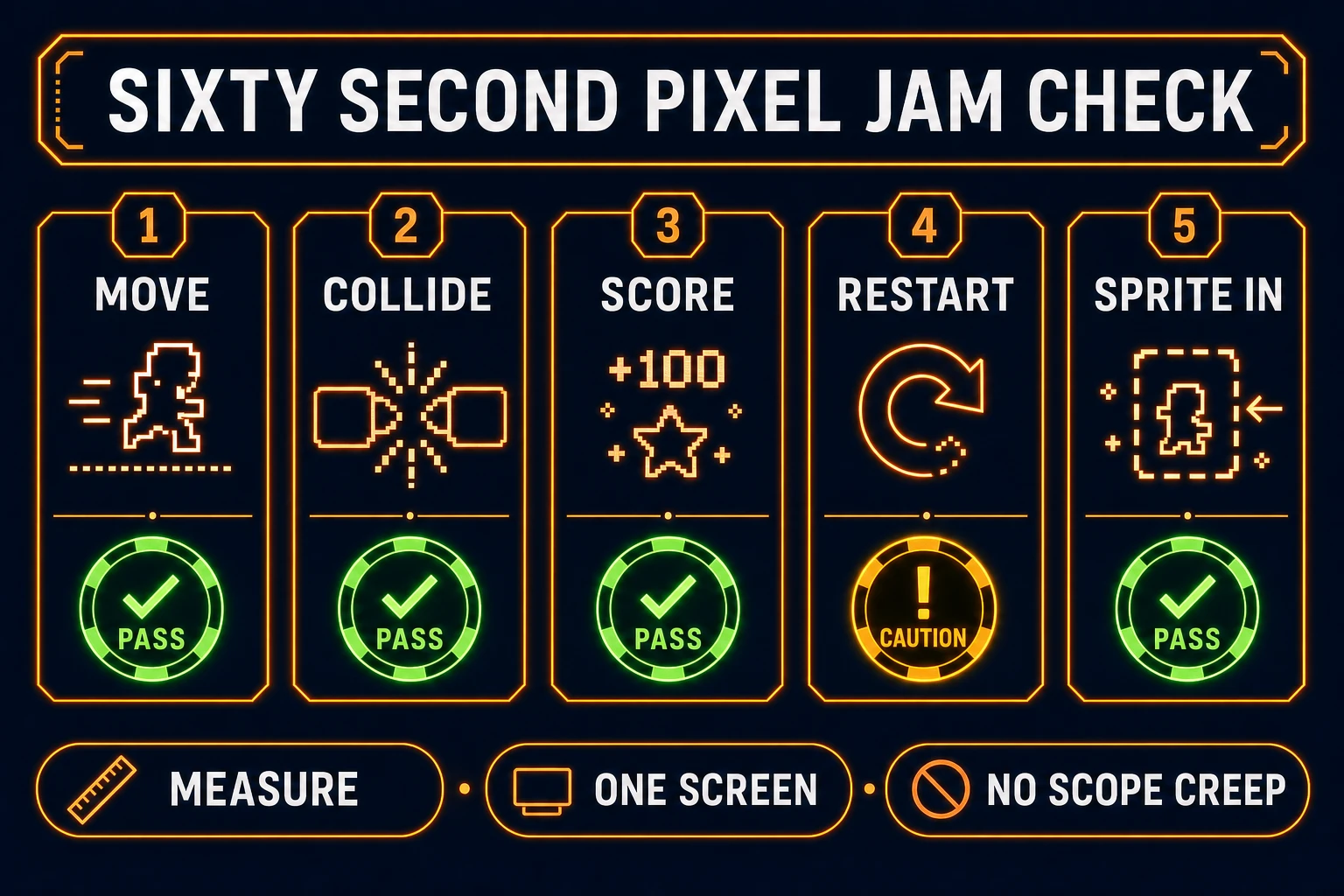
Sixty second jam checklist for how to make a pixel art game playtest
Move, collide, score, restart, sprite-in. Five checks beat ten new features.

Add hit feedback without muddy audio

Pixel games sell impact with tiny cues. After sprites are in, add one jump sound and one land or hit sound from SFX Gen. Keep music optional on pass one; a bed from Music Gen can wait until the checklist passes.

Rules that keep audio from lying:

  • One-shot SFX under 0.5s for jump and coin.
  • No overlapping five jump samples when the player bunny-hops.
  • Music volume ducked under SFX if you add a bed later.

Audio is confirmation, not content. If the slice fails without sound, art and code are not done.

Measure a 60-second playtest

Hand the build to someone who did not write the brief — or force yourself through a cold run. Time 60 seconds and score the checklist:

  1. Move — horizontal control feels intentional within three seconds.
  2. Collide — floors and hazards behave; no tunneling surprises every jump.
  3. Score or goal — the win rule is obvious without a tutorial paragraph.
  4. Restart — failure is cheap and instant.
  5. Sprite-in — pixels read at the scaled resolution; no blurry filter accidents.

Pass all five and you have completed the core of how to make a pixel art game for a jam. Fail any one and fix that item only. Do not unlock inventory screens, dialogue trees, or a second biome.

When you are ready to publish a browser build, browse the stack on the Tools Guide and keep WizardGenie as the loop owner. Pixel art without a restart button is still a mood board.

Common traps for how to make a pixel art game

These patterns burn weekends:

  • Art-first — fifty idle frames, zero gravity code.
  • Grid drift — mixing 16 and 32 mid-project without rewriting the camera.
  • Filter blur — forgetting nearest-neighbor when scaling the canvas.
  • Frontier executor — spending Opus on every coyote-time nudge.
  • Scope creep — “just one more enemy type” before restart works.

Write the trap you are most likely to hit at the bottom of pixel_jam_brief_v1.txt. Read it before every regenerate.

The workflow at a glance

  1. Write the four-line brief (screen, grid, win rule, restart).
  2. Scaffold rectangles in WizardGenie on Phaser v4.2.1.
  3. Convert plates in True Pixel (or prompt sheets in Quick Sprites).
  4. Swap one actor at a time; keep sacred physics constants.
  5. Add two SFX max; playtest 60 seconds; ship or cut.

That is how to make a pixel art game without drowning in assets. The browser slice is the product; the sheets are the costume.

Frequently Asked Questions

What does how to make a pixel art game actually require on day one?

One playable screen with a locked camera, a fixed pixel grid (for example 16×16 or 32×32 tiles), a win or fail rule, and a restart path. Art polish comes after the loop feels honest. WizardGenie scaffolds the code; True Pixel converts plates into sheets you can drop in.

Which Phaser version should I pin when learning how to make a pixel art game in the browser?

Phaser v4.2.1 Giedi (released July 9, 2026) was the stable release checked on the GitHub release notes on July 26, 2026. Name that version in your scaffold prompt so physics and scale APIs do not drift between agent sessions.

Should I draw sprites by hand before I learn how to make a pixel art game?

No. Start with colored rectangles in WizardGenie so movement and collision ship first. Convert concept plates in True Pixel (or generate animated sheets in Quick Sprites) only after the loop passes a 60-second playtest. Hand-pixel perfection is a later pass, not a blocker.

Which coding models should I use inside WizardGenie for a jam budget?

Verified against Sorceress CODING_MODELS on July 26, 2026: keep frontier planners such as Claude Opus 4.7, GPT-5.5, Gemini 3.1 Pro, or Grok 4.2 on planning. Put DeepSeek V4 Pro, Kimi K2.5, or MiniMax M2.7 on the executor so gravity tweaks stay cheap.

How is True Pixel different from Quick Sprites for pixel game art?

True Pixel converts an existing image or video into pixel-art frames and sprite sheets with chroma keying and edge cleanup. Quick Sprites generates animated pixel sheets from prompts. Use True Pixel when you already have plates; use Quick Sprites when you need a walk cycle from a text prompt.

Sources

  1. Phaser v4.2.1 release notes — GitHub
  2. Download Phaser stable — Phaser
  3. Canvas API — MDN Web Docs
  4. Games — MDN Web Docs
  5. Pixel art — Wikipedia
Written by Arron R.·1,536 words·7 min read

Related posts