What’s the Best AI for Game Development? (2026 Test)

By Arron R.11 min read
What’s the best AI for game development in 2026? Not one model — a kit. You need eight coding models, seven image models, six image-to-3D backends, and an audio

Ask Google “what’s the best AI for game development?” and you get back fifty roundups, most of which are graveyards of dead links to general-purpose chatbots that have never actually shipped a game. The honest answer in 2026 is not a single model. It is a kit — a coding rail that can hold a project in context, an image generator that stays on-model across frames, an image-to-3D pipeline that exports glTF, and an audio stack that hands you a looping background track. Those four jobs do not live in one chat window. They live in four different file formats, and the trick is wiring them so a sprite from the art tool actually lands inside the engine the code tool just wrote. This piece runs the honest test across all four, then explains the stack that handles them under a single browser tab.
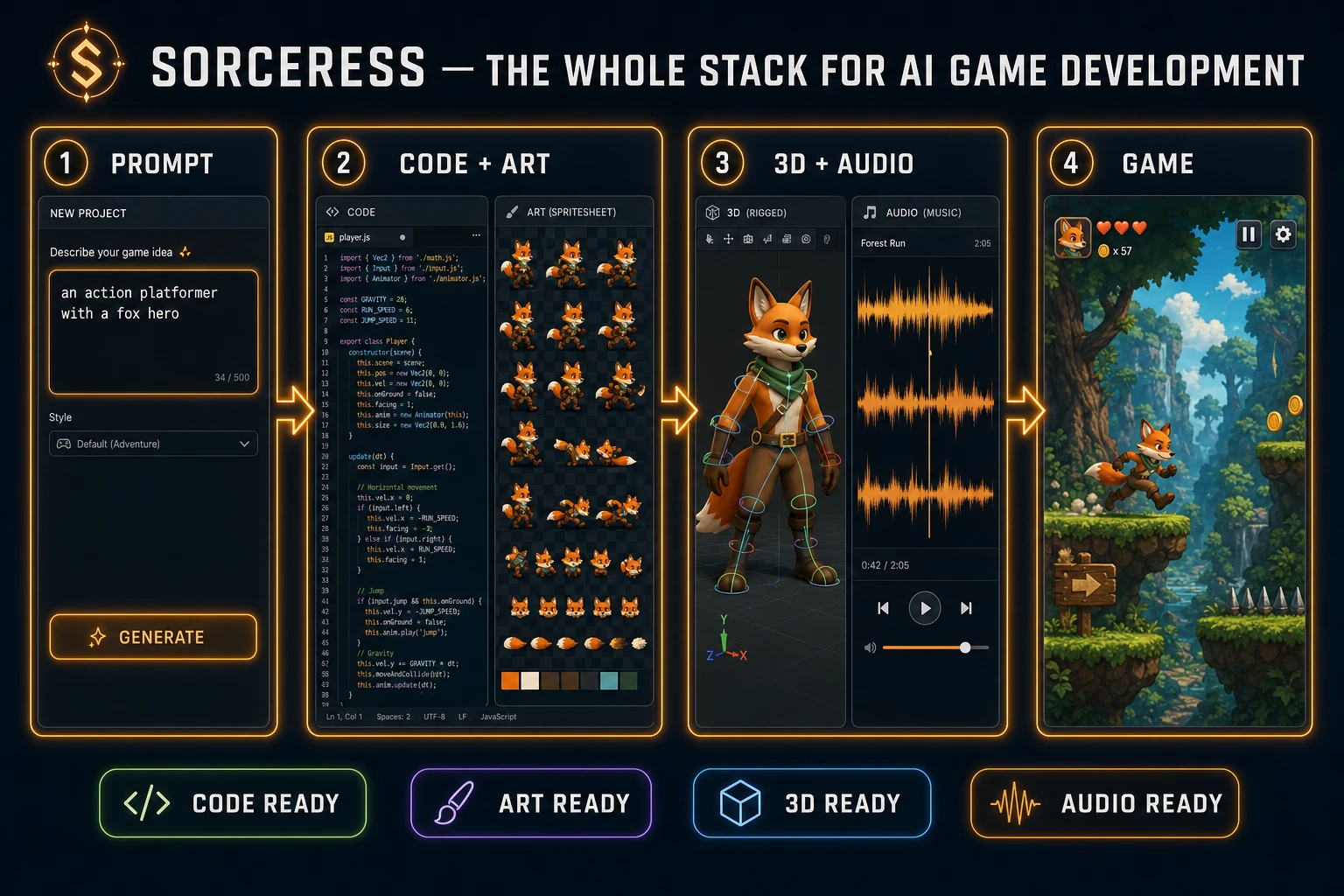
Sorceress stack diagram for AI game development: prompt to code, art, 3D, and audio in a four-step pipeline.
The honest answer to “best AI for game development” in 2026 is a stack: code + art + 3D + audio behind one browser tab.

What “AI for game development” actually covers

Before ranking anything, define the work. A finished video game — even a small one — is at minimum the sum of four production tracks running in parallel:

  • Code. The engine logic, input handling, scene management, save system, and the integration shims that wire assets into the runtime. JavaScript and TypeScript for browser games, GDScript or C# for desktop, Lua for Roblox-style platforms.
  • 2D art. Character sprites with transparent backgrounds, walk cycles, attack frames, UI icons, level tiles, background plates, particle textures.
  • 3D art. If the game is 3D: meshes with clean topology, baked textures, optional PBR maps, a rigged skeletal armature, and an export in glTF 2.0 so any engine can read it.
  • Audio. Music loops (intro, gameplay, boss, victory), one-shot sound effects (jump, hit, pickup), and ambient layers. For story games, voice lines. Some level systems also pull in procedural generation for layouts that change run-to-run.

Any honest scoring of the “best AI for game development” has to score all four. A chatbot that writes good code but cannot hand you a sprite sheet has solved one quarter of the problem. An image model that produces gorgeous concept art but no walk cycle has solved less. The score that matters is how much of the four-track production a tool actually removes from your calendar — not whether the demo on the landing page looks polished.

The honest test for the best AI for game development

To compare tools fairly, run them against the same brief. Ours is the worked example used through the rest of this article: “a side-scrolling action platformer with a fox hero, a forest level, and a single boss fight.” A small but real game. Three weekends of work for a solo dev with the right stack.

The test asks five questions of every candidate for the best AI for game development:

  1. Can it write the engine code? Not just snippets — the full Phaser or Kaplay scene with input handling, collisions, scene transitions, and a working game loop. Project-aware, not file-aware.
  2. Can it generate a character that stays on-model across frames? The fox needs to look like the same fox in the walk cycle, the jump, the attack, and the idle. Reference-image consistency is the bar; one-off concept art is not enough.
  3. Can it produce a sprite sheet the engine can actually load? A grid of frames at a power-of-two resolution with a known cell size, transparent background, no anti-alias bleed on the edges.
  4. Can it generate a 3D mesh that opens cleanly in a 3D viewer? If the game scales up, can the same tool hand you a glTF of the boss with clean topology and a usable rig?
  5. Can it produce music and SFX in the right format? An MP3 that loops seamlessly, a hit sound under 200 ms, a level track that does not clash with the gameplay tempo.

Most “best AI for game development” lists answer one question and hand-wave the other four. The Sorceress stack answers all five because each of its tools is built to feed the next, and the code rail (WizardGenie) is designed to consume the assets the other rails produce. Below is what that looks like in practice.

The Sorceress stack at a glance

Sorceress is a browser-first kit. Open a tab at sorceress.games, sign in, and you have a coding assistant, an image generator, an image-to-3D rail, a sprite-sheet animator, a music generator, a sound effects studio, an auto-rigger, a texture forge, a tileset generator, a voice generator, and a background remover — all sharing the same credit balance and the same export targets. New accounts get 100 starter credits free; top-ups are pay-as-you-go ($10 / 1,000 credits, $20 / 2,000, $50 / 5,000, $100 / 10,000) and never expire. Lifetime Access is $49 once.

That bundling is the point. The reason “best AI for game development” is a stack instead of a chatbot is that the assets have to talk to each other — the sprite from the art tool needs to load into the scene the code tool wrote, the 3D mesh needs to open in the engine the code tool exports for, the music has to match the level the level-tool generated. When the tools live in five different browser tabs from five different vendors, you spend more time copy-pasting URLs than building the game.
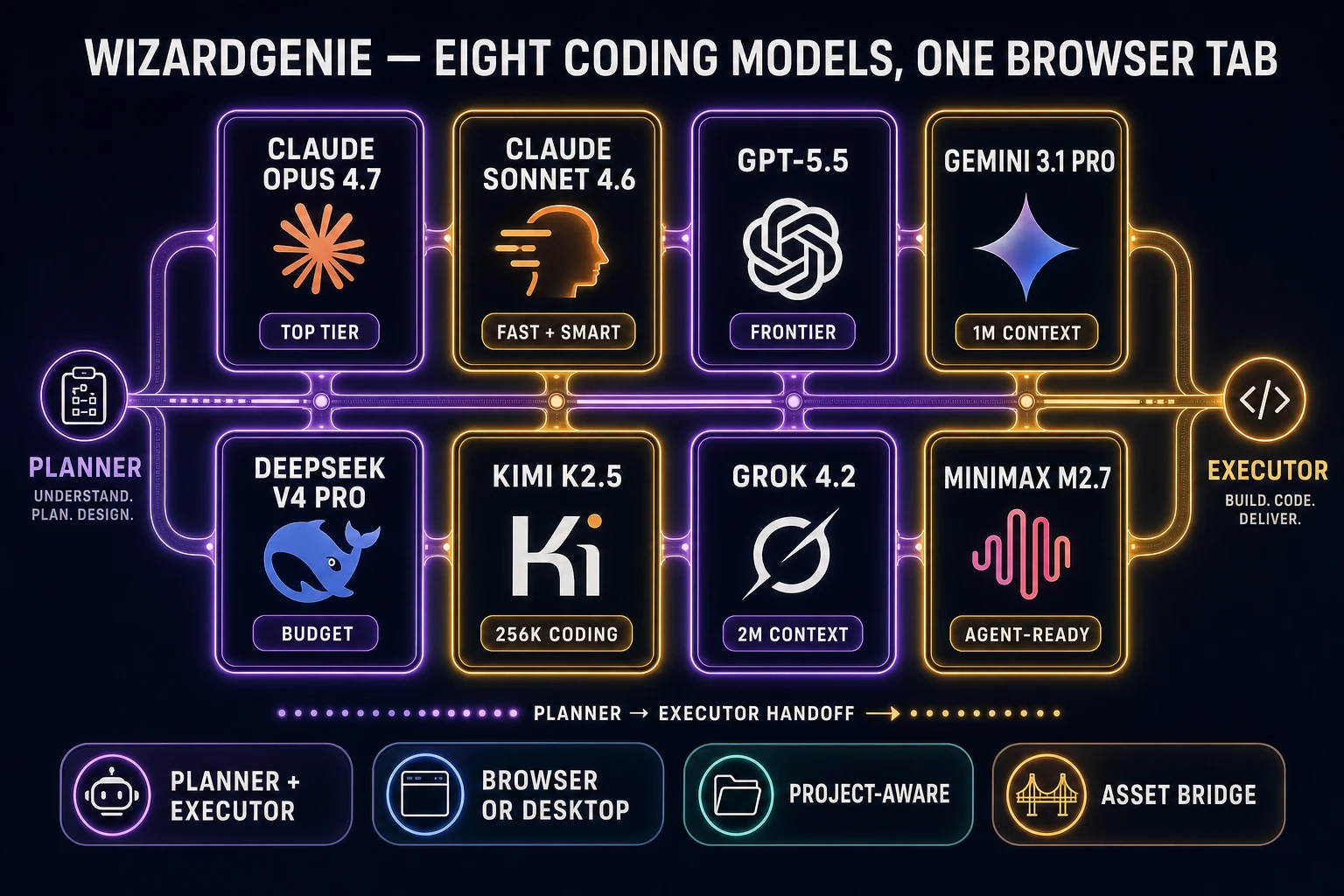
WizardGenie coding model rail: eight coding models including Claude Opus 4.7, Claude Sonnet 4.6, GPT-5.5, Gemini 3.1 Pro, DeepSeek V4 Pro, Kimi K2.5, Grok 4.2, MiniMax M2.7.
WizardGenie exposes eight coding models, each routed by Sorceress credits. Pair an expensive planner with a cheap executor for the right cost ratio.

Code: WizardGenie and the eight-model coding rail

The code rail in Sorceress is WizardGenie. It runs in a browser tab (no install) and also as a desktop app for longer sessions and native file access. Either way, it exposes eight coding models from one switcher:

  • Claude Opus 4.7 (top-tier reasoning, the planner of choice)
  • Claude Sonnet 4.6 (the fast-and-smart middle gear)
  • GPT-5.5 (frontier general-purpose)
  • Gemini 3.1 Pro (1M-token context, good for whole-repo refactors)
  • DeepSeek V4 Pro (the budget workhorse, ideal as the executor)
  • Kimi K2.5 (256K context, strong at long-coding tasks)
  • Grok 4.2 (2M context, the longest haul)
  • MiniMax M2.7 (agent-ready, good for autonomous loops)

The reason an eight-model rail matters is the planner-and-executor pattern. Reasoning is expensive; typing is cheap. You pair an expensive top-tier model (Opus 4.7, GPT-5.5, Gemini 3.1 Pro, Grok 4.2) as the planner that decides what to do, and a fast cheap model (DeepSeek V4 Pro, Kimi K2.5, MiniMax M2.7) as the executor that types the code. The cost ratio works out to roughly one-fifth of single-frontier cost without giving up quality on the decisions that matter. We covered the math in Claude Vibe Coding for Games and Use Claude Code for Vibe Coding — the short version is: never put a frontier-priced model on the typing side, the math is brutal.

Crucially, WizardGenie knows about the rest of the Sorceress stack. When you ask it to wire a sprite into a Phaser scene, it knows the sprite already exists in your asset library and references it by path. This is the “asset bridge” that no general-purpose coding agent has, because none of them ship with an art pipeline attached.
Art: AI Image Gen, Quick Sprites, and the visual pipeline

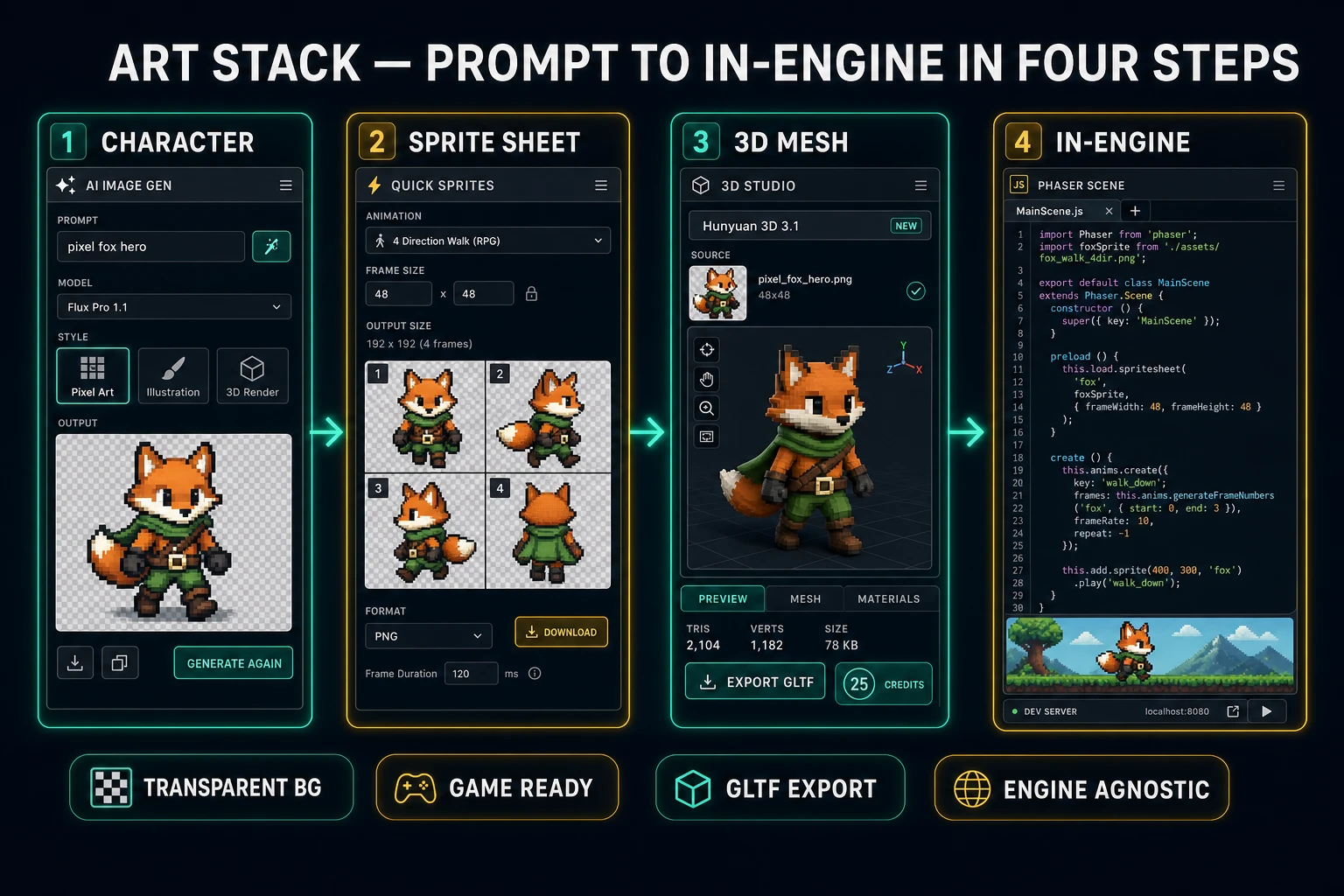
AI Image Gen is the still-image side. Seven models share one prompt box: Nano Banana Pro and Nano Banana 2 (Google’s fast, sharp generators), GPT Image 2 (the model that does in-image text reliably), Seedream 5 Lite (uncensored), Flux 2 Pro (the photoreal pro tier), Z-Image Turbo (the speed tier), and Grok Imagine (the creative wildcard). Reference-image upload is supported on Nano Banana 2 and Flux 2 Pro, which is how you keep a character on-model across frames — generate the hero face-on, upload that as the reference, then generate the side and back views.

For walk cycles and frame sets, Quick Sprites takes a single character image and generates a multi-frame animation sheet. Default style is a four-direction walking cycle at 48×48 pixels per frame — the format the most common 2D platformer engines (Phaser, Kaplay, PixiJS) expect. Each generation costs 9 credits and uses Retro Diffusion’s rd-animation model, so the result looks like proper pixel art instead of an upscaled photo. For one-off VFX (explosions, hit flashes, pickups), the small_sprites and vfx styles cover 32×32 and 24–96px ranges respectively.

The Background Remover handles the cleanup pass — alpha-cut a generated character so the sprite has a transparent background ready to drop into the engine. That is the unglamorous step most “best AI” lists skip, but a sprite with a white background ruins your platformer the moment it touches a colored level. See Cut to the Canva AI Background Remover for a head-to-head against the vendor alternative.

3D: 3D Studio’s six image-to-3D models

If the game is 3D, 3D Studio is the rail. Six image-to-3D backends share one model picker:

  • Hunyuan 3D 3.1 (25 credits, recommended default — the best ratio of quality to cost for game characters in 2026)
  • TRELLIS (8 credits, the budget mesh)
  • TRELLIS 2 (35/40/45 credits at 512/1024/1536 internal resolution — the open-source frontier)
  • Tripo v3.1 (30 credits no-texture, 40 with HD texture, +5 for quad topology)
  • Meshy 6 (50 credits base, +25 for texture, +13 for remesh — the brand-name option)
  • Rodin 2.0 (50 credits, the alternative pro-tier with quad meshes and STL export)

All six output glTF, which any engine reads. Tripo and Meshy also output FBX, OBJ, USDZ, and STL. Rodin offers quad topology natively. The point of a six-model picker is that no single image-to-3D model wins on every input — Hunyuan is the recommended default because it lands the best results on game characters at the lowest credit cost, but for hard-edge mechanical assets or organic creatures the right pick differs. We ran the head-to-head in Rank the Best Image to 3D Model AI if you want the full benchmark.

For rigging, the Auto-Rigging tool takes an OBJ, FBX, or glTF mesh and runs marker-based skeleton construction with heat-diffusion auto-weights — the output is a rigged character ready for Mixamo-style animation or direct import into any engine that reads glTF skinned meshes. See Forge an Auto-Rig Pro Blender Workflow for the comparison against the paid Blender addon.

Sorceress art pipeline: character generation, sprite sheet animation, 3D mesh, and in-engine import in four steps.
The art stack runs character → sprite sheet → 3D mesh → in-engine in four browser steps, all sharing the same credit balance.

Audio: Music Gen, Sound Studio, and AI voice

The audio side has three tools. Music Gen produces looping background tracks — you prompt with genre, tempo, key, and the model returns a 30-second to 2-minute MP3 that seamlessly loops. The Sound Studio generates one-shot effects from text (“footstep on wood,” “sword swing,” “coin pickup”) and bundles them into a pack you can drop into your engine’s audio folder. AI voice handles NPC dialogue and narration when you need it — not every game does, and over-using AI voice in indie titles is a common tell, so use it for narration and accept menus before voicing every line. We covered the discipline in AI Voice for Games and the SFX side in Build a Full SFX Pack from Prompts.

Where every other “best AI” stops

The reason most “best AI for game development” lists collapse is that they list general-purpose tools and pretend the asset pipeline does not exist. A frontier chatbot is great at writing Phaser code, but it cannot hand you a sprite. An image generator can hand you concept art, but it cannot give you a walk cycle the engine can index by frame number. An image-to-3D vendor can produce a beautiful mesh, but you still have to upload it to a separate rigger, then a separate exporter, then a separate engine importer. Each handoff is a chance for the format to break.

The general-purpose coding agents (Cursor, Aider, Cline, Lovable, Replit, Bolt) win on the code rail but ship zero asset tools. The image generators (Midjourney, the Stable Diffusion forks, Flux on Replicate) win on a single hero shot but ship no sprite-sheet animator. The image-to-3D vendors (Meshy, Tripo, Rodin standalone) win on one mesh at a time and demand a separate rigger. The music vendors (Suno, Udio) sit in a fourth tab. By the time you have wired five tabs together, you have not built a game — you have built a context-switching habit.

The honest test for the best AI for game development is whether the assets land where the code expects them, with the format the engine expects, and without leaving the workflow. Sorceress is the only kit we know of that ships the full four-track production behind one credit balance and one browser tab. That is the differentiator — not any single model in any single rail.

How to start in five minutes

The shortest honest path from zero to a running game scene:

  1. Open sorceress.games and sign in. You get 100 starter credits free.
  2. In AI Image Gen, prompt your hero character. Pick Nano Banana 2 if you want a clean reference image you can iterate on.
  3. Pass that character into Quick Sprites for a four-direction walk cycle (9 credits). Save the sprite sheet.
  4. Open WizardGenie, pick a planner-and-executor pair (Opus 4.7 + DeepSeek V4 Pro is the default-strong combo), and ask it to scaffold a Phaser project that loads the sprite sheet into a basic platformer scene.
  5. Prompt Music Gen for a forest-level loop. Drop the MP3 into the project. Test in the browser.

That is one prompt per rail, total credit cost well under the 100-credit starter, and you have a running game loop with a custom character, walk cycle, music, and engine code — in a single browser session. From there it scales: add a 3D boss in 3D Studio, generate tiles in Tileset Forge, rig the boss in Auto-Rigging, and wire the new assets in through WizardGenie. Same balance, same tab. We walked the full pipeline end-to-end in How to Make a Video Game With AI and the engine-specific versions in How to Make a 2D Game in Godot, How to Make a 2D Game in Unity, and How to Make a 2D Game in Unreal Engine.

The verdict on the best AI for game development

The best AI for game development in 2026 is not a single model and never has been. It is a stack — a coding rail with eight model options, an image rail with seven, an image-to-3D rail with six, plus rigging, sprite-sheet animation, music, SFX, voice, and background removal — all sharing one balance and one browser tab. Anyone selling you a single chatbot as the answer is solving one quarter of the production. Anyone selling you five separate vendor tabs is selling you a context-switching habit. Sorceress is the kit that ships all four tracks under one roof, which is why it’s the answer to the question the article title asked. The 100-credit starter is free; the test takes ten minutes; the verdict is yours to run. Verified against the live Tools Guide and the Plans page on June 2, 2026.

Frequently Asked Questions

What is the best AI for game development in 2026?

There isn’t a single “best AI for game development” — the honest answer is a kit. You need a coding model that can hold a project’s state in context, an image model that stays on-model across multiple frames, an image-to-3D pipeline that exports glTF, and an audio stack that produces both music and one-shot SFX. Sorceress bundles all four into a single browser app: WizardGenie covers the code rail with eight models (Claude Opus 4.7, Claude Sonnet 4.6, GPT-5.5, Gemini 3.1 Pro, DeepSeek V4 Pro, Kimi K2.5, Grok 4.2, MiniMax M2.7), AI Image Gen plus Quick Sprites cover 2D art, 3D Studio covers six image-to-3D backends, and Music Gen plus Sound Studio cover the audio side.

Can one AI model handle a whole game by itself?

No. Even the strongest reasoning model on the market in 2026 cannot reliably output a sprite sheet, a rigged glTF, a Phaser scene, and a looping background track from a single prompt. The text-out window is too small, the modalities are different, and the file formats are different (PNG, glTF, MP3, JS). Anyone selling “one-model game dev” is hand-waving the asset pipeline. The honest pattern is a stack — one model per modality, all wired together so the assets land where the code can use them.

Is a browser AI stack really enough for game development?

For a 2D game, browser-first is enough today — the entire Sorceress kit runs in a tab, exports stand-alone HTML5 builds, and works with engines like Phaser, Kaplay, and PixiJS. For 3D, the browser exports glTF, FBX, and OBJ, which any desktop engine can import. The browser is not the limit; the export format is. As long as the AI can hand you a glTF that opens cleanly in Blender, your engine choice stays yours.

What about Unity, Unreal, and other desktop engines?

They’re still the right tool when you need shaders, console builds, or networked multiplayer at scale. But the AI side of the workflow — the part this article is about — sits upstream of the engine. You generate a character in the browser, export the glTF, then drop it into whichever engine you ship in. The browser stack and the desktop engine are complementary, not in competition. Treat AI as the asset and prototype layer, not the engine.

How much does an AI-for-game-development stack cost in 2026?

Sorceress is credit-based with no monthly subscription required. New accounts get 100 starter credits free at sign-up. Top-ups are pay-as-you-go: $10 for 1,000 credits, $20 for 2,000, $50 for 5,000, $100 for 10,000, none of which expire. Lifetime Access is $49 one-time. A typical Quick Sprites generation is 9 credits, an image-to-3D model with Hunyuan 3D 3.1 is 25 credits, and a Meshy 6 mesh with texture is 75 credits. That puts a small game’s art budget well under the cost of a single month on most AI subscriptions.

Is AI for game development just hype, or does it actually ship games?

It ships games. The friction in indie game dev has always been the asset bottleneck — art takes about 70% of the calendar on most solo projects — and AI removes that bottleneck without removing your taste. You still pick the character, the music key, the platforming feel, the level layout. The AI does the typing and the rendering. The judgement stays with you. The recipe in 2026 is consistent: prompt a character, sprite-sheet it, 3D-rig it if it’s 3D, generate the music, write the engine code in WizardGenie, ship the build.

Why is the “best AI for game development” a stack instead of a chatbot?

Because game development is not a single text-generation task. It’s an art pipeline, a 3D pipeline, an audio pipeline, and a code pipeline running in parallel, with file formats and tolerances that a general-purpose chatbot does not understand. A character sprite needs a transparent background. A 3D mesh needs clean topology and a single rigged armature. A music loop needs to seamlessly repeat. A Phaser scene needs to import the sprite without breaking the frame index. Stacks beat chatbots because each tool in the stack respects the format the next tool expects. That’s the whole game.

Sources

  1. Video game development — Wikipedia
  2. Generative artificial intelligence — Wikipedia
  3. Sprite (computer graphics) — Wikipedia
  4. Skeletal animation — Wikipedia
  5. Texture atlas — Wikipedia
  6. Procedural generation — Wikipedia
  7. glTF 2.0 specification — Khronos Group
Written by Arron R.·2,520 words·11 min read

Related posts