Tune the Best AI for Unity (Asset + Code Stack 2026)

By Arron R.14 min read
The best AI for Unity in 2026 is a stack, not a single model. WizardGenie ships eight frontier coding models for C# scripting; Sorceress 3D Studio, Quick Sprite

Type best AI for Unity into Google in 2026 and the first page is a leaderboard of coding agents arguing about which one writes the cleanest C#. Coding is real but it is half the question. An indie dev shipping a Unity game in 2026 also needs concept art for the hero, a sprite sheet for the enemies, a rigged 3D character with animations, a soundtrack, a sound-effect pack, and an NPC voice cast — and every one of those assets has to land inside the Unity project without a middleware step. The honest answer to best AI for Unity in 2026 is a stack, not a single model. This piece walks the stack tab by tab against the live Sorceress source verified June 13, 2026 in src/app/_home-v2/_data/tools.ts.
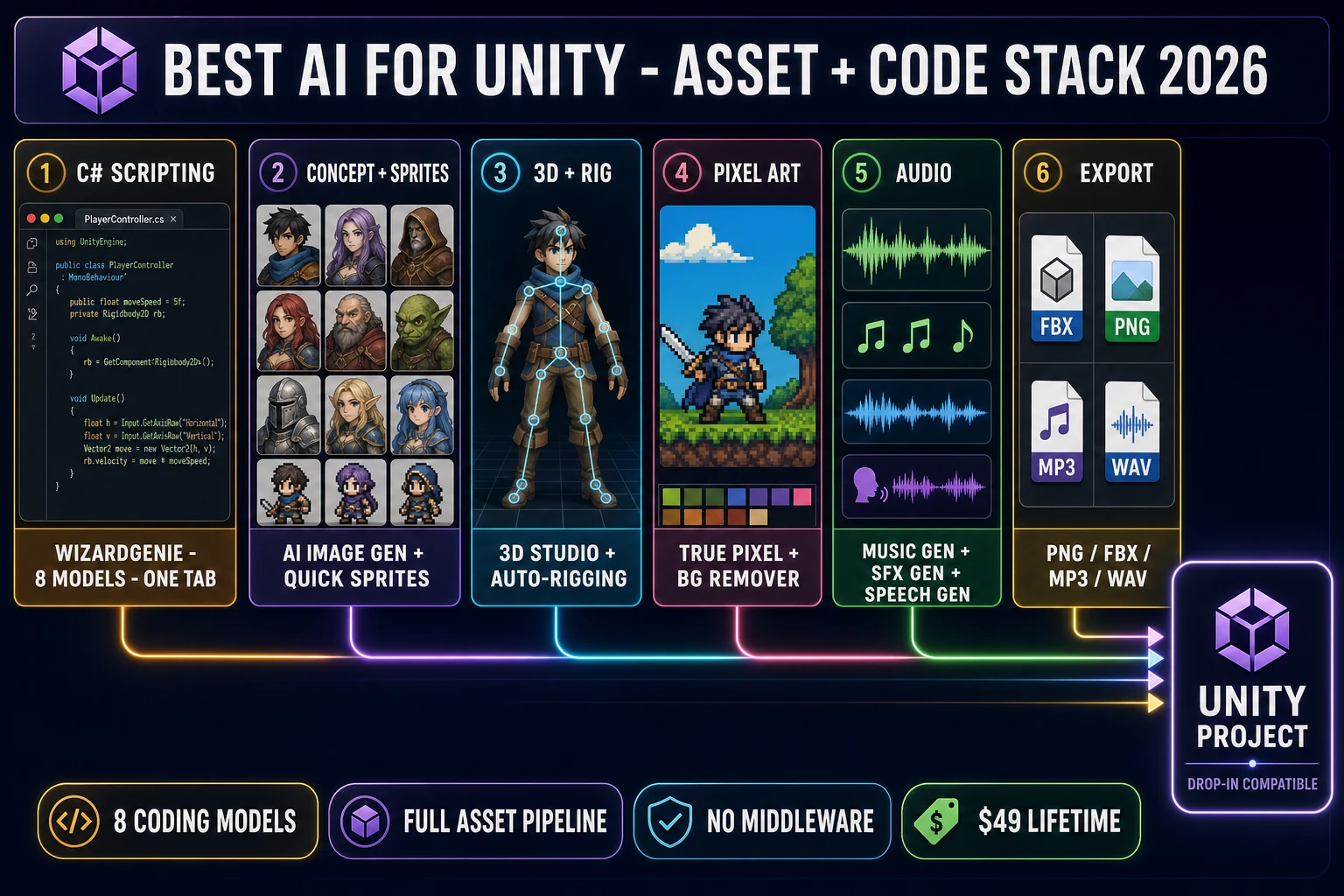
Best AI for Unity asset and code stack 2026 pipeline diagram - six numbered tool panels (WizardGenie for C# scripting, AI Image Gen plus Quick Sprites for sprites, 3D Studio plus Auto-Rigging for 3D characters, True Pixel plus BG Remover for pixel art, Music Gen plus SFX Gen plus Speech Gen for audio, file export panel) feeding into a central Unity project chip with drop-in compatibility for PNG FBX MP3 WAV formats
The best AI for Unity in 2026 is a six-panel stack feeding one Unity project: WizardGenie for C#, AI Image Gen and Quick Sprites for 2D, 3D Studio and Auto-Rigging for 3D, True Pixel for pixel art, Music Gen and SFX Gen and Speech Gen for audio, all exporting native PNG, FBX, MP3, and WAV. Verified June 13, 2026.

What “best AI for Unity” really means for an indie game dev in 2026

The phrase best AI for Unity compresses several distinct questions into one search query. An indie dev typing it into Google may be asking about a Unity-aware coding agent, a sprite generator that exports to the Unity Sprite Editor, an image-to-3D tool that drops an FBX into the Unity Assets folder, an AI audio tool that produces a clip Unity’s AudioSource can play, or all of the above. The leaderboards that dominate the first page of results only answer the first slice. The honest indie-dev answer covers all five.

The right framing for 2026 is that a Unity project is two halves. The first half is C# scripting — C# classes that derive from MonoBehaviour, ScriptableObjects, coroutines, Cinemachine cameras, the input system, and the rest of Unity’s scripting surface. The second half is asset production — sprites, 3D meshes, rigs, animations, music, sound effects, and voiceover. AI now ships both halves to a quality that an indie dev can actually use, but the right model and the right tool are different for each half. The rest of this piece is the mapping.

The sister post at Compare the Best AI for Unity Coding (Honest 2026 Pick) from May 27 is the coding-half deep dive. This piece is the full Unity stack — code plus the full asset pipeline — verified against the Sorceress source on June 13, 2026.

The two halves of a Unity project AI has to handle (code + assets)

Before picking specific tools, it pays to draw the line cleanly between the two halves an indie Unity dev hits across a single project. Every Unity scene is the same shape: GameObjects in the scene hierarchy, components attached to those GameObjects, and assets in the Project window that the components reference. AI shows up in three distinct places against that shape.

The first place is the C# code attached to the components. This is where a coding agent earns its keep — writing the PlayerController that reads input and moves the rigidbody, the EnemyAI that runs the state machine, the SaveSystem that serializes to JSON, the editor tooling that automates a tedious manual workflow. WizardGenie’s eight-model coding picker is the Sorceress answer for this half.

The second place is the visual assets that GameObjects reference — the sprite the SpriteRenderer points at, the mesh the MeshFilter points at, the texture the Material points at, the AnimationClip the Animator points at. AI Image Gen, Quick Sprites, True Pixel, 3D Studio, and Auto-Rigging cover this half end-to-end and export the formats Unity reads natively.

The third place is the audio assets that AudioSources play. Music Gen, SFX Gen, and Speech Gen cover the soundtrack, the SFX pack, and the NPC voice cast respectively, and all three export MP3 and WAV that Unity imports as AudioClip with no conversion step.

The next four sections walk each half against the matching Sorceress tools and the matching AI coding model.

Best AI for Unity code — the 8 frontier coding models in WizardGenie

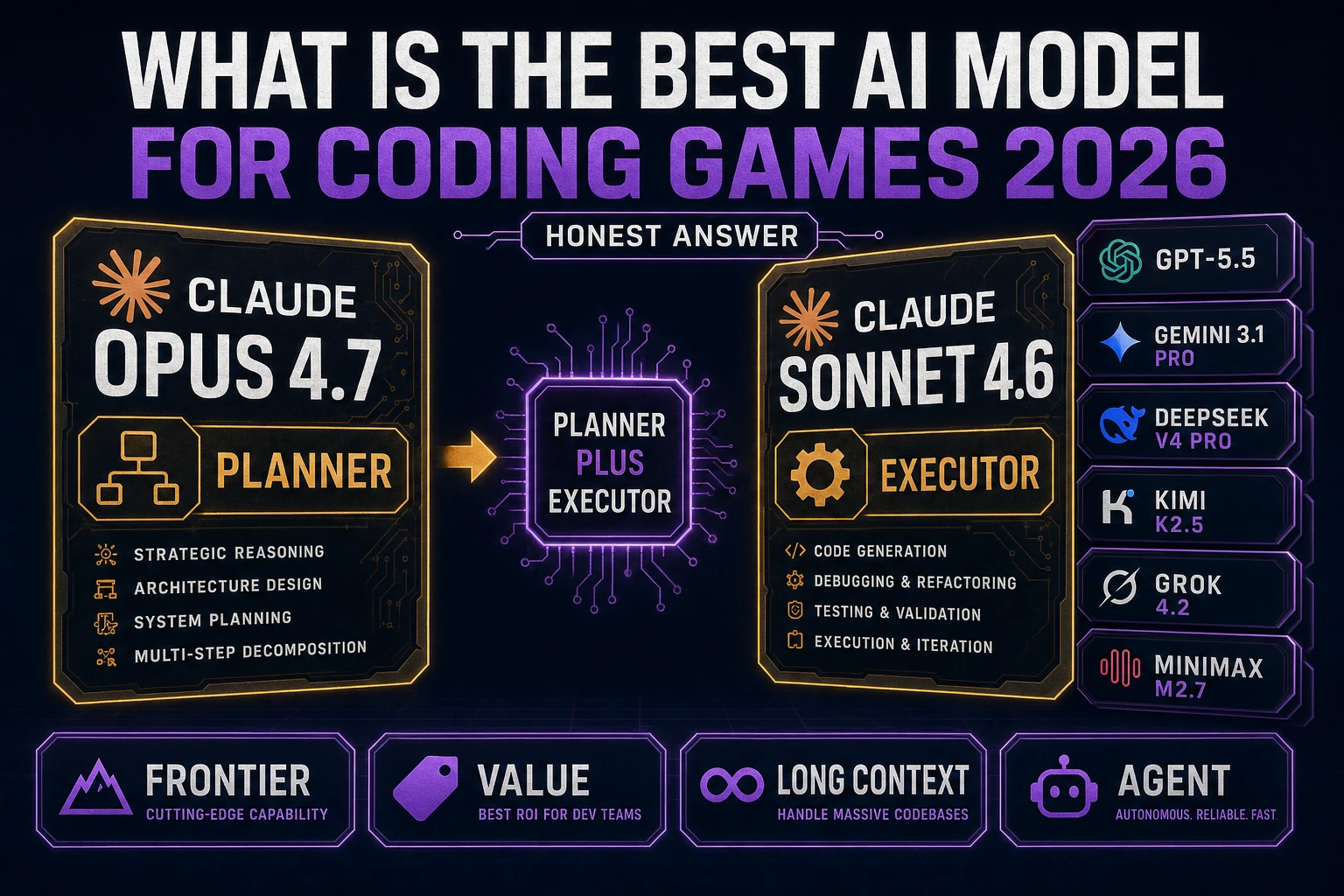
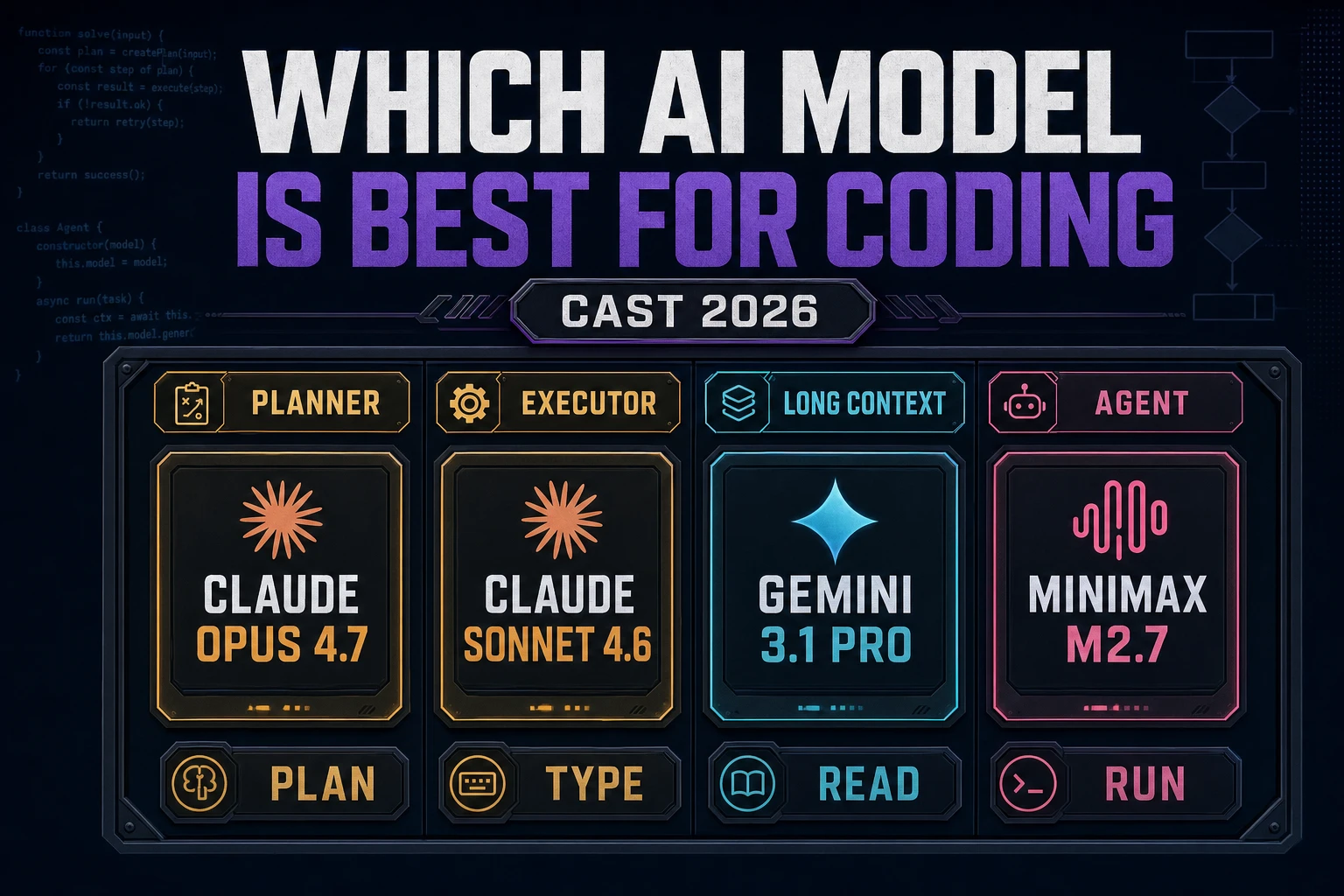
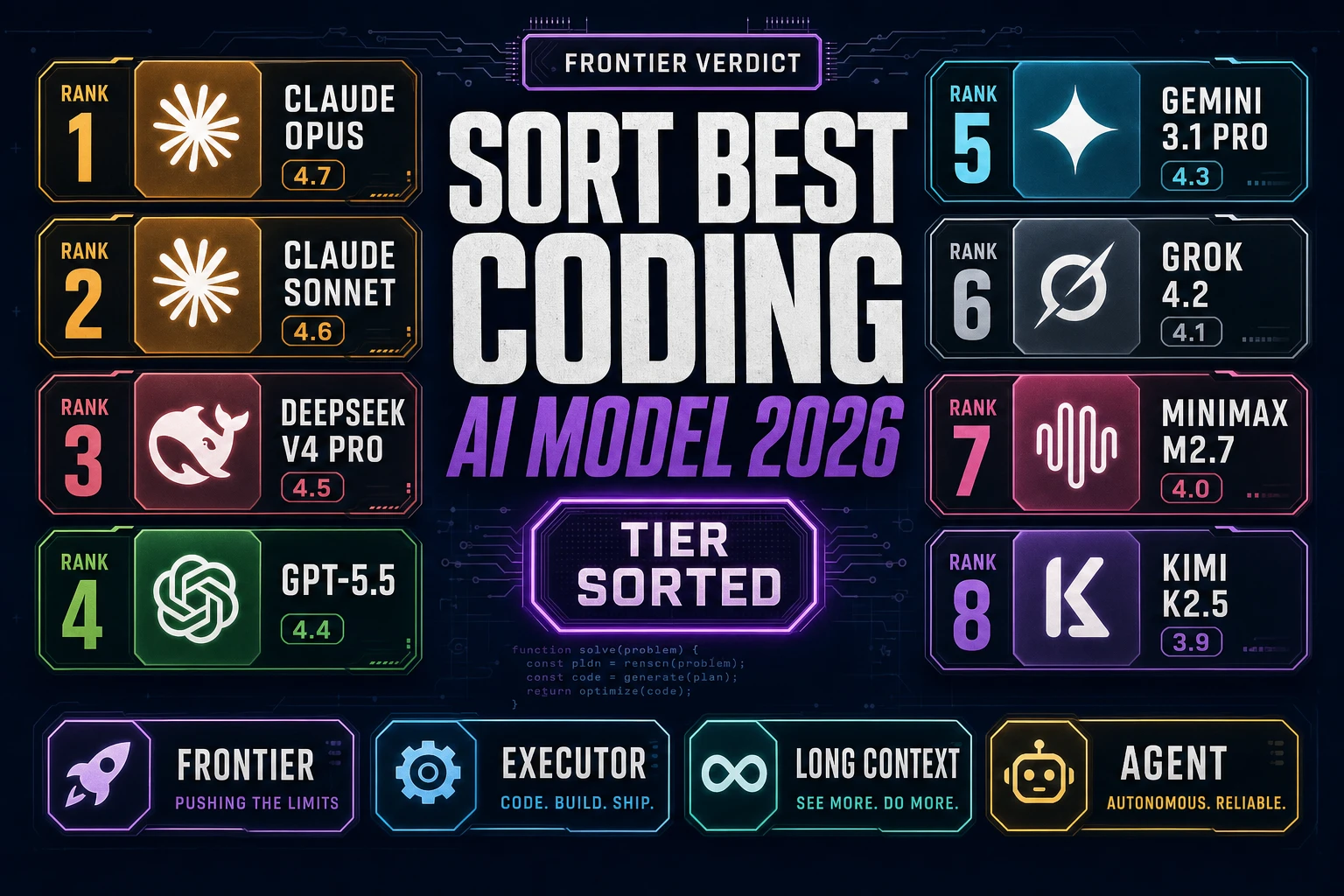
The single most useful thing an indie Unity dev can know in 2026 is that there is no one best AI for Unity coding model — there are eight, and the right pick depends on the task. Verified June 13, 2026 against the CODING_MODELS array in src/app/_home-v2/_data/tools.ts, the WizardGenie coding picker ships eight frontier models reachable from the same tab:

  • Claude Opus 4.7 (Anthropic, tag Top tier) — the heavy reasoner. The right pick for one-shot Unity scaffolds: “build a 2D platformer in Unity with a CharacterController2D, a Cinemachine follow camera, and a tilemap collider”. The failure mode of a smaller model on this kind of task is hallucinating a wrong architecture that compiles but does not run; Opus 4.7 is the cheapest insurance against that hour of debugging.
  • Claude Sonnet 4.6 (Anthropic, tag Fast + smart) — the everyday-flow pick for Unity C#. C# is well-represented in Anthropic’s training data; Sonnet 4.6 ships working MonoBehaviour and ScriptableObject patterns on the first try in most cases. The default model to leave selected for the long tail of small Unity edits.
  • GPT-5.5 (OpenAI, tag Frontier) — the cross-check voice. Useful when the Anthropic family hand-waves over a Unity-specific gotcha like coroutines versus async/await, the input-system action map binding format, or the rules for Cinemachine virtual cameras.
  • Gemini 3.1 Pro (Google, tag 1M context) — the whole-repo model. Drop the entire Assets/Scripts folder into context and ask “where does my save system break” across every script at once. Most indie Unity projects fit inside the 1M window with room to spare.
  • DeepSeek V4 Pro (DeepSeek, tag Budget) — the cheap executor in a Planner+Executor loop. Per-token cost roughly an order of magnitude under the frontier; agentic-loop quality on Unity C# landed at frontier-1 in 2026.
  • Kimi K2.5 (Moonshot, tag 256K coding) — the long-file executor. Holds an entire Unity script file (or a tight group of related scripts) in a single window and types into it without losing track of where it was.
  • Grok 4.2 (xAI, tag 2M context) — the largest-context option. Reads an enormous Unity codebase in one shot. Good as a second opinion on the “what does this whole system do” question across a year-old project.
  • MiniMax M2.7 (MiniMax, tag Agent-ready) — the tool-calling specialist. Pair with a long agentic loop where the agent has to call dozens of tools (read script, write script, run the Unity console parser, take a screenshot) without losing the plot.

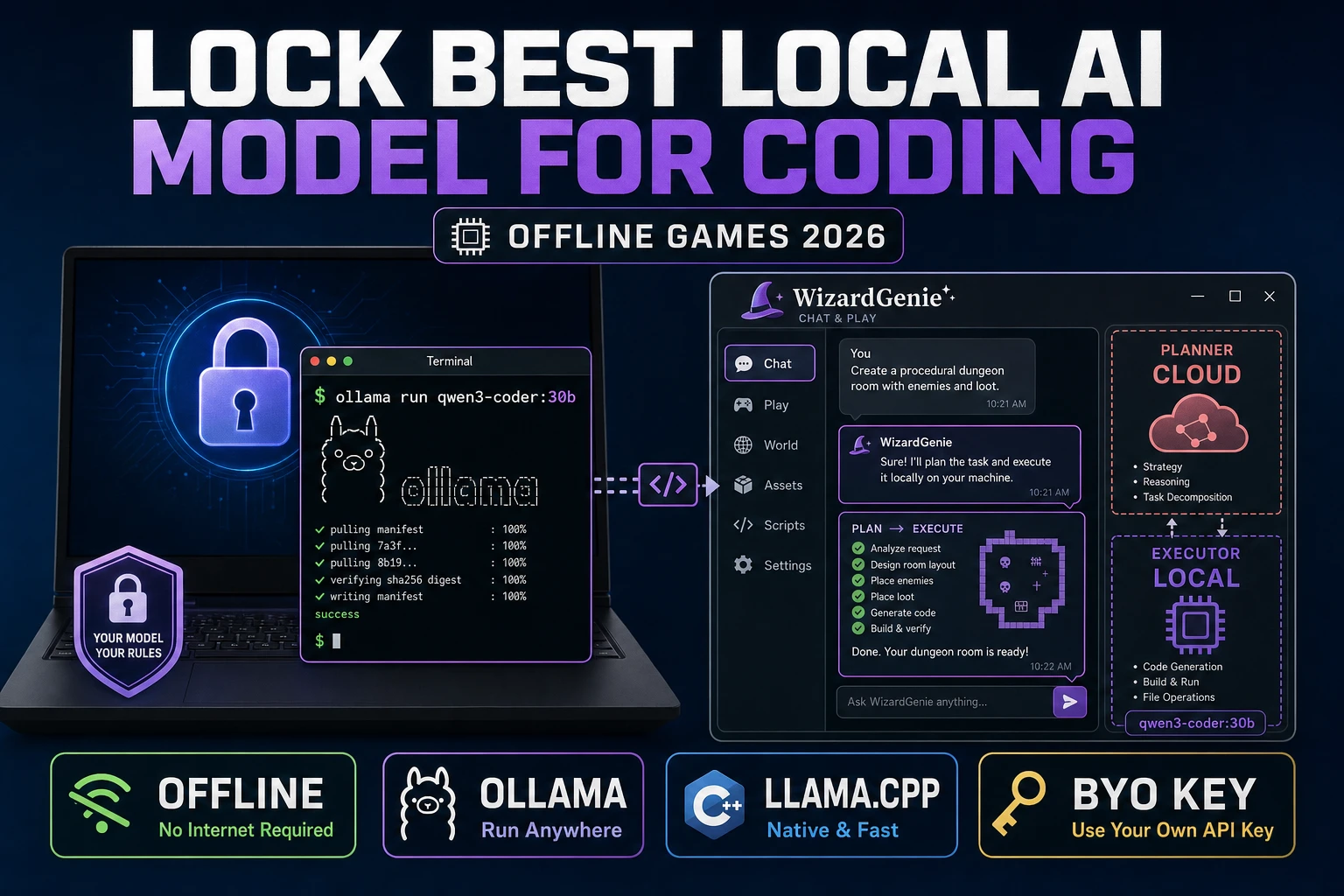
The model picker swaps inline per chat in WizardGenie, so a single Unity project can route the heavy reasoning to Opus on Monday morning and the typing turns to DeepSeek V4 Pro on Monday afternoon without switching products. The lower-level Sorceress Code chat-and-diff interface exposes the same eight models with a stricter file-diff workflow that is well suited to the surgical edit style of late-stage Unity work. The decision-tree sister post at Which AI Model Is Best for Coding? (Indie Game Dev 2026) covers the by-task mapping in depth.

Best AI for Unity sprite assets — AI Image Gen + Quick Sprites + True Pixel + BG Remover

Unity’s 2D pipeline is built around the Texture2D import and the Sprite Editor. Both read PNG natively. Every Sorceress 2D tool exports PNG that drops straight into a Unity project’s Assets/Sprites folder. The honest sprite workflow for an indie Unity dev in 2026 is four tabs:

  • AI Image Gen — the unified panel for Nano Banana Pro, GPT Image 2, Seedream 5 Lite, Flux 2 Pro, Z-Image Turbo, and Grok Imagine. Generate the hero portrait, the boss-monster concept, the title-screen background, the cinematic key art. Reference-image workflows lock the character to a consistent style across an entire roster.
  • Quick Sprites — AI pixel-art animated sprite sheets from a text description. Outputs a grid-formatted PNG with transparent background, sized for Unity’s Sprite Editor with Multiple Sprite Mode and Auto-Slice. Verified credit cost: 9 credits per generation (CREDITS_PER_GEN = 9 in src/app/quick-sprites/page.tsx).
  • True Pixel — convert any AI-generated image or video into authentic pixel art. Chroma key, palette quantization (NES, Game Boy, CGA presets), edge cleanup, batch processing. The right tool when an indie wants the cinematic look of a Flux 2 Pro portrait but at 16×16 sprite resolution.
  • BG Remover — one-click transparent PNG. The required step between a generated portrait and a clean Unity sprite when the source render came in on a colored background. Verified credit cost: 3 credits per image (BG_REMOVER_CREDITS = 3 in src/app/bg-remover/page.tsx).

The Unity-side recipe is the same regardless of which Sorceress tool produced the PNG: drop the file into Assets/Sprites, set Texture Type to Sprite (2D and UI), set Sprite Mode to Multiple for sprite sheets, click Sprite Editor, run Slice with the right grid size, save, and reference the resulting sub-sprites from the SpriteRenderer or the Animation Window. No middleware. The full sprite-sheet sister post at Wire a Free AI Sprite Generator (Game-Ready Pack) walks the prompt-to-grid step in depth; the pixel-art sister post at Snap an Image to Pixel Art AI (Browser, Sprite-Ready) walks the True Pixel conversion step.
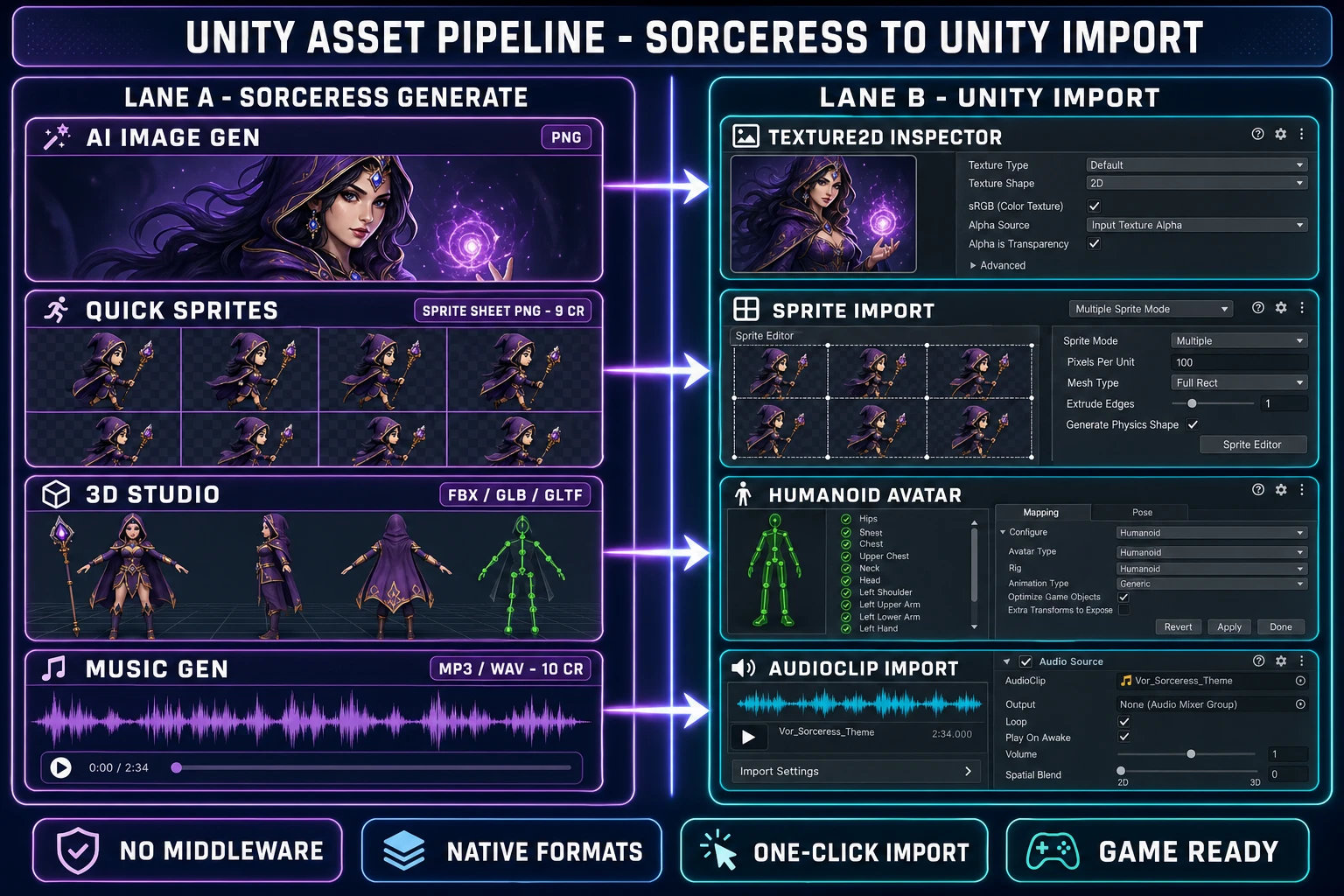
Unity asset pipeline diagram - left lane shows four Sorceress tool panels (AI Image Gen output PNG, Quick Sprites output sprite-sheet PNG at 9 credits, 3D Studio output FBX GLB GLTF, Music Gen output MP3 WAV at 10 credits); right lane shows four matching Unity import inspector panels (Texture2D inspector, Sprite import Multiple mode, Humanoid Avatar configuration, AudioClip import with AudioSource); purple-to-cyan flow arrows connect each Sorceress output to its matching Unity inspector showing no middleware native format compatibility
The Sorceress-to-Unity import path: every asset format the Sorceress stack produces (PNG, sprite-sheet PNG, FBX, GLB, GLTF, MP3, WAV) imports natively into Unity’s standard asset pipeline with no middleware step. Verified June 13, 2026.

Best AI for Unity 3D characters — 3D Studio + Auto-Rigging + text-to-motion to FBX

Unity’s 3D pipeline reads FBX, GLB, and GLTF natively. The Sorceress 3D pipeline ships all three. The honest end-to-end recipe for shipping an AI-generated 3D character into a Unity project in 2026 is:

  1. Generate concept art in AI Image Gen — one or several reference images of the character from a front-on angle. Reference images dramatically improve mesh quality at the image-to-3D step.
  2. Lift to 3D in 3D Studio — the tool ships seven image-to-3D models (Hunyuan 3D 3.1, Pixal3D Free, Meshy 6, TRELLIS 2, TRELLIS, Rodin 2.0, Tripo v3.1) reachable from the same picker. The output is a textured mesh ready for download as FBX, GLB, or GLTF.
  3. Auto-rig the humanoid skeleton in Auto-Rigging — drop the mesh in, get back a fully rigged character with automatic bone placement and weight calculation. The skeleton is Unreal-style by default but maps cleanly to Unity’s Humanoid Avatar system through the Animation Type setting on the FBX import.
  4. Generate motion clips from text prompts inside 3D Studio — “walk forward”, “throw a punch”, “wave hello” — each prompt produces a retargetable skeletal animation clip that drops into Unity’s Animator Controller.
  5. Import to Unity — drop the FBX into Assets/Characters, set Animation Type to Humanoid in the import inspector, configure the Avatar, and the character is ready for the standard Mecanim pipeline.

The image-to-3D quality leaderboard moves every few weeks as the underlying models ship new versions; the deep-dive sister post at Rank the Best Image to 3D Model AI (Six-Model Test) covers the head-to-head. The Mixamo migration path is documented at Replace the Mixamo Auto Rig (Browser, No Adobe ID) for devs already running a Mixamo workflow.

Best AI for Unity audio — Music Gen + SFX Gen + Speech Gen (MP3/OGG for AudioSource)

Unity’s AudioSource component plays MP3, OGG Vorbis, and WAV natively. The Sorceress audio stack covers the three slices an indie Unity game needs:

  • Music Gen — full vocal or instrumental tracks from a prompt or custom lyrics. Each generation creates 2 variations. Verified credit cost: 10 credits per generation (MUSIC_CREDIT_COST = 10 in src/app/music-gen/page.tsx). The right tool for the menu loop, the battle theme, the boss music, the cinematic cutscene track.
  • SFX Gen — full SFX packs from text descriptions, with batch generation and auto-duration detection. Verified credit cost: 3 credits per sound (SFX_CREDIT_COST = 3 in src/app/sfx-gen/page.tsx). The right tool for the footstep packs, the UI clicks, the combat hits, the ambient layer.
  • Speech Gen — realistic AI voiceover and narration with 17 preset voices, 8 emotion controls, and voice cloning. Verified credit costs: 0.5 credits per 1,000 characters on the HD model, 0.3 per 1,000 on Turbo, 1 credit minimum per generation, 400 credits per voice clone (constants verified in src/app/speech-gen/page.tsx lines 30 and 31). The right tool for the NPC voice cast, the narrator track, the boss monologue, the tutorial overlay.

The Unity-side recipe is one drag-and-drop per file: pull the MP3 or WAV into Assets/Audio, attach an AudioSource to the GameObject that should play it, reference the imported AudioClip on the AudioSource, set Loop and Play On Awake on the menu music, leave them off on the one-shot SFX, and the audio is wired. The full audio sister posts at How to Make Video Game Music (AI Loops in Your Browser), Compose AI Sound Effects Generator for Video (Browser), and AI Voice Generator Character Voices (Indie NPC Cast 2026) cover each slice in depth.

The Planner + Executor pattern for Unity C# — why two cheap-and-smart models beat one frontier

The dual-agent pattern at the heart of every long Unity refactor in 2026 is Planner + Executor. An expensive reasoning model (Claude Opus 4.7, GPT-5.5, Gemini 3.1 Pro, or Grok 4.2) writes the plan and reviews the diffs; a cheap fast model (DeepSeek V4 Pro, Kimi K2.5, MiniMax M2.7, Gemini 3.1 Flash, or GPT-5.5 Mini) types out the actual Unity C# changes. The economic logic for a solo indie Unity dev is mechanical:

  • Per-token cost on a frontier model in 2026 sits roughly an order of magnitude above the same tokens on a budget model.
  • The typing side of a long Unity refactor — renaming all references to a deprecated input system, switching a save format, retargeting an Animator across twenty characters — burns roughly 90% of the tokens.
  • Moving the typing side to a budget model collapses total cost to roughly one-fifth of single-frontier, with planning quality intact because the planner still reviews the diffs before they hit disk.

The trap that defeats the pattern is putting an expensive model on the typing side. Claude Sonnet 4.6 input/output tokens are not cheap by the budget-model standard; running Sonnet as the executor erases roughly 80% of the cost advantage the pattern is supposed to deliver. The rule for an indie Unity dev shipping on a credit budget is: never put Sonnet, Opus, GPT-5.5, or Gemini 3.1 Pro on the typing side. The acceptable executors are DeepSeek V4 Pro, Kimi K2.5, MiniMax M2.7, Gemini 3.1 Flash, GPT-5.5 Mini, and Claude Haiku 4.5 when it ships.

WizardGenie wires the Planner+Executor loop inside one tab so the dev does not orchestrate two separate chats. The pattern is also reachable from the lower-level Sorceress Code by manually swapping the model picker between turns. The cost-ratio claim is roughly one-fifth of single-frontier cost, not one-quarter; one-quarter implies an expensive executor, which defeats the pattern. The full coding-models sister post at Which AI Model Is Best for Coding? (Indie Game Dev 2026) walks the dual-agent math in depth.

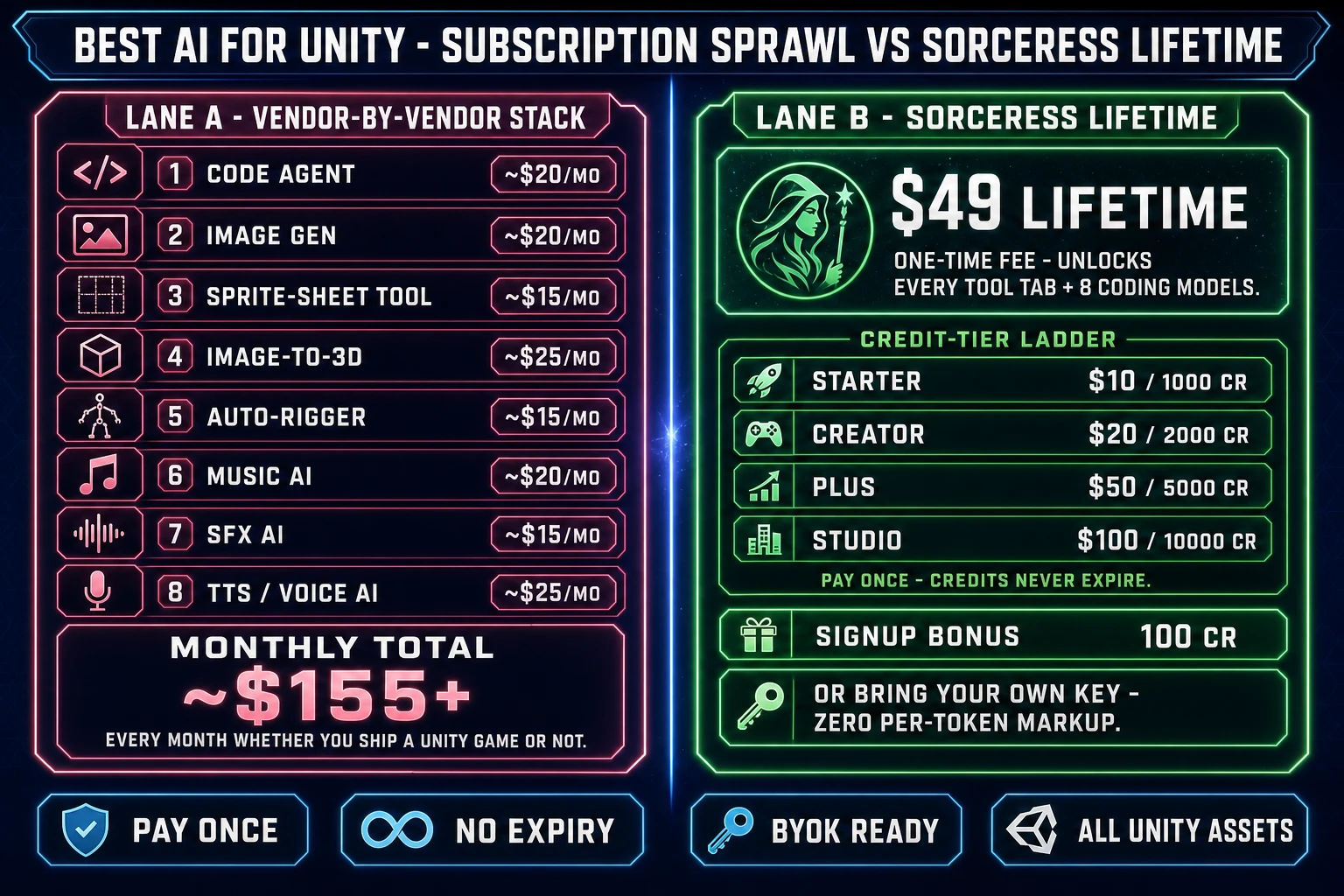
Cost comparison infographic - left lane shows eight separate vendor subscriptions for an indie Unity dev (code agent 20 dollars per month image gen 20 sprite tool 15 image-to-3d 25 auto-rigger 15 music AI 20 SFX AI 15 voice AI 25) totaling roughly 155 dollars per month every month; right lane shows single Sorceress 49 dollar lifetime fee plus credit tier ladder with starter creator plus and studio packs that never expire plus 100 starter credit signup bonus plus BYOK option with zero per token markup
The hidden cost of best AI for Unity is the subscription stack: paying eight vendors separately lands roughly $155/month every month. The Sorceress option is $49 once plus pay-once credits that never expire, with BYOK at zero per-token markup. Verified June 13, 2026.

The verdict on the best AI for Unity indie game dev in 2026

The single-sentence answer to best AI for Unity for an indie game dev in 2026 is: there is no one tool, there is a stack, and the stack is one $49 Lifetime account away. Verified June 13, 2026 against src/app/plans/page.tsx: the Sorceress full-stack option is $49 Lifetime as a one-time fee that unlocks every tool tab including all eight WizardGenie coding models, plus pay-once credits that never expire (Starter $10 for 1,000, Creator $20 for 2,000, Plus $50 for 5,000, Studio $100 for 10,000), plus 100 starter credits at signup, plus bring-your-own-key for devs who already pay each frontier vendor directly.

The Unity-aware stack lines up clean against the project:

  • Unity C# scripting → WizardGenie picker. Sonnet 4.6 for daily flow, Opus 4.7 for one-shot scaffolds, Gemini 3.1 Pro or Grok 4.2 for whole-repo questions, DeepSeek V4 Pro or Kimi K2.5 as the cheap executor in a Planner+Executor loop, GPT-5.5 as the cross-check voice on Unity-specific gotchas.
  • Unity sprite assets → AI Image Gen for concept art, Quick Sprites for animated sprite sheets, True Pixel for pixel-art conversion, BG Remover for transparent PNG output. Every tool exports PNG that drops into Assets/Sprites with no middleware.
  • Unity 3D characters → AI Image Gen for concept art, 3D Studio (seven image-to-3D models in one picker) for the mesh, Auto-Rigging for the humanoid skeleton, text-to-motion inside 3D Studio for the animation clips, FBX/GLB/GLTF export for the Unity Humanoid Avatar pipeline.
  • Unity audio → Music Gen for the soundtrack at 10 credits per track, SFX Gen for the sound-effect pack at 3 credits per sound, Speech Gen for the NPC voice cast at 0.5 credits per 1,000 characters on HD or 0.3 on Turbo, voice cloning for the lead at 400 credits. Every output drops into Assets/Audio as AudioClip with no conversion.

The competing native Unity AI features (Muse, ML-Agents) fill genuinely different roles than this stack and the right indie recipe is to use both — Unity’s native features for the editor-bound workflows, the Sorceress stack for the asset and coding pipeline that feeds Unity from outside. The honest 2026 framing is not WizardGenie versus Unity Muse; it is both, in parallel.

The fastest way to test whether this stack actually fits your Unity project is to open a free Sorceress account, spend the 100 starter credits on one C# prompt to WizardGenie plus one Quick Sprite, one 3D Studio mesh, one Music Gen track, and one Speech Gen voice clip, and decide from inside the workflow whether the $49 Lifetime upgrade earns its keep on the second prompt. The plans page documents the credit tiers; the tools guide walks each tool tab’s credit cost so an indie game dev can budget a Unity project against an actual prompt count.

The Godot and Unreal sister posts at Score the Best AI for Godot Game Dev (Honest 2026 Pick) and Pair the Best AI for Unreal Engine (Honest 2026 Pick) cover the matching stacks for those engines. The umbrella post on generative AI across the full indie game dev cycle shipped June 13 at AI in Game Development (2026 Indie Reality Check). The decision-tree sister post on the coding-model picker specifically is at Which AI Model Is Best for Coding? (Indie Game Dev 2026). The flagship how-to lives at How to Make a Video Game With AI. The right Unity stack in 2026 is the one the dev actually opens on a Tuesday afternoon when the boss-fight scene needs to ship.

Frequently Asked Questions

What is the best AI for Unity in 2026?

The best AI for Unity in 2026 is not a single model — it is a stack. Verified June 13, 2026 against the Sorceress source in src/app/_home-v2/_data/tools.ts, the honest answer is: WizardGenie's eight frontier coding models for Unity C# scripting (Claude Opus 4.7, Claude Sonnet 4.6, GPT-5.5, Gemini 3.1 Pro, DeepSeek V4 Pro, Kimi K2.5, Grok 4.2, MiniMax M2.7), Sorceress AI Image Gen for concept art, Quick Sprites for 2D sprite sheets, True Pixel for pixel-art conversion, 3D Studio for image-to-rigged-mesh with FBX export to Unity, Auto-Rigging for humanoid skeletons, Music Gen for the soundtrack, SFX Gen for sound effects, and Speech Gen for NPC voiceover and voice cloning. All ship inside one $49 Lifetime account with credit packs that never expire. The right model for a Unity scripting prompt is almost never the right tool for the next sprite sheet — the best AI for Unity is the one that has the right tab open for the current task.

Which AI coding model is best for Unity C# scripting?

For Unity C# specifically, Claude Sonnet 4.6 is the everyday-flow pick because C# is well-represented in Anthropic's training data and Sonnet ships working MonoBehaviour and ScriptableObject patterns on the first try. Claude Opus 4.7 is the right pick for one-shot Unity scaffolds — 'build a 2D platformer in Unity with a CharacterController2D, Cinemachine follow camera, and a tilemap collider' — because the planning depth pays back the higher cost when the alternative is debugging a wrong architecture. GPT-5.5 is the useful cross-check voice for Unity-specific patterns like coroutines vs async/await, where the Anthropic models occasionally hand-wave. For long Unity repos (40+ scripts), Gemini 3.1 Pro at 1M context or Grok 4.2 at 2M context handles the whole project in one window so the dev can ask 'where does the save system break' across every script at once. All four ship in the WizardGenie picker.

Can Sorceress AI assets export directly to Unity?

Yes — every Sorceress asset tool exports formats that drop straight into Unity without conversion. Verified against the source code on June 13, 2026: AI Image Gen and BG Remover output transparent PNG (Unity Texture2D import); Quick Sprites and True Pixel output grid-formatted sprite-sheet PNG (Unity Sprite import with auto-slice); 3D Studio exports FBX, GLB, and GLTF (Unity Model import); Auto-Rigging produces a humanoid skeleton compatible with Unity's Humanoid Avatar system; Music Gen, SFX Gen, and Speech Gen output MP3 and WAV (Unity AudioClip import). No middleware step is required — the standard Unity asset import pipeline reads each format natively. The one workflow worth knowing: when bringing an FBX from 3D Studio into Unity, set the Animation Type to Humanoid in the import inspector to use the auto-rigged skeleton with Unity's animation retargeting.

What does the best AI for Unity asset pipeline cost in 2026?

Verified June 13, 2026 against src/app/plans/page.tsx: the Sorceress full-stack option is $49 Lifetime as a one-time fee that unlocks every tool tab (WizardGenie, Sorceress Code, 3D Studio, Auto-Rigging, Quick Sprites, True Pixel, AI Image Gen, Music Gen, SFX Gen, Speech Gen, BG Remover, and the rest of the catalog), plus pay-once credits that never expire (Starter $10 for 1,000 credits, Creator $20 for 2,000, Plus $50 for 5,000, Studio $100 for 10,000). Every new account gets 100 starter credits at signup. Per-tool credit costs verified against the source: Quick Sprites 9 credits per sprite-sheet generation, Music Gen 10 credits per track (two variations per generation), SFX Gen 3 credits per sound effect, BG Remover 3 credits per image, Speech Gen 0.5 credits per 1,000 characters on the HD model and 0.3 on Turbo, Voice Cloning 400 credits per voice. The naive alternative — subscribing to a code agent, an image-gen tool, a sprite-sheet tool, an image-to-3D tool, an auto-rigger, a music tool, an SFX tool, and a voice tool separately — lands well above $150 per month, every month, whether the dev ships a Unity game or zero games.

How does WizardGenie compare to Unity's own native AI features?

Unity ships its own AI features (Muse for asset generation and the long-standing ML-Agents toolkit for in-game agent behavior), and they fill genuinely different roles than WizardGenie. Unity's native AI features run inside the Unity editor itself and are scoped to Unity-specific workflows. WizardGenie and the broader Sorceress stack run in the browser as a separate tab and are scoped to the asset pipeline that feeds Unity, plus the C# scripting agent that writes Unity code outside the editor. The honest indie game dev recipe is the two complement each other: use Unity's native features for the workflows that are tightly coupled to the editor, and use WizardGenie for the model-rich coding agent (eight frontier models on tap, not one) plus the full Sorceress asset pipeline (sprites, 3D, music, SFX, voice) that exports into Unity. The best AI for Unity in 2026 is rarely just one tool — it is the editor's native features plus the external asset and coding pipeline working in parallel.

Should I use the Planner + Executor pattern for Unity C# coding?

Yes, for any Unity work that crosses a single sitting. Planner + Executor is the dual-agent pattern where an expensive reasoning model (Claude Opus 4.7, GPT-5.5, Gemini 3.1 Pro, or Grok 4.2) writes the plan and reviews the diffs while a cheap fast model (DeepSeek V4 Pro, Kimi K2.5, MiniMax M2.7, Gemini 3.1 Flash, or GPT-5.5 Mini) types out the Unity C#. The economic logic in 2026: per-token cost on a frontier model is roughly an order of magnitude above a budget model, the typing side of a long Unity refactor burns about 90% of the tokens, so collapsing the executor to a budget model lands the total cost at roughly one-fifth of single-frontier. For a solo indie dev shipping a Unity jam build on a credit budget, that one-fifth ratio is the difference between affording the whole agent run and giving up halfway. The rule that matters: never put Claude Sonnet 4.6, Claude Opus 4.7, GPT-5.5, or Gemini 3.1 Pro on the typing side — the cheap executor is the whole point.

How is this post different from the May 27, 2026 'Best AI for Unity Coding' post?

The May 27 sister post at /blog/compare-the-best-ai-for-unity-coding-honest-2026-pick is scoped to Unity coding only — which model writes the cleanest Unity C# on a fixed prompt set. This post asks a wider question: which AI handles the whole Unity project, code plus assets. An indie game dev shipping a Unity game in 2026 needs more than a C# agent — they need concept art for the hero, a sprite sheet for the enemies, a rigged 3D character with animations, a soundtrack, a sound-effect pack, and an NPC voice cast, all exported into the Unity project. This piece walks each of those workflows through the matching Sorceress tool and shows where the coding-model decision tree slots into the bigger asset stack. The May 27 post is the coding-only deep dive; this post is the full Unity stack.

What about Unreal Engine and Godot — is the Sorceress stack Unity-only?

No — the Sorceress asset pipeline exports the same formats every major engine reads. Verified against the source: PNG, sprite-sheet PNG, FBX, GLB, GLTF, MP3, OGG, and WAV all import natively into Unity, Unreal Engine 5, Godot 4, GameMaker, and RPG Maker without conversion middleware. The WizardGenie coding models write whichever language the dev points them at — Unity C#, Unreal C++ or Blueprints (the agent reads exported Blueprint XML), Godot GDScript, GameMaker GML. The sister posts at /blog/pair-the-best-ai-for-unreal-engine-honest-2026-pick (May 27) and /blog/score-the-best-ai-for-godot-game-dev-honest-2026-pick (May 26) walk the engine-specific recipes. This piece focuses on Unity specifically because the search query 'best AI for Unity' has its own distinct intent — Unity devs want the Unity-aware mapping, not the generic best-AI-for-game-dev answer.

Sources

  1. Unity (game engine) - Wikipedia
  2. C# (programming language) - Wikipedia
  3. Large language model - Wikipedia
  4. Generative artificial intelligence - Wikipedia
  5. Software agent - Wikipedia
  6. FBX - Wikipedia
  7. Skeletal animation - Wikipedia
  8. Indie game development - Wikipedia
  9. MDN HTMLCanvasElement
Written by Arron R.·3,181 words·14 min read

Related posts