Tune the Best AI Animation Generator (Honest 2026 Test)

By Arron R.12 min read
The best AI animation generator depends on what you animate: Sorceress 3D Studio Animate for rigged 3D characters, Quick Sprites and Auto-Sprite v2 for pixel sp

The question "what is the best AI animation generator in 2026" hides a trap: it assumes one tool wins every job. It doesn’t. Game projects need at least three kinds of animation — cinematic clips for trailers and cutscenes, rigged 3D motion for in-game characters, and packed sprite sheets for 2D engines — and no single model leads all three. This is an honest test of the best AI animation generator for each job, verified against vendor documentation on June 1, 2026, and tested against the actual Sorceress 3D Studio, Quick Sprites, Auto-Sprite V2, and AI Video Gen tools in one browser tab.
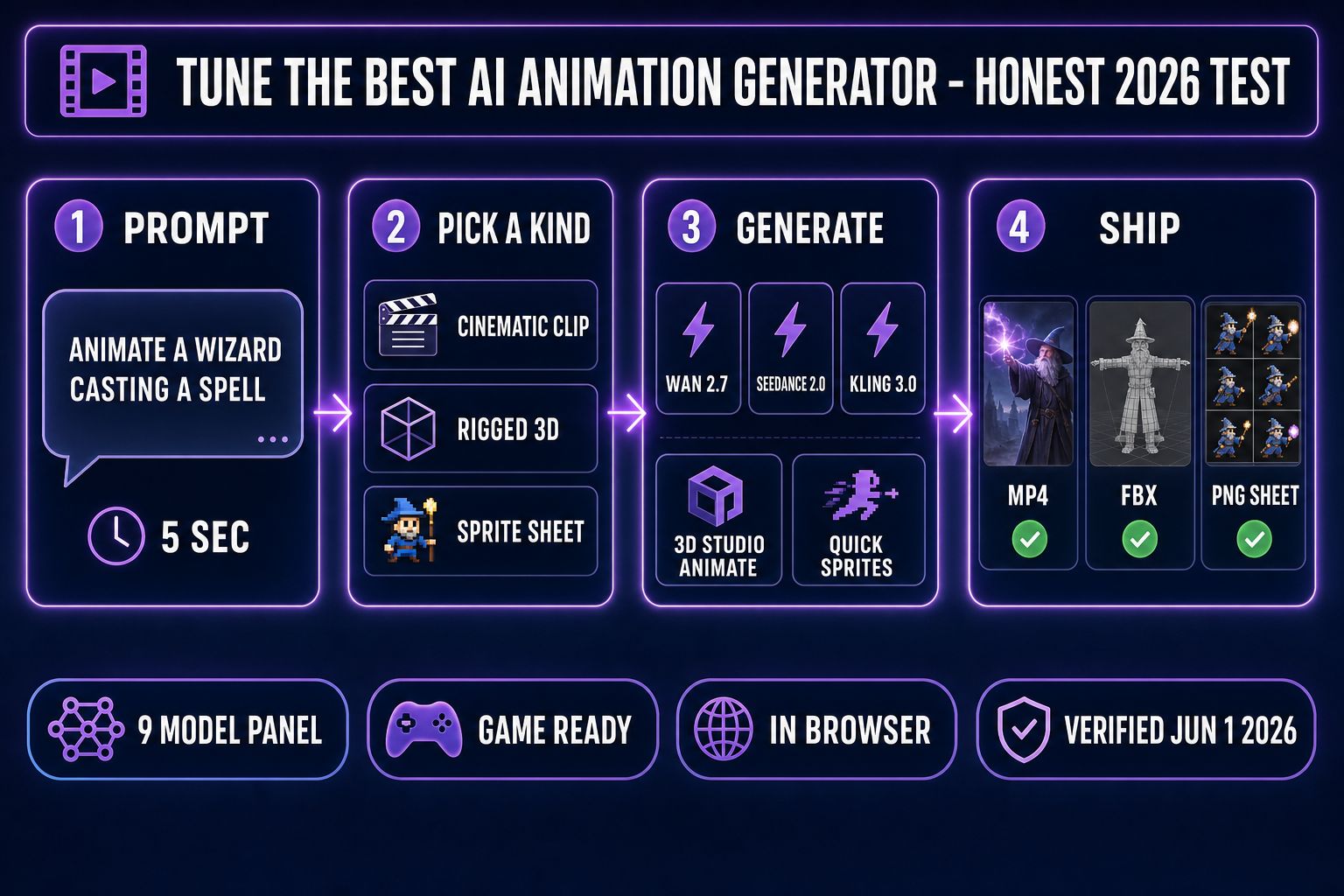
Pipeline diagram of the best AI animation generator workflow: prompt, pick a kind (cinematic, rigged 3D, sprite sheet), generate with Wan 2.7, Seedance 2.0, Kling 3.0, or Sorceress 3D Studio Animate plus Quick Sprites, then ship as MP4, FBX, or PNG sheet.
The four-step workflow: prompt, pick the kind of animation, generate with the right model, ship to your engine. Verified June 1, 2026.

Why "best AI animation generator" depends on what you animate

Walk into any 2026 game-dev Discord and the question repeats: which AI animation generator should I use? The answer changes every time because the asker means a different thing by "animation." A 2D platformer dev wants a walking-cycle sprite sheet for a slime. A 3D adventure dev wants a humanoid wizard to swing a sword on a rigged skeleton. A trailer producer wants a five-second hero-shot flythrough of a dungeon at 1080p with synced audio. Those three outputs do not come out of the same model — they come out of three different model classes wired together.

The right question is not "which one model wins?" but "which kind of animation am I making, and which model leads that kind right now?" The four classes that matter for indie game work are: cinematic short clips (output: MP4 or WebM), rigged 3D character motion (output: FBX, GLB, or glTF on a humanoid skeleton — see the Skeletal animation Wikipedia entry for the rig-bones-mesh primitive), 2D pixel sprite sheets (output: a packed PNG of frames the engine indexes at runtime per the Sprite (computer graphics) definition), and 2D character animation without a sprite-sheet target (output: a looping MP4 or GIF of a single character). Pick the kind first, then pick the model.

Cinematic clips: the best AI animation generator for trailers and B-roll

For cinematic short clips and trailers — the establishing shot of the dungeon, the five-second hero-pose flythrough, the menu-screen idle loop — three video models lead the 2026 pack. All three are available behind a single panel inside Sorceress AI Video Gen at /video, with the credit-cost math abstracted into the unified Sorceress credit pool.

Wan 2.7 (Alibaba Tongyi Lab) is the open-weights pick for cost-conscious production. Verified June 1, 2026: Wan 2.7 launched on cloud platforms in March 2026, with the Wan 2.7 Image companion model following April 1, 2026, all under the Apache 2.0 license. The full suite — text-to-video, image-to-video, reference-to-video with voice cloning, and instruction-based video editing — runs on a shared 27-billion-parameter Mixture-of-Experts transformer backbone. Together AI hosts the model on serverless inference at $0.10 per second of generated video per their April 3, 2026 launch post. Apache 2.0 means you can fine-tune it on your own footage and self-host on a 24 GB GPU.

Kling 3.0 (Kuaishou) is the closed-source cinematic-leaning pick. Verified June 1, 2026 against the official Kling pricing pages: generation costs 6 credits per second at 720p without audio, 8 credits per second at 1080p without audio, 9 credits per second at 720p with native audio, and 12 credits per second at 1080p with native audio. Single-shot clips run 3–15 seconds. The 3.0 release adds native multilingual audio on by default, multi-shot mode for 2–6 connected scenes in one call, and a 4K output tier on top of the existing 720p and 1080p modes.

Seedance 2.0 (ByteDance) launched on Doubao and Jimeng on February 12, 2026 with a unified multimodal audio-video joint generation architecture supporting text, image, audio, and video inputs (verified against the Seedance 2.0 Wikipedia entry). The originally planned global API launch on February 24, 2026 was postponed indefinitely after cease-and-desist letters from Disney, Warner Bros., Paramount, Sony, Netflix, and the MPA; ByteDance officially confirmed the overseas API suspension on March 15, 2026. The model is still accessible through third-party API proxies, and Seedance 2.0 Fast (recommended for image-to-video work) is wired into Sorceress AI Video Gen alongside Seedance 1.5 Pro for fallback.

If a single best AI animation generator had to be named for cinematic clips in 2026, the verdict depends on intent: Wan 2.7 for open-weights freedom and the lowest per-second cost, Kling 3.0 for native audio and 4K ceiling, Seedance 2.0 Fast for the strongest visual-quality-to-cost ratio at 720p. Sorceress AI Video Gen runs all three plus Grok Imagine Video from xAI, Wan 2.2 Fast (uncensored I2V), and Kling 2.5 Turbo Pro in the same panel, which sidesteps the "pick one" trap entirely.
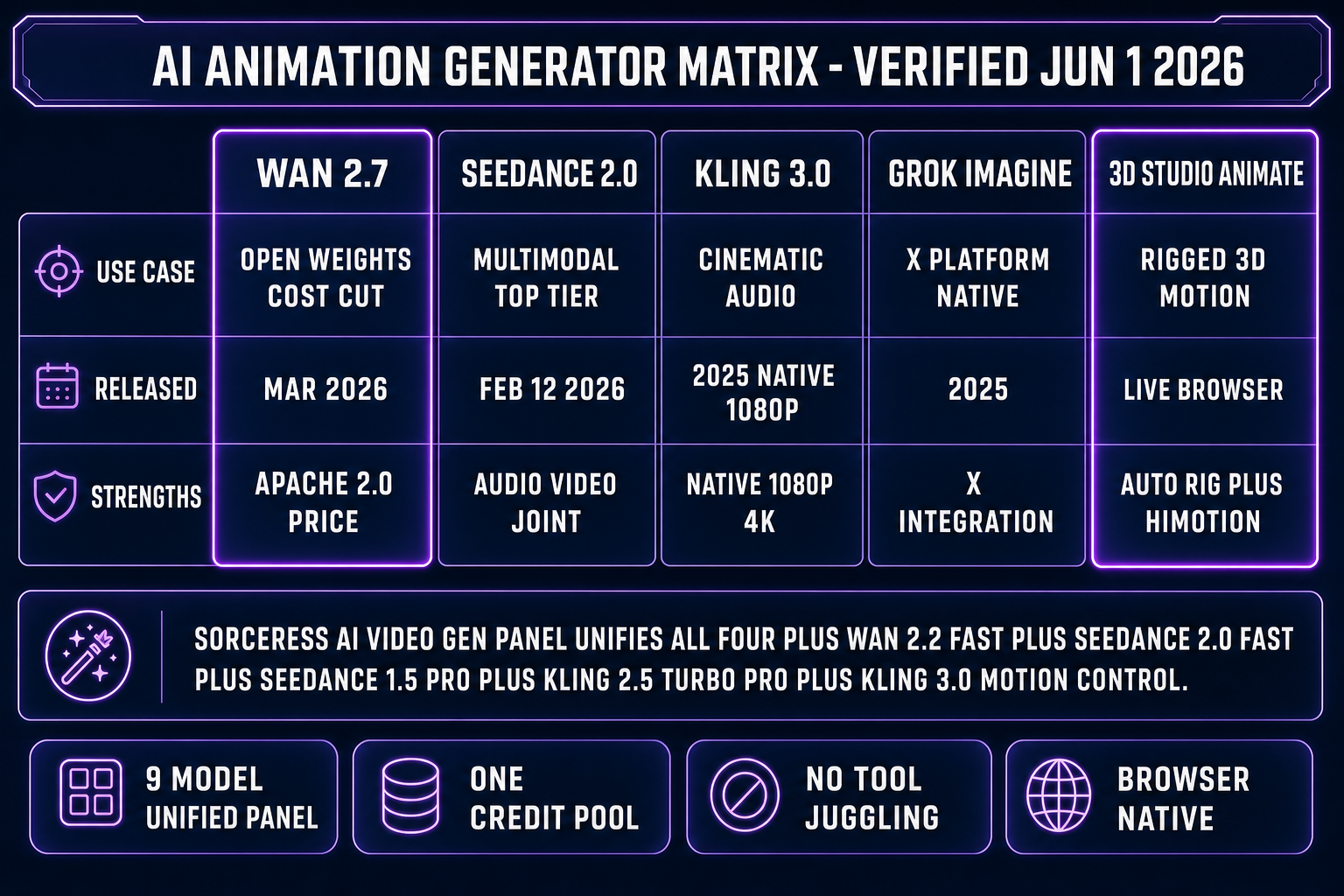
Comparison matrix of the best AI animation generator options for video: Wan 2.7, Seedance 2.0, Kling 3.0, Grok Imagine, and Sorceress 3D Studio Animate, with use cases, release dates, and strengths per column, verified June 1, 2026.
The five-column comparison matrix for cinematic AI animation generators. All four video models live behind one Sorceress credit pool; the 3D Studio Animate column handles rigged motion the video models can’t.

Rigged 3D characters: the best AI animation generator for game-ready motion

The cinematic models lose the moment the brief becomes "animate this rigged 3D character." A video model emits pixels, not a skeleton with bones bound to a mesh, and a game engine cannot blend two pixel streams into a smooth idle-to-walk transition the way it blends two skeletal clips. The bottleneck for the best AI animation generator on game characters is not the motion-clip step; it’s the rigging step that has to happen first.

A finished animated 3D game character is three things stacked: a textured mesh, a humanoid skeleton bound to that mesh, and a library of motion clips referencing that exact skeleton’s bone names. Sorceress 3D Studio chains all three steps inside one browser tab. Verified against src/lib/threed-models.ts on June 1, 2026, the image-to-3D lineup is six models deep: TRELLIS at 8 credits, Hunyuan 3D 3.1 at 25 credits (recommended), Tripo v3.1 at 30–40 credits, TRELLIS 2 at 35–45 credits, Meshy 6 at 50 credits with optional texture and remesh add-ons, and Rodin 2.0 at 50 credits. Lift a character image into a textured mesh in seconds, then auto-rig with 15 humanoid markers (pelvis, shoulders, elbows, wrists, hips, knees, ankles, neck, chin) at /rigging for heat-diffusion auto-weighting.

The animation step itself is text-to-motion: type "walk forward," "throw a punch," "wave hello," and the HiMotion engine generates an SMPL-format motion clip that retargets onto the rigged skeleton at 30 frames per second. The credit cost for an animation is 2 credits — close enough to free that iterating on motion direction never feels expensive. Export to FBX, GLB, or glTF (the Khronos glTF 2.0 specification is the cross-engine runtime format) and drop into Godot, Unity, Phaser, or any other engine.

The browser-only Sorceress chain is the practical best AI animation generator for rigged 3D characters in 2026 because the legacy alternative is four separate tools — a mesh generator, a desktop rigging seat, a motion-capture library, and a retargeting compositor. The desktop stack still produces excellent results, but for indie scope the Sorceress path takes minutes instead of an afternoon.

Sprite sheets: the best AI animation generator for 2D pixel art

2D platformers, RPGs, and roguelikes need a different kind of animation entirely: a packed PNG sheet where each frame is laid out on a fixed grid and the engine reads pixel coordinates at runtime. Cinematic video models cannot emit a clean sprite sheet directly; rigged 3D motion has the wrong output format. The best AI animation generator for sprite sheets is the one that emits a transparent-background PNG sized to your engine’s grid in one step.

Sorceress Quick Sprites at /quick-sprites generates animated pixel-art sprite sheets directly from a text description. Verified June 1, 2026 against src/app/quick-sprites/page.tsx: the tool runs on the retro-diffusion rd-animation model at 9 credits per generation across three style modes — Four Angle Walking (four-direction four-frame walk cycles at 48×48 px for humanoid characters), Small Sprites (six-action sheets at 32×32 px including walking, arms, looking, surprise, and lay-down poses), and VFX Effects (24–96 px square animations for fire, explosions, lightning, and impact effects). The output is a single PNG sheet with grid spacing the engine can read with a TileSet, SpriteSheet, or Aseprite-format atlas loader.

Sorceress Auto-Sprite V2 at /autosprite-v2 takes the video-to-sprite path. Upload an AI-generated character video clip (or a real-camera reference), pull out animation frames at a chosen FPS, background-remove every frame with a single click, and preview the packed sprite sheet before download. The pipeline pairs naturally with AI Video Gen: generate the character with AI Image Gen, animate the still with Wan 2.7 or Kling 3.0 image-to-video at 4–6 seconds, then Auto-Sprite V2 cleans and aligns the frames into a packed grid sheet for Godot, Unity, Phaser, or RPG Maker.
AI animation generator from image: the cleanest browser path

"AI animation generator from image" is a distinct search intent: you already have a still hero pose and you want it to move. The best AI animation generator for the image-to-animation use case depends on the target format.

If the image is a 2D character and the target is a packed sprite sheet, the cleanest path is the three-tool Sorceress chain: AI Video Gen with Wan 2.7 or Kling 3.0 in image-to-video mode gives you a 4–6 second motion clip, then Auto-Sprite V2 background-removes and frame-aligns it into a transparent PNG sheet sized for your engine. If the target is a looping MP4 for a marketing site or social post, the same Wan 2.7 or Kling 3.0 image-to-video step is the entire pipeline. Wan 2.7's open-weights status under Apache 2.0 means you can self-host the image-to-video pipeline on a 24 GB GPU if cloud per-second pricing stops penciling out.

If the image is a static 3D render and you need text-to-motion on a rigged skeleton, the path is Sorceress 3D Studio: lift the image to 3D with Hunyuan 3D 3.1 or Tripo v3.1, auto-rig with the humanoid 15-marker skeleton, then animate via HiMotion text prompts. The two image-to-animation paths share the AI Image Gen entry point but diverge into different downstream tools — the trick is picking the right downstream the first time so you don’t redo work.

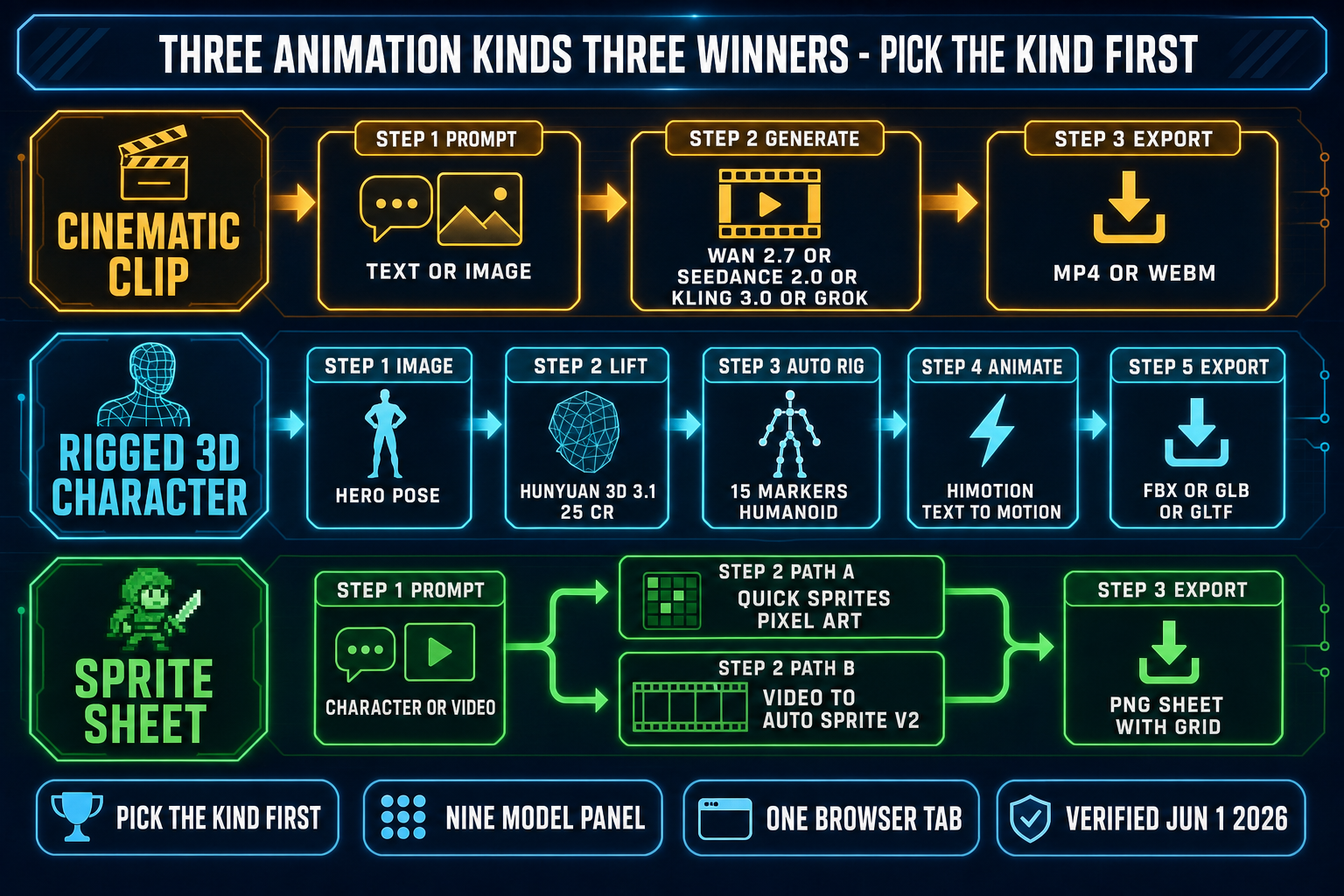
Three-lane pipeline diagram for the best AI animation generator by output kind: cinematic clip lane runs Wan 2.7 or Seedance 2.0 or Kling 3.0 to MP4; rigged 3D character lane lifts an image with Hunyuan 3D 3.1, auto-rigs 15 markers, animates with HiMotion, exports FBX or GLB or glTF; sprite sheet lane runs Quick Sprites for pixel art or video-to-Auto-Sprite V2 for video-derived sheets.
Three animation kinds, three different pipelines. Picking the kind first removes 90 percent of the "which model is best" indecision.

Pricing: free vs paid AI animation generators in 2026

The best free AI animation generator in 2026 is the one that gives you enough free generations to ship a real prototype, not the one with the largest free quota on a watermark-locked tier. Verified June 1, 2026 against src/app/_home-v2/_components/HomeHero.tsx and src/app/plans/page.tsx: Sorceress hands new accounts 100 starter credits with no expiry; that funds several seconds of image-to-video on Wan 2.7, a Quick Sprites sprite sheet, and a 3D Studio image-to-rigged-mesh chain end-to-end on day one with no watermark. The credit packs are $10 for 1,000 credits, $20 for 2,000, $50 for 5,000, and $100 for 10,000 with no expiry on any tier, plus a separate $49 lifetime tier for the non-AI tools.

The alternative free options have tighter ceilings. Wan 2.7 is open-weights under Apache 2.0, so you can run the inference pipeline on your own hardware for free if you have a GPU with at least 24 GB of VRAM — but the electricity and time cost is real, and the model weights are an 80 GB download. Kling 3.0's free consumer tier ladders at 66 daily credits with watermarks and a 720p cap; enough for one or two short test clips per day but not enough to iterate a full prototype. Seedance 2.0 is free on Doubao and Jimeng in China but not accessible to the global API as of June 1, 2026 due to the suspended overseas launch.

For paid production work the per-second math at the open-weights tier is hard to beat. Wan 2.7 at $0.10 per second on Together AI works out to roughly $0.50 for a five-second clip; Sorceress AI Video Gen’s 10 credits per second on the Wan 2.7 panel works out to $0.10 per second on the $10/1,000 credit pack, matching the open-weights cloud rate while keeping the rest of the Sorceress stack on the same credit pool.

How Sorceress unifies the best AI animation generator panel

The pragmatic answer to "what is the best AI animation generator" stops being a single product the moment you accept that game projects need all three animation kinds. The Sorceress stack ships them in one browser tab with one credit pool, which removes the tool-juggling tax that kills most indie animation pipelines before the first prototype.

The AI Video Gen panel at /video runs nine video models verified against src/lib/video-models.ts on June 1, 2026: Grok Imagine Video (xAI), Wan 2.7 with first-and-last-frame control via Kie.ai, Wan 2.2 Fast (uncensored I2V), Seedance 2.0 Fast (recommended), Seedance 2.0, Seedance 1.5 Pro, Kling 3.0 with no-audio single-shot mode, Kling 2.5 Turbo Pro, and Kling 3.0 Motion Control with motion transfer from a reference video at 9 credits per second standard or 14 credits per second pro. Switch between models without re-uploading reference images; compare three clips side-by-side at the same prompt to see which model interpreted the brief best. The unified panel makes "which is the best AI animation generator for this shot" a question you answer empirically, not by reading vendor marketing.

For an indie team specifically — one or two people with a finished game design and a six-month deadline — the value is not picking the model with the best benchmark score. The value is moving from "we need a wizard idle animation" to "the wizard idle animation is in Godot" without leaving the browser. That is the test the best AI animation generator has to pass, and the Sorceress trio of 3D Studio Animate, Quick Sprites, and Auto-Sprite V2 passes it three different ways depending on which animation kind you started with.

The verdict: how to pick the best AI animation generator for your project

If you are building a 3D action RPG, the best AI animation generator is Sorceress 3D Studio Animate. Lift the character with Hunyuan 3D 3.1, auto-rig with the 15-marker humanoid skeleton, animate via HiMotion text prompts at 2 credits per clip, export FBX into Godot or Unity. The 3D Studio chain is the only browser-native path that emits a rigged, animated, game-ready character without bouncing between four desktop tools.

If you are building a 2D pixel-art platformer, the best AI animation generator is Quick Sprites for synthesized walk cycles, idle loops, and VFX, plus Auto-Sprite V2 when you want to derive a sheet from a generated video. Both emit transparent-background PNG sheets sized to your engine’s grid, no Aseprite or Krita seat required.

If you are cutting a trailer, a Steam page hero video, or a Kickstarter pitch reel, the best AI animation generator depends on the cost-vs-control tradeoff: Wan 2.7 at $0.10 per second when budget rules, Kling 3.0 at 12 credits per second when you need native audio at 1080p, Seedance 2.0 Fast when you want the strongest visual quality at 720p inside the credit pool. All three run from the same Sorceress AI Video Gen panel without separate accounts.

The verdict on the best AI animation generator for game projects in 2026 is that the question is wrong — the right question is "which of the three animation kinds am I making, and which model leads that kind today?" Pick the kind first, generate inside the Sorceress browser stack, ship to your engine. The full Sorceress tool guide maps every tool to the animation kinds it serves; the plans page covers the no-expiry credit math; the Sorceress home page ties it all together with the 100-starter-credit grant so day-one experimentation costs nothing.

For deeper reading on the underlying animation primitives: Animation (Wikipedia) covers the medium’s first-principles history, Computer animation covers the digital pipeline, and Adobe Firefly Quick Cut (last updated March 10, 2026) covers a vendor-side editor that complements the generation step — Sorceress handles the generation and the engine handles the integration, neither of which Quick Cut tries to replace.

For the adjacent cinematic AI animation generator deep-dive, the Canva AI animation generator game-motion review, the Perchance AI animation generator free-tier breakdown, the AI animation picture generator image-to-loop workflow, and the Auto-Rig Pro Blender workflow comparison — each covers a sibling sub-vertical of the broader animation cluster.

Frequently Asked Questions

Which is the best AI animation generator for indie game projects in 2026?

There is no single best AI animation generator because game projects need at least three kinds of animation, and no one tool wins all three. For rigged 3D character animation (a wizard walks, swings a sword, casts a spell on a humanoid skeleton), Sorceress 3D Studio Animate at /3d-studio is the cleanest pick because it ships text-to-motion (HiMotion) directly on top of the auto-rigged skeleton it just built, no Mixamo or Maya seat needed. For 2D pixel-art sprite sheets (a slime patrols, a coin spins, an enemy idles), Sorceress Quick Sprites at /quick-sprites generates packed PNG sprite sheets from a text description in seconds, and Auto-Sprite v2 at /autosprite-v2 turns any AI-generated video clip into a clean game-ready sprite sheet. For cinematic short clips and trailers (an establishing shot of the dungeon, a 5-second hero-pose flythrough), Sorceress AI Video Gen at /video runs Wan 2.7 (Alibaba Tongyi Lab, March 2026, Apache 2.0 open weights), Seedance 2.0 (ByteDance, February 12, 2026), Kling 3.0 (Kuaishou, ladders to native 1080p with audio), and Grok Imagine Video (xAI) in one panel. Pick the kind first, then the model. Verified June 1, 2026.

What is the best AI animation video generator for cinematic game trailers?

For cinematic game trailers and cutscene B-roll the best AI animation video generator depends on the look you need. Verified June 1, 2026: Kling 3.0 (Kuaishou) is the cinematic-leaning pick on the closed-source side; per the official Kling VIDEO 3.0 Model User Guide published February 6, 2026, generation costs 6 credits per second at 720p without native audio and ladders up to 12 credits per second at 1080p with native audio, with credit prices on the consumer plans starting at the Standard tier (660 credits) and going up to the Ultra tier (26,000 credits, the only plan that unlocks native 4K Kling 3.0). Wan 2.7 (Alibaba Tongyi Lab) is the open-weights pick for cost-conscious production work; it launched in March 2026, runs on Together AI Serverless Inference from $0.10 per second of generated video, supports clips of 2-15 seconds at 720p or 1080p, and the Apache 2.0 license lets you fine-tune it on your own footage. Seedance 2.0 (ByteDance) launched on its own consumer surfaces (Doubao, Jimeng AI) on February 12, 2026; the global commercial API launch originally scheduled for February 24, 2026 was indefinitely postponed after cease-and-desist letters from Disney, Netflix, Paramount, Warner Bros., Sony, and the MPA. All four models are available behind the same Sorceress AI Video Gen panel, with the credit-cost math abstracted into the unified credit pool.

What is the best AI animation generator from image to animated output?

For the AI animation generator from image use case (you have a still hero pose and want it to walk, idle, or attack), the best pick depends on the output format. If the image is a 2D character and the target is a sprite sheet, the cleanest path is Sorceress Auto-Sprite v2 at /autosprite-v2: feed your character image to AI Video Gen with Wan 2.7 or Kling 3.0 image-to-video, get a 4-6 second motion clip, then Auto-Sprite v2 background-removes and frame-aligns it into a packed PNG sprite sheet sized for Godot, Unity, Phaser, or RPG Maker (verified June 1, 2026 in the Sorceress source at src/lib/video-models.ts and src/app/_home-v2/_data/tools.ts). If the image is a 2D character and the target is more 2D character animation (no sprite sheet), the same Wan 2.7 or Kling 3.0 image-to-video does it directly. If the image is a static 3D model render and you need real text-to-motion on a rigged skeleton, the path is Sorceress 3D Studio: lift the image to 3D with Hunyuan 3D 3.1 or Tripo v3.1, auto-rig with the humanoid skeleton, then animate via HiMotion text prompts (verified against src/lib/threed-models.ts on June 1, 2026).

What is the best free AI animation generator for game art on a budget?

The best free AI animation generator for game art in 2026 is the one that gives you enough free generations to ship a real prototype, not the one with the largest free quota on a watermark-locked tier. Verified June 1, 2026 against src/app/_home-v2/_components/HomeHero.tsx line 701 and src/app/plans/page.tsx: Sorceress hands new accounts 100 starter credits with no expiry; that funds a few seconds of image-to-video on Wan 2.7 (uncensored), a Quick Sprites sprite sheet, and a 3D Studio image-to-rigged-mesh chain end-to-end on day one with no watermark. Per the Sorceress plans page, the credit packs are $10 / 1000 credits, $20 / 2000, $50 / 5000, $100 / 10000 with no expiry and a separate $49 lifetime tier for the non-AI tools. The other free options have tighter ceilings: Wan 2.7 is open-weights under Apache 2.0 so you can run it on your own hardware for free if you have a GPU with 24GB+ VRAM, but the time and electricity cost is real; Kling 3.0's free tier (per the kling official pricing pages) ladders at 66 daily / roughly 2,000 monthly credits with watermark and 720p cap, enough for one or two short test clips per day.

What is the best AI 3D animation generator for game characters in 2026?

For the best AI 3D animation generator on game characters specifically, the bottleneck is the rigging step, not the motion-clip step. Verified against src/app/rigging/page.tsx and src/lib/rigging/types.ts on June 1, 2026: a finished animated 3D game character is a textured mesh, plus a humanoid skeleton bound to that mesh, plus a stack of motion clips referencing that exact skeleton’s bone names. Sorceress 3D Studio chains all three steps inside one browser tab: (1) lift a character image to a textured mesh via the six-model image-to-3D lineup (TRELLIS at 8 credits, Hunyuan 3D 3.1 at 25 credits recommended, Tripo v3.1 at 30-40 credits, TRELLIS 2 at 35-45 credits, Meshy 6 at 50 credits + 25 for texture + 13 for remesh, Rodin 2.0 at 50 credits, all verified against src/lib/threed-models.ts on June 1, 2026); (2) auto-rig the humanoid skeleton with 15 markers (pelvis, shoulders, elbows, wrists, hips, knees, ankles, neck, chin) and heat-diffusion auto-weight via the Sorceress Auto-Rigging tool at /rigging; (3) animate via HiMotion text prompts (walk forward, throw a punch, wave hello) directly on top of the rigged skeleton, then export to FBX, GLB, or GLTF for Godot, Unity, Phaser, or any other engine. The browser-only tools that ship rigged characters with text-to-motion in one chain remain the practical pick over a Mixamo + Blender + DAZ Studio + Maya stack for indie projects.

How does Sorceress AI Video Gen compare to Adobe Firefly Quick Cut for animation?

They aim at different jobs. Adobe Firefly Quick Cut (released February 25, 2026 in beta, per Adobe’s blog and the Quick Cut overview help page last updated March 10, 2026) is a video editor first and an animation generator second; you upload your own b-roll or generated clips and Quick Cut auto-assembles them into a structured first cut using scene detection, smart shot selection, and audio analysis. Adobe Firefly hosts more than 30 industry models for the generation step, including Kling 3.0, Veo 3.1, and Runway Gen-4.5 (verified June 1, 2026 against blog.adobe.com Adobe Firefly expands video and image creation post). Sorceress AI Video Gen at /video is the inverse: a generation panel first and an editor never. The Sorceress lineup is verified against src/lib/video-models.ts on June 1, 2026: Grok Imagine Video (xAI), Wan 2.7 (Kie.ai with first-and-last-frame control), Wan 2.2 Fast (uncensored), Seedance 2.0 Fast (recommended), Seedance 2.0, Seedance 1.5 Pro, Kling 3.0 (no-audio single-shot), Kling 2.5 Turbo Pro, and Kling 3.0 Motion Control with motion transfer from a reference video at 9 credits per second standard or 14 credits per second pro. For game-dev work the Sorceress side wins because Auto-Sprite v2 and Quick Sprites turn the generated clip into a game-ready sprite sheet in the next panel; for film-style edit work the Firefly side wins because Quick Cut handles the timeline.

Which AI animation generator is best for sprite-sheet animation in 2026?

For sprite-sheet animation specifically (the canonical 2D game-dev animation form, where the engine reads a packed PNG of frames and indexes them at runtime per the Sprite computer graphics Wikipedia entry), the cleanest 2026 pick is Sorceress Quick Sprites at /quick-sprites for synthesized pixel-art animations and Sorceress Auto-Sprite v2 at /autosprite-v2 for video-derived sprites. Verified against src/app/_home-v2/_data/tools.ts on June 1, 2026: Quick Sprites generates fully animated pixel-art sprite sheets (walking cycles, idle, attack, death) from a text description, with grid-formatted PNG output, transparent background, sized for Godot, Unity, Phaser, and RPG Maker. Auto-Sprite v2 takes the three-step pipeline further: generate a character with AI Image Gen at /generate, animate it with AI Video Gen (Wan 2.7 or Kling 3.0 image-to-video), then Auto-Sprite v2 strips the background and aligns the frames into a clean sheet. The Mixamo-style legacy path of recording motion-capture, retargeting onto a 2D character, and exporting to a sprite renderer is still possible, but for indie 2D games the AI-generated path takes minutes instead of hours and avoids the four-step asset wall that pure-code agents like Claude Code or any other CLI cannot cross alone.

Sources

  1. Animation (Wikipedia)
  2. Computer animation (Wikipedia)
  3. Skeletal animation (Wikipedia)
  4. Sprite (computer graphics) (Wikipedia)
  5. glTF 2.0 specification (Khronos Group)
  6. Seedance 2.0 (Wikipedia)
  7. Wan 2.7 video model suite on Together AI (April 3, 2026)
  8. Adobe Firefly Quick Cut overview (Adobe Help, last updated March 10, 2026)
Written by Arron R.·2,736 words·12 min read

Related posts