Reel a Sprite to GIF (Loop Preview Export 2026)

By Arron R.8 min read
A sprite to gif path in 2026 is a four-step loop preview export: validate the sheet in Sprite Analyzer, touch up frames in Canvas, produce clean grids with Auto

Publishers and Discord playtesters ask for motion before they open your Phaser build. Searchers typing sprite to gif on July 17, 2026 already have a walk row or idle sheet — they need a looping pitch file, not another screen recording with desktop chrome. This guide covers the 2026 pipeline: Sprite Analyzer locks fps and sections, Canvas cleans bad frames, Auto-Sprite v2 produces uniform PNG grids when you start from video, and Quick Sprites downloads the Animated GIF stakeholders can embed tonight. Tool costs and export paths below are verified against the live Sorceress source on July 17, 2026.
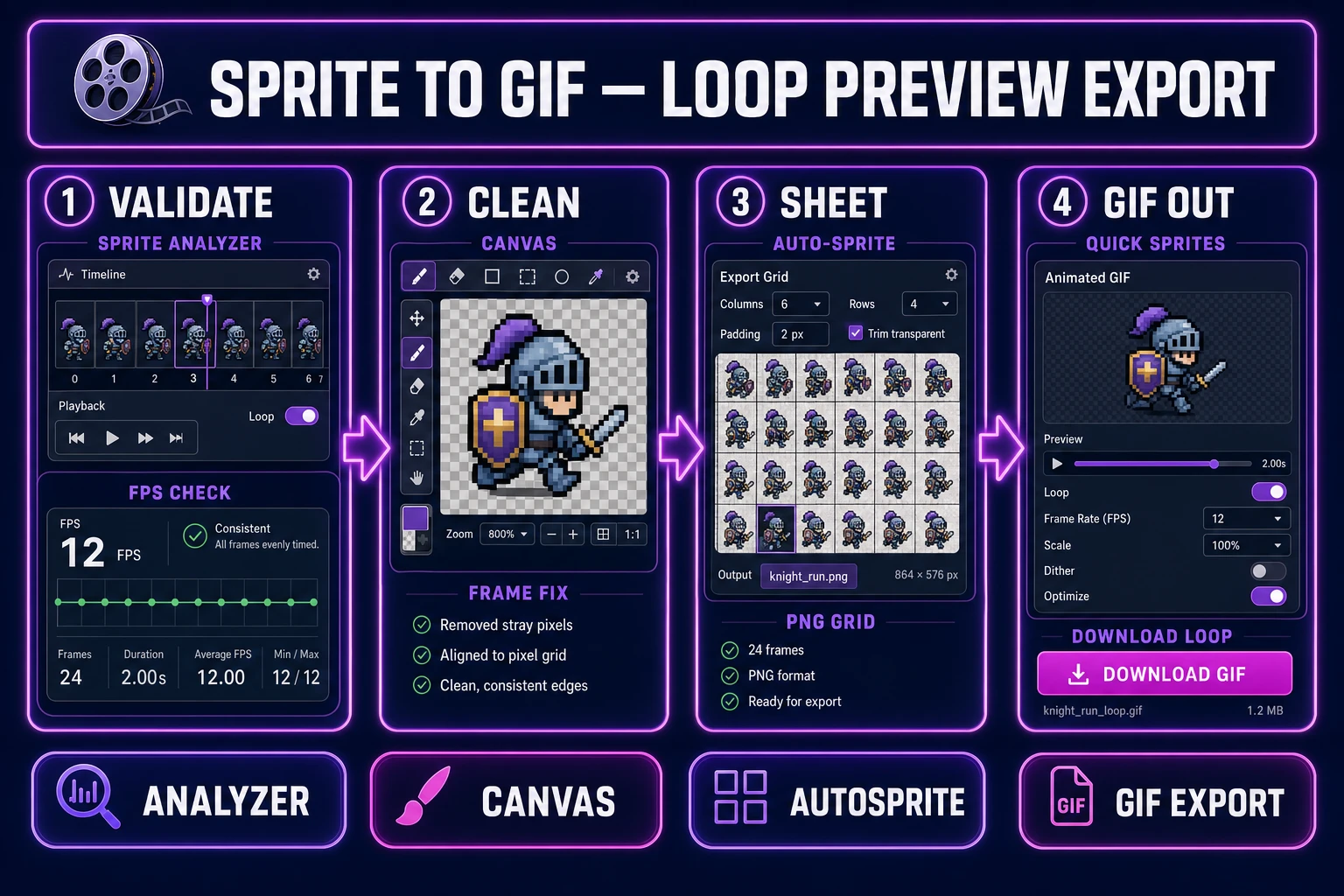
Sprite to gif in 2026, four-step loop preview export from Sprite Analyzer validation through Canvas and Auto-Sprite to Quick Sprites Animated GIF download, verified July 17, 2026
A sprite to gif path in 2026 means four moves: validate the sheet, clean frames, lock a PNG grid, then download an Animated GIF for pitches.

What a sprite to gif export outputs for pitch loops

The phrase sprite to gif (590/mo, KD 0 per DataForSEO probe-fresh-seeds-8.md verified July 16, 2026) targets solo jammers and small teams who need a shareable loop from existing sprites. Sibling queries in the same cluster — sprite sheet to gif (590/mo, KD 2), sprite sheet to gif converter (70/mo, KD 0) — often mix converter shopping with pitch intent. This post stays on the pitch deliverable: a looping GIF with fixed cell size, transparent background, and mute-readable footwork — not a meme compressor that flattens alpha.

Production output is structured. Ship a validation card (frame size, section names, fps, loop seam notes), a cleaned PNG grid or frame zip for the engine, and one Animated GIF for Discord / itch / publisher decks. Pair that pack with the gif sprite sheet maker sibling when you still need to slice a GIF back into cells — Flip is bidirectional; a sprite to gif session is one-way toward the pitch clip. When the sheet itself is still missing, route through the sprite sheet slicer guide before you ask for a GIF download.

Why screen-recorded GIFs fail as sprite previews

Recording the game window feels fast until a publisher zooms in. Screen captures carry variable frame dimensions, compression banding on flat pixel art, cursor flicker, and UI chrome no slicer can cleanly grid. The fps is whatever your laptop managed during the take — not the 8–12 fps your side-scroller needs for readable footwork.

Screen-recorded GIFs also fail the transparency test. Most recorders flatten alpha to a desktop background color. When stakeholders drop that file into a dark Discord theme, every sprite sits in a muddy rectangle. A purpose-built sprite to gif path generates or re-exports frames at fixed dimensions with transparency baked in from the first honest pass.

Generic online “sheet to gif” converters optimize for file size on social feeds. They rarely preserve alpha, never attach fps metadata your Phaser loader can mirror, and cannot hand you atlas JSON for the same loop. That is why the honest 2026 path lives inside a game-dev stack: validate plus clean plus sheet plus GIF download in one Sorceress account. The texture atlas PNG remains what the engine loads at ship time; the GIF is the pitch artifact only.

The Sorceress sprite to gif pipeline in four steps

Every shippable loop preview export ships four runtime pieces: validation card, cleaned frames, engine sheet, and GIF download. In 2026 each maps to one Sorceress surface verified against the live catalog on July 17, 2026:

  • Validation and fps lock: Sprite Analyzer detects grids, plays animation sections, sets per-section fps, and exports PNG plus JSON configs — it does not download a .gif file; it proves the loop before you burn generation credits.
  • Frame cleanup: Canvas paints over bad pixels, fixes silhouettes, and downloads PNG touch-ups (verified PNG export path in src/app/canvas/page.tsx).
  • Video-to-sheet when needed: Auto-Sprite v2 turns an AI video clip into a uniform PNG sprite sheet (fixed 6-column grid) and can hand off into Sprite Analyzer — export is PNG sheet / ZIP frames, not Animated GIF.
  • Animated GIF download: Quick Sprites Output Format toggle → Animated GIF (9 credits per generation, CREDITS_PER_GEN = 9 in src/app/quick-sprites/page.tsx line 21) — this is the honest sprite to gif file download on Sorceress.

Pricing is a $49 lifetime unlock plus pay-as-you-go credit packs. Starter $10/1,000 credits, Creator $20/2,000, Plus $50/5,000, Studio $100/10,000. Verified against src/app/plans/page.tsx lines 51 and 56–59. New accounts ship with 100 starter credits. Keep WizardGenie coding on your own API key when you scaffold the Phaser loader after the pitch GIF lands.
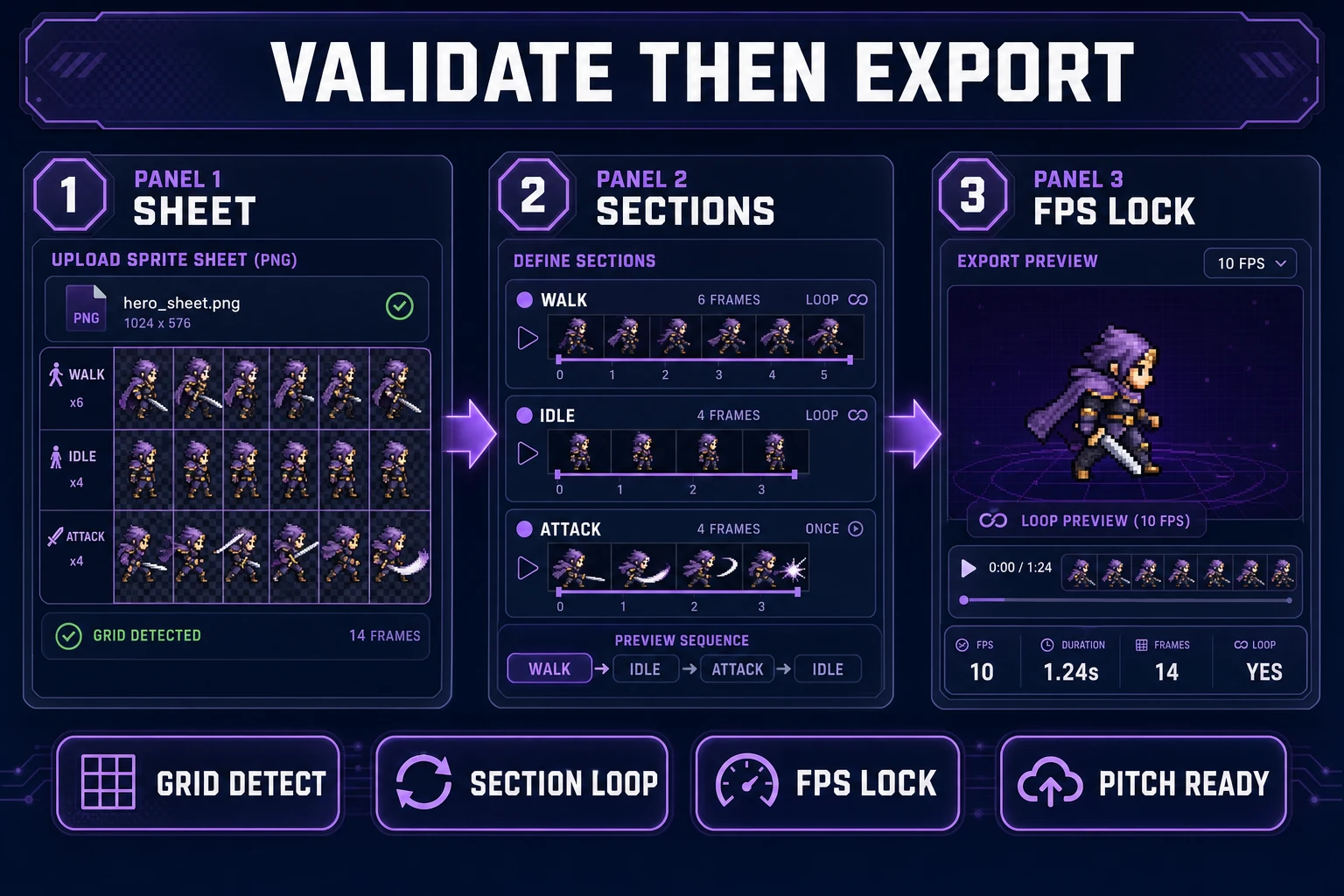
Sprite Analyzer fps lock before a sprite to gif download, verified July 17, 2026
Sprite Analyzer proves section loops and fps before Quick Sprites burns credits on an Animated GIF.

Step 1 — lock frame grid and fps in Sprite Analyzer

Open Sprite Analyzer and drop the sheet you already have — Auto-Sprite export, Quick Sprites PNG grid, or an external atlas. Let grid detection settle, then name sections honestly: walk, idle, attack. Set fps per section (10 fps for retro platformers, 8 fps for chunky 32×32 jams) and scrub until frame zero and frame N−1 share the same foot plant.

Write a one-line validation card before any GIF generation:

  • Frame size — “48×48, side view, feet on row 44.”
  • Loop length — “Four-frame walk, seamless, no root-motion drift.”
  • Export target — “Animated GIF for Discord pitch” plus “PNG atlas for Phaser.”

Export the JSON config with frame indices. That file is what WizardGenie reads when you scaffold a Phaser 4.2 AnimationManager key later. Reject any section that only looks good at 24 fps — pitch GIFs that run faster than the game will feel like a different character. For unknown grids that still need cell cuts, pause here and use the sprite sheet slicer pipeline first.

Step 2 — clean frames in Canvas and produce sheets in Auto-Sprite

If a single frame has a halo, missing boot, or palette spike, open Canvas, paint the fix, and download PNG. Do not “fix it in the GIF compressor” — palette quantization will lock the error forever. Canvas is the cheap honesty step: no generation credits, just pixels.

When your source is still a short AI video instead of a sheet, run Auto-Sprite v2: generate or upload character art, animate with AI video, then extract a clean PNG sprite sheet with background removal and frame alignment. Hand the sheet into Sprite Analyzer with the transfer path the tool already exposes. Remember the contract: Auto-Sprite’s shippable export is the PNG grid / ZIP for engines. Marketing copy may mention GIF preview language; the live page exports sheets for runtime — your downloadable sprite to gif file still comes from Quick Sprites.

Keep two folders in the project: sprites/[character]/walk.png for the atlas and pitch/[character]_walk.gif for social. Never overwrite the atlas with a GIF — engines want the PNG grid, pitches want the loop.

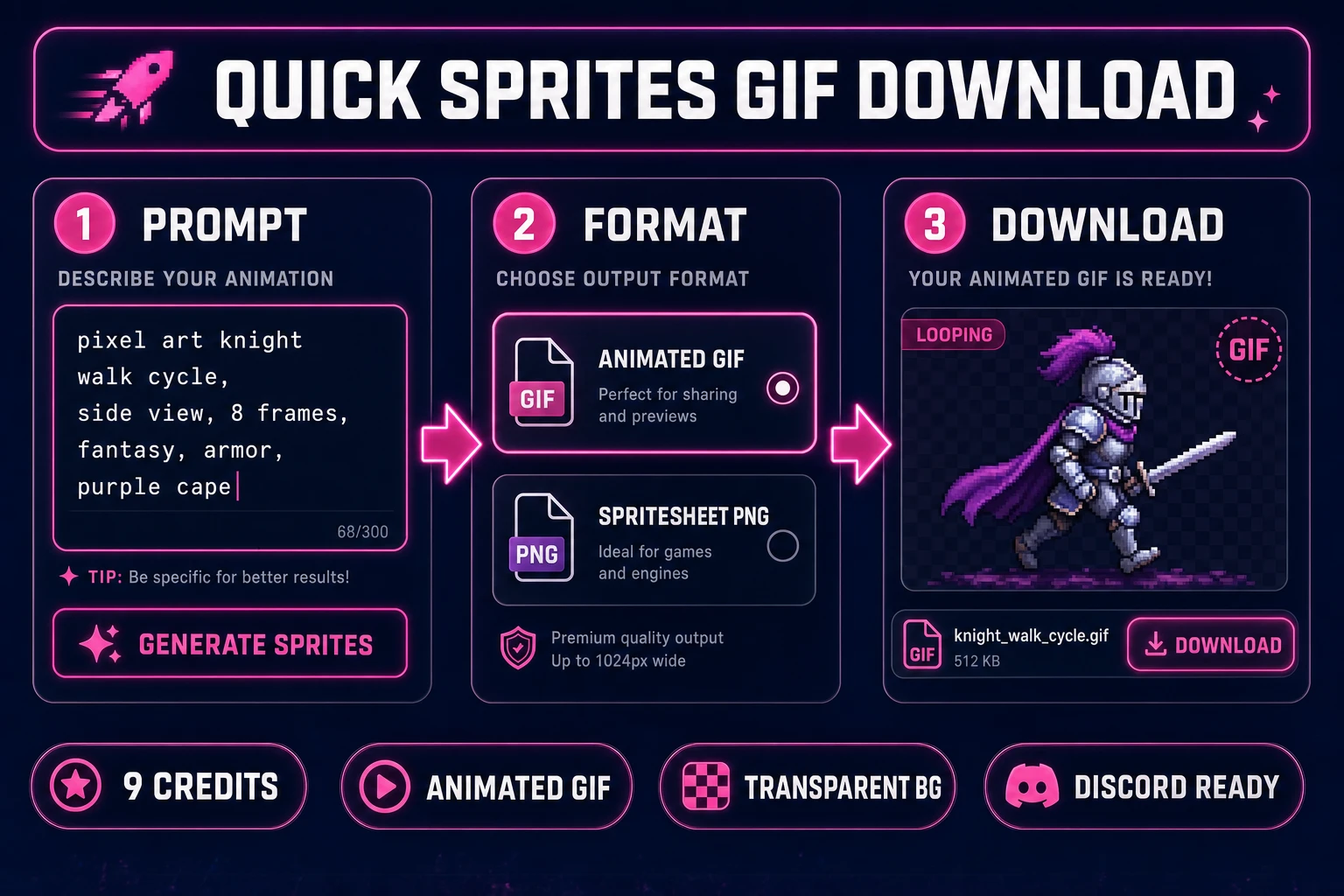
Quick Sprites Animated GIF toggle completing a sprite to gif loop preview export, verified July 17, 2026
Quick Sprites Output Format: Animated GIF for pitch loops, Spritesheet (PNG) when the engine atlas is the priority.

Step 3 — export the Animated GIF in Quick Sprites

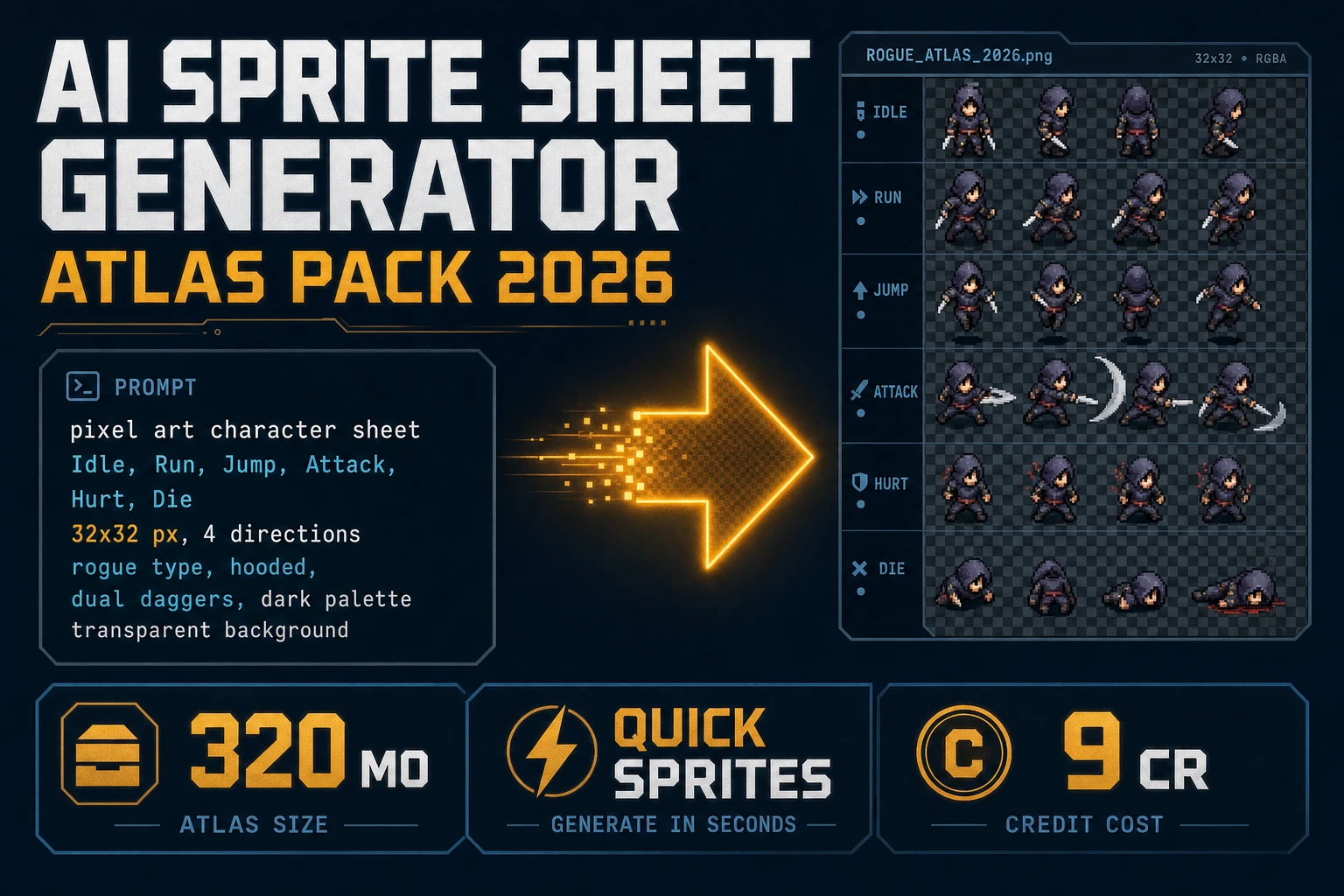
Open Quick Sprites, lock the same style and silhouette brief you validated in Analyzer, and set Output Format to Animated GIF (the alternate toggle is Spritesheet PNG). Prompt structure that works: “Pixel art [character], side-view walk cycle, [N] frames, transparent background, no text, no UI, game sprite, seamless loop.” Generate two or three variants at 9 credits each, pick the loop whose feet match the Analyzer validation card, and download into pitch/[character]_walk.gif.

Use Animated GIF when stakeholders need motion before engine integration exists. Use Spritesheet (PNG) when you are skipping the pitch clip and heading straight to Phaser. If you already shipped a PNG grid from Auto-Sprite and only need a matching GIF for the same silhouette, regenerate in Quick Sprites with the validation card pasted into the prompt — do not pretend a third-party meme converter will preserve your alpha and fps.

Wire the PNG atlas into Phaser after the GIF lands. Phaser 4.2.0 “Giedi” (released June 19, 2026; patch 4.2.1 on July 9, 2026 — verified against phaser.io release notes and the Phaser download archive on July 17, 2026) is the honest browser runtime for playing validated loops. Paste the Analyzer JSON into WizardGenie and ask for an AnimationManager key that matches the section fps you locked — desktop and web WizardGenie both work. Do not promise arcade auto-publish; export the build and host it where you want.

For broader walk-cycle coverage that includes video cleanup, see the ai sprite animation post. For atlas-first workflows without a pitch GIF, the ai sprite sheet generator guide covers sheet packing.

What a sprite to gif session costs on Sorceress in 2026

Pricing verified July 17, 2026 against src/app/plans/page.tsx (LIFETIME_PRICE = 49). Sorceress base unlock is $49 one-time for the full tool suite. AI credits are pay-as-you-go: Starter $10 for 1,000 credits, Creator $20 for 2,000, Plus $50 for 5,000, Studio $100 for 10,000. A typical sprite to gif session burns 18–36 credits for two to four Quick Sprites Animated GIF variants (9 credits each). Sprite Analyzer validation and Canvas touch-ups do not add per-export generation burns. Auto-Sprite video-to-sheet runs on its own credit path when you start from clip instead of an existing grid. WizardGenie coding stays on your own API keys.

Compare that to three disconnected converters, a screen recording, and a Discord thread arguing about fps. The integrated sprite to gif path wins on iteration speed: lock sections, clean one frame, download two GIF variants, freeze the winner beside the PNG atlas — done in a session. Browse the full stack at Sorceress Tools Guide or see plans for credit tiers. When you still need GIF → sheet slicing, switch to the gif sprite sheet maker sibling; when the grid itself is wrong, use the sprite sheet slicer guide.

The category shift is simple: sprite to gif in 2026 is not a random meme encoder with a sprite upload box. It is a production pipeline — validated sections, cleaned frames, engine-ready PNG grids, pitch GIF downloads — that respects how indie reviews actually work. Sorceress built the pieces to run that pipeline in one account; your job is to kill every loop that only looks good in a screen recording before you paste the Discord link. Your validation card is the product; the GIF is the trailer; the PNG atlas is what ships.

Frequently Asked Questions

What does a sprite to gif export output for game pitches?

A sprite to gif export for pitches produces a looping animated GIF with fixed frame size, transparent background, and readable fps — for Discord embeds, itch GIF banners, and publisher decks. On Sorceress that maps to Quick Sprites Animated GIF download (9 credits per generation), with Sprite Analyzer validating the sheet timing first and Canvas handling frame touch-ups.

How is sprite to gif different from a gif sprite sheet maker?

A gif sprite sheet maker (see the sibling Flip post) is bidirectional: GIF ↔ sheet for generation and slicing. Sprite to gif is the one-way pitch path — you already have sprite frames or a sheet and need a shareable loop. Use Flip when you are building the sheet; use Reel when the sheet exists and stakeholders need motion before Phaser import.

Which Sorceress tool downloads an Animated GIF from sprites?

Quick Sprites at /quick-sprites. The Output Format toggle offers Spritesheet (PNG) or Animated GIF (verified in src/app/quick-sprites/page.tsx on July 17, 2026). Each generation costs 9 credits. Auto-Sprite exports PNG sprite sheets and ZIP frames for engines; Sprite Analyzer previews loops and exports PNG plus JSON — use Quick Sprites when the deliverable must be a .gif file.

Can Sprite Analyzer convert a PNG sheet into a GIF?

No. Sprite Analyzer at /spritesheet-analyzer detects grids, plays animation sections, sets fps, and exports PNG sheets plus JSON configs (verified July 17, 2026). It is the validation step before a sprite to gif download. After timing looks right, regenerate or export the pitch loop with Quick Sprites Animated GIF, then wire the PNG atlas into Phaser 4.2 via WizardGenie.

What does a sprite to gif session cost on Sorceress in 2026?

Verified July 17, 2026 against src/app/plans/page.tsx (LIFETIME_PRICE = 49). Base unlock is $49 one-time. A typical session burns 18–36 credits for two to four Quick Sprites GIF variants (9 credits each); Sprite Analyzer and Canvas are Pro tools without per-export credit burns. New accounts ship with 100 starter credits. WizardGenie coding stays on your own API key.

Sources

  1. GIF — Wikipedia
  2. Sprite (computer graphics) — Wikipedia
  3. Texture atlas — Wikipedia
  4. Phaser v4.2.0 release (Giedi)
Written by Arron R.·1,704 words·8 min read

Related posts