Tripo AI Image to 3D Model in Your Browser

By Arron R.13 min read
Tripo AI image to 3D model turns a single image into a textured GLB or FBX mesh. Sorceress 3D Studio routes Tripo v3.1 in your browser with no Tripo subscriptio

Tripo AI image to 3D model turns a single photograph or AI-generated image into a textured GLB mesh, and most of the searches landing on this query in May 2026 hit tripo3d.ai’s pricing page first — Basic free tier at 300 credits per month with public-only models, Professional $19.90 per month, Advanced $49.90, Premium $139.90 (40 percent off on the annual plan). That price is reasonable if Tripo is the only 3D model you will ever need. Most game-dev workflows want a model picker, not a single-vendor subscription. Sorceress 3D Studio routes Tripo v3.1 in your browser via Replicate, no Tripo account required, alongside five other image-to-3D models on a single credit balance. Below is the five-step Tripo AI image to 3D model workflow inside 3D Studio, the Tripo v3.1 knobs that actually move the output (the quad-mesh option, texture alignment, geometry quality), the comparison between Tripo and the other five models, and the Three.js loader code that drops the GLB straight into a browser game. Verified May 17, 2026 against src/lib/threed-models.ts, the live tripo3d.ai pricing page, the Tripo H3.1 launch notes, and the glTF 2.0 specification.
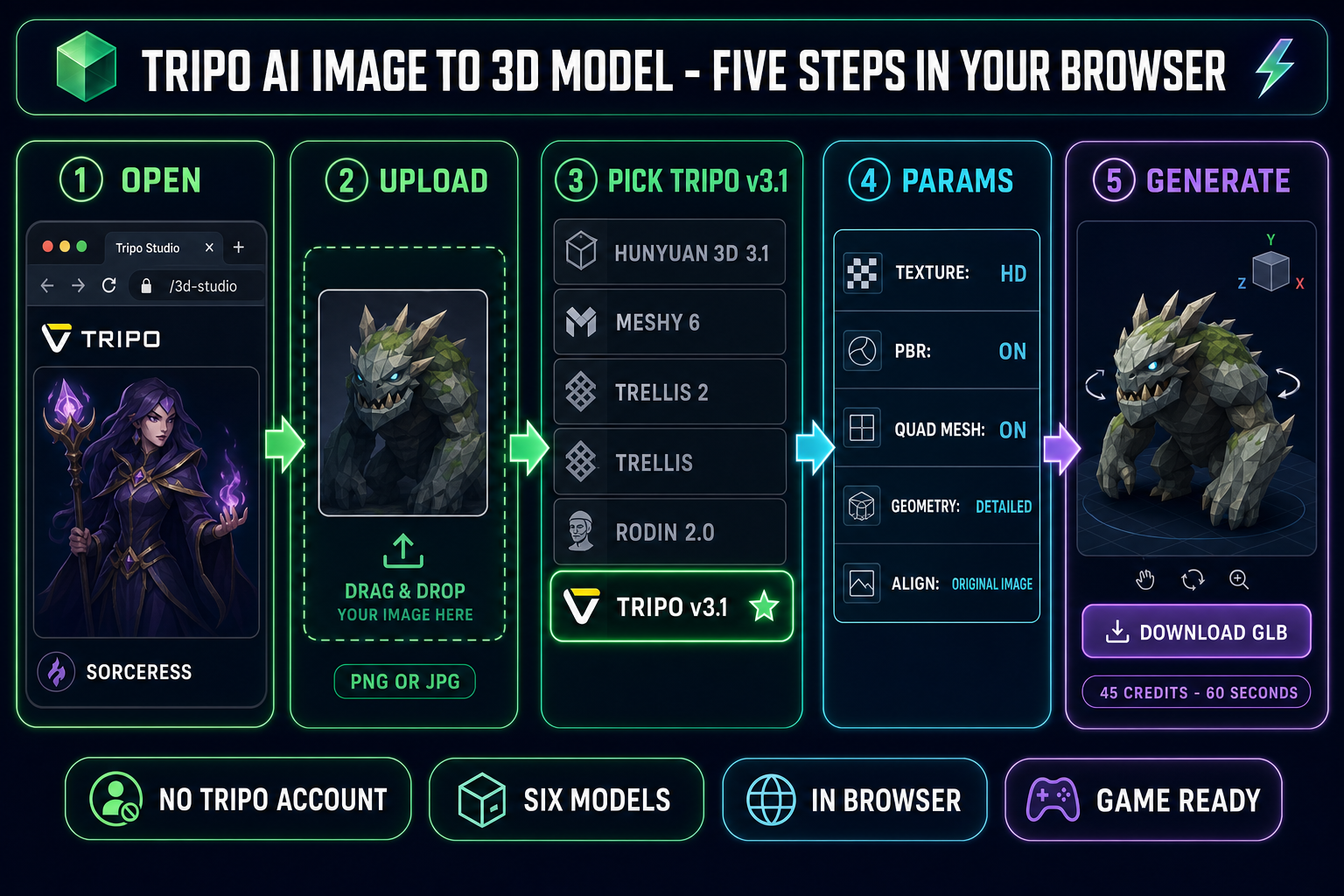
Tripo AI image to 3D model workflow diagram showing five steps inside Sorceress 3D Studio - upload image, pick Tripo v3.1 from the model rail, set parameters, generate, download GLB - with the six-model rail visible (Hunyuan 3D 3.1, Meshy 6, TRELLIS 2, TRELLIS, Rodin 2.0, Tripo v3.1) on a dark navy background with emerald accents
The Tripo AI image to 3D model workflow inside Sorceress 3D Studio — one image in, one GLB out, no tripo3d.ai account along the way. Verified May 17, 2026.

What “Tripo AI image to 3D model” actually does in 2026

Tripo AI image to 3D model is the workflow that takes a single image — a photograph, an AI-generated character render, a hand-drawn concept — and returns a textured 3D mesh. The default output is a glTF 2.0 binary file (.glb), with mesh, UV maps, and material textures embedded into a single drag-and-droppable asset. With the quad-mesh option enabled, Tripo v3.1 emits FBX instead so the quadrilateral topology survives the export — that detail matters because no other model on the Sorceress rail emits true quads natively.

Tripo v3.1, also branded H3.1 (the HD model), is the high-detail Tripo release positioned for hero assets. The named upgrades over v2.5 (Turbo, speed-optimized) and v3.0 (sharper structure) are higher geometric density, sharper edges, cleaner silhouettes that hold up under close inspection, and PBR-ready materials. The model accepts three input modes verified against THREED_MODELS['tripo-v3.1'].inputModes: image-to-3D, text-to-3D, and multi-image-to-3D (front, back, and side reference simultaneously).

The output is engine-ready out of the box. Three.js, Phaser’s 3D scenes, and every modern engine load GLB natively. Textures travel with the file, so there is no relinking step after the download. The mesh comes UV-unwrapped at up to 500,000 faces, with optional PBR maps (base color, metallic, normal, roughness) already mapped to the geometry — ready for a real-lit scene the moment it lands in the engine.

Tripo v3.1 (H3.1): what changed from v2.5 and v3.0

Tripo’s model line in 2026 has three tiers worth knowing about before you pick which version to call. v2.5 is the Turbo model — speed-optimized, lighter geometry, the right pick when you need throughput over fidelity. v3.0 is the Ultra release that introduced sharper structural reconstruction. v3.1 (H3.1) is the HD model positioned for production-ready hero assets — the version that holds up when the camera pushes in close on a marketing render or a cinematic cutscene.

The named upgrades in H3.1 over earlier versions are concrete. First, high-density geometry — H3.1 generates high-poly meshes with increased density, preserving small features and surface details with sharper edges and cleaner silhouettes. Second, PBR-ready materials by default — the model targets PBR pipelines so surfaces respond correctly to lighting across environments. Third, multi-use asset positioning — a single H3.1 generation is built to work across gameplay, marketing visuals, storefronts, and promotional artwork from one mesh, reducing the need for separate pipelines per use case.

The catch — and this is why the Tripo AI image to 3D model search query matters — Tripo gates the highest-leverage features behind paid plans. The Basic tier on tripo3d.ai gives 300 monthly credits but locks generated models to a CC BY 4.0 public license, restricts you to 20 stored models, and caps concurrency at one task. The Professional tier ($19.90 per month, or $11.94 per month on the annual plan) lifts the license to private models with commercial use, raises monthly credits to 3,000, and adds 10 concurrent tasks. Advanced ($49.90 per month) brings 8,000 credits, 15 concurrent tasks, and 200 stored models. Premium ($139.90 per month) gives 25,000 credits, 20 concurrent tasks, unlimited storage, and three free pro refines. Verified May 17, 2026 against the live tripo3d.ai pricing page.

Two paths to use Tripo AI image to 3D model today

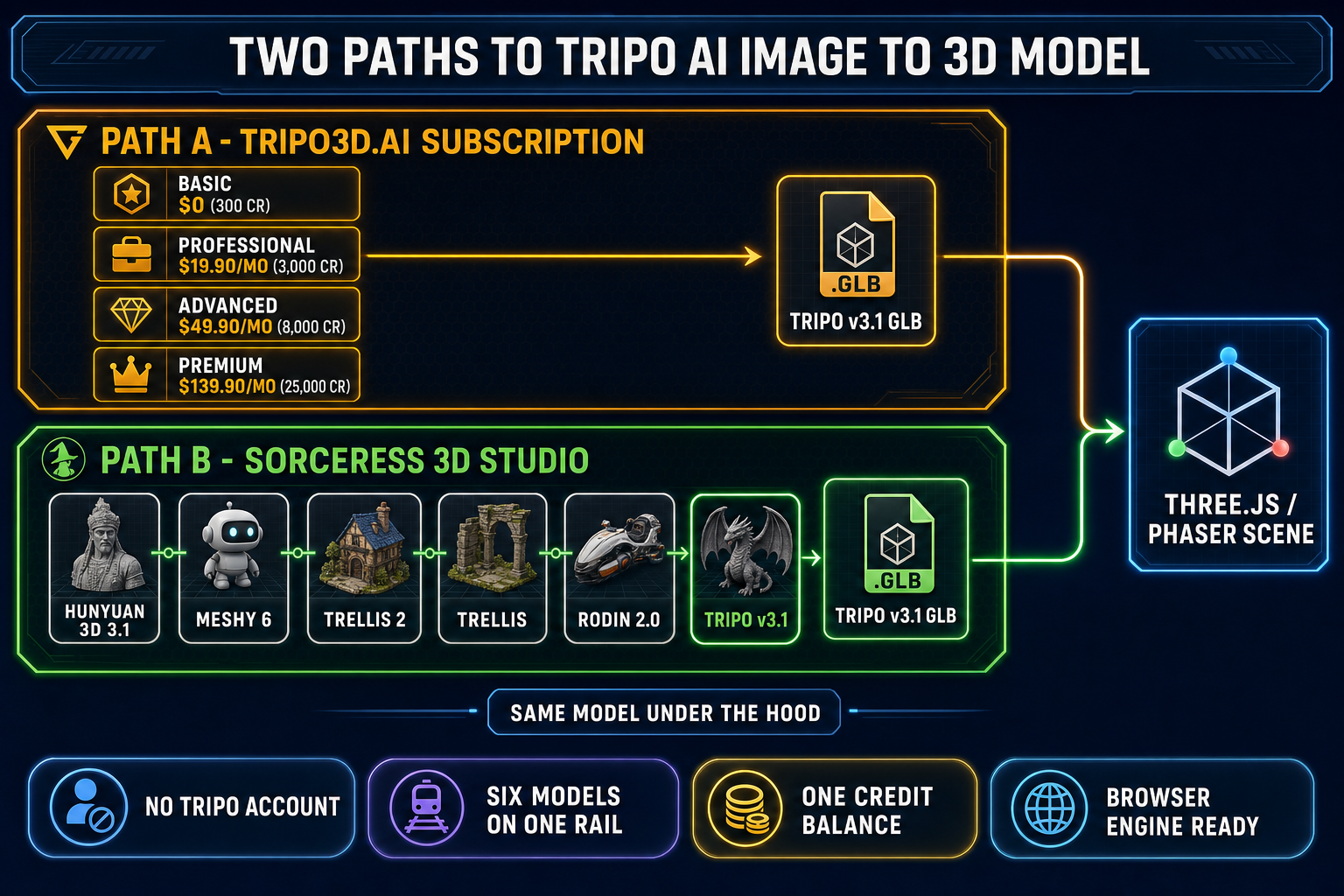
Path A is Tripo direct. Sign up at tripo3d.ai, pick a tier, get 300 / 3,000 / 8,000 / 25,000 monthly credits depending on plan, generate inside Tripo Studio’s web app. Free-tier outputs ship under a CC BY 4.0 license, which is fine for personal or learning work but not viable for commercial games — the Professional tier or higher is the practical minimum if you plan to sell the resulting product.

Path B is Sorceress 3D Studio. Sorceress runs Tripo v3.1 through Replicate’s public API surface, no separate Tripo account required. The model parameters are exposed in the Sorceress UI directly — the same texture, PBR, quad-mesh, geometry quality, face limit, auto size, texture alignment, and orientation knobs Tripo exposes on its own dashboard. The Sorceress credit cost for Tripo v3.1 image-to-3D is 30 credits without textures, 40 credits with textures (standard or HD), plus 5 credits if the quad-mesh option is enabled — up to 45 credits per generation, verified May 17, 2026 against THREED_MODELS['tripo-v3.1'].getCredits in the source.

The reason Path B exists is straightforward. Replicate hosts Tripo as a publicly callable model. Sorceress 3D Studio routes through Replicate, alongside five other 3D models, and surfaces them all in one browser tab on a single credit balance. The trade-off is real and worth naming. Tripo direct gives you a vendor-native UI tuned to Tripo alone, support that knows Tripo quirks, the latest features the same day they ship, and the Tripo-specific bridges into other tools like the Unreal DCC integration in H3.1. Sorceress 3D Studio gives you Tripo v3.1 plus five other models, a unified workflow that does not require a Tripo account, and a credit pool that also covers the rest of the Sorceress tool catalog. Pick by what you actually need: if Tripo is the one model your pipeline depends on, the tripo3d.ai subscription is the cleanest answer. If you want to compare Tripo v3.1 against Meshy 6, Hunyuan 3D 3.1, TRELLIS 2, TRELLIS, and Rodin 2.0 inside one tab, the Sorceress route is the lighter setup.

The five-step Tripo AI image to 3D model workflow (in your browser)

  1. Step 1 — open 3D Studio. Sorceress 3D Studio loads inside any modern browser, no install. The left panel is the model rail (six models). The center panel is the canvas where the input image and the resulting 3D preview render. The right panel is the parameter sheet for whichever model you select.
  2. Step 2 — upload your image. Drag a PNG or JPG onto the canvas. The input that produces the cleanest Tripo AI image to 3D model output is a single subject on a transparent or solid-color background, lit from a soft front-facing angle, no harsh sun shadows. Clean the input through BG Remover first if the original photo has a busy background — every visual conflict in the input shows up as geometric noise in the mesh.
  3. Step 3 — pick Tripo v3.1 from the model rail. The rail shows six options in this order: Hunyuan 3D 3.1 (the Sorceress default), Meshy 6, TRELLIS 2, TRELLIS, Rodin 2.0, and Tripo v3.1. Click Tripo v3.1. The right-panel parameter sheet swaps to Tripo’s settings.
  4. Step 4 — set the parameters that matter. Defaults are honest for most subjects. The four knobs worth touching: texture (HD is the default, switch to no if you only want geometry and will texture by hand), quad (enable for sculpting or subdivision pipelines, expect FBX output instead of GLB), geometry_quality (standard for game props, detailed for hero assets viewed at close range), and texture_alignment (original_image to match the input photo’s colors exactly, geometry to prioritize consistent texturing across the mesh).
  5. Step 5 — click Generate. Tripo v3.1 typically returns in 30 seconds to two minutes depending on Replicate queue depth — H3.1 is the high-detail version, not the speed-optimized v2.5 Turbo, so do not expect single-digit-second runs. The result lands as a downloadable GLB (or FBX if quad mesh was on) plus a real-time 3D preview rotating in the canvas. Drag the file into your engine project. That is the entire Tripo AI image to 3D model workflow in your browser, no tripo3d.ai account.
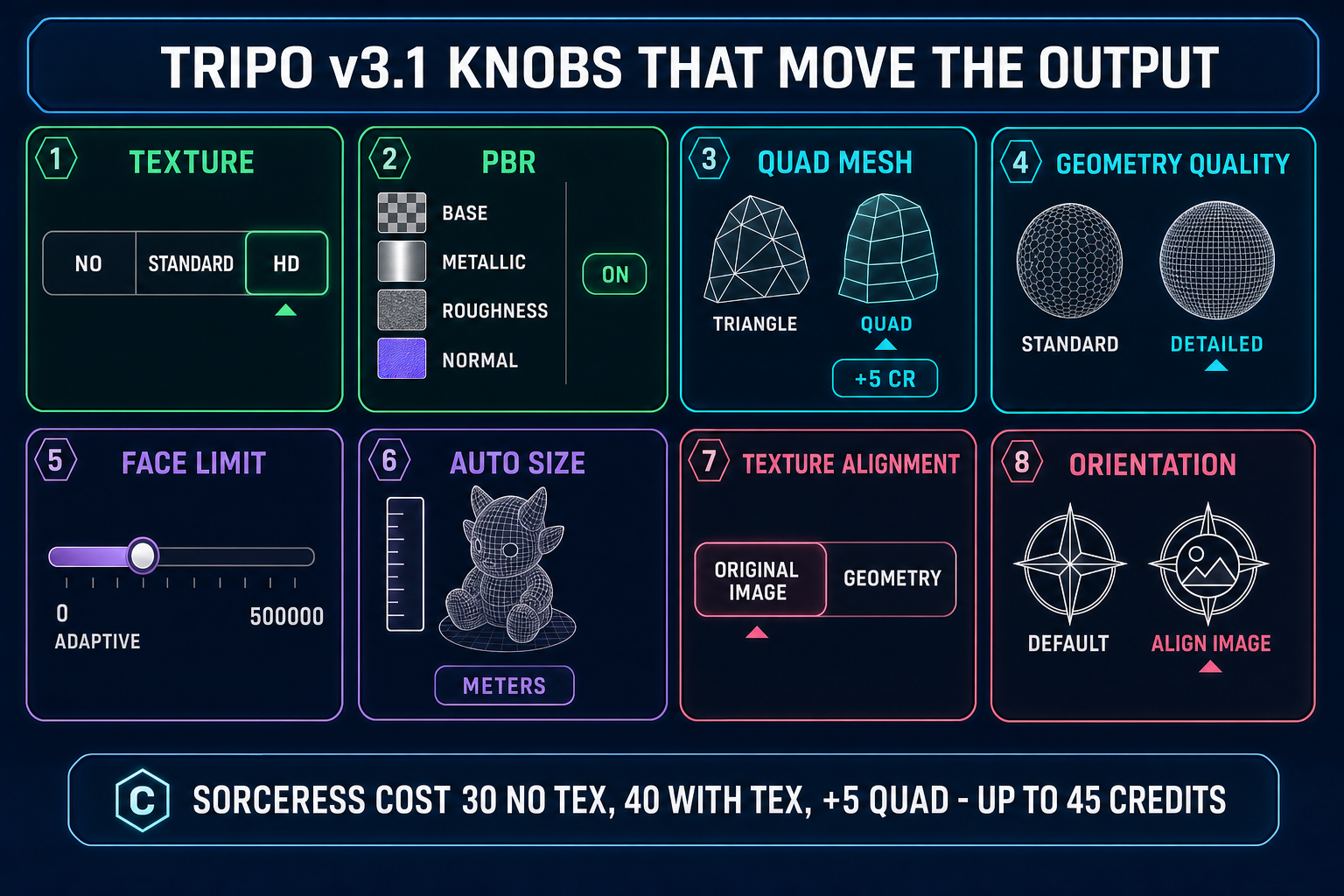
Tripo v3.1 settings panel infographic showing the eight knobs that matter for Tripo AI image to 3D model outputs - texture no standard HD, PBR on off, quad mesh option with +5 credit pill, geometry quality standard versus detailed, face limit slider 0 adaptive to 500K, auto size meters, texture alignment original image versus geometry, orientation default versus align image - each setting visualized as a stylized UI control on a dark navy background
The Tripo v3.1 parameter sheet inside 3D Studio. Eight knobs in total; only four matter for a typical game-asset run.

Tripo v3.1 knobs that matter for Tripo AI image to 3D model outputs

Verified May 17, 2026 against THREED_MODELS['tripo-v3.1'].params in the Sorceress source. Tripo’s parameter set is the most distinctive on the rail — the quad-mesh option, the texture_alignment knob, and the geometry_quality switch do not exist on any other 3D Studio model.

  • texture (no / standard / HD, default HD). no outputs a white geometry-only mesh at 30 credits. standard generates color textures at 40 credits. HD generates higher-resolution textures at the same 40 credits (Tripo’s upstream pricing tier is identical for standard and HD on v3.1). Pick HD by default; it is free relative to standard.
  • pbr (default off). Adds physically-based rendering materials (base color, metallic, normal, roughness). Worth turning on for any 3D scene that uses real lighting — which is most modern browser games.
  • quad (default off, +5 credits). The signature Tripo knob. Enables quadrilateral mesh topology instead of triangles. Forces FBX format output. Worth the surcharge for any pipeline that subdivides the mesh in Blender or sculpts in Maya — quads survive subdivision cleanly where triangles fracture into asymmetric polygons. No other Sorceress 3D Studio model emits quads natively.
  • geometry_quality (standard / detailed, default standard). The v3.1-only knob. standard for game props and background characters. detailed maximizes fine surface detail at the cost of generation time — worth it for hero assets, marketing renders, and cutscene meshes where the camera pushes in close.
  • face_limit (0 adaptive, 500 to 500,000, default 0). Zero means Tripo picks the best polygon count for the subject. Cap it lower (50,000 or below) for web or mobile targets, or leave at 0 and decimate afterwards using Sorceress mesh-optimization tools.
  • auto_size (default off). Automatically scales the model to real-world dimensions in meters. Useful for AR and architectural workflows; ignorable for most game asset work where the engine handles scale.
  • texture_alignment (original_image / geometry, default original_image). The other distinctive Tripo knob. original_image prioritizes matching the input photo’s colors exactly — the right pick when the photo is the visual reference. geometry prioritizes consistent texturing across the mesh — the right pick when the input is rough or low-resolution and the geometry should drive the texture decisions.
  • orientation (default / align_image, default default). default leaves the model in Tripo’s standard orientation. align_image auto-rotates the model to match the input image angle, useful when the input photo shows a three-quarter view rather than a straight-on portrait.

When Tripo v3.1 is the wrong pick — the other five models in 3D Studio

Sorceress 3D Studio ships six image-to-3D models. Tripo v3.1 is excellent at what it is excellent at, and a poor fit for the rest. Here is the honest scorecard, verified May 17, 2026 against THREED_MODELS and THREED_MODEL_ORDER:

ModelCost (Sorceress credits)Best at
Hunyuan 3D 3.125Default pick. Up to 1.5M face count, PBR on by default, fast.
Meshy 650–88Hard-surface props (weapons, mechanical), multi-image input (front + back + side), low-poly stylized mode.
TRELLIS 235–45Microsoft Research model. Up to 4K texture output, remesh by default.
TRELLIS8Cheapest model on the rail. Fast iteration when you do not need final quality.
Rodin 2.050Multi-format export (GLB, FBX, OBJ, USDZ, STL). 3D printing.
Tripo v3.130–45Quad mesh, texture alignment to input image, detailed geometry preset for hero assets.

The recommended default in 3D Studio is Hunyuan 3D 3.1 (per the RECOMMENDED_MODELS set in the source). It is the cheapest non-trivial model on the rail, ships PBR by default, and generates faster than Tripo v3.1 on most subjects. Tripo v3.1 wins specifically when you need quad-mesh topology for sculpting, texture alignment to match the input image’s colors exactly, or the Detailed geometry preset for hero assets viewed at close range. For a generic character or creature with no quad-mesh requirement, Hunyuan handles the job at less than the credit cost of Tripo without textures.

For 3D-print-ready output, Rodin 2.0 is the cleanest pick because it exports STL natively — see the image to 3D print pipeline for the full workflow. For the cheapest preview pass — iterating on a concept before committing the final-quality run — TRELLIS at 8 credits is the right tool. For hard-surface mechanical props, the Meshy 6 path handles sharp creases better than any other model. The model picker is the point: Tripo AI image to 3D model is one model on the rail, not the whole rail.

Side-by-side comparison diagram showing two paths to Tripo AI image to 3D model - left lane labeled tripo3d.ai subscription path with pricing tiers Basic free 300 credits Professional $19.90 Advanced $49.90 Premium $139.90, right lane labeled Sorceress 3D Studio path with the six-model rail Hunyuan 3D 3.1 Meshy 6 TRELLIS 2 TRELLIS Rodin 2.0 Tripo v3.1 highlighted - both paths converging on a GLB file output ready for Three.js
Two routes to a Tripo v3.1 GLB. Same model under the hood; different surface, different pricing model, different number of neighbouring models on the rail.

Drop the Tripo GLB into a Three.js scene

The default output of Tripo AI image to 3D model is a glTF 2.0 binary file. Three.js loads it with GLTFLoader. Verified against the Three.js r184 release (April 2026):

import * as THREE from 'three';
import { GLTFLoader } from 'three/examples/jsm/loaders/GLTFLoader.js';

const scene = new THREE.Scene();
const loader = new GLTFLoader();

loader.load('/assets/tripo-output.glb', (gltf) => {
  scene.add(gltf.scene);
  // Tripo v3.1 PBR maps load automatically when pbr was on
  // at generation time. No extra material setup required.
});

That is the entire integration. The GLB ships with mesh, UV maps, and material textures embedded — no relinking required. If you generated with the quad-mesh option turned on, Tripo emits FBX instead of GLB — swap GLTFLoader for FBXLoader (also part of three/examples/jsm/loaders) and the rest of the integration is identical. Phaser 4 handles 3D scenes through Three.js under the hood; the same loader code works inside a Phaser 3D scene. For complete browser-game projects that consume image-to-3D outputs, see the full image to 3D model pipeline — generate, rig, animate.

For rigged Tripo outputs, the Sorceress auto-rigging tool takes the GLB and emits a skeleton-bound version ready for Mixamo-style animation libraries. That two-tool chain — Tripo v3.1 generation, then auto-rigging — replaces the traditional Blender skeleton pass entirely.

Five mistakes that ruin Tripo AI image to 3D model outputs

  1. Busy backgrounds in the input image. Tripo v3.1 reads everything in the photo. A character on a forest background returns geometric noise around the silhouette. Cut the background out with BG Remover before uploading — the single highest-leverage one-click cleanup.
  2. Enabling quad mesh and expecting GLB output. Tripo’s quad-mesh path forces FBX format. If your engine pipeline assumes GLB end-to-end (most browser-game Three.js setups do), enabling the quad knob silently changes the file extension and breaks the loader. Either swap to FBXLoader, or leave quad mesh off and accept triangle topology.
  3. Using standard texture when HD costs the same. Tripo’s upstream pricing tier on v3.1 is identical for standard and HD textures — both are 40 credits in Sorceress. Picking standard is leaving texture resolution on the table for no cost saving.
  4. Setting face_limit very low to get a low-poly look. Counterintuitive but real: capping face count aggressively at generation time degrades texture quality because the UV unwrap has less surface to land on. Generate at the default adaptive face limit, then decimate afterwards using Sorceress mesh-optimization tools (or pick geometry_quality=standard instead, which produces a cleaner low-density mesh by design).
  5. Picking texture_alignment=geometry when the input photo is the visual reference. The geometry mode prioritizes consistent texturing across the mesh, which is the right call when the input is rough or sketchy. For a clean reference photo where the colors matter, original_image is the better pick — it preserves the exact palette of the input rather than averaging across the mesh surface.

The verdict

Tripo AI image to 3D model in May 2026 means one specific thing: take an image, run it through Tripo v3.1 (H3.1, the HD model), get a textured GLB or quad-mesh FBX back. The model is excellent at high-density geometry, hero-asset quality at close camera ranges, and the Tripo-specific knobs — quad mesh, texture alignment, detailed geometry — that nothing else on the Sorceress rail matches. The honest framing is that Tripo v3.1 is one of six image-to-3D models in Sorceress 3D Studio, routable in your browser without a tripo3d.ai subscription, on a credit pool that also covers free 3D model generation, image generation, and the rest of the Sorceress catalog. Pick Tripo v3.1 when its strengths match your asset; pick Hunyuan 3D 3.1 by default; pick Meshy 6 for hard-surface props; pick Rodin 2.0 when you need multi-format export; pick TRELLIS 2 when you need a 4K texture; pick TRELLIS when you need to iterate cheaply. The model picker is the answer to “which AI for image to 3D” — not the vendor.

Frequently Asked Questions

What is Tripo AI image to 3D model and what does it actually output?

Tripo AI image to 3D model is the workflow that takes a single image — a photograph, an AI-generated character render, or a hand-drawn concept — and returns a textured 3D mesh. The default output is a glTF 2.0 binary file (.glb) with mesh, UV maps, and material textures embedded into a single drag-and-droppable asset. With the quad-mesh option enabled, Tripo v3.1 emits FBX instead so the quadrilateral topology survives the export. It is not photogrammetry, which needs sixty or more photos taken from every angle of a real physical object. Tripo AI image to 3D model infers the back of the mesh from the front using a high-density geometric reconstruction model trained on millions of meshes. The mesh ships UV-unwrapped at up to 500,000 faces, with optional PBR maps (base color, metallic, roughness, normal) baked in, ready to drop into Three.js, Phaser, Godot, Unity, or Unreal without a relinking step.

Do I need a Tripo account to use Tripo AI image to 3D model?

No. There are two paths. Path A is tripo3d.ai direct — sign up, pick a tier (Basic free at 300 credits per month, Professional $19.90 per month, Advanced $49.90 per month, or Premium $139.90 per month at list pricing, with 40 percent off on the annual plan), and use the Tripo Studio web app. Path B is Sorceress 3D Studio, which routes Tripo v3.1 through Replicate without a separate Tripo account. The 3D Studio UI exposes the same Tripo v3.1 parameters (texture quality, PBR, quad mesh, geometry quality, face limit, auto size, texture alignment, orientation) and bills against your existing Sorceress credits. Verified May 17, 2026 against src/lib/threed-models.ts and the live tripo3d.ai pricing page. Pick path A if Tripo is the only 3D model your pipeline depends on. Pick path B if you want Tripo v3.1 alongside Hunyuan 3D 3.1, Meshy 6, TRELLIS 2, TRELLIS, and Rodin 2.0 on a single credit balance.

What is Tripo v3.1 (H3.1) and how is it different from earlier Tripo models?

Tripo v3.1 — also branded H3.1 (the HD model) — is the high-detail Tripo release positioned for hero assets. The named upgrades over v2.5 (Turbo, speed-optimized) and v3.0 (sharper structure) are higher geometric density, sharper edges, cleaner silhouettes that hold up under close inspection, and PBR-ready materials. Tripo positions the model for asset reuse across gameplay, marketing visuals, storefronts, and cinematic shots from a single generation. In Sorceress 3D Studio, Tripo v3.1 is routed as model_version v3.1-20260211 verified in src/lib/threed-models.ts. It inherits the Tripo Turbo pricing tier upstream, which Sorceress surfaces at 30 credits without textures or 40 credits with textures (HD or standard), plus 5 credits if the quad-mesh option is enabled.

How much does Tripo v3.1 image-to-3D cost in Sorceress 3D Studio?

Verified May 17, 2026 against THREED_MODELS['tripo-v3.1'].getCredits in src/lib/threed-models.ts: 30 credits when texture is set to no (geometry only), 40 credits when texture is set to standard or HD. The quad-mesh option adds 5 credits because Tripo charges an upstream surcharge for quad topology, bringing the maximum to 45 credits per generation. The HD texture preset costs the same as standard — the upstream Tripo pricing tier is identical for both. For comparison, Hunyuan 3D 3.1 (the recommended default in 3D Studio) is 25 credits flat, Meshy 6 is 50 to 88 credits, TRELLIS is 8 credits, TRELLIS 2 is 35 to 45 credits depending on resolution, and Rodin 2.0 is 50 credits. Tripo v3.1 lands in the middle of the pack on price and produces the cleanest quad-mesh output on the rail.

How do I drop a Tripo AI image to 3D model into a Three.js scene?

Three.js loads the GLB with GLTFLoader. Verified against the Three.js r184 release (April 16, 2026): import * as THREE from 'three'; import { GLTFLoader } from 'three/examples/jsm/loaders/GLTFLoader.js'; const scene = new THREE.Scene(); const loader = new GLTFLoader(); loader.load('/assets/tripo-output.glb', (gltf) => { scene.add(gltf.scene); }); That is the entire integration. The GLB ships with mesh, UV maps, and material textures embedded — no relinking required. If PBR was on at generation time, the PBR maps load automatically. If you generated with the quad-mesh option, the output is FBX instead of GLB — swap GLTFLoader for FBXLoader (also part of three/examples/jsm/loaders). Phaser 4 handles 3D scenes through Three.js under the hood, so the same loader code works inside a Phaser 3D scene.

When is Tripo v3.1 the right pick for Tripo AI image to 3D model, and when should I use another model?

Tripo v3.1 wins specifically when you need quad-mesh topology for sculpting or subdivision pipelines (no other model on the Sorceress rail emits true quads natively), when you need texture alignment to match the input image colors exactly (the texture_alignment knob is Tripo-only), or when you need the Detailed geometry_quality preset for hero assets viewed at close range. For everything else, the other five models in 3D Studio are often a better fit. Use Hunyuan 3D 3.1 (the recommended default in the source) for generic characters and creatures — 25 credits, PBR on by default, fast. Use Meshy 6 for hard-surface props with sharp creases. Use TRELLIS 2 when you need a 4K texture map. Use TRELLIS at 8 credits for cheap iteration. Use Rodin 2.0 when you need multi-format export including STL for 3D printing. The model picker is the point: Tripo AI image to 3D model is one model on a six-model rail, not the whole rail.

Sources

  1. glTF — Wikipedia
  2. glTF 2.0 specification — Khronos
  3. Polygon mesh (quad topology) — Wikipedia
  4. Physically based rendering — Wikipedia
  5. UV mapping — Wikipedia
  6. Three.js documentation
Written by Arron R.·2,903 words·13 min read

Related posts