Sample a Sound Effects Generator AI (Browser SFX Library)

By Arron R.14 min read
A 2026 sound effects generator AI runs three browser rails: prompt-to-MP3 via Suno Sounds V5.5 (3 credits per render), zero-credit slice and loop in SFX Editor,

A sound effects generator AI in 2026 is the cheapest way for an indie team to ship a browser SFX library that does not sound like every other royalty-free pack on Itch. The category collapsed three historical bottlenecks — the licensing search through stock libraries, the Foley session that few indie teams can afford, and the digital signal processing pass that bends a stock clip toward the in-world texture — into a single browser tab. The honest 2026 pipeline runs three rails: a prompt-to-MP3 generation rail, a free in-browser slice-and-loop editor, and a procedural code-driven rail for the sounds prompts cannot land. Sorceress ships all three on one credit pool: SFX Gen at 3 credits per render through Suno Sounds V5_5, the zero-cost SFX Editor, and Sound Studio at 1 credit per code-driven sound. This guide samples each rail in order and builds a complete 60-clip indie SFX library, with every credit cost and model name re-verified against the live source on June 28, 2026.
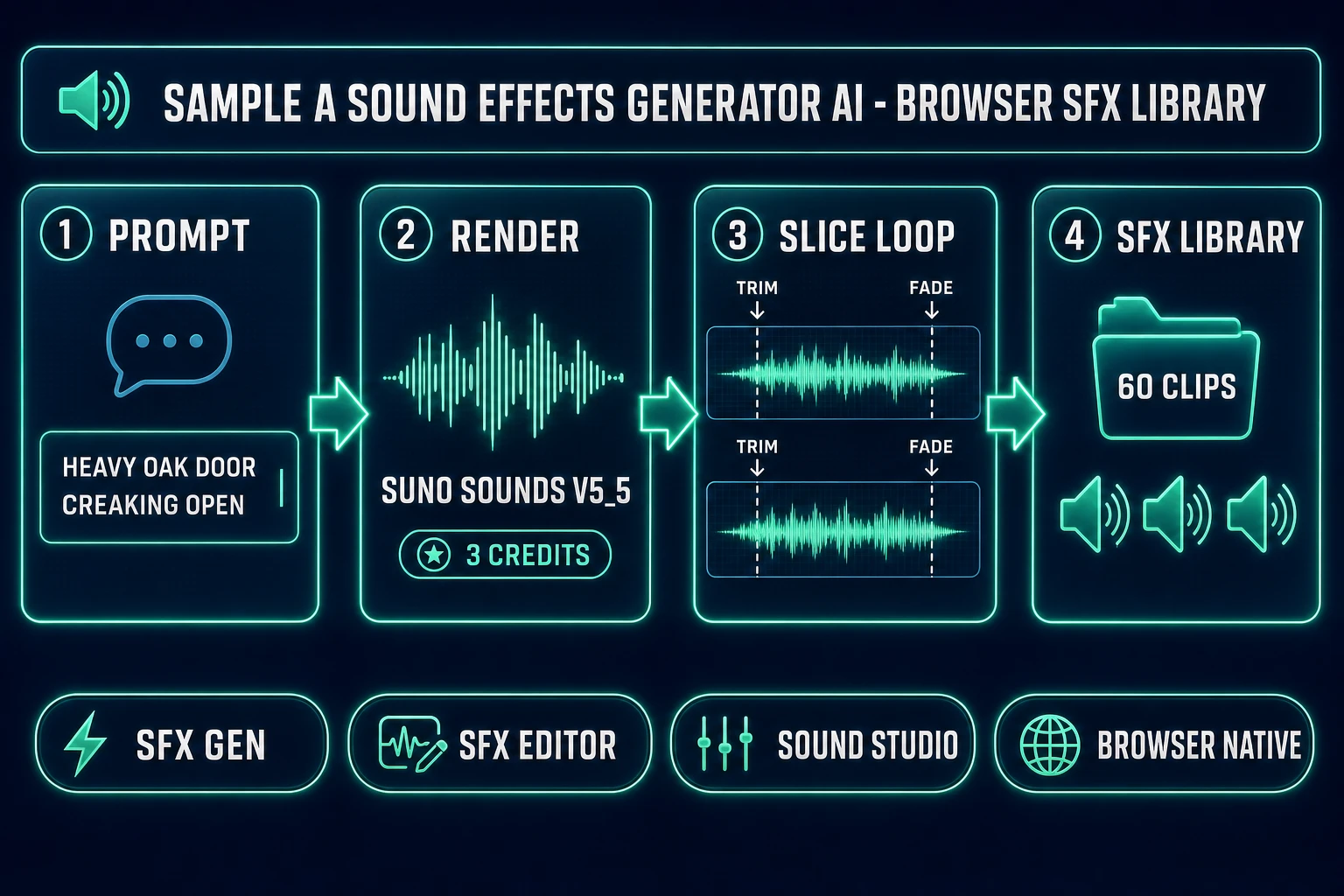
Sound effects generator AI pipeline diagram for indie games - prompt SFX Gen Suno Sounds V5_5 SFX Editor slice loop browser SFX library output
A 2026 sound effects generator AI pipeline runs four steps in one Sorceress tab — prompt, render, slice and loop, deliver to the browser SFX library — with verified credit costs from src/app/sfx-gen/page.tsx on June 28, 2026.

What a sound effects generator AI actually means for indie games in 2026

The category covers any tool that takes a short English prompt and renders a non-musical audio clip suitable for an in-engine event — a footstep, a sword unsheathing, a UI confirmation, a creature growl, an ambient room tone. The technical primitive sits between two well-established disciplines: sound effect design, which has been a recorded craft since the Jack Foley era at Universal in the 1920s, and generative artificial intelligence, which produces audio output that resembles training data without copying it. A modern sound effects generator AI routes the prompt through an audio diffusion model trained on licensed and public-domain recordings.

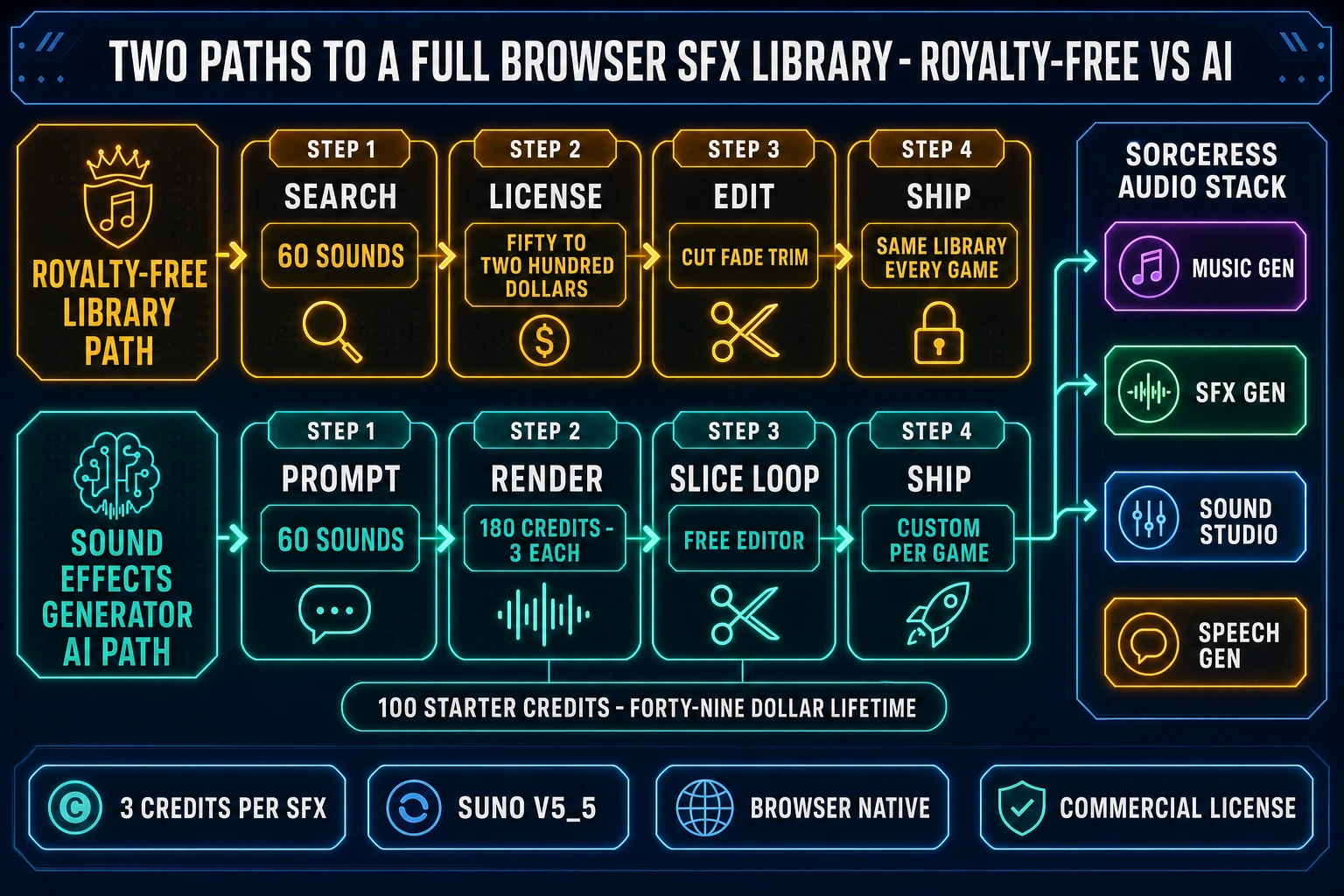
For an indie team the practical impact is brutal arithmetic. A 60-clip SFX library — the rough minimum for a small action or platformer build — used to mean three to five days of royalty-free library search, an optional one-day Foley session if the budget allowed, and an afternoon of audio editing. The same 60-clip library through Sorceress SFX Gen costs 180 credits (about $1.80 on the Starter pack), renders in under thirty minutes of prompt iteration, and produces clips that are custom to the game rather than recycled across every other small studio shipping that month.

The three production-ready output formats: MP3 for shipping size (the default from SFX Gen via Suno Sounds V5_5), WAV for lossless intermediate work in the editor, and code blueprints from Sound Studio that compile to in-browser oscillator chains for retro and chiptune textures.

The three SFX library layers every indie game ships

Before picking a sound effects generator AI, decide what kind of audio belongs in the library. The indie SFX library splits cleanly into three layers, and a different rail handles each one well:

  • UI layer. Menu chimes, button confirmations, pause stings, dialogue advance bleeps, achievement unlocks. These are short (under 600 ms), tonal, often stylised. They have to be consistent across the whole game so the player learns their meaning. Pick: SFX Gen for natural-tone chimes, Sound Studio for synthetic 8-bit-style bleeps.
  • In-world layer. Footsteps, weapon hits, environmental ambience, NPC barks, creature voices, vehicle engines, magic spells. The largest layer by clip count (a typical indie ships 40 to 80 in-world SFX), it needs variation across surfaces and materials, and it has to sit in the mix under music and dialogue. Pick: SFX Gen with prompt patterns that name source, action, and room tone.
  • Sting layer. Cutscene impacts, boss-fight transitions, story-beat reveals, level-complete cues. These are longer (2 to 8 seconds), high-impact, and often combine multiple textures. Pick: SFX Gen for the primary texture layered with Sound Studio for synthetic shimmer or sub-bass.

The Sorceress credit pool means you can mix layers from all three rails on the same project without juggling separate subscriptions. A 60-clip indie library might be 40 SFX Gen renders (120 credits), 15 Sound Studio renders (15 credits), and five SFX Editor multi-layer mixes (zero credits) — a total of 135 credits, well under the 100-credit starter allowance plus a single $10 Starter top-up.
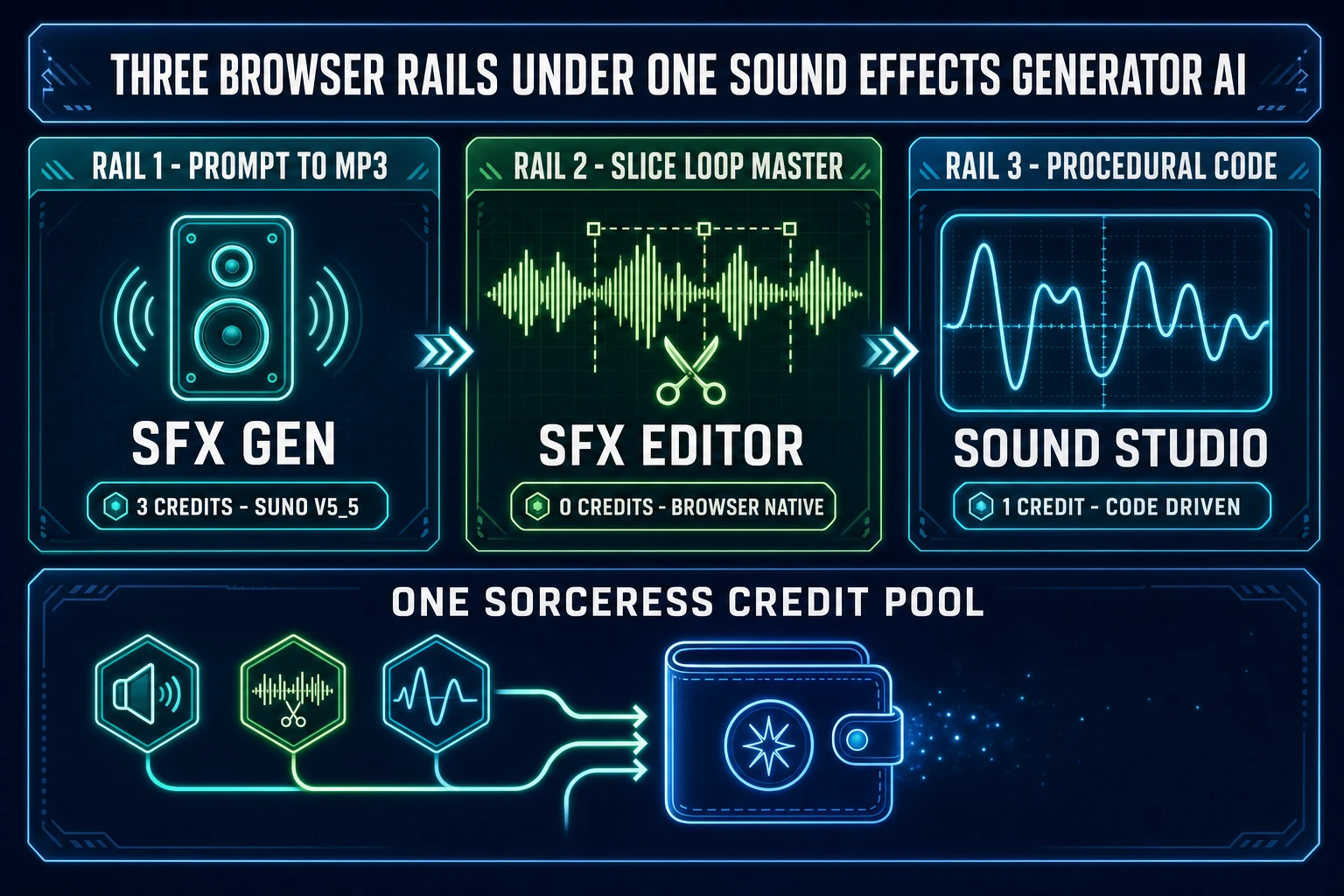
Three browser rails under one sound effects generator AI - SFX Gen prompt to MP3 3 credits, SFX Editor slice loop master 0 credits, Sound Studio procedural code 1 credit on one Sorceress credit pool
A 2026 browser SFX library runs three rails under one sound effects generator AI — prompt-to-MP3 via SFX Gen, slice-loop-master in the free SFX Editor, procedural code in Sound Studio — all on the same Sorceress credit pool.

The 2026 sound effects generator AI free-tier landscape — honest read

Free is a slippery word in this category, and the three contenders most teams compare have three different shapes of free, each with a different catch.

  • ElevenLabs Sound Effects free tier. 10,000 credits per month, MP3 plus WAV at 48 kHz, 30-second per-clip cap, default cost 200 credits per generation (four variations per submission) on the website or 50 credits per second when duration is specified, re-verified against the official ElevenLabs pricing page on June 28, 2026. The catch: the free tier outputs require attribution and lack commercial usage rights. The 10K monthly free credits cover roughly 50 default generations — enough for prototype work, not enough for a full game pack, and not legally shippable in a paid build without upgrading to the Starter tier at $5 per month.
  • Adobe Firefly Sound Effect Generator. Free trial credits, sound-effect generation gated to the paid Standard plan and above, 4K-quality premium credits on the Pro tier at $19.99 per month, full commercial license on every paid tier, trained on licensed and public-domain content per the official Firefly product page (re-verified June 28, 2026). The catch: the free trial credits exhaust within a single session of real production work, and the editor flow lives inside Adobe Express or Premiere Pro rather than a dedicated SFX tab.
  • Sorceress SFX Gen. 100 starter credits at sign-up (about 33 SFX Gen renders), 3 credits per generation thereafter, full commercial license on the starter allowance and on every paid tier, output drops directly into the free in-browser SFX Editor for trim, loop, and master. Verified against src/app/sfx-gen/page.tsx line 24 (SFX_CREDIT_COST = 3) and src/app/plans/page.tsx on June 28, 2026. The 100 starter credits plus a single $10 Starter top-up (1,000 additional credits) ships the full 60-clip indie SFX library with budget to spare.

The cleanest path for any commercial indie game ship: start at the Sorceress 100-credit allowance to render the first 33 sounds, top up at $10 per 1,000 credits as needed, slice and loop every clip in the free SFX Editor, and fall back to Sound Studio for the synthetic-shaped sounds that Suno cannot land. Two related Sorceress walkthroughs cover earlier slices of this workflow: the SFX generator pipeline walkthrough covers multi-clip batch generation, and the video-cut sync workflow covers timing-locked SFX for cutscenes and trailers.

Step 1 — prompt the SFX Gen rail (Suno Sounds V5_5 in one tab)

The core generation step of a 2026 sound effects generator AI is the prompt-to-MP3 call, and Sorceress SFX Gen handles it through a single API. The verified spec on June 28, 2026 against src/app/api/sfx-gen/route.ts: model V5_5 (Suno Sounds V5_5 via the KIE audio provider on the /api/v1/generate/sounds endpoint), flat 3 credits per generation charged only on success, soundLoop flag supported for seamless ambience, prompt cap at 500 characters with whitespace-aware truncation to the last word boundary.

The five-line prompt pattern that produces shippable game SFX consistently:

  1. Source material. Name the physical thing making the sound: wood, metal, glass, water, fabric, stone. Specific materials beat generic categories. “Heavy oak door” lands better than “door.”
  2. Action verb. Slam, creak, scrape, swing, ignite, shatter, splash. Avoid abstract verbs like “trigger” or “activate” — they confuse the diffusion model.
  3. Spatial framing. Close-mic, distant, reverberant, indoor hallway, outdoor field, small bathroom, large warehouse. Reverb and tail length come from this line.
  4. Duration cue. Brief, sustained, three seconds, one second. Suno responds to numeric duration cues better than to qualitative ones.
  5. Style tag. Realistic, cinematic, retro 8-bit, sci-fi, horror, fantasy. Optional but strongly steers tonal balance.

Worked prompts that ship clean takes in production through SFX Gen:

  • “Heavy oak door creaking open with a slow groan, close-mic, two seconds, realistic fantasy game.”
  • “Steel sword unsheathed with a bright ring, close-mic, 1.5 seconds, cinematic action.”
  • “Low fantasy menu chime with a soft bell tail, no reverb, 0.8 seconds, modern app UI.”
  • “Footstep on wet stone with subtle reverb, close-mic, 0.4 seconds, realistic.”
  • “Magical sparkle ascending arpeggio bright, no reverb, one second, fantasy spell.”
  • “Heavy enemy footstep on concrete with low rumble, close-mic, 0.6 seconds, horror.”

Prompts that fail consistently: abstract (“a sad sound,” “a happy chime”), genre-only (“8-bit retro game,” “fantasy RPG”), or longer than 500 characters per the V5_5 API limit verified on June 28, 2026. The 500-character cap is enforced source-side in src/app/api/sfx-gen/route.ts with a whitespace-aware truncation — long prompts are silently shortened to the last word boundary under the cap, never split mid-word.

The loop:true flag on the SFX Gen request payload returns a seamlessly tileable variant of the same prompt, ideal for the ambient beds that every game needs in the SFX library: rain on canvas tent, fire crackling, wind through pine trees, distant tavern crowd, machinery hum, ocean shoreline. Set the flag once at request time rather than trying to crossfade a non-looping clip in the editor — the source-side loop generation produces phase-coherent endpoints that no post-processing pass can match.
Step 2 — slice and loop in the browser SFX Editor

A raw clip from any sound effects generator AI is rarely ready to drop into the engine. It needs trim, fade, normalize, and often a loop-trim pass to set a seamless tile point. Sorceress SFX Editor handles the entire post-render pass in the browser at zero credits, verified against the source on June 28, 2026: the editor runs entirely client-side on the Web Audio API plus the lamejs MP3 encoder, accepts MP3 or WAV input from any source (SFX Gen output, Sound Studio output, third-party export, or a field recording you uploaded), and never sends the audio data off the browser tab during edits.

The five-pass workflow that every shipping clip in the SFX library should go through:

  1. Trim. Drag the head and tail handles on the waveform to remove leading and trailing silence. Snap-to-zero-crossing eliminates click artifacts at the trim points. The Suno V5_5 model frequently produces 30 to 200 ms of dead air at the start of each clip — trim it before anything else.
  2. Fade. A 5 to 15 ms fade-in and a 50 to 200 ms fade-out removes pop transients at the cut. Critical for SFX that fire on rapid in-engine events (footsteps, weapon swings, projectile impacts) where the player will hear them in quick succession.
  3. Normalize. Set the peak level to about minus 6 dB so the in-engine mixer has headroom to combine multiple SFX layers without clipping. Normalising to 0 dB peak is the most common indie audio mistake — it leaves no room for the music or dialogue layers to sit on top.
  4. Loop-trim. For ambient beds, find the zero-crossing nearest the target loop point in the waveform and trim to that sample. Combined with the source-side loop flag on the SFX Gen call, this produces seamless tile points that hold up over minutes of continuous playback.
  5. Export. MP3 at 320 kbps via the lamejs encoder for shipping size, WAV at the native sample rate for lossless intermediate work that will be re-encoded downstream by the game engine.

The honest rule: every shipping clip gets all five passes before drop-in. The whole sequence runs in under sixty seconds per clip once the workflow becomes muscle memory. The same editor handles voice clips from Speech Gen and music stems from Music Gen on the same Sorceress credit pool, so the entire indie audio post pipeline lives behind a single set of tabs.

Step 3 — fall back to Sound Studio for synthetic textures Suno cannot land

A sound effects generator AI built on a diffusion model is great at acoustic textures — foley, ambient, organic sounds — and brittle at synthetic textures — 8-bit chiptune blips, retro lasers, pure FM tones, sub-bass drops, parameterised whooshes with exact target durations. The brittleness is structural: diffusion models learn the distribution of their training data, and most training corpora over-represent organic recordings.

For the synthetic layer of the SFX library, Sorceress Sound Studio ships a code-driven rail. Verified against src/app/sound-creator/page.tsx on June 28, 2026: the tool costs 1 credit per generation (SOUND_CREDIT_COST = 1), uses a four-model picker for the code-writing step — GPT-5 Nano (default), Gemini 2.5 Flash, Gemini 3 Pro, and Claude Opus 4.6 — and produces JavaScript code that drives the Web Audio API at playback time. The output is a parameterisable blueprint: oscillator chains, noise generators, ADSR envelopes, biquad filters, gain stages. You can re-render the same blueprint at a different pitch, duration, or envelope shape without spending another credit.

The decision tree for SFX Gen vs Sound Studio on any given clip:

  • Pick SFX Gen. Source material is physical (wood, metal, water, fabric). Style is realistic, cinematic, or fantasy with acoustic textures. The clip will sit in the in-world layer or as a cutscene sting. Three credits, MP3 output, ready in roughly 20 to 40 seconds.
  • Pick Sound Studio. Source material is synthetic (8-bit, retro, FM synth, pure waveform). Style is stylised, abstract, or chiptune. The clip needs exact duration (a 180 ms whoosh that has to land on frame X). One credit, parameterisable code output, re-renderable at different parameters for free.
  • Pick both, layered. Sting-layer cutscene impact where the textural body comes from SFX Gen and the synthetic shimmer or sub-bass comes from Sound Studio. Mix in the SFX Editor at zero credits. Four credits total for a sting that no royalty-free library has.

Step 4 — wire the SFX library into the rest of the audio stack

A complete indie game audio stack ships four layers, and a sound effects generator AI owns one of them. The other three layers live in the same Sorceress credit pool:

  • Underscore layer. Looping background music. Sorceress Music Gen returns instrumental cues from a text prompt, sharing the credit pool with SFX Gen. Three to five generations cover the full music bed of a small indie game.
  • SFX layer. Every fired in-engine event. SFX Gen at 3 credits per generation for foley and acoustic textures, Sound Studio at 1 credit for procedural and synthetic textures. 60 to 100 clips for a typical indie SFX library.
  • Voice layer. NPC dialogue, narration, optional voice-cloned protagonist. Sorceress Speech Gen handles short utterances on the same pool, ideal for vendor barks and quest hooks.
  • Post layer. Per-clip and per-stem editing. SFX Editor at zero credits for every clip from every rail above — trim, fade, normalize, loop, EQ, reverb, master.

The complete four-layer stack for a small indie game (60 SFX clips, four music cues, 50 short voice lines) fits inside a single $10 Starter credit pack with the 100-credit signup allowance and leaves plenty of room for iteration. The $49 Lifetime tier verified against src/app/plans/page.tsx on June 28, 2026 unlocks the same flat credit-purchase rate forever without a recurring subscription.

Two paths to a full browser SFX library - royalty-free library path with search license edit ship versus sound effects generator AI path with prompt render slice loop ship to game
Two paths to a full browser SFX library — the royalty-free path costs $50 to $200 and ships a fixed catalogue every other small studio has, while the sound effects generator AI path costs 180 credits (about $1.80) and ships a custom library per game.

Pitfalls and pro moves for a 2026 SFX library workflow

Seven short rules that separate a polished browser SFX library from a budget-burn loop:

  1. Iterate prompts at short duration first. Generate at one to two seconds to lock the prompt shape, then re-render at the final length once the prompt converges. SFX Gen charges the same 3 credits for a 1-second clip and a 10-second clip — iterating long is wasted budget.
  2. Set the loop flag at request time, not in post. The source-side loop generation produces phase-coherent endpoints that no editor crossfade can match. Critical for ambient beds that play for minutes at a time.
  3. Trim and fade before drop-in. Browser-native zero-cross trimming in the SFX Editor is faster and more accurate than the same cleanup inside a desktop DAW. Never drop a raw SFX Gen clip directly into the engine.
  4. Normalize to minus 6 dB peak, never to 0. Leave 6 dB of headroom for the in-engine mixer to combine multiple SFX layers, music, and dialogue without clipping.
  5. EQ before reverb. Fix the tonal balance of the raw clip first, then add space. Reverb on a muddy clip makes it muddier; reverb on a clean clip makes it sit in the mix.
  6. Layer organic and synthetic for stings. A glass-shatter clip from SFX Gen layered with a high-pitched synth shimmer from Sound Studio reads more cinematic than either alone. Use both rails on the same sting when the visual deserves it.
  7. Store the license confirmation alongside the asset folder. On the day you publish the game build, screenshot the Sorceress plan page and store it next to the SFX folder. The 2026 audio-licensing landscape is moving fast; the snapshot is your audit trail.

The verdict on a sound effects generator AI for indie games in 2026

A 2026 sound effects generator AI is no longer optional infrastructure for indie game audio — it is the default rail. The royalty-free library path costs $50 to $200, ships a fixed catalogue every other small studio also has access to, and forces you to edit and re-cut stock clips to disguise their origin. The AI rail costs about $1.80 in credits for a 60-clip library, ships custom textures per game, and leaves the heavy editing and re-cutting work to the source-side prompt iteration step where it belongs.

Sorceress wires the rail into a single browser tab on a single credit pool. SFX Gen at 3 credits per render handles the prompt-to-MP3 step through Suno Sounds V5_5. SFX Editor at zero credits handles trim, loop, fade, normalize, and export across every clip in the library. Sound Studio at 1 credit per code-driven sound handles the synthetic layer Suno cannot land. Music Gen and Speech Gen cover the underscore and voice layers on the same pool. New accounts pick up 100 starter credits at sign-up — enough to render the first 33 SFX before spending a paid credit — and the $49 Lifetime tier unlocks the same flat credit-purchase rate forever without a recurring subscription.

Every credit cost, model name, and feature flag in this guide was re-verified on June 28, 2026 against the live source: src/app/sfx-gen/page.tsx (SFX_CREDIT_COST = 3), src/app/api/sfx-gen/route.ts (model V5_5, 500-character prompt cap with whitespace-aware truncation, soundLoop flag), src/app/sound-creator/page.tsx (SOUND_CREDIT_COST = 1, four-model picker), and src/app/plans/page.tsx (Lifetime $49, Starter $10 / 1,000 credits). The companion SFX pipeline walkthrough covers batch generation patterns, and the video-cut sync workflow covers timing-locked SFX for cutscenes and trailers. Sign in for the 100 starter credits, sample a heavy oak door through the five-line prompt pattern above, slice it in the SFX Editor, and ship the first clip of your browser SFX library inside an hour. The full Sorceress tool catalogue and the home page have the rest of the rail map.

Frequently Asked Questions

What does a sound effects generator AI actually do for an indie game?

A sound effects generator AI is a text-to-audio engine that takes a short English description (a heavy oak door creaking open, a steel sword unsheathed, a low fantasy menu chime) and renders a non-musical audio clip ready for an in-engine event. For indie game work the engine collapses three historical bottlenecks at once: the licensing search through royalty-free libraries, the foley recording session, and the digital signal processing pass that bends a stock clip toward the in-world texture. Sorceress SFX Gen runs on the Suno Sounds V5_5 model verified against src/app/api/sfx-gen/route.ts on June 28, 2026, charges 3 credits per generation against the SFX_CREDIT_COST constant at line 24 of src/app/sfx-gen/page.tsx, supports the loop flag for seamless ambience, and accepts prompts up to 500 characters with whitespace-aware truncation.

How many credits does a sound effects generator AI cost on Sorceress in 2026?

Sorceress SFX Gen charges 3 credits per generated sound effect, verified against SFX_CREDIT_COST in src/app/sfx-gen/page.tsx on June 28, 2026. The charge fires only on a successful render, never on a failed task. At the Starter credit pack rate verified against src/app/plans/page.tsx ($10 for 1,000 credits, no expiry), one rendered SFX costs about 3 cents. A 60-clip indie SFX library costs 180 credits, roughly $1.80 on the Starter pack. New accounts receive 100 starter credits at sign-up, enough to render the first 33 sounds without spending a paid credit. The $49 Lifetime tier verified against the same plans page unlocks the flat credit-purchase rate forever without a recurring subscription.

What is the difference between Sorceress SFX Gen and Sound Studio in 2026?

Sorceress SFX Gen at /sfx-gen is the prompt-to-MP3 rail: type a description, get a rendered audio clip from Suno Sounds V5_5. Sorceress Sound Studio at /sound-creator is a code-driven procedural rail: a frontier coding model writes a Web Audio API script that generates the sound from primitives (oscillators, noise generators, ADSR envelopes, biquad filters) at 1 credit per sound (SOUND_CREDIT_COST in src/app/sound-creator/page.tsx). The split matters because the two rails handle different SFX classes well. SFX Gen handles natural recording-shaped sounds (foley, ambience, UI chimes); Sound Studio handles procedural-shaped sounds (8-bit blips, retro lasers, FM synth bleeps, pure tones, parameterised whooshes that have to land at exactly 0.4 seconds). For a complete browser SFX library ship both rails: render foley through SFX Gen, generate the procedural layer through Sound Studio, edit both in SFX Editor.

Is there a free sound effects generator AI that works for commercial indie game projects?

The 2026 free-tier landscape splits into three categories. Free with no commercial license: ElevenLabs Free at 10,000 credits per month covers about 50 default SFX generations (200 credits each, four variations per submission), 30-second cap, MP3 plus WAV at 48 kHz output, but the free tier requires attribution and lacks commercial usage rights per the official ElevenLabs pricing page verified June 28, 2026. Free credits with paid plan: Adobe Firefly bundles 10 credits per sound effect generation, included in the Standard, Pro, or Premium tiers (2,000 to 50,000 monthly credits) with full commercial license. Free trial credits with commercial license: Sorceress hands new accounts 100 starter credits, equivalent to roughly 33 SFX renders through SFX Gen at 3 credits each, with full commercial use rights and no attribution requirement, then charges 3 cents per sound thereafter on the Starter pack. The honest free path for a commercial indie game in 2026 starts at the Sorceress 100-credit allowance and tops up at $10 per 1,000 additional credits.

How do I pair a sound effects generator AI with the rest of my game audio stack?

A complete indie game audio stack ships four layers and a sound effects generator AI owns one of them. Layer 1 is the underscore (looping background music), handled by Music Gen at 10 credits per generation for two variations. Layer 2 is the SFX (every fired event in the game), handled by SFX Gen at 3 credits per sound. Layer 3 is the procedural and synthesised layer (8-bit chiptune blips, retro UI bleeps, parameterised whooshes), handled by Sound Studio at 1 credit per sound. Layer 4 is the voice (NPC dialogue, narration, voice-cloned protagonist), handled by Speech Gen for short utterances. All four tools share one Sorceress credit pool and the SFX Editor handles per-clip trim, fade, normalize, and master across every clip from every rail at zero credits per edit.

What prompt patterns produce usable game SFX from Suno Sounds V5_5 in 2026?

Suno Sounds V5_5 (the model under Sorceress SFX Gen) responds best to prompts that specify three things: the source material (wood, metal, water, glass), the action verb (creaking, slamming, shattering, splashing), and the spatial framing (close-mic, distant, reverberant). Prompts that work in production: a heavy oak door creaking open with a slow groan close-mic two seconds; a steel sword unsheathed with a bright ring close-mic 1.5 seconds; a low fantasy menu chime with a soft bell tail no reverb 0.8 seconds; a footstep on wet stone with subtle reverb close-mic 0.4 seconds; a magical sparkle ascending arpeggio bright no reverb one second; a heavy enemy footstep on concrete with low rumble close-mic 0.6 seconds. Prompts that fail in production are abstract (a sad sound, a happy chime), genre-only (8-bit retro game, fantasy RPG), or longer than 500 characters per the V5_5 API limit verified June 28, 2026. The loop flag set true on the SFX Gen request payload returns a seamlessly loopable variant, ideal for ambient beds (rain on canvas tent, fire crackling, wind through pine trees, tavern crowd hum).

How do I slice, loop, and master sound effects after the AI renders them?

Sorceress SFX Editor at /sfx-editor is the browser audio editor that handles the post-render pass. Verified June 28, 2026 against the source: the editor runs entirely client-side on the Web Audio API plus the lamejs Mp3Encoder, costs zero credits per edit, and accepts MP3 or WAV input from any source (SFX Gen output, Sound Studio output, third-party export, your own field recording). The five-pass workflow on every rendered clip: pass 1 trim leading and trailing silence with snap-to-zero-crossing; pass 2 fade in 5 to 15 ms and fade out 50 to 200 ms to remove pop transients; pass 3 normalize to about minus 6 dB peak so the in-engine mixer has headroom; pass 4 loop-trim ambience to the zero-crossing nearest the target loop point; pass 5 export as MP3 ready to drop into the engine. The same editor handles voice clips from Speech Gen and music stems from Music Gen, so the indie audio post pipeline lives behind one set of tabs.

Are AI-generated sound effects legal to ship in a commercial indie game in 2026?

Commercial use rights depend on the platform terms of the specific sound effects generator AI. Sorceress SFX Gen output is commercially licensable on every paid credit pack and on the 100-credit starter allowance, no attribution required. ElevenLabs Free output requires attribution and lacks commercial usage rights per the official pricing page; commercial output starts at the Starter $5 tier per the pricing page verified June 28, 2026. Adobe Firefly Sound Effects output ships with full commercial license on every paid plan, trained on licensed and public-domain content per the official Firefly product page. The 2026 indie-game rule of thumb: read the platform terms on the day you publish the game build, store the platform license confirmation alongside the asset folder, and track which clips came from which rail. The legal posture in most jurisdictions treats AI-generated audio output as commercially licensable so long as the underlying training data was licensed and the platform terms grant commercial rights to the user.

Sources

  1. Sound effect (Wikipedia)
  2. Foley (filmmaking) (Wikipedia)
  3. MP3 (Wikipedia)
  4. WAV (Wikipedia)
  5. Generative artificial intelligence (Wikipedia)
  6. Diffusion model (Wikipedia)
  7. Web Audio API (MDN)
  8. Indie game development (Wikipedia)
Written by Arron R.·3,224 words·14 min read

Related posts