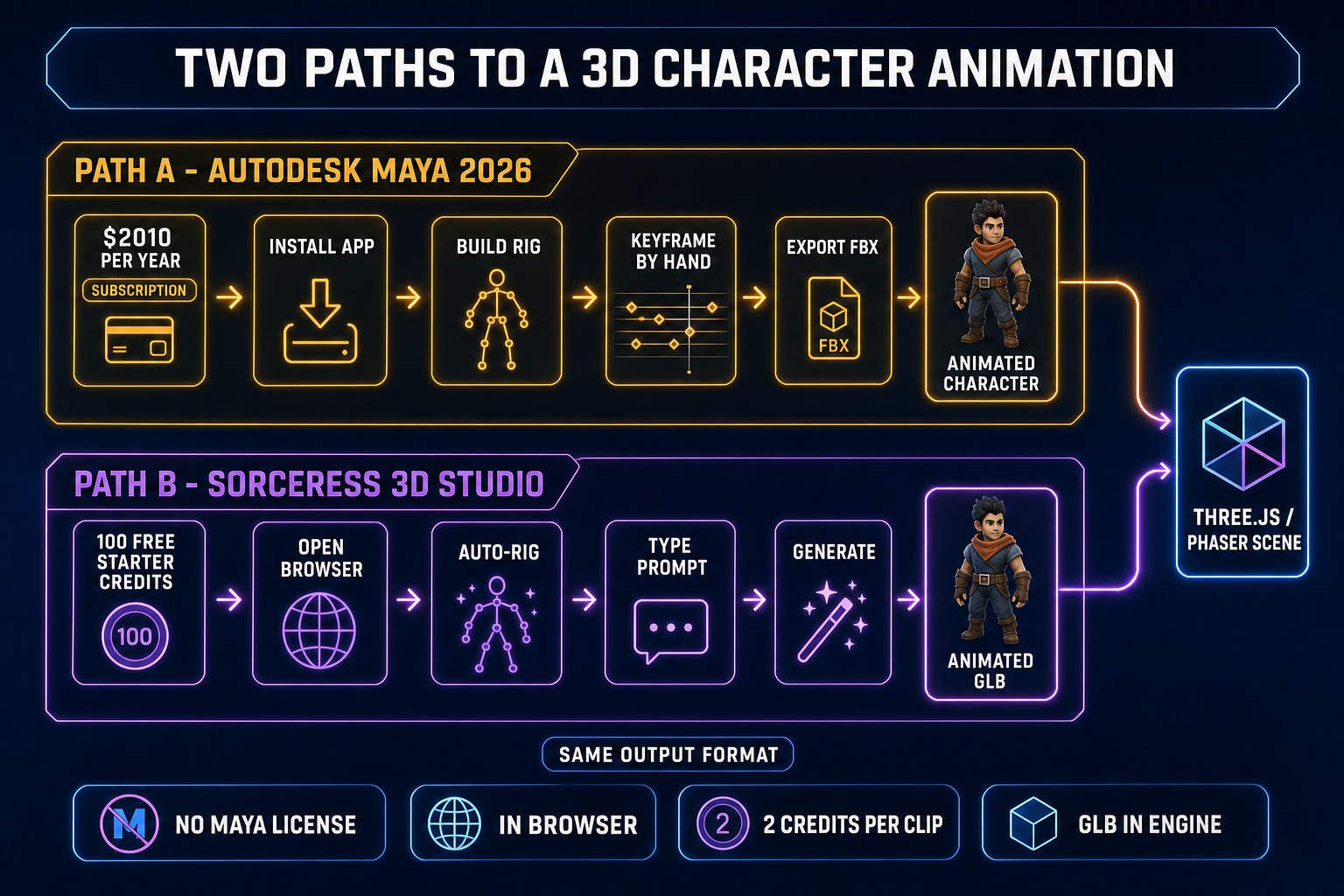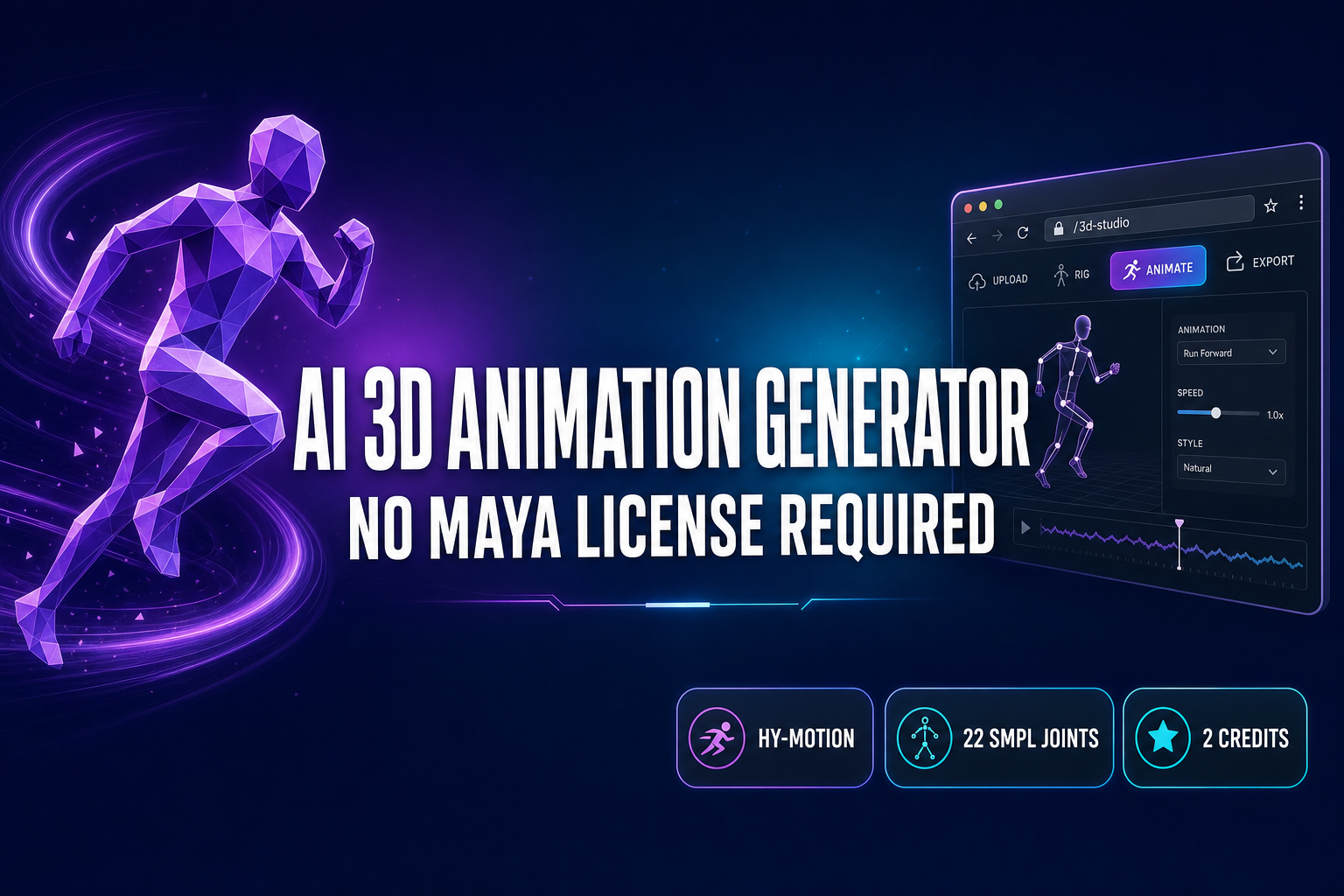
An AI 3D animation generator in 2026 means one specific thing: a text-to-motion model that takes a short prompt and returns a 30 fps stack of joint rotations on a humanoid skeleton, ready to drop into a rigged GLB. The traditional alternative is Autodesk Maya 2026, which costs $2,010 per year on the annual subscription ($168 effective monthly, or $255 month-to-month) — verified May 18, 2026 on autodesk.com. For most indie game-dev workflows that is a high recurring spend on a tool you may use a few hours a week. Sorceress 3D Studio’s Animate tab routes Tencent’s HY-Motion 1.0 model in your browser, generates a clip in 30 to 90 seconds, and writes the animation tracks back into the GLB for two credits per generation. Below is the five-step AI 3D animation generator workflow inside 3D Studio, the SMPL skeleton format under the hood, the Three.js AnimationMixer code that plays the resulting GLB, and the honest places this pipeline still falls short of a hand-keyed Maya pass. Verified May 18, 2026 against src/components/studio/animate/AnimateUnified.tsx, src/app/api/animation/generate/route.ts, the live Autodesk Maya 2026 pricing page, the HY-Motion 1.0 release notes, and the glTF 2.0 specification.
What an AI 3D animation generator actually does in 2026
An AI 3D animation generator is a text-to-motion model: it accepts a short natural-language prompt — “a person walks forward naturally”, “a character does a strong front kick”, “a person waves hello with their right hand” — and returns a sequence of 3D joint rotations over time. The output is not a video. It is a stack of per-frame transforms on a humanoid skeleton, in the SMPL body model format used by most modern motion-capture pipelines.
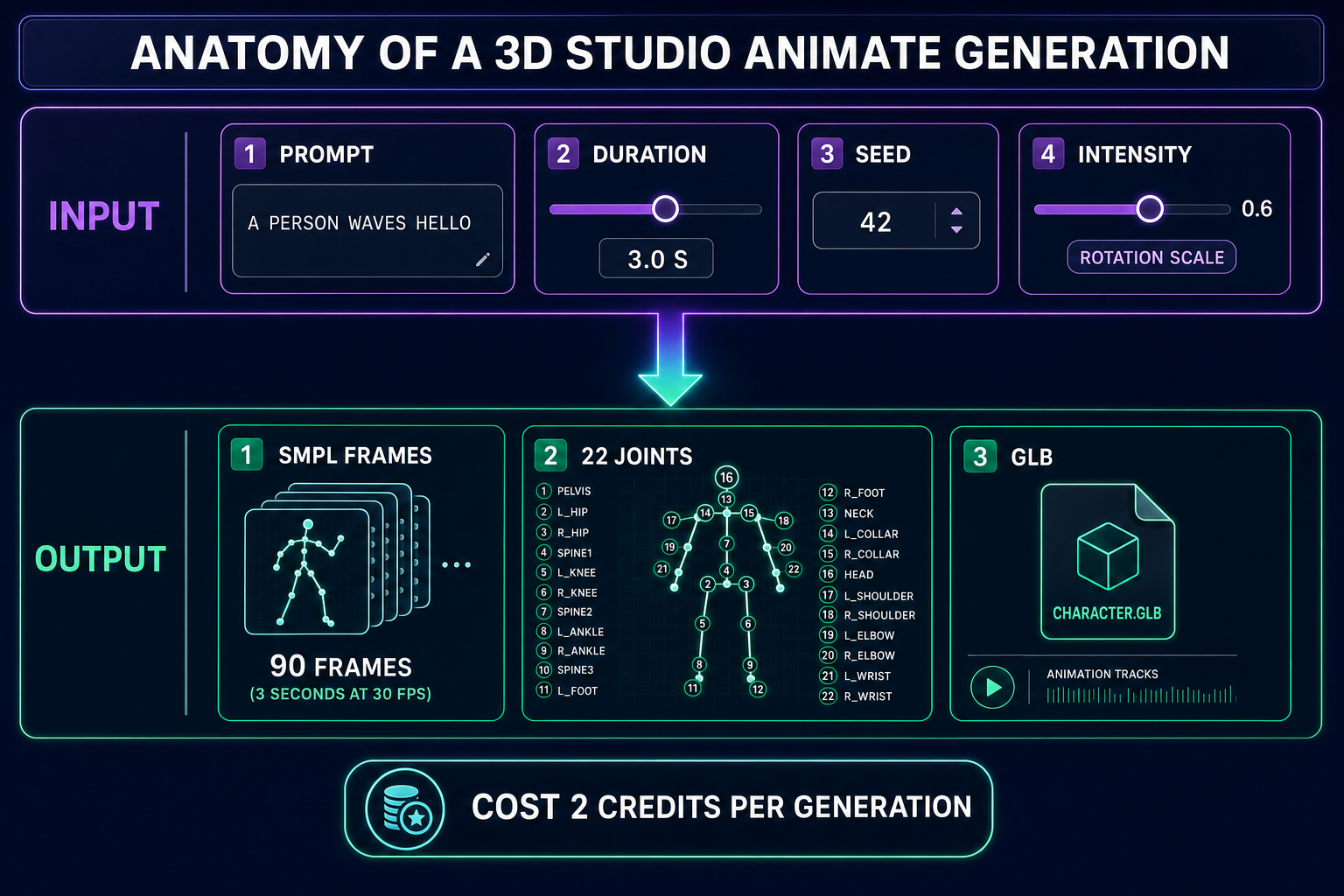
SMPL is twenty-two joints: Pelvis, Spine1, Spine2, Spine3, Neck, Head, the two collars, the two shoulders, the two elbows, the two wrists, the two hips, the two knees, the two ankles, and the two feet. Verified May 18, 2026 against the SMPL_JOINT_NAMES array in src/components/studio/animate/types.ts. The model emits a rotation track for each of those joints at thirty frames per second for the requested clip duration. A three-second walk cycle is ninety frames; a one-and-a-half-second punch is forty-five frames. Sorceress 3D Studio writes those tracks into the GLB’s animations array using the glTF 2.0 animation format, so the engine layers the motion onto your character with a single AnimationMixer call.
The model behind most of the credible AI 3D animation generator results in 2026 is Tencent’s HY-Motion 1.0, open-sourced on December 30, 2025 on the Tencent-Hunyuan GitHub organization. It is a Diffusion Transformer scaled to a billion parameters for text-to-motion, trained on more than 3,000 hours of mocap, fine-tuned on 400 hours of curated 3D motion clips, and aligned with reinforcement learning from human feedback. The model covers more than two hundred motion categories across six top-level classes — locomotion, combat, expressive, sports, social, and idle — which lines up with the preset prompts shipped in 3D Studio: walk, run, jump, kick, punch, wave, dance, idle, sit down, crouch.
Why an AI 3D animation generator beats a $2,010 Maya seat for indie work
Autodesk Maya 2026 is the industry-standard 3D animation suite. Verified May 18, 2026 against autodesk.com: the annual subscription is $2,010 per year (which works out to $168 per month effective), monthly is $255 per month if you pay month-to-month, and the Flex token plan starts at $300 per 100 tokens with a six-token-per-day cap. For a studio paying salaries to a full-time animator, that is small money. For a hobbyist shipping one game-jam project a quarter, an indie team of two, or a vibe coder finishing a Phaser browser game on weekends, the recurring spend is the deal-breaker, and the keyframing UI itself is a multi-week learning curve before you produce a clean walk cycle.
An AI 3D animation generator collapses that. The prompt box replaces the keyframe timeline. The duration slider replaces the keyframe count. The seed replaces the “try it again with slightly different timing” iteration loop. The 100 starter credits Sorceress grants every new account — verified against supabase/migrations/20260507000005_default_new_users_to_100_credits.sql — are enough for fifty motion-clip generations before you ever buy a credit top-up. Compared with Maya’s $2,010 per year, the AI 3D animation generator path is closer to one-tenth of one percent of the cost for the same amount of motion data on a typical hobbyist workload.
| Path | Year-one cost | Time to first usable clip | Output format |
|---|---|---|---|
| Autodesk Maya 2026 (annual) | $2,010 | days to weeks (install + learn keyframing) | FBX |
| Autodesk Maya 2026 (monthly) | $3,060 if held all year | days to weeks | FBX |
| Sorceress 3D Studio Animate | $0 to $49 (Lifetime tier) | 30 to 90 seconds (no install) | GLB with embedded animation tracks |
The trade-off is real and worth naming. Maya gives you a frame-perfect keyframe editor, IK constraints you author by hand, blend shapes for facial work, and an artist-grade rigging UI with thirty years of muscle memory baked into it. An AI 3D animation generator gives you a one-line prompt and a ninety-frame clip in a minute. Pick by what you actually need: a Pixar-grade character performance is still a hand-keyed Maya job. A walk cycle, a sword swing, an idle breathing loop, a punch — that is what AI 3D animation generators are for, and that is what most game projects need.
The five-step AI 3D animation generator workflow in your browser
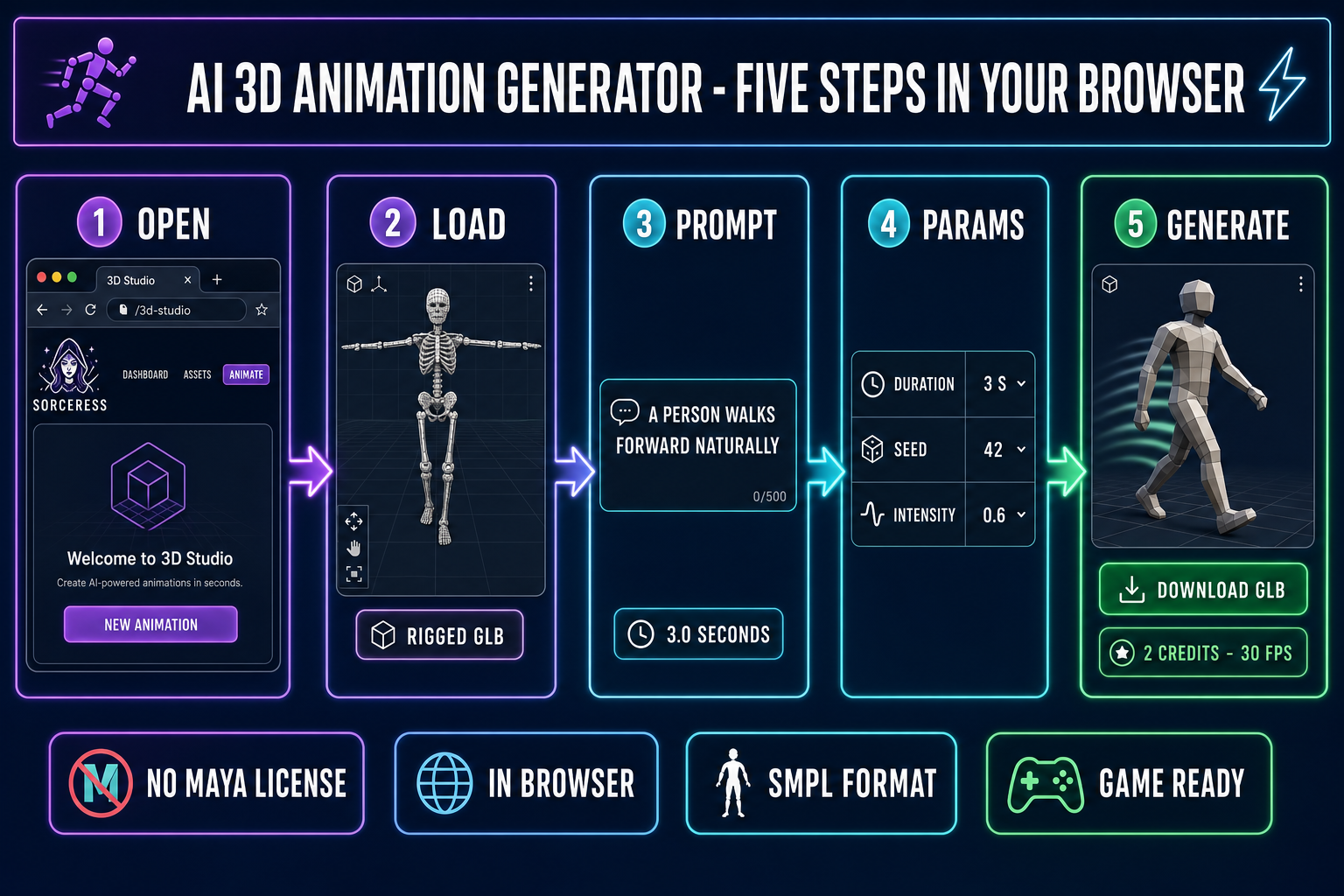
- Step 1 — open 3D Studio. The studio loads inside any modern browser, no install. The tab strip across the top is Generate, Uploads, Rig, Refine, Animate, and Rigged Characters. Click Animate. The center is the 3D viewport. The right side is the prompt panel and parameter sheet.
- Step 2 — load a rigged GLB. An AI 3D animation generator needs a target skeleton to drive. The cleanest path is to start from Generate with an image-to-3D pass (Hunyuan 3D 3.1 at 25 credits is the default), send the result to Rig for the auto-rigging step, save the rigged character, then click over to Animate with that character pre-loaded. If you already have a rigged GLB on disk, drop it into Uploads and route it through Rig the same way.
- Step 3 — type the motion prompt. Plain natural language. “A person walks forward naturally”, “a character does a strong front kick”, “a person dances happily with rhythm”. The model latches onto verbs and intensity adverbs. Adjectives like “cinematic”, “dramatic”, “subtle” nudge the motion energy in predictable ways. The Animate tab also exposes ten preset prompts that map cleanly to the model’s training data: Walk, Run, Jump, Kick, Punch, Wave, Dance, Idle, Sit down, Crouch — verified against the
PRESET_ANIMATIONSarray inAnimateUnified.tsx. - Step 4 — set duration and intensity. Duration is bounded between 0.5 seconds and 10 seconds (the upper cap is enforced server-side in
src/app/api/animation/generate/route.ts). Three seconds is the right default for a walk cycle, two seconds for a kick, one and a half for a punch, four for a dance, three for an idle. Intensity (rotation_scaleon the API side, between 0.1 and 1.0) controls how much the model amplifies joint rotations — 0.6 is the natural default, 0.4 reads as restrained, 0.9 reads as exaggerated stage performance. - Step 5 — click Generate. The model returns in roughly 30 to 90 seconds depending on RunPod queue depth, and costs two credits per run regardless of duration. The result lands as a real-time animated preview in the viewport plus a saved entry in the animation history panel. Save the clip, give it a name (“walk_loop”, “kick_R”, “idle_breathe”), and export the GLB — the saved animation rides along inside the file. That is the entire AI 3D animation generator workflow in your browser.