Replace the Mixamo Auto Rig (Browser, No Adobe ID)

By Arron R.12 min read
Replace the Mixamo auto rig with Sorceress 3D Studio in five browser-native steps: drop in any humanoid mesh, walk the guided marker placement, auto-build the S

The Mixamo auto rig has been the default first stop for indie 3D character riggers since 2010 — drop a humanoid FBX into a browser tab, wait thirty seconds, get back a skinned skeleton ready for animation. In 2026, two things have shifted: the service has been intermittently broken since June 16, 2025 because of a backend authentication failure that Adobe has not fully repaired, and a browser-native replacement now exists that does not require an Adobe ID, does not gate behind Enterprise/Federated account restrictions, and ships paint-style weight refinement that Mixamo never added in fifteen years. This piece walks the five-step replacement workflow inside Sorceress 3D Studio’s Rig tab, with marker placement, SMPL skeleton auto-detect, two-bone IK, weight paint, and FBX/GLB/GLTF export, verified against the live source on May 27, 2026.
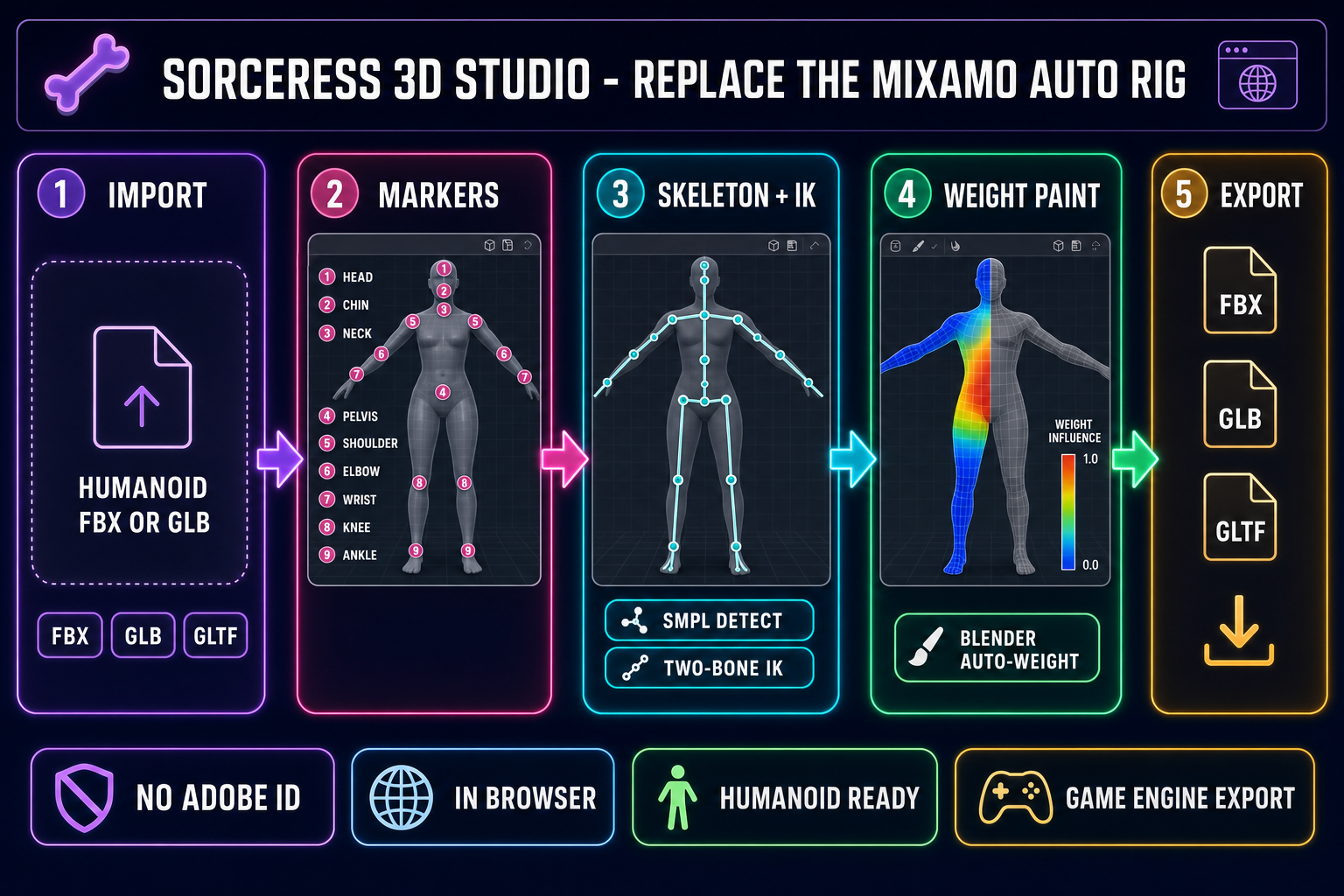
Five-panel browser AI pipeline diagram for the Sorceress 3D Studio replacement for the Mixamo auto rig — import, markers, skeleton plus IK, weight paint, FBX or GLB or GLTF export
The five-step Sorceress 3D Studio replacement workflow for the Mixamo auto rig, end to end in the browser. No Adobe ID, no upload to a third party, no humanoid-only ceiling at the suite level. Hero image generated with GPT Image 2.

What the Mixamo auto rig actually does in 2026

The Mixamo auto rig is Adobe’s free browser-based auto-rigging service for humanoid 3D characters. The user uploads an FBX or ZIP, the service detects head, body, arms, and legs, then writes a 65-bone skeleton plus skin weights and returns the rigged file. Verified against the official Mixamo FAQ on helpx.adobe.com on May 27, 2026: the service is free with an Adobe ID, is not available for Enterprise or Federated IDs, is not available for users with a country code from China, and accepts only bipedal humanoid characters. Animals, vehicles, multi-leg creatures, characters with large extra appendages, oversized wings, large tails, or large hair items are rejected. The input must be in a default neutral pose, centered at the world origin, with a clean error-free mesh and no helper objects, cameras, or scene clutter in the file.

That feature set has been stable since the 2015 Adobe acquisition. The service shipped with a fixed humanoid skeleton, no in-browser weight repaint, no IK refinement, no per-vertex tweak, and no support for any topology that does not look like a standard bipedal anatomy. Eleven years later, the constraints are the same. The Mixamo auto rig is best understood as a 2015-era tool kept on life support — useful when it works, fragile when it does not.

Why the Mixamo auto rig has been intermittently broken since June 2025

On June 16, 2025 — almost exactly ten years after Adobe acquired Mixamo Inc. — the service’s authenticated features began failing in production. The Adobe community forum has documented the symptoms in detail through 2026: login attempts fail with token errors, the Account button points to a deprecated accounts.adobe.com URL while Adobe’s current identity service lives at account.adobe.com, file uploads return Too many requests, try again later even on cold sessions, and the Download button errors out on animations that previewed fine. The frontend SSL certificates were renewed quietly but a backend token or identity-service handshake appears to have expired and not been rotated. Verified against three separate Adobe community threads on May 27, 2026, the issue has persisted at varying severity for almost twelve months without a stable fix.

Mixamo’s animation library still renders for unauthenticated users — the previews are working frontend assets — but every feature tied to user authentication is unreliable in 2026. Upload, download, the auto-rigger itself, and account state are all gated behind the broken identity layer. For a studio planning a release in the next quarter, that is the strongest single argument to plan for a Mixamo auto rig replacement now, before a downtime window blocks an animation pipeline at the wrong moment.

Replace the Mixamo auto rig in five browser-native steps

The Sorceress replacement workflow runs entirely inside the 3D Studio Rig tab. It does not require an Adobe ID, does not upload the mesh to a third-party server outside the Sorceress stack, and does not gate behind humanoid-only acceptance at the suite level (humanoid models go through the Rig tab; multi-legged creatures go through Procedural Walk in the same suite). The pipeline at a glance:

  1. Import any humanoid mesh in FBX, GLB, or GLTF format into the Rig tab. The format detector at src/lib/rigging/mesh-utils.ts handles all three transparently.
  2. Walk the thirteen-step guided marker placement — top of head, chin, neck base, pelvis, shoulders, elbows, wrists, knees, ankles — with mirror-assist on the symmetric pairs.
  3. Auto-build the SMPL skeleton from the placed markers, with the two-bone IK solver wired up for the arms and legs and a per-bone gizmo for manual adjustment.
  4. Refine weights in the paint-style Weight Panel after the Blender auto-weight pass returns. Repaint problem joints, lock segments, and rerun auto-weight against just the changed area.
  5. Export FBX, GLB, or GLTF with the skeleton and skin weights embedded. The exported bone names follow standard SMPL conventions, so retargeting onto an engine humanoid is a one-time configuration.

The next five sections walk each step in detail. The fastest first run through this pipeline lands around eight minutes for a clean humanoid mesh; the slowest first run is closer to twenty when the marker placement needs corrections.

Step 1: Drop the humanoid mesh into 3D Studio

Open 3D Studio in the browser and switch to the Rig tab. The mesh import accepts FBX (legacy Autodesk container, still the default for game-engine pipelines), GLB (the binary glTF 2.0 format from Khronos Group), or GLTF (the JSON variant of the same spec). The detectModelFormat helper in src/lib/rigging/mesh-utils.ts reads the file signature and routes to the correct loader without a manual format toggle, verified against the live source on May 27, 2026.

The mesh should be a humanoid character in roughly T-pose or A-pose. Unlike the Mixamo auto rig, the Sorceress Rig tab does not strictly reject off-neutral poses, but the SMPL marker detector matches faster when the limbs are extended. Two practical preparation tips: scale the mesh so the character stands roughly two meters tall in world units (the SMPL body model expects metric scale), and clear any pre-existing skeleton or weights from the import — the Rig tab is going to write fresh ones, and old bones will conflict with the new hierarchy. Both checks take under thirty seconds in any DCC tool of the user’s choice before the import. For a mesh generated inside Sorceress 3D Studio’s image-to-3D pipeline (Hunyuan 3D 3.1 at 25 credits, Meshy 6 at 50 credits, TRELLIS at 8 credits, TRELLIS 2 at 40 credits, Tripo v3.1, or Hyper3D Rodin — verified against src/lib/threed-models.ts on May 27, 2026), the mesh arrives clean and ready, no DCC trip required.

Step 2: Walk the guided marker placement

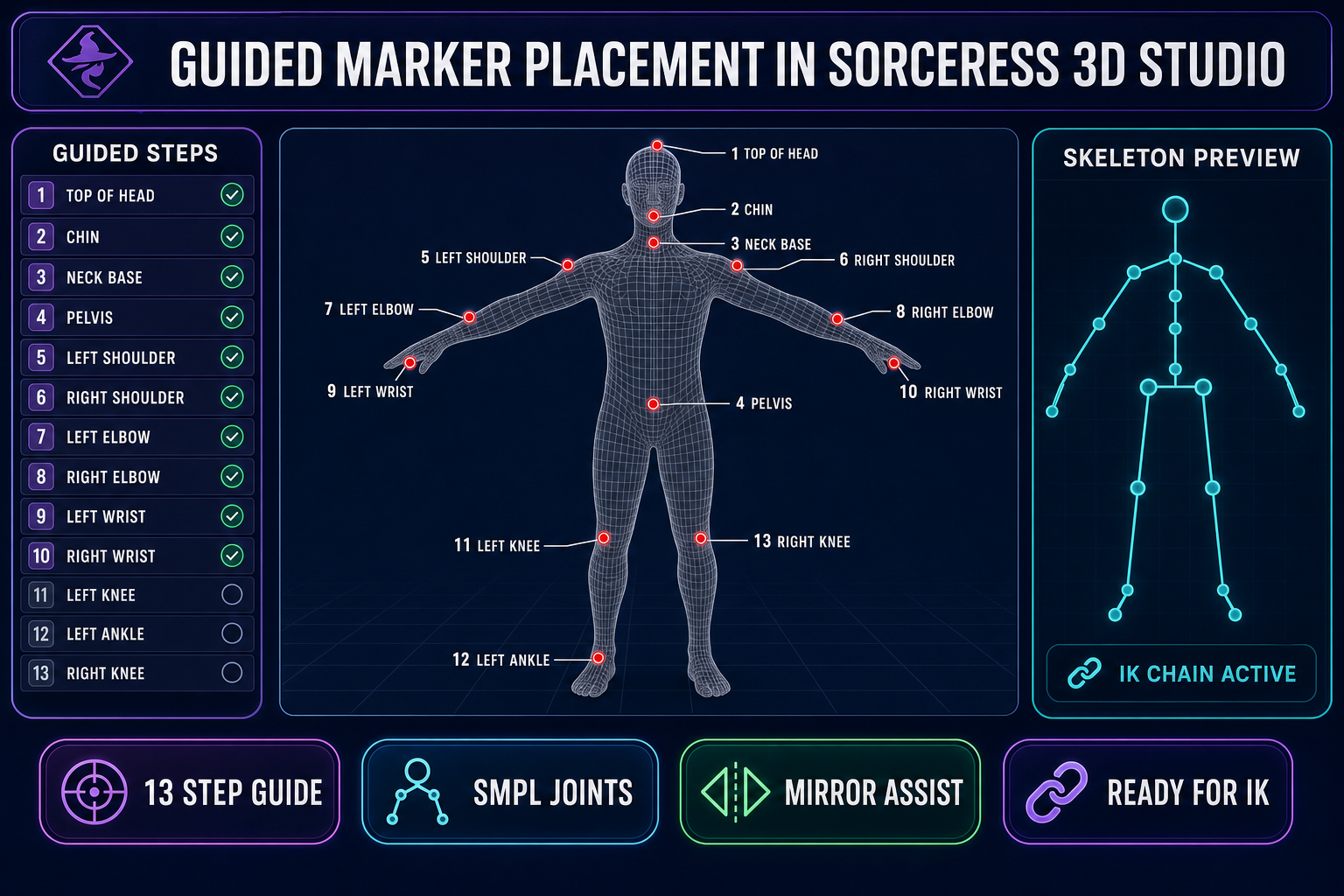
The Rig tab opens a thirteen-step guided flow in the marker panel. The user clicks the position of each anatomical landmark on the 3D viewport — top of head, chin, neck base, pelvis, left/right shoulder, left/right elbow, left/right wrist, left/right knee, left/right ankle — and the panel advances automatically. The full GUIDED_STEPS list is defined in src/components/studio/rig/RigUnified.tsx at the top of the file; each step ships a one-line description so a first-time user does not have to guess where the chin actually ends.

The flow has mirror-assist on the symmetric pairs: placing the left shoulder lets the right shoulder snap to a reflected position that the user can confirm or nudge. That single feature is the practical reason the marker placement takes a couple of minutes instead of fifteen. Two optional helpers extend the standard SMPL set: a chin marker at index 100 that tightens neck-to-head deformation, and a pair of breast helper bones at indices 101 and 102 that prevent shoulder-region pinching on bustier humanoid topology. The breast helpers run from a single click — place the left nipple, the right is mirrored automatically — and add bones to the auto-generated skeleton without modifying the SMPL root hierarchy.
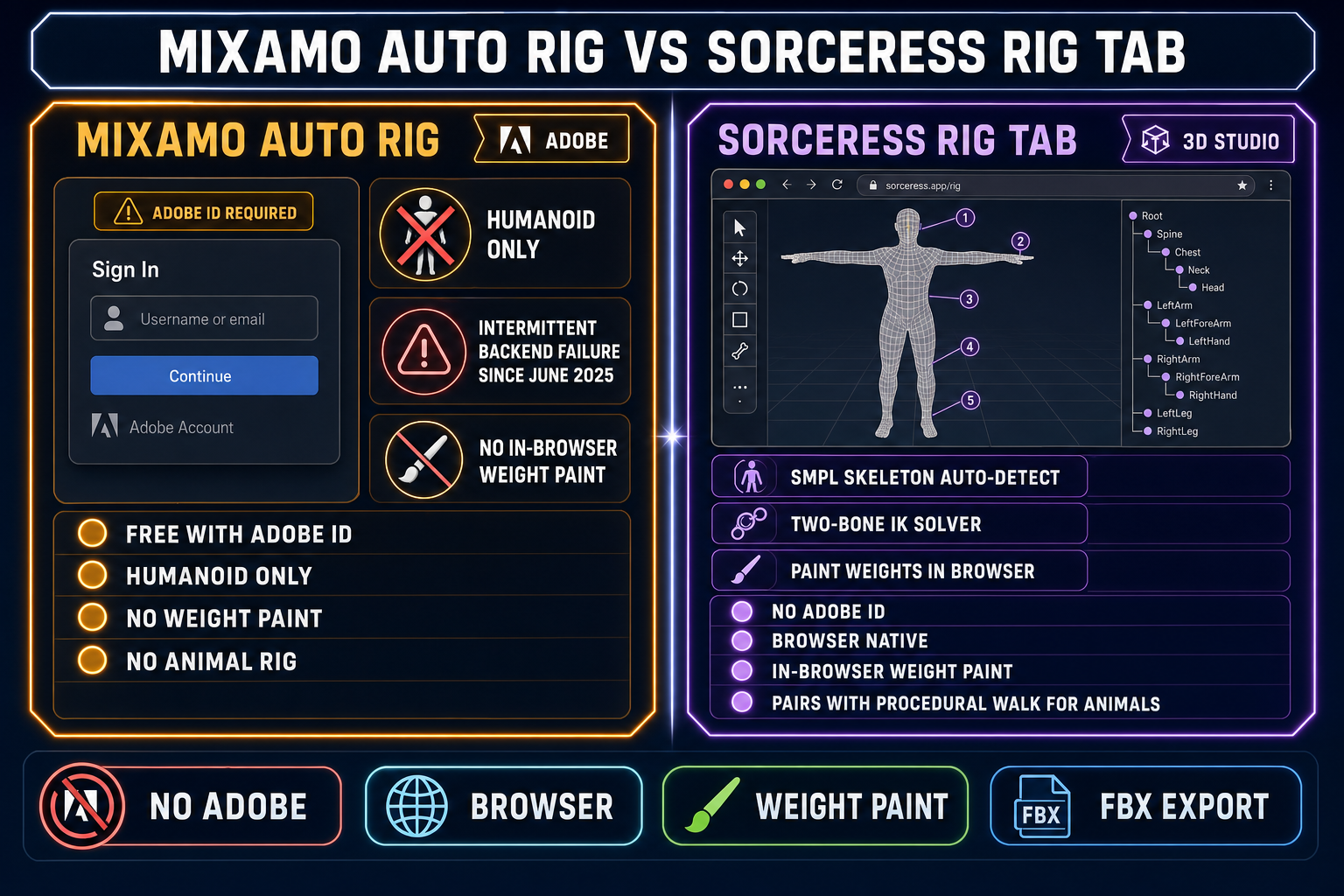
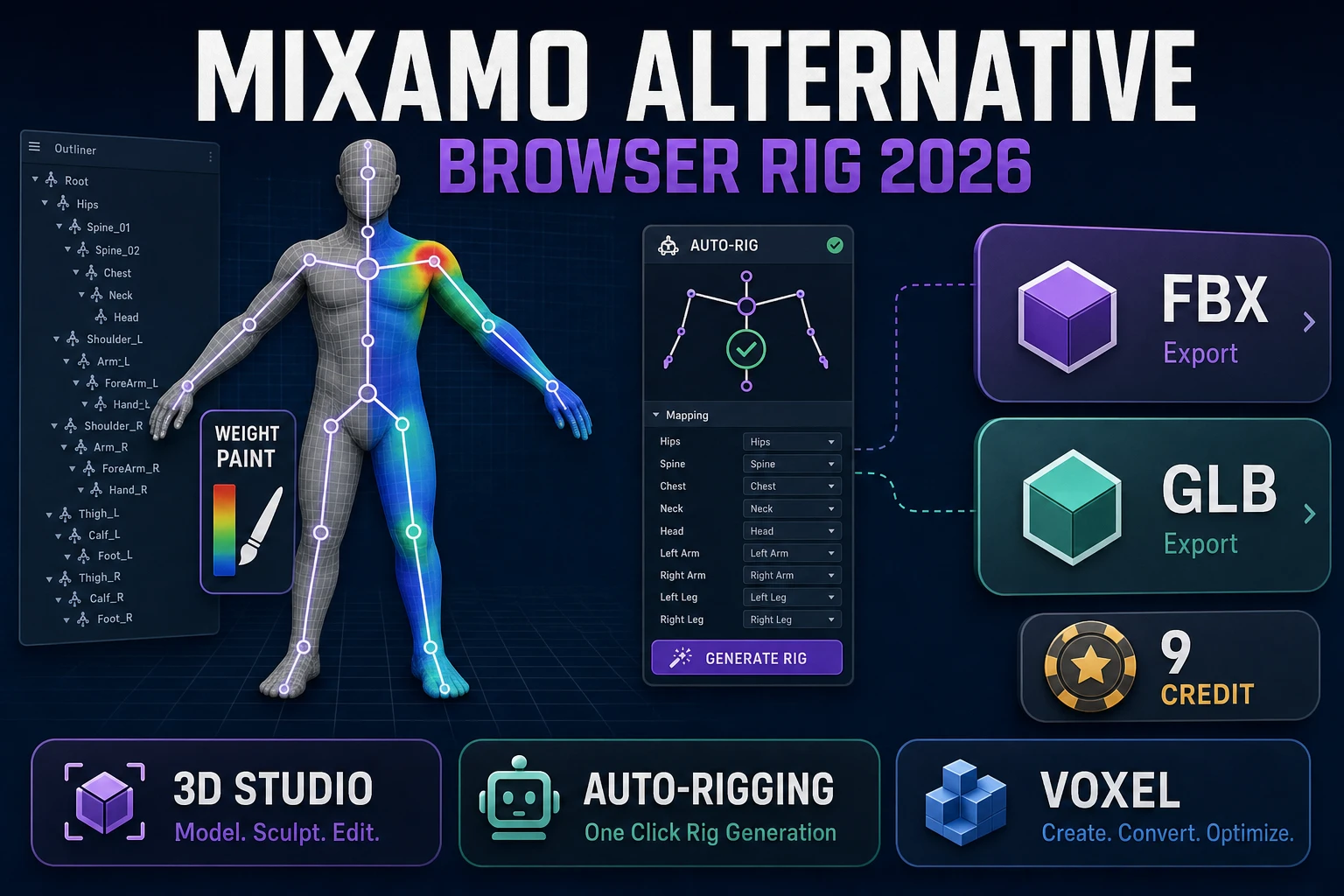
Side-by-side comparison of the Mixamo auto rig versus the Sorceress 3D Studio Rig tab — Adobe ID requirement, humanoid-only ceiling, intermittent failure since June 2025 versus no Adobe ID, in-browser weight paint, FBX export
Mixamo auto rig versus the Sorceress Rig tab in 2026. Adobe ID gate plus humanoid-only plus intermittent backend failure since June 2025, versus no Adobe ID plus browser-native plus paint-style weight refinement plus the Procedural Walk path for non-humanoids. Body image generated with GPT Image 2.

Step 3: Auto-build the SMPL skeleton and solve IK

Once the guided markers are placed, the Rig tab runs autoDetectAndPlaceSMPLDebug from src/lib/rigging/skeleton.ts to position the 22-joint SMPL skeleton inside the mesh. SMPL — Skinned Multi-Person Linear model — is a body topology that maps cleanly onto humanoid game characters. The auto-detect step uses the placed markers as anchors, then back-solves the internal joint positions (spine segments, collars, internal hand and foot joints) from anatomical proportion ratios.

The two-bone IK solver from src/lib/rigging/posing.ts wires up immediately for the arm chains (shoulder to elbow to wrist) and the leg chains (hip to knee to ankle). Inverse kinematics means the user can drag the wrist or the ankle in the viewport and the upstream joints rotate to follow — the standard ergonomic gain that hand-rigging skips. Each bone also has a manual transform gizmo for the cases where the auto-detect placed a joint slightly off; the gizmo respects FK (forward kinematics) on the root chain and IK on the limb chains, so adjustments at the hip do not break the foot plant. The bind pose is auto-centered through autoCenterSmplJoints before the weighting step begins.

Step 4: Refine weights with the paint-style panel

The Weight Panel opens after the auto-weight pass returns. The auto-weight itself is a Blender backend call — requestBlenderAutoweight in src/lib/rigging/blender-client.ts, verified against the live source on May 27, 2026 — that runs Blender’s tested skin-weighting algorithm on the joined mesh-plus-skeleton and returns a per-vertex weight matrix. That matrix is what determines how each vertex deforms when a bone rotates: skeletal animation in production game engines is just a per-frame matrix multiply between the weight matrix and the current bone transforms.

This is the step the Mixamo auto rig does not ship. After Mixamo’s auto-weight finishes, the user gets a single FBX back; problem joints get repainted in Blender or Maya in a separate session. The Sorceress Rig tab keeps the weight panel open in the same browser context. The user picks the bone that is misbehaving (the typical first failures are the shoulder, the hip, and the upper spine on stylized characters), repaints the influence with a brush-style tool, locks adjacent segments to prevent regression, and reruns the auto-weight against just the changed area. The repaint is non-destructive — the original auto-weight is preserved until export — so a bad brush stroke is undone with a single click. For game-ready meshes where the elbow or hip is the typical failure point, this single feature is the strongest practical argument for replacing the Mixamo auto rig with this workflow.

Guided marker placement diagram inside the Sorceress 3D Studio Rig tab — thirteen anatomical landmarks on a humanoid mesh in T-pose, with SMPL skeleton preview and IK chain indicator
The thirteen-step guided marker placement inside the Sorceress 3D Studio Rig tab. Click each anatomical landmark in the viewport; the SMPL skeleton auto-detect and two-bone IK solver wire up from the placed markers. Body image generated with GPT Image 2.

Step 5: Export FBX, GLB, or GLTF for any engine

The export step writes the rigged mesh with its skeleton and skin weights embedded. FBX is the legacy default for Unity Mecanim and Unreal MetaHuman pipelines; GLB is the modern default for Three.js, Babylon.js, Godot 4 imports, and any glTF 2.0 runtime; GLTF is the JSON variant that opens cleanly in text-based diff tooling. All three formats round-trip the skeleton bone-name hierarchy that the auto-detect step writes, and all three are part of the Khronos glTF 2.0 specification family in the case of GLB and GLTF, or the open FBX format for the legacy path.

The exported bone names follow standard SMPL conventions (Pelvis, Spine1, Spine2, Spine3, LeftShoulder, LeftElbow, LeftWrist, and so on). That naming is recognized by every major game engine humanoid retargeter. For Unity Mecanim Humanoid imports, the importer maps the SMPL hip-spine-chest-shoulders-arms-head hierarchy into Mecanim humanoid slots without manual remap. For Unreal Engine, the manual-skeleton import path accepts a one-time bone-name mapping configuration. For Godot 4.6, the GLB importer reads the embedded skeleton directly into a Skeleton3D node, no remap needed. The same exported file plays in all three engines.

What this workflow does that the Mixamo auto rig cannot

Three concrete deltas matter in production. First, the Sorceress Rig tab ships a paint-style Weight Panel that the Mixamo auto rig does not have. Repainting the elbow or shoulder in the same browser session collapses what is otherwise a separate Blender or Maya trip after every Mixamo export. Second, the suite level handles non-humanoid characters through Procedural Walk — spiders, crabs, insects, centipedes, quadrupeds, and any non-biped — with real-time inverse kinematics that drive feet on uneven terrain. Mixamo has no equivalent path: its auto-rigger rejects every non-bipedal input. Third, the workflow is paid in Sorceress credits rather than gated behind an Adobe ID, which means no Enterprise or Federated account block, no country-code block, and no exposure to Adobe’s intermittent backend failures since June 2025.

The pipeline also pairs cleanly with the rest of Sorceress. The mesh that enters the Rig tab can come from AI Image Gen through the image-to-3D pipeline, the rigged result can feed 3D Studio’s text-to-animation step for HiMotion motion clips, and the exported FBX can drop into any engine. That is the wider argument: replacing the Mixamo auto rig with a tool that lives inside a fuller suite is a one-time migration, not a perpetual workflow tax.

Common issues when you replace the Mixamo auto rig

Five issues come up consistently in first-time runs of this replacement workflow. First, the mesh scale is wrong — the SMPL detector expects metric scale around two meters tall and gracefully scales down stylized characters, but a model that imports at centimeter scale (common in some FBX exports) will place markers at the wrong absolute distances; rescale to meters before import. Second, the mesh has pre-existing bones from a prior rig — clear them in the source DCC before exporting the FBX, otherwise the Rig tab finds two competing skeletons. Third, the auto-weight pinches at the shoulder — that is the most common shoulder-weight failure mode across every auto-rigger and the Weight Panel repaint exists exactly for this case; the fix is a 30-second brush stroke on the upper trapezius region.

Fourth, the exported FBX does not load with the right axes in the destination engine — different engines disagree on the up-axis convention and the FBX up-axis flag handles the remap; in Unity it is the import-axis setting, in Unreal it is the Skeleton Import Options, in Godot it is the GLTF axis configuration. Fifth and most often, the user expects the rigged mesh to immediately animate after export — the Rig tab writes the skeleton and weights, but the animation clips themselves come from 3D Studio’s text-to-animation step or from a retargeted existing library (Mixamo animations retarget cleanly onto SMPL skeletons after a one-time bone-name remap). The rig is the first half of the work; the motion is the second half.

The honest tradeoff in 2026

Mixamo’s auto-rigger was the right answer in 2015. In 2026, it is gated behind an Adobe ID that some users cannot get, restricted to humanoid topology, missing in-browser weight refinement, and intermittently broken at the backend. The Sorceress 3D Studio Rig tab is a paid workflow inside a paid suite, but it ships everything the Mixamo auto rig ships plus everything the Mixamo auto rig has never shipped: paint-style weight refinement, two-bone IK on the limb chains, mirror-assist on symmetric pairs, breast and chin helper bones, FBX and GLB and GLTF round-trip export, and a non-humanoid path through Procedural Walk in the same suite. For studios already running a Mixamo workflow, the migration cost is one afternoon of re-rigging the active character roster and a one-time bone-name remap on the existing animation library. For studios starting from scratch in 2026, the question is simpler: pick the workflow that does not depend on a broken identity layer.

Frequently Asked Questions

What does the Mixamo auto rig actually do in 2026?

The Mixamo auto rig is Adobe's free browser-based auto-rigging service. The user uploads a humanoid FBX or ZIP, the service detects head, body, arms, and legs, then writes a skeleton plus skin weights and returns the rigged file. Verified against the official Adobe Mixamo FAQ on May 27, 2026 (helpx.adobe.com): the service is free but requires an Adobe ID, is not available for Enterprise or Federated IDs, is not available for users with a country code from China, and works only for bipedal humanoid characters - animals, vehicles, multi-leg creatures, and characters with large extra appendages or wings or tails are rejected. The input model must be in a default neutral pose, centered at the world origin, with a clean error-free mesh and no helper objects or cameras in the file. Those constraints have been stable since 2015 and the service has not received feature development in years.

Is the Mixamo auto rig actually broken in 2026?

Intermittently, yes. The Adobe community forum has documented a backend authentication failure starting June 16, 2025 - almost exactly ten years after Adobe acquired Mixamo from Mixamo Inc in 2015 - and the issue has remained partially unresolved into 2026. The symptoms verified across multiple community threads on May 27, 2026: login fails with token errors, the Account button points to a deprecated accounts.adobe.com URL instead of the current account.adobe.com, uploads return Too many requests, try again later, and the Download button often returns errors on animations that previewed fine. The frontend SSL certificates were renewed but a backend token or identity-service handshake appears to have expired and not been rotated. Mixamo's animation previews still work for unauthenticated users, but every feature tied to user authentication - upload, download, custom rigging - is unreliable in 2026. That is the strongest single reason to plan for a Mixamo auto rig replacement now, before a downtime window blocks a release.

Can the Sorceress 3D Studio Rig tab handle non-humanoid characters that the Mixamo auto rig rejects?

The 3D Studio Rig tab itself is humanoid-focused (it auto-detects the SMPL skeleton, which is a humanoid body model), but the wider Sorceress suite covers the gap. Sorceress Procedural Walk at /rigging-multileg auto-rigs spiders, crabs, insects, centipedes, quadrupeds, and any non-biped, then drives feet on uneven terrain with real-time inverse kinematics - no Adobe equivalent exists. For humanoid characters with non-standard topology (extra arms, oversized wings, large hair), the Rig tab's guided marker workflow is more tolerant than the Mixamo auto rig because the markers are placed by the user; the SMPL detector does its best to match them rather than rejecting the whole upload. Where Mixamo's auto-rigger says no - asymmetric, posed, multi-limbed, animal - the Sorceress workflow either succeeds with manual marker tweaks or falls back to Procedural Walk for true non-biped rigs.

What file formats does the Sorceress Rig tab import and export, and do they import cleanly into Unity, Unreal, and Godot?

Verified against src/lib/rigging/mesh-utils.ts on May 27, 2026, the 3D Studio Rig tab detects FBX, GLB, and GLTF inputs automatically and exports the rigged result in the same three formats. The exported skeleton uses standard bone naming compatible with humanoid retargeting in Unity (the Humanoid avatar import path), Unreal Engine (the manual-skeleton import path with a configurable bone-name mapping), and Godot (Godot 4.6 imports GLB with embedded skeletons natively into the Skeleton3D node). No additional retargeting step is required when the engine reads the included bone names. For Unity Mecanim Humanoid, the importer maps the SMPL hip-spine-chest-shoulders-arms-head hierarchy into Mecanim slots automatically. For Unreal MetaHuman skeletons, the bone-name remap is a one-time configuration. For Godot Skeleton3D, no remap is needed.

How does the Sorceress weight paint refinement compare to the Mixamo auto rig's automatic weighting?

The Mixamo auto rig writes skin weights once at the end of the rigging step and returns the file - there is no in-browser weight refinement, no per-vertex tweak, no joint-by-joint repaint. If the shoulder pinches or the knee deforms badly, the user re-exports to Blender or Maya to fix it by hand. The Sorceress Rig tab takes the opposite path: the auto-weight pass runs through a Blender backend (verified against requestBlenderAutoweight in src/lib/rigging/blender-client.ts on May 27, 2026), and then a paint-style Weight Panel opens in the same browser session where the user can repaint problem joints, lock segments, and rerun the auto-weight against just the changed area. The repaint is non-destructive - the original auto-weight is preserved until export. For game-ready meshes where the elbow or hip is the typical failure point, that one feature alone is the strongest practical argument for replacing the Mixamo auto rig.

Does replacing the Mixamo auto rig with the Sorceress Rig tab cost anything?

The Sorceress Rig tab is part of the 3D Studio paid stack. Verified against the live 3D Studio model registry in src/lib/threed-models.ts on May 27, 2026: the upstream image-to-3D models are credit-priced (Hunyuan 3D 3.1 at 25 credits per generation, Meshy 6 at 50 credits, TRELLIS at 8 credits, TRELLIS 2 at 40 credits, Tripo v3.1 around $0.40 per call, Rodin 2.0 via Hyper3D). The Rig tab itself runs on the user's already-generated mesh and uses an auto-weight backend that is bundled with the studio subscription rather than charged per call. The headline cost comparison is honest: Mixamo's auto-rigger is free with an Adobe ID, the Sorceress 3D Studio stack is paid. The trade is that the Sorceress workflow is paid in credits but available in 2026, paid in credits but no Adobe ID required, and paid in credits but includes the weight paint and IK refinement that Mixamo never shipped.

Can I retarget Mixamo animations onto a Sorceress Rig tab skeleton?

Yes, with a one-time bone-name remap. Mixamo's exported FBX uses its own bone-name convention (mixamorig:Hips, mixamorig:Spine, mixamorig:LeftArm) and Sorceress 3D Studio's SMPL-based skeleton uses standard SMPL names (Pelvis, Spine1, LeftShoulder). Inside Unity or Unreal, the retargeting tool the engine ships handles this remap natively when both skeletons are recognized as Humanoid. For a Godot 4.6 workflow, the GLB importer reads both bone-name sets and the GLTFDocument allows a custom bone-rename pass before the skeleton is constructed. The practical workflow when migrating off Mixamo is to keep the existing Mixamo animation library, re-rig the character with the Sorceress Rig tab, then retarget the Mixamo animations onto the new skeleton inside the engine - no animation data is lost.

Sources

  1. Skeletal animation - Wikipedia
  2. Inverse kinematics - Wikipedia
  3. glTF 2.0 Specification - Khronos Group
  4. Polygon mesh - Wikipedia
  5. Rigging (computer graphics) - Wikipedia
  6. FBX - Wikipedia
Written by Arron R.·2,660 words·12 min read

Related posts