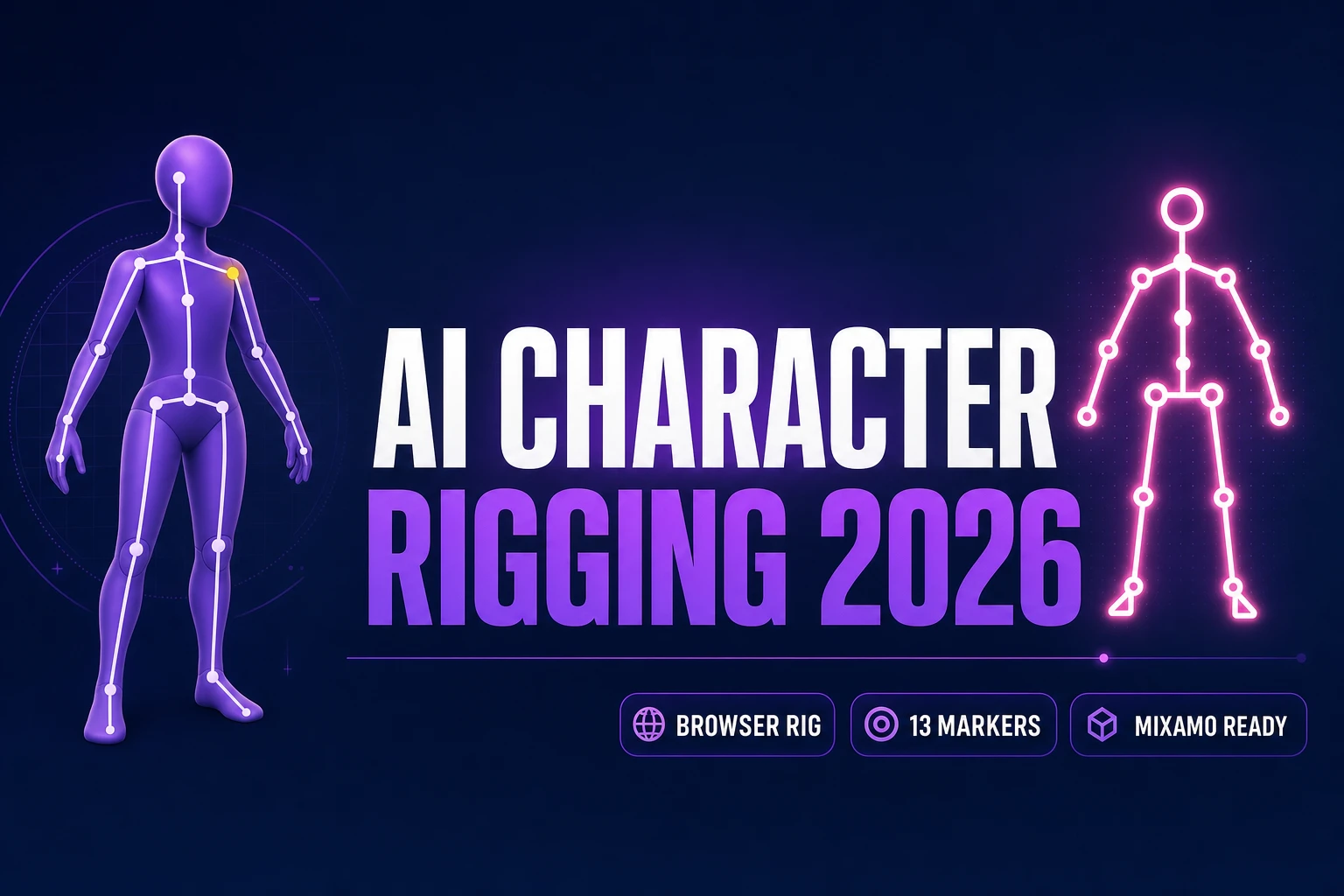
Prime AI Character Rigging (Browser 13-Marker 2026)

By Arron R.14 min read
AI character rigging in 2026: Sorceress Auto-Rigging attaches a full skeleton and skinning weights in one browser tab, 13-marker guided placement (9 clicks with

The search intent behind ai character rigging in 2026 is specific: an indie dev, a hobbyist, or a small studio has a 3D character mesh (generated, sculpted, or bought) and needs to attach a skeleton and skinning weights so the character can actually move. The traditional path routes through Blender plus a paid rigging plugin, or through Adobe’s aging Mixamo web service, or through a Windows-only $299 desktop suite. Every one of those paths front-loads either an install, an account, or a subscription before the reader has rigged a single character. Sorceress Auto-Rigging runs entirely inside a browser tab — the reader places nine markers on the mesh, auto-mirror finishes the other four, and the tool computes bones and skinning weights on the reader’s own GPU via WebGL and WebGPU at zero credit cost. This walks the complete browser workflow end-to-end, then puts it side by side with Auto-Rig Pro, Mixamo, Character Creator 5, and Cascadeur so the reader can pick honestly. Every price, marker count, and behaviour below is verified against the live Sorceress source in src/lib/rigging/types.ts and against each competitor’s official page on July 2, 2026.
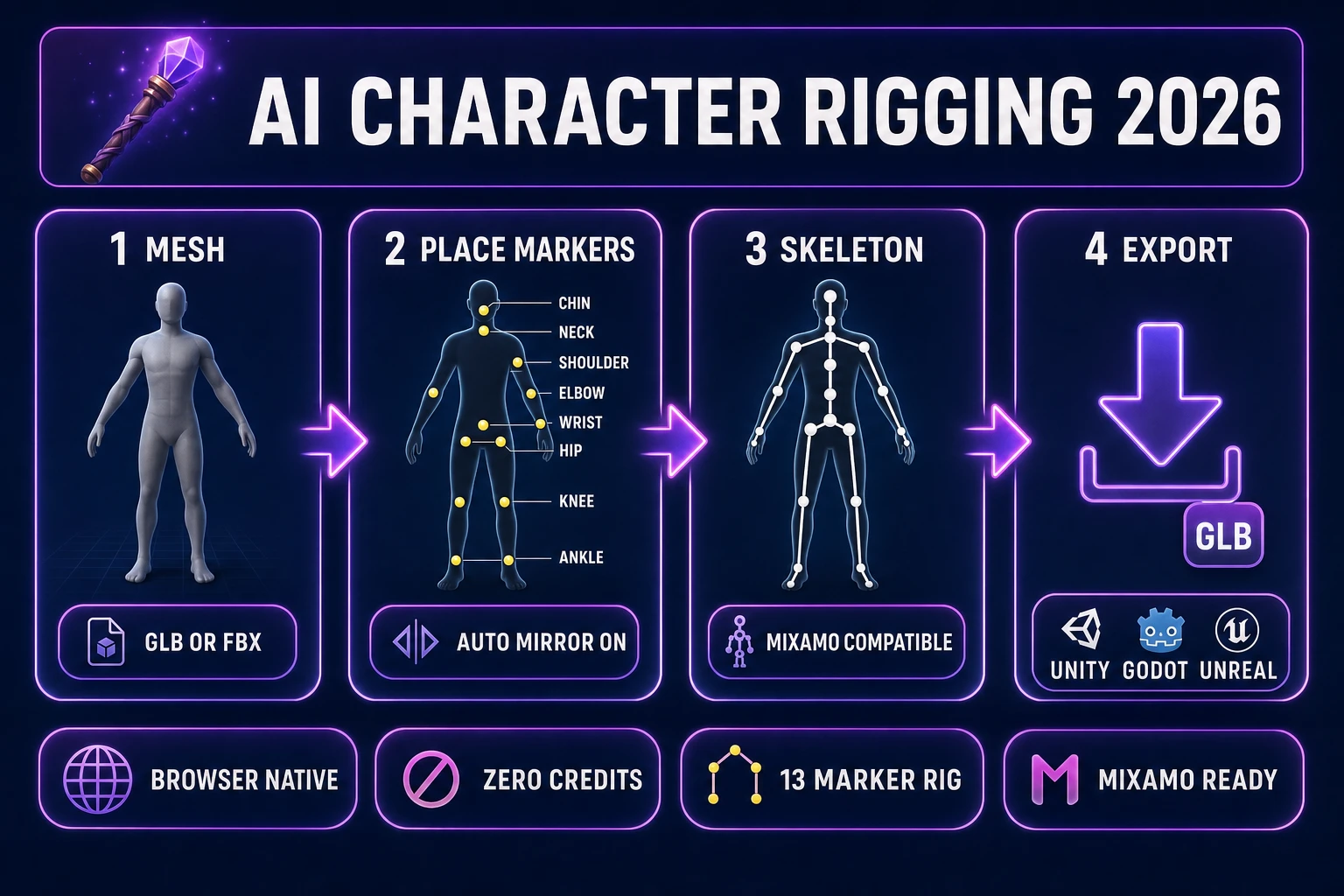
AI character rigging 2026 four-panel pipeline diagram from mesh to marker placement to skeleton to GLB export
The 2026 browser-native ai character rigging pipeline: drop a GLB or FBX into Auto-Rigging, place nine markers (auto-mirror fills the other four for a full 13-bone humanoid), let the tool infer the skeleton and compute skinning weights, and export a rigged asset ready for Unity, Godot, and Unreal.

What AI character rigging actually solves in 2026

A 3D character mesh straight from a sculpting tool, an image-to-3D generator, or a marketplace download is a sculpture — it has geometry and textures but no way to animate. To make it walk, run, or swing a sword, two things have to be attached to the mesh. First, an armature: a hierarchy of bones (root/pelvis at the top, spine and neck stacked above, arm and leg chains branching off) that follows the general shape of the character. Second, skinning weights: a per-vertex number for every bone, from 0 to 1, that says how strongly each bone influences each vertex. Wikipedia’s entry on skeletal animation covers the theory in more detail; the practical point is that both attachments together are called a rig, and the process of creating them is called rigging.

Manual rigging in Blender or Maya is slow because both attachments are painful. Placing 30 to 60 bones by hand inside a mesh, positioning each joint at the right anatomical landmark, and getting bone roll angles consistent across a symmetric skeleton takes hours for a first-time rigger and 20 to 40 minutes for an experienced one. Hand-painting skinning weights — per vertex, per bone, blending falloffs across joints so knees and elbows deform smoothly — is where days disappear. That two-stage cost is why every modern AI character rigging tool exists: they infer the skeleton from a small set of landmarks (Sorceress Auto-Rigging), from a full-mesh classifier (Adobe Mixamo, Character Creator 5 AccuRIG), or from a physics-plus-neural pose solver (Cascadeur AutoPosing), then compute skinning weights automatically using heat-diffusion or voxel-based algorithms. The five tools compared in this article all target the same job through different tradeoffs.

The three quality axes that separate a good rigger from a bad one: joint placement accuracy (does the elbow sit at the actual elbow, or half a hand up the forearm), weight painting smoothness (does the shoulder deform naturally when the arm lifts, or does the whole ribcage warp), and skeleton portability (does the rigged output work in the reader’s target engine without a retarget step). A rig that scores well on all three drops into a game with zero manual cleanup. A rig that scores poorly on any one of them forces the developer back into Blender for weight painting, which defeats the point of AI-assisted rigging in the first place.

The browser AI character rigging path: Sorceress Auto-Rigging in 9 guided markers

Sorceress Auto-Rigging runs at /rigging and requires nothing more than a modern browser (Chrome, Firefox, Edge, Safari) and a GPU that supports WebGL 2 or WebGPU. There is no install, no account beyond the standard Sorceress login, and no per-character credit charge. The tool is available under the $49 Lifetime tier (per src/app/plans/page.tsx line 45) alongside 3D Studio, Procedural Walk, and every other non-generative Sorceress tool — the rigging step itself never bills credits.

Step 1: open Auto-Rigging and drop a mesh file (OBJ, FBX, or GLB) onto the canvas. The tool decodes the file client-side, extracts the vertex/triangle data, and renders the mesh in a Three.js viewport with orbit and pan controls. Typical decode time is one to three seconds for a 100k-triangle mesh. If the mesh comes out of a 3D character generator (like the paths covered in the 3D character generator AI walkthrough), export directly as GLB and drop that file in.

Step 2: place the guided markers. The tool ships nine required markers for the left half of the body — chin, neck, pelvis, hipLeft, shoulderLeft, elbowLeft, wristLeft, kneeLeft, ankleLeft — and auto-mirror is enabled by default, so placing the left hip automatically drops the right hip at the mirrored position (verified against src/lib/rigging/types.ts GUIDED_LEFT_ORDER and src/app/rigging/page.tsx autoMirror default on July 2, 2026). The guided flow walks the reader through markers in order, highlighting the current target with a crosshair overlay. Total placement time for a familiar humanoid mesh: 3 to 5 minutes.

Step 3: click Build Skeleton. The tool infers bone lengths, orientations, and roll angles from the 13 landmark positions (9 placed + 4 mirrored), applying anatomical constraints so the elbow bends the correct way and the knee does not hyperextend. The full REQUIRED_MARKERS set is 13 (pelvis, neck, chin, both shoulders, both elbows, both wrists, both knees, both ankles) plus 2 optional hip markers (hipLeft, hipRight) for characters where the hip needs a separate root bone (per src/lib/rigging/types.ts REQUIRED_MARKERS and OPTIONAL_MARKERS on July 2, 2026). Skeleton generation takes 2 to 5 seconds. The result renders inline over the mesh as a wireframe skeleton the reader can inspect and adjust.

Step 4: click Compute Weights. The tool runs a WebGL-based skinning weight solver over the mesh, computing per-vertex bone influences using a bounded-biharmonic-weights variant that handles limb transitions cleanly. Weights preview in real time as a color-coded overlay — blue for low influence, red for high — and the reader can toggle bone visibility to check individual chains. Weight computation runs on the user’s GPU and takes 5 to 20 seconds for a 50k-triangle mesh depending on hardware. There is no server round-trip; every computation lives in the reader’s browser process.
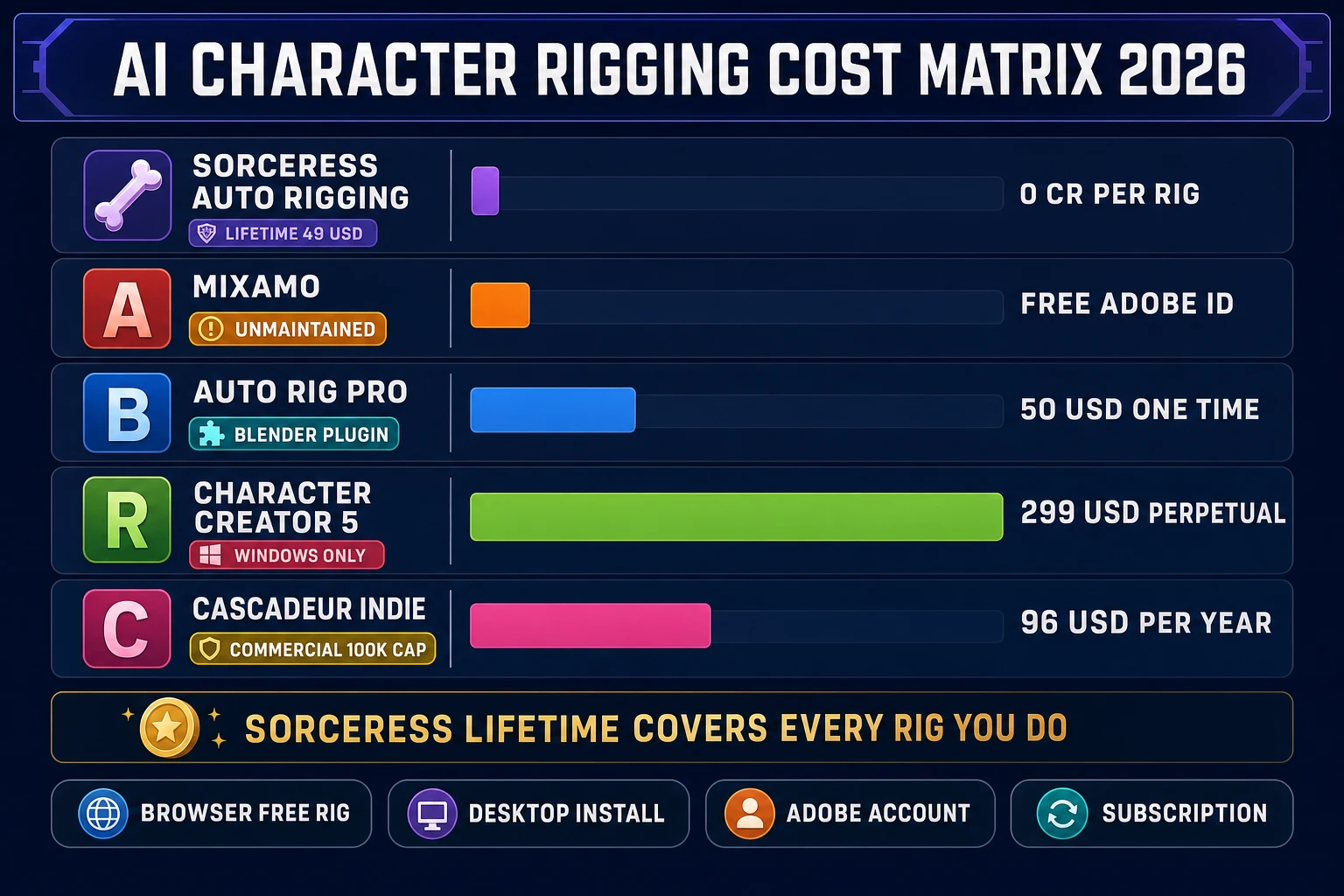
AI character rigging cost matrix 2026 - Sorceress zero credits vs Mixamo free vs Auto-Rig Pro 50 dollars vs Character Creator 5 299 dollars vs Cascadeur Indie 96 per year
Live AI character rigging cost comparison on July 2, 2026: Sorceress Auto-Rigging covers unlimited rigs under the $49 Lifetime tier, Mixamo is free but unmaintained, Auto-Rig Pro is a one-time $50 plugin plus a Blender install, Character Creator 5 is $299 perpetual Windows-only, and Cascadeur Indie is $8 monthly billed annually with a $100k commercial revenue cap.

Where AI character rigging pipelines break (and how to catch it early)

Every AI character rigging tool has the same three failure modes, and knowing them saves the reader a whole afternoon of debugging in the wrong direction. The first is T-pose vs A-pose input. Automatic rigging works best on a T-posed mesh (arms extended horizontally, legs slightly apart) because the arm and leg bones need to be clearly separated from the torso for weight painting to compute cleanly. A mesh in a dynamic action pose — a running silhouette, a battle stance, arms crossed — forces the algorithm to guess where the shoulder ends and the ribcage begins, and skinning weights bleed across the boundary. Fix: pose the mesh into T-pose or A-pose before rigging, or regenerate the mesh with a t-pose flag if the upstream generator supports one (Meshy 6’s pose_mode parameter, for example).

The second failure mode is asymmetric geometry. A character with a sword in one hand, a shield on the other arm, or a cape draped over one shoulder confuses the auto-mirror step because the left and right halves of the mesh no longer match. The fix in Sorceress Auto-Rigging is to disable auto-mirror in the toolbar and place all 13 markers manually — each side independently. It takes an extra 2 to 3 minutes but produces cleaner weights on asymmetric props. For meshes generated by paid image-to-3D models like Hunyuan 3D 3.1 or Meshy 6, enable the symmetry_mode parameter at generation time so the base mesh comes back symmetric even if the reference image is not.

The third failure mode is topology density. Any modern image-to-3D generator can produce a 200k-triangle mesh, which is far more than most game engines want at runtime. High-density meshes also slow weight computation and produce noisy weight painting because each vertex weighs less individually. Fix: run the mesh through a decimation step before rigging (Sorceress 3D Studio ships a browser-based decimator that reduces polygon count in-place), target 5,000 to 30,000 triangles for game-ready characters, then rig. Weight painting on the decimated mesh is dramatically smoother.
AI character rigging matrix: Sorceress vs Auto-Rig Pro vs Mixamo vs AccuRIG vs Cascadeur

Every price, license term, and platform gate in this section is verified against the vendor’s official page on July 2, 2026. Where a competitor mentions a specific product, the article names it in plain text without an outbound link — readers who want to buy the competitor product can search directly.

Sorceress Auto-Rigging. Browser-native at /rigging. Nine-marker guided placement with auto-mirror on by default (13 required markers total, 2 optional hip markers per src/lib/rigging/types.ts). Zero credits per rig. Included in the $49 Lifetime tier on the plans page alongside 3D Studio, Procedural Walk, and every other non-generative Sorceress tool. No install, no account beyond standard Sorceress login. Mixamo-compatible skeleton so any Mixamo BVH animation retargets cleanly. Weight painting via bounded-biharmonic-weights variant computed on the user’s GPU. Export as GLB or FBX. Verified against src/app/rigging/page.tsx on July 2, 2026.

Auto-Rig Pro. A paid Blender addon by Lucky3D (Artell), sold on Superhive (the marketplace formerly known as Blender Market). Full edition is $50, Lite edition is $25, both one-time purchases with lifetime updates. Multi-seat licenses at $162 for 10 seats and $227 for 20 seats. Current version 3.76 supports Blender 2.93 through 5.1 (verified on the Superhive product page on July 2, 2026). Requires a Blender install (roughly 500 MB) plus the plugin. The Smart marker detection (auto-skeleton-from-mesh) is Full-only, which is what most riggers actually pay for. Best-in-class for Blender users, but the total cost is Blender install + $50 + a learning curve.

Adobe Mixamo. Free with an Adobe ID (no Creative Cloud subscription needed). Bipedal humanoid only (per the Mixamo FAQ at helpx.adobe.com). Adobe has not shipped meaningful updates in years, and the backend broke on June 16, 2025 — logins failed, uploads and downloads stalled, and the Accounts link inside Mixamo pointed to a deprecated URL. Uploads and downloads were restored by June 19, 2025, but the Accounts link continues to misfire and the platform remains effectively unmaintained (verified via Adobe community threads on July 2, 2026). The 2,500-clip Mixamo animation library is still genuinely useful, and the auto-rigger still works most days, but the reader should not build a shipping pipeline around infrastructure Adobe has stopped funding.

Reallusion Character Creator 5. Windows 10+ desktop suite. $299 for a perpetual license, or Character Creator 365 subscription at $29 monthly / $99 annually (per cgchannel.com licensing article from January 2026, verified July 2, 2026). AccuRIG is the free rigging tool inside the ActorCore ecosystem and works standalone or as part of the CC5 workflow. Cost-benefit is worth it for a studio building many characters (the CC5 asset library alone justifies the $299), overkill for one indie ship. Windows-only rules out Mac and Linux developers entirely.

Cascadeur. Standalone AI-assisted keyframe animation software focused on physics-plausible poses. Free tier available for non-commercial use with export locked to the proprietary .casc format. Indie plan $19 monthly or $96 annually ($8 monthly billed annually, per cascadeur.com/plans on July 2, 2026), adds FBX/DAE/USD export, commercial use up to $100k annual revenue, and converts to a perpetual license after one year of subscription. Pro plan $49 monthly or $396 annually removes the revenue cap. AutoPosing is Cascadeur’s neural pose solver, useful for cleaning up motion-captured animation rather than for character rigging in the traditional sense. If the reader wants both a rigger and a physics animation tool in one, Cascadeur is worth a look; if they only need the rig, Sorceress or Auto-Rig Pro is the cheaper pick.

Pose-test the rig in the browser (Mixamo retarget, weight paint editor)

A rigged character with a wrong weight painting is worse than no rig at all — the game ships and the shoulders warp on every attack. Sorceress Auto-Rigging ships an in-canvas Pose Testing mode that runs animations directly on the freshly-rigged mesh so the reader catches skinning problems before export. Load a Mixamo BVH clip (walk, run, idle, punch) into the pose test slot, hit Play, and the tool retargets the animation onto the current rig using the Mixamo bone name convention. If the elbow bends the wrong way during the walk cycle, or the shoulder dislocates on the punch, the failure shows up visually inside two seconds of playback.

Weight painting fixes happen in Refinement Studio, which pairs with Auto-Rigging in the same tab. The Weight Paint editor exposes a per-vertex brush with adjustable strength and falloff radius. Click a bone in the skeleton panel, then paint on the mesh to increase or decrease that bone’s influence on the vertices under the brush. Common fixes: reduce the neck bone’s influence on the shoulder blade, dial down the pelvis influence on the upper thigh, sharpen the elbow crease so it does not smear. Every paint stroke re-runs the skinning preview immediately — there is no separate bake step, and the whole loop stays on the GPU.

The inverse kinematics preview inside the Pose Testing panel is worth using explicitly. Drag the wrist marker and the elbow and shoulder rotate to follow, which is the fastest sanity check for whether the arm chain rigged correctly. If the elbow snaps 90 degrees instead of following naturally, either the elbow marker was placed too far up the forearm during rigging (fix: re-place with the Adjust Marker tool) or the shoulder bone roll is off (fix: use the Joint Adjust tool with auto-mirror on to correct both sides at once). Total time from rig to validated rig is 5 to 10 minutes for a first-time character; experienced users hit 3 to 4 minutes.

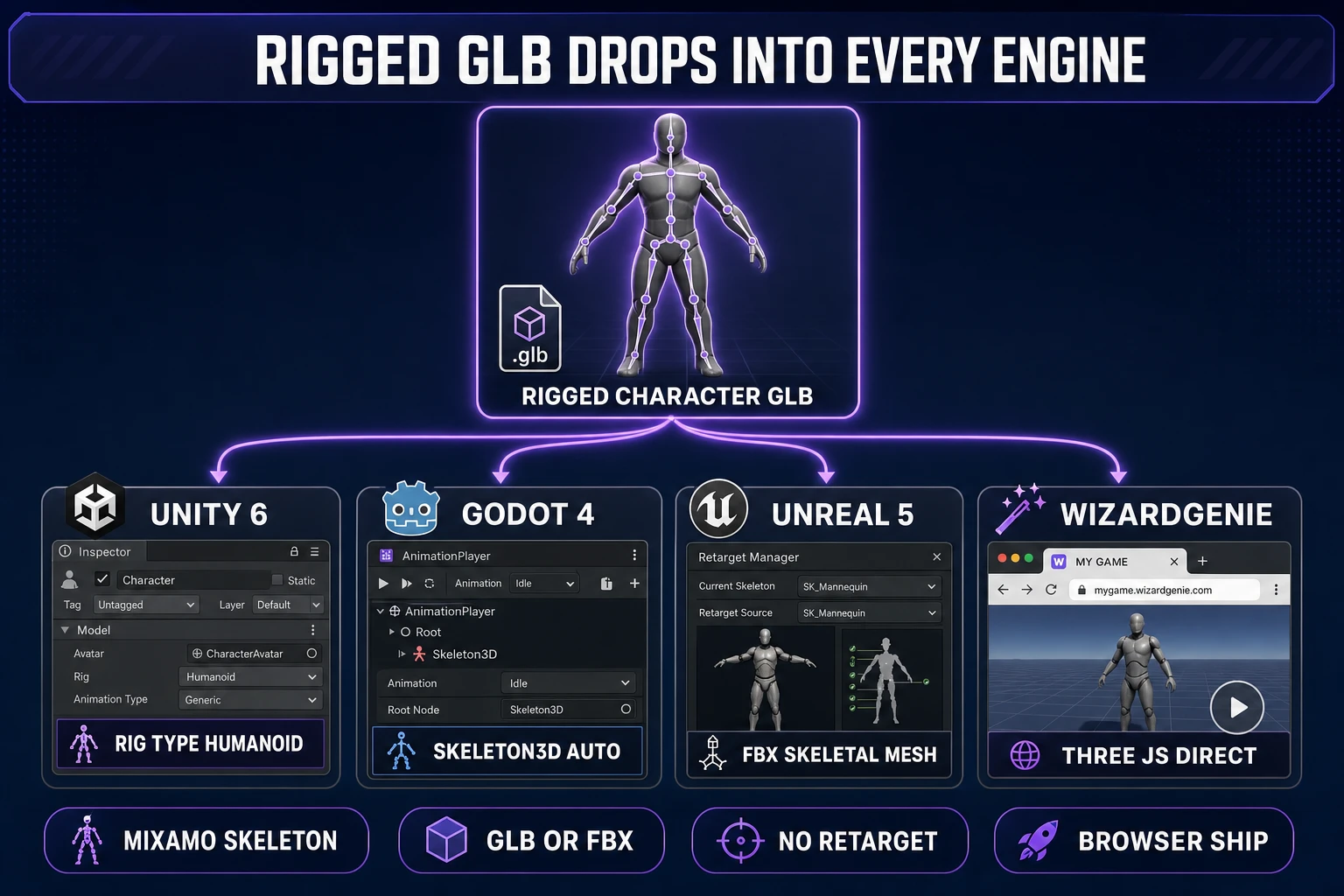
Rigged AI character rigging GLB dropping into Unity Godot Unreal WizardGenie game engines 2026
The rigged GLB or FBX out of Sorceress Auto-Rigging drops directly into Unity 6, Godot 4.5, Unreal Engine 5.5, and the browser-native WizardGenie engine — the Mixamo-compatible skeleton is portable across every mainstream engine in 2026 with no format conversion or retarget step.

Export the rigged GLB or FBX to Unity, Godot, Unreal, and WizardGenie

Auto-Rigging exports the finished rig as either GLB (glTF 2.0 binary, per the Wikipedia glTF entry) or FBX. GLB is the preferred format for three of the four target engines below because it embeds the skeleton, skinning weights, textures, and materials in a single file. FBX is preferred for Unreal because Unreal’s glTF importer is still marked experimental for skinned meshes in 5.5. Both formats carry the Mixamo bone-name convention so downstream animation retargeting stays trivial.

Unity 6. Drag the GLB into the Assets folder. Unity auto-imports the mesh, skeleton, and materials, and creates a Prefab. Select the imported model in the Project pane, switch the Rig type to Humanoid in the Inspector, and Unity’s Mecanim system auto-maps the Mixamo bone names onto its humanoid template. Drop the character into a scene, attach an Animator component, and drop any Mixamo GLB animation clip on the Animator to preview it in the scene view. Total time from download to first walk cycle in the editor: under 5 minutes.

Godot 4.5. Drop the GLB into res:// and Godot creates a Scene resource with a Skeleton3D node and a MeshInstance3D node parented under it. Add an AnimationPlayer node to the scene, import any Mixamo GLB animation using the Import As Scene > Animation flow, and the imported animation track binds to the imported skeleton automatically. Godot 4.5’s glTF importer specifically handles Mixamo-convention bone names correctly, which was not universally true in Godot 3.x. Total time to first walk cycle: under 5 minutes.

Unreal Engine 5.5. Use the FBX export from Auto-Rigging rather than GLB. Drag the FBX into the Content Browser, select Skeletal Mesh in the Import dialog, and Unreal creates the Skeletal Mesh asset, a Skeleton asset, a Physics Asset stub, and an Animation Blueprint scaffold. Open the Retarget Manager on the imported Skeleton, pick the Mixamo template from the source pose list, and Unreal auto-maps the bones onto its humanoid retarget rig. Retargeting any Mixamo animation clip onto the Unreal humanoid template then works with a single click. Unreal is the heaviest of the four engines for a first-time rig but ships the cleanest animation blueprint scaffolding once the rig is in.

WizardGenie. Drop the GLB into the Assets tab of the WizardGenie project. The engine’s three.js runtime loads glTF skinned meshes natively, so no engine-specific import step is required. Reference the character in a scene script, hand it any Mixamo animation clip in GLB form, and the character animates directly in the browser preview. This is the correct target when the shipping game is a web build — the entire prompt-to-rigged-character-to-first-frame pipeline stays inside one browser session from concept to play.

The verdict: when AI character rigging saves a week (and when it doesn’t)

The honest 2026 read on ai character rigging is that the browser-native path — Sorceress Auto-Rigging plus Refinement Studio — is the shortest route from mesh to game-ready rigged character for solo indies, jam participants, and small teams that ship on Windows, Mac, or Linux. Total cost: $0 per rig, capped by the $49 Lifetime tier that unlocks unlimited rigs across every future character. Total time: 5 to 10 minutes from mesh load to validated rig for a familiar humanoid. Compare that to a Blender + Auto-Rig Pro pipeline (30 to 60 minutes plus $50 plus a Blender install), a Mixamo upload-wait-download workflow (10 to 15 minutes plus an aging Adobe backend that broke publicly in June 2025), or a Character Creator 5 flow ($299 perpetual plus a Windows install plus a 10 GB app), and the tradeoff is clear for anyone not already working in Blender.

The situations where the browser path is not the right pick: a studio already fluent in Blender that wants sub-vertex control over rig topology and bone rolls (buy Auto-Rig Pro Full at $50, keep everything in Blender), a studio building 50+ characters for a single project with heavy customization needs (Character Creator 5 pays for itself in the asset library alone at $299), or an animator who wants physics-plausible pose cleanup as part of the rigging step (Cascadeur Indie at $96 annually for the AutoPosing tool). For every other case — the vast majority of indie AI character rigging jobs in 2026 — the browser is where the work belongs. Start a rig at Sorceress Auto-Rigging, browse the full stack at the Tools Guide, or pick up the $49 Lifetime tier on the Sorceress home page.

Frequently Asked Questions

What does AI character rigging actually do in 2026?

AI character rigging in 2026 is the discipline (and now the tooling) that takes a static 3D character mesh and attaches two things: a bone hierarchy (the skeleton or armature) and skinning weights (per-vertex bone influences). Without those two attachments the mesh is a sculpture — it cannot walk, run, wave, or swing a sword. The classic manual workflow in Blender or Maya requires placing each bone by hand and hand-painting weights per vertex, which is why AI-assisted riggers (Sorceress Auto-Rigging, Adobe Mixamo, Auto-Rig Pro, Character Creator 5 AccuRIG, Cascadeur AutoPosing) exist — they infer the skeleton from a small set of user-placed landmarks or from a full-mesh classifier, then compute skinning weights automatically. The output is a rigged asset (typically GLB or FBX) that any modern game engine treats as a Skeletal Mesh.

How many markers does the Sorceress AI character rigging workflow actually need?

The Sorceress Auto-Rigging tool (at /rigging) requires 13 markers to build a humanoid skeleton, plus 2 optional hip markers, but the guided placement flow only asks the user to click 9 markers on the left side of the mesh — chin, neck, pelvis, hipLeft, shoulderLeft, elbowLeft, wristLeft, kneeLeft, ankleLeft — and auto-mirror is enabled by default to generate the right-side markers automatically (verified against src/lib/rigging/types.ts REQUIRED_MARKERS and GUIDED_LEFT_ORDER on July 2, 2026). Once markers are in place, the tool infers bone lengths and orientations from the landmark geometry, then computes skinning weights on the mesh in-browser via WebGL and WebGPU. First-time placement takes 3 to 5 minutes for a familiar humanoid mesh.

Is Sorceress Auto-Rigging really free, or does it cost credits per character?

The rigging step itself costs zero credits. Auto-Rigging runs entirely in the reader’s browser via WebGL and WebGPU (per src/app/rigging/page.tsx), so the mesh, marker placement, skeleton inference, and skinning weight computation all happen locally with no server round-trip and no per-generation billing. Access to Auto-Rigging is bundled into the $49 Lifetime tier alongside 3D Studio, Procedural Walk, and every other non-AI-generative Sorceress tool (per src/app/plans/page.tsx line 45). If the reader arrives with a mesh already in hand, the entire AI character rigging workflow is a $49 one-time cost. If the reader also needs the mesh generated (image-to-3D or text-to-3D), the paid image-to-3D models in 3D Studio bill credits separately at $0.01 per credit at the Starter tier.

How does Sorceress AI character rigging compare to Auto-Rig Pro, Mixamo, and Character Creator 5?

Auto-Rig Pro is a paid Blender addon by Lucky3D, sold on Superhive (formerly Blender Market): Full edition $50, Lite edition $25, both one-time purchases with lifetime updates on version 3.76 for Blender 2.93 to 5.1 (verified July 2, 2026). It is the most powerful humanoid rigger in the Blender ecosystem but requires a Blender install plus the plugin purchase. Adobe Mixamo is free with an Adobe ID and bipedal-humanoid-only, but the backend has been unmaintained since a June 16, 2025 outage that broke login and download briefly and continues to misfire on the Accounts link. Reallusion Character Creator 5 costs $299 for a perpetual license or $29 monthly / $99 annually on the CC 365 subscription, requires a Windows 10+ install, and bundles AccuRIG free through the ActorCore platform. Cascadeur is free for non-commercial hobby use with .casc export only; the Indie plan is $19 monthly or $96 annually ($8/mo billed annually) with FBX/DAE/USD export, commercial rights under $100k revenue, and converts to a perpetual license after one year. Sorceress Auto-Rigging sits in a different category: browser-native, zero credits per character, no install, Mixamo-compatible skeleton out of the box.

Can I drop the rigged AI character rigging output straight into Unity, Godot, and Unreal?

Yes. Auto-Rigging exports GLB (glTF 2.0 binary) with the skeleton, skinning weights, textures, and materials embedded in a single file, or FBX for engines that prefer FBX. For Unity 6, drag the GLB into the Assets folder, select the imported model, and set Rig type to Humanoid in the Inspector — Mecanim auto-detects the Mixamo skeleton convention. For Godot 4.5, drop the GLB into res:// and Godot creates a Scene with Skeleton3D and MeshInstance3D nodes; add an AnimationPlayer and import any Mixamo GLB animation for a working track. For Unreal Engine 5.5, use FBX export instead (Unreal’s glTF importer is still marked experimental for skinned meshes) and import as Skeletal Mesh; the Retarget Manager maps the Mixamo bone names onto Unreal’s humanoid template. For Sorceress WizardGenie, drop the GLB into the Assets tab and the browser-native three.js runtime loads the skinned mesh directly with no engine-specific import.

Does Sorceress AI character rigging work for non-humanoid characters (spiders, quadrupeds, birds)?

No. The Auto-Rigging tool at /rigging is humanoid-only and requires the 13 humanoid markers (pelvis, neck, chin, shoulders, elbows, wrists, knees, ankles) to build the skeleton. For non-humanoid creatures — spiders, ants, drakes, four-legged beasts, anything with more or fewer than two legs — Sorceress ships a separate tool called Procedural Walk at /rigging-multileg that auto-rigs multi-legged creatures and drives them with real-time inverse kinematics so feet plant naturally on uneven terrain. The two tools cover the two ends of the character-rigging spectrum: humanoid characters through Auto-Rigging, non-humanoid characters through Procedural Walk. Both are Pro tools included in the $49 Lifetime tier.

Sources

  1. Skeletal animation (Wikipedia)
  2. glTF (Wikipedia)
  3. Inverse kinematics (Wikipedia)
  4. Blender (software) (Wikipedia)
  5. Rigging (Wikipedia)
Written by Arron R.·3,227 words·14 min read

Related posts