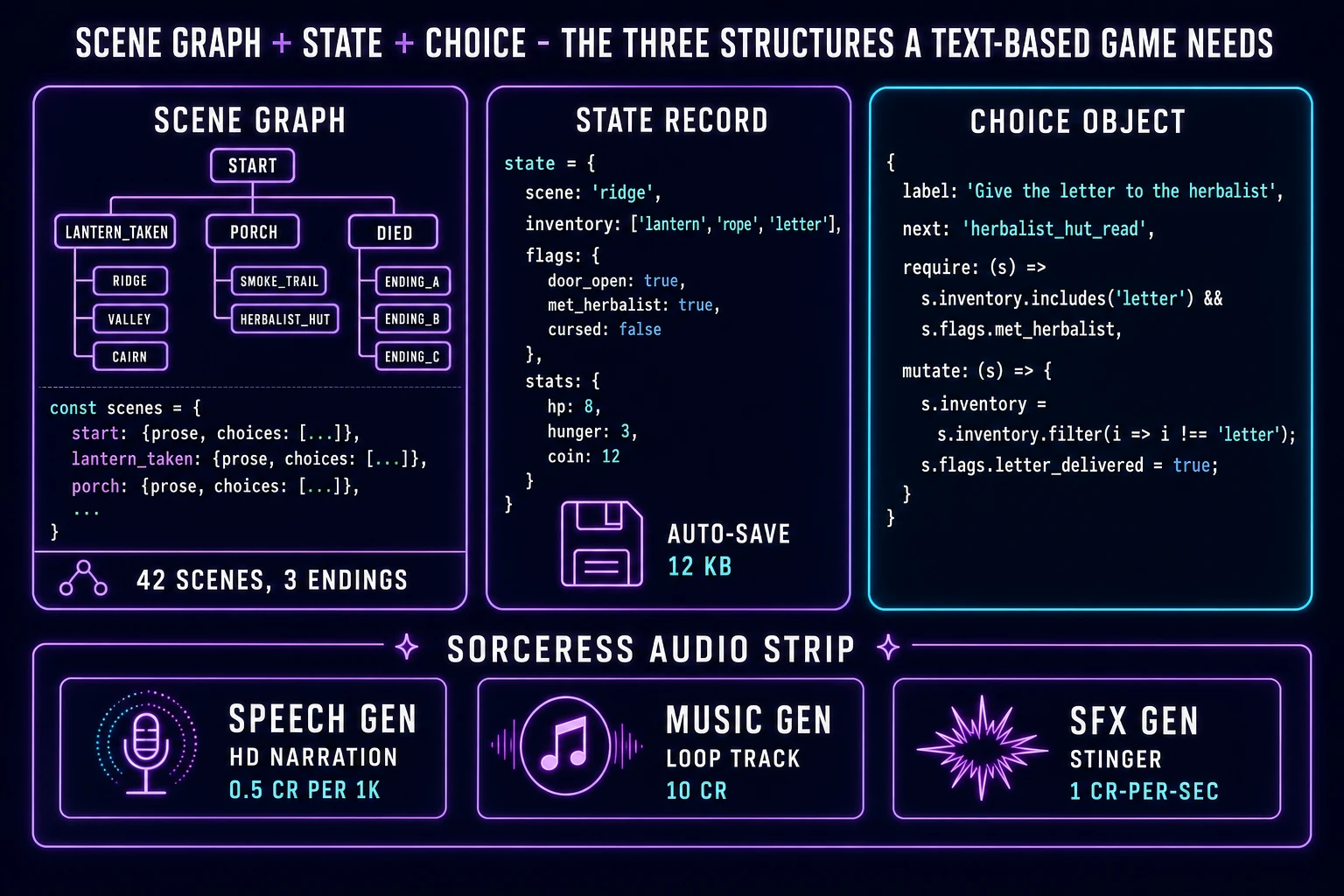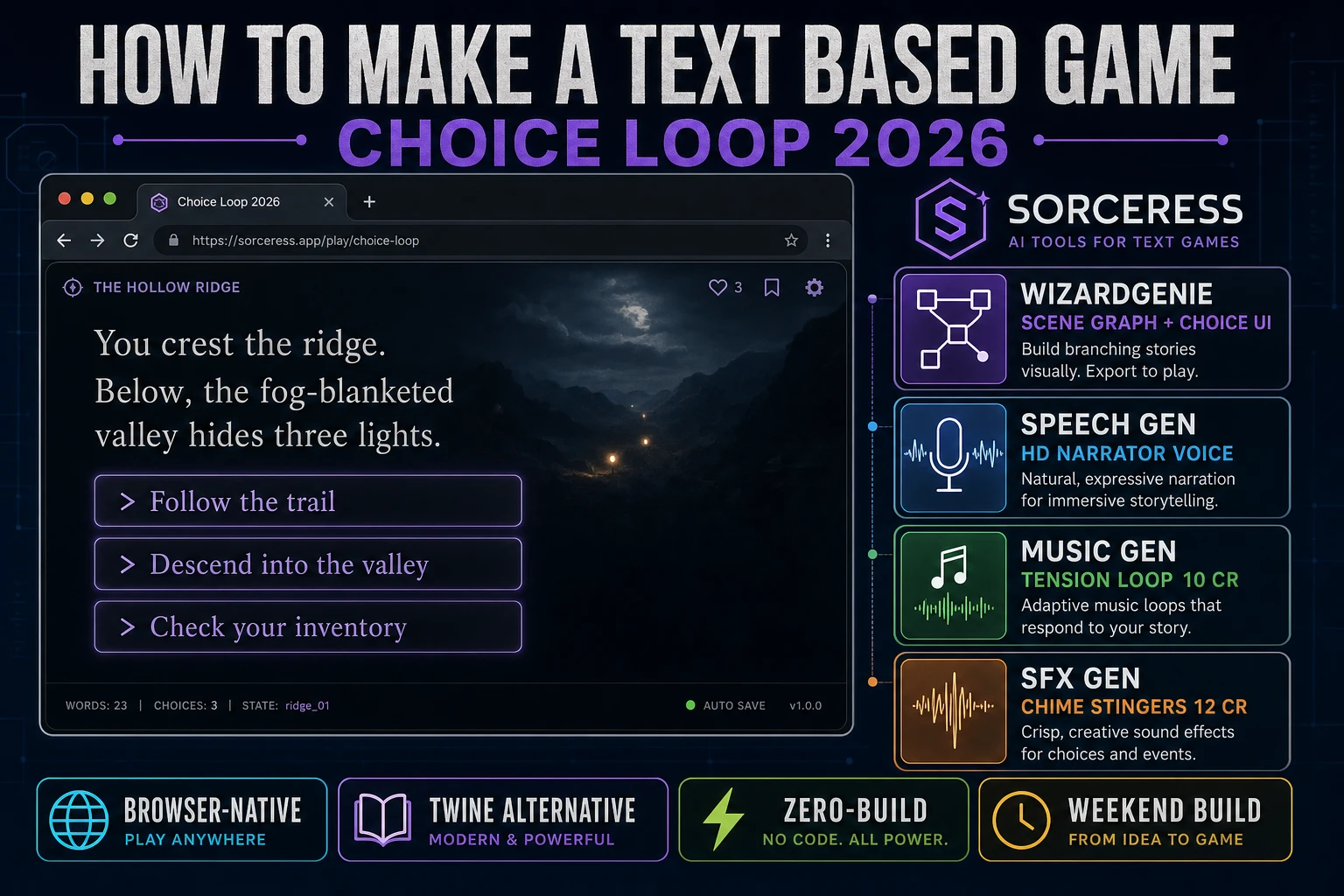
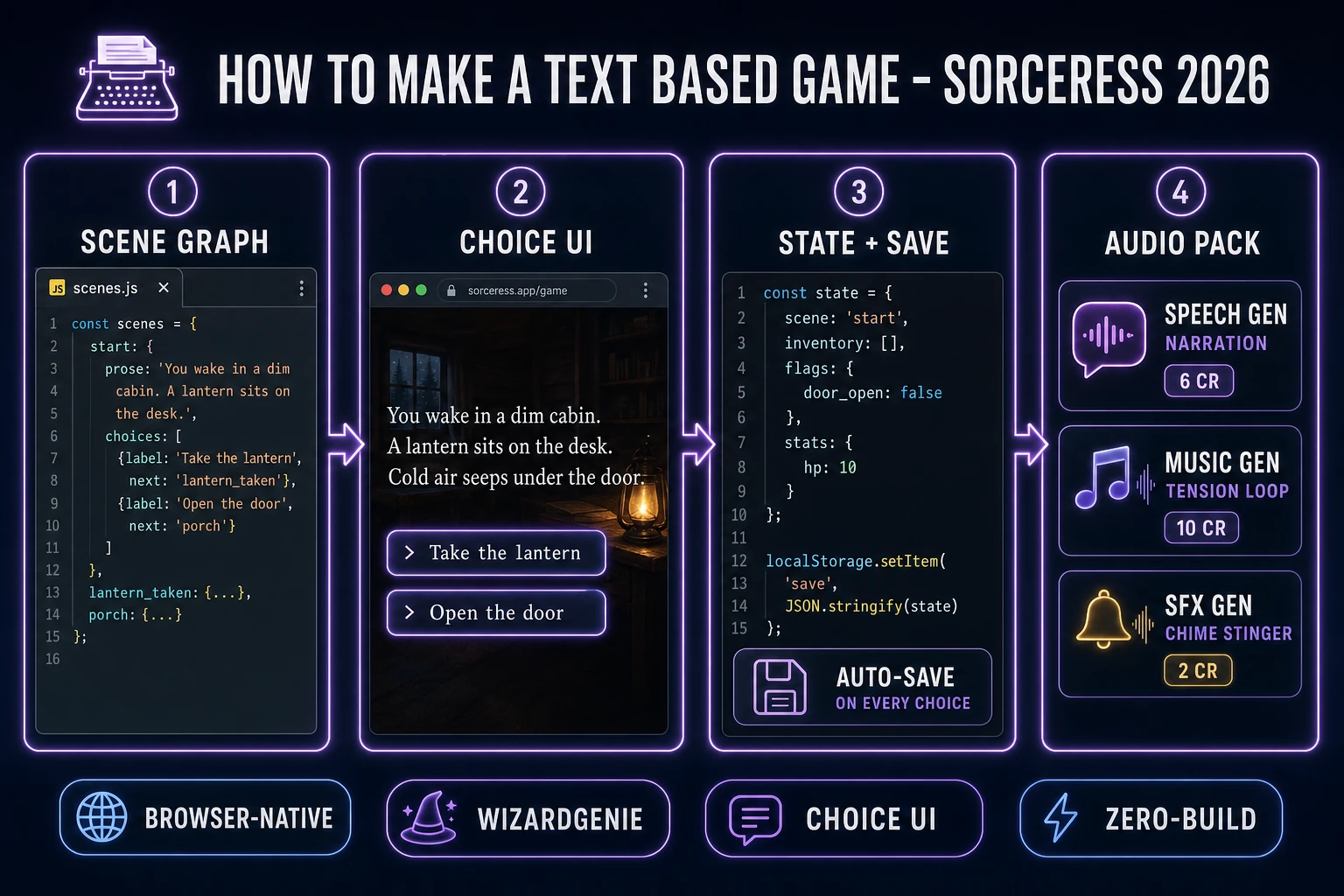
Colossal Cave Adventure shipped in 1976 (verified against en.wikipedia.org/wiki/Interactive_fiction on 2026-08-16) and every question of the form “how to make a text based game” still reduces to the same skeleton fifty years later: a graph of scenes, a small record of who the player is and what they carry, a render loop that prints the current scene and reads the next choice, and a save routine that pickles the whole state to disk. The 2026 stack has not changed those primitives, but everything above them — the narrator voice, the tension-bed music, the chime and thud SFX, and even the branching logic itself — is now a one-prompt problem instead of a one-month problem. That means WizardGenie to scaffold the scene graph, the choice UI, and the JSON save-load pair, Sorceress Speech Gen for the narrator voice, Music Gen for the loopable tension track, and SFX Gen for the handful of stingers that separate a plain page of prose from a game. This guide is the honest end-to-end for how to make a text based game that ships in a browser tab in a weekend in 2026, under two dollars in Sorceress credits.
What “how to make a text based game” actually means in 2026
The query “how to make a text based game” hides three related but different styles. Some searchers want a parser-driven interactive fiction game — the player types verb-noun commands (GO NORTH, TAKE LANTERN, EXAMINE DESK) and the game parses those into scene mutations. That was the shape of Zork in 1980 and it is still the shape of most modern IFComp entries. Some searchers want a choice-based text game — the player reads a passage of prose and taps one of two to five choice buttons; each choice advances to a new passage. That is the shape most modern web text games take because it maps cleanly onto touchscreens. And some searchers want a hybrid text RPG — short prose scenes plus combat, inventory, stats, and a save file. This guide targets the shared 2026 core of all three because the mental model is identical: JavaScript reads the player's next choice, runs a resolve function on world state, and re-renders the current scene as prose plus buttons.
Four things make a text based game still one of the highest-quality-per-hour builds in 2026. First, the audience is huge and underserved: interactive fiction has an active competition circuit (IFComp, Spring Thing) and a permanent archive at the Interactive Fiction Community Forum, per en.wikipedia.org/wiki/Interactive_fiction verified 2026-08-16. Second, the tooling is trivial — a scene graph is a plain JavaScript object, a choice is a button, a save file is a JSON string. Third, the writing carries the game, which means an author with strong prose ships a great text based game before a shader nerd finishes a single lighting pass. Fourth, voice, music, and SFX are now generative, so a lone writer can also ship a full audiobook-quality narrator track without hiring a voice actor. The genre has never been in better shape for a hobby build.
The text based game loop in one minute
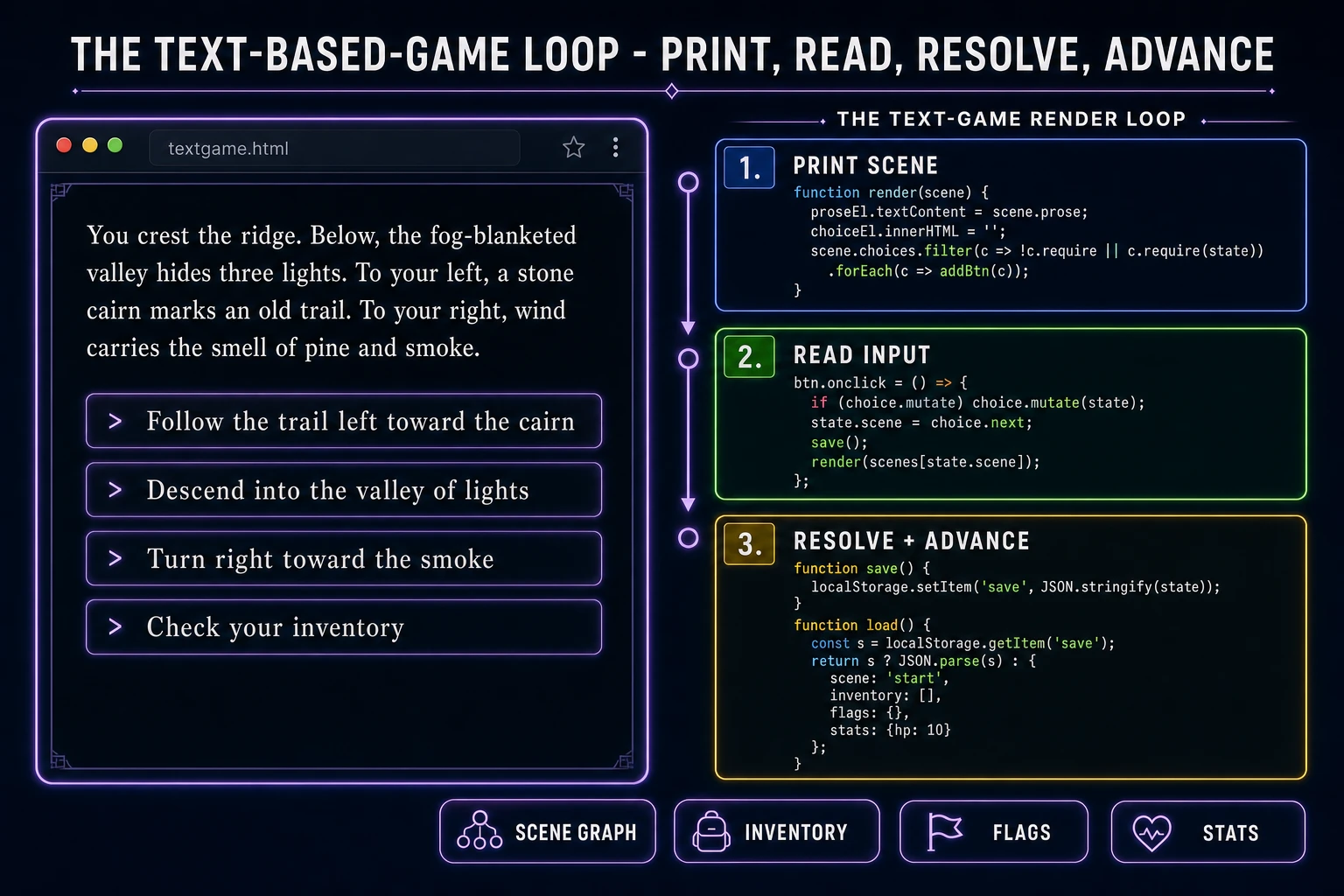
Every text based game is the same three-line skeleton. Print the current scene — write its prose into a reading pane and append one button per available choice. Read the input — wait for a click on a choice button (or, in a parser game, wait for the player to hit Enter in a command line). Resolve and advance — run any state mutation the choice specifies (add an item to the inventory, set a story flag, deduct HP), swap the current scene ID to the choice's target, save the state, and re-render. That is the whole loop, and in modern JavaScript it fits in about thirty lines with zero dependencies.
The critical discipline is the same one that keeps a canvas game honest: the render function never mutates state and the resolve function never writes DOM. Concretely: keep a state record as a plain JS object (current scene ID, inventory array, flags object, stats object), a scenes object keyed by scene ID (each value has a prose string and a choices array), and a small ui record with references to the two DOM nodes (a <div id="prose"> and a <div id="choices">). The render function reads state.scene, looks up scenes[state.scene], writes its prose to the prose div, and appends one button per available choice. The click handler mutates state, then calls render. Everything else — the save-load pair via the browser's localStorage API verified 2026-08-16, the audio playback, the death and ending screens — is layered on top of these three pieces.
Pick your engine for how to make a text based game: vanilla JS, Twine, or WizardGenie
Three good targets in 2026, each with a very different trade-off. Vanilla HTML plus a single JavaScript module is the right pick when you want total control over the presentation, the save format, and the audio pipeline — and when the game is under a couple hundred scenes. A working vanilla JS text-based game is roughly 200 lines of JavaScript: a scenes object, a state record, a render function, a click handler, and a localStorage save-load pair. You get pixel-level control of the reading pane, a save file you own, and a total bundle size under 20 KB before audio. This is the honest default when you already want the audio pipeline that Sorceress ships.
Twine 2.12.0 (released 10 April 2026, verified against twinery.org on 2026-08-16) is the honest default when the story is huge (hundreds of scenes), the mechanics are simple (mostly branching prose), and you want a visual passage editor that draws the story graph for you. Twine is free, open source, and exports to a single self-contained HTML file that runs anywhere. Its built-in story formats (Harlowe, Chapbook, SugarCube, Snowman) cover everything from beginner-friendly hyperlink fiction to SugarCube's full JavaScript API for stat systems and inventories. The trade-off: adding custom audio, custom UI, or a hybrid text-RPG feel means fighting the story format's assumptions. When the mechanical ambition is beyond “click a link to advance,” a vanilla JavaScript build is usually less friction than a heavily customized Twine build.
WizardGenie is not a separate engine — it scaffolds whichever of the two above you pick from a single natural-language prompt. WizardGenie is the Sorceress game-native coding agent, and it ships as both a Windows desktop app (installer with auto-update, available to Early Access supporters and above) and a no-install web build at the same URL. Its coding-model lineup (verified 2026-08-16 in src/app/_home-v2/_data/tools.ts lines 766 through 775) covers Claude Opus 4.7, Claude Sonnet 4.6, GPT-5.5, Gemini 3.1 Pro, DeepSeek V4 Pro, Kimi K2.5, Grok 4.2, and MiniMax M2.7. For a first vanilla-JS text based game, any model in the lineup writes the whole skeleton in under two minutes. If you want to run cheap on a long story session, pair a frontier planner (Claude Opus 4.7 or GPT-5.5) with a budget executor (DeepSeek V4 Pro or Kimi K2.5) — the planner designs the scene graph and the resolve rules, the executor types the code and populates the scenes. That pairing runs at roughly one-fifth the cost of a single-frontier session.