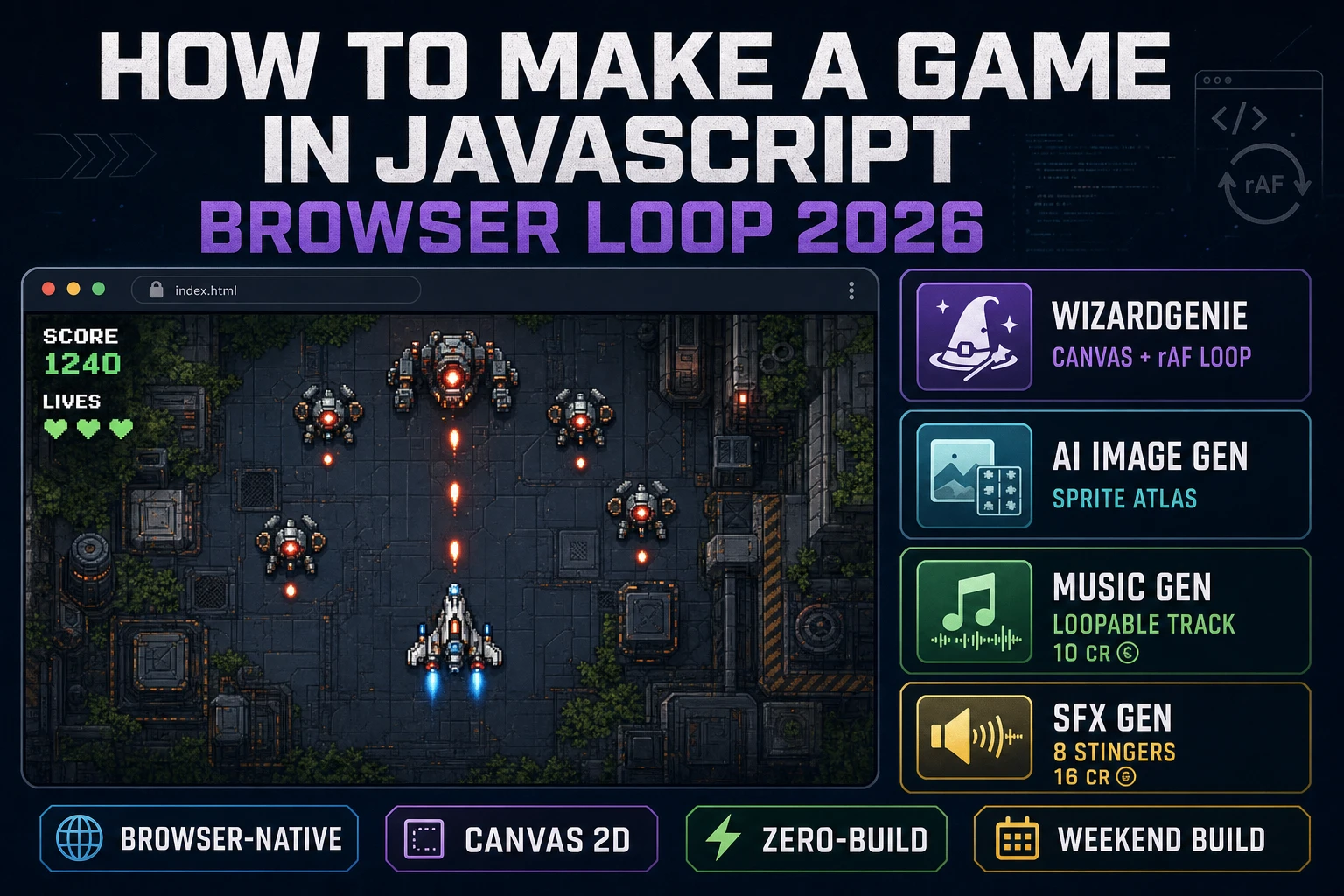
Code How to Make a Game in JavaScript (Browser Loop 2026)

By Arron R.13 min read
How to make a game in javascript in 2026: an HTML canvas, a requestAnimationFrame update-and-draw loop with a delta-time accumulator, four DOM input listeners,

Brendan Eich sketched JavaScript in ten days at Netscape in May 1995 (verified against en.wikipedia.org/wiki/JavaScript on 2026-08-16), and thirty-one years later every question of the form “how to make a game in javascript” still reduces to the same three primitives: an HTML <canvas> element, a request-animation-frame loop that reads state and draws pixels, and a small pile of keyboard and mouse event handlers. The 2026 stack has not changed those primitives, but everything above them — the sprite art, the music, the SFX, and even the tick loop scaffolding — is now a one-prompt problem instead of a one-weekend problem. That means WizardGenie to scaffold the update-and-draw loop, the input handlers, and the JSON save-load pair, Sorceress AI Image Gen for the sprite art and background layers, Music Gen for the loopable soundtrack, and SFX Gen for the ten-plus stingers that separate a demo from a game. This guide is the honest end-to-end for how to make a game in javascript that ships in a browser tab in a weekend in 2026, under five dollars in Sorceress credits.
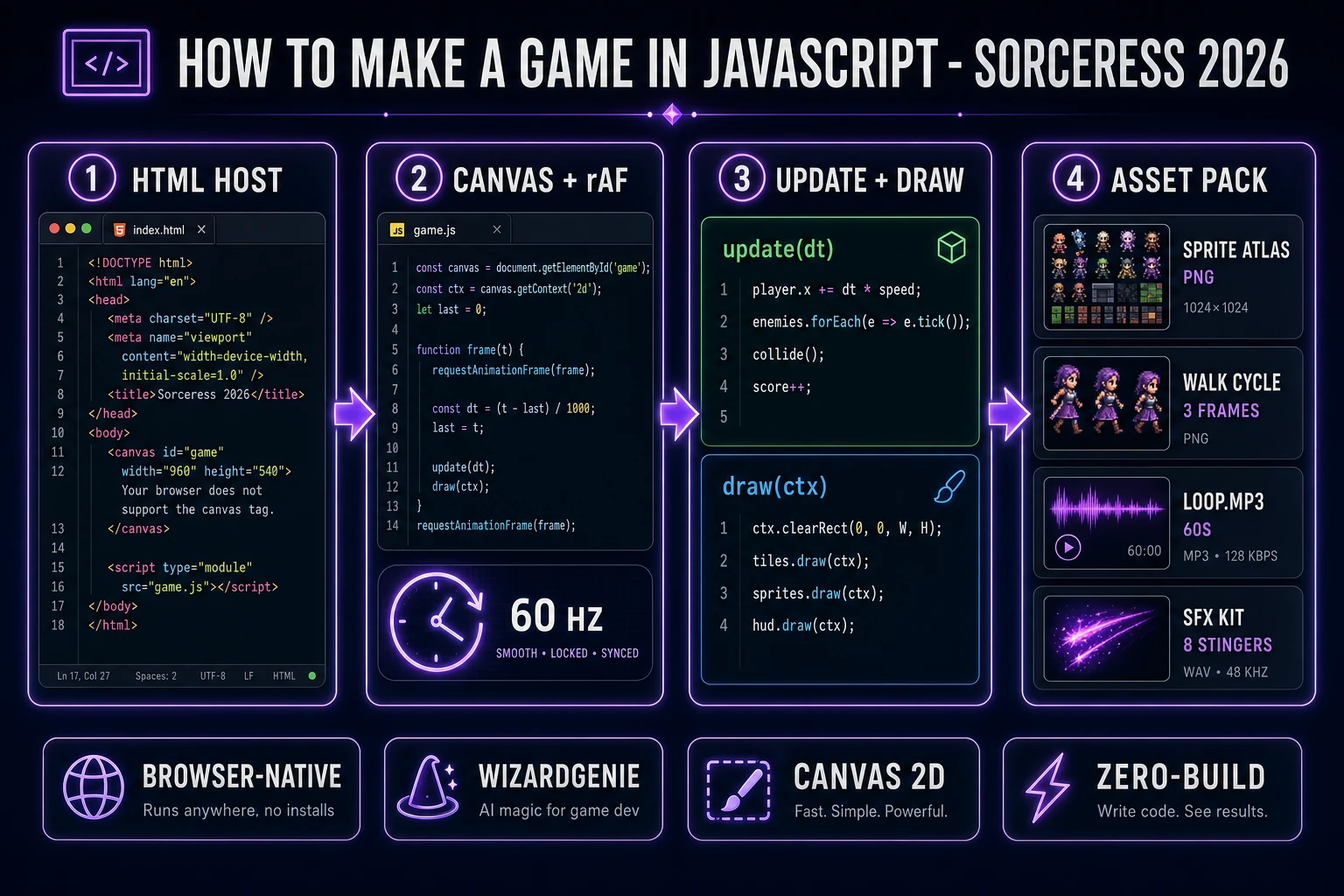
How to make a game in javascript browser pipeline: canvas element, requestAnimationFrame loop, input handlers, and asset pack with WizardGenie and Sorceress tools
The 2026 how to make a game in javascript recipe: an HTML host page with a single canvas element, a requestAnimationFrame-driven update-and-draw loop, keyboard and mouse input handlers into a small buffer, and an asset pack of sprites, music, and SFX pumped in from Sorceress.

What “how to make a game in javascript” actually means in 2026

The query “how to make a game in javascript” hides three very different builds. Some searchers want a vanilla-JS Canvas game — a single HTML file, one <canvas>, a couple hundred lines of ES modules, no build step, no framework. Some searchers want a Phaser or three.js game — a proper game framework, ES modules bundled by Vite, a scene graph, a physics engine, and a real production-ready deploy. And some searchers want a Node-plus-browser game — a small server keeping shared state (multiplayer, leaderboards) with JavaScript on both sides. This guide targets the shared 2026 core of all three because the mental model is identical: JavaScript reads player input, runs an update function on world state, and paints the result to a canvas at 60 Hz.

Four things make JavaScript still the correct answer for a hobby game in 2026. First, the browser is the delivery target: no installer, no store review, no cross-platform build matrix, just a URL. Second, Canvas 2D and WebGL2 are stable and fast per the MDN Canvas API reference verified 2026-08-16 — a modern browser draws thousands of sprites per frame without breaking a sweat. Third, requestAnimationFrame gives you a v-sync-matched 60 Hz callback for free per the MDN requestAnimationFrame reference verified 2026-08-16, so you never write the render clock yourself. Fourth, ES module syntax and modern JavaScript are a real language now — classes, generators, private fields, top-level await, structured clone — and a coding agent writes idiomatic modern JS by default. Nothing about writing a game in JavaScript in 2026 requires a compile step or a build tool if you keep the scope tight.

The JavaScript game loop in thirty lines

Every game in JavaScript is the same skeleton. Read input, update world state, draw the world to the canvas, and yield to the browser until the next frame. In modern JS the whole loop fits in about thirty lines and never touches the DOM after boot except through the single canvas element. The five moving parts are: an input buffer that keyboard and mouse listeners push events into, an update function that reads the buffer plus current world state and mutates world state, a draw function that reads world state and paints pixels to the canvas, a request-animation-frame boot that ties update and draw together, and a delta-time accumulator that keeps the update rate independent of the render rate so a 144 Hz monitor and a 30 Hz mobile tab both feel the same.

The critical discipline is the same one that keeps a simulation game or a platformer honest: the update function never draws pixels and the draw function never mutates world state. That single rule means your game survives a slow tab, a hot reload, or a save-and-restore without any hidden coupling. Concretely: keep a world object as a plain JS record (player position, enemy array, tile grid, score counter), a keys record for currently-held keys, and a small input array for one-shot events (mouse clicks, key-down transitions). The update function consumes input and reads keys; the draw function only reads world. Everything else — the pause menu, the save-load system via the browser's localStorage API verified 2026-08-16, the game-over screen, the audio playback — is layered on top of these five pieces.
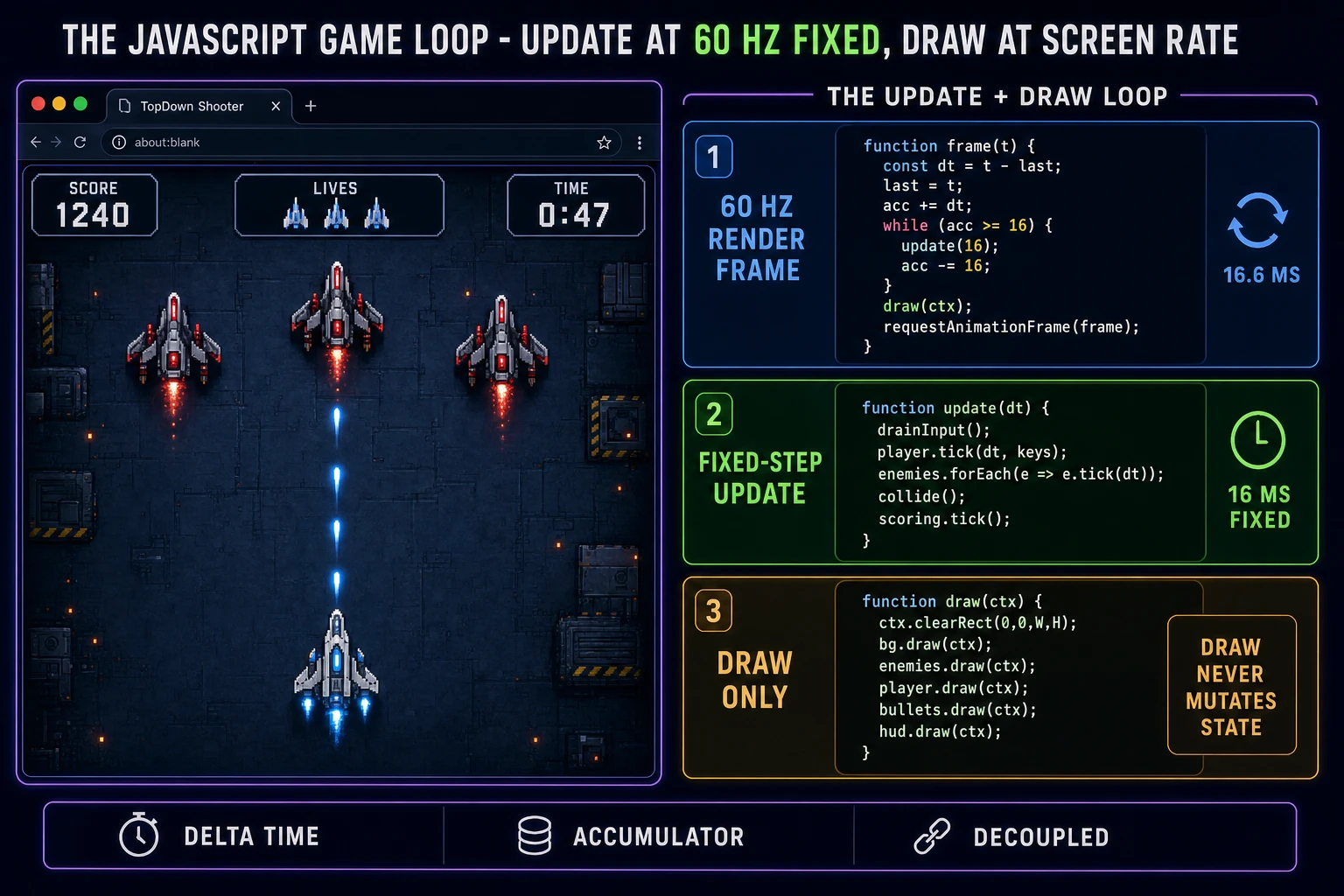
JavaScript game loop timeline: 60 Hz render frame, delta-time accumulator, and update function separated from draw function
The two-part JavaScript game loop that survives any browser tab. The render frame runs at 60 Hz via requestAnimationFrame and only draws. The update function runs off a delta-time accumulator so its rate stays constant even if the render rate wobbles.

Pick your engine for how to make a game in javascript: vanilla Canvas, Phaser 4, or WizardGenie

Three good targets in 2026, each with a very different trade-off. Vanilla HTML plus a single Canvas element plus ES modules is the right pick when the game is a small arcade build (breakout, snake, a shooter, a match-3) and you want zero build steps. A working vanilla JS game engine is roughly 300 lines of JavaScript: the boot function that creates the canvas and 2D context, the input listener pair, the update-and-draw loop, the sprite atlas that maps IDs to positions in a single PNG, and the save-load pair. You get pixel-level control, zero framework overhead, and a total build size under 40 KB before assets. This is the honest default for a first arcade or puzzle build.

Phaser 4.2.1 “Giedi” (released 9 July 2026, verified against phaser.io/download/stable on 2026-08-16) is the honest default when the game needs a real scene graph, a proper camera, a tween system, tilemap loading from Tiled, physics for a platformer or a top-down shooter, or an asset loader that streams sprite sheets and audio in parallel. Phaser is a single JavaScript file, roughly 900 KB minified, and pulls in via a script tag or an npm install. It ships Scene management, an asset loader, tween animations, a Tilemap layer, an arcade physics engine, and audio playback in one library. Any game bigger than a single-screen arcade build is easier in Phaser.

WizardGenie is not a separate rendering engine — it scaffolds whichever of the two above you pick from a single natural-language prompt. WizardGenie is the Sorceress game-native coding agent. It ships as both a Windows desktop app (installer with auto-update, available to Early Access supporters and above) and a no-install web build at the same URL. Its coding-model lineup (verified 2026-08-16 in src/app/_home-v2/_data/tools.ts lines 766 through 775) covers Claude Opus 4.7, Claude Sonnet 4.6, GPT-5.5, Gemini 3.1 Pro, DeepSeek V4 Pro, Kimi K2.5, Grok 4.2, and MiniMax M2.7. For a first vanilla-JS Canvas game with a single-file scope, any model in the lineup writes the whole skeleton in under two minutes. If you want to run cheap on a long session, pair a frontier planner (Claude Opus 4.7 or GPT-5.5) with a budget executor (DeepSeek V4 Pro or Kimi K2.5) — the planner writes the world-state schema and the update pseudo-code, the executor types the code. That pairing runs at roughly one-fifth the cost of a single-frontier session.
Step 1 — scaffold the HTML host page, canvas, and input handlers

Open a fresh directory and create one HTML file, one JavaScript file, and one CSS file — nothing else. The HTML host page is roughly ten lines: a doctype, a head with the page title and a link to the CSS, and a body with a single <canvas id="game" width="960" height="540"></canvas> and a script tag that loads the JavaScript module. The CSS file is thirty lines: reset the body margin to zero, set the background to a dark color so the letterboxing looks intentional, center the canvas with flexbox, and give the canvas a pixelated image-rendering if the game uses pixel art (per MDN's image-rendering reference verified 2026-08-16). That is your entire host page — a single canvas at a fixed logical resolution that scales up cleanly to any monitor.

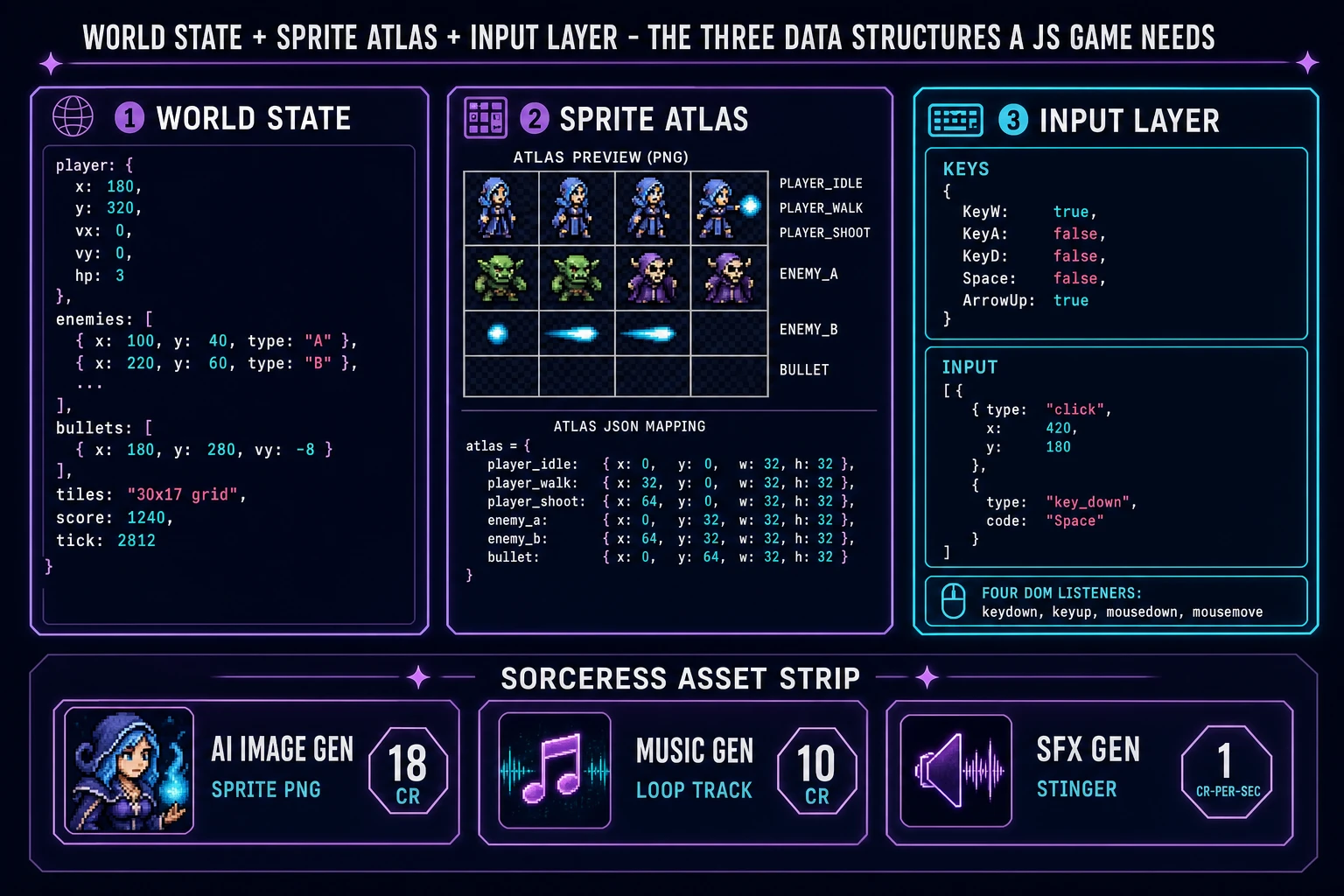
Now the input handlers. In the JavaScript module, keep a keys record and an input array at module scope. Attach four listeners to window: keydown writes true into keys[e.code] and pushes a {type: 'key_down', code: e.code} event into input; keyup writes false; mousedown reads the canvas bounding rect and pushes a {type: 'click', x, y} event; and mousemove updates a single mouse record with the current position. That is the entire input layer. The update function reads keys for held-down movement and drains the input array for one-shot events like jump, shoot, and menu clicks. Reset the input array to empty at the end of each update pass so events fire exactly once.

Boot with two lines: const canvas = document.getElementById('game') and const ctx = canvas.getContext('2d'). That gives you the 2D drawing context per the MDN Canvas API reference. Everything else — the sprite atlas load, the world-state init, the request-animation-frame call — is inside a single boot() async function that fires on window.load. Modern JavaScript resolves the whole boot in under 50 ms on a fresh page load.

JavaScript game data structures: world state object, sprite atlas map, and input buffer with keys record
The three JavaScript data structures every browser game needs. World state as a plain record, a sprite atlas as an ID-to-rect map into a single PNG, and an input buffer plus a keys record fed by four DOM event listeners.

Step 2 — write the update-and-draw loop in one file with WizardGenie

Open WizardGenie and paste your data structures in as the seed. Give the agent one paragraph: “Wire the JavaScript game loop for this world model. Build it as one ES module: (1) a boot function that gets the canvas, its 2D context, loads a single sprite atlas PNG, initializes the world state, and starts the animation frame loop, (2) a delta-time accumulator that adds the elapsed time between requestAnimationFrame callbacks and fires a fixed-step update function once every 16 ms, (3) an update function that drains the input buffer, reads the keys record, and mutates world state (player position, enemy AI, collision, score), (4) a draw function that clears the canvas, draws the background layer, walks the sprite list back to front, and draws the HUD, and (5) a localStorage save that serializes world state to a JSON string on every 60th frame and restores it on boot if a save exists.” Any coding model in the lineup produces the module in under three minutes.

The update function is where the game lives. A simple starting rule set for a top-down arcade shooter that already feels like a game: read WASD or arrow keys to move the player, drain the input buffer for space-bar shoot events, spawn a bullet on shoot, advance every enemy along its patrol path, check bullet-vs-enemy axis-aligned bounding-box collisions, remove hit enemies and increment the score, and check enemy-vs-player collision to end the game. That is roughly forty lines of JavaScript. A platformer swaps the AI for a gravity-and-jump physics pass and adds a tile-map collision check; the total is still under a hundred lines.

The draw function is the mirror image. Clear the canvas to a background color, draw the parallax background layer (a single image translated by the camera position), walk the enemy array and draw each one by looking up its sprite ID in the atlas map, draw the player on top, draw the bullet array, and draw the HUD (score, lives, timer) as text via ctx.fillText. The whole draw pass is under twenty lines and runs in under two milliseconds on a modern laptop for a hundred sprites.

Step 3 — AI Image Gen sprites, Music Gen loop, SFX Gen stingers

Colored rectangles work for testing but a real game in JavaScript needs three asset layers: sprite art, a loopable music track, and a handful of SFX stingers. Sorceress covers all three in under an hour of hands-on time.

Sprite art first. A first arcade game needs six sprites (player idle, player walk, player shoot, enemy A, enemy B, bullet) plus a background layer. Open AI Image Gen and prompt each sprite as a small square PNG on a transparent background. Keep the prompt style identical across all sprites — the same art direction phrase (“pixel art, 32x32, flat colors, hard outline, transparent background”) plus a per-sprite subject — so the set looks like a set rather than a bag of stray images. Six sprites at the default 2K Nano Banana Pro rate (18 credits per image, verified 2026-08-16 in src/lib/models.ts line 303 as credits: 18) is 108 credits or $1.08. Optionally add a walk-cycle at 32x32 via Quick Sprites at 9 credits per generation (verified 2026-08-16 in src/app/quick-sprites/page.tsx line 21 as CREDITS_PER_GEN = 9), so 27 credits for a three-frame walk.

Music second. A JavaScript arcade game rewards a single loopable track with a clear tempo, since the same loop plays for the entire session. Open Music Gen. Music Gen bills 10 credits per generation (verified 2026-08-16 in src/app/music-gen/page.tsx line 28 as MUSIC_CREDIT_COST = 10). One track is usually enough; two or three generations to nail the tempo and mood, so budget 20 to 30 credits total (about $0.20 to $0.30). Add 2 credits per WAV export (WAV_CREDIT_COST = 2, same file line 31) if you want lossless. Play the track from JavaScript with a single Audio object per the MDN HTMLAudioElement reference verified 2026-08-16, set loop = true, and start it on the first user input event so browser autoplay policy stays happy.

SFX third. A JavaScript game feels alive when small stingers punctuate every action: a shot sound on space bar, a hit sound on enemy destruction, a pickup chime on power-up, a menu blip on button click, and a game-over sting on death. Open SFX Gen. SFX Gen bills 1 credit per second on the seed-audio tier (verified 2026-08-16 in src/app/sfx-gen/page.tsx line 23 as SEED_AUDIO_CREDITS_PER_SECOND = 1). A full arcade SFX kit is roughly 8 short stingers times 2 seconds each, so 16 credits (about $0.16). Play each stinger with a fresh Audio object so overlapping shots do not cut each other off, or use the Web Audio API for finer control.

What a how to make a game in javascript project costs on Sorceress in 2026

Concrete asset and generation budget for a browser arcade game in JavaScript with a canvas, six sprite types, a walk-cycle, one music track, and a full SFX kit, from empty repo to zip-and-share playable, all numbers verified 2026-08-16 against local Sorceress source:

  • Sprite art (AI Image Gen, Nano Banana Pro 2K): 18 credits per image, 6 sprites plus a background layer (7 total), so 126 credits ($1.26 USD).
  • Walk-cycle frames (Quick Sprites): 9 credits per generation, 3 frames (idle, walk, shoot), so 27 credits ($0.27 USD).
  • Music (Music Gen): 10 credits per generation, 1 track with 2 to 3 tries, so 20 to 30 credits ($0.20 to $0.30 USD). Add 2 credits per WAV export.
  • SFX (SFX Gen, seed-audio tier): 1 credit per second, 8 stingers at 2 seconds each = 16 credits ($0.16 USD).
  • WizardGenie coding time: effectively free on the Sorceress side (bring your own model API key, or use one of the built-in trial-key options for the smaller models). Model-side API cost for a 2-to-3-hour prompt session on a cheap Executor like DeepSeek V4 Pro is typically under $0.60.
  • Total for one complete browser JavaScript game build (7 sprite tiles, 3 animation frames, 1 music loop, 8 SFX stingers, working canvas engine): 189 to 199 credits, or roughly $1.89 to $1.99 USD in Sorceress credits, plus under $0.60 in model API time. Under $3 end-to-end for a first playable game in javascript.

Sorceress bills 100 credits per dollar at the standard rate (CREDITS_PER_DOLLAR = 100 in src/lib/models.ts line 69). New accounts start with 100 free credits (SIGNUP_GRANT = 100 in src/app/api/admin/credits/route.ts line 12), which is enough for the walk-cycle sprites, the SFX kit, and one music track with room to spare. The Sorceress Lifetime tier at $49 one-time (LIFETIME_PRICE = 49 in src/app/plans/page.tsx line 51) covers unlimited Music Gen, SFX Gen, and Quick Sprites use, which matters if the JavaScript game is the first entry in a series or a game-jam pipeline that ships a new arcade build every weekend.

For related browser-game pipelines that share the canvas-and-update-loop spine, the closest reads are Ship How to Make a 2D Game (Browser AI Loop) for the generalized 2D companion, Host How to Make a Web Game (Browser AI 2026) for the web-deployment sibling, Wire a Browser Game Engine (Phaser AI Loop 2026) for the Phaser deep-dive, and Sim How to Make a Simulation Game (Browser Sandbox 2026) for the tick-loop cousin. The Sorceress Tools Guide is the master index for every tool the guide referenced. Under three dollars, one weekend, and how to make a game in javascript is a done deal on Sorceress in 2026.

Frequently Asked Questions

Do I need a framework like Phaser or three.js to make a game in JavaScript?

Not for a first arcade or puzzle game. A single HTML file, a single canvas element, and roughly 300 lines of vanilla JavaScript is enough to ship a working browser game. Concretely: 10 lines of HTML for the host page, 30 lines of CSS for centering and letterboxing, and one ES module with a boot function, an input listener pair, an update-and-draw loop, and a sprite atlas load. Total build size stays under 40 KB before assets. Reach for Phaser when the game needs a real scene graph, tween animations, a tilemap layer, or arcade physics - so any platformer, top-down shooter, or side-scroller with more than one screen. Reach for three.js when the game needs 3D. For a first project, vanilla JS is the honest default because there is no framework mental model to learn on top of the game itself, and the whole game is one file you can read top-to-bottom in fifteen minutes.

How do I keep the JavaScript game loop running at a consistent speed across different monitors?

Two clocks and an accumulator. The render frame runs at whatever the monitor supports (60 Hz, 120 Hz, or 144 Hz) via requestAnimationFrame per developer.mozilla.org/en-US/docs/Web/API/Window/requestAnimationFrame verified 2026-08-16. The update function should run at a fixed 60 Hz regardless. Keep a single accumulator variable, add the elapsed time between rAF callbacks to it, and fire the update function every 16 ms while the accumulator has budget. That pattern is called a fixed-step accumulator and it decouples game logic from render rate. A 144 Hz monitor calls rAF more often but each update still advances the same 16 ms of simulation. A 30 Hz mobile tab in the background gets called less often but the accumulator catches up on foreground return by firing multiple updates back to back. The rule to internalize: the update function never draws pixels and the draw function never mutates state. That single discipline is what makes the game survive slow tabs, hot reloads, and save-and-restore without any hidden coupling.

How should I handle keyboard and mouse input in a JavaScript game?

Four DOM listeners on the window object plus two module-scope data structures. The two structures: a keys record (a plain object mapping event.code strings to boolean held/not-held state) and an input array (a queue of one-shot events like clicks and key-down transitions). The four listeners: keydown writes true into keys[e.code] and pushes a {type: 'key_down', code: e.code} event onto input; keyup writes false into keys[e.code]; mousedown reads the canvas bounding rect via getBoundingClientRect and pushes a {type: 'click', x, y} event onto input; mousemove updates a single mouse record with the current pointer position. The update function reads keys for held-down movement (WASD or arrow keys), then drains the input array for one-shot events (jump, shoot, menu clicks), then resets input to an empty array. This decoupling is critical: it means a click during a frame update never corrupts state mid-tick, and it means every input goes through one code path that is easy to log or replay.

How do I save a JavaScript game's progress to the browser?

localStorage for a first game, IndexedDB when the save file grows past 5 MB. localStorage per developer.mozilla.org/en-US/docs/Web/API/Window/localStorage verified 2026-08-16 gives every origin roughly 5 to 10 MB of synchronous string storage, which is more than enough for a game with a player state, an enemy array of a few hundred entries, a tile grid, and a score. Serialize the world state to a JSON string with JSON.stringify on every 60th update tick (once per second at 60 Hz), and read it back with JSON.parse on page load in the boot function. The synchronous read-write model matches how the update tick already thinks: read state, mutate state, write state. IndexedDB is the right answer only if the save grows past 5 MB (which happens with tens of thousands of enemies or a large procedurally generated map with rich per-tile state). Also expose a manual export button that downloads the save as a JSON file via a data URL - that single feature turns a browser game into a shareable artifact instead of a session that dies with the tab.

How much does it cost to make a browser game in JavaScript with Sorceress?

Under $3 in Sorceress credits plus under $0.60 in model API time for a first playable arcade game. Concrete breakdown at 2026-08-16 credit rates all verified in local source. AI Image Gen at 18 credits per Nano Banana Pro 2K generation (src/lib/models.ts line 303) for 6 sprites plus a background layer is 126 credits or $1.26. Quick Sprites at 9 credits per generation (src/app/quick-sprites/page.tsx line 21) for a three-frame walk-cycle is 27 credits or $0.27. Music Gen at 10 credits per generation (src/app/music-gen/page.tsx line 28) for one track with two or three tries is 20 to 30 credits or $0.20 to $0.30. SFX Gen at 1 credit per second on the seed-audio tier (src/app/sfx-gen/page.tsx line 23) for 8 two-second stingers is 16 credits or $0.16. Total: 189 to 199 credits or roughly $1.89 to $1.99, plus under $0.60 for a coding-agent session on a cheap Executor like DeepSeek V4 Pro. New Sorceress accounts get 100 free credits (src/app/api/admin/credits/route.ts line 12), which covers the walk-cycle, the SFX kit, and the first music track with room to spare.

Sources

  1. JavaScript - Wikipedia
  2. Phaser 4 - HTML5 Game Framework
  3. MDN - Canvas API
  4. MDN - requestAnimationFrame
  5. MDN - localStorage
  6. MDN - HTMLAudioElement
Written by Arron R.·2,882 words·13 min read

Related posts