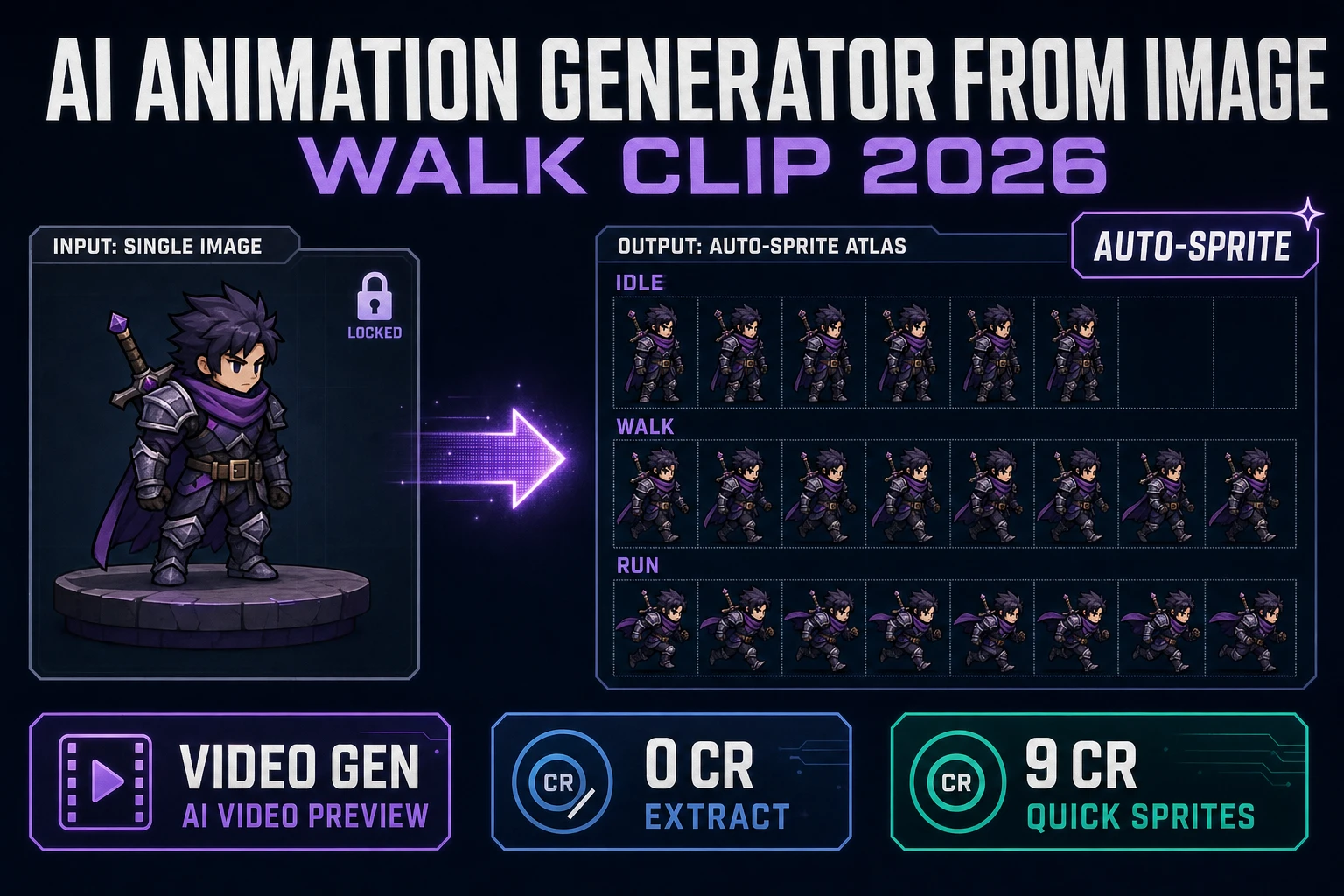
Renderforest AI Animation Generator (2026 Game Test)

By Arron R.13 min read
The Renderforest AI animation generator runs Pixverse, Hailuo, Seedance, Veo, and Sora 2 inside a polished marketing-video editor with a watermarked free tier a

An AI animation generator does one job well when the output is a polished marketing video. It does a different job — one that almost no marketing-first tool ships natively in 2026 — when the output is a transparent walk cycle aligned to a 48×48 sprite grid, loaded by an engine the same hour you generated it. The renderforest ai animation generator sits on the marketing side of that line with real polish, real third-party model integrations, and a watermarked free tier that genuinely lets you try the pipeline. The friction shows up only when the next step is “now drop these frames into a Phaser scene”. Below is what the Renderforest AI animation generator actually does in 2026, the pricing tiers verified June 3, 2026 against the live renderforest.com/subscription page, where it stops for indie game work, and the sprite-ready Sorceress bridge that closes the loop.
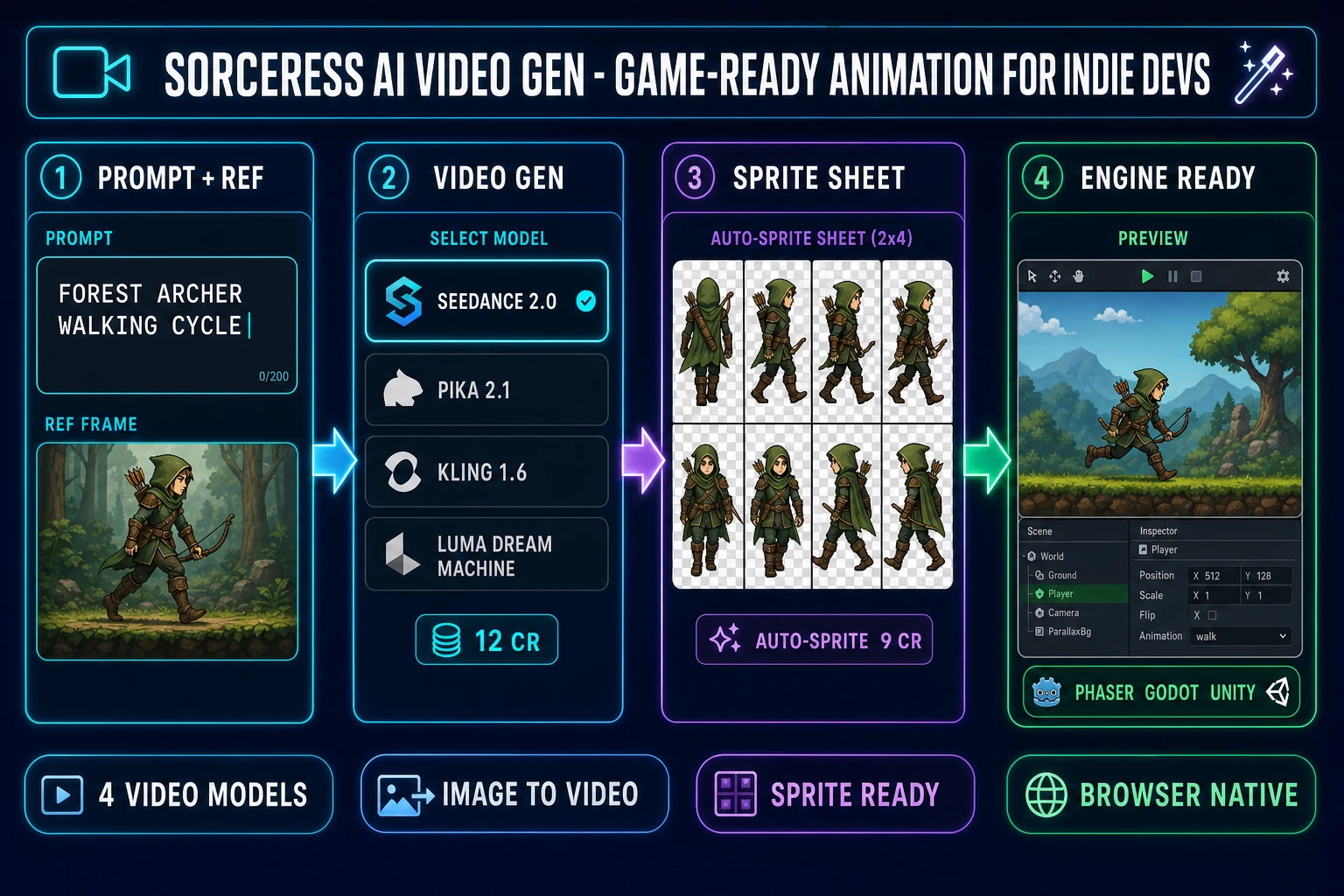
Sorceress AI Video Gen pipeline diagram with four numbered panels showing prompt and reference image inputs, the multi-model video generation step with Seedance 2.0 selected, the Auto-Sprite extraction step producing a transparent eight-pose walking sheet, and a final engine-ready panel showing the same character running inside a side-scrolling game viewport, with cyan, purple, and emerald accents on a dark navy background
The game-ready alternative to the Renderforest AI animation generator: same flagship model families, one-tab hand-off into a sprite sheet, transparent backgrounds, and no recurring subscription on the cutout step. Verified June 3, 2026 against src/app/_home-v2/_data/tools.ts.

What the Renderforest AI animation generator actually does in 2026

The Renderforest AI animation generator is the animation entry point inside renderforest.com, an all-in-one cloud video, design, and website-builder platform that bundles AI video generation, animated explainer templates, logo making, and a stock library behind a single dashboard. The animation surface lives at renderforest.com/ai-animation-generator, and it accepts three main inputs. Text-to-Video takes a written description and builds a structured marketing animation in seconds. Idea-to-Video takes a short prompt and expands it into a fuller scripted story. Image-to-Video takes a still photo and produces a four-to-twelve-second animated clip. Verified June 3, 2026 against the live renderforest.com/ai-animation-generator product page.

The output side is where the tool’s identity becomes obvious. Renderforest renders full marketing-grade videos with scenes, narration, music, and on-screen text. The platform advertises more than 60 styles — cartoonish 2D and 3D templates, anime variants, and realistic looks — plus voiceovers in over fifty languages. Aspect ratios cover 16:9 horizontal for YouTube, 9:16 vertical for TikTok and Instagram Reels, and the original photo dimensions on image-to-video runs. Length sits at roughly five to twelve seconds for image-to-video clips and up to three minutes (extendable) for full text-to-video productions. Renderforest 2.0, launched as the major model upgrade ahead of 2026, brought up to 2× faster generation, improved physical realism in motion, automatic lip sync, and built-in sound effects so visuals and audio are generated together.

The model picker is the genuinely interesting piece. Behind the scenes the platform integrates the Renderforest Fast model (the high-speed unlimited rail on Pro and higher), the Renderforest Pro model (the higher-quality AI-image variant), plus third-party flagships including Pixverse, Hailuo (MiniMax), Seedance (ByteDance), Google Veo, OpenAI Sora, and ByteDance Seed. Verified June 3, 2026 against the renderforest.com/ai-video-generator product page and the renderforest.com/blog/renderforest-ai-video-generator-whats-new-and-what-you-can-create launch post. That is a respectable lineup — you are not stuck with a single in-house model, and the credit ladder gives access to the flagship third-party engines on the upper tiers.

Renderforest pricing in 2026 — and where the AI animation generator sits

Pricing verified June 3, 2026 against the live renderforest.com/subscription page. The tier ladder relevant to indie game devs:

  • Free: genuinely free to try. Basic templates, exports HD with a Renderforest watermark, limited storage, limited premium-template access. The image-to-video flow is reachable but the watermark sits on every export, so the free tier is for evaluation, not for shipped work.
  • Lite — $8/mo billed yearly (about $96/yr): 400 AI credits per month (roughly 400 AI images or 40 AI videos), 5 HD720 template exports, 10GB cloud storage, premium AI models, one premium website on a custom domain.
  • Pro — $9.50/mo first year billed yearly (regular $19/mo), $228 second year: 1,600 AI credits per month, unlimited HD720 AI video creations with the Renderforest Fast model, unlimited AI image processing with the Renderforest model, Full HD1080 template exports, 50GB storage, the full 5M+ stock library. This is the tier most reviews recommend for active creators.
  • Business — $34.30/mo first year billed yearly (regular $49/mo): 3,000 AI credits per month, unlimited HD1080 AI video creations, Ultra HD 4K template exports, reseller license, team management, 100GB storage per seat.
  • AI credit refill add-on: credits can be topped up anytime on an active plan when the monthly allowance runs dry.

The headline number for an indie game dev is two things at once: the free tier ships a watermark on every export (so it is not the shipping path), and the first useful tier is Lite at $8/mo with only 40 AI videos per month. Forty videos sounds plentiful until you remember a single character walk cycle wants four directions × four frames each — that is sixteen image-to-video runs for one character, before you generate a single line of code. The Pro tier at $9.50/mo first-year unlocks unlimited HD720, which fixes the throttle but locks you into a recurring subscription that bills whether the studio shipped this month or not.

Where the Renderforest AI animation generator stops for game sprites

Three honest places the Renderforest side stops, all rooted in game-pipeline economics rather than animation quality on a single render.

1. No sprite-sheet packer, no transparent-background grid, no engine atlas. Verified June 3, 2026: the output of every Renderforest AI animation generator run is an MP4 video file sized for marketing platforms. There is no “export as sprite sheet” option, no transparent-background frame extractor, no walking-cycle row layout, no texture atlas downloader. To bridge a Renderforest clip into a game pipeline you have to download the MP4, then run it through a separate sprite-sheet pipeline that handles frame extraction, alpha matting, and grid packing. That second pipeline is the part this article is about.

2. Watermarked free tier, monthly subscription past that. The free tier ships a Renderforest watermark on every export, which makes it useful for evaluation only. The Lite tier at $8/mo bills annually and caps AI videos at 40 per month, which is below the sustained rate of a single active character pipeline. The Pro tier at $9.50/mo first-year (then $19/mo) unlocks unlimited HD720 but is a recurring bill that does not pause for the months you are deep in code rather than animation. For a studio that runs marketing video all day, the math is great; for a sprite pipeline that ships in bursts, the credit-pack model is closer to how indie studios actually budget.

3. The model picker is excellent for marketing video, but the downstream is still “download MP4, find another tool”. Even when you choose the strongest third-party model on Renderforest (Seedance, Veo, Sora), the output is still a marketing-shaped MP4. You cannot hand the same model output directly to a sprite packer, a 3D mesh generator, or an agent coding session. The hand-off is “download, switch tools, re-upload”. For a single explainer video, fine. For a workflow that needs to land in a Phaser scene the same afternoon, that is three extra hops you did not have to take.
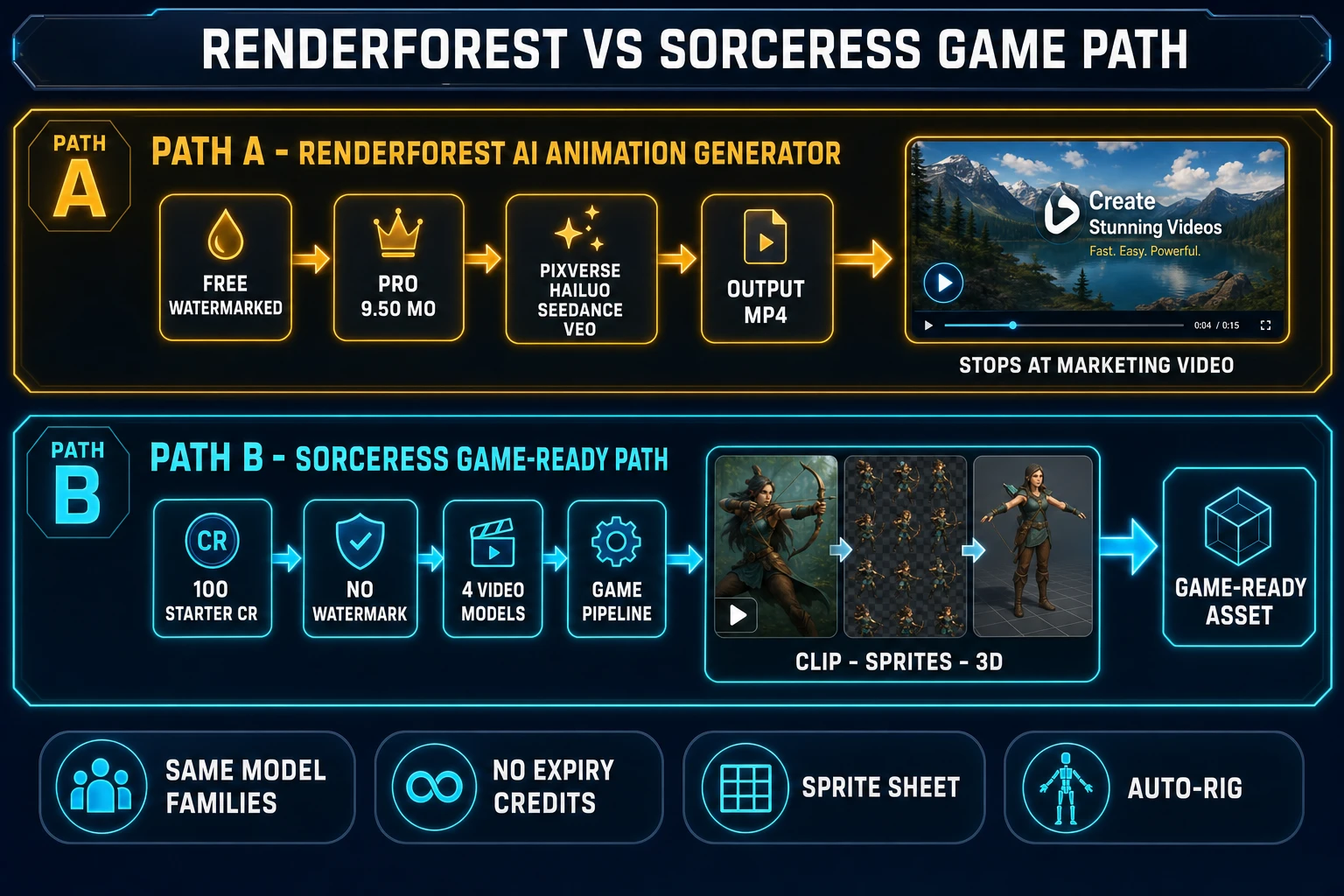
Two-lane side-by-side comparison infographic showing Path A as the Renderforest AI animation generator workflow with chips reading Free Watermarked, Pro 9.50 per month, third-party models Pixverse Hailuo Seedance Veo, and an MP4 output icon ending at marketing video, and Path B as the Sorceress game-ready path with chips reading 100 starter credits, no watermark, four video models, full game pipeline, and a row of thumbnails showing the same character first as a clip then as a sprite sheet then as a 3D model
The Renderforest AI animation generator runs a strong third-party model lineup behind a marketing-shaped exit. The Sorceress path runs an overlapping model lineup behind a sprite-sheet and 3D exit. Same model families, different downstream.

The verdict at a glance — Renderforest AI animation generator vs Sorceress AI Video Gen

Comparison verified June 3, 2026 against the live renderforest.com/subscription page and against src/app/_home-v2/_data/tools.ts, src/lib/video-models.ts, and src/app/quick-sprites/page.tsx in the Sorceress source.

DimensionRenderforest AI animation generatorSorceress AI Video Gen
Free-tier outputWatermarked MP4 on every exportNo watermark on any tier — 100-credit starter pack on every new account
First useful tierLite at $8/mo billed yearly (40 AI videos/mo)$10 for 1,000 credits, no expiry, no recurring bill
Monthly recurringYes — Lite, Pro, Business all bill monthly or yearlyNone — credits are no-expiry top-ups
Top-tier flagship video modelsPixverse, Hailuo, Seedance, Google Veo, OpenAI Sora, ByteDance SeedGrok Imagine Video, Wan 2.7, Seedance 2.0, Kling 3.0 (four flagships)
Image-to-videoNative, 4 to 12 seconds, original photo dimensionsNative on every video model, with end-frame control on supporting models
Sprite-sheet hand-offNone — manual MP4 download into another toolDirect drop into Auto-Sprite v2 for frame extraction
3D bridgeNoneDirect image-to-mesh in 3D Studio, then auto-rig
Pixel-art bridgeNoneDrop a frame into True Pixel for raster-true pixel art
Storyboard upstreamTemplate libraryStoryboards for shot planning, then push frames into AI Video Gen
Best atPolished marketing videos, social-platform exports, explainersGame-character clips, sprite-pack source, 3D-mesh source, end-frame loops

The verdict in one line: Renderforest wins for polished marketing video where the exit point is a social platform; Sorceress AI Video Gen wins for indie game work where the exit point is a sprite sheet, a rigged 3D character, or a Phaser scene. The two tools draw from overlapping flagship model families — Seedance 2.0 sits on both rosters — and the right pick depends entirely on what comes after the clip.
Why the model picker matters more than the brand

The actual quality of an AI animation generator in 2026 is determined less by the wrapper and more by which underlying text-to-video model you can route to. Renderforest’s strength is its picker — on Pro and higher you can pick Pixverse for stylised animation, Hailuo for cinematic pans, Seedance for crisp short clips, and on Business or as a credit-paid option you can reach Google Veo and OpenAI Sora. That is a real differentiator over single-model platforms.

The Sorceress AI Video Gen panel runs a parallel lineup tuned to the game-asset use case: Grok Imagine Video as the ultra-fast rail, Wan 2.7 as the uncensored character-action rail (the one that does not refuse a fight-scene prompt the way some marketing-first models do), Seedance 2.0 as the top-tier shared flagship, and Kling 3.0 as the cinematic motion-control rail. Verified June 3, 2026 against VIDEO_MODELS in src/app/_home-v2/_data/tools.ts lines 726-731. That is four flagships in one panel with no upgrade path required, no subscription floor, and end-frame control plus native audio on the models that support it.

The technical primitive behind every modern video generator is the same family of diffusion model architecture, so the actual quality gap between platforms on the same underlying model is small. The gap between platforms is downstream: where does the output go next. That is the question the comparison hinges on.

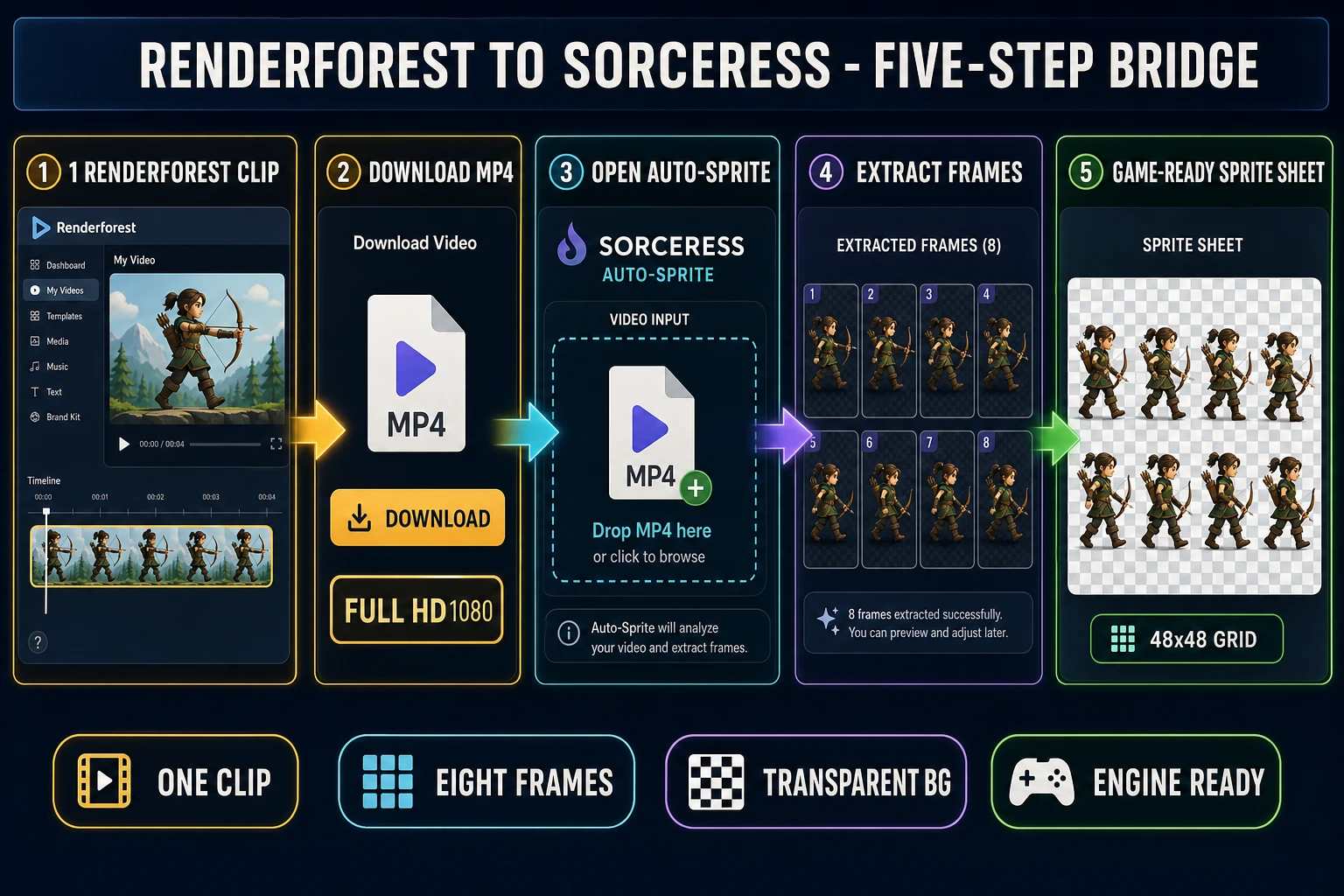
The full bridge — Renderforest clip to Sorceress sprite sheet in five steps

The cleanest path when you want Renderforest for the polished marketing video and Sorceress for the game-ready downstream. Verified June 3, 2026 against the source at src/app/quick-sprites/page.tsx, the Auto-Sprite v2 video-input handler, and the 3D Studio pipeline.

  1. Render the animated clip in Renderforest. Use Pro or higher so the MP4 export is watermark-free. Pick the model that matches the look (Seedance for crisp action, Pixverse for stylised animation, Hailuo for cinematic). Aim for a short loop — eight to ten seconds is the sweet spot for sprite extraction because longer clips waste frames on dead motion.
  2. Download the MP4 in Full HD1080. Pro tier unlocks the Full HD download. Keep the source resolution as high as the plan allows because the sprite-sheet step downsamples to the engine grid, and downsampling from a high source is always cleaner than upscaling.
  3. Open Sorceress Auto-Sprite v2. The page accepts both image and video uploads. Drop the MP4 into the video input slot, and Auto-Sprite extracts the frames automatically. No need to pre-split with a video editor.
  4. Extract frames into a clean transparent-background sprite sheet. Auto-Sprite handles frame selection, alpha matting via the same hard-edge bias the Sorceress BG Remover uses, and grid layout aligned to your chosen size. The default 48×48 grid matches the Quick Sprites four_angle_walking standard verified in src/app/quick-sprites/page.tsx line 36.
  5. Load the sprite sheet in the engine. The output is a single PNG texture atlas the engine reads in one call. For Phaser, that is a this.load.spritesheet call with the frame width and height. For Godot, an AnimatedSprite2D backed by a SpriteFrames resource. For Unity, a SpriteRenderer with a sliced sprite atlas. Same atlas, three engines.
Five-step bridge diagram with numbered panels showing the Renderforest dashboard with an animated archer video frame in a timeline, then a download button mockup with Full HD1080 chip, then Sorceress Auto-Sprite with the MP4 dropped into the video input slot, then a frame-extraction grid showing eight walking poses, then a final sprite-sheet canvas with the eight characters laid out on a transparent checker pattern at 48 by 48 pixels per cell
From a Renderforest marketing clip to an engine-ready sprite sheet in five steps. The bridge keeps the polish of the third-party video models and adds the sprite-pack tail the marketing-first platform leaves out.

The math — Renderforest subscription vs Sorceress credit pack

Free tools are not actually free if the workflow is wrong for the job. For a realistic indie pipeline — one hero character with a four-direction walk cycle plus an idle, run, and attack animation — the relevant ratio is cash and credits spent against minutes of human attention. That is roughly twenty-eight image-to-video runs across the seven animation states (four directions × seven states / 4-direction packing efficiency ≈ 28 video clips).

On the Renderforest AI animation generator, twenty-eight image-to-video runs requires an active Pro subscription at $9.50/mo first-year ($19/mo regular). The Pro tier ships unlimited HD720 with the Renderforest Fast model, which covers the throughput. Inside Pro the workflow is twenty-eight image-to-video runs, twenty-eight MP4 downloads, twenty-eight uploads into a third-party frame extractor, twenty-eight alpha-cleanup passes, and twenty-eight grid alignments — roughly two to three hours of focused human attention across the tool-switching boundary.

On the Sorceress side the same twenty-eight clips draw from no-expiry credits at $10 per 1,000, sit inside one tab with the Auto-Sprite v2 extractor downstream, and the alpha and grid steps are automatic. The 100-credit starter pack on every new account covers a roughly six-to-eight clip evaluation run at no cost. Verified June 3, 2026 against src/app/plans/page.tsx lines 47-50 (the $10 / $20 / $50 / $100 no-expiry top-up tiers) and the Lifetime price at $49 on the non-generative tool set.

The choice is not subscription-vs-free. It is “a $9.50-to-$19 monthly subscription plus the minutes-per-frame in a tool-switching workflow that ends at MP4” against “a credit pack on a starter account and a single-tab workflow that ends at a sprite atlas”. For a studio that runs marketing video all day, the Pro subscription pays for itself; for a sprite pipeline that ships in bursts, the credit model is closer to how indie studios actually budget.

Pick the Renderforest AI animation generator if…

  • The job lives at the marketing exit — social-media clips, brand stories, explainer videos, animated promos with built-in voiceovers.
  • The third-party model picker matters more than the downstream — you want Pixverse, Hailuo, Seedance, Veo, and Sora behind a single dashboard.
  • You need template-based scenes with narration, music, and on-screen text generated together.
  • You already pay for Pro for the marketing side of the studio, so the AI-video credit allotment is sunk cost.
  • The output is going onto a marketing platform (YouTube, TikTok, Instagram), not into a game engine.

Pick the Sorceress AI Video Gen path if…

  • The downstream is a sprite sheet, a rigged 3D character, or a Phaser scene — not a social-platform export.
  • You need image-to-video clips with hard-alpha backgrounds for engine compositing.
  • You want the four-flagship model picker (Grok Imagine Video, Wan 2.7, Seedance 2.0, Kling 3.0) in one panel without an upgrade path.
  • You do not want a recurring subscription floor on a tool you use in bursts — credits are no-expiry top-ups, and the Lifetime price covers the non-generative tool set forever at $49.
  • The next step is also a Sorceress step — Auto-Sprite for sprite-sheet packing, 3D Studio for image-to-mesh, Auto-Rigging for humanoid auto-rig, Quick Sprites for the walk-cycle row layout, or WizardGenie for the code-side integration.

What both tools still miss

Three honest gaps that neither side has solved yet, worth knowing before you commit a project.

One-shot character-state generation. Neither the Renderforest AI animation generator nor Sorceress AI Video Gen yet exposes a “generate idle, walk, run, jump, attack, cast, hit, victory in one call” mode. The current workflow is one video per animation state, with the artist coordinating consistency by hand or by reference-image lock. The reference-image lock helps a lot — the reference-image character workflow is the closest thing — but it does not yet collapse into a single call.

End-frame loop control on every video model. Some video models in the Sorceress lineup support end-frame control (you provide the first and last frame, the model interpolates a clean loop). Others do not. Renderforest does not expose end-frame control at all on its 2026 picker. For a perfect walk-cycle loop, the current best path is the end-frame-supporting model in Sorceress AI Video Gen plus a frame-by-frame review in Canvas if the loop seam still drifts.

Engine-format export beyond PNG atlas. Both tools today end at a PNG sprite sheet or an MP4 file. Direct export to glTF 2.0-embedded animation tracks (the standard the 3D side of the industry has converged on for rigged-character animation) is not yet a one-click endpoint anywhere on either side. The Sorceress 3D Studio pipeline does produce .glb meshes with humanoid auto-rig data, but pairing that with the 2D video output into a single animated asset still takes a manual step in the engine.

Use the Renderforest AI animation generator when the job ends at a marketing-platform upload and the model picker is the value. Use Sorceress AI Video Gen plus Auto-Sprite v2 when the job ends in an engine viewport and the sprite-pack tail is the value. The two tools draw from overlapping flagship model families on purpose — the right pick is the one tuned for the tool that comes next.

Frequently Asked Questions

What is the Renderforest AI animation generator and what does it actually do?

The Renderforest AI animation generator is a feature of renderforest.com, an all-in-one cloud video, design, and website-builder platform that bundles AI video generation, animated explainer templates, logo making, and a stock library behind a single dashboard. The animation entry point lives at renderforest.com/ai-animation-generator. It accepts two main inputs (Text-to-Video, where you describe an idea and the AI builds a structured animation in seconds, and Idea-to-Video, where the AI expands a short prompt into a fuller story) plus an image-to-video flow that turns a still photo into a four-to-twelve-second animated clip. Outputs are full marketing-grade videos with scenes, narration, music, and on-screen text. As of June 3, 2026, the platform supports more than 60 styles (cartoonish 2D and 3D templates, anime, realistic) and voiceovers in over fifty languages. Verified June 3, 2026 against the live renderforest.com/ai-animation-generator page.

How much does the Renderforest AI animation generator cost in 2026?

Renderforest ships four tiers (verified June 3, 2026 against the live renderforest.com/subscription page). Free is genuinely free to try, includes basic templates, exports HD with a Renderforest watermark, and has limited storage and limited premium-template access. Lite is 8 dollars a month billed yearly (about 96 dollars a year), grants 400 AI credits a month (roughly 400 AI images or 40 AI videos), 5 HD720 template exports, 10GB cloud storage, premium AI models, and one premium website on a custom domain. Pro is 9.50 dollars a month for the first year billed yearly (regularly 19 dollars a month), grants 1,600 AI credits a month, unlimited HD720 AI video creations with the Renderforest Fast model, unlimited AI image processing with the Renderforest model, Full HD1080 template exports, 50GB storage, and the full 5M+ stock library. Business is 34.30 dollars a month for the first year billed yearly (regularly 49 dollars), grants 3,000 AI credits a month, unlimited HD1080 AI video creations, Ultra HD 4K template exports, reseller license, team management, and 100GB storage per seat. AI credits can be refilled anytime on an active plan.

What AI models does the Renderforest AI animation generator actually run?

Renderforest integrates several generative AI video models behind a single picker. The native Renderforest models are Renderforest Fast (high-speed HD video generation, the unlimited model on Pro and higher) and Renderforest Pro (the higher-quality variant for AI image processing). Third-party models surfaced inside the Renderforest dashboard, verified June 3, 2026 against the renderforest.com/ai-video-generator product page and the renderforest.com/blog/renderforest-ai-video-generator-whats-new-and-what-you-can-create launch post, include Pixverse, Hailuo (MiniMax), Seedance (ByteDance), Google Veo, OpenAI Sora, and ByteDance Seed. Higher-end generative flows that build a video from scratch consume creative credits, while template-based flows draw from the monthly AI-credit allocation. Renderforest 2.0, launched as a major model upgrade, brought up to 2x faster generation, improved physical realism in motion, automatic lip sync, and built-in sound effects so visuals and audio are generated together.

Can the Renderforest AI animation generator make a game-ready sprite sheet?

Not natively. The Renderforest AI animation generator outputs MP4 video clips and template-based animations sized for marketing platforms (16:9 horizontal for YouTube, 9:16 vertical for TikTok and Instagram, plus image-to-video at the original photo dimensions). There is no sprite-sheet packer, no pixel-art frame extractor, no engine-format atlas, no transparent-background pose grid, no walking-cycle row layout. The video can hold roughly 5 to 12 seconds for image-to-video, up to 3 minutes (extendable) for full AI video, and Full HD1080 export caps the resolution above the Lite tier. To bridge a Renderforest output into a game pipeline you would download the MP4, then run it through a separate sprite-sheet pipeline. Sorceress Auto-Sprite v2 at /autosprite-v2 handles exactly that step (AI video to pixel sprite sheet) and the Sorceress AI Video Gen rail at /video runs the same Seedance 2.0, Wan 2.7, Kling 3.0, and Grok Imagine Video models so you can keep the entire workflow in one tab. Verified June 3, 2026 against src/app/_home-v2/_data/tools.ts lines 236-248 (AI Video Gen panel) and lines 56-87 (Auto-Sprite panel).

How does the Renderforest AI animation generator compare to Sorceress AI Video Gen?

Both tools are browser-native, both expose multi-model pickers, and both surface the same flagship video models (Seedance 2.0, plus Pixverse and Hailuo on the Renderforest side, plus Wan 2.7 and Kling 3.0 on the Sorceress side). The functional split is the downstream. Renderforest is engineered for marketing creatives: explainer videos, social-media clips, brand stories, animated promos with built-in voiceovers and template-based scenes. Sorceress AI Video Gen is engineered for indie game devs: image-to-video for character animation, end-frame control for loop animations, native audio for SFX-driven cuts, and a direct hand-off into Auto-Sprite for sprite-sheet packing or 3D Studio for textured rigged 3D characters. The model rosters overlap on Seedance 2.0, but Sorceress runs four named flagships in one panel (Grok Imagine Video, Wan 2.7, Seedance 2.0, Kling 3.0) verified June 3, 2026 against src/app/_home-v2/_data/tools.ts VIDEO_MODELS lines 726-731. For a single explainer video, Renderforest wins on template polish; for a game-character walk cycle, Sorceress closes the loop.

Does Renderforest give me commercial rights for an indie game release?

Renderforest grants users commercial-use rights to outputs generated on paid plans (Lite, Pro, Business) for both digital and printed projects, including indie game releases on Steam, mobile stores, and itch.io. The free tier exports with a Renderforest watermark and is positioned for testing and personal-use evaluation; reusing watermarked free-tier outputs in a paid game is not the practical path. The Business tier specifically adds a reseller license, which lets agencies and studios resell the rendered videos as part of client deliverables. Underlying models also carry their own license layers: Pixverse, Hailuo, Seedance, Google Veo, and OpenAI Sora each have explicit commercial-output terms via their respective API providers, which Renderforest passes through to subscribers. Sorceress AI Video Gen runs the same Seedance 2.0 and Wan 2.7 families with explicit commercial-output terms documented per-provider, no watermark on outputs at any credit tier, and no recurring license fee on the Lifetime tier. Verified June 3, 2026 via the live renderforest.com terms-of-service page and renderforest.com/subscription pricing page.

Can I bridge a Renderforest clip into a Sorceress sprite sheet for game work?

Yes, and that is the cleanest path when you want Renderforest for the polished marketing video and Sorceress for the game-ready downstream. The five-step bridge: render the animated clip in Renderforest (use Pro or higher so the MP4 is watermark-free), download the MP4 in Full HD1080, open Sorceress Auto-Sprite at /autosprite-v2 (or True Pixel at /pixel-art for pixel-art conversion), drop the MP4 into the video input slot, and let Auto-Sprite extract the frames into a clean transparent-background sprite sheet aligned to a 48x48 or 64x64 grid. For a 3D-character animation path, render a turntable clip in Renderforest, run it through Sorceress 3D to 2D at /3d-to-2d for sprite-sheet conversion from any camera angle, or feed the front-facing frame into Sorceress 3D Studio at /3d-studio for a textured GLB mesh and an automatic humanoid auto-rig. Total Sorceress credit cost for the bridge sits around 30 to 60 credits depending on the path, well inside the 100-credit starter pack new accounts receive at sign-up. Verified June 3, 2026.

Sources

  1. Animation — Wikipedia
  2. Computer animation — Wikipedia
  3. Texture atlas (sprite sheet) — Wikipedia
  4. Sprite (computer graphics) — Wikipedia
  5. Video synthesis (text-to-video model) — Wikipedia
  6. Diffusion model — Wikipedia
  7. glTF 2.0 specification — Khronos
Written by Arron R.·2,919 words·13 min read

Related posts